dvi connection to tv = no sound

benstevensuk

New member
Local time
1:54 AM
Messages
38
i have connected to a tv through hdmi by way of dvi connection. i cant get any sound through the tv.
any ideas?
 

My Computer My Computer

At a glance

win7 / win7 / win7 / win7 / vista / xp
Computer Manufacturer/Model Number
sony / asus / toshiba / hand-built / dell / merion
OS
win7 / win7 / win7 / win7 / vista / xp
i have connected to a tv through hdmi by way of dvi connection. i cant get any sound through the tv.
any ideas?
You could start by filling in your system specs (lower left corner) so we know what hardware you have.


thanks in advance

Ken
 

My Computer My Computer

At a glance

Win 8 Release candidate 8400[email protected]4 gigsNvidia 9600M
Computer Manufacturer/Model Number
HP Pavillion dv-7 1005 Tx
OS
Win 8 Release candidate 8400
CPU
[email protected]
Memory
4 gigs
Graphics Card(s)
Nvidia 9600M
Sound Card
HD built-in
Monitor(s) Displays
17" Wxga
Screen Resolution
1440x900
Cooling
none
Internet Speed
45Mb down 5Mb up
youre probably right, but this is one of four systems im now running and playing with win7 on.

its an old desktop pc.
i dont think it is the system thats causing problems though.
all drivers are okay and operating fine. the sound devices control centre is saying that speakers and audio devices are playing sound - the graphic equaliser is working, but no sound comes out at the other end.
i have just put a dvi to hdmi lead on to get both sound and vision in the same place on the tv, as when using a pci lead i could patch sound onto another channel using an rca lead adapter.
i just dont get what could stop the sound travelling down the same lead as the picture. lol
 

My Computer My Computer

At a glance

win7 / win7 / win7 / win7 / vista / xp
Computer Manufacturer/Model Number
sony / asus / toshiba / hand-built / dell / merion
OS
win7 / win7 / win7 / win7 / vista / xp

My Computer My Computer

At a glance

Windows 7 SP1 x64Intel E8400 3.0 GHz4x1 Trascend DDR2 800 MhzGainward 8800GT 512 Mb
Computer type
PC/Desktop
Computer Manufacturer/Model Number
Custom
OS
Windows 7 SP1 x64
CPU
Intel E8400 3.0 GHz
Motherboard
Gigabyte EP45-DS3R
Memory
4x1 Trascend DDR2 800 Mhz
Graphics Card(s)
Gainward 8800GT 512 Mb
Sound Card
Realtek HD Audio 889A
Monitor(s) Displays
LG L204WS
Screen Resolution
1680x1050
Hard Drives
Intel 520 Series 120Gb SSD (System)
Western Digital 6400AAKS 640Gb (Data)
PSU
Cooler Master 650W
Case
Cooler Master Centurion 532
Cooling
2x 12 cm fans
Keyboard
Logitech Wave
Mouse
Logitech G5
Internet Speed
10 Mbit Cable Flat
Antivirus
NOD32 Smart Security
Browser
Google Chrome
awesome, i will give that a try this week, looks plausable
 

My Computer My Computer

At a glance

win7 / win7 / win7 / win7 / vista / xp
Computer Manufacturer/Model Number
sony / asus / toshiba / hand-built / dell / merion
OS
win7 / win7 / win7 / win7 / vista / xp
i have connected to a tv through hdmi by way of dvi connection. i cant get any sound through the tv.
any ideas?


I had a simular problem "AT FIRST" only to realise that with ONBOARD SOUND, You may need to UNPLUG your sound card connections to the speakers as you may have sensors to the connectors....

GO TO the SOUND control panel.... or select your volume control and chage its source to DIGITAL AUDIO HDMI - this will only appear after the tv is connected to the hdmi port... if your card is really good, you may have not noticed that the sound may have been coming out of "BOTH" SOURCES at the same time.....

If these options dont help just check your sound card driver again......If your running windows seven you should not really be having these problems really....
 

My Computer My Computer

At a glance

Windows 7 64-bit 7600 OEMAMD Phenom Quad CORE 2.5 ghzOCZ Vista Series 8GB (2x4GB) DDR2 PC2-6400C5 ...RADION 3200 HDMI & DVI
Computer Manufacturer/Model Number
MySelF -
OS
Windows 7 64-bit 7600 OEM
CPU
AMD Phenom Quad CORE 2.5 ghz
Motherboard
Gigabyte GA-MA78GM-S2H AMD 780G Micro-ATX (Socket AM2) PCI-E
Memory
OCZ Vista Series 8GB (2x4GB) DDR2 PC2-6400C5 Dual Channel
Graphics Card(s)
RADION 3200 HDMI & DVI
Sound Card
EMU 1812 - Optical ADAT
Monitor(s) Displays
42LG LCD & 2 19inch ELO TOUCH SCREENS
Screen Resolution
1360x768
Hard Drives
2 1TB samsung 39mbCACHE - SATA
1 500GB Western Digital - SATA
PSU
500W
Case
silverstone -
Cooling
Standard CPU FAN <<<<< ALWAYS BEST >>>>> Coolermaster
Keyboard
Microsoft Wireless optical
Mouse
Microsoft Wireless optical
Internet Speed
2mbits
Other Info
Will be Getting the Tesla Card from NVIDIA SOON <<<<< tesla supercomputer >>> nvidia CODA, PS: Motherboard Has Got Hardware assisted virtualization... If Your motherboard does not have it, It may JUST need the correct BIOS UPGRADE, CHECK BIOS DATES BEFORE FINALIZING A BUY, EVEN LOOKIN BIOS IF POSSIBLE as its not stated on the spec sheets, THAT WILL HAVE TO CHANGE as many mother board DO have hardw
i have connected to a tv through hdmi by way of dvi connection. i cant get any sound through the tv.
any ideas?
You could start by filling in your system specs (lower left corner) so we know what hardware you have.


thanks in advance

Ken
youre probably right, but this is one of four systems im now running and playing with win7 on.

its an old desktop pc.
i dont think it is the system thats causing problems though.
all drivers are okay and operating fine. the sound devices control centre is saying that speakers and audio devices are playing sound - the graphic equaliser is working, but no sound comes out at the other end.
i have just put a dvi to hdmi lead on to get both sound and vision in the same place on the tv, as when using a pci lead i could patch sound onto another channel using an rca lead adapter.
i just dont get what could stop the sound travelling down the same lead as the picture. lol
I have to agree with the OP here, Ken. The actual hardware being used on a specific OS has absolutely nothing to do with the problem.

Cross-referencing the OPs problem with a vast knowledge base of similar problems and solutions with known hardware would be absolutely pointless.

It is far better for you and I and other forum members to throw random guesses at a perceived problem.
 
I agree.:D
 

My Computer My Computer

At a glance

Vista Ult64, Win7600Intel Core 2 Quad Q6600 @ 2400 MHz 64bit OS4096 MB DDR3-SDRAMATI Radeon HD 3870 Series x2 Crossfired
Computer Manufacturer/Model Number
Self Build 64bit
OS
Vista Ult64, Win7600
CPU
Intel Core 2 Quad Q6600 @ 2400 MHz 64bit OS
Motherboard
Asus P5E3 Deluxe WiFi @p 64 bit OS
Memory
4096 MB DDR3-SDRAM
Graphics Card(s)
ATI Radeon HD 3870 Series x2 Crossfired
Sound Card
Realtek on board
Monitor(s) Displays
Samsung SyncMaster - 23 inches
Screen Resolution
1680x1050 pixels at 60 Hz in True Colors
Hard Drives
Hitachi (250 GB)/Samsung 750 GB. /Barracuda 160 GB.
My Book 1 TB external..
PSU
Cooler Master 1000w
Case
Cooler Master Cosmos 1000.
Cooling
Fans and fresh air,
Keyboard
Wireless
Mouse
Wireless
Internet Speed
Never fast enough
Other Info
I use a Magnum.
Is it me??? My understanding of the difference between HDMI and DVI is that DVI was the video element only of HDMI and that you needed to use another connection for AUDIO? Please shoot me if I'm wrong:o

I'm using the HDMI to DVI and a optic via SPDIF for Audio.

UKMedia
 

My Computer My Computer

At a glance

Windows 7 Ultimate 64Bit (SP 1)Intel Core i7 4770K OC32GB 1600Mhz DDR3MSI GTX580 Twin Frozr II/OC and NVIDIA GTX 970
Computer Manufacturer/Model Number
Self Build
OS
Windows 7 Ultimate 64Bit (SP 1)
CPU
Intel Core i7 4770K OC
Motherboard
ASUS Maximus VII Ranger
Memory
32GB 1600Mhz DDR3
Graphics Card(s)
MSI GTX580 Twin Frozr II/OC and NVIDIA GTX 970
Sound Card
On-Board and Soundblaster Recon 3 D headset
Monitor(s) Displays
x2 Flat screen 21" LG displays + x1 LG W2363D (3D)
Hard Drives
5 internal Hard Drives:
1 x WD 120GB Solid State
4 x WD 1TB (CAVIAR BLACK 1TB 32MB 7200 SATA) as Raid 5 array
PSU
Dark Power Pro 10 1200W
Case
CoolerMaster HAF 932 Case - Black
Cooling
Thermaltake Contac21 cooler
Keyboard
Cyborg
Mouse
Razor Mamba
Internet Speed
0.5 Mb - (Benefits of rural location!) & 24 MB Sat
Antivirus
MSE
Other Info
Teaming 2 GB network connection to Wired 1GB switch.
Connected to 37TB (Raid 5) of network storage on a wired 1GB lan.
(Mixture of internal hard drives, 1TB, 2TB, 4TB & 16TB Terastations)
Is it me??? My understanding of the difference between HDMI and DVI is that DVI was the video element only of HDMI and that you needed to use another connection for AUDIO? Please shoot me if I'm wrong:o

I'm using the HDMI to DVI and a optic via SPDIF for Audio.

UKMedia
Some cards support HDMI audio over the DVI out - many require a low cost adapter between the DVI and HDMI cable.

A DVI to HDMI cable is not sufficient.

Example - ATI HD3850

USMC Rifle Expert - 18 awards
 
USMC Rifle Expert - 18 awards

I ask for that didn't I...lol:D
 

My Computer My Computer

At a glance

Windows 7 Ultimate 64Bit (SP 1)Intel Core i7 4770K OC32GB 1600Mhz DDR3MSI GTX580 Twin Frozr II/OC and NVIDIA GTX 970
Computer Manufacturer/Model Number
Self Build
OS
Windows 7 Ultimate 64Bit (SP 1)
CPU
Intel Core i7 4770K OC
Motherboard
ASUS Maximus VII Ranger
Memory
32GB 1600Mhz DDR3
Graphics Card(s)
MSI GTX580 Twin Frozr II/OC and NVIDIA GTX 970
Sound Card
On-Board and Soundblaster Recon 3 D headset
Monitor(s) Displays
x2 Flat screen 21" LG displays + x1 LG W2363D (3D)
Hard Drives
5 internal Hard Drives:
1 x WD 120GB Solid State
4 x WD 1TB (CAVIAR BLACK 1TB 32MB 7200 SATA) as Raid 5 array
PSU
Dark Power Pro 10 1200W
Case
CoolerMaster HAF 932 Case - Black
Cooling
Thermaltake Contac21 cooler
Keyboard
Cyborg
Mouse
Razor Mamba
Internet Speed
0.5 Mb - (Benefits of rural location!) & 24 MB Sat
Antivirus
MSE
Other Info
Teaming 2 GB network connection to Wired 1GB switch.
Connected to 37TB (Raid 5) of network storage on a wired 1GB lan.
(Mixture of internal hard drives, 1TB, 2TB, 4TB & 16TB Terastations)
all of those seem possible. i havent had a chance to play for a few days. when i have a proper look i will get back to you with specific graphics cards and what-not. i think this pc was (almost) hand built, so it could be almost anything.

just so you know, its not just the hdmi dvi cable that doesnt produce sound. i attached a headphone to phono rca cable adapter before buying the dvi cable. i could get sound, but only as a seperate source to vision, although that might be my tv picking things up and putting them in different places. my aim (obviously) is to get sound and picture on the same channel, preferably using the same leads. but since using the dvi out no sounds comes from the headphones jack either. i will check again.

cheers everyone
 

My Computer My Computer

At a glance

win7 / win7 / win7 / win7 / vista / xp
Computer Manufacturer/Model Number
sony / asus / toshiba / hand-built / dell / merion
OS
win7 / win7 / win7 / win7 / vista / xp
i have connected to a tv through hdmi by way of dvi connection. i cant get any sound through the tv.
any ideas?

Cant be done, DVI is video signal only, HDMI is audio & video.

If your using DVI then you need to connect your sound card to your TV as well!!
 

My Computer My Computer

At a glance

MS Windows 7 Professional 64-bit SP1AMD FX(tm)-6100 Six-Core Processor Socket AM3...8.00 GB Dual-Channel DDR3 @ 802MHz (11-11-11-...NVIDIA GeForce GTX 560 Ti
Computer type
PC/Desktop
Computer Manufacturer/Model Number
Self Build
OS
MS Windows 7 Professional 64-bit SP1
CPU
AMD FX(tm)-6100 Six-Core Processor Socket AM3+ (942)
Motherboard
ASUSTeK COMPUTER INC. SABERTOOTH 990FX (AM3r2)
Memory
8.00 GB Dual-Channel DDR3 @ 802MHz (11-11-11-36) 1.5Volts
Graphics Card(s)
NVIDIA GeForce GTX 560 Ti
Sound Card
Onboard Realtek HD
Monitor(s) Displays
shimian (1920x1080@60Hz)
Screen Resolution
1920*1080
Hard Drives
OCZ-AGIL ITY3 SATA Disk Device 120GB
PSU
Corsair TX 750
Case
Corsair
Cooling
WaterCooled
Keyboard
Microsoft Wired
Mouse
Logitech USB Optical TiltWheel Mouse
Internet Speed
Realtek PCIe GBE Family Controller 20MB*1MB
Antivirus
Avast
Browser
Firefox
Other Info
150GB Internal Hard Drive for Backing Up Important Files -
Hauppauge Nova-DT Dual DVB-T Tuner Device (+IR) -
USB PC Camera with Mic (SN9C105)
Cant be done, DVI is video signal only, HDMI is audio & video.

Yes it can. See Antman's post on the 1st page of this thread. Any ATI card from the HD2xxx series and up, and most of the 9xxx series and up are all capbable of passing audio over the DVI connection. Only thing is it needs the adapter that comes with the card(s), any old DVI/HDMI adapter or cable won't work.

Also looks like we're still guessing as to what kind of hardware the OP is trying to make this all work on. Would help immensely if we knew if his video card, etc is even capable of passing audio over HDMI.
 

My Computer My Computer

At a glance

Win 7 Ultimate x64FX-8350 @ 4.6 GHz so farADATA XPG V1 Series Black 8GB DDR3 1600Sapphire R9 270x Dual-X
Computer type
PC/Desktop
Computer Manufacturer/Model Number
Me
OS
Win 7 Ultimate x64
CPU
FX-8350 @ 4.6 GHz so far
Motherboard
Asus M5A97 EVO
Memory
ADATA XPG V1 Series Black 8GB DDR3 1600
Graphics Card(s)
Sapphire R9 270x Dual-X
Sound Card
Xonar DGX w/ Corsair Vengence 1300
Monitor(s) Displays
Acer S232HL Abid
Screen Resolution
1920x1080
Hard Drives
120 GB OCZ Vertex 3
500 GB Seagate 7200.12
PSU
Antec Earthwatts 650W Green
Case
Antec Three Hundred
Cooling
Cooler Master 212 EVO
Keyboard
Logitech G510
Mouse
Logitech G500s
Internet Speed
35000/3000
I've solved the problem, so why argue?
DVI can transmit sound and video and is HDCP compatible,...the only thing to do is to connect a 2-pin cable to your graphic card and sound card...
thread solved;)
No one is arguing. Plus, you solved a problem for a single card type and the solution is not the same for all card types.

What is being pointed out here is that a blanket statement, an incorrect blanket statement, will not survive scrutiny.

What you are seeing as an argument is simply an effort to prevent any additional occurrences of things like this:
 

Attachments

  • Capture.PNG
    Capture.PNG
    10.6 KB · Views: 28
Sound via DVI

I can state categorically that on my system sound is provided on the computer DVI output. I have the DVI monitor socket on my Zotac GeForce 9300-ITX connected via a DVI-HDMI lead to one of the HDMI sockets (it does not matter which) on my LG 42LF7700 HDTV. On booting the computer the TV receives both video and sound over this connection, and a very good monitor it makes. The computer is running Windows 7 RC1, and I have a Hauppauge Nova-TD Stick dual DVB-T tuner plugged in to a USB port. Media Center provides both TV and music, which both work fine, until....
As soon as I switch the TV input from HDMI to either Satellite or Antenna (this TV has both types of tuner), and then back to HDMI again, the computer sound disappears. It can only be restored, it would appear, by rebooting the computer. Inconvenient to say the least.
The only clue I have found is that, in Control Panel/Sound/Playback, NVidia HDMI Out is indicated as 'unconnected' when computer sound is missing from the TV, whereas normally it shows as 'connected' and is the default device.
I have reloaded the NVidia drivers more than once, and in Device Manager both Nvidia and Realtek drivers show up as the best available. I can not think of anything else to try at the moment. All comments will be welcome.
 

My Computer My Computer

At a glance

w 7Intel E54002GBNvidia 9300 on-board
Computer Manufacturer/Model Number
Built by me
OS
w 7
CPU
Intel E5400
Motherboard
Zotac 9300 mini-ITX wifi
Memory
2GB
Graphics Card(s)
Nvidia 9300 on-board
Sound Card
Realtek HD audio on-board
Monitor(s) Displays
LG42LF7700
Hard Drives
Seagate 1 TB
I can state categorically that on my system sound is provided on the computer DVI output.

No, sorry mate, but that simply cannot be. DVI connections do not carry sound signals. Period. Are you using a HDMI-DVI adapter?

DVI - Digital Video Interface
Pin 1 TMDS Data 2- Digital red - (Link 1) Pin 2 TMDS Data 2+ Digital red + (Link 1) Pin 3 TMDS Data 2/4 shield
Pin 4 TMDS Data 4- Digital green - (Link 2) Pin 5 TMDS Data 4+ Digital green + (Link 2) Pin 6 DDC clock
Pin 7 DDC data
Pin 8 Analog vertical sync
Pin 9 TMDS Data 1- Digital green - (Link 1) Pin 10 TMDS Data 1+ Digital green + (Link 1) Pin 11 TMDS Data 1/3 shield
Pin 12 TMDS Data 3- Digital blue - (Link 2) Pin 13 TMDS Data 3+ Digital blue + (Link 2) Pin 14 +5 V Power for monitor when in standby Pin 15 Ground Return for pin 14 and analog sync Pin 16 Hot plug detect
Pin 17 TMDS data 0- Digital blue - (Link 1) and digital sync Pin 18 TMDS data 0+ Digital blue + (Link 1) and digital sync Pin 19 TMDS data 0/5 shield
Pin 20 TMDS data 5- Digital red - (Link 2) Pin 21 TMDS data 5+ Digital red + (Link 2) Pin 22 TMDS clock shield
Pin 23 TMDS clock+ Digital clock + (Links 1 and 2) Pin 24 TMDS clock- Digital clock - (Links 1 and 2) C1 Analog red C2 Analog green C3 Analog blue C4 Analog horizontal sync C5 Analog ground Return for R, G and B signals

No sound.

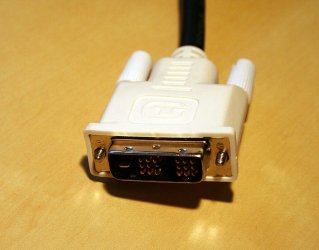
DVI plug:
762px-DVI_Connector.jpg

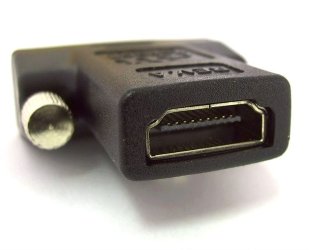
DVI-HDMI adapter:
 

Attachments

  • 750px-Adapter_dvi_hdmi_S7302224_wp.jpg
    750px-Adapter_dvi_hdmi_S7302224_wp.jpg
    34.3 KB · Views: 55

My Computer My Computer

At a glance

8 Pro x64i7 3770K 4.6GHz16GB G.Skill Trident X 2666mhzx2 EVGA 780 Ti Superclocked SLI
Computer type
PC/Desktop
Computer Manufacturer/Model Number
Systems by SmartEyeball
OS
8 Pro x64
CPU
i7 3770K 4.6GHz
Motherboard
ASUS P8Z77 WS
Memory
16GB G.Skill Trident X 2666mhz
Graphics Card(s)
x2 EVGA 780 Ti Superclocked SLI
Sound Card
SB X-FI Surround 5.1 PRO USB / ATH-AD900 Headphones
Monitor(s) Displays
x3 Dell U2410 / 58" Samsung
Screen Resolution
5760*1200/ 1920*1200
Hard Drives
2x Intel 520 240GB (RAID 0) * 2x WD Caviar Blacks 2TB (RAID 0) * 2TB WD Caviar Black * Sony Optirac DVD
PSU
Silverstone Strider Evolution 1200W
Case
Thermaltake Level 10 GT Snow Edition
Cooling
Noctua NH-D14
Keyboard
Topre Realforce // Ducky Shine MX Black // Filco Ninja TKL
Mouse
Thermaltake Theron (Highly Recommended) + Razer Imperator
Antivirus
MSE
Browser
IE, FF, WaterFox
Other Info
GT Extreme V2 Sim Racing Cockpit + 40" LCD and K/B Mouse stand ▼
Fanatec CSR Elite Wheel + Clubsport V1 Pedals + CSR shifter/7G-H ▼Saitek X52 Pro ▼ TrackIR 5 Pro
Buttkicker v2 Seat Rumbler with Dedicated 5.1 and Sub Woofer attached to frame ▼
=
Bloody Big Grin
Then perhaps you would care to explain how the sound signal is getting from the computer to the TV/Monitor. There is no other connection, and, no, I am not using an HDMI/DVI adaptor. Are you certain that the specification you cite applies to all the latest variants of DVI?
 

My Computer My Computer

At a glance

w 7Intel E54002GBNvidia 9300 on-board
Computer Manufacturer/Model Number
Built by me
OS
w 7
CPU
Intel E5400
Motherboard
Zotac 9300 mini-ITX wifi
Memory
2GB
Graphics Card(s)
Nvidia 9300 on-board
Sound Card
Realtek HD audio on-board
Monitor(s) Displays
LG42LF7700
Hard Drives
Seagate 1 TB
Back
Top