Dynamic and Basic Partitions?!?!

Boot Partition Wizard flash stick by tapping the ESC or F9 key at boot, then select the flash stick to boot.

Highlight the HD by clicking on it, then from Disk tab select Convert DYnamic Disk to Basic: How to convert dynamic disk to basic disk with Partition Wizard?

Confirm the System partition is marked Active: How to Set Active/Inactive partition -Partition Wizard Video Help.

Apply steps, reboot. If WIn7 will not boot then you may need to run Startup Repair - Run up to 3 Separate Times.

Once Win7 starts you can again boot PW to rightclick C to Modify>Set to Logical, click OK.
then rightclick the deleted WIn8 partition space to Create a new Logical Partition, click OK, Apply both steps. How to Set Active/Inactive partition -Partition Wizard Video Help.
Partition Wizard Create Partition Video Help
Thanks for your reply but when I go to select my drive and I right click on it to convert it to basic, the option is not highlighted, therefore I cannot click on it. Please tell me there is a solution to this.
 

My Computer

Computer type
Laptop
Computer Manufacturer/Model Number
HP DM4-3099se
OS
Windows 7 Home Premium 64bit
CPU
Intel Core i5 2450M @ 2.50GHz Sandy Bridge 32nm Technology
Motherboard
Hewlett-Packard 1793 (CPU1)
Memory
6.00GB Dual-Channel DDR3 @ 665MHz
Graphics Card(s)
Generic PnP Monitor (1600x900@40Hz) Intel HD Graphics 3000 (
Sound Card
IDT High Definition Audio CODEC
Screen Resolution
1600x900
Hard Drives
596GB Hitachi HTS547564A9E384 (SATA)
Browser
Google Chrome
Thanks for your reply but when I go to select my drive and I right click on it to convert it to basic, the option is not highlighted, therefore I cannot click on it. Please tell me there is a solution to this.

But it doesn't say to right click. Click on the Win7 HD # to highlight it:

Highlight the HD by clicking on it, then from Disk tab select Convert DYnamic Disk to Basic: How to convert dynamic disk to basic disk with Partition Wizard?

I provided you a movie to watch how to do this in the blue link. Did you view it?
 
Thanks for your reply but when I go to select my drive and I right click on it to convert it to basic, the option is not highlighted, therefore I cannot click on it. Please tell me there is a solution to this.

But it doesn't say to right click. Click on the Win7 HD # to highlight it like it says:

Highlight the HD by clicking on it, then from Disk tab select Convert DYnamic Disk to Basic: How to convert dynamic disk to basic disk with Partition Wizard?

I provided you a movie to watch how to do this in the blue link. Did you view it?

Yes I did view it. That is what I meant to say. I mean I did click the disk tab but it did not have the option highlighted to Convert disk from dynamic to basic either.
 

My Computer

Computer type
Laptop
Computer Manufacturer/Model Number
HP DM4-3099se
OS
Windows 7 Home Premium 64bit
CPU
Intel Core i5 2450M @ 2.50GHz Sandy Bridge 32nm Technology
Motherboard
Hewlett-Packard 1793 (CPU1)
Memory
6.00GB Dual-Channel DDR3 @ 665MHz
Graphics Card(s)
Generic PnP Monitor (1600x900@40Hz) Intel HD Graphics 3000 (
Sound Card
IDT High Definition Audio CODEC
Screen Resolution
1600x900
Hard Drives
596GB Hitachi HTS547564A9E384 (SATA)
Browser
Google Chrome
Is the Disk # highlighted in the drive listings as shown here where Disk 2 has the band that is is lighted up in blue?

convert-gpt-dynamic-disk-to-basic-disk2.jpg

You should see this blue band highlighted before the Disk tab will make that choice available.
 
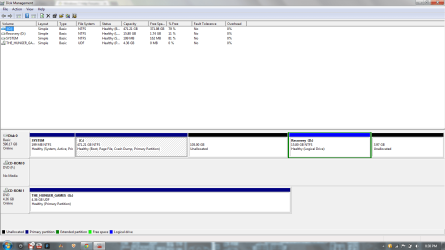
This is what shows up:
 

Attachments

  • screenshot.png
    screenshot.png
    89.8 KB · Views: 6

My Computer

Computer type
Laptop
Computer Manufacturer/Model Number
HP DM4-3099se
OS
Windows 7 Home Premium 64bit
CPU
Intel Core i5 2450M @ 2.50GHz Sandy Bridge 32nm Technology
Motherboard
Hewlett-Packard 1793 (CPU1)
Memory
6.00GB Dual-Channel DDR3 @ 665MHz
Graphics Card(s)
Generic PnP Monitor (1600x900@40Hz) Intel HD Graphics 3000 (
Sound Card
IDT High Definition Audio CODEC
Screen Resolution
1600x900
Hard Drives
596GB Hitachi HTS547564A9E384 (SATA)
Browser
Google Chrome
It has converted back to Basic now as shown by the Basic label at the far left of the drive.

You seem to have lost the small 4gb HP Tools partition at the end of the drive, which may mean that the Recovery partition will also now no longer run from boot. This can be tested later by attempting to queue up HP System Recovery to run, or trying to make your HP Recovery disks if you haven't already done so. If neither will work then you can also delete the HP Recovery partition to reclaim its space, although if time came to run Recovery and you preferred that to getting a Clean Reinstall - Factory OEM Windows 7 we can possibly help you manually run it from that partition by marking it Active first. These are options to consider.

Without the HP Tools partition you can go ahead an create a fourth Primary partition to install Win8 upon which would be the maximum Primary, or if you intend to add any other partitions create the Win8 partition Logical so that other adjacent Logicals can be added now or later. Partition Wizard Create Partition Video Help

If you have any questions ask them back.
 
It has converted back to Basic now as shown by the Basic label at the far left of the drive.

You seem to have lost the small 4gb HP Tools partition at the end of the drive, which may mean that the Recovery partition will also now no longer run from boot. This can be tested later by attempting to queue up HP System Recovery to run, or trying to make your HP Recovery disks if you haven't already done so. If neither will work then you can also delete the HP Recovery partition to reclaim its space, although if time came to run Recovery and you preferred that to getting a Clean Reinstall - Factory OEM Windows 7 we can possibly help you manually run it from that partition by marking it Active first. These are options to consider.

Without the HP Tools partition you can go ahead an create a fourth Primary partition to install Win8 upon which would be the maximum Primary, or if you intend to add any other partitions create the Win8 partition Logical so that other adjacent Logicals can be added now or later. Partition Wizard Create Partition Video Help

If you have any questions ask them back.

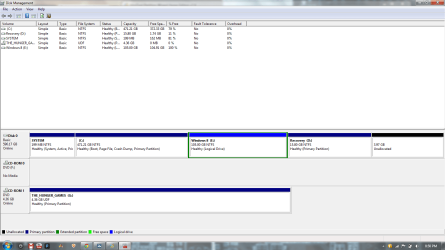
Ok. So right now you want me to create another partition right? Do you want me to do anything else before that. I have to be extra careful now haha. What about the unallocated 105 GB partition that I created a long time ago that you told me to erase. Here is a screenshot of my Disk Management:
 

Attachments

  • screenshot 2.png
    screenshot 2.png
    40.7 KB · Views: 4

My Computer

Computer type
Laptop
Computer Manufacturer/Model Number
HP DM4-3099se
OS
Windows 7 Home Premium 64bit
CPU
Intel Core i5 2450M @ 2.50GHz Sandy Bridge 32nm Technology
Motherboard
Hewlett-Packard 1793 (CPU1)
Memory
6.00GB Dual-Channel DDR3 @ 665MHz
Graphics Card(s)
Generic PnP Monitor (1600x900@40Hz) Intel HD Graphics 3000 (
Sound Card
IDT High Definition Audio CODEC
Screen Resolution
1600x900
Hard Drives
596GB Hitachi HTS547564A9E384 (SATA)
Browser
Google Chrome
I don't know why Recovery was converted to Logical as it won't boot if it's Logical even if it will still boot without the 4gb HP OEM Tools partition which was somehow deleted.

You can use the installed Partition Wizard Home edition which takes 20 seconds to install:

Rightclick Recovery in Partition Wizard to Modify>Set to Primary, click OK.

Rightclick the empty 105gb space to Create a New Logical Partition, label it Windows 8, click OK, Apply both steps.

Boot the Win8 installation DVD to install to its partition.
 
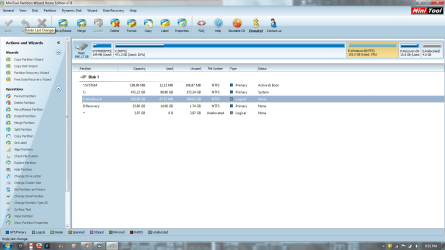
Ok I did what you told me too so now am I good to go with the installation of Windows 8 on my laptop? Here are two screenshots of my Disk Management and the Partition Wizard.
 

Attachments

  • disk management.png
    disk management.png
    43.2 KB · Views: 2
  • partition wizard.png
    partition wizard.png
    90.3 KB · Views: 2

My Computer

Computer type
Laptop
Computer Manufacturer/Model Number
HP DM4-3099se
OS
Windows 7 Home Premium 64bit
CPU
Intel Core i5 2450M @ 2.50GHz Sandy Bridge 32nm Technology
Motherboard
Hewlett-Packard 1793 (CPU1)
Memory
6.00GB Dual-Channel DDR3 @ 665MHz
Graphics Card(s)
Generic PnP Monitor (1600x900@40Hz) Intel HD Graphics 3000 (
Sound Card
IDT High Definition Audio CODEC
Screen Resolution
1600x900
Hard Drives
596GB Hitachi HTS547564A9E384 (SATA)
Browser
Google Chrome
Yes, good work.

If you want to add another partition now, you'd use PW CD for safest resize of C from the right or D from the left to create another Logical adjacent to the Windows 8 partition. You can have as many Logicals as you want but they must be together.

Did you understand what I wrote about your Recovery partition several posts back? You didn't say.
 
Yes, good work.

If you want to add another partition now, you'd use PW CD for safest resize of C from the right or D from the left to create another Logical adjacent to the Windows 8 partition. You can have as many Logicals as you want but they must be together.

Did you understand what I wrote about your Recovery partition several posts back? You didn't say.

No I didn't really understand. If I boot into the HP Recovery Manager thing, then can I atleast create a recovery disc?
 

My Computer

Computer type
Laptop
Computer Manufacturer/Model Number
HP DM4-3099se
OS
Windows 7 Home Premium 64bit
CPU
Intel Core i5 2450M @ 2.50GHz Sandy Bridge 32nm Technology
Motherboard
Hewlett-Packard 1793 (CPU1)
Memory
6.00GB Dual-Channel DDR3 @ 665MHz
Graphics Card(s)
Generic PnP Monitor (1600x900@40Hz) Intel HD Graphics 3000 (
Sound Card
IDT High Definition Audio CODEC
Screen Resolution
1600x900
Hard Drives
596GB Hitachi HTS547564A9E384 (SATA)
Browser
Google Chrome
As stated you should try making your Recovery Disks now to see if the partition will work without the OEM Tools partition you deleted. If it makes the disks it still might not run from boot, although you can queue it up to see, then bail out before actually running the Recovery if it will respond.

If it will do neither then you can either delete the partition to reclaim the space, or keep it on the chance it might later be made to run by marking it Active first, then rebooting into HP System Recovery.

A better choice with all of the preinstalled HP bloatware which smothers Win7 native performance is to Clean Reinstall - Factory OEM Windows 7.

At the minimum I'd Clean Up Factory Bloatware
 
Ok thanks. I'll look more into it later. Thank you gregrocker for ALL of your help and I would REALLY like to donate because I know it is hard work to research and find a solution to people's various problems. I just simply can not donate because I am only in the 10th grade and I don't have a credit card. All I can do is Thank You for all of your help because we posted in this forum all day and finally my problem got fixed. Thank You gregrocker!
 

My Computer

Computer type
Laptop
Computer Manufacturer/Model Number
HP DM4-3099se
OS
Windows 7 Home Premium 64bit
CPU
Intel Core i5 2450M @ 2.50GHz Sandy Bridge 32nm Technology
Motherboard
Hewlett-Packard 1793 (CPU1)
Memory
6.00GB Dual-Channel DDR3 @ 665MHz
Graphics Card(s)
Generic PnP Monitor (1600x900@40Hz) Intel HD Graphics 3000 (
Sound Card
IDT High Definition Audio CODEC
Screen Resolution
1600x900
Hard Drives
596GB Hitachi HTS547564A9E384 (SATA)
Browser
Google Chrome
That's OK Maxwell, we are volunteers and don't work for anything but experience and appreciation here.

Let us know how that Dual Boot works out, and visit our sister forums Windows 8 Forums for any help on Windows 8 you need.
 
Ok. Thanks again gregrocker
 

My Computer

Computer type
Laptop
Computer Manufacturer/Model Number
HP DM4-3099se
OS
Windows 7 Home Premium 64bit
CPU
Intel Core i5 2450M @ 2.50GHz Sandy Bridge 32nm Technology
Motherboard
Hewlett-Packard 1793 (CPU1)
Memory
6.00GB Dual-Channel DDR3 @ 665MHz
Graphics Card(s)
Generic PnP Monitor (1600x900@40Hz) Intel HD Graphics 3000 (
Sound Card
IDT High Definition Audio CODEC
Screen Resolution
1600x900
Hard Drives
596GB Hitachi HTS547564A9E384 (SATA)
Browser
Google Chrome
Ok so last night I actually installed Windows 8 on that partition and I successfully installed it but then at the dual boot menu where I select which operating system I want to continue with, I picked Windows 7 and the system started performing an automatic repair and now Windows 7 will not boot! I decided to perform a full system restore back to its original factory condition. I really want to try this again gregrocker so can you please help me today in installing Windows 8. I still have the boot cd and there is no problem in that but I just need help in dual booting. Do you think I should start another thread instead of posting it in this one?
 

My Computer

Computer type
Laptop
Computer Manufacturer/Model Number
HP DM4-3099se
OS
Windows 7 Home Premium 64bit
CPU
Intel Core i5 2450M @ 2.50GHz Sandy Bridge 32nm Technology
Motherboard
Hewlett-Packard 1793 (CPU1)
Memory
6.00GB Dual-Channel DDR3 @ 665MHz
Graphics Card(s)
Generic PnP Monitor (1600x900@40Hz) Intel HD Graphics 3000 (
Sound Card
IDT High Definition Audio CODEC
Screen Resolution
1600x900
Hard Drives
596GB Hitachi HTS547564A9E384 (SATA)
Browser
Google Chrome

My Computer

Computer type
Laptop
Computer Manufacturer/Model Number
HP DM4-3099se
OS
Windows 7 Home Premium 64bit
CPU
Intel Core i5 2450M @ 2.50GHz Sandy Bridge 32nm Technology
Motherboard
Hewlett-Packard 1793 (CPU1)
Memory
6.00GB Dual-Channel DDR3 @ 665MHz
Graphics Card(s)
Generic PnP Monitor (1600x900@40Hz) Intel HD Graphics 3000 (
Sound Card
IDT High Definition Audio CODEC
Screen Resolution
1600x900
Hard Drives
596GB Hitachi HTS547564A9E384 (SATA)
Browser
Google Chrome
Back
Top