
I am in desperate need for your help.
I just bought a new HP laptop (Envy 14) with Window 7 home on it. The hard drive has 500 GB capacity and has 4 partitions already on it.
1. System (199 MB, it does not have drive letter)
2. Partition C
3. Recovery (partition D, 16 GB)
4. HP_Tools (partition E, 103 MB)
I want to partition drive C into 2 parts: one small capacity for all system file and program file, the one large capacity for all data files. I have done this in my previous computers with Window XP and without any problems. I used free software “Partition Wizard Home Edition” to do it.
My computer still runs fine except I just realize that all partitions now become dynamic disk. I don’t know how it happened. When I try to run Acronis True Image software to create backup image it won’t even see the disk.
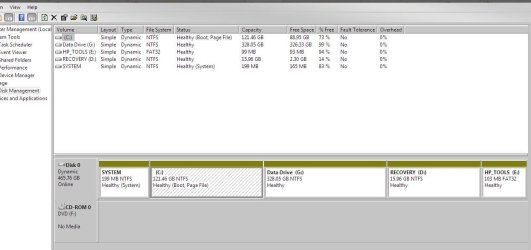
Here is the screen shot of my HD current configuration: Partition G is the new one I created for data file.
I read through the posts on this forum and I am still not sure what my options are at this point.
1. If I want to create image backup for the whole system using Acronis True Image or some other software, do I have to converting the dynamic disk to basic disk to do that?
2. I read tutorial on how to convert dynamic disk to basic disk. It seems to me that wouldrequire deleting the current disk and all files on it. I have already installed a lot of software on the computer. I really don’t want to reinstall them if I don’t have to. I only have small amount of data on it now. So back up data is not the problem. But reinstall all the software would be a huge headache. Is there anyway of converting the dynamic disk to basic disk without deleting the file or formatting the disk? If so, please provide instruction.
3. If I understand correctly from the posts in this forum basic disk only allows 3 primary partitions. Since HP has already used up these partitions I need to delete one of these partitions. Which one should I delete and how to do it?
Your help is urgently needed!!! This computer is for my daughter to bring to college and she will leave soon.
I just bought a new HP laptop (Envy 14) with Window 7 home on it. The hard drive has 500 GB capacity and has 4 partitions already on it.
1. System (199 MB, it does not have drive letter)
2. Partition C
3. Recovery (partition D, 16 GB)
4. HP_Tools (partition E, 103 MB)
I want to partition drive C into 2 parts: one small capacity for all system file and program file, the one large capacity for all data files. I have done this in my previous computers with Window XP and without any problems. I used free software “Partition Wizard Home Edition” to do it.
My computer still runs fine except I just realize that all partitions now become dynamic disk. I don’t know how it happened. When I try to run Acronis True Image software to create backup image it won’t even see the disk.
Here is the screen shot of my HD current configuration: Partition G is the new one I created for data file.
I read through the posts on this forum and I am still not sure what my options are at this point.
1. If I want to create image backup for the whole system using Acronis True Image or some other software, do I have to converting the dynamic disk to basic disk to do that?
2. I read tutorial on how to convert dynamic disk to basic disk. It seems to me that wouldrequire deleting the current disk and all files on it. I have already installed a lot of software on the computer. I really don’t want to reinstall them if I don’t have to. I only have small amount of data on it now. So back up data is not the problem. But reinstall all the software would be a huge headache. Is there anyway of converting the dynamic disk to basic disk without deleting the file or formatting the disk? If so, please provide instruction.
3. If I understand correctly from the posts in this forum basic disk only allows 3 primary partitions. Since HP has already used up these partitions I need to delete one of these partitions. Which one should I delete and how to do it?
Your help is urgently needed!!! This computer is for my daughter to bring to college and she will leave soon.
My Computer
At a glance
window 7
- OS
- window 7


