
Solved Dynamic Disk Type?

Vigorous

New member
I shrank my C: drive about 40 gigabytes so I could make a backup partition. Once it finished it changed all my partitions except the boot one to dynamic, even the C: drive. Is this fine? Will it ruin anything or will I need to change my C: drive back to basic or primary? On my laptop my C: drive is blue on the bottom Disk 0 line and on the list its listed as basic.
 

Attachments
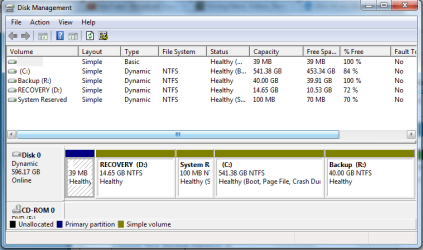
  • Disk Management.PNG
    Disk Management.PNG
    88.4 KB · Views: 27
Last edited:

My Computer

OS
Windows Home Premium x64
CPU
Intel Pentium E5400
Motherboard
Dell 0J190T
Graphics Card(s)
Intel G41 Express Chipset
I shrank my C: drive about 40 gigabytes so I could make a backup partition. Once it finished it changed all my partitions except the boot one to dynamic, even the C: drive. Is this fine? Will it ruin anything or will I need to change my C: drive back to basic or primary? On my laptop my C: drive is blue on the bottom Disk 0 line and on the list its listed as basic.
Welcome V look mate am no expert but what exactly were you trying to do - if it was just backing up why not just use an external drive?
 

My Computer

Computer type
PC/Desktop
Computer Manufacturer/Model Number
Own build (new) Desk1 / Asus ROG Win 7 / Desk2 1st build
OS
Desk1 7 Home Prem / Desk2 10 Pro / Main lap Asus ROG 10 Pro 2 laptop Toshiba 7 Pro Asus P2520 7 & 10
CPU
Desk1 i5 3750K / Laptop i7 GTX 860M / Desk2 i5 2500
Motherboard
Desk1 Asus P877-V / Desk2 Gigabyte H67 UD3H / Laptop ?
Memory
Desk1 8GB (1866) / Desk2 16GB (1333) / Laptop 8Gb DDR3
Graphics Card(s)
Desk 1& 2NVidia GTX 650 & Laptops on board Intel
Sound Card
Desk 1 & 2 -XONAR DG Realtek High Def audio Laptop
Monitor(s) Displays
Desk 1 Benq HD 2450 / Desk2 Philips 24" / Laptop 17.5"
Screen Resolution
1920x1080 D1 & D2 & Laptop 1
Hard Drives
Desk1 Samsung 120GB 830 SSD
Asus ROG 256GB 850 Pro SSD
Desk2 Samsung 840 256 SSD
Toshiba 120GB EVO
PSU
Desk 1 Corsair HX 1050/ Laptop ? / Desk 2 Corsair HX 650
Case
Desk 1 Cooler HAF XM ? Toshiba laptop / Desk2 Coolermaster
Cooling
Fans on all Desk1 -2 Desk2 - all Coolermasters 5 Laptop ?
Keyboard
Desk 1 MS Sidewinder X6 Desk 2 MS Sidewinder X 4
Mouse
Desk 1&2 - Gigabyte MS 900 gamer - laptop - Logitec wireless
Internet Speed
ADSL2+
Other Info
One other Desktop (tester) and spare Toshba laptop both with SSD's
Running Kaspersky 2016 ISS on all machines config'd identically
Logitec audio stereo systems on each machine (x3)
Canon MG5250MFC
Router/modem TP-Link running WPA2SK
I just don't want to get a external hard drive.
 

My Computer

OS
Windows Home Premium x64
CPU
Intel Pentium E5400
Motherboard
Dell 0J190T
Graphics Card(s)
Intel G41 Express Chipset
I just don't want to get a external hard drive.
No probs - just a suggestion - personally I find it a really safe way of keeping my drive cloned / backed up / imaged and ready to rock should the main throw in the sponge.
 

My Computer

Computer type
PC/Desktop
Computer Manufacturer/Model Number
Own build (new) Desk1 / Asus ROG Win 7 / Desk2 1st build
OS
Desk1 7 Home Prem / Desk2 10 Pro / Main lap Asus ROG 10 Pro 2 laptop Toshiba 7 Pro Asus P2520 7 & 10
CPU
Desk1 i5 3750K / Laptop i7 GTX 860M / Desk2 i5 2500
Motherboard
Desk1 Asus P877-V / Desk2 Gigabyte H67 UD3H / Laptop ?
Memory
Desk1 8GB (1866) / Desk2 16GB (1333) / Laptop 8Gb DDR3
Graphics Card(s)
Desk 1& 2NVidia GTX 650 & Laptops on board Intel
Sound Card
Desk 1 & 2 -XONAR DG Realtek High Def audio Laptop
Monitor(s) Displays
Desk 1 Benq HD 2450 / Desk2 Philips 24" / Laptop 17.5"
Screen Resolution
1920x1080 D1 & D2 & Laptop 1
Hard Drives
Desk1 Samsung 120GB 830 SSD
Asus ROG 256GB 850 Pro SSD
Desk2 Samsung 840 256 SSD
Toshiba 120GB EVO
PSU
Desk 1 Corsair HX 1050/ Laptop ? / Desk 2 Corsair HX 650
Case
Desk 1 Cooler HAF XM ? Toshiba laptop / Desk2 Coolermaster
Cooling
Fans on all Desk1 -2 Desk2 - all Coolermasters 5 Laptop ?
Keyboard
Desk 1 MS Sidewinder X6 Desk 2 MS Sidewinder X 4
Mouse
Desk 1&2 - Gigabyte MS 900 gamer - laptop - Logitec wireless
Internet Speed
ADSL2+
Other Info
One other Desktop (tester) and spare Toshba laptop both with SSD's
Running Kaspersky 2016 ISS on all machines config'd identically
Logitec audio stereo systems on each machine (x3)
Canon MG5250MFC
Router/modem TP-Link running WPA2SK
Dynamic volumes are generally seen in use with server drives as a rule. For the home pc you generally see the Basic instead by default. That's why there's always a few mbs lying around unused on a drive people wonder to allow for changing volume types.

As long as you are not seeing any problems as far as OS or partition table information you should be alright. Some good information on this can be looked over in the MS TechNet library however on the page seen at Working with Basic and Dynamic Disks
 

My Computers

System One System Two

  • Computer type
    PC/Desktop
    Computer Manufacturer/Model Number
    Custom builds = 2
    OS
    W7 Ultimate x64/W10 Pro x64/W11 Pro Triple Boot - Main PC W7 Remote PC Micro ATX W7 Pro x64/W11 Pro
    CPU
    AMD Phenom II X4 975 Deneb 3.6ghz - 965 2nd remote pc
    Motherboard
    Gigabyte GA-790XTA-UD4-Gigabyte GA-880GM-D2H remote pc
    Memory
    Kingston Hyper X DDR3 1600 1.5v 16gb - Hyper X Fury 8gb 2nd
    Graphics Card(s)
    MSI HD Radeon 5750 1gb - MSI HD Radeon 6450 on mini tower
    Sound Card
    Creative Labs X-Fi Xtreme Audio P - Realtek onooard 2nd case
    Monitor(s) Displays
    ASUS VW199T-P 19" HP 2082a Main-HP 2082a 20" remote pc
    Screen Resolution
    Asus 1440x900 - HP 1600x900
    Hard Drives
    WD Black 1TB HD per OS W7, W10, and pending W11 presently on 500gb OS Drive - Pending Triple 1TB HDs for Spanned Storage/backup volume
    Single 2TB external USB enclosure, single 1TB System 7 Host/Boot drive, Pending 8TB external HD for system image b
    PSU
    Corsair 750TX - primary / Corsair CX600 - second
    Case
    Antec 900-2 - SSD compatible / NZXT Vulcan mini tower
    Cooling
    Zalman CNPS9900A
    Keyboard
    AZIO L70 Backlit Letters Gaming - ONN Cordless/USB
    Mouse
    MSI DS200 Programmable, Logitech Cordless
    Internet Speed
    30mbps upgrade - primary hard wired - mini tower usb WiFi
    Antivirus
    GFI VIPRE Internet Security 2014 on W7 2016 beta on W10,
    Browser
    Cyberfox, WaterFox 64bit FF variants, FireFox x64, Pale Moon
    Other Info
    Accomdata fan cooled usb 2.0 PIDE/Sata II, III external enclosure.
    Sambient usb/eSata PATA/Sata II, III external enclosure.
  • Computer type
    PC/Desktop
    System Manufacturer/Model Number
    CUSTOM ASSEMBLY
    OS
    W7 Pro x64/W11 Pro
    CPU
    AMD Deneb 3.6ghz - 965
    Motherboard
    Gigabyte GA-880GM-D2H remote pc
    Memory
    Kingston Hyper X Fury 8gb
    Graphics Card(s)
    MSI HD Radeon 6450 DVI Output
    Sound Card
    Realtek onooard Creative or Other separate PENDING
    Monitor(s) Displays
    VIZIO 32" LCD TV Separate LCD Pending
    Screen Resolution
    1600x1080
    Hard Drives
    WD 500GB OS Host/Boot WD Green 1TB Storage/Backup
    PSU
    Corsair 600W - THERMALTAKE 600W spare case
    Case
    NZXT Vulcan mini tower
    Cooling
    Twin 120mm Top Fans - 240mm Side Cover
    Keyboard
    ONN Cordless/USB Logitech Cordless
    Mouse
    ONN USB/Cordless - Logitech Cordless
    Internet Speed
    DSL 5G
    Browser
    MS Edge, FireFox, WaterFox x64, FireFox Nightly
    Other Info
    OS Testing-Remote Access to Main TeamViewer
No you do not want a Dynamic Disk which is why it warns that your HD is about to convert when adding a fifth Primary partition. Dynamic is meant to span partition(s) across multiple HD's.

The only way to convert it back non-destructively is to use free Partition Wizard bootable CD version 4.2 which is the last version Conversion was included as a free feature. Download from here and burn to CD using Windows Image Burner or ImgBurn freeware: pw422.zip ISO - Windows Live

Before converting boot PW CD to delete the R partition since you can only have 4 Primary, or 3 Primary and unlimited Logical partitions.

Then follow this video tutorial: How to convert dynamic disk to basic disk with Partition Wizard?

Afterwards you can Modify>Convert to Logical C then Resize to add as many Logical sub-partitions as you want.
 
Do you know what speed I should burn it at? I must boot from the disc?
 

My Computer

OS
Windows Home Premium x64
CPU
Intel Pentium E5400
Motherboard
Dell 0J190T
Graphics Card(s)
Intel G41 Express Chipset

My Computer

OS
Windows Home Premium x64
CPU
Intel Pentium E5400
Motherboard
Dell 0J190T
Graphics Card(s)
Intel G41 Express Chipset
Partition Wizard?? Yes.
 

My Computer

Computer type
PC/Desktop
Computer Manufacturer/Model Number
Ignatz Special; 4 speed manual gearbox; factory air conditioning; one of one
OS
Windows 7 Home Premium SP1, 64-bit
CPU
Intel Skylake i5-6600K, not overclocked
Motherboard
AsRock Z170M Extreme 4, micro ATX
Memory
8 GB HyperX DDR4-2666 (2 x 4 GB)
Graphics Card(s)
none; graphics are integrated on CPU
Sound Card
onboard: Realtek ALC1150; external: USB Behringer UF0-202
Monitor(s) Displays
Dell S2340M 23 inch IPS
Screen Resolution
1600 x 900
Hard Drives
System: Crucial MX100 series SSD, 128 GB;
Data: Samsung Spinpoint 103SJ, 1 TB;
Backup: WD Caviar Green WD30EZRX-00D8PB0, 3 TB
PSU
Rosewill SilentNight 500 watt fanless, semi-modular
Case
Antec Solo II
Cooling
Noctua NH-U12S; Noctua F12 intake, Noctua S12A exhaust
Keyboard
Microsoft 200 6JH-00001 USB
Mouse
Dell or Microsoft optical wired; USB
Antivirus
Microsoft Security Essentials and Malwarebytes Premium
Browser
Pale Moon
Other Info
All fans PWM; speeds at idle: CPU circa 500 rpm; intake circa 600 rpm; exhaust circa 600 rpm; CPU temps 27 idle and 47 C load in a warm room (27 C/81 F) when running Intel Extreme Tuning Utility stress test.
So I boot Partition Wizard from the disc and follow that tutorial video?
 

My Computer

OS
Windows Home Premium x64
CPU
Intel Pentium E5400
Motherboard
Dell 0J190T
Graphics Card(s)
Intel G41 Express Chipset
Yes, but first you'll have to delete the fifth Primary partition you added which caused it to convert. Just delete it, no need to resize.

I wrote about how you can deal with adding partitions after converting your disk.
 
Yes, but first you'll have to delete the fifth Primary partition you added which caused it to convert.

I wrote about how you can deal with adding partitions after converting your disk.

What do I delete it with? Partition Wizard?
 

My Computer

OS
Windows Home Premium x64
CPU
Intel Pentium E5400
Motherboard
Dell 0J190T
Graphics Card(s)
Intel G41 Express Chipset
All I get is Disk 1 and its just that showing everything. It isn't showing my partitions though.
 

My Computer

OS
Windows Home Premium x64
CPU
Intel Pentium E5400
Motherboard
Dell 0J190T
Graphics Card(s)
Intel G41 Express Chipset
Post a picture of what you do see in Partition Wizard if you can't figure it out.
 

My Computer

Computer type
PC/Desktop
Computer Manufacturer/Model Number
Ignatz Special; 4 speed manual gearbox; factory air conditioning; one of one
OS
Windows 7 Home Premium SP1, 64-bit
CPU
Intel Skylake i5-6600K, not overclocked
Motherboard
AsRock Z170M Extreme 4, micro ATX
Memory
8 GB HyperX DDR4-2666 (2 x 4 GB)
Graphics Card(s)
none; graphics are integrated on CPU
Sound Card
onboard: Realtek ALC1150; external: USB Behringer UF0-202
Monitor(s) Displays
Dell S2340M 23 inch IPS
Screen Resolution
1600 x 900
Hard Drives
System: Crucial MX100 series SSD, 128 GB;
Data: Samsung Spinpoint 103SJ, 1 TB;
Backup: WD Caviar Green WD30EZRX-00D8PB0, 3 TB
PSU
Rosewill SilentNight 500 watt fanless, semi-modular
Case
Antec Solo II
Cooling
Noctua NH-U12S; Noctua F12 intake, Noctua S12A exhaust
Keyboard
Microsoft 200 6JH-00001 USB
Mouse
Dell or Microsoft optical wired; USB
Antivirus
Microsoft Security Essentials and Malwarebytes Premium
Browser
Pale Moon
Other Info
All fans PWM; speeds at idle: CPU circa 500 rpm; intake circa 600 rpm; exhaust circa 600 rpm; CPU temps 27 idle and 47 C load in a warm room (27 C/81 F) when running Intel Extreme Tuning Utility stress test.
I've never seen PW not show a drive map. What does it show for Disk 1: size, content, listings?

If it matches your HD, then click on the Disk # and see if Disk Tab allows you to choose Convert to Basic. If so, then select it and Apply step.

If not, reboot into Disk Management to delete R Partition, then reboot into PW CD to see if you can click on Disk # to Convert to Basic from Disk tab.
 
This is what I get.
 

Attachments

  • IMG_4497.jpg
    IMG_4497.jpg
    393.1 KB · Views: 12

My Computer

OS
Windows Home Premium x64
CPU
Intel Pentium E5400
Motherboard
Dell 0J190T
Graphics Card(s)
Intel G41 Express Chipset
The only thing that I see that I can do is convert but I haven't gotten to delete that partition yet.
 

My Computer

OS
Windows Home Premium x64
CPU
Intel Pentium E5400
Motherboard
Dell 0J190T
Graphics Card(s)
Intel G41 Express Chipset
Back
Top