Windows 7, Windows Live Mail. I just want to send a link of any page I have accessed on internet. I'm sure you can tell I am not computer literate! Thanks for your help...
I'm not familiar with Windows Live anything, but I'm certain that there are many here who are. Hopefully someone will come along soon who can properly advise you. You might start by checking your Options/Preferences for Live Mail.
My Computer
At a glance
7 Ultimate x64/7 Home Premium x64Intel i3 550 3.2 GHzCorsair 16 GB DDR3 (4 X 4GB)Intel HD Graphics
Computer Manufacturer/Model Number
Dell Inspiron 580
OS
7 Ultimate x64/7 Home Premium x64
CPU
Intel i3 550 3.2 GHz
Motherboard
Dell/Intel H57
Memory
Corsair 16 GB DDR3 (4 X 4GB)
Graphics Card(s)
Intel HD Graphics
Sound Card
Intel P55 HD Audio
Monitor(s) Displays
LG E2360 LED
Screen Resolution
1920 X 1080
Hard Drives
Seagate 1TB X 2 Internal,
Seagate 1TB eSATA (Backup)
PSU
Dell 300W
Case
Dell Inspiron
Cooling
Dell/Intel
Keyboard
Microsoft Wireless Comfort Keyboard 5000
Mouse
Microsoft Wireless Mouse 5000
Internet Speed
4,000 Mbit DSL
Other Info
Custom Installation -
OS separate on C:
Pagefile Separate on P:
Program Files Separate on U:
Users and ProgramData separate on V:
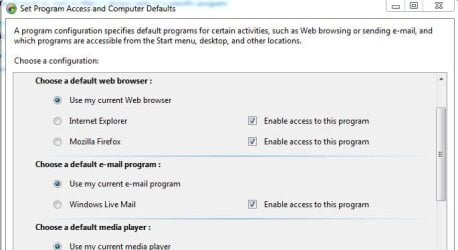
Click default programs in start menu, then choose Set program access and computer defaults then click on custom and you will be able to set it from there.