
Hello.
This is in regards to a single boot Windows 7 (HP) laptop.
:huh:
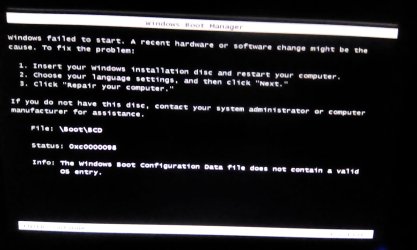
Recently, while trying out EasyBCD and EasyRE (EasyBCD - NeoSmart Technologies), I tried to make a bootable EasyBCD key. I accidentally clicked upon the wrong partition letter/number, and instead of installing the bootable BCD software on to the waiting USB stick, I installed it into my boot partition. I cannot boot into Windows 7, now. I have attached a screenshot of the boot failure message.
Windows 7 startup repair, and reverting to the last recovery point, did not help. The supposedly bootable EasyBCD memory stick, I did make, does not work either, and fails to boot.
(Before I do anything) how can I undo this, and recover the Windows 7 system?
To anyone who replies:
Thank you for your time.
This is in regards to a single boot Windows 7 (HP) laptop.
:huh:
Recently, while trying out EasyBCD and EasyRE (EasyBCD - NeoSmart Technologies), I tried to make a bootable EasyBCD key. I accidentally clicked upon the wrong partition letter/number, and instead of installing the bootable BCD software on to the waiting USB stick, I installed it into my boot partition. I cannot boot into Windows 7, now. I have attached a screenshot of the boot failure message.
Windows 7 startup repair, and reverting to the last recovery point, did not help. The supposedly bootable EasyBCD memory stick, I did make, does not work either, and fails to boot.
(Before I do anything) how can I undo this, and recover the Windows 7 system?
To anyone who replies:
Thank you for your time.
Attachments
My Computer
- Computer type
- Laptop
- Computer Manufacturer/Model Number
- HP Pavilion g6-1b39wm Notebook PC
- OS
- Windows 7 Home Premium x64
- Antivirus
- Malwarebytes
- Browser
- Chrome


