Solved edges getting cut off on my monitor

Accurateboy

New member
Local time
10:27 PM
Messages
9
just the edges of my screen are getting cut off on my moniter and its really buging me. Is their any way to fix it? its at 1600:900 right now and when i play games i can set it to like 1440:900 or smaller and i get some black bars but i can see everything.

basically what im asking is is their any way to reduce the screen resolution to fit my screen. i have gone to screenresolution on control panel but it just reduces the resolution not the size.

thanks in advance im just getting used to windows seven and dont know all too much about computers.
 

My Computer My Computer

At a glance

windows 7Pavilion p6334f8gbddr3NVIDIA Geforce GT220
Computer Manufacturer/Model Number
HP
OS
windows 7
CPU
Pavilion p6334f
Memory
8gbddr3
Graphics Card(s)
NVIDIA Geforce GT220
Hard Drives
1 terabyte
Hello Accurateboy, and welcome to Seven Forums.

You might try different screen resolution settings in the game to see if you can find one that looks ok.

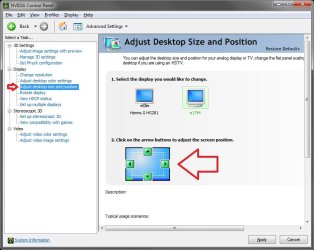
If not, then you can go into the NVIDIA Control Panel (right click on Desktop), and select the Adjust desktop size and position option. From here, you would select your monitor if you have more than one, then click on the green arrow boxes to adjust your screen horizontal and vertical display position to how you like it on the screen.

NVIDIA.jpg

Hope this helps,
Shawn
 

My Computer My Computer

At a glance

64-bit Windows 11 Pro for WorkstationsIntel i7-8700K OC'd to 5 GHz64 GB (4x16GB) G.SKILL TridentZ RGB DDR4 3600...ASUS ROG-STRIX-GTX1080TI-O11G-GAMING
Computer type
PC/Desktop
Computer Manufacturer/Model Number
Self built custom
OS
64-bit Windows 11 Pro for Workstations
CPU
Intel i7-8700K OC'd to 5 GHz
Motherboard
ASUS ROG Maximus XI Formula Z390
Memory
64 GB (4x16GB) G.SKILL TridentZ RGB DDR4 3600 MHz
Graphics Card(s)
ASUS ROG-STRIX-GTX1080TI-O11G-GAMING
Sound Card
Integrated
Monitor(s) Displays
2 x Samsung Odyssey G7 27"
Screen Resolution
2560x1440
Hard Drives
1TB Samsung 990 PRO M.2,
4TB Samsung 990 PRO PRO M.2,
TerraMaster F8 SSD Plus NAS
PSU
Seasonic Prime Titanium 850W
Case
Thermaltake Core P3
Cooling
Corsair Hydro H115i
Keyboard
Logitech wireless K800
Mouse
Logitech MX Master 4
Internet Speed
2 Gb/s Download and 100 Mb/s Upload
Antivirus
Malwarebyte Anti-Malware Premium
Browser
Google Chrome
Other Info
Logitech Z625 speaker system,
Logitech BRIO 4K Pro webcam,
HP Color LaserJet Pro MFP M477fdn,
APC SMART-UPS RT 1000 XL - SURT1000XLI,
Galaxy S23 Plus phone
Is it doing it when your on the net ?
Is it all the time?
 

My Computer My Computer

At a glance

Windows 7 Ultimate 64BitC2D E82008GB PNY PC2-6400BFG 9600GT x 2
Computer Manufacturer/Model Number
Myself
OS
Windows 7 Ultimate 64Bit
CPU
C2D E8200
Motherboard
XFX 750i
Memory
8GB PNY PC2-6400
Graphics Card(s)
BFG 9600GT x 2
Sound Card
Stock XFX Optical
Monitor(s) Displays
Gateway 22" HD Display
Hard Drives
C: 1 TB G: 500 GB H: 500 GB
PSU
Ultra LSP 550 Pro Lifetime Series
Case
Xion2
Cooling
ThermalTake
it happens all the time

thank you very much brink
 

My Computer My Computer

At a glance

windows 7Pavilion p6334f8gbddr3NVIDIA Geforce GT220
Computer Manufacturer/Model Number
HP
OS
windows 7
CPU
Pavilion p6334f
Memory
8gbddr3
Graphics Card(s)
NVIDIA Geforce GT220
Hard Drives
1 terabyte
You're most welcome Accurateboy. :)
 

My Computer My Computer

At a glance

64-bit Windows 11 Pro for WorkstationsIntel i7-8700K OC'd to 5 GHz64 GB (4x16GB) G.SKILL TridentZ RGB DDR4 3600...ASUS ROG-STRIX-GTX1080TI-O11G-GAMING
Computer type
PC/Desktop
Computer Manufacturer/Model Number
Self built custom
OS
64-bit Windows 11 Pro for Workstations
CPU
Intel i7-8700K OC'd to 5 GHz
Motherboard
ASUS ROG Maximus XI Formula Z390
Memory
64 GB (4x16GB) G.SKILL TridentZ RGB DDR4 3600 MHz
Graphics Card(s)
ASUS ROG-STRIX-GTX1080TI-O11G-GAMING
Sound Card
Integrated
Monitor(s) Displays
2 x Samsung Odyssey G7 27"
Screen Resolution
2560x1440
Hard Drives
1TB Samsung 990 PRO M.2,
4TB Samsung 990 PRO PRO M.2,
TerraMaster F8 SSD Plus NAS
PSU
Seasonic Prime Titanium 850W
Case
Thermaltake Core P3
Cooling
Corsair Hydro H115i
Keyboard
Logitech wireless K800
Mouse
Logitech MX Master 4
Internet Speed
2 Gb/s Download and 100 Mb/s Upload
Antivirus
Malwarebyte Anti-Malware Premium
Browser
Google Chrome
Other Info
Logitech Z625 speaker system,
Logitech BRIO 4K Pro webcam,
HP Color LaserJet Pro MFP M477fdn,
APC SMART-UPS RT 1000 XL - SURT1000XLI,
Galaxy S23 Plus phone
My screen will cut off on the left. I go into nvidia. All I have to do is open it and the screen will correct. However, the fix is not permanent. Every time the screen saver prompts then the cut off begins. Any solutions? I downloaded Spyder3 Elite and this started to happen.
 

My Computer My Computer

At a glance

vista
OS
vista
just the edges of my screen are getting cut off on my moniter and its really buging me. Is their any way to fix it? its at 1600:900 right now and when i play games i can set it to like 1440:900 or smaller and i get some black bars but i can see everything.

basically what im asking is is their any way to reduce the screen resolution to fit my screen. i have gone to screenresolution on control panel but it just reduces the resolution not the size.

thanks in advance im just getting used to windows seven and dont know all too much about computers.

have you tried resetting your monitor on its own panel ?
 

My Computer My Computer

At a glance

win7 ultimate / virtual boxIntel Core i7 3770K,1155, Ivy BridgeGSkill Ripjaws Z Series 1600 CL 9.0 16GBKFA2 GeForce GTX 670 EX OC 2048MB GDDR5 PCI-E...
Computer Manufacturer/Model Number
built my own
OS
win7 ultimate / virtual box
CPU
Intel Core i7 3770K,1155, Ivy Bridge
Motherboard
MSI Z77A-G43
Memory
GSkill Ripjaws Z Series 1600 CL 9.0 16GB
Graphics Card(s)
KFA2 GeForce GTX 670 EX OC 2048MB GDDR5 PCI-E gfx card
Sound Card
onboard Nvidia HDMI audio
Monitor(s) Displays
ASUS VK222H 22" widescreen LCD monitor
Screen Resolution
1680x1050
Hard Drives
Kingston 128gb SSD
OCZ Vertex 90gb SSD
500GB WDCaviar 16mb 5000KS
320GB WDCaviar 16mb 3200AAKS sata 2
1TB Samsung 16mb HD103SJ sata 2
PSU
Corsair HX 750W ATX2.2 Modular
Cooling
Antec 25 Kuhler H2O 620
Keyboard
logitech
Mouse
logitech MX518
Internet Speed
7mb adsl
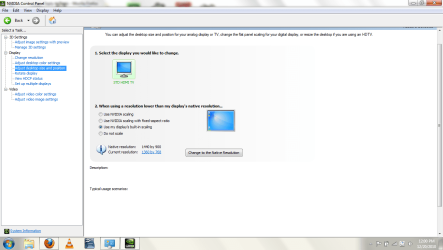
I'm having a similar issue to this, but it's happening on all corners of the screen. I've tried setting the resolution to different things, setting the aspect ratio on the HDTV, and reinstalling the video card driver. As for the solution posted above - my "adjust desktop size and position" tab simply doesn't look like that. How it looks is shown in a screenshot I've attached below. Can anyone help me with this? It's driving me crazy.

EDIT: The NVidia software also insists that its native resolution is 1440 by 900, even though it's 1366x768. This may be related.
 

Attachments

  • adjustdesktop.png
    adjustdesktop.png
    46.7 KB · Views: 941

My Computer My Computer

At a glance

Windows 7 Home Premium 64bit
OS
Windows 7 Home Premium 64bit
My 32" Bravia has a native resolution of 1366 X 768 and if I use HDMI which is mandated to only output either 720 or 1080 lines of resolution from the graphics card the picture is so overscanned that I can barely see the window controls in the upper right hand corner of the screen. My ATI graphics card can bring the edges of the picture back in to fit the size of the monitor, but it becomes distorted and the text is very hard to read.

~Maxx~
.
Win7_50.png
 

My Computer My Computer

At a glance

Windows 7 x64 Home PremiumIntel Core i7 930 @ 2.8 Ghz Socket 1366 LGA8 GB 1366 Mhz DDR3 (PC3-10700) RAMATI Radeon 5770 1 GB DDR5 RAM
Computer Manufacturer/Model Number
HP HPE 270f
OS
Windows 7 x64 Home Premium
CPU
Intel Core i7 930 @ 2.8 Ghz Socket 1366 LGA
Motherboard
Pegatron Truckee v1.04E41
Memory
8 GB 1366 Mhz DDR3 (PC3-10700) RAM
Graphics Card(s)
ATI Radeon 5770 1 GB DDR5 RAM
Sound Card
Realtech High Definition
Monitor(s) Displays
32" Sony Bravia
Screen Resolution
1366 X 768
Hard Drives
Intel 25nm 120 GB Series 320 SSD HD Tune- 265 MBps Read/ 130 MBps Write

LaCie 1TB + 1TB RAID 0 eSATA Drive HD Tune- 160 MBps Read/ 90 MBps Write
Keyboard
Logitech Illuminated
Mouse
Logitech MX Revolution
Internet Speed
36.4 Mbps Maximum on a 37 Mbps Motorola SB501 Modem
Use native HD input

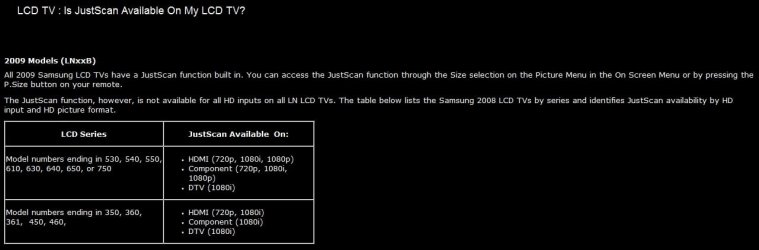
I had the same problem initally using an intel i3 over hdmi on my samsung. The solution was to use an input option called 'just scan' on my tv which says it uses the native hd signal. I'm assuming it turns off the overscan. I'm betting most of the other tv's have somthing similar.
 

My Computer My Computer

At a glance

windows 7
OS
windows 7
celockwood- Welcome to the Windows 7 Forums! Its unfortunate that Just Scan only works for those who have a Samsung TV.

~Maxx~
.
Win7_50.png
 

Attachments

  • Just Scan.jpg
    Just Scan.jpg
    43.1 KB · Views: 320
Last edited:

My Computer My Computer

At a glance

Windows 7 x64 Home PremiumIntel Core i7 930 @ 2.8 Ghz Socket 1366 LGA8 GB 1366 Mhz DDR3 (PC3-10700) RAMATI Radeon 5770 1 GB DDR5 RAM
Computer Manufacturer/Model Number
HP HPE 270f
OS
Windows 7 x64 Home Premium
CPU
Intel Core i7 930 @ 2.8 Ghz Socket 1366 LGA
Motherboard
Pegatron Truckee v1.04E41
Memory
8 GB 1366 Mhz DDR3 (PC3-10700) RAM
Graphics Card(s)
ATI Radeon 5770 1 GB DDR5 RAM
Sound Card
Realtech High Definition
Monitor(s) Displays
32" Sony Bravia
Screen Resolution
1366 X 768
Hard Drives
Intel 25nm 120 GB Series 320 SSD HD Tune- 265 MBps Read/ 130 MBps Write

LaCie 1TB + 1TB RAID 0 eSATA Drive HD Tune- 160 MBps Read/ 90 MBps Write
Keyboard
Logitech Illuminated
Mouse
Logitech MX Revolution
Internet Speed
36.4 Mbps Maximum on a 37 Mbps Motorola SB501 Modem

My Computer My Computer

At a glance

Windows 7 Home Premuim 32bit
OS
Windows 7 Home Premuim 32bit
I had the same issue and for me it was a monitor thing. I had to go into monitor settings and auto adjust image. May not be the solution for everyone but was for me.
 

My Computer My Computer

At a glance

Windows 7 Home Premium 32bit.
OS
Windows 7 Home Premium 32bit.
alan333's fix fixed mine too after I hooked up a KVM switch
 

My Computer My Computer

At a glance

Windows 7 x86
Computer type
PC/Desktop
OS
Windows 7 x86
Just registered to say thank you for the useful ideas. I had the same problem for two years and I wasn't too hopeful today either when trying "for the last time" again. Found this thread with some new ideas I haven't tried yet, and it WORKED! The problem with the edge truncation is on the monitor side, no woder I have been trying in vain with the screen resolution control panel. I have a Sony Bravia 32" (really old, like 8 years) and the trick that fixed it was to press the "Home" button on the remote control, go into Settings, then Screen, and change "Display Area" to "Full Pixel". Now I can watch videos in VLC (especially the ones that demo computer screens) without any of the edges cut off. Very happy. This made my day!
 

My Computer My Computer

At a glance

Windows 7 Pro 64bitIntel i58GB
Computer type
Laptop
Computer Manufacturer/Model Number
Dell
OS
Windows 7 Pro 64bit
CPU
Intel i5
Memory
8GB
Back
Top