
EDIT IN WINDOWS START UP SCREEN

DEEPWOE

New member
I recently had trouble with my usb ports disconnecting at start up in Windows 7, trying to figure out why i pressed f11 at computer logo and was asked for commands to edit. Is there a way to keep the Windows 7 start-up from disconnecting my external harddrives and flashdrives? thanks in advance
running an Emachine T3516a- Also I TRIED EVERY OTHER POSSIBLE SOLUTION EXCEPT THROWING IT AWAY AND BUYING A NEW P.C.
 

My Computer

OS
Windows 7 Home Premium
Hi, welcome to the forums :)

Are the disconnecting instantly or just after a certain amount of time?

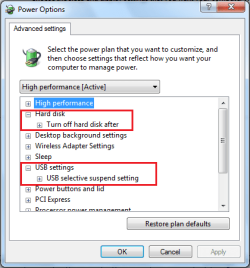
If after some time then it could be your power options causing this. Click :orb: Control Panel > Hardware and Sound > Power next click Change Plan Settings (under the currently selected plan) then Change advanced settings
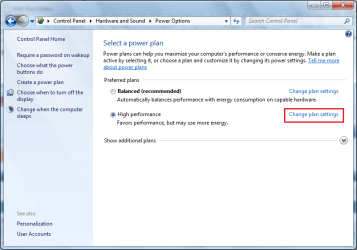
Power Options.PNG

HDD USB.PNG

Make sure to disable any sleep mode that your HDD or USB devices are set for and this should solve your problem.


OS
 

My Computer

Computer Manufacturer/Model Number
Compaq Desktop
OS
Windows 7 Ultimate x64
CPU
AMD Sempron Dual Core
Memory
3GB
Graphics Card(s)
NVIDIA GeForce 6150SE nForce 430
Screen Resolution
1024x768
Hard Drives
150GB Sata
Yes i have disabled suspend select, sleep mode, ran the solution for device manager, went to manufacturer of computer, and motherboard downloaded drivers, repaired W7, clean installed W7, bought a new hard disk, checked the jumpers. checked the memory and everytthing else Bing can site while searching. My usb worked fine befor install now notta, my computer recognizes the external hard disk, ive checked it on other computers the disk works but no port action or power on this one.
 

My Computer

OS
Windows 7 Home Premium
Is this a USB powered hard drive?

If it is some notebooks do not put out enough power from one USB port to power these HDD.

Western Digital actually sells a cable for this reason. It has 2 USB connectors on it to one HDD connector to supply more power to the HDD.
 

My Computer

Computer Manufacturer/Model Number
Built be Me
OS
Windows 7 Pro x64
CPU
i5 760
Motherboard
Asus P7P55D-E Pro
Memory
16GB
Graphics Card(s)
Nvidia GTS450
Sound Card
On board
Monitor(s) Displays
Dell 2007WFP Dell 1800FP
Screen Resolution
1680x1050 1280x1024
Hard Drives
Seagate 250GB & 750GB
WD 1TB
PSU
Antec 750
Case
In Win
Cooling
Cooler Master Hyper 212+
Keyboard
IBM
Mouse
MS
Thanks for the reply However that didnt work either i bout the plug from best buy or adapter to replace the current docking power supply. When plugged in the light comes on and nothing else IF I RESTART THE COMPUTER I GET A BLUE SCREEN SAYING USB DRIVER ERROR UNPLUG DEVICE AND RESTART COMPUTER.

IF I START THE COMPUTER THE COMPUTER RECOGNIZES THE EXTERNAL HARD DRIVE IN BOOT SECTOR AND BIOS AS SEAGATE GOFLEX, BUT WHEN I SAVE AND EXIT BIOS THE COMPUTER DISABLES THE SEAGATE THE LIGHT TURNS OFF AND ONCE LOGGED ON NOTHING REGISTERS NO XHDD NO FLASHDRIVE ETC ONLY THING THAT DOES WORK IS THE OPTICAL MOUSE
 

My Computer

OS
Windows 7 Home Premium
Then I think the hard drive is bad.

With the HDD unplugged from the USB ports and you restart the PC can you then plug in a flash drive and have that seen by Windows?

Sorry but you still haven't answered one question.

Is this a USB powered external hard drive.

If not I am sorry for bring it up again.
 

My Computer

Computer Manufacturer/Model Number
Built be Me
OS
Windows 7 Pro x64
CPU
i5 760
Motherboard
Asus P7P55D-E Pro
Memory
16GB
Graphics Card(s)
Nvidia GTS450
Sound Card
On board
Monitor(s) Displays
Dell 2007WFP Dell 1800FP
Screen Resolution
1680x1050 1280x1024
Hard Drives
Seagate 250GB & 750GB
WD 1TB
PSU
Antec 750
Case
In Win
Cooling
Cooler Master Hyper 212+
Keyboard
IBM
Mouse
MS
Yes it is a USB powered external, I thought it might be the HDD as well, but i took it to a computer repair shop and connected it to another computer and it worked. I'm thinking it may be the PCI to USB bridge it doesnt show in the Universal Serial Bus controller
 

My Computer

OS
Windows 7 Home Premium
I have actually had this same problem before. I couldn't tell you exactly what it is as it was while ago however i do remember it was a hardware issue. Not sure if that helps :P
 

My Computer

OS
Windows 7 Home Premium x64
Back
Top