Solved "Edit With Gimp" Context Menu Missing

Arc

New member
SF Team
Local time
1:40 AM
Messages
35,002
Hi ! :D

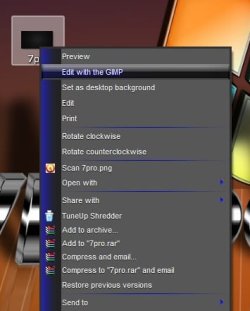
There was a picture file format context menu (for .jpg, .png etc) "Edit With Gimp . Today I have had an image restoration , and after that the menu is missing .

I have restored that image many times previously, but I have never missed it . I have tried the tutorial http://www.sevenforums.com/tutorials/19449-default-file-type-associations-restore.html . But I havent get it back .

Is there any easy way to get it back other than reinstalling GIMP ?

Thanks in advance .
 

My Computer

Computer type
PC/Desktop
Computer Manufacturer/Model Number
Self Assembled
OS
Microsoft Windows 10 Pro Insider Preview 64-bit
CPU
Intel(R) Core(TM) i3-4130 CPU @ 3.40GHz
Motherboard
Gigabyte Technology Co., Ltd. B85M-D3H
Memory
Corsair Vengence 4GB x2 (8.00GB Dual-Channel DDR3 @ 798MHz)
Graphics Card(s)
2047MB GeForce GTS 450 (ZOTAC International)
Sound Card
Onboard (Realtek High Definition Audio)
Monitor(s) Displays
LG Flatron E2040T
Screen Resolution
1600x900
Hard Drives
Western Digital 1 TB
Seagate 500 GB
PSU
Corsair VS550
Case
Cooler Master K380
Cooling
Cooler Master Seidon 120V Plus
Keyboard
Logitech MK260r
Mouse
Logitech MK260r
Internet Speed
PMPL Broadband
Antivirus
Windows Defender + MBAM
Browser
Firefox
Other Info
Dell Studio 15" Laptop
Hi Arc
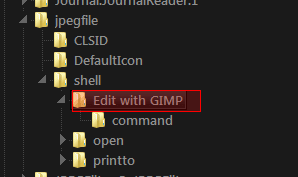
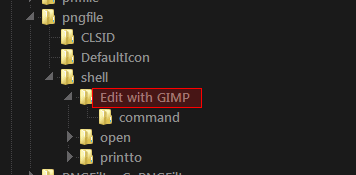
Do you have a "Edit with GIMP" at
HKEY_CLASSES_ROOT\jpegfile\shell
&
HKEY_CLASSES_ROOT\pngfile\shell

& icofile & giffile

I can export them for you if needed
Jerry
 

Attachments

  • Region.png
    Region.png
    3 KB · Views: 2,498
  • Region2.png
    Region2.png
    2.6 KB · Views: 146

My Computer

Computer type
Laptop
Computer Manufacturer/Model Number
Sager NP9170
OS
Win 7 Pro x64 / Win 10 Pro
CPU
Intel(R) Core(TM) i7-3630QM CPU @ 2.40GHz
Motherboard
CLEVO P170EM
Memory
12 GB
Graphics Card(s)
(1) Intel(R) HD Graphics 4000 (2) NVIDIA GeForce GTX 675M
Sound Card
(1) Realtek High Definition Audio (2) Intel(R) Display Aud
Monitor(s) Displays
17.3
Screen Resolution
1920x1080
Hard Drives
(1) Samsung 860 EVO 500GB(OS) (1) Samsung 860 EVO 500GB(Data)
Keyboard
Backlite
Antivirus
MSE, Malwarebytes Pro
Browser
Firefox
Other Info
DESKTOP: Custom-built.
OS: Win 10 Pro x64.
CASE: Rosewill R5.
CPU: Intel I5 4670K CPU @ 3.40GHz.
CPU COOLER: Cool Master Hyper 212 EVO.
MOTHERBOARD: Asus Z87-A.
MEMORY: Kingston HyperX 2x4 GB.
GPU: Nvidia Geforce 650 TI.
PSU: Corsair TX750.
DRIVES: (1) Samsung 840 120 GB SSD (2) Western Digital blue 500 GB 7200 RPM.
Thanks for helping Jerry . But I dont have those entries :(

Am I to add those ? Actually I dont have enough experience with registry items . Always leave those untouched .
 

My Computer

Computer type
PC/Desktop
Computer Manufacturer/Model Number
Self Assembled
OS
Microsoft Windows 10 Pro Insider Preview 64-bit
CPU
Intel(R) Core(TM) i3-4130 CPU @ 3.40GHz
Motherboard
Gigabyte Technology Co., Ltd. B85M-D3H
Memory
Corsair Vengence 4GB x2 (8.00GB Dual-Channel DDR3 @ 798MHz)
Graphics Card(s)
2047MB GeForce GTS 450 (ZOTAC International)
Sound Card
Onboard (Realtek High Definition Audio)
Monitor(s) Displays
LG Flatron E2040T
Screen Resolution
1600x900
Hard Drives
Western Digital 1 TB
Seagate 500 GB
PSU
Corsair VS550
Case
Cooler Master K380
Cooling
Cooler Master Seidon 120V Plus
Keyboard
Logitech MK260r
Mouse
Logitech MK260r
Internet Speed
PMPL Broadband
Antivirus
Windows Defender + MBAM
Browser
Firefox
Other Info
Dell Studio 15" Laptop
Thanks for helping Jerry . But I dont have those entries :(

Am I to add those ? Actually I dont have enough experience with registry items . Always leave those untouched .

Make a backup of your registry & download the zip & open it & double click on the reg files click Yes & OK & see if you have Edit with Gimp in your context menu or reinstall gimp
Jerry
 

Attachments

My Computer

Computer type
Laptop
Computer Manufacturer/Model Number
Sager NP9170
OS
Win 7 Pro x64 / Win 10 Pro
CPU
Intel(R) Core(TM) i7-3630QM CPU @ 2.40GHz
Motherboard
CLEVO P170EM
Memory
12 GB
Graphics Card(s)
(1) Intel(R) HD Graphics 4000 (2) NVIDIA GeForce GTX 675M
Sound Card
(1) Realtek High Definition Audio (2) Intel(R) Display Aud
Monitor(s) Displays
17.3
Screen Resolution
1920x1080
Hard Drives
(1) Samsung 860 EVO 500GB(OS) (1) Samsung 860 EVO 500GB(Data)
Keyboard
Backlite
Antivirus
MSE, Malwarebytes Pro
Browser
Firefox
Other Info
DESKTOP: Custom-built.
OS: Win 10 Pro x64.
CASE: Rosewill R5.
CPU: Intel I5 4670K CPU @ 3.40GHz.
CPU COOLER: Cool Master Hyper 212 EVO.
MOTHERBOARD: Asus Z87-A.
MEMORY: Kingston HyperX 2x4 GB.
GPU: Nvidia Geforce 650 TI.
PSU: Corsair TX750.
DRIVES: (1) Samsung 840 120 GB SSD (2) Western Digital blue 500 GB 7200 RPM.
Make a backup of your registry & download the zip & open it & double click on the reg files click Yes & OK & see if you have Edit with Gimp in your context menu or reinstall gimp
Jerry
Thanks Jerry :D Sorry for the let reply ; I was posting a tutorial as Shawn told me to do so . Downloaded the zip, and I am to see now whether it works or not .


Thanks for your help, Wolfgang :D But I didnot want it in "Open With" list . The actual situation was it was in the context menu between Open and Edit , s the second item thereto . So it saved a fraction of a second in searching .... as there is a lot of programs in the context menu of image files' open with list :)
 

My Computer

Computer type
PC/Desktop
Computer Manufacturer/Model Number
Self Assembled
OS
Microsoft Windows 10 Pro Insider Preview 64-bit
CPU
Intel(R) Core(TM) i3-4130 CPU @ 3.40GHz
Motherboard
Gigabyte Technology Co., Ltd. B85M-D3H
Memory
Corsair Vengence 4GB x2 (8.00GB Dual-Channel DDR3 @ 798MHz)
Graphics Card(s)
2047MB GeForce GTS 450 (ZOTAC International)
Sound Card
Onboard (Realtek High Definition Audio)
Monitor(s) Displays
LG Flatron E2040T
Screen Resolution
1600x900
Hard Drives
Western Digital 1 TB
Seagate 500 GB
PSU
Corsair VS550
Case
Cooler Master K380
Cooling
Cooler Master Seidon 120V Plus
Keyboard
Logitech MK260r
Mouse
Logitech MK260r
Internet Speed
PMPL Broadband
Antivirus
Windows Defender + MBAM
Browser
Firefox
Other Info
Dell Studio 15" Laptop
Thanks a lot Jerry :thumbsup:
Untitled.jpg

I've got it back :dinesh::dinesh:
 

My Computer

Computer type
PC/Desktop
Computer Manufacturer/Model Number
Self Assembled
OS
Microsoft Windows 10 Pro Insider Preview 64-bit
CPU
Intel(R) Core(TM) i3-4130 CPU @ 3.40GHz
Motherboard
Gigabyte Technology Co., Ltd. B85M-D3H
Memory
Corsair Vengence 4GB x2 (8.00GB Dual-Channel DDR3 @ 798MHz)
Graphics Card(s)
2047MB GeForce GTS 450 (ZOTAC International)
Sound Card
Onboard (Realtek High Definition Audio)
Monitor(s) Displays
LG Flatron E2040T
Screen Resolution
1600x900
Hard Drives
Western Digital 1 TB
Seagate 500 GB
PSU
Corsair VS550
Case
Cooler Master K380
Cooling
Cooler Master Seidon 120V Plus
Keyboard
Logitech MK260r
Mouse
Logitech MK260r
Internet Speed
PMPL Broadband
Antivirus
Windows Defender + MBAM
Browser
Firefox
Other Info
Dell Studio 15" Laptop
Good deal Arc glad you got it
Jerry
 

My Computer

Computer type
Laptop
Computer Manufacturer/Model Number
Sager NP9170
OS
Win 7 Pro x64 / Win 10 Pro
CPU
Intel(R) Core(TM) i7-3630QM CPU @ 2.40GHz
Motherboard
CLEVO P170EM
Memory
12 GB
Graphics Card(s)
(1) Intel(R) HD Graphics 4000 (2) NVIDIA GeForce GTX 675M
Sound Card
(1) Realtek High Definition Audio (2) Intel(R) Display Aud
Monitor(s) Displays
17.3
Screen Resolution
1920x1080
Hard Drives
(1) Samsung 860 EVO 500GB(OS) (1) Samsung 860 EVO 500GB(Data)
Keyboard
Backlite
Antivirus
MSE, Malwarebytes Pro
Browser
Firefox
Other Info
DESKTOP: Custom-built.
OS: Win 10 Pro x64.
CASE: Rosewill R5.
CPU: Intel I5 4670K CPU @ 3.40GHz.
CPU COOLER: Cool Master Hyper 212 EVO.
MOTHERBOARD: Asus Z87-A.
MEMORY: Kingston HyperX 2x4 GB.
GPU: Nvidia Geforce 650 TI.
PSU: Corsair TX750.
DRIVES: (1) Samsung 840 120 GB SSD (2) Western Digital blue 500 GB 7200 RPM.
Conflict w/Windows Live Photo Gallery

The registry fix here didn't work for me. Nor did a reinstall of Gimp. Decided to do some experimenting.
Turned out that .jpg was set to Windows Live Photo Gallery as its default Open action. When I changed this to Windows Photo Viewer, presto, the "Edit with Gimp" option now appears on right click of .jpg files.

I don't want to use Gimp as the Open default. That would probably fix it as well. And once in a while I use the Photo Gallery tool (I think)... uninstalling that would probably work also.

How to do what I did...
- Start menu
- Key in "file associations"
- Select "change the file type..."
- In the tool that opens (I guess its the Default Programs, Set Associations tool), find .jpg, .gif, etc. and mess with the default Open. Probably anything but Windows Live Photo Gallery will resolve the issue, though I haven't tried other options.

Update...
Looks like what you select for the default open makes a difference. .gif files revealed this because I selected Paint... no "Edit with Gimp" option. But if I set it to IE, the "Edit with Gimp" menu appears.
Conclusion: you probably have to select whatever the Windows default is for the file type. This is not hard to identify because when you click "Change program" in the file associations tool, it will go to the windows default in the Recommended Programs list.
 
Last edited:

My Computer

Computer Manufacturer/Model Number
Lenovo Thinkpad W520
OS
Win 7 Home Prem. x64
CPU
i7
  • Like
Reactions: whs
Does anyone know why this happens. I've been struggling with this for an app but would like to know why that affects the menus showing up or not?
 

My Computer

OS
Windows 7 64-bit
If it bugs you with the Open with dialog then it is because that the reg is referencing the wrong place.

I my case it worked with:
C:\Program Files\GIMP 2\bin\gimp-2.8.exe

Have added an updated version of the reg file
 

Attachments

My Computer

OS
Windows 7 - 64 bit
I have the same issue, and am looking for the reg entry's for 32bit Windows 7 Pro. That will add "Edit with Gimp" to my right click menu.
 

My Computer

Computer type
PC/Desktop
Computer Manufacturer/Model Number
Dell
OS
Windows 7 Pro 32 bit
I have the same issue, and am looking for the reg entry's for 32bit Windows 7 Pro. That will add "Edit with Gimp" to my right click menu.
Welcome to the Seven Forums

What version of gimp do you have?

Jerry
 

My Computer

Computer type
Laptop
Computer Manufacturer/Model Number
Sager NP9170
OS
Win 7 Pro x64 / Win 10 Pro
CPU
Intel(R) Core(TM) i7-3630QM CPU @ 2.40GHz
Motherboard
CLEVO P170EM
Memory
12 GB
Graphics Card(s)
(1) Intel(R) HD Graphics 4000 (2) NVIDIA GeForce GTX 675M
Sound Card
(1) Realtek High Definition Audio (2) Intel(R) Display Aud
Monitor(s) Displays
17.3
Screen Resolution
1920x1080
Hard Drives
(1) Samsung 860 EVO 500GB(OS) (1) Samsung 860 EVO 500GB(Data)
Keyboard
Backlite
Antivirus
MSE, Malwarebytes Pro
Browser
Firefox
Other Info
DESKTOP: Custom-built.
OS: Win 10 Pro x64.
CASE: Rosewill R5.
CPU: Intel I5 4670K CPU @ 3.40GHz.
CPU COOLER: Cool Master Hyper 212 EVO.
MOTHERBOARD: Asus Z87-A.
MEMORY: Kingston HyperX 2x4 GB.
GPU: Nvidia Geforce 650 TI.
PSU: Corsair TX750.
DRIVES: (1) Samsung 840 120 GB SSD (2) Western Digital blue 500 GB 7200 RPM.
I have the same issue, and am looking for the reg entry's for 32bit Windows 7 Pro. That will add "Edit with Gimp" to my right click menu.
Welcome to the Seven Forums

What version of gimp do you have?

Jerry
Thanks for the welcome, and I'm using Gimp 2.8.10
 

My Computer

Computer type
PC/Desktop
Computer Manufacturer/Model Number
Dell
OS
Windows 7 Pro 32 bit

My Computer

Computer type
Laptop
Computer Manufacturer/Model Number
Sager NP9170
OS
Win 7 Pro x64 / Win 10 Pro
CPU
Intel(R) Core(TM) i7-3630QM CPU @ 2.40GHz
Motherboard
CLEVO P170EM
Memory
12 GB
Graphics Card(s)
(1) Intel(R) HD Graphics 4000 (2) NVIDIA GeForce GTX 675M
Sound Card
(1) Realtek High Definition Audio (2) Intel(R) Display Aud
Monitor(s) Displays
17.3
Screen Resolution
1920x1080
Hard Drives
(1) Samsung 860 EVO 500GB(OS) (1) Samsung 860 EVO 500GB(Data)
Keyboard
Backlite
Antivirus
MSE, Malwarebytes Pro
Browser
Firefox
Other Info
DESKTOP: Custom-built.
OS: Win 10 Pro x64.
CASE: Rosewill R5.
CPU: Intel I5 4670K CPU @ 3.40GHz.
CPU COOLER: Cool Master Hyper 212 EVO.
MOTHERBOARD: Asus Z87-A.
MEMORY: Kingston HyperX 2x4 GB.
GPU: Nvidia Geforce 650 TI.
PSU: Corsair TX750.
DRIVES: (1) Samsung 840 120 GB SSD (2) Western Digital blue 500 GB 7200 RPM.

Attachments

My Computer

Computer type
Laptop
Computer Manufacturer/Model Number
Sager NP9170
OS
Win 7 Pro x64 / Win 10 Pro
CPU
Intel(R) Core(TM) i7-3630QM CPU @ 2.40GHz
Motherboard
CLEVO P170EM
Memory
12 GB
Graphics Card(s)
(1) Intel(R) HD Graphics 4000 (2) NVIDIA GeForce GTX 675M
Sound Card
(1) Realtek High Definition Audio (2) Intel(R) Display Aud
Monitor(s) Displays
17.3
Screen Resolution
1920x1080
Hard Drives
(1) Samsung 860 EVO 500GB(OS) (1) Samsung 860 EVO 500GB(Data)
Keyboard
Backlite
Antivirus
MSE, Malwarebytes Pro
Browser
Firefox
Other Info
DESKTOP: Custom-built.
OS: Win 10 Pro x64.
CASE: Rosewill R5.
CPU: Intel I5 4670K CPU @ 3.40GHz.
CPU COOLER: Cool Master Hyper 212 EVO.
MOTHERBOARD: Asus Z87-A.
MEMORY: Kingston HyperX 2x4 GB.
GPU: Nvidia Geforce 650 TI.
PSU: Corsair TX750.
DRIVES: (1) Samsung 840 120 GB SSD (2) Western Digital blue 500 GB 7200 RPM.
The registry fix here didn't work for me. Nor did a reinstall of Gimp. Decided to do some experimenting.
Turned out that .jpg was set to Windows Live Photo Gallery as its default Open action. When I changed this to Windows Photo Viewer, presto, the "Edit with Gimp" option now appears on right click of .jpg files.

I don't want to use Gimp as the Open default. That would probably fix it as well. And once in a while I use the Photo Gallery tool (I think)... uninstalling that would probably work also.

How to do what I did...
- Start menu
- Key in "file associations"
- Select "change the file type..."
- In the tool that opens (I guess its the Default Programs, Set Associations tool), find .jpg, .gif, etc. and mess with the default Open. Probably anything but Windows Live Photo Gallery will resolve the issue, though I haven't tried other options.

Update...
Looks like what you select for the default open makes a difference. .gif files revealed this because I selected Paint... no "Edit with Gimp" option. But if I set it to IE, the "Edit with Gimp" menu appears.
Conclusion: you probably have to select whatever the Windows default is for the file type. This is not hard to identify because when you click "Change program" in the file associations tool, it will go to the windows default in the Recommended Programs list.

I had the same issue after installing and uninstalling picasa (i didn't like it :/)
I soon found that the "edit with gimp" option when right clicking an image didn't come up, only the regular "edit" that opens in paint (or something like that).
I reinstalled gimp, and nothing changed, but I tried your first option to change the "open with" for jpg and png files to be with windows photo viewer, even though they already were. (click to change and select the same thing, then OK).
And when I did that for both PNG and JPG type files, the "edit with gimp" option returned :)

YAY!!! :D :D :D


THANK YOU SO MUCH!!!! :D
 

My Computer

Computer type
PC/Desktop
Computer Manufacturer/Model Number
I made her myself :)
OS
Windows 7 Professional
CPU
Intel i5-4670k
Motherboard
Asus Z87-Pro
Memory
G.SKILL Ripjaws X Series 16GB 1600mhz (F3-1600C9D-16GXM)
Graphics Card(s)
EVGA GTX770 SC ACX 2gb
Monitor(s) Displays
Acer H236HLbid 23" ips 5ms GTG
Screen Resolution
1080p
Hard Drives
-128gb Samsung 840 Pro (C drive with OS)
-1tb WD Black 7200rpm 64mb WD1002FAEX (music, programs, files, etc.)
-120gb Samsung 840 evo (games)
PSU
SeaSonic M12II 750watt
Case
Coolermaster HAF 922 all black, usb 3.0
Cooling
CPU: CM hyper 212 evo with push-pull Cougar Vortex fans
Keyboard
CM Storm QuickFire TK (brown switch mechanical)
Mouse
perixx mx-2000
Internet Speed
21Mb/s down, 2Mb/s up (on a good day)
Antivirus
Malwarebytes and Microsoft Security Essentials
Browser
Chrome
Other Info
Fans on case: front 200mm in, top 200mm out, x2 side 120mm in (cougar vortex), rear 120mm out

I've never seen my cpu go above 40c and my card above 60c even with intense games or benchmarks
I don't overclock anything, as I rely on this machine too much for other things to risk it getting fried.
Hi! I found it on this page, it worked for me, even if the main post's fix not. I hope it'll help someone.
 

Attachments

Last edited:

My Computer

Computer type
PC/Desktop
OS
Windows 8.1 x64
Hi! I found it on the GIMP's offical page, it worked for me, even if the main post's fix not. I hope it'll help someone.

I would like to know. Where on the Gimp website did you find this information?
 

My Computer

Computer type
PC/Desktop
Computer Manufacturer/Model Number
Dell
OS
Windows 7 Pro 32 bit
Back
Top