Elevated Program Shortcut - Create for Standard User

How to Create an Elevated Program Shortcut Any User is able to Run in Vista, Windows 7, and Windows 8

   Information
This will show you how to create an elevated program shortcut that allows any user (ex: Standard user) to be able to run a program that runs as administrator without being prompted to enter the administator's password each time in Vista, Windows 7, and Windows 8.

   Note
If the user you want to have this shortcut has been restricted with Parental Controls in Windows 7 with it set as Standard Account can only use the programs I allow, then they will not be able to use the shortcut in this tutorial since they will not be allowed to use the runas.exe file used by this shortcut. Windows 7 will not allow runas.exe to be added to the allowed to run list.


If the user you want to have this shortcut has been restricted with Family Safety in Windows 8 with it set as (user) can only use the apps I allow, then they will not be able to use the shortcut in this tutorial since they will not be allowed to use the runas.exe file used by this shortcut. Windows 8 will not allow runas.exe to be added to the allowed to run list.


You will not be able to do this in Vista Starter, Vista Home Basic, Vista Home Premium, Windows 7 Home Basic, and Windows 7 Starter editions since the runas /savecred switch option is not available and will be ignored in them.


If you disable the built-in Administrator account, the elevated shortcut will stop working until you enable the built-in Administrator again. This is because the elevated shortcut uses the password of the built-in Administrator to approve running it.


OPTION ONE

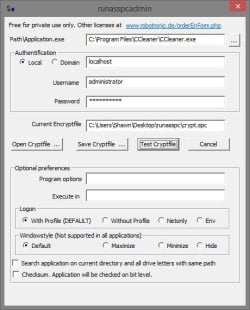
To Create Elevated Shortcut for User using RunasSPC Program


1. Download the free RunasSPC program in a .zip file at the site below.

Download


2. The link below can help show you how to use the program.
Runas Spc guidance and examples

runasspcadmin.jpg


OPTION TWO

To Create Elevated Shortcut for User using runas Command


   Tip
This option uses the runas command included in Windows.

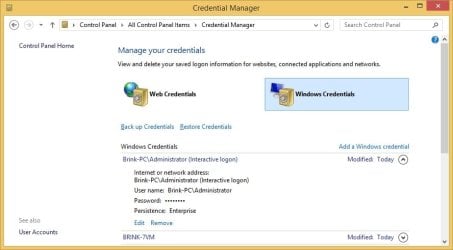
The Administrator's password (credential) used by the elevated shortcut is encrypted and stored in the Credential Manager (Control Panel (icons view)) as an "interactive logon" entry under Windows Credentials for only that user account like below.

The Administrator account's password cannot be viewed.

If you like, you can Remove (delete) this credential at anytime in Credential Manager to strip the password from the elevated shortcut to make it ask for the password again when opened like in step 18 below.
Credential_Manager.jpg

   Warning
This elevated shortcut creates a security hole.

It would be best to only do this with a trusted user.

Once you have created the elevated shortcut, the user can use the built-in Administrator's saved credentials in Credential Manager along with the command below to run and access anything they want on the computer with the same rights as the built-in Administrator.

RUNAS /savecred /user:administrator "command to run"


1. If you have not already, enable the built-in elevated "Administrator" account, and create a password for it.

   Warning
You must use the actual built-in Administrator account, and not just another administrator type user account. If you don't the shortcut will not work.


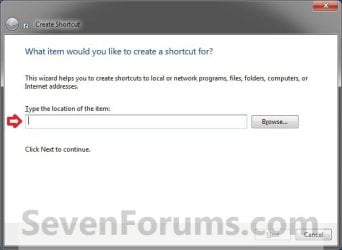
2. Log in to the built-in Administrator account, right click or press and hold on an empty space on the desktop, and click/tap on New and Shortcut.


3. Type the location below into the location area, and click/tap on the Next button. (see screenshot below)
Step1.jpg

   Note

  • You would substitute ComputerName in the command below with the actual computer name.
  • If the Administrator account has been renamed, then you would also need to substitute Administrator in the command below with the new name.
  • You would substitute Full path to program's exe file in the command below with the actual full path of the elevated program's exe file within quotes that you want to have the standard user be able to run.
Code:
runas /user:[B][COLOR=red]ComputerName[/COLOR][/B]\[B]Administrator[/B] /savecred "[B][COLOR=red]Full path to program's exe file[/COLOR][/B]"
For example: I would like to have a standard user to be able to run CCleaner without me or them having to enter the Administrator's account password each time. For this, I would type this:
Code:
runas /user:[B][COLOR=red]Brink-PC[/COLOR][/B]\[B]Administrator[/B] /savecred "[B][COLOR=red]C:\Program Files\CCleaner\CCleaner.exe[/COLOR][/B]"
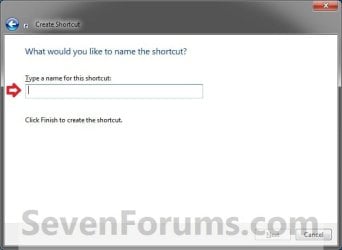
3. Type in the name of the program (ex: CCleaner), and click/tap on the Finish button. (see screenshot below)
Step2.jpg
4. Right click or press and hold on the new shortcut, click/tap on Properties, Shortcut tab, and on the Change Icon button. (see screenshot below)
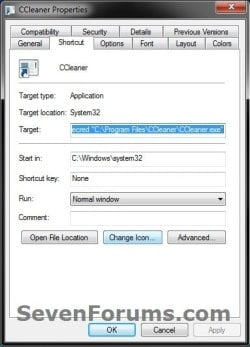
Step3.jpg
5. Click/tap on OK. (see screenshot below)
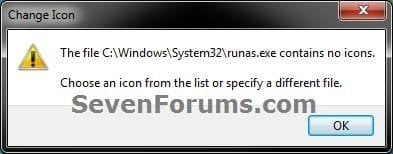
Step4.jpg
6. Click/tap on the Browse button, navigate to the location of the program's (ex: CCleaner) exe file, click on Open, select the program's icon, and click/tap on OK. (see screenshots below)
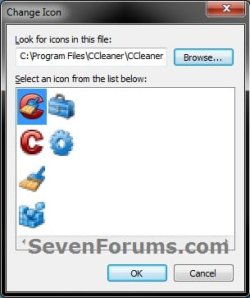
Step5A.jpg

Step5B.jpg

7. Click/tap on OK. (see screenshot below)
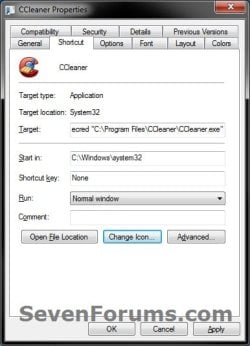
Step6.jpg
8. While still logged in to the "Administrator" account, copy the shortcut to the desktop folder of the user account (ex: Test) that you would like to be able to run this elevated program without getting a UAC prompt or having to provide the administrator's password for it.
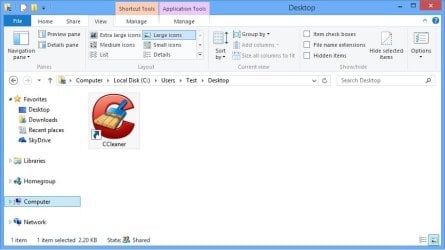
Desktop.jpg
9. Right click or swipe down on the shortcut on the user's desktop that you just copied to, and click/tap on Properties. (see screenshot above)

10. Click/tap on the Security tab, and Advanced button. (see screenshot below)
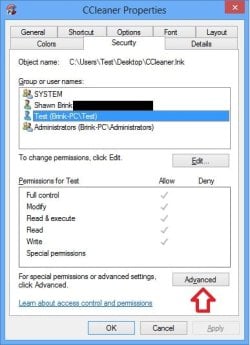
Security-1.jpg
11. Select the user account (ex: Test) that the elevated shortcut is for, and click/tap on the Disable inheritance button. (see screenshot below)
Security-2.jpg
12. Click/tap on Convert inherited permissions into explicit permissions on this object. (see screenshot below)
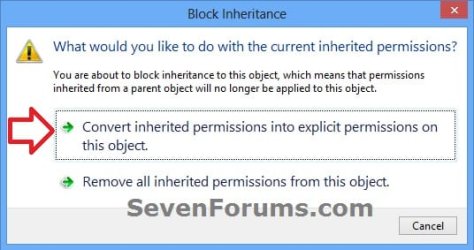
Security-3.jpg
13. Select the user account (ex: Test), and click/tap on the Edit button. (see screenshot below)
security-4.jpg
14. Make sure that only the Read & execute and Read "Allow" permissions are checked, and click/tap on OK. (see screenshot below)
NOTE: This will prevent the user (ex: Test) from being able to change the target of the elevated shortcut, and only be able to run the program the elevated shortcut was created to run.
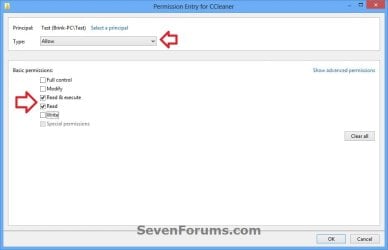
Security-5.jpg
15. Click/tap on OK. (see screenshot below)
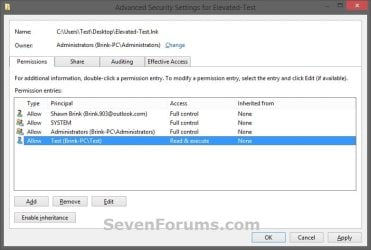
Read_Execute.jpg
16. Click/tap on OK. (see screenshot below)
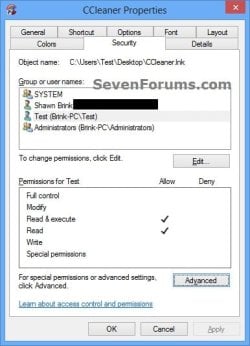
Security-7.jpg
17. Log on to the user account (ex: Test) that you made a copy of this shortcut to, and run the shortcut.

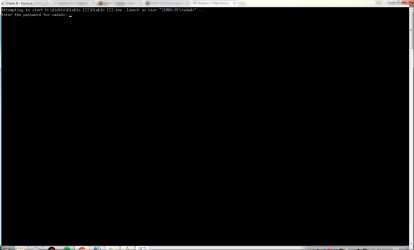
18. In the command prompt that opened, type in your built-in Administrator account's password and press Enter. You will not see the password while you are typing it in. (see screenshot below)

NOTE: You will only have to enter the Administrator's password for only the first time that this shortcut is ran in the user account (ex: Test). Afterwards, it will be remembered and entered automatically for the user when they run it without anyone being able to see the password.
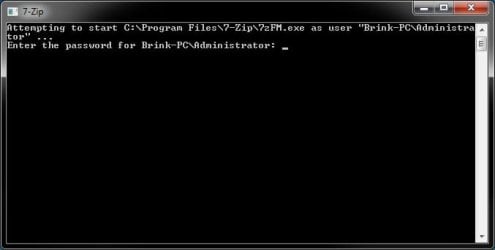
step7.jpg
19. In Vista and Windows 7, the user can now Pin to Taskbar (Windows 7 only) or Pin to Start Menu, add to Quick Launch, assign a keyboard shortcut to it, or move this shortcut to where you like for easy use.

20. In Windows 8 and 8.1, the user can Pin to Taskbar on desktop, Pin to Start screen, add to Quick Launch, assign a keyboard shortcut to it, or move this shortcut to where you like for easy use.


That's it,
Shawn


Last edited:
Hello zingy, and welcome to Seven Forums. :)

When you see "Include inheritable permissions from this object's parent", it means that "Disable Inheritance" has already been done for it.

You might see if using option 1 may work better for you as a test.
 

My Computer

Computer type
PC/Desktop
Computer Manufacturer/Model Number
Self built custom
OS
64-bit Windows 11 Pro for Workstations
CPU
Intel i7-8700K OC'd to 5 GHz
Motherboard
ASUS ROG Maximus XI Formula Z390
Memory
64 GB (4x16GB) G.SKILL TridentZ RGB DDR4 3600 MHz
Graphics Card(s)
ASUS ROG-STRIX-GTX1080TI-O11G-GAMING
Sound Card
Integrated
Monitor(s) Displays
2 x Samsung Odyssey G7 27"
Screen Resolution
2560x1440
Hard Drives
1TB Samsung 990 PRO M.2,
4TB Samsung 990 PRO PRO M.2,
TerraMaster F8 SSD Plus NAS
PSU
Seasonic Prime Titanium 850W
Case
Thermaltake Core P3
Cooling
Corsair Hydro H115i
Keyboard
Logitech wireless K800
Mouse
Logitech MX Master 4
Internet Speed
2 Gb/s Download and 100 Mb/s Upload
Antivirus
Malwarebyte Anti-Malware Premium
Browser
Google Chrome
Other Info
Logitech Z625 speaker system,
Logitech BRIO 4K Pro webcam,
HP Color LaserJet Pro MFP M477fdn,
APC SMART-UPS RT 1000 XL - SURT1000XLI,
Galaxy S23 Plus phone
With the attached picture below I have gotten a runas.exe up but for some reason I cant type in it. and if it is one where you can see what you type in the password is easy so I know I am getting it right any ideas as why the exe wont launch? thanks
 

Attachments

  • Untitled.png
    Untitled.png
    81 KB · Views: 94

My Computer

Computer type
PC/Desktop
OS
64
Hello lolgen, and welcome to Seven Forums. :)

Double check the blue note box at the top of the tutorial to see if anything may apply to why it may not be working.

If nothing applies to this, then a mistake may have been made while creating the shortcut. It's not hard to do. You might delete the shortcut and its credentials in Credential Manager (see yellow tip box in OPTION TWO) to start over and create a new one to see if it may work.
 

My Computer

Computer type
PC/Desktop
Computer Manufacturer/Model Number
Self built custom
OS
64-bit Windows 11 Pro for Workstations
CPU
Intel i7-8700K OC'd to 5 GHz
Motherboard
ASUS ROG Maximus XI Formula Z390
Memory
64 GB (4x16GB) G.SKILL TridentZ RGB DDR4 3600 MHz
Graphics Card(s)
ASUS ROG-STRIX-GTX1080TI-O11G-GAMING
Sound Card
Integrated
Monitor(s) Displays
2 x Samsung Odyssey G7 27"
Screen Resolution
2560x1440
Hard Drives
1TB Samsung 990 PRO M.2,
4TB Samsung 990 PRO PRO M.2,
TerraMaster F8 SSD Plus NAS
PSU
Seasonic Prime Titanium 850W
Case
Thermaltake Core P3
Cooling
Corsair Hydro H115i
Keyboard
Logitech wireless K800
Mouse
Logitech MX Master 4
Internet Speed
2 Gb/s Download and 100 Mb/s Upload
Antivirus
Malwarebyte Anti-Malware Premium
Browser
Google Chrome
Other Info
Logitech Z625 speaker system,
Logitech BRIO 4K Pro webcam,
HP Color LaserJet Pro MFP M477fdn,
APC SMART-UPS RT 1000 XL - SURT1000XLI,
Galaxy S23 Plus phone
Hi! I'm actually trying to make this work in two steps at once, so I guess it might not work, but:

I use ShrewSoft VPN on Windows 10 Home to access a system. To access it, I use a shortcut with the credentials included, so the users don't have to enter these ever time. It looks like this:

"C:\Program Files\ShrewSoft\VPN Client\ipsecc.exe" -r "VPN Profile Name" -u "Username" -p "Password"

The remaining problem is the UAC and Admin passwords to allow the client to run. So I tried out your tutorial to set this up. I followed the tutorial in detail (using Administratör wich is the Swedish version of administrator) and put the above string as the full program string in your tutorial.

Now, the problem is that when I copied the new shortcut to the users desktop and tried to run it from there, the commandprompt just flashes and dies away. So I never have the time to enter the admin password.

So, I guess my real question is, do you think it would be possible at all to set up such a shortcut as outlined above? And if so, what can I have missed?
 

My Computer

Computer type
PC/Desktop
Computer Manufacturer/Model Number
HP ProBook 6560b
OS
Windows 10 Home 1511 10586.420 (64b)
CPU
Core i5 2520M
Motherboard
-
Memory
8GB
Hello Vidfamne, and welcome to Seven Forums. :)

You might see if using something like the command below with the tutorial for one shortcut to open this may work.

Code:
runas /user:[B][COLOR=red]ComputerName[/COLOR][/B]\Administratör /savecred "C:\Program Files\ShrewSoft\VPN Client\ipsecc.exe" -r "VPN Profile Name" -u "Username" -p "Password"
 

My Computer

Computer type
PC/Desktop
Computer Manufacturer/Model Number
Self built custom
OS
64-bit Windows 11 Pro for Workstations
CPU
Intel i7-8700K OC'd to 5 GHz
Motherboard
ASUS ROG Maximus XI Formula Z390
Memory
64 GB (4x16GB) G.SKILL TridentZ RGB DDR4 3600 MHz
Graphics Card(s)
ASUS ROG-STRIX-GTX1080TI-O11G-GAMING
Sound Card
Integrated
Monitor(s) Displays
2 x Samsung Odyssey G7 27"
Screen Resolution
2560x1440
Hard Drives
1TB Samsung 990 PRO M.2,
4TB Samsung 990 PRO PRO M.2,
TerraMaster F8 SSD Plus NAS
PSU
Seasonic Prime Titanium 850W
Case
Thermaltake Core P3
Cooling
Corsair Hydro H115i
Keyboard
Logitech wireless K800
Mouse
Logitech MX Master 4
Internet Speed
2 Gb/s Download and 100 Mb/s Upload
Antivirus
Malwarebyte Anti-Malware Premium
Browser
Google Chrome
Other Info
Logitech Z625 speaker system,
Logitech BRIO 4K Pro webcam,
HP Color LaserJet Pro MFP M477fdn,
APC SMART-UPS RT 1000 XL - SURT1000XLI,
Galaxy S23 Plus phone
Hmmm, I tried it on two separate machines, but still the same problem that when I try to execute the shortcut as user, the cmd window flashes and goes away in a blink.

I just double checked the Windows Credentials for some older info, but there were none...

Any ideas?
 

My Computer

Computer type
PC/Desktop
Computer Manufacturer/Model Number
HP ProBook 6560b
OS
Windows 10 Home 1511 10586.420 (64b)
CPU
Core i5 2520M
Motherboard
-
Memory
8GB
You might see if creating two separate elevated shortcuts one for each command may do the trick.
 

My Computer

Computer type
PC/Desktop
Computer Manufacturer/Model Number
Self built custom
OS
64-bit Windows 11 Pro for Workstations
CPU
Intel i7-8700K OC'd to 5 GHz
Motherboard
ASUS ROG Maximus XI Formula Z390
Memory
64 GB (4x16GB) G.SKILL TridentZ RGB DDR4 3600 MHz
Graphics Card(s)
ASUS ROG-STRIX-GTX1080TI-O11G-GAMING
Sound Card
Integrated
Monitor(s) Displays
2 x Samsung Odyssey G7 27"
Screen Resolution
2560x1440
Hard Drives
1TB Samsung 990 PRO M.2,
4TB Samsung 990 PRO PRO M.2,
TerraMaster F8 SSD Plus NAS
PSU
Seasonic Prime Titanium 850W
Case
Thermaltake Core P3
Cooling
Corsair Hydro H115i
Keyboard
Logitech wireless K800
Mouse
Logitech MX Master 4
Internet Speed
2 Gb/s Download and 100 Mb/s Upload
Antivirus
Malwarebyte Anti-Malware Premium
Browser
Google Chrome
Other Info
Logitech Z625 speaker system,
Logitech BRIO 4K Pro webcam,
HP Color LaserJet Pro MFP M477fdn,
APC SMART-UPS RT 1000 XL - SURT1000XLI,
Galaxy S23 Plus phone
A bit unsure how you mean, two commands??? :o

If I create a 'normal' shortcut and use the below in the commandline for the shortcut, it starts up, but I have the UAC dialog to enter admin password first. But I don't see how it could be two commands???

ipsecc.exe -r "VPN Profile Name" -u "Username" -p "Password" -a
 

My Computer

Computer type
PC/Desktop
Computer Manufacturer/Model Number
HP ProBook 6560b
OS
Windows 10 Home 1511 10586.420 (64b)
CPU
Core i5 2520M
Motherboard
-
Memory
8GB
I'm not sure it will work since that command calls for elevation. You may need to manually run it after startup or logging in. :(
 

My Computer

Computer type
PC/Desktop
Computer Manufacturer/Model Number
Self built custom
OS
64-bit Windows 11 Pro for Workstations
CPU
Intel i7-8700K OC'd to 5 GHz
Motherboard
ASUS ROG Maximus XI Formula Z390
Memory
64 GB (4x16GB) G.SKILL TridentZ RGB DDR4 3600 MHz
Graphics Card(s)
ASUS ROG-STRIX-GTX1080TI-O11G-GAMING
Sound Card
Integrated
Monitor(s) Displays
2 x Samsung Odyssey G7 27"
Screen Resolution
2560x1440
Hard Drives
1TB Samsung 990 PRO M.2,
4TB Samsung 990 PRO PRO M.2,
TerraMaster F8 SSD Plus NAS
PSU
Seasonic Prime Titanium 850W
Case
Thermaltake Core P3
Cooling
Corsair Hydro H115i
Keyboard
Logitech wireless K800
Mouse
Logitech MX Master 4
Internet Speed
2 Gb/s Download and 100 Mb/s Upload
Antivirus
Malwarebyte Anti-Malware Premium
Browser
Google Chrome
Other Info
Logitech Z625 speaker system,
Logitech BRIO 4K Pro webcam,
HP Color LaserJet Pro MFP M477fdn,
APC SMART-UPS RT 1000 XL - SURT1000XLI,
Galaxy S23 Plus phone
Ok, thanks for your help so far anyway!!!
 

My Computer

Computer type
PC/Desktop
Computer Manufacturer/Model Number
HP ProBook 6560b
OS
Windows 10 Home 1511 10586.420 (64b)
CPU
Core i5 2520M
Motherboard
-
Memory
8GB
Hi!

Thank you for the useful tutorial!

I'm applying this to my brother's account successfully. However, one of his programs doesn't work well with this workaround. His games that require 'Run as Admin.." work well with the tweak but there is a software that follows the stock market, doesn't work correctly. It got elevated properly with admin right, and a login window appears for him to enter his trading credentials. After that, errors occur about certain files that couldn't be updated. After clicking ok several times to bypass those errors, the program exits itself.

Such errors wouldn't appear if I run it under an admin account or right click and hit "Run as Admin".

So I assume that this software runs some kind of update before launch. But why wouldn't it runs properly under runas.exe command while it's fine under other circumstances (right-click run as admin or under an admin account).

Then I was asking myself this question: whether there is a difference in the way programs got elevated by runas.exe and via GUI right-click "run as admin"

Any idea?
 

My Computer

Computer type
PC/Desktop
Computer Manufacturer/Model Number
Custom build
OS
Windows 10 Pro x64
CPU
i3
Motherboard
Asus
Memory
4GB
Graphics Card(s)
builtin
Hard Drives
WD500gb
Browser
FF
Hello Naeco, and welcome to Seven Forums. :)

If the program opens other items that require UAC for run as administrator, then the elevated shortcut usually will not work since it doesn't affect these other items.
 

My Computer

Computer type
PC/Desktop
Computer Manufacturer/Model Number
Self built custom
OS
64-bit Windows 11 Pro for Workstations
CPU
Intel i7-8700K OC'd to 5 GHz
Motherboard
ASUS ROG Maximus XI Formula Z390
Memory
64 GB (4x16GB) G.SKILL TridentZ RGB DDR4 3600 MHz
Graphics Card(s)
ASUS ROG-STRIX-GTX1080TI-O11G-GAMING
Sound Card
Integrated
Monitor(s) Displays
2 x Samsung Odyssey G7 27"
Screen Resolution
2560x1440
Hard Drives
1TB Samsung 990 PRO M.2,
4TB Samsung 990 PRO PRO M.2,
TerraMaster F8 SSD Plus NAS
PSU
Seasonic Prime Titanium 850W
Case
Thermaltake Core P3
Cooling
Corsair Hydro H115i
Keyboard
Logitech wireless K800
Mouse
Logitech MX Master 4
Internet Speed
2 Gb/s Download and 100 Mb/s Upload
Antivirus
Malwarebyte Anti-Malware Premium
Browser
Google Chrome
Other Info
Logitech Z625 speaker system,
Logitech BRIO 4K Pro webcam,
HP Color LaserJet Pro MFP M477fdn,
APC SMART-UPS RT 1000 XL - SURT1000XLI,
Galaxy S23 Plus phone
Hey there Brink!
Thank for the quick reply!

Yes, my current assumption at the moment that runas.exe /user:PC\user /savecred program doesn't elevate program as good as right-click "run as admin". It doesn't make much sense though as I think it would give the same level of administrative access to the program so that it can run as it should.
 

My Computer

Computer type
PC/Desktop
Computer Manufacturer/Model Number
Custom build
OS
Windows 10 Pro x64
CPU
i3
Motherboard
Asus
Memory
4GB
Graphics Card(s)
builtin
Hard Drives
WD500gb
Browser
FF
Hi Brink,

This sounds fantastic, and almost too good to be true. What I'm wondering is : does it open an easier path for malware ? Can malware take advantage of it ? For one, I seem to remember that folks would usually advise you not to enable the built-in Administrator account, the logic being that this would close one more possible avenue for mischief (not thinking of local users).
 

My Computer

Computer type
PC/Desktop
Computer Manufacturer/Model Number
Custom build
OS
Windows 7 Home Premium 64-bit (OEM)
CPU
AMD Athlon II X4 640 (3 GHz, 4 cores)
Motherboard
Asus M4A 89 GTD Pro/USB3
Memory
Patriot 16Gb DDR3 1600 (2 kits of 2)
Graphics Card(s)
ATI Radeon HD 4290 (integrated)
Sound Card
AMD + Realtek HD Audio (integrated)
Monitor(s) Displays
Hewlett-Packard ZR2440w (24")
Screen Resolution
1920 x 1200
Hard Drives
Internal : Samsung SSD 860 EVO 250 Gb (system), Seagate Barrcuda 1 Tb (data), Western Digital Caviar Blue 500 Gb (archives).
External (USB) : 2 x 1 Tb 2,5" Seagate Barracuda (backups).
PSU
Corsair VX 450 W
Case
Antec Solo
Cooling
Cooler Master Hyper 212 Plus, 2 Nexus Real Silent Case fans
Keyboard
Cherry KC 1000
Mouse
Logitech M 90
Internet Speed
Fiber, 300 Mbit/s down, 200 Mbit/s up
Antivirus
Microsoft Security Essentials
Browser
Vivaldi, Tor
Other Info
BIOS Date: 07/18/11 Ver: 08.00.15.
Modem-router : provided by ISP
Hello Clairvaux, :)

Unless you use Option 1, it is possible for malware or another user to be able to misuse this as per the warning in Option 2.
 

My Computer

Computer type
PC/Desktop
Computer Manufacturer/Model Number
Self built custom
OS
64-bit Windows 11 Pro for Workstations
CPU
Intel i7-8700K OC'd to 5 GHz
Motherboard
ASUS ROG Maximus XI Formula Z390
Memory
64 GB (4x16GB) G.SKILL TridentZ RGB DDR4 3600 MHz
Graphics Card(s)
ASUS ROG-STRIX-GTX1080TI-O11G-GAMING
Sound Card
Integrated
Monitor(s) Displays
2 x Samsung Odyssey G7 27"
Screen Resolution
2560x1440
Hard Drives
1TB Samsung 990 PRO M.2,
4TB Samsung 990 PRO PRO M.2,
TerraMaster F8 SSD Plus NAS
PSU
Seasonic Prime Titanium 850W
Case
Thermaltake Core P3
Cooling
Corsair Hydro H115i
Keyboard
Logitech wireless K800
Mouse
Logitech MX Master 4
Internet Speed
2 Gb/s Download and 100 Mb/s Upload
Antivirus
Malwarebyte Anti-Malware Premium
Browser
Google Chrome
Other Info
Logitech Z625 speaker system,
Logitech BRIO 4K Pro webcam,
HP Color LaserJet Pro MFP M477fdn,
APC SMART-UPS RT 1000 XL - SURT1000XLI,
Galaxy S23 Plus phone
Thanks, Brink. Maybe I'll try this some day then, but only with RunAsSpc.
 

My Computer

Computer type
PC/Desktop
Computer Manufacturer/Model Number
Custom build
OS
Windows 7 Home Premium 64-bit (OEM)
CPU
AMD Athlon II X4 640 (3 GHz, 4 cores)
Motherboard
Asus M4A 89 GTD Pro/USB3
Memory
Patriot 16Gb DDR3 1600 (2 kits of 2)
Graphics Card(s)
ATI Radeon HD 4290 (integrated)
Sound Card
AMD + Realtek HD Audio (integrated)
Monitor(s) Displays
Hewlett-Packard ZR2440w (24")
Screen Resolution
1920 x 1200
Hard Drives
Internal : Samsung SSD 860 EVO 250 Gb (system), Seagate Barrcuda 1 Tb (data), Western Digital Caviar Blue 500 Gb (archives).
External (USB) : 2 x 1 Tb 2,5" Seagate Barracuda (backups).
PSU
Corsair VX 450 W
Case
Antec Solo
Cooling
Cooler Master Hyper 212 Plus, 2 Nexus Real Silent Case fans
Keyboard
Cherry KC 1000
Mouse
Logitech M 90
Internet Speed
Fiber, 300 Mbit/s down, 200 Mbit/s up
Antivirus
Microsoft Security Essentials
Browser
Vivaldi, Tor
Other Info
BIOS Date: 07/18/11 Ver: 08.00.15.
Modem-router : provided by ISP
:thumbsup:
 

My Computer

Computer type
PC/Desktop
Computer Manufacturer/Model Number
Self built custom
OS
64-bit Windows 11 Pro for Workstations
CPU
Intel i7-8700K OC'd to 5 GHz
Motherboard
ASUS ROG Maximus XI Formula Z390
Memory
64 GB (4x16GB) G.SKILL TridentZ RGB DDR4 3600 MHz
Graphics Card(s)
ASUS ROG-STRIX-GTX1080TI-O11G-GAMING
Sound Card
Integrated
Monitor(s) Displays
2 x Samsung Odyssey G7 27"
Screen Resolution
2560x1440
Hard Drives
1TB Samsung 990 PRO M.2,
4TB Samsung 990 PRO PRO M.2,
TerraMaster F8 SSD Plus NAS
PSU
Seasonic Prime Titanium 850W
Case
Thermaltake Core P3
Cooling
Corsair Hydro H115i
Keyboard
Logitech wireless K800
Mouse
Logitech MX Master 4
Internet Speed
2 Gb/s Download and 100 Mb/s Upload
Antivirus
Malwarebyte Anti-Malware Premium
Browser
Google Chrome
Other Info
Logitech Z625 speaker system,
Logitech BRIO 4K Pro webcam,
HP Color LaserJet Pro MFP M477fdn,
APC SMART-UPS RT 1000 XL - SURT1000XLI,
Galaxy S23 Plus phone
Back
Top