
Elevated Program Shortcut - Create for Standard User

How to Create an Elevated Program Shortcut Any User is able to Run in Vista, Windows 7, and Windows 8

   Information
This will show you how to create an elevated program shortcut that allows any user (ex: Standard user) to be able to run a program that runs as administrator without being prompted to enter the administator's password each time in Vista, Windows 7, and Windows 8.

   Note
If the user you want to have this shortcut has been restricted with Parental Controls in Windows 7 with it set as Standard Account can only use the programs I allow, then they will not be able to use the shortcut in this tutorial since they will not be allowed to use the runas.exe file used by this shortcut. Windows 7 will not allow runas.exe to be added to the allowed to run list.


If the user you want to have this shortcut has been restricted with Family Safety in Windows 8 with it set as (user) can only use the apps I allow, then they will not be able to use the shortcut in this tutorial since they will not be allowed to use the runas.exe file used by this shortcut. Windows 8 will not allow runas.exe to be added to the allowed to run list.


You will not be able to do this in Vista Starter, Vista Home Basic, Vista Home Premium, Windows 7 Home Basic, and Windows 7 Starter editions since the runas /savecred switch option is not available and will be ignored in them.


If you disable the built-in Administrator account, the elevated shortcut will stop working until you enable the built-in Administrator again. This is because the elevated shortcut uses the password of the built-in Administrator to approve running it.


OPTION ONE

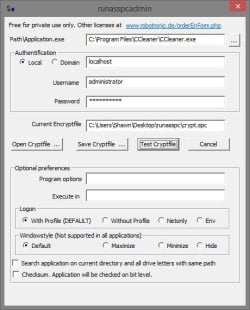
To Create Elevated Shortcut for User using RunasSPC Program


1. Download the free RunasSPC program in a .zip file at the site below.

Download


2. The link below can help show you how to use the program.
Runas Spc guidance and examples

runasspcadmin.jpg


OPTION TWO

To Create Elevated Shortcut for User using runas Command


   Tip
This option uses the runas command included in Windows.

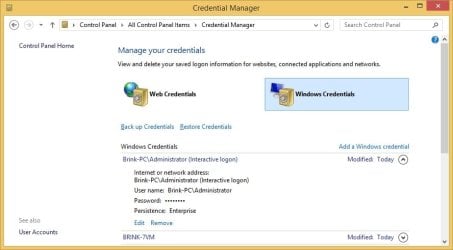
The Administrator's password (credential) used by the elevated shortcut is encrypted and stored in the Credential Manager (Control Panel (icons view)) as an "interactive logon" entry under Windows Credentials for only that user account like below.

The Administrator account's password cannot be viewed.

If you like, you can Remove (delete) this credential at anytime in Credential Manager to strip the password from the elevated shortcut to make it ask for the password again when opened like in step 18 below.
Credential_Manager.jpg

   Warning
This elevated shortcut creates a security hole.

It would be best to only do this with a trusted user.

Once you have created the elevated shortcut, the user can use the built-in Administrator's saved credentials in Credential Manager along with the command below to run and access anything they want on the computer with the same rights as the built-in Administrator.

RUNAS /savecred /user:administrator "command to run"


1. If you have not already, enable the built-in elevated "Administrator" account, and create a password for it.

   Warning
You must use the actual built-in Administrator account, and not just another administrator type user account. If you don't the shortcut will not work.


2. Log in to the built-in Administrator account, right click or press and hold on an empty space on the desktop, and click/tap on New and Shortcut.


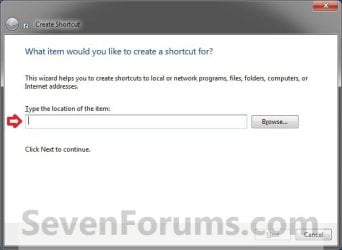
3. Type the location below into the location area, and click/tap on the Next button. (see screenshot below)
Step1.jpg

   Note

  • You would substitute ComputerName in the command below with the actual computer name.
  • If the Administrator account has been renamed, then you would also need to substitute Administrator in the command below with the new name.
  • You would substitute Full path to program's exe file in the command below with the actual full path of the elevated program's exe file within quotes that you want to have the standard user be able to run.
Code:
runas /user:[B][COLOR=red]ComputerName[/COLOR][/B]\[B]Administrator[/B] /savecred "[B][COLOR=red]Full path to program's exe file[/COLOR][/B]"
For example: I would like to have a standard user to be able to run CCleaner without me or them having to enter the Administrator's account password each time. For this, I would type this:
Code:
runas /user:[B][COLOR=red]Brink-PC[/COLOR][/B]\[B]Administrator[/B] /savecred "[B][COLOR=red]C:\Program Files\CCleaner\CCleaner.exe[/COLOR][/B]"
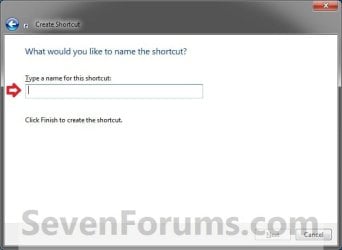
3. Type in the name of the program (ex: CCleaner), and click/tap on the Finish button. (see screenshot below)
Step2.jpg
4. Right click or press and hold on the new shortcut, click/tap on Properties, Shortcut tab, and on the Change Icon button. (see screenshot below)
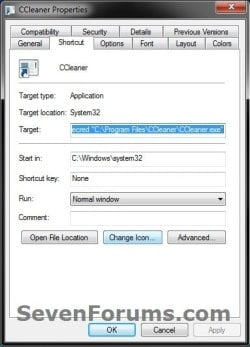
Step3.jpg
5. Click/tap on OK. (see screenshot below)
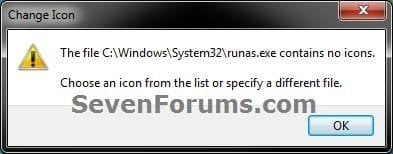
Step4.jpg
6. Click/tap on the Browse button, navigate to the location of the program's (ex: CCleaner) exe file, click on Open, select the program's icon, and click/tap on OK. (see screenshots below)
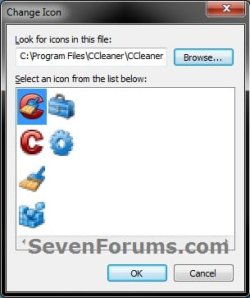
Step5A.jpg

Step5B.jpg

7. Click/tap on OK. (see screenshot below)
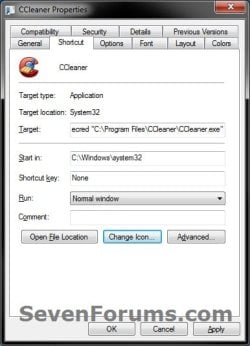
Step6.jpg
8. While still logged in to the "Administrator" account, copy the shortcut to the desktop folder of the user account (ex: Test) that you would like to be able to run this elevated program without getting a UAC prompt or having to provide the administrator's password for it.
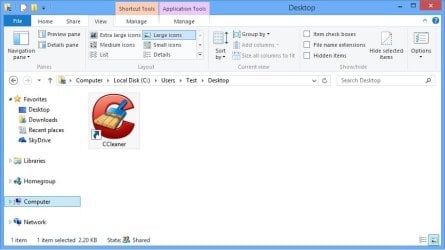
Desktop.jpg
9. Right click or swipe down on the shortcut on the user's desktop that you just copied to, and click/tap on Properties. (see screenshot above)

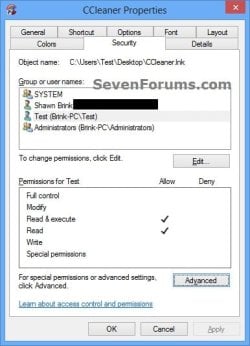
10. Click/tap on the Security tab, and Advanced button. (see screenshot below)
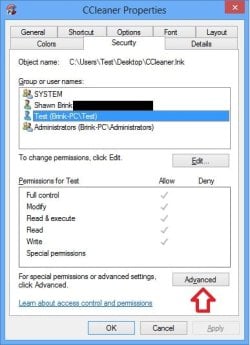
Security-1.jpg
11. Select the user account (ex: Test) that the elevated shortcut is for, and click/tap on the Disable inheritance button. (see screenshot below)
Security-2.jpg
12. Click/tap on Convert inherited permissions into explicit permissions on this object. (see screenshot below)
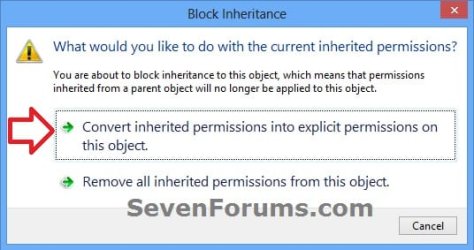
Security-3.jpg
13. Select the user account (ex: Test), and click/tap on the Edit button. (see screenshot below)
security-4.jpg
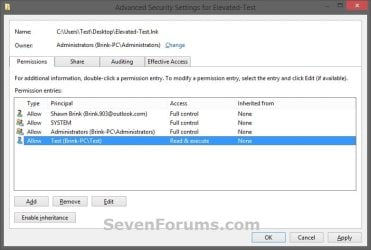
14. Make sure that only the Read & execute and Read "Allow" permissions are checked, and click/tap on OK. (see screenshot below)
NOTE: This will prevent the user (ex: Test) from being able to change the target of the elevated shortcut, and only be able to run the program the elevated shortcut was created to run.
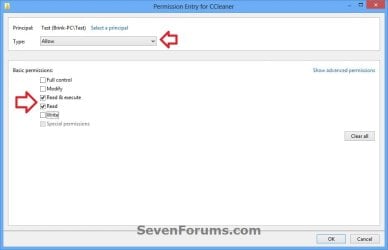
Security-5.jpg
15. Click/tap on OK. (see screenshot below)
Read_Execute.jpg
16. Click/tap on OK. (see screenshot below)
Security-7.jpg
17. Log on to the user account (ex: Test) that you made a copy of this shortcut to, and run the shortcut.

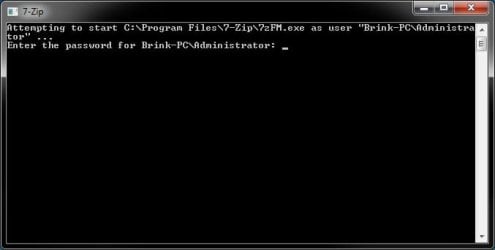
18. In the command prompt that opened, type in your built-in Administrator account's password and press Enter. You will not see the password while you are typing it in. (see screenshot below)

NOTE: You will only have to enter the Administrator's password for only the first time that this shortcut is ran in the user account (ex: Test). Afterwards, it will be remembered and entered automatically for the user when they run it without anyone being able to see the password.
step7.jpg
19. In Vista and Windows 7, the user can now Pin to Taskbar (Windows 7 only) or Pin to Start Menu, add to Quick Launch, assign a keyboard shortcut to it, or move this shortcut to where you like for easy use.

20. In Windows 8 and 8.1, the user can Pin to Taskbar on desktop, Pin to Start screen, add to Quick Launch, assign a keyboard shortcut to it, or move this shortcut to where you like for easy use.


That's it,
Shawn


Last edited:
Hello, thanks you very much !
With the saved credentials, can the user, by a way or an other, start other .exe as admin by making the correct .lnk file ?
 

My Computer

Computer type
PC/Desktop
OS
7x64 ultimate / 7x64 pro / Some linux x64 distro
CPU
i7-870
Motherboard
MSI P55-GD85
Memory
Kingston 4x2gb 1600 9-9-9
Graphics Card(s)
MSI GTX460 Cyclone 1GDDR5x2 + Gigabyte 285GTX 1GDDR5(PhysX)
Sound Card
Realtek alc 889
Monitor(s) Displays
Samsung syncmaster 2333sw + some old acer screen
Screen Resolution
3200x1024
Hard Drives
WDC WD1500HLFS-01G6U1 - System partition
WDC WD1500HLFS-01G6U1 -
WDC WD1500HLFS-01G6U1 | RAID
WDC WD1500HLFS-01G6U1 |
WDC WD1500HLFS-01G6U1-
PSU
LC Power "Arkangel" 850W
Case
Aerocool BX-500
Cooling
Noctua NH something
Keyboard
Razer Lycosa
Mouse
Razer Imperator
Antivirus
Kaspersky Pure/Kaspersky Small Office Security
Browser
Chrome+Chrominium & Internet Explorer
Other Info
Razer Nostromo (Because there's not enough buttons for all the shortcut on a keyboard)
Hello Magissia,

You would need to create a new elevated shortcut for each one you want to allow the user to be able to run.
 

My Computer

Computer type
PC/Desktop
Computer Manufacturer/Model Number
Self built custom
OS
64-bit Windows 11 Pro for Workstations
CPU
Intel i7-8700K OC'd to 5 GHz
Motherboard
ASUS ROG Maximus XI Formula Z390
Memory
64 GB (4x16GB) G.SKILL TridentZ RGB DDR4 3600 MHz
Graphics Card(s)
ASUS ROG-STRIX-GTX1080TI-O11G-GAMING
Sound Card
Integrated
Monitor(s) Displays
2 x Samsung Odyssey G7 27"
Screen Resolution
2560x1440
Hard Drives
1TB Samsung 990 PRO M.2,
4TB Samsung 990 PRO PRO M.2,
TerraMaster F8 SSD Plus NAS
PSU
Seasonic Prime Titanium 850W
Case
Thermaltake Core P3
Cooling
Corsair Hydro H115i
Keyboard
Logitech wireless K800
Mouse
Logitech MX Master 4
Internet Speed
2 Gb/s Download and 100 Mb/s Upload
Antivirus
Malwarebyte Anti-Malware Premium
Browser
Google Chrome
Other Info
Logitech Z625 speaker system,
Logitech BRIO 4K Pro webcam,
HP Color LaserJet Pro MFP M477fdn,
APC SMART-UPS RT 1000 XL - SURT1000XLI,
Galaxy S23 Plus phone
Hello, also would like to know why we use the -500 admin account and not any admin account, what's so different but the fact the -500 one is built in ? Wouldn't it be a secuirty issue to enable the -500 admin account ?

How things will appear on logs if a normal user use a program with runas and the built in admin account (or an other account) ?

Should we consider that the -500 admin account should be used to make something similar to sudo on linux ? (su acces without really having it)

Edit : I just tested this with my account (not the 500 account)
I created a shortcut with the runas and all, it asked for my password, i gave it, then i copied the shortcut to a normal user desktop, but this user had command prompt screen asking for my password, how can i "share" the credential ?

Since it was a test, i entered te password myself on the user session, the program was run as admin, but then i was able to run other programs as admin without this prompt by modifying the shortcut path, leaving the first part, and just changing the program to run. It seems to be a security issue for me.
 
Last edited:

My Computer

Computer type
PC/Desktop
OS
7x64 ultimate / 7x64 pro / Some linux x64 distro
CPU
i7-870
Motherboard
MSI P55-GD85
Memory
Kingston 4x2gb 1600 9-9-9
Graphics Card(s)
MSI GTX460 Cyclone 1GDDR5x2 + Gigabyte 285GTX 1GDDR5(PhysX)
Sound Card
Realtek alc 889
Monitor(s) Displays
Samsung syncmaster 2333sw + some old acer screen
Screen Resolution
3200x1024
Hard Drives
WDC WD1500HLFS-01G6U1 - System partition
WDC WD1500HLFS-01G6U1 -
WDC WD1500HLFS-01G6U1 | RAID
WDC WD1500HLFS-01G6U1 |
WDC WD1500HLFS-01G6U1-
PSU
LC Power "Arkangel" 850W
Case
Aerocool BX-500
Cooling
Noctua NH something
Keyboard
Razer Lycosa
Mouse
Razer Imperator
Antivirus
Kaspersky Pure/Kaspersky Small Office Security
Browser
Chrome+Chrominium & Internet Explorer
Other Info
Razer Nostromo (Because there's not enough buttons for all the shortcut on a keyboard)
Magissia,

Enabling the built-in "elevated" Administrator account (-500 admin account) and creating a password for it would be no more of security risk than any other administrator account. In fact it may be more secure now that a password as been created for it when by default it doesn't have one.

This will not work with any other user account than the built-in "elevated" Administrator account.

Yes, that could be a security breach by changing the target of the shortcut. I have updated the tutorial to address and prevent this with steps 9-16.
 

My Computer

Computer type
PC/Desktop
Computer Manufacturer/Model Number
Self built custom
OS
64-bit Windows 11 Pro for Workstations
CPU
Intel i7-8700K OC'd to 5 GHz
Motherboard
ASUS ROG Maximus XI Formula Z390
Memory
64 GB (4x16GB) G.SKILL TridentZ RGB DDR4 3600 MHz
Graphics Card(s)
ASUS ROG-STRIX-GTX1080TI-O11G-GAMING
Sound Card
Integrated
Monitor(s) Displays
2 x Samsung Odyssey G7 27"
Screen Resolution
2560x1440
Hard Drives
1TB Samsung 990 PRO M.2,
4TB Samsung 990 PRO PRO M.2,
TerraMaster F8 SSD Plus NAS
PSU
Seasonic Prime Titanium 850W
Case
Thermaltake Core P3
Cooling
Corsair Hydro H115i
Keyboard
Logitech wireless K800
Mouse
Logitech MX Master 4
Internet Speed
2 Gb/s Download and 100 Mb/s Upload
Antivirus
Malwarebyte Anti-Malware Premium
Browser
Google Chrome
Other Info
Logitech Z625 speaker system,
Logitech BRIO 4K Pro webcam,
HP Color LaserJet Pro MFP M477fdn,
APC SMART-UPS RT 1000 XL - SURT1000XLI,
Galaxy S23 Plus phone
Hello, thanks for the update but i think the user may still be able to exploit it this way :

1. Right click on desktop
2. New
3. New shortcut
4. Write manually C:\Windows\System32\runas.exe /user:COMPUTER_NAME\ADMIN'S_NAME /savecred "Path:\To\The\.exe"

While it may sound a bit paranoid, as a chess player, i'm looking at all the possibilities the user will be able to acces if (s)he really wishes to start a program with admin rights for whatever reason and start to dig arround.

I agree on the part that denying modify rights on the shortcut will stop most people, but it may not be enough.
Regards
 

My Computer

Computer type
PC/Desktop
OS
7x64 ultimate / 7x64 pro / Some linux x64 distro
CPU
i7-870
Motherboard
MSI P55-GD85
Memory
Kingston 4x2gb 1600 9-9-9
Graphics Card(s)
MSI GTX460 Cyclone 1GDDR5x2 + Gigabyte 285GTX 1GDDR5(PhysX)
Sound Card
Realtek alc 889
Monitor(s) Displays
Samsung syncmaster 2333sw + some old acer screen
Screen Resolution
3200x1024
Hard Drives
WDC WD1500HLFS-01G6U1 - System partition
WDC WD1500HLFS-01G6U1 -
WDC WD1500HLFS-01G6U1 | RAID
WDC WD1500HLFS-01G6U1 |
WDC WD1500HLFS-01G6U1-
PSU
LC Power "Arkangel" 850W
Case
Aerocool BX-500
Cooling
Noctua NH something
Keyboard
Razer Lycosa
Mouse
Razer Imperator
Antivirus
Kaspersky Pure/Kaspersky Small Office Security
Browser
Chrome+Chrominium & Internet Explorer
Other Info
Razer Nostromo (Because there's not enough buttons for all the shortcut on a keyboard)
Magissia,

I don't blame you. It's best to not allow standard users to run anything elevated for just that reason.

I'm not sure about a way to prevent that workaround. :(
 

My Computer

Computer type
PC/Desktop
Computer Manufacturer/Model Number
Self built custom
OS
64-bit Windows 11 Pro for Workstations
CPU
Intel i7-8700K OC'd to 5 GHz
Motherboard
ASUS ROG Maximus XI Formula Z390
Memory
64 GB (4x16GB) G.SKILL TridentZ RGB DDR4 3600 MHz
Graphics Card(s)
ASUS ROG-STRIX-GTX1080TI-O11G-GAMING
Sound Card
Integrated
Monitor(s) Displays
2 x Samsung Odyssey G7 27"
Screen Resolution
2560x1440
Hard Drives
1TB Samsung 990 PRO M.2,
4TB Samsung 990 PRO PRO M.2,
TerraMaster F8 SSD Plus NAS
PSU
Seasonic Prime Titanium 850W
Case
Thermaltake Core P3
Cooling
Corsair Hydro H115i
Keyboard
Logitech wireless K800
Mouse
Logitech MX Master 4
Internet Speed
2 Gb/s Download and 100 Mb/s Upload
Antivirus
Malwarebyte Anti-Malware Premium
Browser
Google Chrome
Other Info
Logitech Z625 speaker system,
Logitech BRIO 4K Pro webcam,
HP Color LaserJet Pro MFP M477fdn,
APC SMART-UPS RT 1000 XL - SURT1000XLI,
Galaxy S23 Plus phone
Hello, problem is, some old (or badly written) programs need rights to write on it's own folder because it doesn't use %userprofile% to store settings, that's why i tried to find something, from the system itself if possible.

The only workaround i know is a paid software making an encrypted file that contain the runas command with the correct parameters and without /savecred, the users just need read/execute rights on the software, and the encrypted file to start the program as admin.

The file is encrypted with AES256 but i don't know more. As i don't know if it's allowed to name paid programs here, i will give it to any admin that ask for it and let the admin team decide to make a guide for this paid software, or name it in the guide for "increased" security.

"Increased" because I don't know how robust is their encryption, and have no more information than "AES256".
I don't know if they have any backdoor, if the passphrase used for encryption is unique on each machine (and if it's the case, some may be able to find it, since it must be saved somewhere to run)

I hope Microsoft will adress this issue in future release of Windows, best would be an update for our current systems too.

Even if we didn't found a "super secure" solution here, i hope it will make users reading this guide that security is important, and that they should think twice before leaving a program with elevated priviledge.

Best regards, Magissia
 

My Computer

Computer type
PC/Desktop
OS
7x64 ultimate / 7x64 pro / Some linux x64 distro
CPU
i7-870
Motherboard
MSI P55-GD85
Memory
Kingston 4x2gb 1600 9-9-9
Graphics Card(s)
MSI GTX460 Cyclone 1GDDR5x2 + Gigabyte 285GTX 1GDDR5(PhysX)
Sound Card
Realtek alc 889
Monitor(s) Displays
Samsung syncmaster 2333sw + some old acer screen
Screen Resolution
3200x1024
Hard Drives
WDC WD1500HLFS-01G6U1 - System partition
WDC WD1500HLFS-01G6U1 -
WDC WD1500HLFS-01G6U1 | RAID
WDC WD1500HLFS-01G6U1 |
WDC WD1500HLFS-01G6U1-
PSU
LC Power "Arkangel" 850W
Case
Aerocool BX-500
Cooling
Noctua NH something
Keyboard
Razer Lycosa
Mouse
Razer Imperator
Antivirus
Kaspersky Pure/Kaspersky Small Office Security
Browser
Chrome+Chrominium & Internet Explorer
Other Info
Razer Nostromo (Because there's not enough buttons for all the shortcut on a keyboard)
Hello,

I'm just curious whether this could work on an elevated command prompt instead of a particular program on the PC. Also, can this technique work on Vista too?
 

My Computer

Computer type
PC/Desktop
Computer Manufacturer/Model Number
Packard Bell
OS
Windows Vista Home Premium 32bit SP2
Hello Abdul, and welcome to Seven Forums.

Yes, you can do this in Vista as well.

If you like, you could use this tutorial with an elevated command prompt shortcut instead of a program. However, if you let a standard user be able to use an elevated command prompt, they will be able to have full administrator rights and access to everything on the computer through that elevated command prompt.

Hope this helps, :)
Shawn
 

My Computer

Computer type
PC/Desktop
Computer Manufacturer/Model Number
Self built custom
OS
64-bit Windows 11 Pro for Workstations
CPU
Intel i7-8700K OC'd to 5 GHz
Motherboard
ASUS ROG Maximus XI Formula Z390
Memory
64 GB (4x16GB) G.SKILL TridentZ RGB DDR4 3600 MHz
Graphics Card(s)
ASUS ROG-STRIX-GTX1080TI-O11G-GAMING
Sound Card
Integrated
Monitor(s) Displays
2 x Samsung Odyssey G7 27"
Screen Resolution
2560x1440
Hard Drives
1TB Samsung 990 PRO M.2,
4TB Samsung 990 PRO PRO M.2,
TerraMaster F8 SSD Plus NAS
PSU
Seasonic Prime Titanium 850W
Case
Thermaltake Core P3
Cooling
Corsair Hydro H115i
Keyboard
Logitech wireless K800
Mouse
Logitech MX Master 4
Internet Speed
2 Gb/s Download and 100 Mb/s Upload
Antivirus
Malwarebyte Anti-Malware Premium
Browser
Google Chrome
Other Info
Logitech Z625 speaker system,
Logitech BRIO 4K Pro webcam,
HP Color LaserJet Pro MFP M477fdn,
APC SMART-UPS RT 1000 XL - SURT1000XLI,
Galaxy S23 Plus phone
Thanks! Just what I was looking, I'll let you know how it works out with this tutorial.

Oh and thanks for the quick reply BTW.
Abdul,
 

My Computer

Computer type
PC/Desktop
Computer Manufacturer/Model Number
Packard Bell
OS
Windows Vista Home Premium 32bit SP2
You're most welcome Abdul. :)
 

My Computer

Computer type
PC/Desktop
Computer Manufacturer/Model Number
Self built custom
OS
64-bit Windows 11 Pro for Workstations
CPU
Intel i7-8700K OC'd to 5 GHz
Motherboard
ASUS ROG Maximus XI Formula Z390
Memory
64 GB (4x16GB) G.SKILL TridentZ RGB DDR4 3600 MHz
Graphics Card(s)
ASUS ROG-STRIX-GTX1080TI-O11G-GAMING
Sound Card
Integrated
Monitor(s) Displays
2 x Samsung Odyssey G7 27"
Screen Resolution
2560x1440
Hard Drives
1TB Samsung 990 PRO M.2,
4TB Samsung 990 PRO PRO M.2,
TerraMaster F8 SSD Plus NAS
PSU
Seasonic Prime Titanium 850W
Case
Thermaltake Core P3
Cooling
Corsair Hydro H115i
Keyboard
Logitech wireless K800
Mouse
Logitech MX Master 4
Internet Speed
2 Gb/s Download and 100 Mb/s Upload
Antivirus
Malwarebyte Anti-Malware Premium
Browser
Google Chrome
Other Info
Logitech Z625 speaker system,
Logitech BRIO 4K Pro webcam,
HP Color LaserJet Pro MFP M477fdn,
APC SMART-UPS RT 1000 XL - SURT1000XLI,
Galaxy S23 Plus phone
Hi Brink,

After following the instructions of the tutorial you gave via the link, I successfully created an elevated command prompt shortcut on the built in administrator account. Then I followed the instructions using this tutorial. Before I even moved the shortcut into the standard user's Desktop, I checked it it even worked - it didn't :/.

When I click on the shortcut, a quick flash of a cmd pops up and disappears immediately. I'm not sure what to do, where I went wrong or if this is meant to happen...

Abdul,
 

My Computer

Computer type
PC/Desktop
Computer Manufacturer/Model Number
Packard Bell
OS
Windows Vista Home Premium 32bit SP2
Yeah, the steps need to be done completely before it'll work as it supposed to.

Be sure that you have the elevated command prompt shortcut (not the task one) in a location like the "C:\Users\Public" folder that the standard user has execution permission in. If you have it in the Administrators folder or desktop, then they will not be able to run it.
 

My Computer

Computer type
PC/Desktop
Computer Manufacturer/Model Number
Self built custom
OS
64-bit Windows 11 Pro for Workstations
CPU
Intel i7-8700K OC'd to 5 GHz
Motherboard
ASUS ROG Maximus XI Formula Z390
Memory
64 GB (4x16GB) G.SKILL TridentZ RGB DDR4 3600 MHz
Graphics Card(s)
ASUS ROG-STRIX-GTX1080TI-O11G-GAMING
Sound Card
Integrated
Monitor(s) Displays
2 x Samsung Odyssey G7 27"
Screen Resolution
2560x1440
Hard Drives
1TB Samsung 990 PRO M.2,
4TB Samsung 990 PRO PRO M.2,
TerraMaster F8 SSD Plus NAS
PSU
Seasonic Prime Titanium 850W
Case
Thermaltake Core P3
Cooling
Corsair Hydro H115i
Keyboard
Logitech wireless K800
Mouse
Logitech MX Master 4
Internet Speed
2 Gb/s Download and 100 Mb/s Upload
Antivirus
Malwarebyte Anti-Malware Premium
Browser
Google Chrome
Other Info
Logitech Z625 speaker system,
Logitech BRIO 4K Pro webcam,
HP Color LaserJet Pro MFP M477fdn,
APC SMART-UPS RT 1000 XL - SURT1000XLI,
Galaxy S23 Plus phone
Will this work for start up programs that require administrator password ? I have a few and it's quite annoying having to type in the administrator password all the time.
 

My Computer

Computer type
PC/Desktop
Computer Manufacturer/Model Number
Custom Built
OS
Windows 10 Pro
CPU
Core2Quad (2.6 Ghz)
Motherboard
nVidia 775
Memory
8 Gigs DDR2
Graphics Card(s)
Geforce Titan Black
Sound Card
Motherboard Audio
Monitor(s) Displays
25" Asus LCD
Screen Resolution
1680x1050
Hard Drives
120 Gig SSD
60 Gig SSD
750 Gig HDD
PSU
850 Watts
Case
Mid-Size
Keyboard
Logitech
Mouse
Logitech - I love logitech mouses
Internet Speed
DSL 25Mbps - Although extremely expensive
Antivirus
Microsoft Anti-Virus
Browser
FireFox 36.x

My Computer

Computer type
PC/Desktop
Computer Manufacturer/Model Number
Self built custom
OS
64-bit Windows 11 Pro for Workstations
CPU
Intel i7-8700K OC'd to 5 GHz
Motherboard
ASUS ROG Maximus XI Formula Z390
Memory
64 GB (4x16GB) G.SKILL TridentZ RGB DDR4 3600 MHz
Graphics Card(s)
ASUS ROG-STRIX-GTX1080TI-O11G-GAMING
Sound Card
Integrated
Monitor(s) Displays
2 x Samsung Odyssey G7 27"
Screen Resolution
2560x1440
Hard Drives
1TB Samsung 990 PRO M.2,
4TB Samsung 990 PRO PRO M.2,
TerraMaster F8 SSD Plus NAS
PSU
Seasonic Prime Titanium 850W
Case
Thermaltake Core P3
Cooling
Corsair Hydro H115i
Keyboard
Logitech wireless K800
Mouse
Logitech MX Master 4
Internet Speed
2 Gb/s Download and 100 Mb/s Upload
Antivirus
Malwarebyte Anti-Malware Premium
Browser
Google Chrome
Other Info
Logitech Z625 speaker system,
Logitech BRIO 4K Pro webcam,
HP Color LaserJet Pro MFP M477fdn,
APC SMART-UPS RT 1000 XL - SURT1000XLI,
Galaxy S23 Plus phone
I followed the steps perfectly, when I rebooting the computer the command prompt window was open and stalled on the desktop for the task I had created. The only way to close the command window was to close the specific task that I had created a task for within task scheduler which was flashing in the task bar waiting for an administrator password.

On Step 15 is mentions a standard user cannot run a elevated program at startup to login. If the task scheduler author is 'administrator' then this won't work when logging into a 'standard' user ?
 

My Computer

Computer type
PC/Desktop
Computer Manufacturer/Model Number
Custom Built
OS
Windows 10 Pro
CPU
Core2Quad (2.6 Ghz)
Motherboard
nVidia 775
Memory
8 Gigs DDR2
Graphics Card(s)
Geforce Titan Black
Sound Card
Motherboard Audio
Monitor(s) Displays
25" Asus LCD
Screen Resolution
1680x1050
Hard Drives
120 Gig SSD
60 Gig SSD
750 Gig HDD
PSU
850 Watts
Case
Mid-Size
Keyboard
Logitech
Mouse
Logitech - I love logitech mouses
Internet Speed
DSL 25Mbps - Although extremely expensive
Antivirus
Microsoft Anti-Virus
Browser
FireFox 36.x
I'm afraid so. An elevated program just will not run at startup for a standard user like this.

As a test, you might see if creating a shortcut using the tutorial on the first page here, then using the other tutorial to run this shortcut instead at startup using both tasks to see how it may work.
 

My Computer

Computer type
PC/Desktop
Computer Manufacturer/Model Number
Self built custom
OS
64-bit Windows 11 Pro for Workstations
CPU
Intel i7-8700K OC'd to 5 GHz
Motherboard
ASUS ROG Maximus XI Formula Z390
Memory
64 GB (4x16GB) G.SKILL TridentZ RGB DDR4 3600 MHz
Graphics Card(s)
ASUS ROG-STRIX-GTX1080TI-O11G-GAMING
Sound Card
Integrated
Monitor(s) Displays
2 x Samsung Odyssey G7 27"
Screen Resolution
2560x1440
Hard Drives
1TB Samsung 990 PRO M.2,
4TB Samsung 990 PRO PRO M.2,
TerraMaster F8 SSD Plus NAS
PSU
Seasonic Prime Titanium 850W
Case
Thermaltake Core P3
Cooling
Corsair Hydro H115i
Keyboard
Logitech wireless K800
Mouse
Logitech MX Master 4
Internet Speed
2 Gb/s Download and 100 Mb/s Upload
Antivirus
Malwarebyte Anti-Malware Premium
Browser
Google Chrome
Other Info
Logitech Z625 speaker system,
Logitech BRIO 4K Pro webcam,
HP Color LaserJet Pro MFP M477fdn,
APC SMART-UPS RT 1000 XL - SURT1000XLI,
Galaxy S23 Plus phone
I'm afraid so. An elevated program just will not run at startup for a standard user like this.

As a test, you might see if creating a shortcut using the tutorial on the first page here, then using the other tutorial to run this shortcut instead at startup using both tasks to see how it may work.

In the second tutorial your posted the link for it mentions at the top of the tutorial; I'll run into the same issue, arghhhh.
For a Standard User Account:
You will not be able to run elevated programs at startup or at log on for a standard user account though. Only unelevated programs (ex: Notepad)
 

My Computer

Computer type
PC/Desktop
Computer Manufacturer/Model Number
Custom Built
OS
Windows 10 Pro
CPU
Core2Quad (2.6 Ghz)
Motherboard
nVidia 775
Memory
8 Gigs DDR2
Graphics Card(s)
Geforce Titan Black
Sound Card
Motherboard Audio
Monitor(s) Displays
25" Asus LCD
Screen Resolution
1680x1050
Hard Drives
120 Gig SSD
60 Gig SSD
750 Gig HDD
PSU
850 Watts
Case
Mid-Size
Keyboard
Logitech
Mouse
Logitech - I love logitech mouses
Internet Speed
DSL 25Mbps - Although extremely expensive
Antivirus
Microsoft Anti-Virus
Browser
FireFox 36.x
Normally yes, but if you have the task run the elevated shortcut that all users can run in this tutorial it may work as a workaround to let it. I haven't tested it, so it may still not for a standard user.
 

My Computer

Computer type
PC/Desktop
Computer Manufacturer/Model Number
Self built custom
OS
64-bit Windows 11 Pro for Workstations
CPU
Intel i7-8700K OC'd to 5 GHz
Motherboard
ASUS ROG Maximus XI Formula Z390
Memory
64 GB (4x16GB) G.SKILL TridentZ RGB DDR4 3600 MHz
Graphics Card(s)
ASUS ROG-STRIX-GTX1080TI-O11G-GAMING
Sound Card
Integrated
Monitor(s) Displays
2 x Samsung Odyssey G7 27"
Screen Resolution
2560x1440
Hard Drives
1TB Samsung 990 PRO M.2,
4TB Samsung 990 PRO PRO M.2,
TerraMaster F8 SSD Plus NAS
PSU
Seasonic Prime Titanium 850W
Case
Thermaltake Core P3
Cooling
Corsair Hydro H115i
Keyboard
Logitech wireless K800
Mouse
Logitech MX Master 4
Internet Speed
2 Gb/s Download and 100 Mb/s Upload
Antivirus
Malwarebyte Anti-Malware Premium
Browser
Google Chrome
Other Info
Logitech Z625 speaker system,
Logitech BRIO 4K Pro webcam,
HP Color LaserJet Pro MFP M477fdn,
APC SMART-UPS RT 1000 XL - SURT1000XLI,
Galaxy S23 Plus phone
Sorry, I'm reading the warning about Standard users not being able to run Elevated Administrator Account programs at start-up. What do you suggest I follow again ? :)
 

My Computer

Computer type
PC/Desktop
Computer Manufacturer/Model Number
Custom Built
OS
Windows 10 Pro
CPU
Core2Quad (2.6 Ghz)
Motherboard
nVidia 775
Memory
8 Gigs DDR2
Graphics Card(s)
Geforce Titan Black
Sound Card
Motherboard Audio
Monitor(s) Displays
25" Asus LCD
Screen Resolution
1680x1050
Hard Drives
120 Gig SSD
60 Gig SSD
750 Gig HDD
PSU
850 Watts
Case
Mid-Size
Keyboard
Logitech
Mouse
Logitech - I love logitech mouses
Internet Speed
DSL 25Mbps - Although extremely expensive
Antivirus
Microsoft Anti-Virus
Browser
FireFox 36.x
Back
Top