Elevated Program Shortcut without UAC Prompt - Create

How to Create an Elevated Program Shortcut without a UAC Prompt in Windows


   Information
This will show you how to create an elevated "Run as administrator" shortcut of any installed program using Task Scheduler so that it will not give you a UAC prompt for permission when you start it while still having UAC turned on in Vista, Windows 7, and Windows 8.

In the tutorial, you will first create a new task, then a new shortcut to run the task. Afterwards, how to change the icon of the shortcut.

   Note
Special thanks to OEM for pointing this out, and the previous Vista version by DMEX.

   Warning


  • This shortcut and task can only be created and work while logged in as an administrator account.
  • This shortcut will not work in a standard user account.


Here's How:
1. Press the Windows + R keys to open the Run dialog, type taskschd.msc, and press Enter.
NOTE: This will open Task Scheduler. This file is located at:
C:\Windows\system32\taskschd.msc.

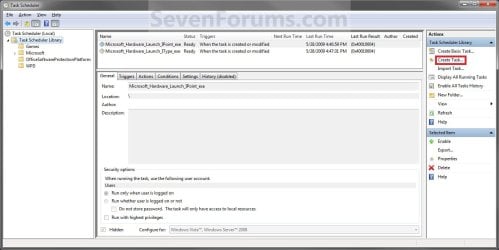
2. While having Task Scheduler Library selected in the left pane, click/tap on Create task in the far right pane. (see screenshot below)
Step1.jpg
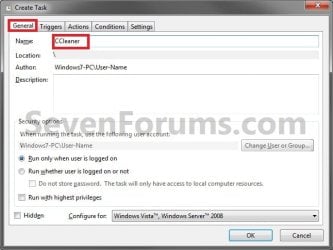
3. Under the General tab, type in the "Name" of the program you want to create this shortcut for. (see screenshot below)
NOTE: This will be the name of the task. As an example, I will use CCleaner for that program. Make note of this name, you will need it later in step 12 and 14 below.
Step2.jpg
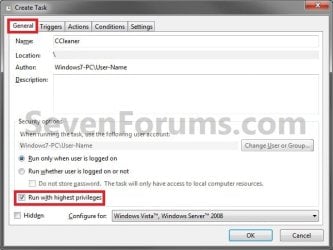
4. Check the Run with highest privileges box. (See screenshot below)
Step3.jpg
5. Click/tap on the Configure for drop down box to open it, and select Windows® 7, Windows Server™ 2008 R2 or the Windows you are currently in. (see screenshot above and below)
NOTE: This is like compatibility mode. If the program does not support running in Windows 7 normally, then you can select the OS that is does support running in instead to have it run in compatibility mode as if it was running in that OS instead of Windows 7.

Drop_Down_Box.jpg
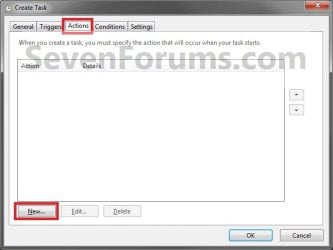
6. Click/tap on the Actions tab, then on the New button. (see screenshot below)
Step4.jpg
7. In the Program/script: box in the Actions tab, copy and paste the path below. (see screenshot below step 9)
NOTE: Thank you to chillz for the updated steps 7 and 8.
%windir%\System32\cmd.exe
8. In the Add arguments (optional): box in the Actions tab, type in the argument below. (see screenshot below step 9)

NOTE: Substitute Task Name in the argument below with the name you entered in step 3 (ex: CCleaner) within quotes, and substitute Full Path of Program in the argument below with the actual full path of the program's .exe file within quote.
/c start "Task Name" "Full Path of Program"


For example:

Code:
/c start "CCleaner" "C:\Program Files\CCleaner\CCleaner64.exe"
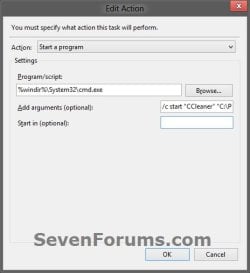
9. Click/tap on OK. (see screenshot below)
step7.jpg
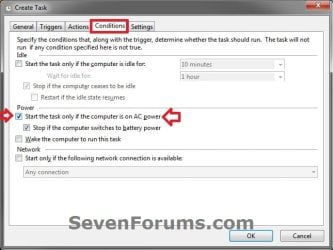
10. Click/tap on the Conditions tab, and uncheck the Stop if the computer switches to battery power box first, then uncheck the Start the task only if the computer is on AC power box. (see screenshots below)
NOTE: This step is mostly for laptops, so that you will be able to run the program when the laptop is running on battery power.
step8.jpg

Conditions.jpg

11. Click/tap on OK. (See screenshots above)

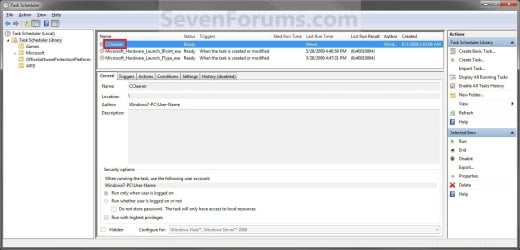
12. You will now see your new task created with the name (ex: CCleaner) you gave it in step 3. Close Task Scheduler. (see screenshot below)
Step9.jpg
13. Right click or press and hold on an empty area of your desktop, then click/tap on New and Shortcut.

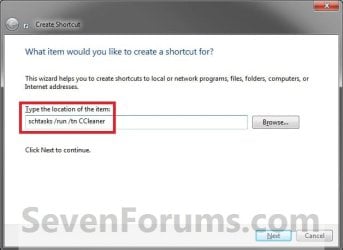
14. Type in the target below for the location field, then click/tap on the Next button. (see screenshot below)
NOTE: Subsitute task-name in the target with the name (ex: CCleaner) within quotes that you used in step 3.
schtasks /run /tn "task-name"

For example: For my task name CCleaner I used from step 3, I would type:
schtasks /run /tn "CCleaner"
Step10.jpg
15. Type in a name you want for the shortcut (ex: CCleaner), then click/tap on the Finish button. (see screenshot below)
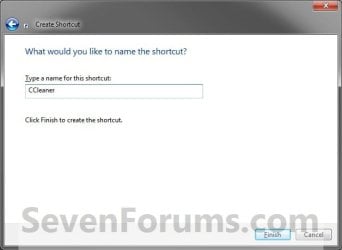
Step11.jpg
16. Right click on the new shortcut (ex: CCleaner) on the desktop, then click/tap on Properties.

17. Click/tap on the Shortcut tab, and on the Change Icon button. (see screenshot below)
Step12.jpg
18. Click/tap on OK. (see screenshot below)
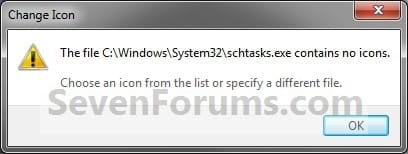
Step13.jpg
19. Click/tap on the Browse button. (see screenshot below)
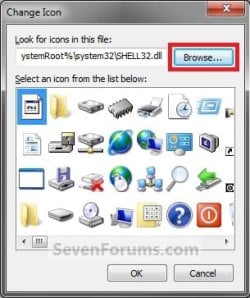
Step14.jpg
20. Navigate to the .exe file of the program that you have created this shortcut with, select it, and click/tap on Open. (see screenshot below)
NOTE: If you have a icon of your own that you would prefer to use instead, then navigate to where you have that icon saved at instead.
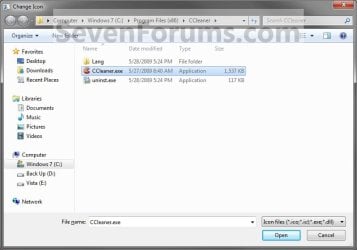
Step15.jpg
21. Select the icon you want for the shortcut, then click/tap on OK. (see screenshot below)
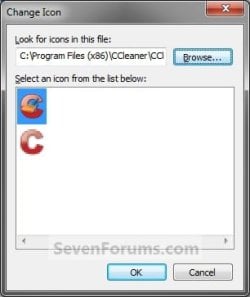
Step16.jpg
22. Click/tap on OK. (see screenshot below)
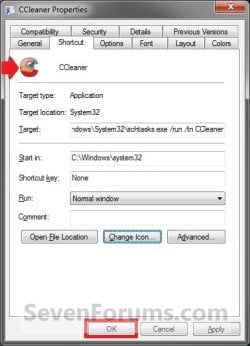
Step17.jpg
23. You can now use this elevated shortcut to run at startup in your "Startup" folder, run at startup as a task, Pin to Start Menu, Pin to Taskbar, assign a keyboard shortcut, or move to where you like for easy use.

24. When you run this new elevated shortcut, you will now no longer have to click/tap on YES to approve the UAC prompt to allow the program run as administrator.


   Tip
To Undo and Remove this Task:
  • While having Task Scheduler Library selected in the left pane, right click on the task in the right pane that you created in step 12, then click on Delete and Yes to approve.
  • Delete the shortcut.
That's it,
Shawn


Last edited:
Sub question, do I modify my associations to call this instead of the program directly to achieve the same thing with associated file opening? That is, Right Click -> Edit -> Audition So instead of Audition, should I point it to the modified shortcut on the desktop?

Hello Colin,

I haven't test this with associations, so I would just point it to the created elevated shortcut. :)
 
Last edited:

My Computer

Computer type
PC/Desktop
Computer Manufacturer/Model Number
Self built custom
OS
64-bit Windows 11 Pro for Workstations
CPU
Intel i7-8700K OC'd to 5 GHz
Motherboard
ASUS ROG Maximus XI Formula Z390
Memory
64 GB (4x16GB) G.SKILL TridentZ RGB DDR4 3600 MHz
Graphics Card(s)
ASUS ROG-STRIX-GTX1080TI-O11G-GAMING
Sound Card
Integrated
Monitor(s) Displays
2 x Samsung Odyssey G7 27"
Screen Resolution
2560x1440
Hard Drives
1TB Samsung 990 PRO M.2,
4TB Samsung 990 PRO PRO M.2,
TerraMaster F8 SSD Plus NAS
PSU
Seasonic Prime Titanium 850W
Case
Thermaltake Core P3
Cooling
Corsair Hydro H115i
Keyboard
Logitech wireless K800
Mouse
Logitech MX Master 4
Internet Speed
2 Gb/s Download and 100 Mb/s Upload
Antivirus
Malwarebyte Anti-Malware Premium
Browser
Google Chrome
Other Info
Logitech Z625 speaker system,
Logitech BRIO 4K Pro webcam,
HP Color LaserJet Pro MFP M477fdn,
APC SMART-UPS RT 1000 XL - SURT1000XLI,
Galaxy S23 Plus phone
Create an Elevated Pgm Shortcut - result is command screen

I'm running Win 7 Pro (64 bit) from an administrator account. I followed the tutorial twice to create a shortcut for excel 97 with the same result. When I run the newly created shortcut, the result is a command screen with this prompt: C:\Windows\system32. Nothing else happens. Any idea where I might have made an error?

This is my first post, so I apologize if I'm not submitting this properly.

Bob Kaiser
 

My Computer

Computer Manufacturer/Model Number
Dell Inspiron 620
OS
win 7 pro (x64)
CPU
Intel Core i5-2320 3 GHz
Motherboard
unk
Memory
8 GB
Graphics Card(s)
AMD Radeon HD 6450 1 GB DDR3
Sound Card
standard
Monitor(s) Displays
21.5 ST2220LB
Hard Drives
1 TB 7200 RPM
PSU
What is a PSU?
Case
mini tower
Cooling
Internal fan

My Computer

Computer type
PC/Desktop
Computer Manufacturer/Model Number
Self built custom
OS
64-bit Windows 11 Pro for Workstations
CPU
Intel i7-8700K OC'd to 5 GHz
Motherboard
ASUS ROG Maximus XI Formula Z390
Memory
64 GB (4x16GB) G.SKILL TridentZ RGB DDR4 3600 MHz
Graphics Card(s)
ASUS ROG-STRIX-GTX1080TI-O11G-GAMING
Sound Card
Integrated
Monitor(s) Displays
2 x Samsung Odyssey G7 27"
Screen Resolution
2560x1440
Hard Drives
1TB Samsung 990 PRO M.2,
4TB Samsung 990 PRO PRO M.2,
TerraMaster F8 SSD Plus NAS
PSU
Seasonic Prime Titanium 850W
Case
Thermaltake Core P3
Cooling
Corsair Hydro H115i
Keyboard
Logitech wireless K800
Mouse
Logitech MX Master 4
Internet Speed
2 Gb/s Download and 100 Mb/s Upload
Antivirus
Malwarebyte Anti-Malware Premium
Browser
Google Chrome
Other Info
Logitech Z625 speaker system,
Logitech BRIO 4K Pro webcam,
HP Color LaserJet Pro MFP M477fdn,
APC SMART-UPS RT 1000 XL - SURT1000XLI,
Galaxy S23 Plus phone
I was not able to do the tutorial for a standard user. When I right-clicked on an open area of the desktop, the only choice for NEW was a FOLDER -- no choice for SHORTCUT. This problem only occurs when I'm logged onto the built-in Administrator account. Can we try to make the tutorial work for the elevated shortcut (the first tutorial I tried)?

Bob Kaiser
 

My Computer

Computer Manufacturer/Model Number
Dell Inspiron 620
OS
win 7 pro (x64)
CPU
Intel Core i5-2320 3 GHz
Motherboard
unk
Memory
8 GB
Graphics Card(s)
AMD Radeon HD 6450 1 GB DDR3
Sound Card
standard
Monitor(s) Displays
21.5 ST2220LB
Hard Drives
1 TB 7200 RPM
PSU
What is a PSU?
Case
mini tower
Cooling
Internal fan
Bob,

I'm not sure why you were wanting to do this with Excel. It doesn't need to be run as administrator to run. A standard user should be able to open and run Excel without a UAC prompt by default.

At least not with Excel 2010.
 

My Computer

Computer type
PC/Desktop
Computer Manufacturer/Model Number
Self built custom
OS
64-bit Windows 11 Pro for Workstations
CPU
Intel i7-8700K OC'd to 5 GHz
Motherboard
ASUS ROG Maximus XI Formula Z390
Memory
64 GB (4x16GB) G.SKILL TridentZ RGB DDR4 3600 MHz
Graphics Card(s)
ASUS ROG-STRIX-GTX1080TI-O11G-GAMING
Sound Card
Integrated
Monitor(s) Displays
2 x Samsung Odyssey G7 27"
Screen Resolution
2560x1440
Hard Drives
1TB Samsung 990 PRO M.2,
4TB Samsung 990 PRO PRO M.2,
TerraMaster F8 SSD Plus NAS
PSU
Seasonic Prime Titanium 850W
Case
Thermaltake Core P3
Cooling
Corsair Hydro H115i
Keyboard
Logitech wireless K800
Mouse
Logitech MX Master 4
Internet Speed
2 Gb/s Download and 100 Mb/s Upload
Antivirus
Malwarebyte Anti-Malware Premium
Browser
Google Chrome
Other Info
Logitech Z625 speaker system,
Logitech BRIO 4K Pro webcam,
HP Color LaserJet Pro MFP M477fdn,
APC SMART-UPS RT 1000 XL - SURT1000XLI,
Galaxy S23 Plus phone
You are right that there's no UAC message for Excel 2010, but there is one when you attempt to run Excel 97. I know that Excel 2010 will open and save Excel 97 documents, but I need to run Excel 97 for its user interface. The program works fine, but I'm just trying to get rid of the UAC message without having to click it off every time.

Bob Kaiser
 

My Computer

Computer Manufacturer/Model Number
Dell Inspiron 620
OS
win 7 pro (x64)
CPU
Intel Core i5-2320 3 GHz
Motherboard
unk
Memory
8 GB
Graphics Card(s)
AMD Radeon HD 6450 1 GB DDR3
Sound Card
standard
Monitor(s) Displays
21.5 ST2220LB
Hard Drives
1 TB 7200 RPM
PSU
What is a PSU?
Case
mini tower
Cooling
Internal fan
Elevated Pgm Shortcut without UAC Prompt - Create

I went through this tutorial for the 3rd time and found that I had skipped part of step 14. In addition, I used the tip from Chillz. Now it works perfectly. Thanks for the help.

Bob Kaiser
 

My Computer

Computer Manufacturer/Model Number
Dell Inspiron 620
OS
win 7 pro (x64)
CPU
Intel Core i5-2320 3 GHz
Motherboard
unk
Memory
8 GB
Graphics Card(s)
AMD Radeon HD 6450 1 GB DDR3
Sound Card
standard
Monitor(s) Displays
21.5 ST2220LB
Hard Drives
1 TB 7200 RPM
PSU
What is a PSU?
Case
mini tower
Cooling
Internal fan
Ah, ok. I figured that there must have been something different with Excel 97.

I'm happy to hear that you got it sorted and working now.

Would you have any personal suggestions that you would like to offer to help make the tutorial easier to follow along? I strive to make the tutorials as easy as possible, so anything would be appreciated. :)
 

My Computer

Computer type
PC/Desktop
Computer Manufacturer/Model Number
Self built custom
OS
64-bit Windows 11 Pro for Workstations
CPU
Intel i7-8700K OC'd to 5 GHz
Motherboard
ASUS ROG Maximus XI Formula Z390
Memory
64 GB (4x16GB) G.SKILL TridentZ RGB DDR4 3600 MHz
Graphics Card(s)
ASUS ROG-STRIX-GTX1080TI-O11G-GAMING
Sound Card
Integrated
Monitor(s) Displays
2 x Samsung Odyssey G7 27"
Screen Resolution
2560x1440
Hard Drives
1TB Samsung 990 PRO M.2,
4TB Samsung 990 PRO PRO M.2,
TerraMaster F8 SSD Plus NAS
PSU
Seasonic Prime Titanium 850W
Case
Thermaltake Core P3
Cooling
Corsair Hydro H115i
Keyboard
Logitech wireless K800
Mouse
Logitech MX Master 4
Internet Speed
2 Gb/s Download and 100 Mb/s Upload
Antivirus
Malwarebyte Anti-Malware Premium
Browser
Google Chrome
Other Info
Logitech Z625 speaker system,
Logitech BRIO 4K Pro webcam,
HP Color LaserJet Pro MFP M477fdn,
APC SMART-UPS RT 1000 XL - SURT1000XLI,
Galaxy S23 Plus phone
Elevated Pgm Shortcut without UAC Prompt - Create

Brink - Ref your request on how to make this tutorial better -- I think it is very good as is and definitely thorough. The only thing I can think of is to incorporate the useful comments of other users into the tutorial rather than having a "complete" tutorial with references to separate user comments (e.g. Chillz).

Bob Kaiser
 

My Computer

Computer Manufacturer/Model Number
Dell Inspiron 620
OS
win 7 pro (x64)
CPU
Intel Core i5-2320 3 GHz
Motherboard
unk
Memory
8 GB
Graphics Card(s)
AMD Radeon HD 6450 1 GB DDR3
Sound Card
standard
Monitor(s) Displays
21.5 ST2220LB
Hard Drives
1 TB 7200 RPM
PSU
What is a PSU?
Case
mini tower
Cooling
Internal fan
Thank you Bob. :)

I'm glad you find it good as is. I try to make them way to help make them as clear and easy to use as possible, but yeah they indeed can be thorough at times. LOL

Chillz had came up with that additional option to be included in to the tutorial to help improve it by having the program run with focus. Whenever someone is kind enough to do something like that, I'll reference them so everyone will know who contributed that updated part in the tutorial.
 

My Computer

Computer type
PC/Desktop
Computer Manufacturer/Model Number
Self built custom
OS
64-bit Windows 11 Pro for Workstations
CPU
Intel i7-8700K OC'd to 5 GHz
Motherboard
ASUS ROG Maximus XI Formula Z390
Memory
64 GB (4x16GB) G.SKILL TridentZ RGB DDR4 3600 MHz
Graphics Card(s)
ASUS ROG-STRIX-GTX1080TI-O11G-GAMING
Sound Card
Integrated
Monitor(s) Displays
2 x Samsung Odyssey G7 27"
Screen Resolution
2560x1440
Hard Drives
1TB Samsung 990 PRO M.2,
4TB Samsung 990 PRO PRO M.2,
TerraMaster F8 SSD Plus NAS
PSU
Seasonic Prime Titanium 850W
Case
Thermaltake Core P3
Cooling
Corsair Hydro H115i
Keyboard
Logitech wireless K800
Mouse
Logitech MX Master 4
Internet Speed
2 Gb/s Download and 100 Mb/s Upload
Antivirus
Malwarebyte Anti-Malware Premium
Browser
Google Chrome
Other Info
Logitech Z625 speaker system,
Logitech BRIO 4K Pro webcam,
HP Color LaserJet Pro MFP M477fdn,
APC SMART-UPS RT 1000 XL - SURT1000XLI,
Galaxy S23 Plus phone
Thank you for your help Brink!

I have used this information for my program Paint Shop Pro 8
and it worked out great.
 

My Computer

Computer type
Laptop
Computer Manufacturer/Model Number
HP Pavilion g7 series
OS
Windows 7 Home Premium 64 bit.
Memory
4 GB
Hard Drives
DVD/CD Roms
Case
Charcoal Gray
Cooling
Internal Fan
Keyboard
Duel Keyboard with Side Number Pad included and not USB #Pad
Mouse
G.E. Gray & Black Laser Mouse with Cord.
Internet Speed
Earthlink High Speed Wifi
Antivirus
M. S. E.
Browser
Firefox and Google Chrome.
Other Info
I use the computer to practice my typing skills,
but I really like to play online dressup games.
I am very sorry Brink.
I did every think as per your instruction (I do hope) and was using CCleaner.
After first eliminate Event Viewer, in: Computer Management—System Tools—Event Viewer—Custom Views—Administrative Events, get “Query Error” information “Security The instance name passed was not recognized as valid by a WMI data provider”
“Error, Eventlog, System, ID 22, Local Service = The event logging service encountered an error while initializing publishing resources for channel Security. If channel type is Analytic or Debug, then this could mean there was an error initializing logging resources as well.”
Try to find solution unfortunately do not get any idea.
Will appreciate your suggestion.
With all my regards,
stasioau
 

My Computer

OS
Windows 7

My Computer

Computer type
PC/Desktop
Computer Manufacturer/Model Number
Self built custom
OS
64-bit Windows 11 Pro for Workstations
CPU
Intel i7-8700K OC'd to 5 GHz
Motherboard
ASUS ROG Maximus XI Formula Z390
Memory
64 GB (4x16GB) G.SKILL TridentZ RGB DDR4 3600 MHz
Graphics Card(s)
ASUS ROG-STRIX-GTX1080TI-O11G-GAMING
Sound Card
Integrated
Monitor(s) Displays
2 x Samsung Odyssey G7 27"
Screen Resolution
2560x1440
Hard Drives
1TB Samsung 990 PRO M.2,
4TB Samsung 990 PRO PRO M.2,
TerraMaster F8 SSD Plus NAS
PSU
Seasonic Prime Titanium 850W
Case
Thermaltake Core P3
Cooling
Corsair Hydro H115i
Keyboard
Logitech wireless K800
Mouse
Logitech MX Master 4
Internet Speed
2 Gb/s Download and 100 Mb/s Upload
Antivirus
Malwarebyte Anti-Malware Premium
Browser
Google Chrome
Other Info
Logitech Z625 speaker system,
Logitech BRIO 4K Pro webcam,
HP Color LaserJet Pro MFP M477fdn,
APC SMART-UPS RT 1000 XL - SURT1000XLI,
Galaxy S23 Plus phone
Brink thank you very much. Will work with this tutorial.
Always, when I am here and read your instructions, comments etc, came to my mind discussion some time ago, when you start create tutorial. I remember number of people who they do not like it. And today, without your tutorial idea, Forum would not be the same.
Thanks of all, best regards,
stasioau
 

My Computer

OS
Windows 7
You're most welcome Stasioau. I'm glad it was able to work for you. :)
 

My Computer

Computer type
PC/Desktop
Computer Manufacturer/Model Number
Self built custom
OS
64-bit Windows 11 Pro for Workstations
CPU
Intel i7-8700K OC'd to 5 GHz
Motherboard
ASUS ROG Maximus XI Formula Z390
Memory
64 GB (4x16GB) G.SKILL TridentZ RGB DDR4 3600 MHz
Graphics Card(s)
ASUS ROG-STRIX-GTX1080TI-O11G-GAMING
Sound Card
Integrated
Monitor(s) Displays
2 x Samsung Odyssey G7 27"
Screen Resolution
2560x1440
Hard Drives
1TB Samsung 990 PRO M.2,
4TB Samsung 990 PRO PRO M.2,
TerraMaster F8 SSD Plus NAS
PSU
Seasonic Prime Titanium 850W
Case
Thermaltake Core P3
Cooling
Corsair Hydro H115i
Keyboard
Logitech wireless K800
Mouse
Logitech MX Master 4
Internet Speed
2 Gb/s Download and 100 Mb/s Upload
Antivirus
Malwarebyte Anti-Malware Premium
Browser
Google Chrome
Other Info
Logitech Z625 speaker system,
Logitech BRIO 4K Pro webcam,
HP Color LaserJet Pro MFP M477fdn,
APC SMART-UPS RT 1000 XL - SURT1000XLI,
Galaxy S23 Plus phone
It didn't work for me. I got the message "An error occurred for task Everything: User account restriction error. The possible reasons are that blank passwords not allowed, or that a policy restriction has been enforced".

I don't have a blank password and I'm configured as an administrator.

Eddy
 

My Computer

OS
XP
Hello Eddy,

This tutorial is not for XP if that's what you are trying to do it in by your specs.

If you are doing this in Windows 7, then please go ahead and start over making sure that you don't miss a step, and that each step is done exactly. The smallest of error could cause it to not work.

Have you set any other policies that restrict being able to run specific programs or file types?
 

My Computer

Computer type
PC/Desktop
Computer Manufacturer/Model Number
Self built custom
OS
64-bit Windows 11 Pro for Workstations
CPU
Intel i7-8700K OC'd to 5 GHz
Motherboard
ASUS ROG Maximus XI Formula Z390
Memory
64 GB (4x16GB) G.SKILL TridentZ RGB DDR4 3600 MHz
Graphics Card(s)
ASUS ROG-STRIX-GTX1080TI-O11G-GAMING
Sound Card
Integrated
Monitor(s) Displays
2 x Samsung Odyssey G7 27"
Screen Resolution
2560x1440
Hard Drives
1TB Samsung 990 PRO M.2,
4TB Samsung 990 PRO PRO M.2,
TerraMaster F8 SSD Plus NAS
PSU
Seasonic Prime Titanium 850W
Case
Thermaltake Core P3
Cooling
Corsair Hydro H115i
Keyboard
Logitech wireless K800
Mouse
Logitech MX Master 4
Internet Speed
2 Gb/s Download and 100 Mb/s Upload
Antivirus
Malwarebyte Anti-Malware Premium
Browser
Google Chrome
Other Info
Logitech Z625 speaker system,
Logitech BRIO 4K Pro webcam,
HP Color LaserJet Pro MFP M477fdn,
APC SMART-UPS RT 1000 XL - SURT1000XLI,
Galaxy S23 Plus phone
Hey guys, just a few quick notes to add to this... I'm a little OCD, so I wanted all of these tasks nice and neat. I created a folder called 'Elevated Command Prompt' inside the Task Scheduler Library and put it there. I did this AFTER I had gotten a working link by exporting and re-importing the Task, but Obviously I don't have to. This changes two parts: The physical location of the shortcut, and the text you put in the target box itself.

I "think" if you decide to do this after the fact, you can create your Task, and then open it up again, and on the "General" Tab under "Location", just type \"Your Folder Name Here", and it may move it for you. This I have not verified.

What I have confirmed is that when you set up the target, instead of schtasks /run /tn "task-name", just change it to schtasks /run /tn "\YOUR FOLDER NAME HERE\task-name", with the changed part in green for every one. Here is what mine looks like: C:\Windows\System32\schtasks.exe /run /tn "\Elevated Command Prompt\Defraggler"

Overall, many thanks for a fix to this annoying implementation of Wndows Security. I have been looking for a fix for this since Noah was a boy...

Mike Wells
 

My Computer

Computer type
PC/Desktop
OS
Utah
Hello Mike, and welcome to Seven Forums.

Just changing the target in your shortcut will not move the task though. The target is telling the shortcut where the task is located at to run it.

Yes, you sure could have the task in a folder of your own instead of in Task Scheduler Library. You would just need to include that folder in the target as you pointed out in the green part of your post above.

I just didn't include this option in order to keep the tutorial as simple as possible without to many twists and turns, but it's certainly an option for any that would like to do. :)
 

My Computer

Computer type
PC/Desktop
Computer Manufacturer/Model Number
Self built custom
OS
64-bit Windows 11 Pro for Workstations
CPU
Intel i7-8700K OC'd to 5 GHz
Motherboard
ASUS ROG Maximus XI Formula Z390
Memory
64 GB (4x16GB) G.SKILL TridentZ RGB DDR4 3600 MHz
Graphics Card(s)
ASUS ROG-STRIX-GTX1080TI-O11G-GAMING
Sound Card
Integrated
Monitor(s) Displays
2 x Samsung Odyssey G7 27"
Screen Resolution
2560x1440
Hard Drives
1TB Samsung 990 PRO M.2,
4TB Samsung 990 PRO PRO M.2,
TerraMaster F8 SSD Plus NAS
PSU
Seasonic Prime Titanium 850W
Case
Thermaltake Core P3
Cooling
Corsair Hydro H115i
Keyboard
Logitech wireless K800
Mouse
Logitech MX Master 4
Internet Speed
2 Gb/s Download and 100 Mb/s Upload
Antivirus
Malwarebyte Anti-Malware Premium
Browser
Google Chrome
Other Info
Logitech Z625 speaker system,
Logitech BRIO 4K Pro webcam,
HP Color LaserJet Pro MFP M477fdn,
APC SMART-UPS RT 1000 XL - SURT1000XLI,
Galaxy S23 Plus phone
Sorry... I didn't mean changing the shortcut, I meant changing it in the task itself, under "Location", then adding that part to the shortcut Target.

Also, I didn't realize you'd intentionally left it out. My bad. Figured I'd help out if I could.

Either way, thanks AGAIN for the tutorial, it rocks, and I plan to send it on to friends who may be finding this annoying even on their home systems.
 

My Computer

Computer type
PC/Desktop
OS
Utah
Back
Top