Elevated Program Shortcut without UAC Prompt - Create

How to Create an Elevated Program Shortcut without a UAC Prompt in Windows


   Information
This will show you how to create an elevated "Run as administrator" shortcut of any installed program using Task Scheduler so that it will not give you a UAC prompt for permission when you start it while still having UAC turned on in Vista, Windows 7, and Windows 8.

In the tutorial, you will first create a new task, then a new shortcut to run the task. Afterwards, how to change the icon of the shortcut.

   Note
Special thanks to OEM for pointing this out, and the previous Vista version by DMEX.

   Warning


  • This shortcut and task can only be created and work while logged in as an administrator account.
  • This shortcut will not work in a standard user account.


Here's How:
1. Press the Windows + R keys to open the Run dialog, type taskschd.msc, and press Enter.
NOTE: This will open Task Scheduler. This file is located at:
C:\Windows\system32\taskschd.msc.

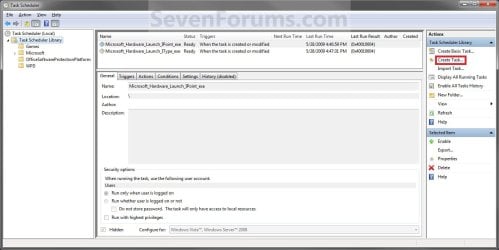
2. While having Task Scheduler Library selected in the left pane, click/tap on Create task in the far right pane. (see screenshot below)
Step1.jpg
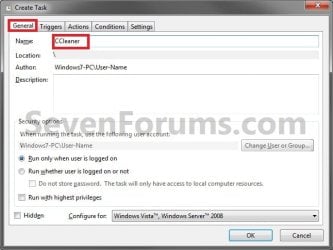
3. Under the General tab, type in the "Name" of the program you want to create this shortcut for. (see screenshot below)
NOTE: This will be the name of the task. As an example, I will use CCleaner for that program. Make note of this name, you will need it later in step 12 and 14 below.
Step2.jpg
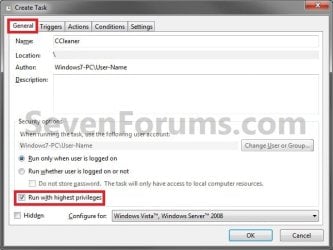
4. Check the Run with highest privileges box. (See screenshot below)
Step3.jpg
5. Click/tap on the Configure for drop down box to open it, and select Windows® 7, Windows Server™ 2008 R2 or the Windows you are currently in. (see screenshot above and below)
NOTE: This is like compatibility mode. If the program does not support running in Windows 7 normally, then you can select the OS that is does support running in instead to have it run in compatibility mode as if it was running in that OS instead of Windows 7.

Drop_Down_Box.jpg
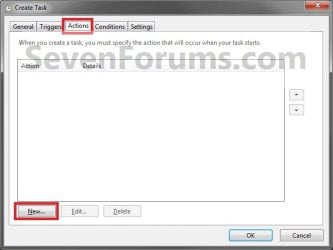
6. Click/tap on the Actions tab, then on the New button. (see screenshot below)
Step4.jpg
7. In the Program/script: box in the Actions tab, copy and paste the path below. (see screenshot below step 9)
NOTE: Thank you to chillz for the updated steps 7 and 8.
%windir%\System32\cmd.exe
8. In the Add arguments (optional): box in the Actions tab, type in the argument below. (see screenshot below step 9)

NOTE: Substitute Task Name in the argument below with the name you entered in step 3 (ex: CCleaner) within quotes, and substitute Full Path of Program in the argument below with the actual full path of the program's .exe file within quote.
/c start "Task Name" "Full Path of Program"


For example:

Code:
/c start "CCleaner" "C:\Program Files\CCleaner\CCleaner64.exe"
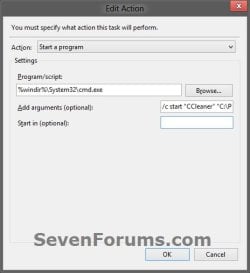
9. Click/tap on OK. (see screenshot below)
step7.jpg
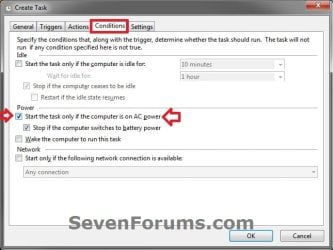
10. Click/tap on the Conditions tab, and uncheck the Stop if the computer switches to battery power box first, then uncheck the Start the task only if the computer is on AC power box. (see screenshots below)
NOTE: This step is mostly for laptops, so that you will be able to run the program when the laptop is running on battery power.
step8.jpg

Conditions.jpg

11. Click/tap on OK. (See screenshots above)

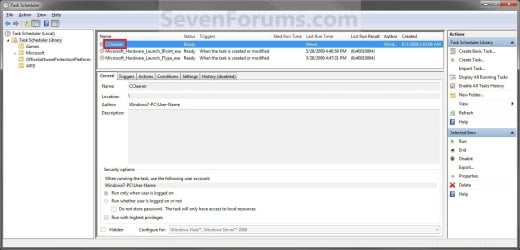
12. You will now see your new task created with the name (ex: CCleaner) you gave it in step 3. Close Task Scheduler. (see screenshot below)
Step9.jpg
13. Right click or press and hold on an empty area of your desktop, then click/tap on New and Shortcut.

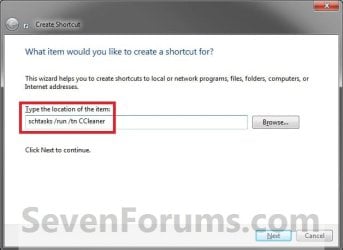
14. Type in the target below for the location field, then click/tap on the Next button. (see screenshot below)
NOTE: Subsitute task-name in the target with the name (ex: CCleaner) within quotes that you used in step 3.
schtasks /run /tn "task-name"

For example: For my task name CCleaner I used from step 3, I would type:
schtasks /run /tn "CCleaner"
Step10.jpg
15. Type in a name you want for the shortcut (ex: CCleaner), then click/tap on the Finish button. (see screenshot below)
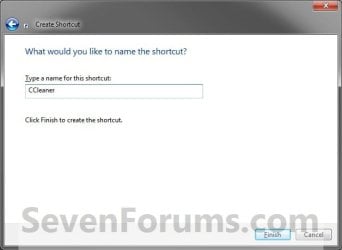
Step11.jpg
16. Right click on the new shortcut (ex: CCleaner) on the desktop, then click/tap on Properties.

17. Click/tap on the Shortcut tab, and on the Change Icon button. (see screenshot below)
Step12.jpg
18. Click/tap on OK. (see screenshot below)
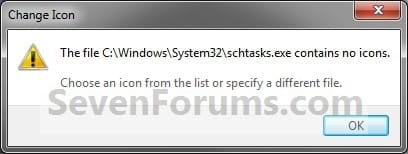
Step13.jpg
19. Click/tap on the Browse button. (see screenshot below)
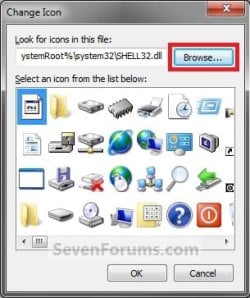
Step14.jpg
20. Navigate to the .exe file of the program that you have created this shortcut with, select it, and click/tap on Open. (see screenshot below)
NOTE: If you have a icon of your own that you would prefer to use instead, then navigate to where you have that icon saved at instead.
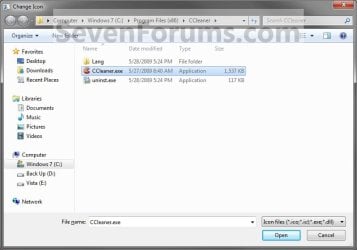
Step15.jpg
21. Select the icon you want for the shortcut, then click/tap on OK. (see screenshot below)
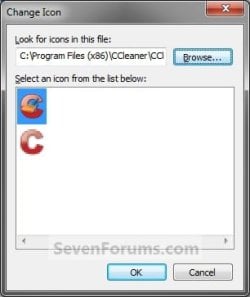
Step16.jpg
22. Click/tap on OK. (see screenshot below)
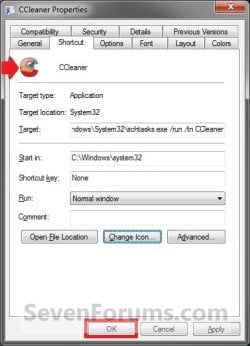
Step17.jpg
23. You can now use this elevated shortcut to run at startup in your "Startup" folder, run at startup as a task, Pin to Start Menu, Pin to Taskbar, assign a keyboard shortcut, or move to where you like for easy use.

24. When you run this new elevated shortcut, you will now no longer have to click/tap on YES to approve the UAC prompt to allow the program run as administrator.


   Tip
To Undo and Remove this Task:
  • While having Task Scheduler Library selected in the left pane, right click on the task in the right pane that you created in step 12, then click on Delete and Yes to approve.
  • Delete the shortcut.
That's it,
Shawn


Last edited:
No worries Mike. All ideas are welcomed. :)

You wouldn't be able to change the location of the task like that, but you could right click on the task to export it to say your desktop, then right click on the new folder to import the exported task into it.
 

My Computer

Computer type
PC/Desktop
Computer Manufacturer/Model Number
Self built custom
OS
64-bit Windows 11 Pro for Workstations
CPU
Intel i7-8700K OC'd to 5 GHz
Motherboard
ASUS ROG Maximus XI Formula Z390
Memory
64 GB (4x16GB) G.SKILL TridentZ RGB DDR4 3600 MHz
Graphics Card(s)
ASUS ROG-STRIX-GTX1080TI-O11G-GAMING
Sound Card
Integrated
Monitor(s) Displays
2 x Samsung Odyssey G7 27"
Screen Resolution
2560x1440
Hard Drives
1TB Samsung 990 PRO M.2,
4TB Samsung 990 PRO PRO M.2,
TerraMaster F8 SSD Plus NAS
PSU
Seasonic Prime Titanium 850W
Case
Thermaltake Core P3
Cooling
Corsair Hydro H115i
Keyboard
Logitech wireless K800
Mouse
Logitech MX Master 4
Internet Speed
2 Gb/s Download and 100 Mb/s Upload
Antivirus
Malwarebyte Anti-Malware Premium
Browser
Google Chrome
Other Info
Logitech Z625 speaker system,
Logitech BRIO 4K Pro webcam,
HP Color LaserJet Pro MFP M477fdn,
APC SMART-UPS RT 1000 XL - SURT1000XLI,
Galaxy S23 Plus phone
....... does this method also work on Windows 8 ?
 

My Computer

OS
Windows 7 Ultimate x64
Hello Tommy,

Yes, it sure does. :)
 

My Computer

Computer type
PC/Desktop
Computer Manufacturer/Model Number
Self built custom
OS
64-bit Windows 11 Pro for Workstations
CPU
Intel i7-8700K OC'd to 5 GHz
Motherboard
ASUS ROG Maximus XI Formula Z390
Memory
64 GB (4x16GB) G.SKILL TridentZ RGB DDR4 3600 MHz
Graphics Card(s)
ASUS ROG-STRIX-GTX1080TI-O11G-GAMING
Sound Card
Integrated
Monitor(s) Displays
2 x Samsung Odyssey G7 27"
Screen Resolution
2560x1440
Hard Drives
1TB Samsung 990 PRO M.2,
4TB Samsung 990 PRO PRO M.2,
TerraMaster F8 SSD Plus NAS
PSU
Seasonic Prime Titanium 850W
Case
Thermaltake Core P3
Cooling
Corsair Hydro H115i
Keyboard
Logitech wireless K800
Mouse
Logitech MX Master 4
Internet Speed
2 Gb/s Download and 100 Mb/s Upload
Antivirus
Malwarebyte Anti-Malware Premium
Browser
Google Chrome
Other Info
Logitech Z625 speaker system,
Logitech BRIO 4K Pro webcam,
HP Color LaserJet Pro MFP M477fdn,
APC SMART-UPS RT 1000 XL - SURT1000XLI,
Galaxy S23 Plus phone
@Shawn

....... thanks for your reply.
I guess the shortcut can be created everywhere not necessarily only on the desktop or am I mistaken ...?...
 

My Computer

OS
Windows 7 Ultimate x64
Hey Shawn, I was wondering if this would disable that stupid UAC Shield on certain icons such as Defraggler, using Windows 8
 
Last edited:

My Computer

Computer Manufacturer/Model Number
HP p6270z
OS
Windows 7 Home Premium x64
CPU
AMD Athlon II X4 620
Motherboard
Foxconn ALOE (CPU 1)
Memory
4.00GB Dual Channel DDR3 @ 666Mhz (9-9-9-24)
Graphics Card(s)
HD Radeon 4200 (Integrated)
Sound Card
Realtek High Definition Audio
Monitor(s) Displays
HP 2311 (1920x1080) @ 60Hz
Screen Resolution
1920x1080
Hard Drives
488GB Seagate ST3500418AS SCSI Disk Device (RAID)
Hello Echo,

The elevated shortcut that you create using this tutorial will not have an UAC shield on it's icon, but it will not remove the UAC shield on other files.
 

My Computer

Computer type
PC/Desktop
Computer Manufacturer/Model Number
Self built custom
OS
64-bit Windows 11 Pro for Workstations
CPU
Intel i7-8700K OC'd to 5 GHz
Motherboard
ASUS ROG Maximus XI Formula Z390
Memory
64 GB (4x16GB) G.SKILL TridentZ RGB DDR4 3600 MHz
Graphics Card(s)
ASUS ROG-STRIX-GTX1080TI-O11G-GAMING
Sound Card
Integrated
Monitor(s) Displays
2 x Samsung Odyssey G7 27"
Screen Resolution
2560x1440
Hard Drives
1TB Samsung 990 PRO M.2,
4TB Samsung 990 PRO PRO M.2,
TerraMaster F8 SSD Plus NAS
PSU
Seasonic Prime Titanium 850W
Case
Thermaltake Core P3
Cooling
Corsair Hydro H115i
Keyboard
Logitech wireless K800
Mouse
Logitech MX Master 4
Internet Speed
2 Gb/s Download and 100 Mb/s Upload
Antivirus
Malwarebyte Anti-Malware Premium
Browser
Google Chrome
Other Info
Logitech Z625 speaker system,
Logitech BRIO 4K Pro webcam,
HP Color LaserJet Pro MFP M477fdn,
APC SMART-UPS RT 1000 XL - SURT1000XLI,
Galaxy S23 Plus phone
Shawn,

This is a great technique. The only problem with it is that I have too many programs that include their version number in the program's name. Since I've started writing tutorials for friends who have owned computers for years but pay no attention to the operating system, I realize how frustrated you must get sometimes. I have a friend, I'll call him A. A first bought a computer when Windows 95 came out. Yesterday I had to write a tutorial for A so that he could finally use Control Panel to uninstall a file. Fortunately he is so paranoid about installing files that he's survived until last Friday without needing to uninstall a program. Of course I had to show him the two different views of Control Panel. He had the default of "All Control Panel Items" and I had to show that and then show him what to push to get the "old-fashioned" Control Panel. The next day I had to show him how to get back to "All Control Panel Items". This and several others has made me appreciate your efforts on our behalves even more than before.

Thanks is insufficient but it will have to do.

Gerry
 

My Computer

Computer Manufacturer/Model Number
Home Made
OS
Windows 7 Home Premium
CPU
Intel I5Core750
Motherboard
Gigabyte P55A-UD3
Memory
6 GB Corsair DDR3 1600
Graphics Card(s)
Zotac GeForce 9600 GT
Sound Card
7:1 on otherboard
Monitor(s) Displays
ViewSonic VG2030m (one of the last 4 by 3 monitors)
Screen Resolution
1400 by 1050 (Native Resolution)
Hard Drives
2 500 GB Western Digital SATA
PSU
Thermaltake TR2 500W
Case
Cooler Master Elite 332
Cooling
Thermaltake SpinQ
Keyboard
400 v1.0
Mouse
Logitech LX-8
Internet Speed
9.82 Mbs download speed 1.87 Mbs Upload speed
Other Info
Monochrome Laser Printer -HP 1020
Ink-Jet color all in one without fax - Canon Pixma MP 170
500GB external portable hard drive - Iomega
You're most welcome Gerry. I'm glad that they are able to help. :)
 

My Computer

Computer type
PC/Desktop
Computer Manufacturer/Model Number
Self built custom
OS
64-bit Windows 11 Pro for Workstations
CPU
Intel i7-8700K OC'd to 5 GHz
Motherboard
ASUS ROG Maximus XI Formula Z390
Memory
64 GB (4x16GB) G.SKILL TridentZ RGB DDR4 3600 MHz
Graphics Card(s)
ASUS ROG-STRIX-GTX1080TI-O11G-GAMING
Sound Card
Integrated
Monitor(s) Displays
2 x Samsung Odyssey G7 27"
Screen Resolution
2560x1440
Hard Drives
1TB Samsung 990 PRO M.2,
4TB Samsung 990 PRO PRO M.2,
TerraMaster F8 SSD Plus NAS
PSU
Seasonic Prime Titanium 850W
Case
Thermaltake Core P3
Cooling
Corsair Hydro H115i
Keyboard
Logitech wireless K800
Mouse
Logitech MX Master 4
Internet Speed
2 Gb/s Download and 100 Mb/s Upload
Antivirus
Malwarebyte Anti-Malware Premium
Browser
Google Chrome
Other Info
Logitech Z625 speaker system,
Logitech BRIO 4K Pro webcam,
HP Color LaserJet Pro MFP M477fdn,
APC SMART-UPS RT 1000 XL - SURT1000XLI,
Galaxy S23 Plus phone
Hi Shawn,

I have an .exe programme (doesn't install) that I need to run on Start-up. I've turned off UAC and have added the programme to the start menu. The darn thing still won't start when I re-boot the computer.

I've also created a short-cut on my desktop in order to manually run the programme. This programme usually needs to be run with UAC.

You've listed several different options for the 'Elevated Program Shortcut' which one would work for my situation.

With thanks, ms:)
 

My Computer

Computer type
PC/Desktop
Computer Manufacturer/Model Number
Asus CM-6870
OS
Windows 7 Home Premium 64bit
CPU
Intel Core i7-3770, CPU @ 3.4 GHz
Motherboard
Asus
Memory
16 GB RM (4 cores)
Graphics Card(s)
NVIDIA GeForce GT 630,
Sound Card
Realtek HD Audio standard
Monitor(s) Displays
Asus VE248Q
Screen Resolution
1920 x 1080
Hard Drives
2 TB
PSU
300W
Case
Asus
Cooling
Smart Cooling System and Q-Fan
Keyboard
Microsoft Wireless
Mouse
Microsoft Laser 3500 Wireless
Internet Speed
25 mbps or greater
Antivirus
Bitdefender Total Security 2018
Browser
Firefox/Chrome/IE
Other Info
Firewall - Bitdefender 2018
Printer: HP Officejet Pro 8600 Plus (wireless)
Hello Miss Sherlock,

If you like, you could place the elevated shortcut in your Startup folder or the "run at startup as a task" option at step 23 to run it at startup. This will not work for standard users though.

Hope this helps. :)
 

My Computer

Computer type
PC/Desktop
Computer Manufacturer/Model Number
Self built custom
OS
64-bit Windows 11 Pro for Workstations
CPU
Intel i7-8700K OC'd to 5 GHz
Motherboard
ASUS ROG Maximus XI Formula Z390
Memory
64 GB (4x16GB) G.SKILL TridentZ RGB DDR4 3600 MHz
Graphics Card(s)
ASUS ROG-STRIX-GTX1080TI-O11G-GAMING
Sound Card
Integrated
Monitor(s) Displays
2 x Samsung Odyssey G7 27"
Screen Resolution
2560x1440
Hard Drives
1TB Samsung 990 PRO M.2,
4TB Samsung 990 PRO PRO M.2,
TerraMaster F8 SSD Plus NAS
PSU
Seasonic Prime Titanium 850W
Case
Thermaltake Core P3
Cooling
Corsair Hydro H115i
Keyboard
Logitech wireless K800
Mouse
Logitech MX Master 4
Internet Speed
2 Gb/s Download and 100 Mb/s Upload
Antivirus
Malwarebyte Anti-Malware Premium
Browser
Google Chrome
Other Info
Logitech Z625 speaker system,
Logitech BRIO 4K Pro webcam,
HP Color LaserJet Pro MFP M477fdn,
APC SMART-UPS RT 1000 XL - SURT1000XLI,
Galaxy S23 Plus phone
Hi Brink,

Hope all is well in Texas!:D

I created a start-up rule under the Task Scheduler. Now my programme, so far, is starting when I re-boot the computer.

Thanks so much for all your excellent Tutorials.

ms
 

My Computer

Computer type
PC/Desktop
Computer Manufacturer/Model Number
Asus CM-6870
OS
Windows 7 Home Premium 64bit
CPU
Intel Core i7-3770, CPU @ 3.4 GHz
Motherboard
Asus
Memory
16 GB RM (4 cores)
Graphics Card(s)
NVIDIA GeForce GT 630,
Sound Card
Realtek HD Audio standard
Monitor(s) Displays
Asus VE248Q
Screen Resolution
1920 x 1080
Hard Drives
2 TB
PSU
300W
Case
Asus
Cooling
Smart Cooling System and Q-Fan
Keyboard
Microsoft Wireless
Mouse
Microsoft Laser 3500 Wireless
Internet Speed
25 mbps or greater
Antivirus
Bitdefender Total Security 2018
Browser
Firefox/Chrome/IE
Other Info
Firewall - Bitdefender 2018
Printer: HP Officejet Pro 8600 Plus (wireless)
You're most welcome MS. I'm happy to hear that it's working well for you. :)
 

My Computer

Computer type
PC/Desktop
Computer Manufacturer/Model Number
Self built custom
OS
64-bit Windows 11 Pro for Workstations
CPU
Intel i7-8700K OC'd to 5 GHz
Motherboard
ASUS ROG Maximus XI Formula Z390
Memory
64 GB (4x16GB) G.SKILL TridentZ RGB DDR4 3600 MHz
Graphics Card(s)
ASUS ROG-STRIX-GTX1080TI-O11G-GAMING
Sound Card
Integrated
Monitor(s) Displays
2 x Samsung Odyssey G7 27"
Screen Resolution
2560x1440
Hard Drives
1TB Samsung 990 PRO M.2,
4TB Samsung 990 PRO PRO M.2,
TerraMaster F8 SSD Plus NAS
PSU
Seasonic Prime Titanium 850W
Case
Thermaltake Core P3
Cooling
Corsair Hydro H115i
Keyboard
Logitech wireless K800
Mouse
Logitech MX Master 4
Internet Speed
2 Gb/s Download and 100 Mb/s Upload
Antivirus
Malwarebyte Anti-Malware Premium
Browser
Google Chrome
Other Info
Logitech Z625 speaker system,
Logitech BRIO 4K Pro webcam,
HP Color LaserJet Pro MFP M477fdn,
APC SMART-UPS RT 1000 XL - SURT1000XLI,
Galaxy S23 Plus phone
Shawn,

I was about to toss in the towel when I saw the Seven Forum as a google search result for what I was wanting to do with launching a bat file.

I followed your tutorial and thought I had everything done correctly. I tried using the shortcut and it didn't work so I thought this wouldn't work with CMD and a .bat file.

After looking my setup over a couple of times, I found my error. I didn't have the path enclosed in quotes for the "location" field in the shortcut
2ykxly0.jpg


Once the quotes were added, it works great
nouh6q.jpg


I have somewhat of an off-topic question but it relates somewhat to the way that I'm using this UAC bypass shortcut.

I'm using this procedure to launch a .bat file which disables the "hibernate" option within "Powercfg".

Here's my .bat script:

Code:
@echo off
:: Get ADMIN Privs
:-------------------------------------
mkdir "%windir%\BatchGotAdmin"
if '%errorlevel%' == '0' (
  rmdir "%windir%\BatchGotAdmin" & goto gotAdmin 
) else ( goto UACPrompt )
:UACPrompt
echo Set UAC = CreateObject^("Shell.Application"^) > "%temp%\getadmin.vbs"
echo UAC.ShellExecute %0, "", "", "runas", 1 >> "%temp%\getadmin.vbs"
"%temp%\getadmin.vbs"
exit /B
:gotAdmin
if exist "%temp%\getadmin.vbs" ( del "%temp%\getadmin.vbs" )
  pushd "%CD%"      
  CD /D "%~dp0"
:-------------------------------------
:: End Get ADMIN Privs
@echo on
powercfg -hibernate off
@echo off
timeout /t 5

This works great as it allows me to launch the .bat file and set the user as Admin within it but I realized that I don't need that part in the script as your Task Scheduler launch will do the same thing, temporarily disabling the UAC prompt for this .bat launch.

The question that I have about this is related to the query in powercfg.

After I run the .bat file, I don't see a change in the query info, ie when I'm in the CMD window and I enter

powercfg /query

I look at the return info but I don't see any value that has changed after I previously ran the .bat file which disables the "hibernate" option.

However, I know it's working as I see the change in

Control Panel/Power Options/Change When the Computer Sleeps/Change Advanced Power Settings/Sleep

When I expand the "sleep" tree within Power Options, I can see the "Allow Hybrid Sleep" option appear and then disappear, depending on the "hibernate on/off" command entry in CMD.

I found it interesting that I don't see a status change when querying Powercfg in CMD.

I don't use Hybrid Sleep mode since I prefer a faster Sleep launch and I always close all my activity before putting my PC in Standby.

You're sure right about the UAC being the last line of defense. That's why I don't run my PC with the UAC disabled for everything. I recall when a couple of malware intrusions made it past my AV. I knew immediately due to the UAC prompt appearing suddenly on my screen.
 

My Computer

Computer type
PC/Desktop
Computer Manufacturer/Model Number
Built at Micro Center Richardson, TX
OS
Windows 7 Home Premium 64 bit
CPU
Intel i5 650 Dual Core 3.20 GHz Cache 4MB Threads: 4
Motherboard
ASUS PRO P7P55D-E
Memory
Corsair 16GB DDR3 1600MHz 9-9-9-24 P/N: CMZ8GX3M2A1600C
Graphics Card(s)
ZOTAC GeFORCE 9500 ZT-95TEK2M-FSL 1GB GDDR2
Sound Card
Mother Bd
Monitor(s) Displays
ASUS V228H 21.5” Diag
Screen Resolution
1440 x 900
Hard Drives
SEAGATE BARRACUDA (2ea) 3.5” INTERNAL 1Tb 16 MB SATA ST1000DM003-9YN162 7200RPM, 64MB, SATA 6Gb/s ** 2 Sata Hot-Swap Racks installed in Tower
PSU
Thermaltake Model TR2 RX 750W
Cooling
2 Tower Fans
Keyboard
Dell Quietkey PS/2 Windows 104 P/N 0463CD
Mouse
Kensington Mechanical Trackball USB Model 64217
Internet Speed
35/35
Antivirus
Norton 360 & MBAM Pro
Browser
IE10
Other Info
Printer: HP DeskJet 3520 USB 2.0 **
Speakers: ALTEC Model VS4621 2.1 28 W/Channel w/Sub-woofer **
IOGEAR HDMI Monitor Switcher Swx3 MODEL GHDSW3 ** Addonics ZDRWESU3 eSata/USB 3.0 external DVD Read/Write DVD Drive** SEAGATE GoFlex USB 2.0 Portable HD 500GB 5400 RPM P/N: 9ZF2A2-570
That's great news Scoop. :party:

A query will only show you what your current power plan settings are set as. It will not tell you if you have hibernate enable or disabled though.

If you like use the command below to have the query saved as a .txt file on your desktop to read the full query from instead.

powercfg /query > "%UserProfile%\Desktop\query.txt"


Code:
Power Scheme GUID: 8c5e7fda-e8bf-4a96-9a85-a6e23a8c635c  (High performance).....
 
 [B]Power Setting GUID: 94ac6d29-73ce-41a6-809f-6363ba21b47e  (Allow hybrid sleep)
[/B] GUID Alias: HYBRIDSLEEP
      Possible Setting Index: 000
      Possible Setting Friendly Name: Off
      Possible Setting Index: 001
      Possible Setting Friendly Name: On
    [B][COLOR=red]Current AC Power Setting Index: 0x00000000
    Current DC Power Setting Index: 0x00000000[/COLOR][/B]
    
 [B]Power Setting GUID: 9d7815a6-7ee4-497e-8888-515a05f02364  (Hibernate after)
[/B] GUID Alias: HIBERNATEIDLE
      Minimum Possible Setting: 0x00000000
      Maximum Possible Setting: 0xffffffff
      Possible Settings increment: 0x00000001
      Possible Settings units: Seconds
    [B][COLOR=red]Current AC Power Setting Index: 0x00000000
    Current DC Power Setting Index: 0x00000000
[/COLOR][/B]
 

My Computer

Computer type
PC/Desktop
Computer Manufacturer/Model Number
Self built custom
OS
64-bit Windows 11 Pro for Workstations
CPU
Intel i7-8700K OC'd to 5 GHz
Motherboard
ASUS ROG Maximus XI Formula Z390
Memory
64 GB (4x16GB) G.SKILL TridentZ RGB DDR4 3600 MHz
Graphics Card(s)
ASUS ROG-STRIX-GTX1080TI-O11G-GAMING
Sound Card
Integrated
Monitor(s) Displays
2 x Samsung Odyssey G7 27"
Screen Resolution
2560x1440
Hard Drives
1TB Samsung 990 PRO M.2,
4TB Samsung 990 PRO PRO M.2,
TerraMaster F8 SSD Plus NAS
PSU
Seasonic Prime Titanium 850W
Case
Thermaltake Core P3
Cooling
Corsair Hydro H115i
Keyboard
Logitech wireless K800
Mouse
Logitech MX Master 4
Internet Speed
2 Gb/s Download and 100 Mb/s Upload
Antivirus
Malwarebyte Anti-Malware Premium
Browser
Google Chrome
Other Info
Logitech Z625 speaker system,
Logitech BRIO 4K Pro webcam,
HP Color LaserJet Pro MFP M477fdn,
APC SMART-UPS RT 1000 XL - SURT1000XLI,
Galaxy S23 Plus phone
^ Thanks for the info :)

I saved 2 notepad files, one with hibernate on, and the other with hibernate off.

They're identical but the command is working great as I see the verification within Control Panel and I also see the difference when I put the PC into Sleep (hibernate on, the HDD is saving environment and off, HDD activity almost instantaneous before system Standby is launched).

Weird. I guess the bottom line is what counts. It's working good, just strange that I don't see the status change in the query data.

I do notice something that may be related to this.

I'm running "balanced" power mode, with the Registry Key power plan as:

381b4222-f694-41f0-9685-ff5bb260df2e

However, in the query output notepad files, I don't see that key included in the query data. Instead, here's what's in my query output files:

Power Setting GUID: 94ac6d29-73ce-41a6-809f-6363ba21b47e (Allow hybrid sleep)
Possible Setting Index: 000
Possible Setting Friendly Name: Off
Possible Setting Index: 001
Possible Setting Friendly Name: On
Current AC Power Setting Index: 0x00000001
Current DC Power Setting Index: 0x00000001
Power Setting GUID: 9d7815a6-7ee4-497e-8888-515a05f02364 (Hibernate after)
Minimum Possible Setting: 0x00000000
Maximum Possible Setting: 0xffffffff
Possible Settings increment: 0x00000001
Possible Settings units: Seconds
Current AC Power Setting Index: 0x00000000
Current DC Power Setting Index: 0x00000000

I don't know if that's the reason I'm not seeing a change in the query data when I change the Hibernate state in CMD.

[edit] I missed your first line in your earlier reply, that powercfg won't show whether Hibernate is enabled or disabled. I guess that's why I won't see it toggle in the query data.
 

My Computer

Computer type
PC/Desktop
Computer Manufacturer/Model Number
Built at Micro Center Richardson, TX
OS
Windows 7 Home Premium 64 bit
CPU
Intel i5 650 Dual Core 3.20 GHz Cache 4MB Threads: 4
Motherboard
ASUS PRO P7P55D-E
Memory
Corsair 16GB DDR3 1600MHz 9-9-9-24 P/N: CMZ8GX3M2A1600C
Graphics Card(s)
ZOTAC GeFORCE 9500 ZT-95TEK2M-FSL 1GB GDDR2
Sound Card
Mother Bd
Monitor(s) Displays
ASUS V228H 21.5” Diag
Screen Resolution
1440 x 900
Hard Drives
SEAGATE BARRACUDA (2ea) 3.5” INTERNAL 1Tb 16 MB SATA ST1000DM003-9YN162 7200RPM, 64MB, SATA 6Gb/s ** 2 Sata Hot-Swap Racks installed in Tower
PSU
Thermaltake Model TR2 RX 750W
Cooling
2 Tower Fans
Keyboard
Dell Quietkey PS/2 Windows 104 P/N 0463CD
Mouse
Kensington Mechanical Trackball USB Model 64217
Internet Speed
35/35
Antivirus
Norton 360 & MBAM Pro
Browser
IE10
Other Info
Printer: HP DeskJet 3520 USB 2.0 **
Speakers: ALTEC Model VS4621 2.1 28 W/Channel w/Sub-woofer **
IOGEAR HDMI Monitor Switcher Swx3 MODEL GHDSW3 ** Addonics ZDRWESU3 eSata/USB 3.0 external DVD Read/Write DVD Drive** SEAGATE GoFlex USB 2.0 Portable HD 500GB 5400 RPM P/N: 9ZF2A2-570
Yeppers. The query only shows what your current power plan settings are.

If you were to say set hibernate to Never vs X amount of minutes, then you would see that change in the query after each time.
 
Last edited:

My Computer

Computer type
PC/Desktop
Computer Manufacturer/Model Number
Self built custom
OS
64-bit Windows 11 Pro for Workstations
CPU
Intel i7-8700K OC'd to 5 GHz
Motherboard
ASUS ROG Maximus XI Formula Z390
Memory
64 GB (4x16GB) G.SKILL TridentZ RGB DDR4 3600 MHz
Graphics Card(s)
ASUS ROG-STRIX-GTX1080TI-O11G-GAMING
Sound Card
Integrated
Monitor(s) Displays
2 x Samsung Odyssey G7 27"
Screen Resolution
2560x1440
Hard Drives
1TB Samsung 990 PRO M.2,
4TB Samsung 990 PRO PRO M.2,
TerraMaster F8 SSD Plus NAS
PSU
Seasonic Prime Titanium 850W
Case
Thermaltake Core P3
Cooling
Corsair Hydro H115i
Keyboard
Logitech wireless K800
Mouse
Logitech MX Master 4
Internet Speed
2 Gb/s Download and 100 Mb/s Upload
Antivirus
Malwarebyte Anti-Malware Premium
Browser
Google Chrome
Other Info
Logitech Z625 speaker system,
Logitech BRIO 4K Pro webcam,
HP Color LaserJet Pro MFP M477fdn,
APC SMART-UPS RT 1000 XL - SURT1000XLI,
Galaxy S23 Plus phone
Yeppers. The query only shows what your current power plan settings are.

If you were to say set hibernate to Never vs X amount of minutes, then you would see that change in the query after each time.

I see now. Thanks again :D

I just added a shortcut for MBAM (Malwarebytes). This is perfect for those handful of apps & other utilities that we launch several times daily.

I just want to say....

9065n8.jpg
"We hereby decree that the tutorials at the Windows 7 Forum be awarded first prize for the best user-friendly concise instructions in cyberspace. So let it be ordained on this day, the 9th of September 2013 A.D. 11:35am UTC"

"Ayes?"
2cpqqhi.jpg


"Nays"?
x2trf4.jpg


"Motion unanimously carried."

2nunifa.jpg
 
Last edited by a moderator:

My Computer

Computer type
PC/Desktop
Computer Manufacturer/Model Number
Built at Micro Center Richardson, TX
OS
Windows 7 Home Premium 64 bit
CPU
Intel i5 650 Dual Core 3.20 GHz Cache 4MB Threads: 4
Motherboard
ASUS PRO P7P55D-E
Memory
Corsair 16GB DDR3 1600MHz 9-9-9-24 P/N: CMZ8GX3M2A1600C
Graphics Card(s)
ZOTAC GeFORCE 9500 ZT-95TEK2M-FSL 1GB GDDR2
Sound Card
Mother Bd
Monitor(s) Displays
ASUS V228H 21.5” Diag
Screen Resolution
1440 x 900
Hard Drives
SEAGATE BARRACUDA (2ea) 3.5” INTERNAL 1Tb 16 MB SATA ST1000DM003-9YN162 7200RPM, 64MB, SATA 6Gb/s ** 2 Sata Hot-Swap Racks installed in Tower
PSU
Thermaltake Model TR2 RX 750W
Cooling
2 Tower Fans
Keyboard
Dell Quietkey PS/2 Windows 104 P/N 0463CD
Mouse
Kensington Mechanical Trackball USB Model 64217
Internet Speed
35/35
Antivirus
Norton 360 & MBAM Pro
Browser
IE10
Other Info
Printer: HP DeskJet 3520 USB 2.0 **
Speakers: ALTEC Model VS4621 2.1 28 W/Channel w/Sub-woofer **
IOGEAR HDMI Monitor Switcher Swx3 MODEL GHDSW3 ** Addonics ZDRWESU3 eSata/USB 3.0 external DVD Read/Write DVD Drive** SEAGATE GoFlex USB 2.0 Portable HD 500GB 5400 RPM P/N: 9ZF2A2-570
:thumbsup:
 

My Computer

Computer type
PC/Desktop
Computer Manufacturer/Model Number
Self built custom
OS
64-bit Windows 11 Pro for Workstations
CPU
Intel i7-8700K OC'd to 5 GHz
Motherboard
ASUS ROG Maximus XI Formula Z390
Memory
64 GB (4x16GB) G.SKILL TridentZ RGB DDR4 3600 MHz
Graphics Card(s)
ASUS ROG-STRIX-GTX1080TI-O11G-GAMING
Sound Card
Integrated
Monitor(s) Displays
2 x Samsung Odyssey G7 27"
Screen Resolution
2560x1440
Hard Drives
1TB Samsung 990 PRO M.2,
4TB Samsung 990 PRO PRO M.2,
TerraMaster F8 SSD Plus NAS
PSU
Seasonic Prime Titanium 850W
Case
Thermaltake Core P3
Cooling
Corsair Hydro H115i
Keyboard
Logitech wireless K800
Mouse
Logitech MX Master 4
Internet Speed
2 Gb/s Download and 100 Mb/s Upload
Antivirus
Malwarebyte Anti-Malware Premium
Browser
Google Chrome
Other Info
Logitech Z625 speaker system,
Logitech BRIO 4K Pro webcam,
HP Color LaserJet Pro MFP M477fdn,
APC SMART-UPS RT 1000 XL - SURT1000XLI,
Galaxy S23 Plus phone
Thank you for this forum. After 8 yrs I finally got a new computer running Windows 7 (previously XP) & have had nothing but problems since. I have resolved one of the problems thanks to this forum. I would like to know if it is possible to resolve the UAC box issue in Documents. I downloaded OpenOffice & was able to follow your instructions so that when I open OpenOffice from the newly created shortcut, the UAC box does not open. However, once I create a document in OpenOffice and it goes to the Documents library, when I try to open it I get the UAC box. Is there a way around this?
 

My Computer

Computer type
Laptop
Computer Manufacturer/Model Number
Dell Inspiron 5521
OS
Windows 7 Home Premium 64 bit
CPU
Intel i5-3337U
Memory
6 GB
Browser
Firefox
Hello Elromo, and welcome to Seven Forums.

The issue is that when you open the file it's set to open the .exe of OpenOffice instead of the elevated shortcut. If you like, you should be able to right click on the document to use Open with to select to always open those type of files with the elevated shortcut.

http://www.sevenforums.com/tutorials/12196-open-change-default-program.html

Hope this helps, :)
Shawn
 

My Computer

Computer type
PC/Desktop
Computer Manufacturer/Model Number
Self built custom
OS
64-bit Windows 11 Pro for Workstations
CPU
Intel i7-8700K OC'd to 5 GHz
Motherboard
ASUS ROG Maximus XI Formula Z390
Memory
64 GB (4x16GB) G.SKILL TridentZ RGB DDR4 3600 MHz
Graphics Card(s)
ASUS ROG-STRIX-GTX1080TI-O11G-GAMING
Sound Card
Integrated
Monitor(s) Displays
2 x Samsung Odyssey G7 27"
Screen Resolution
2560x1440
Hard Drives
1TB Samsung 990 PRO M.2,
4TB Samsung 990 PRO PRO M.2,
TerraMaster F8 SSD Plus NAS
PSU
Seasonic Prime Titanium 850W
Case
Thermaltake Core P3
Cooling
Corsair Hydro H115i
Keyboard
Logitech wireless K800
Mouse
Logitech MX Master 4
Internet Speed
2 Gb/s Download and 100 Mb/s Upload
Antivirus
Malwarebyte Anti-Malware Premium
Browser
Google Chrome
Other Info
Logitech Z625 speaker system,
Logitech BRIO 4K Pro webcam,
HP Color LaserJet Pro MFP M477fdn,
APC SMART-UPS RT 1000 XL - SURT1000XLI,
Galaxy S23 Plus phone
Back
Top