Elevated Program Shortcut without UAC Prompt - Create

How to Create an Elevated Program Shortcut without a UAC Prompt in Windows


   Information
This will show you how to create an elevated "Run as administrator" shortcut of any installed program using Task Scheduler so that it will not give you a UAC prompt for permission when you start it while still having UAC turned on in Vista, Windows 7, and Windows 8.

In the tutorial, you will first create a new task, then a new shortcut to run the task. Afterwards, how to change the icon of the shortcut.

   Note
Special thanks to OEM for pointing this out, and the previous Vista version by DMEX.

   Warning


  • This shortcut and task can only be created and work while logged in as an administrator account.
  • This shortcut will not work in a standard user account.


Here's How:
1. Press the Windows + R keys to open the Run dialog, type taskschd.msc, and press Enter.
NOTE: This will open Task Scheduler. This file is located at:
C:\Windows\system32\taskschd.msc.

2. While having Task Scheduler Library selected in the left pane, click/tap on Create task in the far right pane. (see screenshot below)
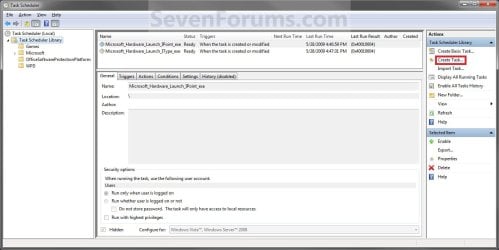
Step1.jpg
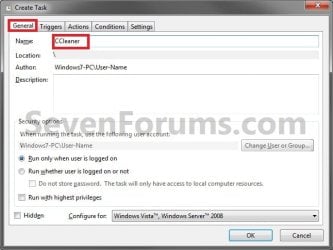
3. Under the General tab, type in the "Name" of the program you want to create this shortcut for. (see screenshot below)
NOTE: This will be the name of the task. As an example, I will use CCleaner for that program. Make note of this name, you will need it later in step 12 and 14 below.
Step2.jpg
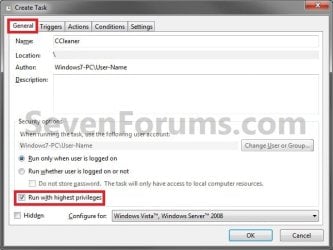
4. Check the Run with highest privileges box. (See screenshot below)
Step3.jpg
5. Click/tap on the Configure for drop down box to open it, and select Windows® 7, Windows Server™ 2008 R2 or the Windows you are currently in. (see screenshot above and below)
NOTE: This is like compatibility mode. If the program does not support running in Windows 7 normally, then you can select the OS that is does support running in instead to have it run in compatibility mode as if it was running in that OS instead of Windows 7.

Drop_Down_Box.jpg
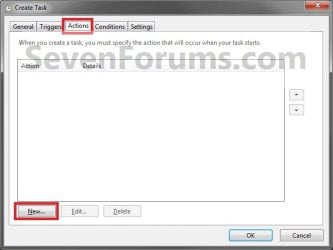
6. Click/tap on the Actions tab, then on the New button. (see screenshot below)
Step4.jpg
7. In the Program/script: box in the Actions tab, copy and paste the path below. (see screenshot below step 9)
NOTE: Thank you to chillz for the updated steps 7 and 8.
%windir%\System32\cmd.exe
8. In the Add arguments (optional): box in the Actions tab, type in the argument below. (see screenshot below step 9)

NOTE: Substitute Task Name in the argument below with the name you entered in step 3 (ex: CCleaner) within quotes, and substitute Full Path of Program in the argument below with the actual full path of the program's .exe file within quote.
/c start "Task Name" "Full Path of Program"


For example:

Code:
/c start "CCleaner" "C:\Program Files\CCleaner\CCleaner64.exe"
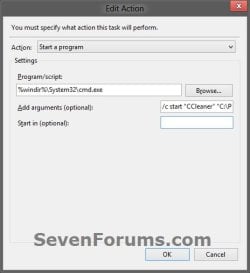
9. Click/tap on OK. (see screenshot below)
step7.jpg
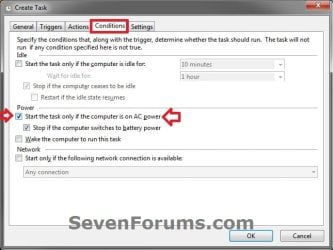
10. Click/tap on the Conditions tab, and uncheck the Stop if the computer switches to battery power box first, then uncheck the Start the task only if the computer is on AC power box. (see screenshots below)
NOTE: This step is mostly for laptops, so that you will be able to run the program when the laptop is running on battery power.
step8.jpg

Conditions.jpg

11. Click/tap on OK. (See screenshots above)

12. You will now see your new task created with the name (ex: CCleaner) you gave it in step 3. Close Task Scheduler. (see screenshot below)
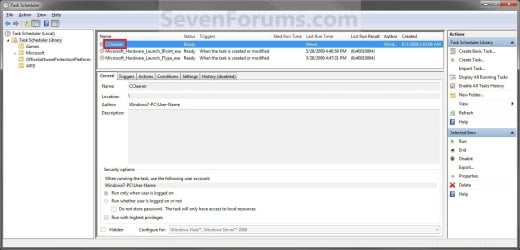
Step9.jpg
13. Right click or press and hold on an empty area of your desktop, then click/tap on New and Shortcut.

14. Type in the target below for the location field, then click/tap on the Next button. (see screenshot below)
NOTE: Subsitute task-name in the target with the name (ex: CCleaner) within quotes that you used in step 3.
schtasks /run /tn "task-name"

For example: For my task name CCleaner I used from step 3, I would type:
schtasks /run /tn "CCleaner"
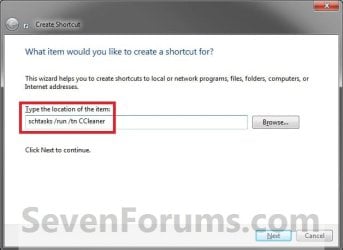
Step10.jpg
15. Type in a name you want for the shortcut (ex: CCleaner), then click/tap on the Finish button. (see screenshot below)
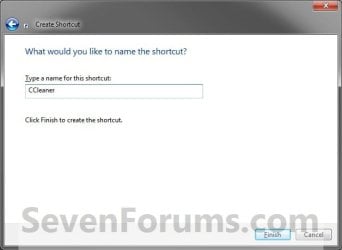
Step11.jpg
16. Right click on the new shortcut (ex: CCleaner) on the desktop, then click/tap on Properties.

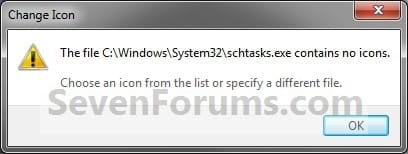
17. Click/tap on the Shortcut tab, and on the Change Icon button. (see screenshot below)
Step12.jpg
18. Click/tap on OK. (see screenshot below)
Step13.jpg
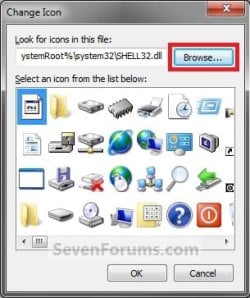
19. Click/tap on the Browse button. (see screenshot below)
Step14.jpg
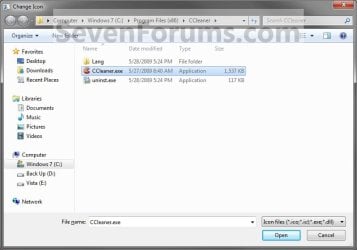
20. Navigate to the .exe file of the program that you have created this shortcut with, select it, and click/tap on Open. (see screenshot below)
NOTE: If you have a icon of your own that you would prefer to use instead, then navigate to where you have that icon saved at instead.
Step15.jpg
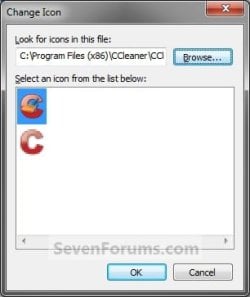
21. Select the icon you want for the shortcut, then click/tap on OK. (see screenshot below)
Step16.jpg
22. Click/tap on OK. (see screenshot below)
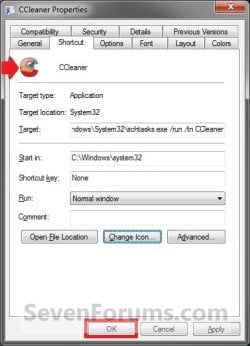
Step17.jpg
23. You can now use this elevated shortcut to run at startup in your "Startup" folder, run at startup as a task, Pin to Start Menu, Pin to Taskbar, assign a keyboard shortcut, or move to where you like for easy use.

24. When you run this new elevated shortcut, you will now no longer have to click/tap on YES to approve the UAC prompt to allow the program run as administrator.


   Tip
To Undo and Remove this Task:
  • While having Task Scheduler Library selected in the left pane, right click on the task in the right pane that you created in step 12, then click on Delete and Yes to approve.
  • Delete the shortcut.
That's it,
Shawn


Last edited:
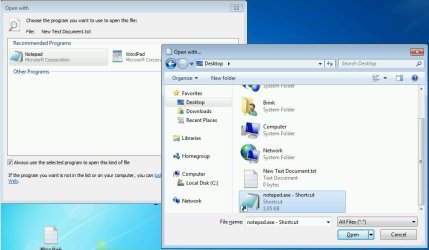
Thank you for your quick response. Unfortunately, I cannot figure out how I choose the elevated shortcut. When I go to "Open with" none of the programs seem to be the one for the shortcut. I typed in what I thought was the path from looking at the "properties" of the shortcut but that didn't work. In addition, the path I typed brought up an icon that says "Manages scheduled tasks". I tried something else but that resulted in a third icon showing in "Recommended Programs". Now it seems I can't delete either one of these "Recommended Programs" that do not work. Any ideas??
 

My Computer

Computer type
Laptop
Computer Manufacturer/Model Number
Dell Inspiron 5521
OS
Windows 7 Home Premium 64 bit
CPU
Intel i5-3337U
Memory
6 GB
Browser
Firefox

My Computer

Computer type
PC/Desktop
Computer Manufacturer/Model Number
Self built custom
OS
64-bit Windows 11 Pro for Workstations
CPU
Intel i7-8700K OC'd to 5 GHz
Motherboard
ASUS ROG Maximus XI Formula Z390
Memory
64 GB (4x16GB) G.SKILL TridentZ RGB DDR4 3600 MHz
Graphics Card(s)
ASUS ROG-STRIX-GTX1080TI-O11G-GAMING
Sound Card
Integrated
Monitor(s) Displays
2 x Samsung Odyssey G7 27"
Screen Resolution
2560x1440
Hard Drives
1TB Samsung 990 PRO M.2,
4TB Samsung 990 PRO PRO M.2,
TerraMaster F8 SSD Plus NAS
PSU
Seasonic Prime Titanium 850W
Case
Thermaltake Core P3
Cooling
Corsair Hydro H115i
Keyboard
Logitech wireless K800
Mouse
Logitech MX Master 4
Internet Speed
2 Gb/s Download and 100 Mb/s Upload
Antivirus
Malwarebyte Anti-Malware Premium
Browser
Google Chrome
Other Info
Logitech Z625 speaker system,
Logitech BRIO 4K Pro webcam,
HP Color LaserJet Pro MFP M477fdn,
APC SMART-UPS RT 1000 XL - SURT1000XLI,
Galaxy S23 Plus phone
Task Scheduler & App Options at startup

Have turned to this Forum many times for solutions, though, this is my first posting.

After reading a posting in the HowToGeek column, I utilized Task Scheduler to automate running SyncToy for doing backups. Today, however, I ran into several issues attempting to automate the Malwarebytes application.

Your script on bypassing the UAC was spot on. However, once the app starts up, it stops at the screen offering "Quick Scan" and "Full Scan" options. I disabled the prompt for updating, but cannot determine how to just get things to run without my interaction. (which defeats the whole purpose of this script). Subbing in other .exe files within the program's folder had no effect.

When a program opens as this one does, asking for user selections before it proceeds, is it simply not possible to automate the process as I did with the SyncToy app?

Thanks.
 

My Computer

Computer type
PC/Desktop
Computer Manufacturer/Model Number
Gateway
OS
WIN7 Home Premium x64
Memory
3GB
Hard Drives
1TB
Antivirus
AVG 2014 (Paid)
Browser
IE11, Firefox, Chrome
Have turned to this Forum many times for solutions, though, this is my first posting.

After reading a posting in the HowToGeek column, I utilized Task Scheduler to automate running SyncToy for doing backups. Today, however, I ran into several issues attempting to automate the Malwarebytes application.

Your script on bypassing the UAC was spot on. However, once the app starts up, it stops at the screen offering "Quick Scan" and "Full Scan" options. I disabled the prompt for updating, but cannot determine how to just get things to run without my interaction. (which defeats the whole purpose of this script). Subbing in other .exe files within the program's folder had no effect.

When a program opens as this one does, asking for user selections before it proceeds, is it simply not possible to automate the process as I did with the SyncToy app?

Thanks.

Hi,

I have Malwarebytes as well but I'm only using the Task Scheduler (UAC bypass) to launch the main MBAM console, which starts up in the "Scanner" tab, as you mentioned.

I asked about this at the MBAM forum, whether there are shortcut keys that can be used with a script, once the main console launches.

Unfortunately, MBAM's console is limited without the mouse. I haven't as yet seen a way to switch to the other tabs, as with the <ctrl> tab function in IE, etc.

I thought about writing a script (using Autohotkey) with mouse x/y coordinates, to do some things with MBAM's console but I put that idea on my back burner for now.

MBAM does have several command-line options, like resetting the scanner schedules, but there weren't any commands available that I was interested in using at the time I looked into it.

The list of non-interactive command-mode items that can be done, from CMD or internally in a script, are are listed in the "help" index from the "about" tab, then the "help" button. The index has a section labeled "Command Line Parameters".
 

My Computer

Computer type
PC/Desktop
Computer Manufacturer/Model Number
Built at Micro Center Richardson, TX
OS
Windows 7 Home Premium 64 bit
CPU
Intel i5 650 Dual Core 3.20 GHz Cache 4MB Threads: 4
Motherboard
ASUS PRO P7P55D-E
Memory
Corsair 16GB DDR3 1600MHz 9-9-9-24 P/N: CMZ8GX3M2A1600C
Graphics Card(s)
ZOTAC GeFORCE 9500 ZT-95TEK2M-FSL 1GB GDDR2
Sound Card
Mother Bd
Monitor(s) Displays
ASUS V228H 21.5” Diag
Screen Resolution
1440 x 900
Hard Drives
SEAGATE BARRACUDA (2ea) 3.5” INTERNAL 1Tb 16 MB SATA ST1000DM003-9YN162 7200RPM, 64MB, SATA 6Gb/s ** 2 Sata Hot-Swap Racks installed in Tower
PSU
Thermaltake Model TR2 RX 750W
Cooling
2 Tower Fans
Keyboard
Dell Quietkey PS/2 Windows 104 P/N 0463CD
Mouse
Kensington Mechanical Trackball USB Model 64217
Internet Speed
35/35
Antivirus
Norton 360 & MBAM Pro
Browser
IE10
Other Info
Printer: HP DeskJet 3520 USB 2.0 **
Speakers: ALTEC Model VS4621 2.1 28 W/Channel w/Sub-woofer **
IOGEAR HDMI Monitor Switcher Swx3 MODEL GHDSW3 ** Addonics ZDRWESU3 eSata/USB 3.0 external DVD Read/Write DVD Drive** SEAGATE GoFlex USB 2.0 Portable HD 500GB 5400 RPM P/N: 9ZF2A2-570
For now, having the task scheduler launch the application will serve as a reminder to run mbam. (at least until I throw down a buy the full version, to set up ongoing processes).

thanks for the very prompt reply.
 

My Computer

Computer type
PC/Desktop
Computer Manufacturer/Model Number
Gateway
OS
WIN7 Home Premium x64
Memory
3GB
Hard Drives
1TB
Antivirus
AVG 2014 (Paid)
Browser
IE11, Firefox, Chrome
I used the info in this Tutorial which worked well, but it soon dawned on me that the applications seemed to be taking a long time to run.

Than the penny dropped - Scheduled Tasks run at priority 7 by default (which is lower than directly run applications typically run at) and the Task Scheduler does not directly provide a way to set priorities. So I Exported each task [that I had added] (as XML), deleted each task, edited the XML to change priority to 6 (which makes all the difference) and then Imported the tasks again. Problem solved.

Might I suggest that the Tutorial could mention the priority issue and its solution.

Whilst on the subject of priorities, they should not be set too high - 4 to 6 should be adequate for most purposes. Setting the priority too high can cause instabilities (esp. priorities 0 & 1) as system critical processes which are vital to the systems smooth operation can can held back.
 
Last edited:

My Computer

Computer type
PC/Desktop
Computer Manufacturer/Model Number
ZooStorm
OS
W7 x86
CPU
i3-3240
Motherboard
GigaByte H61M-DS2-DVI
Memory
4GB
Hard Drives
Western Digital 1TB
Antivirus
Avast
Browser
Chrome
Batch - How do you know that Scheduled tasks run at a priority 7 ?
 

My Computer

Computer type
PC/Desktop
Computer Manufacturer/Model Number
Custom Built
OS
Windows 10 Pro
CPU
Core2Quad (2.6 Ghz)
Motherboard
nVidia 775
Memory
8 Gigs DDR2
Graphics Card(s)
Geforce Titan Black
Sound Card
Motherboard Audio
Monitor(s) Displays
25" Asus LCD
Screen Resolution
1680x1050
Hard Drives
120 Gig SSD
60 Gig SSD
750 Gig HDD
PSU
850 Watts
Case
Mid-Size
Keyboard
Logitech
Mouse
Logitech - I love logitech mouses
Internet Speed
DSL 25Mbps - Although extremely expensive
Antivirus
Microsoft Anti-Virus
Browser
FireFox 36.x
Hi Brink,
very nice guide, thanks a lot,
one question, will this work also on standard users non admin or power users?
Thanks in advance.
 

My Computer

OS
Windows 7 Ultimate x64

My Computer

Computer type
PC/Desktop
Computer Manufacturer/Model Number
Self built custom
OS
64-bit Windows 11 Pro for Workstations
CPU
Intel i7-8700K OC'd to 5 GHz
Motherboard
ASUS ROG Maximus XI Formula Z390
Memory
64 GB (4x16GB) G.SKILL TridentZ RGB DDR4 3600 MHz
Graphics Card(s)
ASUS ROG-STRIX-GTX1080TI-O11G-GAMING
Sound Card
Integrated
Monitor(s) Displays
2 x Samsung Odyssey G7 27"
Screen Resolution
2560x1440
Hard Drives
1TB Samsung 990 PRO M.2,
4TB Samsung 990 PRO PRO M.2,
TerraMaster F8 SSD Plus NAS
PSU
Seasonic Prime Titanium 850W
Case
Thermaltake Core P3
Cooling
Corsair Hydro H115i
Keyboard
Logitech wireless K800
Mouse
Logitech MX Master 4
Internet Speed
2 Gb/s Download and 100 Mb/s Upload
Antivirus
Malwarebyte Anti-Malware Premium
Browser
Google Chrome
Other Info
Logitech Z625 speaker system,
Logitech BRIO 4K Pro webcam,
HP Color LaserJet Pro MFP M477fdn,
APC SMART-UPS RT 1000 XL - SURT1000XLI,
Galaxy S23 Plus phone

My Computer

OS
Windows 7 Ultimate x64
You're welcome. :)
 

My Computer

Computer type
PC/Desktop
Computer Manufacturer/Model Number
Self built custom
OS
64-bit Windows 11 Pro for Workstations
CPU
Intel i7-8700K OC'd to 5 GHz
Motherboard
ASUS ROG Maximus XI Formula Z390
Memory
64 GB (4x16GB) G.SKILL TridentZ RGB DDR4 3600 MHz
Graphics Card(s)
ASUS ROG-STRIX-GTX1080TI-O11G-GAMING
Sound Card
Integrated
Monitor(s) Displays
2 x Samsung Odyssey G7 27"
Screen Resolution
2560x1440
Hard Drives
1TB Samsung 990 PRO M.2,
4TB Samsung 990 PRO PRO M.2,
TerraMaster F8 SSD Plus NAS
PSU
Seasonic Prime Titanium 850W
Case
Thermaltake Core P3
Cooling
Corsair Hydro H115i
Keyboard
Logitech wireless K800
Mouse
Logitech MX Master 4
Internet Speed
2 Gb/s Download and 100 Mb/s Upload
Antivirus
Malwarebyte Anti-Malware Premium
Browser
Google Chrome
Other Info
Logitech Z625 speaker system,
Logitech BRIO 4K Pro webcam,
HP Color LaserJet Pro MFP M477fdn,
APC SMART-UPS RT 1000 XL - SURT1000XLI,
Galaxy S23 Plus phone
Batch - How do you know that Scheduled tasks run at a priority 7 ?

'Cos if one creates a Scheduled Task there is no way (within the Create Task dialogue) to set the priority. But if one then exports such a scheduled task (as XML), it is clear that the priority is set to 7 by default.
 

My Computer

Computer type
PC/Desktop
Computer Manufacturer/Model Number
ZooStorm
OS
W7 x86
CPU
i3-3240
Motherboard
GigaByte H61M-DS2-DVI
Memory
4GB
Hard Drives
Western Digital 1TB
Antivirus
Avast
Browser
Chrome
Batch - How do you know that Scheduled tasks run at a priority 7 ?

'Cos if one creates a Scheduled Task there is no way (within the Create Task dialogue) to set the priority. But if one then exports such a scheduled task (as XML), it is clear that the priority is set to 7 by default.

I don't have any Scheduled tasks, nor can I think of any to make. Can you send me or post to download your XML file from one of your Scheduled tasks so I can take a look ?
 

My Computer

Computer type
PC/Desktop
Computer Manufacturer/Model Number
Custom Built
OS
Windows 10 Pro
CPU
Core2Quad (2.6 Ghz)
Motherboard
nVidia 775
Memory
8 Gigs DDR2
Graphics Card(s)
Geforce Titan Black
Sound Card
Motherboard Audio
Monitor(s) Displays
25" Asus LCD
Screen Resolution
1680x1050
Hard Drives
120 Gig SSD
60 Gig SSD
750 Gig HDD
PSU
850 Watts
Case
Mid-Size
Keyboard
Logitech
Mouse
Logitech - I love logitech mouses
Internet Speed
DSL 25Mbps - Although extremely expensive
Antivirus
Microsoft Anti-Virus
Browser
FireFox 36.x
JerometheGiraff

"I don't have any Scheduled tasks, nor can I think of any to make"??? :confused:

How about simply following the instructions in this tutorial for, say, Notepad.exe or any other program that you care to choose. Then export the Scheduled Task (as an XML file). Open up the XML and you can clearly see the priority in the relevant tag as <Priority>7</Priority>. It is a simple matter to edit the XML, delete the task (as originally created) and then import the edited XML. Once you've satisfied your curiosity you are free to delete the task.

As an aside, from my experience applications that create scheduled tasks (i.e. not using the UI) don't suffer from this issue and can create tasks with higher (and lower) priorities. It may well be that the interface used by such applications accepts the task creation using an XML file anyhow.
 

My Computer

Computer type
PC/Desktop
Computer Manufacturer/Model Number
ZooStorm
OS
W7 x86
CPU
i3-3240
Motherboard
GigaByte H61M-DS2-DVI
Memory
4GB
Hard Drives
Western Digital 1TB
Antivirus
Avast
Browser
Chrome
I don't have any Scheduled tasks, nor can I think of any to make. Can you send me or post to download your XML file from one of your Scheduled tasks so I can take a look ?

Hi,

I use one task to wake my PC overnight to run unattended AV & MBAM scans. That eliminates any system slow-down issues while scanning since I'm not using the PC during that time.
 

My Computer

Computer type
PC/Desktop
Computer Manufacturer/Model Number
Built at Micro Center Richardson, TX
OS
Windows 7 Home Premium 64 bit
CPU
Intel i5 650 Dual Core 3.20 GHz Cache 4MB Threads: 4
Motherboard
ASUS PRO P7P55D-E
Memory
Corsair 16GB DDR3 1600MHz 9-9-9-24 P/N: CMZ8GX3M2A1600C
Graphics Card(s)
ZOTAC GeFORCE 9500 ZT-95TEK2M-FSL 1GB GDDR2
Sound Card
Mother Bd
Monitor(s) Displays
ASUS V228H 21.5” Diag
Screen Resolution
1440 x 900
Hard Drives
SEAGATE BARRACUDA (2ea) 3.5” INTERNAL 1Tb 16 MB SATA ST1000DM003-9YN162 7200RPM, 64MB, SATA 6Gb/s ** 2 Sata Hot-Swap Racks installed in Tower
PSU
Thermaltake Model TR2 RX 750W
Cooling
2 Tower Fans
Keyboard
Dell Quietkey PS/2 Windows 104 P/N 0463CD
Mouse
Kensington Mechanical Trackball USB Model 64217
Internet Speed
35/35
Antivirus
Norton 360 & MBAM Pro
Browser
IE10
Other Info
Printer: HP DeskJet 3520 USB 2.0 **
Speakers: ALTEC Model VS4621 2.1 28 W/Channel w/Sub-woofer **
IOGEAR HDMI Monitor Switcher Swx3 MODEL GHDSW3 ** Addonics ZDRWESU3 eSata/USB 3.0 external DVD Read/Write DVD Drive** SEAGATE GoFlex USB 2.0 Portable HD 500GB 5400 RPM P/N: 9ZF2A2-570
I don't know whether this has been mentioned in this thread, but I was in the process of creating a task which I haven't done in a long time on Windows 8.1 and I get a dialog asking me for my Network User Name and Password, to which I enter in the accounts password then I get an error the task can't be created ?
 

My Computer

Computer type
PC/Desktop
Computer Manufacturer/Model Number
Custom Built
OS
Windows 10 Pro
CPU
Core2Quad (2.6 Ghz)
Motherboard
nVidia 775
Memory
8 Gigs DDR2
Graphics Card(s)
Geforce Titan Black
Sound Card
Motherboard Audio
Monitor(s) Displays
25" Asus LCD
Screen Resolution
1680x1050
Hard Drives
120 Gig SSD
60 Gig SSD
750 Gig HDD
PSU
850 Watts
Case
Mid-Size
Keyboard
Logitech
Mouse
Logitech - I love logitech mouses
Internet Speed
DSL 25Mbps - Although extremely expensive
Antivirus
Microsoft Anti-Virus
Browser
FireFox 36.x
How you log into your "windows workstation" (username + pwd)
 

My Computer

Computer type
Laptop
Computer Manufacturer/Model Number
Dell
OS
Windows 7 Ultimate 64bit
CPU
2.2
Memory
8Gb
Graphics Card(s)
NVIDIA
Screen Resolution
1280/762
Mouse
built in pad || iphone || MS wireless
Internet Speed
100MB
Antivirus
Avast
Browser
Chrome, Chrome portable
was about to ask, but then I remembered what I heard at the shop when buying some milk (customer in front has some PSx issue, multi-role-local-shopkeeper-cum-agony-aunt asks, "How you tried Googling it on... Google?!" :) found this

Code:
Task priority	Priority Class	Priority Level
0	REALTIME_PRIORITY_CLASS	THREAD_PRIORITY_TIME_CRITICAL
1	HIGH_PRIORITY_CLASS	THREAD_PRIORITY_HIGHEST
2	ABOVE_NORMAL_PRIORITY_CLASS	THREAD_PRIORITY_ABOVE_NORMAL
3	ABOVE_NORMAL_PRIORITY_CLASS	THREAD_PRIORITY_ABOVE_NORMAL
4	NORMAL_PRIORITY_CLASS	THREAD_PRIORITY_NORMAL
5	NORMAL_PRIORITY_CLASS	THREAD_PRIORITY_NORMAL
6	NORMAL_PRIORITY_CLASS	THREAD_PRIORITY_NORMAL
7	BELOW_NORMAL_PRIORITY_CLASS	THREAD_PRIORITY_BELOW_NORMAL
8	BELOW_NORMAL_PRIORITY_CLASS	THREAD_PRIORITY_BELOW_NORMAL
9	IDLE_PRIORITY_CLASS	THREAD_PRIORITY_LOWEST
10	IDLE_PRIORITY_CLASS	THREAD_PRIORITY_IDLE

Compare with Synergy

IT3Zbi4.png


Creating task:
7kTUj3S.png


9Lnrt4j.png


SfMtoFG.png


IkdqLHT.png


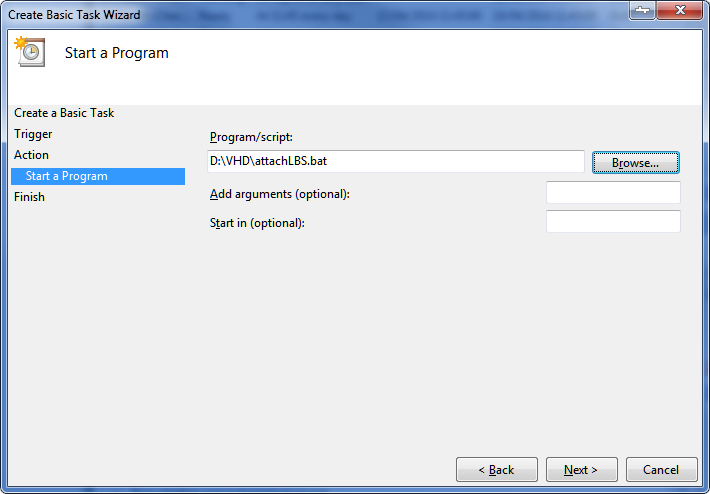
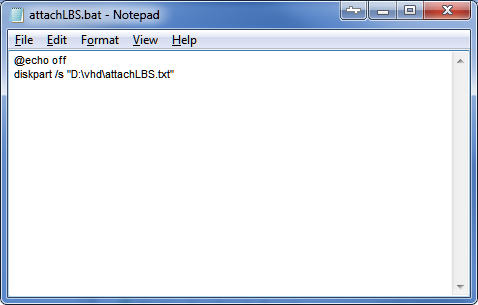
AttachLBS.bat
6vSZxl7.png


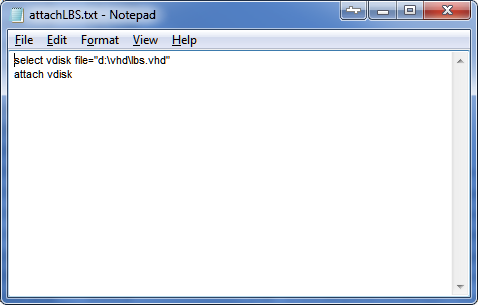
AttachLBS.txt
O5OMbYb.png


CZ4nYKb.png


Config for win 7

vtsq52b.png


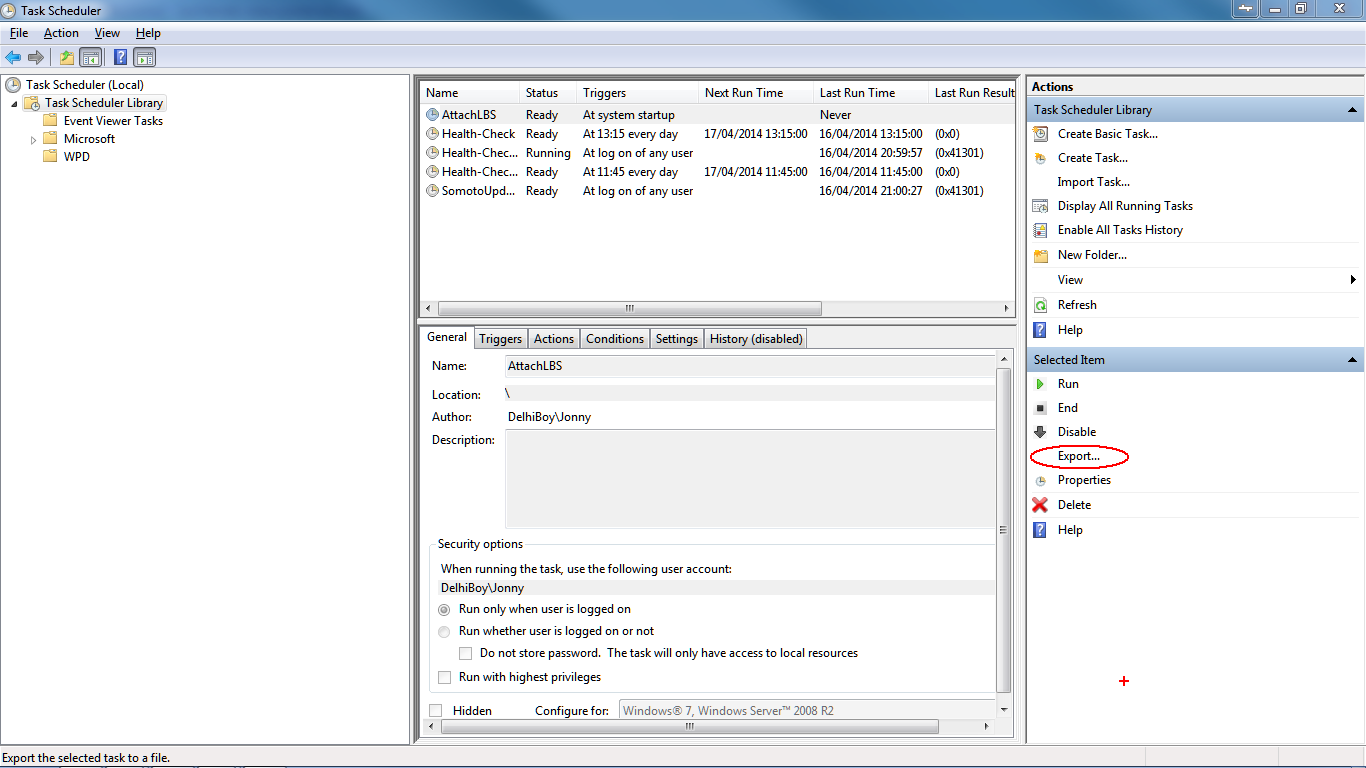
Export
NSegMn2.png


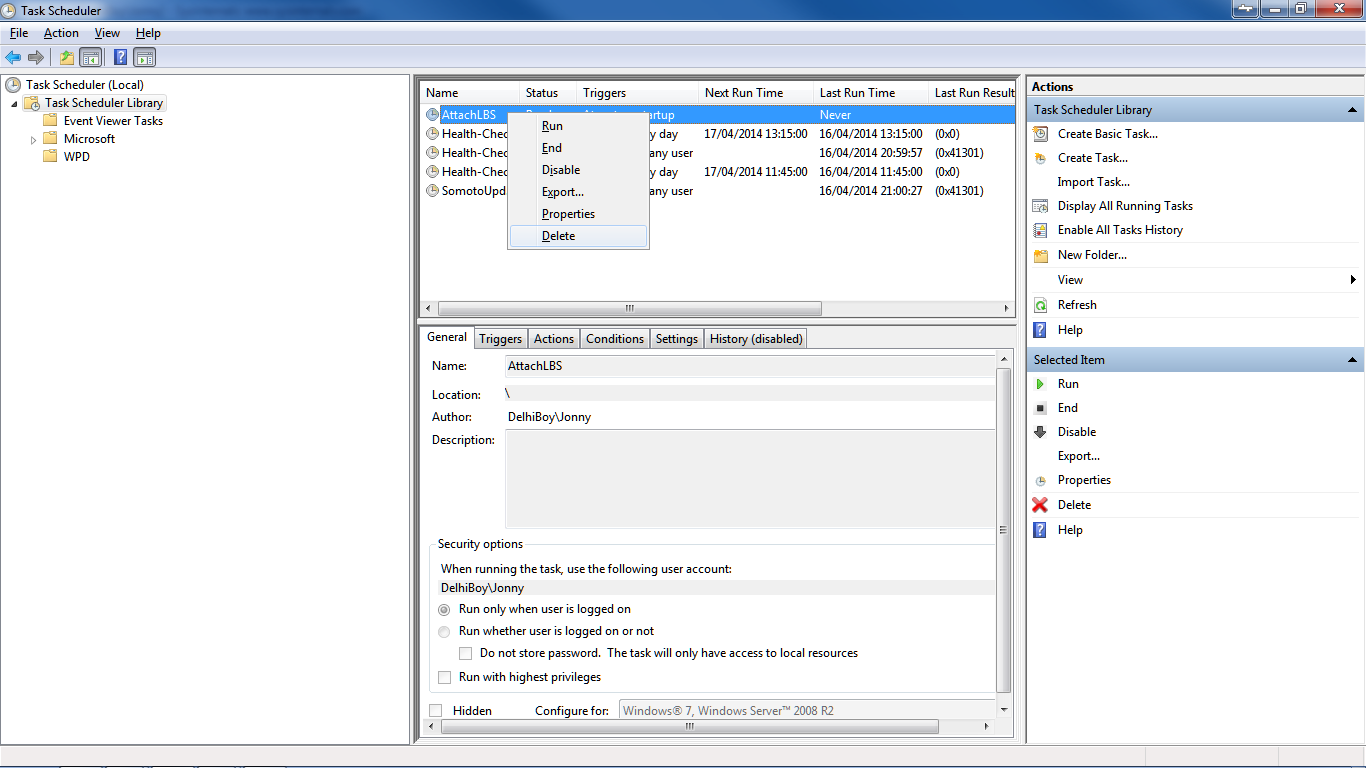
Delete Original Task
vGfjeCV.png


Edit Priority (Will set to 6, as suggested)
JtSpOaF.png


Import edited task
dr7QZtJ.png
 

My Computer

Computer type
Laptop
Computer Manufacturer/Model Number
Dell
OS
Windows 7 Ultimate 64bit
CPU
2.2
Memory
8Gb
Graphics Card(s)
NVIDIA
Screen Resolution
1280/762
Mouse
built in pad || iphone || MS wireless
Internet Speed
100MB
Antivirus
Avast
Browser
Chrome, Chrome portable
This failed to achieve the goal of loading the volume before the shell. Modifying userinit succeeded in delaying the desktop, as the diskpart script WAS being executed, but still the shell doesn't load the items until explorer's restarted.. I'll live with it!
 

My Computer

Computer type
Laptop
Computer Manufacturer/Model Number
Dell
OS
Windows 7 Ultimate 64bit
CPU
2.2
Memory
8Gb
Graphics Card(s)
NVIDIA
Screen Resolution
1280/762
Mouse
built in pad || iphone || MS wireless
Internet Speed
100MB
Antivirus
Avast
Browser
Chrome, Chrome portable
First of all, thanks for this amazing tutorial, it has helped me a great deal! I have a question, but I am not sure if this is the appropriate place to ask, but I will in case there is somebody who can help me.

I have created an elevated shortcut of utorrent because I need it in order to make Sickbeard work. This way, Sickbeard automatically adds my torrents in utorrent without asking for my permission and it works like a charm. When I try to load a torrent though and I have previously started utorrent with the elevated shortcut, I get an error from utorrent that "It seems like uTorrent is already running but not responding" thus, making it impossible to add it. But when I try to load a torrent and utorrent was started from the regular shortcut or wasn't started at all, everything works fine.

Is there anything I am missing here? Thanks again! :)
 

My Computer

Computer type
PC/Desktop
OS
Windows 8.1 Pro x64 with Media Center
Back
Top