Eliminated admin password in boot, now can't get past blue screen of d

Have you checked and install Windows Updates?
 

My Computer My Computer

At a glance

Windows 10 Pro. 64/ version 1709 Windows 7 Pr...Intel i7-6800K @ 4.3Corsair Platinum 16 gig @2400EVGA GTX 1070 OC
Computer type
PC/Desktop
Computer Manufacturer/Model Number
Home made Desktop
OS
Windows 10 Pro. 64/ version 1709 Windows 7 Pro/64
CPU
Intel i7-6800K @ 4.3
Motherboard
ASUS X-99 Deluxe II
Memory
Corsair Platinum 16 gig @2400
Graphics Card(s)
EVGA GTX 1070 OC
Monitor(s) Displays
Asus 27" LED LCD/VE278Q
Screen Resolution
1920-1080 or 1280-720 HDMI
Hard Drives
INTEL SSD 730-240 Gb Sata 3.0/
PSU
EVGA Platium 1200W
Case
Phanteks Luxe Tempered Glass 8 fans/ one radiator
Cooling
XSPC/ Water Cooled CPU
Keyboard
Das 4 Professional
Mouse
Logitech M705/MX Anywhere 2-S
Internet Speed
100 mbits
Antivirus
Microsoft Security Essentials/ Malwarebytes Premium 3.0/ SAS
Browser
I.E. 11 default/Firefox/ ISP Time Warner Cable/Spectrum
Other Info
LG BluRay Burner/
Sound system-KLipsch-THX/
Icy Dock ssd Hot Swap bays.
Why are you installing a bunch of drivers in a driver-complete OS? Did you think this is still XP?

The steps to get a perfect install are all in Clean Reinstall - Factory OEM Windows 7

Have the Wireless drive in your backup so if it's not provided by the installer you can install it to get online. Then enable Automatically deliver drivers via Windows Update (Step 3).

Run all rounds of Important and Optional Updates to completion, including required reboots. Keep going back for more Updates until they are complete. You can set up your desktop and install programs at the same time.

Any drivers still missing in Device Manager can be found on the Support Downloads webpage for your PC model. Other tips for HP's are included in the tutorial.
 
Are you able to confirm that the drivers have installed? Has your original problem been solved?

As with the link issue, I am not entirely sure... How are you going about creating the links?

Josh


Shockingly i installed the drivers and then rebooted and it's not showing up as installed .
 

My Computer My Computer

At a glance

win 7 64 Home edition2430 i5 intel6imtegrated
Computer type
Laptop
Computer Manufacturer/Model Number
asus U56E
OS
win 7 64 Home edition
CPU
2430 i5 intel
Motherboard
?Asus
Memory
6
Graphics Card(s)
imtegrated
Sound Card
Microsoft
Hard Drives
WDC WD6400BPVT-80HXZT3 ATA Device
Antivirus
Kaspersky trial AV 2014
Browser
chrome
Why are you installing a bunch of drivers in a driver-complete OS? Did you think this is still XP?

The steps to get a perfect install are all in Clean Reinstall - Factory OEM Windows 7

Have the Wireless drive in your backup so if it's not provided by the installer you can install it to get online. Then enable Automatically deliver drivers via Windows Update (Step 3).

Run all rounds of Important and Optional Updates to completion, including required reboots. Keep going back for more Updates until they are complete. You can set up your desktop and install programs at the same time.

Any drivers still missing in Device Manager can be found on the Support Downloads webpage for your PC model. Other tips for HP's are included in the tutorial.


I have followed that process numerous times and this one particular driver is always missing.
 

My Computer My Computer

At a glance

win 7 64 Home edition2430 i5 intel6imtegrated
Computer type
Laptop
Computer Manufacturer/Model Number
asus U56E
OS
win 7 64 Home edition
CPU
2430 i5 intel
Motherboard
?Asus
Memory
6
Graphics Card(s)
imtegrated
Sound Card
Microsoft
Hard Drives
WDC WD6400BPVT-80HXZT3 ATA Device
Antivirus
Kaspersky trial AV 2014
Browser
chrome
What is exact driver? Can you show us the link where you've downloaded it?
 
Here is the driver, i usually just use Slim drivers but Shadowjk gave me the link in his posts and unfortunately it didn't work.

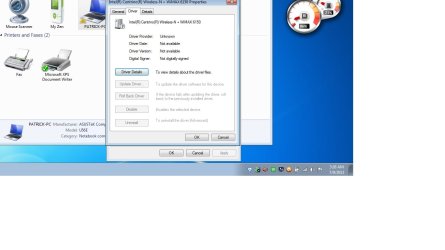
I should note that even trying to update driver from following instructions it never is able to find it online or on the computer, it's the only one that always goes missing.


The pic on the left is the drivers i usually install after Win 7 is installed from an ISO disk, do i need these and which ones are necessary for install. I install Win 7 then these drivers and then install Win 7 updates.

I don't understand the Win 7 is driver complete comment when i need to install all these extras.
 

Attachments

  • Untitled.png
    Untitled.png
    45.6 KB · Views: 7
  • Untitled.jpg
    Untitled.jpg
    63.3 KB · Views: 6

My Computer My Computer

At a glance

win 7 64 Home edition2430 i5 intel6imtegrated
Computer type
Laptop
Computer Manufacturer/Model Number
asus U56E
OS
win 7 64 Home edition
CPU
2430 i5 intel
Motherboard
?Asus
Memory
6
Graphics Card(s)
imtegrated
Sound Card
Microsoft
Hard Drives
WDC WD6400BPVT-80HXZT3 ATA Device
Antivirus
Kaspersky trial AV 2014
Browser
chrome
herbc

On the second image the properties window can you click on the Details tab and on the drop down menu under property choose Hardware Ids and take a PrntScrn of that and upload the image .
 

My Computer My Computer

At a glance

Windows 7 Ultimate 32-Bit & Windows 7 Ultimat...Intel Core i7 CPU 950 @ 3.07GHzOCZ 6GB (3 x 2GB) 240-Pin DDR3 SDRAM DDR3 160...ATI Radeon HD 5700 Series
Computer Manufacturer/Model Number
Custom Built
OS
Windows 7 Ultimate 32-Bit & Windows 7 Ultimate 64-Bit
CPU
Intel Core i7 CPU 950 @ 3.07GHz
Motherboard
ASUS P6T DELUXE V2
Memory
OCZ 6GB (3 x 2GB) 240-Pin DDR3 SDRAM DDR3 1600 OCZ3X1600R2
Graphics Card(s)
ATI Radeon HD 5700 Series
Sound Card
OnBoard
Hard Drives
WD6400AACS-00M3B0 (640GB SATA )
PSU
CORSAIR 850w
Case
NZXT LEXA
Cooling
Intel Stock Heatsink Fan
Keyboard
Microsoft Wireless Laser Keyboard 7000
Mouse
Microsoft Wireless Laser Mouse 7000

My Computer My Computer

At a glance

Windows 7 Ultimate 32-Bit & Windows 7 Ultimat...Intel Core i7 CPU 950 @ 3.07GHzOCZ 6GB (3 x 2GB) 240-Pin DDR3 SDRAM DDR3 160...ATI Radeon HD 5700 Series
Computer Manufacturer/Model Number
Custom Built
OS
Windows 7 Ultimate 32-Bit & Windows 7 Ultimate 64-Bit
CPU
Intel Core i7 CPU 950 @ 3.07GHz
Motherboard
ASUS P6T DELUXE V2
Memory
OCZ 6GB (3 x 2GB) 240-Pin DDR3 SDRAM DDR3 1600 OCZ3X1600R2
Graphics Card(s)
ATI Radeon HD 5700 Series
Sound Card
OnBoard
Hard Drives
WD6400AACS-00M3B0 (640GB SATA )
PSU
CORSAIR 850w
Case
NZXT LEXA
Cooling
Intel Stock Heatsink Fan
Keyboard
Microsoft Wireless Laser Keyboard 7000
Mouse
Microsoft Wireless Laser Mouse 7000
Yeah, it downloaded but after it supposedly installed it's still not showing as installed in device manager.
 

My Computer My Computer

At a glance

win 7 64 Home edition2430 i5 intel6imtegrated
Computer type
Laptop
Computer Manufacturer/Model Number
asus U56E
OS
win 7 64 Home edition
CPU
2430 i5 intel
Motherboard
?Asus
Memory
6
Graphics Card(s)
imtegrated
Sound Card
Microsoft
Hard Drives
WDC WD6400BPVT-80HXZT3 ATA Device
Antivirus
Kaspersky trial AV 2014
Browser
chrome
herbc

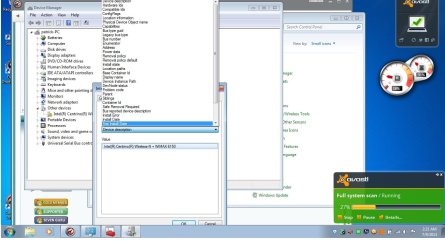
On the second image the properties window can you click on the Details tab and on the drop down menu under property choose Hardware Ids and take a PrntScrn of that and upload the image .


Does this help
 

Attachments

  • Untitled.jpg
    Untitled.jpg
    110.3 KB · Views: 7

My Computer My Computer

At a glance

win 7 64 Home edition2430 i5 intel6imtegrated
Computer type
Laptop
Computer Manufacturer/Model Number
asus U56E
OS
win 7 64 Home edition
CPU
2430 i5 intel
Motherboard
?Asus
Memory
6
Graphics Card(s)
imtegrated
Sound Card
Microsoft
Hard Drives
WDC WD6400BPVT-80HXZT3 ATA Device
Antivirus
Kaspersky trial AV 2014
Browser
chrome
That's the driver I posted on Post #28 . Have you tried restarting the PC ?
 

My Computer My Computer

At a glance

Windows 7 Ultimate 32-Bit & Windows 7 Ultimat...Intel Core i7 CPU 950 @ 3.07GHzOCZ 6GB (3 x 2GB) 240-Pin DDR3 SDRAM DDR3 160...ATI Radeon HD 5700 Series
Computer Manufacturer/Model Number
Custom Built
OS
Windows 7 Ultimate 32-Bit & Windows 7 Ultimate 64-Bit
CPU
Intel Core i7 CPU 950 @ 3.07GHz
Motherboard
ASUS P6T DELUXE V2
Memory
OCZ 6GB (3 x 2GB) 240-Pin DDR3 SDRAM DDR3 1600 OCZ3X1600R2
Graphics Card(s)
ATI Radeon HD 5700 Series
Sound Card
OnBoard
Hard Drives
WD6400AACS-00M3B0 (640GB SATA )
PSU
CORSAIR 850w
Case
NZXT LEXA
Cooling
Intel Stock Heatsink Fan
Keyboard
Microsoft Wireless Laser Keyboard 7000
Mouse
Microsoft Wireless Laser Mouse 7000
Yes, i always reboot after but still does not show.
 

My Computer My Computer

At a glance

win 7 64 Home edition2430 i5 intel6imtegrated
Computer type
Laptop
Computer Manufacturer/Model Number
asus U56E
OS
win 7 64 Home edition
CPU
2430 i5 intel
Motherboard
?Asus
Memory
6
Graphics Card(s)
imtegrated
Sound Card
Microsoft
Hard Drives
WDC WD6400BPVT-80HXZT3 ATA Device
Antivirus
Kaspersky trial AV 2014
Browser
chrome
This thing is not being recognized no matter what i do, i don't even think i need it.
 

Attachments

  • Untitled.jpg
    Untitled.jpg
    61.4 KB · Views: 6

My Computer My Computer

At a glance

win 7 64 Home edition2430 i5 intel6imtegrated
Computer type
Laptop
Computer Manufacturer/Model Number
asus U56E
OS
win 7 64 Home edition
CPU
2430 i5 intel
Motherboard
?Asus
Memory
6
Graphics Card(s)
imtegrated
Sound Card
Microsoft
Hard Drives
WDC WD6400BPVT-80HXZT3 ATA Device
Antivirus
Kaspersky trial AV 2014
Browser
chrome
The screen print in Post #30 is displaying the Device Description, not the Hardware IDs VistaKing asked for.
Click on Hardware Ids in the drop down list to display them.
 

My Computer My Computer

At a glance

Multi-Boot W7_Pro_x64 W8.1_Pro_x64 W10_Pro_x6...AMD Athlon II x4 6206GB GSkill DDR2 800AMD 4670 GPU + AMD 4200 IGP
Computer type
PC/Desktop
Computer Manufacturer/Model Number
home built
OS
Multi-Boot W7_Pro_x64 W8.1_Pro_x64 W10_Pro_x64 +Linux_VMs +Chromium_VM
CPU
AMD Athlon II x4 620
Motherboard
Gigabyte GA-MA785G-UD3H
Memory
6GB GSkill DDR2 800
Graphics Card(s)
AMD 4670 GPU + AMD 4200 IGP
Sound Card
on board Realtek ALC889A
Monitor(s) Displays
RCA 40" LCD TV, Insignia 32" LCD TV, HP 15" LCD monitor
Screen Resolution
1680 x 1050
Hard Drives
OCZ Vertex 3 120GB,
Samsung F3 1TB (3),
Several others - WD, Seagate, Hitachi, ...
PSU
Corsair 500 W
Case
Rosewill mid tower
Cooling
CM 90mm rifle
Keyboard
Gyration wireless, Logitech wireless, Dell USB wired
Mouse
Gyration wireless, Logitech wireless, V7 USB wired
Internet Speed
Spectrum - 100Mbps D / 10Mbps U
Antivirus
Avast, MBAM3, EMET, WinPatrol
Browser
Pale Moon, Firefox, IE
Other Info
2 multi-boot PC's
Mainly HTPC/Office/Gen purpose (no gaming).
Trendnet USB KVM.
LG DVD burner/Blue Ray Player.
Tray system for removable SATA backup drives.

Not currently OCd, under-volted.
I use Hybrid sleep, rarely re-boot or shutdown.

Hauppauge HD-PVR, Avermedia PCIe TV Tuner, Hauppauge PCI TV Tuner.
I don't know if these questions were asked already, but if they haven't

Have you tried uninstalling the device in Device Manager, rebooting, and let Windows rediscover the device?
Could a faulty Centrino chip in the MB be causing this issue?

Would testing with a Linux OS help determine if there is a Hardware problem?
 

My Computer My Computer

At a glance

Multi-Boot W7_Pro_x64 W8.1_Pro_x64 W10_Pro_x6...AMD Athlon II x4 6206GB GSkill DDR2 800AMD 4670 GPU + AMD 4200 IGP
Computer type
PC/Desktop
Computer Manufacturer/Model Number
home built
OS
Multi-Boot W7_Pro_x64 W8.1_Pro_x64 W10_Pro_x64 +Linux_VMs +Chromium_VM
CPU
AMD Athlon II x4 620
Motherboard
Gigabyte GA-MA785G-UD3H
Memory
6GB GSkill DDR2 800
Graphics Card(s)
AMD 4670 GPU + AMD 4200 IGP
Sound Card
on board Realtek ALC889A
Monitor(s) Displays
RCA 40" LCD TV, Insignia 32" LCD TV, HP 15" LCD monitor
Screen Resolution
1680 x 1050
Hard Drives
OCZ Vertex 3 120GB,
Samsung F3 1TB (3),
Several others - WD, Seagate, Hitachi, ...
PSU
Corsair 500 W
Case
Rosewill mid tower
Cooling
CM 90mm rifle
Keyboard
Gyration wireless, Logitech wireless, Dell USB wired
Mouse
Gyration wireless, Logitech wireless, V7 USB wired
Internet Speed
Spectrum - 100Mbps D / 10Mbps U
Antivirus
Avast, MBAM3, EMET, WinPatrol
Browser
Pale Moon, Firefox, IE
Other Info
2 multi-boot PC's
Mainly HTPC/Office/Gen purpose (no gaming).
Trendnet USB KVM.
LG DVD burner/Blue Ray Player.
Tray system for removable SATA backup drives.

Not currently OCd, under-volted.
I use Hybrid sleep, rarely re-boot or shutdown.

Hauppauge HD-PVR, Avermedia PCIe TV Tuner, Hauppauge PCI TV Tuner.
OK thanks, was not sure what that was or where to find them.
 

Attachments

  • Untitled.jpg
    Untitled.jpg
    67.7 KB · Views: 6

My Computer My Computer

At a glance

win 7 64 Home edition2430 i5 intel6imtegrated
Computer type
Laptop
Computer Manufacturer/Model Number
asus U56E
OS
win 7 64 Home edition
CPU
2430 i5 intel
Motherboard
?Asus
Memory
6
Graphics Card(s)
imtegrated
Sound Card
Microsoft
Hard Drives
WDC WD6400BPVT-80HXZT3 ATA Device
Antivirus
Kaspersky trial AV 2014
Browser
chrome
I don't know if these questions were asked already, but if they haven't

Have you tried uninstalling the device in Device Manager, rebooting, and let Windows rediscover the device?
Could a faulty Centrino chip in the MB be causing this issue?

Would testing with a Linux OS help determine if there is a Hardware problem?


Yes i tried that and it still cant find them, thanks though.
 

My Computer My Computer

At a glance

win 7 64 Home edition2430 i5 intel6imtegrated
Computer type
Laptop
Computer Manufacturer/Model Number
asus U56E
OS
win 7 64 Home edition
CPU
2430 i5 intel
Motherboard
?Asus
Memory
6
Graphics Card(s)
imtegrated
Sound Card
Microsoft
Hard Drives
WDC WD6400BPVT-80HXZT3 ATA Device
Antivirus
Kaspersky trial AV 2014
Browser
chrome
You might of already tried this but it's hard for me to tell.

Right click on the chosen hardware and select Update Driver.
Then select Browser my Computer.
Then select Let me Pick.
You might have more than one choice; pick one and select Next.
 

My Computer My Computer

At a glance

Windows 10 Pro. 64/ version 1709 Windows 7 Pr...Intel i7-6800K @ 4.3Corsair Platinum 16 gig @2400EVGA GTX 1070 OC
Computer type
PC/Desktop
Computer Manufacturer/Model Number
Home made Desktop
OS
Windows 10 Pro. 64/ version 1709 Windows 7 Pro/64
CPU
Intel i7-6800K @ 4.3
Motherboard
ASUS X-99 Deluxe II
Memory
Corsair Platinum 16 gig @2400
Graphics Card(s)
EVGA GTX 1070 OC
Monitor(s) Displays
Asus 27" LED LCD/VE278Q
Screen Resolution
1920-1080 or 1280-720 HDMI
Hard Drives
INTEL SSD 730-240 Gb Sata 3.0/
PSU
EVGA Platium 1200W
Case
Phanteks Luxe Tempered Glass 8 fans/ one radiator
Cooling
XSPC/ Water Cooled CPU
Keyboard
Das 4 Professional
Mouse
Logitech M705/MX Anywhere 2-S
Internet Speed
100 mbits
Antivirus
Microsoft Security Essentials/ Malwarebytes Premium 3.0/ SAS
Browser
I.E. 11 default/Firefox/ ISP Time Warner Cable/Spectrum
Other Info
LG BluRay Burner/
Sound system-KLipsch-THX/
Icy Dock ssd Hot Swap bays.
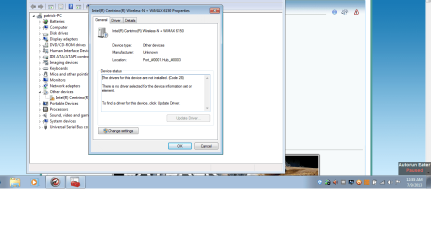
The pic on the left is the drivers i usually install after Win 7 is installed from an ISO disk, do i need these and which ones are necessary for install. I install Win 7 then these drivers and then install Win 7 updates.

I don't understand the Win 7 is driver complete comment when i need to install all these extras.

What makes you think you need to supply all of those drivers? That's XP-era installation procedure, not Win7.

Again, Win7 is driver-complete in the installer and once you get online to enable Automatically deliver drivers via Windows Update (Step 3) then run all rounds of Important and Optional Windows Updates to completion - when prompted for reboot, after it restarts go back to check for more Updates until there are none.

Then you only need to install the drivers which are still missing in Device Manager, from the Support Downloads webpage for your PC or device model - not an outdated disk or driver file.

If you didn't install your OS this way then you didn't do it correctly. We stopped needing to install a bunch of drivers into a fresh install after XP ten years ago.

I would start over and follow these steps to get and keep a perfect Clean Reinstall - Factory OEM Windows 7.

This is the second time I wrote all of this out for you. Yesterday we had a case where I wrote it out four times and when the OP actually did it correctly was when his install problem was resolved after several days. Why is it so hard to understand?
 
I'm thinking their is a chance that the drivers were downloaded but not installed.
 

My Computer My Computer

At a glance

Windows 10 Pro. 64/ version 1709 Windows 7 Pr...Intel i7-6800K @ 4.3Corsair Platinum 16 gig @2400EVGA GTX 1070 OC
Computer type
PC/Desktop
Computer Manufacturer/Model Number
Home made Desktop
OS
Windows 10 Pro. 64/ version 1709 Windows 7 Pro/64
CPU
Intel i7-6800K @ 4.3
Motherboard
ASUS X-99 Deluxe II
Memory
Corsair Platinum 16 gig @2400
Graphics Card(s)
EVGA GTX 1070 OC
Monitor(s) Displays
Asus 27" LED LCD/VE278Q
Screen Resolution
1920-1080 or 1280-720 HDMI
Hard Drives
INTEL SSD 730-240 Gb Sata 3.0/
PSU
EVGA Platium 1200W
Case
Phanteks Luxe Tempered Glass 8 fans/ one radiator
Cooling
XSPC/ Water Cooled CPU
Keyboard
Das 4 Professional
Mouse
Logitech M705/MX Anywhere 2-S
Internet Speed
100 mbits
Antivirus
Microsoft Security Essentials/ Malwarebytes Premium 3.0/ SAS
Browser
I.E. 11 default/Firefox/ ISP Time Warner Cable/Spectrum
Other Info
LG BluRay Burner/
Sound system-KLipsch-THX/
Icy Dock ssd Hot Swap bays.
Back
Top