Elune replacement explorerframe.dll crashes my computer

sanddobby

New member
Local time
4:11 AM
Messages
12
Hello!

I am attempting to install the Elune theme from dA (Browsing deviantART). I installed UxStyle and copied the theme files into the C:\Windows\Resources\Themes folder. The new theme shows up under the Personalize window, but when I click it it looks like a weird mix of XP and Windows 95...not what the theme is supposed to look like at all.

Then I realized I had skipped the step where you replace the explorerframe.dll with the one included in the download. I took ownership of the file, renamed it as explorerframebackup.dll, moved the new one to the system32 file, and restarted my computer. When I tried to log in, explorer refused to start and I had to run system restore.

Everything is working fine now, but I can't seem to leave well enough alone and I still want that stupid theme! Where did I go wrong? Has anyone installed this theme successfully and can offer some insight?

Thank you!
 

My Computer

OS
Windows 7 Home Premium 32bit
Hello again, sanddobby.

To rename the explorerframe.dll file, you need to open up an Elevated Command Prompt and rename the file there. The new file name should be explorerframe.dll.bak (or explorerframe.dll.old is another common renaming convention). Then copy in the new explorerframe.dll file.

Do you need help in doing those steps? Let me know.
 
Last edited:

My Computer

Computer Manufacturer/Model Number
me / #1
OS
windows 7 x64 Home Premium
CPU
intel q6600
Motherboard
gigbyte ga ep45 ud3l
Memory
g.skill 8gb ddr2 1066 (pc2 8500)
Graphics Card(s)
evga geforce 9800 gtx 512 mb
Screen Resolution
1680 x 1050
Hard Drives
wd caviar black 500 gb
wd caviar black 1tb
wd elements 1tb external hd x2
PSU
raidmax 500w
Case
smilodon (yes, t'was the pretty blue lites that got me!)
Hi Stevieray!

I tried your steps and opened an Elevated Command Prompt, renamed the file explorerframe.dll.old, and copied the new file into the folder, but when I restarted it still crashed :(

The error I get is "The application failed to initialize properly 0xc000007B
Click on ok to terminate the application," for explorer and nothing will open. Should I just give up?
 

My Computer

OS
Windows 7 Home Premium 32bit
That's up to you. :D

Do you have sp1 installed? I read through the comments at DeviantArt, and some folks seem to have trouble installing it on systems with sp1 installed as the explorer versions no longer match. If the version numbers don't match, then explorer will crash. That can be fixed with Resource Hacker or Restorator.

You could also try another theme, a more recent one perhaps, that was designed with sp1 in mind. If that works, then you could go back and change the new explorerframe.dll's version and product numbers so it matches your system.
 

My Computer

Computer Manufacturer/Model Number
me / #1
OS
windows 7 x64 Home Premium
CPU
intel q6600
Motherboard
gigbyte ga ep45 ud3l
Memory
g.skill 8gb ddr2 1066 (pc2 8500)
Graphics Card(s)
evga geforce 9800 gtx 512 mb
Screen Resolution
1680 x 1050
Hard Drives
wd caviar black 500 gb
wd caviar black 1tb
wd elements 1tb external hd x2
PSU
raidmax 500w
Case
smilodon (yes, t'was the pretty blue lites that got me!)
I installed the theme it seemed to work with no problem. I did not change the explorerframe.dll as stevieray pointed out there could be a problem with that .dll.
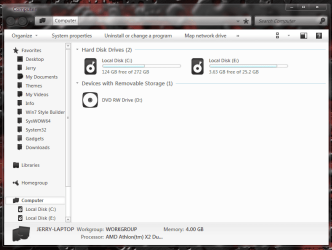
Did the theme look like this after you've installed it?
theme.PNG

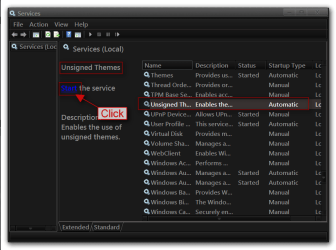
Sometimes when using UxStyle you will need to restart the service to make it work properly here is how
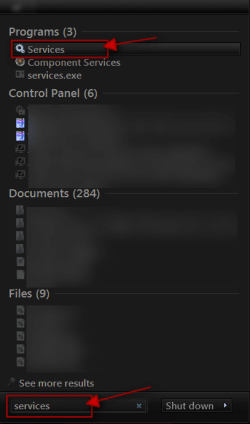
Click on the Start Button type in Services In the search box and then click on Services
1.png


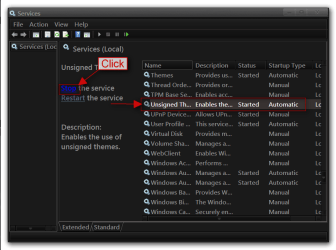
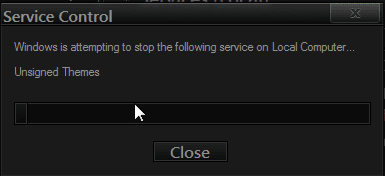
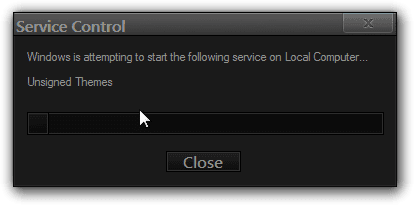
Scroll down until you see unsigned themes select it in click on the Stop text and let it stop after that click on Start text and see if the theme works. Your screen may blink when you do this.
4.pngstop.PNG
5.pngstart.png

If we can get the theme going for you then we can work on getting the explorerframe.dll straightened out next.
Jerry
 

My Computer

Computer type
Laptop
Computer Manufacturer/Model Number
Sager NP9170
OS
Win 7 Pro x64 / Win 10 Pro
CPU
Intel(R) Core(TM) i7-3630QM CPU @ 2.40GHz
Motherboard
CLEVO P170EM
Memory
12 GB
Graphics Card(s)
(1) Intel(R) HD Graphics 4000 (2) NVIDIA GeForce GTX 675M
Sound Card
(1) Realtek High Definition Audio (2) Intel(R) Display Aud
Monitor(s) Displays
17.3
Screen Resolution
1920x1080
Hard Drives
(1) Samsung 860 EVO 500GB(OS) (1) Samsung 860 EVO 500GB(Data)
Keyboard
Backlite
Antivirus
MSE, Malwarebytes Pro
Browser
Firefox
Other Info
DESKTOP: Custom-built.
OS: Win 10 Pro x64.
CASE: Rosewill R5.
CPU: Intel I5 4670K CPU @ 3.40GHz.
CPU COOLER: Cool Master Hyper 212 EVO.
MOTHERBOARD: Asus Z87-A.
MEMORY: Kingston HyperX 2x4 GB.
GPU: Nvidia Geforce 650 TI.
PSU: Corsair TX750.
DRIVES: (1) Samsung 840 120 GB SSD (2) Western Digital blue 500 GB 7200 RPM.
That's up to you. :D

Do you have sp1 installed? I read through the comments at DeviantArt, and some folks seem to have trouble installing it on systems with sp1 installed as the explorer versions no longer match. If the version numbers don't match, then explorer will crash. That can be fixed with Resource Hacker or Restorator.

I just made it so the explorerframe.dll version from the theme matched the one from the system32 folder (I guess I do have sp1 installed, surprise!), but it still crashed.


Scroll down until you see unsigned themes select it in click on the Stop text and let it stop after that click on Start text and see if the theme works. Your screen may blink when you do this.

Jerry

Hey Jerry, this is what my desktop looks like when I click on it:
screenshot.png


But when I go to the services list the unsigned themes service isn't there.
 

My Computer

OS
Windows 7 Home Premium 32bit
Drats! I hoped the mismatched version numbers would fix it for you... it's done wonders for me in the past. :(

Hmmm... if UxStyle Core shows up in Control Panel but not in Services, it is installed, but it is not running for some reason. It could be blocked by an antivirus program, or perhaps there is a corruption in your system files.

You could try uninstalling UxStyle, disabling your antivirus, and then re-installing it. If that doesn't work, you also could try running sfc /scannow to repair your system, and then again try installing UxStyle.
 

My Computer

Computer Manufacturer/Model Number
me / #1
OS
windows 7 x64 Home Premium
CPU
intel q6600
Motherboard
gigbyte ga ep45 ud3l
Memory
g.skill 8gb ddr2 1066 (pc2 8500)
Graphics Card(s)
evga geforce 9800 gtx 512 mb
Screen Resolution
1680 x 1050
Hard Drives
wd caviar black 500 gb
wd caviar black 1tb
wd elements 1tb external hd x2
PSU
raidmax 500w
Case
smilodon (yes, t'was the pretty blue lites that got me!)
So I reinstalled UxStyle with both UAC and antivirus turned off, and restarted. It showed up under services, but it won't start because it can't find the file. According to the service's executable path it's supposed to be in C:\Windows...and it was! I tried to run UnsignedThemesSvc.exe(which is what the service is executing) but it wouldn't start.

Whaaaat is going on! The problems never end!
 

My Computer

OS
Windows 7 Home Premium 32bit
Well, you're getting closer... but it is still being blocked somehow. What antivirus program are you using? Do you have one of those third-party security programs that "lock down" your start menu or startup?
 

My Computer

Computer Manufacturer/Model Number
me / #1
OS
windows 7 x64 Home Premium
CPU
intel q6600
Motherboard
gigbyte ga ep45 ud3l
Memory
g.skill 8gb ddr2 1066 (pc2 8500)
Graphics Card(s)
evga geforce 9800 gtx 512 mb
Screen Resolution
1680 x 1050
Hard Drives
wd caviar black 500 gb
wd caviar black 1tb
wd elements 1tb external hd x2
PSU
raidmax 500w
Case
smilodon (yes, t'was the pretty blue lites that got me!)
I use AVG, but I disabled the anti-virus and identity protection before installing and trying UxStyle. I'm not sure I know what you mean by "lock down" the start menu, I guess that means it doesn't do it? I also made an exception for the program in Windows Firewall, and nothing changed. I feel like the fix for this is going to be something really dumb :P
 

My Computer

OS
Windows 7 Home Premium 32bit
There are a few "startup manager" and "desktop lock" programs floating around out there that prevent any new processes/programs from running unless you specifically add them to a white list. This is to prevent malware from running when you start Windows.

I think AVG's Identity Protection is somehow causing this, but I don't know enough about AVG to offer advice on it. Does AVG keep a log of services it blocks? I dunno... Perhaps you could uninstall AVG temporarily, not just disable it, and see if that does it.
 

My Computer

Computer Manufacturer/Model Number
me / #1
OS
windows 7 x64 Home Premium
CPU
intel q6600
Motherboard
gigbyte ga ep45 ud3l
Memory
g.skill 8gb ddr2 1066 (pc2 8500)
Graphics Card(s)
evga geforce 9800 gtx 512 mb
Screen Resolution
1680 x 1050
Hard Drives
wd caviar black 500 gb
wd caviar black 1tb
wd elements 1tb external hd x2
PSU
raidmax 500w
Case
smilodon (yes, t'was the pretty blue lites that got me!)
I uninstalled AVG, then uninstalled/reinstalled UxStyle. Still no luck. I even tried taking ownership of the UnsignedThemesSvc.exe, but nothing changed. UAC is also turned off.
 

My Computer

OS
Windows 7 Home Premium 32bit
Gah! This is a mystery. Maybe you should skip UxStyle Core and use the Universal Theme Patcher that came with Elune in the "Tools" folder instead.
 

My Computer

Computer Manufacturer/Model Number
me / #1
OS
windows 7 x64 Home Premium
CPU
intel q6600
Motherboard
gigbyte ga ep45 ud3l
Memory
g.skill 8gb ddr2 1066 (pc2 8500)
Graphics Card(s)
evga geforce 9800 gtx 512 mb
Screen Resolution
1680 x 1050
Hard Drives
wd caviar black 500 gb
wd caviar black 1tb
wd elements 1tb external hd x2
PSU
raidmax 500w
Case
smilodon (yes, t'was the pretty blue lites that got me!)
Hahaha...see, the reason I was using UxStyle was because Universal Theme Patcher wouldn't patch my themeservice.dll. Oh well, I guess it's just not meant to be. Thanks so much for all your help and patience!
 

My Computer

OS
Windows 7 Home Premium 32bit

My Computer

Computer Manufacturer/Model Number
me / #1
OS
windows 7 x64 Home Premium
CPU
intel q6600
Motherboard
gigbyte ga ep45 ud3l
Memory
g.skill 8gb ddr2 1066 (pc2 8500)
Graphics Card(s)
evga geforce 9800 gtx 512 mb
Screen Resolution
1680 x 1050
Hard Drives
wd caviar black 500 gb
wd caviar black 1tb
wd elements 1tb external hd x2
PSU
raidmax 500w
Case
smilodon (yes, t'was the pretty blue lites that got me!)
Back
Top