eMachines laptop battery stuck at 43%

dalmacietis

New member
Local time
7:25 PM
Messages
27
I had problems with my laptop's battery to the point that it displayed a warning to the effect of "consider changing your battery; the computer may turn off". The laptop didn't work on battery, only when connected to AC.

So I got a new battery and now it is stuck at 43% charged and the laptop still doesn't run on battery only. I tried the following things.

1. Turn off laptop - take out battery - hold power button for 30~60 seconds - put in battery and turn on laptop.

2. Uninstall Microsoft ACPI Compliant Control Method Battery driver and then scan for hardware changes to reinstall.

3. Disconnect and reconnect battery while laptop is running as suggested here.

4. Ran CHKDSK on startup as suggested here.

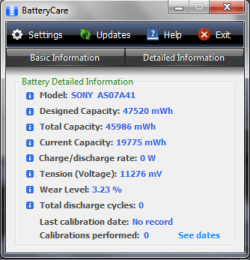
I also ran powercfg -energy from command prompt and installed BatteryCare. The logs are attached.
It's curious that BatteryCare shows charge rate at 0W. Could this be a problem with the charger? I can't test a different charger at the moment.
 

Attachments
My Computer My Computer

At a glance

Windows 7 Home Premium x64Intel® Core™ i5-4460 Processor @ 3.40GHz2x4.00 GBNVIDIA GeForce GTX 750 Ti
Computer type
PC/Desktop
Computer Manufacturer/Model Number
custom build
OS
Windows 7 Home Premium x64
CPU
Intel® Core™ i5-4460 Processor @ 3.40GHz
Motherboard
ASUS B85M-E
Memory
2x4.00 GB
Graphics Card(s)
NVIDIA GeForce GTX 750 Ti
Monitor(s) Displays
Samsung SyncMaster P2270
Screen Resolution
1920x1080
Hard Drives
WDC WD5000AAKS-65V0A0 ATA Device
Crucial MX100 SSD 128GB 2.5" 7mm SATAIII 6GB/s
Western Digital WD10EZEX 1 TB
Browser
Google Chrome
Hello dalmacietis mate please run PART A: of this and send back a shot of the readout

Using HW Info

PART A:

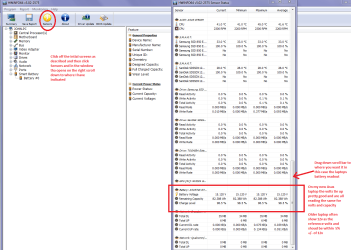
You can test the volts onthe PSU with HW Info HWiNFO,HWiNFO32/64 - Download <download the right bit version and close the right hand window select Sensorsand scroll down to the power section where you will see what the volts aredoing see my pic. In my pic the section (Nuvoton)with VBATT is a dead give away you are in the section for the rail voltages.There are other section titles and one that pops up often is ITE

Now the voltage on thedifferent rails have to be within 5% =+/- of what is required or the machinewill not work properly if at all.

See this for the railvoltage info

http://www.tomshardware.com/reviews/power-supply-specifications-atx-reference,3061.html (Section 2.)

The original right handwindow shows the machine running and is handy for that but for looking at thecomponents in some detail close it and use the main left hand side panel

FOR OTHER COMPONENTS

PART B:

Open each small squarewith + in it on the section the components are in and then click on theindividual component/s (it willhighlight in blue) - in the right hand side will appear all sorts of detailsincluding brands speeds and other essential info that particular device. Seepic for example.
You should get a pic like mine and I want to see the volts and capacities it will soon tell us if the cells in the battery are failing.


Attachments

  • LAPTOP BATTERY.PNG
    LAPTOP BATTERY.PNG
    55.4 KB · Views: 2

My Computer My Computer

At a glance

Desk1 7 Home Prem / Desk2 10 Pro / Main lap A...Desk1 i5 3750K / Laptop i7 GTX 860M / Desk2 i...Desk1 8GB (1866) / Desk2 16GB (1333) / Laptop...Desk 1& 2NVidia GTX 650 & Laptops on board Intel
Computer type
PC/Desktop
Computer Manufacturer/Model Number
Own build (new) Desk1 / Asus ROG Win 7 / Desk2 1st build
OS
Desk1 7 Home Prem / Desk2 10 Pro / Main lap Asus ROG 10 Pro 2 laptop Toshiba 7 Pro Asus P2520 7 & 10
CPU
Desk1 i5 3750K / Laptop i7 GTX 860M / Desk2 i5 2500
Motherboard
Desk1 Asus P877-V / Desk2 Gigabyte H67 UD3H / Laptop ?
Memory
Desk1 8GB (1866) / Desk2 16GB (1333) / Laptop 8Gb DDR3
Graphics Card(s)
Desk 1& 2NVidia GTX 650 & Laptops on board Intel
Sound Card
Desk 1 & 2 -XONAR DG Realtek High Def audio Laptop
Monitor(s) Displays
Desk 1 Benq HD 2450 / Desk2 Philips 24" / Laptop 17.5"
Screen Resolution
1920x1080 D1 & D2 & Laptop 1
Hard Drives
Desk1 Samsung 120GB 830 SSD
Asus ROG 256GB 850 Pro SSD
Desk2 Samsung 840 256 SSD
Toshiba 120GB EVO
PSU
Desk 1 Corsair HX 1050/ Laptop ? / Desk 2 Corsair HX 650
Case
Desk 1 Cooler HAF XM ? Toshiba laptop / Desk2 Coolermaster
Cooling
Fans on all Desk1 -2 Desk2 - all Coolermasters 5 Laptop ?
Keyboard
Desk 1 MS Sidewinder X6 Desk 2 MS Sidewinder X 4
Mouse
Desk 1&2 - Gigabyte MS 900 gamer - laptop - Logitec wireless
Internet Speed
ADSL2+
Other Info
One other Desktop (tester) and spare Toshba laptop both with SSD's
Running Kaspersky 2016 ISS on all machines config'd identically
Logitec audio stereo systems on each machine (x3)
Canon MG5250MFC
Router/modem TP-Link running WPA2SK
Hey,

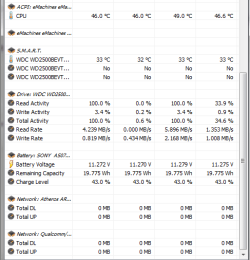
the readout seems to be fine.
 

Attachments

  • pic1.png
    pic1.png
    11.4 KB · Views: 4

My Computer My Computer

At a glance

Windows 7 Home Premium x64Intel® Core™ i5-4460 Processor @ 3.40GHz2x4.00 GBNVIDIA GeForce GTX 750 Ti
Computer type
PC/Desktop
Computer Manufacturer/Model Number
custom build
OS
Windows 7 Home Premium x64
CPU
Intel® Core™ i5-4460 Processor @ 3.40GHz
Motherboard
ASUS B85M-E
Memory
2x4.00 GB
Graphics Card(s)
NVIDIA GeForce GTX 750 Ti
Monitor(s) Displays
Samsung SyncMaster P2270
Screen Resolution
1920x1080
Hard Drives
WDC WD5000AAKS-65V0A0 ATA Device
Crucial MX100 SSD 128GB 2.5" 7mm SATAIII 6GB/s
Western Digital WD10EZEX 1 TB
Browser
Google Chrome
Sorry mate the readouts are really letting you know the battery is going south if not there already. Most internal components work on very fine tolerances that is 5% +/- of the required voltage ie 12v = either 11.4v min or 12.6v max anything outside these voltages and it can damage components or at very least not let them work properly if at all - see that link in PART A:

Just to give you a simple example if say the CPU is being overclocked and is running at 3.4GHz on 1.0v just an increase of 0.2v could raise that frequency to 3.9GHz same goes for the volts to the RAM etc

So my advice is to replace that battery ASAP it could possibly malfunction in a way that you do not want.
 

Attachments

  • BATT VOLTS.PNG
    BATT VOLTS.PNG
    5.8 KB · Views: 0

My Computer My Computer

At a glance

Desk1 7 Home Prem / Desk2 10 Pro / Main lap A...Desk1 i5 3750K / Laptop i7 GTX 860M / Desk2 i...Desk1 8GB (1866) / Desk2 16GB (1333) / Laptop...Desk 1& 2NVidia GTX 650 & Laptops on board Intel
Computer type
PC/Desktop
Computer Manufacturer/Model Number
Own build (new) Desk1 / Asus ROG Win 7 / Desk2 1st build
OS
Desk1 7 Home Prem / Desk2 10 Pro / Main lap Asus ROG 10 Pro 2 laptop Toshiba 7 Pro Asus P2520 7 & 10
CPU
Desk1 i5 3750K / Laptop i7 GTX 860M / Desk2 i5 2500
Motherboard
Desk1 Asus P877-V / Desk2 Gigabyte H67 UD3H / Laptop ?
Memory
Desk1 8GB (1866) / Desk2 16GB (1333) / Laptop 8Gb DDR3
Graphics Card(s)
Desk 1& 2NVidia GTX 650 & Laptops on board Intel
Sound Card
Desk 1 & 2 -XONAR DG Realtek High Def audio Laptop
Monitor(s) Displays
Desk 1 Benq HD 2450 / Desk2 Philips 24" / Laptop 17.5"
Screen Resolution
1920x1080 D1 & D2 & Laptop 1
Hard Drives
Desk1 Samsung 120GB 830 SSD
Asus ROG 256GB 850 Pro SSD
Desk2 Samsung 840 256 SSD
Toshiba 120GB EVO
PSU
Desk 1 Corsair HX 1050/ Laptop ? / Desk 2 Corsair HX 650
Case
Desk 1 Cooler HAF XM ? Toshiba laptop / Desk2 Coolermaster
Cooling
Fans on all Desk1 -2 Desk2 - all Coolermasters 5 Laptop ?
Keyboard
Desk 1 MS Sidewinder X6 Desk 2 MS Sidewinder X 4
Mouse
Desk 1&2 - Gigabyte MS 900 gamer - laptop - Logitec wireless
Internet Speed
ADSL2+
Other Info
One other Desktop (tester) and spare Toshba laptop both with SSD's
Running Kaspersky 2016 ISS on all machines config'd identically
Logitec audio stereo systems on each machine (x3)
Canon MG5250MFC
Router/modem TP-Link running WPA2SK
I'm a bit confused. The compatible batteries for my laptop are all supposed to have voltage of 11.1 V. (See e.g. here.)
Also I found the laptop's specs here.
 

My Computer My Computer

At a glance

Windows 7 Home Premium x64Intel® Core™ i5-4460 Processor @ 3.40GHz2x4.00 GBNVIDIA GeForce GTX 750 Ti
Computer type
PC/Desktop
Computer Manufacturer/Model Number
custom build
OS
Windows 7 Home Premium x64
CPU
Intel® Core™ i5-4460 Processor @ 3.40GHz
Motherboard
ASUS B85M-E
Memory
2x4.00 GB
Graphics Card(s)
NVIDIA GeForce GTX 750 Ti
Monitor(s) Displays
Samsung SyncMaster P2270
Screen Resolution
1920x1080
Hard Drives
WDC WD5000AAKS-65V0A0 ATA Device
Crucial MX100 SSD 128GB 2.5" 7mm SATAIII 6GB/s
Western Digital WD10EZEX 1 TB
Browser
Google Chrome
Back
Top