
email error windows live mail/server error 0x800CCC90

xgdude: keep the issue on this thread, but mark it Unsolved.

Also please provide the version of WE Mail you're running (WLM is now called Windows Essentials(WE) Mail )

post a screen of your att email account (server and advanced tab)
hold atl and tap prt scn on your keyboard to capture the window for each tab
do one tab at a time
open paint and ctrl V to paste the image
use the eraser to clear your email infomation (see arrows in pics)

The only thing that are probably different on your config are the server names. I'll take a look to see what att wants - but the ports are fairly standard depending on if they want secure sockets or not.

If you have a lot of mail in your inbox, create a new folder in the storage folder - I call mine Rcvd, and move, not copy, everything in your inbox (ctrl A, Right click - move) to that new folder
 

Attachments
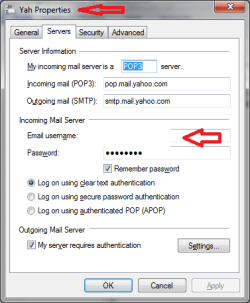
  • eMailSrv.png
    eMailSrv.png
    12.3 KB · Views: 4
  • eMailAdv.png
    eMailAdv.png
    12.5 KB · Views: 4

My Computer My Computer

Computer type
Laptop
Computer Manufacturer/Model Number
HP Pavilion dv6-6c10us
OS
x64 (6.3.9600) Win8.1 Pro & soon dual boot x64 (6.1.7601) Win7_SP1 HomePrem
CPU
AMD A6-3420M APU with Radeon(tm) HD Graphics
Motherboard
Hewlett-Packard 1805
Memory
6.00 GB
Graphics Card(s)
AMD Radeon(TM) HD 6520G
Sound Card
(1) AMD High Definition Audio Device (2) IDT High Definiti
Monitor(s) Displays
HP W2072a 20" LCD (1600 x 900) @ 60 Hz
Screen Resolution
1366 x 768 x 32 bits (4294967296 colors) @ 60 Hz
Hard Drives
ST640LM0 00 HM641JI SATA Disk Device
Keyboard
Logitech k520 wireless KB
Mouse
Logitech m320 wireless mouse (bundled with KB)
Internet Speed
15/5 | 54 MB Wireless 'n'
Antivirus
Realtime: Defender or Avast | On-demand: Malwarebytes, ESET
Browser
IE 11 on Win8, IE 10 on win 7
Other Info
Media: [Gimp, Audacity, VLC] || Comm: [WEmail 2012, Skype] || Productivity: [OpenOffice,| Textpad] || Utils: [Sysinternals, cCleaner, Speccy, Defraggler]
Slartybart: My live mail fixed itself again during the night; don't know howlog it will last.
My Windows Essentials versin is 16.4.3505.912
I have attached the screen shots of the sserver tab and advanced tab.

xgdude
 
Last edited:

My Computer My Computer

Computer type
PC/Desktop
Computer Manufacturer/Model Number
HP Pavilion p 6380t
OS
Microsoft Windows 7 Home Premium 64-bit 7601 Multiprocessor Free Service Pack 1
CPU
Intel(R) Core(TM)2 Quad CPU Q8300 @ 2.50GHz
Motherboard
PEGATRON CORPORATION Eureka3
Memory
4.00 GB
Graphics Card(s)
(1) Intel(R) G45/G43 Express Chipset (2) Intel(R) G45/G43
Sound Card
(1) Realtek High Definition Audio (2) USB Audio Device
Screen Resolution
800 x 600 x 32 bits (4294967296 colors) @ 99 Hz
Hard Drives
(1) WDC WD6400AAKS-65A7B2 ATA Device (2) WDC WD50 00AAKS-65A7B2 USB Device
Antivirus
Avast premiere
Browser
IE 10
Hello xgdude,

I think you inserted the same image twice, so your screen prints don't show what servers you are using.
Are you using the new "att.net" servers as I showed in post #6 ?
You can edit your post to show the servers screen print...
I haven't had any problems since switching to them in Outlook 2010 and WLM 2012.
 

My Computer My Computer

Computer type
PC/Desktop
Computer Manufacturer/Model Number
home built
OS
Multi-Boot W7_Pro_x64 W8.1_Pro_x64 W10_Pro_x64 +Linux_VMs +Chromium_VM
CPU
AMD Athlon II x4 620
Motherboard
Gigabyte GA-MA785G-UD3H
Memory
6GB GSkill DDR2 800
Graphics Card(s)
AMD 4670 GPU + AMD 4200 IGP
Sound Card
on board Realtek ALC889A
Monitor(s) Displays
RCA 40" LCD TV, Insignia 32" LCD TV, HP 15" LCD monitor
Screen Resolution
1680 x 1050
Hard Drives
OCZ Vertex 3 120GB,
Samsung F3 1TB (3),
Several others - WD, Seagate, Hitachi, ...
PSU
Corsair 500 W
Case
Rosewill mid tower
Cooling
CM 90mm rifle
Keyboard
Gyration wireless, Logitech wireless, Dell USB wired
Mouse
Gyration wireless, Logitech wireless, V7 USB wired
Internet Speed
Spectrum - 100Mbps D / 10Mbps U
Antivirus
Avast, MBAM3, EMET, WinPatrol
Browser
Pale Moon, Firefox, IE
Other Info
2 multi-boot PC's
Mainly HTPC/Office/Gen purpose (no gaming).
Trendnet USB KVM.
LG DVD burner/Blue Ray Player.
Tray system for removable SATA backup drives.

Not currently OCd, under-volted.
I use Hybrid sleep, rarely re-boot or shutdown.

Hauppauge HD-PVR, Avermedia PCIe TV Tuner, Hauppauge PCI TV Tuner.
attached is server tab as requested.


xgdude
 
Last edited:

My Computer My Computer

Computer type
PC/Desktop
Computer Manufacturer/Model Number
HP Pavilion p 6380t
OS
Microsoft Windows 7 Home Premium 64-bit 7601 Multiprocessor Free Service Pack 1
CPU
Intel(R) Core(TM)2 Quad CPU Q8300 @ 2.50GHz
Motherboard
PEGATRON CORPORATION Eureka3
Memory
4.00 GB
Graphics Card(s)
(1) Intel(R) G45/G43 Express Chipset (2) Intel(R) G45/G43
Sound Card
(1) Realtek High Definition Audio (2) USB Audio Device
Screen Resolution
800 x 600 x 32 bits (4294967296 colors) @ 99 Hz
Hard Drives
(1) WDC WD6400AAKS-65A7B2 ATA Device (2) WDC WD50 00AAKS-65A7B2 USB Device
Antivirus
Avast premiere
Browser
IE 10
Blank out or delete your username in the screen print unless you like spam !
 

My Computer My Computer

Computer type
PC/Desktop
Computer Manufacturer/Model Number
home built
OS
Multi-Boot W7_Pro_x64 W8.1_Pro_x64 W10_Pro_x64 +Linux_VMs +Chromium_VM
CPU
AMD Athlon II x4 620
Motherboard
Gigabyte GA-MA785G-UD3H
Memory
6GB GSkill DDR2 800
Graphics Card(s)
AMD 4670 GPU + AMD 4200 IGP
Sound Card
on board Realtek ALC889A
Monitor(s) Displays
RCA 40" LCD TV, Insignia 32" LCD TV, HP 15" LCD monitor
Screen Resolution
1680 x 1050
Hard Drives
OCZ Vertex 3 120GB,
Samsung F3 1TB (3),
Several others - WD, Seagate, Hitachi, ...
PSU
Corsair 500 W
Case
Rosewill mid tower
Cooling
CM 90mm rifle
Keyboard
Gyration wireless, Logitech wireless, Dell USB wired
Mouse
Gyration wireless, Logitech wireless, V7 USB wired
Internet Speed
Spectrum - 100Mbps D / 10Mbps U
Antivirus
Avast, MBAM3, EMET, WinPatrol
Browser
Pale Moon, Firefox, IE
Other Info
2 multi-boot PC's
Mainly HTPC/Office/Gen purpose (no gaming).
Trendnet USB KVM.
LG DVD burner/Blue Ray Player.
Tray system for removable SATA backup drives.

Not currently OCd, under-volted.
I use Hybrid sleep, rarely re-boot or shutdown.

Hauppauge HD-PVR, Avermedia PCIe TV Tuner, Hauppauge PCI TV Tuner.
In YOUR posts you can click the "Edit" button in the lower right corner to make corrections.

In ANY post you can click the "Red triangle (Report Post)" icon in the upper right to alert SF administrators.
In this case you can click the "Red triangle (Report Post)" and ask the admins to delete or edit your post.

Only you or a SF administrator can edit your posts - I can't...

General advice - never post any personal data in any forum, including an email address.

hope this helps,
David
 

My Computer My Computer

Computer type
PC/Desktop
Computer Manufacturer/Model Number
home built
OS
Multi-Boot W7_Pro_x64 W8.1_Pro_x64 W10_Pro_x64 +Linux_VMs +Chromium_VM
CPU
AMD Athlon II x4 620
Motherboard
Gigabyte GA-MA785G-UD3H
Memory
6GB GSkill DDR2 800
Graphics Card(s)
AMD 4670 GPU + AMD 4200 IGP
Sound Card
on board Realtek ALC889A
Monitor(s) Displays
RCA 40" LCD TV, Insignia 32" LCD TV, HP 15" LCD monitor
Screen Resolution
1680 x 1050
Hard Drives
OCZ Vertex 3 120GB,
Samsung F3 1TB (3),
Several others - WD, Seagate, Hitachi, ...
PSU
Corsair 500 W
Case
Rosewill mid tower
Cooling
CM 90mm rifle
Keyboard
Gyration wireless, Logitech wireless, Dell USB wired
Mouse
Gyration wireless, Logitech wireless, V7 USB wired
Internet Speed
Spectrum - 100Mbps D / 10Mbps U
Antivirus
Avast, MBAM3, EMET, WinPatrol
Browser
Pale Moon, Firefox, IE
Other Info
2 multi-boot PC's
Mainly HTPC/Office/Gen purpose (no gaming).
Trendnet USB KVM.
LG DVD burner/Blue Ray Player.
Tray system for removable SATA backup drives.

Not currently OCd, under-volted.
I use Hybrid sleep, rarely re-boot or shutdown.

Hauppauge HD-PVR, Avermedia PCIe TV Tuner, Hauppauge PCI TV Tuner.
I have blocked the user name; see attached.


xgdude
 
Last edited:

My Computer My Computer

Computer type
PC/Desktop
Computer Manufacturer/Model Number
HP Pavilion p 6380t
OS
Microsoft Windows 7 Home Premium 64-bit 7601 Multiprocessor Free Service Pack 1
CPU
Intel(R) Core(TM)2 Quad CPU Q8300 @ 2.50GHz
Motherboard
PEGATRON CORPORATION Eureka3
Memory
4.00 GB
Graphics Card(s)
(1) Intel(R) G45/G43 Express Chipset (2) Intel(R) G45/G43
Sound Card
(1) Realtek High Definition Audio (2) USB Audio Device
Screen Resolution
800 x 600 x 32 bits (4294967296 colors) @ 99 Hz
Hard Drives
(1) WDC WD6400AAKS-65A7B2 ATA Device (2) WDC WD50 00AAKS-65A7B2 USB Device
Antivirus
Avast premiere
Browser
IE 10
Ok, according to ATT suport your configuratin looks good.

IT's possible that an item in your inbox or outbox causes the issue


In WE Mail
create a new folder under Storage Folders: Client_Inbox
--> move everything in the Inbox to the new folder Client_Inbox

create a new folder under Storage Folders: Client_Outbox
--> move everything in the Outbox to the new folder Client_Outbox


Now log on to the web based ATT mail

create a new folder: Srvr_Inbox
--> move everything in the Inbox to the new folder Srvr_Inbox


create a new folder: Srvr_Outbox
--> move everything in the Outbox to the new folder Srvr_Outbox

This does a few things
1) if there is an object causing the error, it is no longer part of the regular eMail processing
2) it shrinks the eMail client index
3) it backs up your inbox (probably nothing in your outbox to back up)
4) there are fewer objects to check between cleint and server

I employ filters to move inbound mail to specific folders under Storage Folders. It takes a little thinking, but easy things can be organized - family, friends, work, news, sports.

Let me know if this helps o we need to take a differnt tact.

**IMPORTANT**
You might have missed the sentence in my post asking you for the account inforamtion that said
"use the eraser to clear your email infomation (see arrows in pics)"

You should edit each of your posts and just remove the image.
edit post
go advanced
scroll down to advanced option and click
manage attachments
--> delete any attached image

You can leave the last one if you want, the one without personl info.

Thanks
 
Last edited:

My Computer My Computer

Computer type
Laptop
Computer Manufacturer/Model Number
HP Pavilion dv6-6c10us
OS
x64 (6.3.9600) Win8.1 Pro & soon dual boot x64 (6.1.7601) Win7_SP1 HomePrem
CPU
AMD A6-3420M APU with Radeon(tm) HD Graphics
Motherboard
Hewlett-Packard 1805
Memory
6.00 GB
Graphics Card(s)
AMD Radeon(TM) HD 6520G
Sound Card
(1) AMD High Definition Audio Device (2) IDT High Definiti
Monitor(s) Displays
HP W2072a 20" LCD (1600 x 900) @ 60 Hz
Screen Resolution
1366 x 768 x 32 bits (4294967296 colors) @ 60 Hz
Hard Drives
ST640LM0 00 HM641JI SATA Disk Device
Keyboard
Logitech k520 wireless KB
Mouse
Logitech m320 wireless mouse (bundled with KB)
Internet Speed
15/5 | 54 MB Wireless 'n'
Antivirus
Realtime: Defender or Avast | On-demand: Malwarebytes, ESET
Browser
IE 11 on Win8, IE 10 on win 7
Other Info
Media: [Gimp, Audacity, VLC] || Comm: [WEmail 2012, Skype] || Productivity: [OpenOffice,| Textpad] || Utils: [Sysinternals, cCleaner, Speccy, Defraggler]
I apologize for not posting sooner; My Dsl modem bit the dust and it took four days to get a replacement, so i am finally able to access the internet.

I created the new folders in Window Essentials and in the web based att email.
My WE client is working fine now , so how do we test the new folders to see iff they have any effect?

xgdude
 

My Computer My Computer

Computer type
PC/Desktop
Computer Manufacturer/Model Number
HP Pavilion p 6380t
OS
Microsoft Windows 7 Home Premium 64-bit 7601 Multiprocessor Free Service Pack 1
CPU
Intel(R) Core(TM)2 Quad CPU Q8300 @ 2.50GHz
Motherboard
PEGATRON CORPORATION Eureka3
Memory
4.00 GB
Graphics Card(s)
(1) Intel(R) G45/G43 Express Chipset (2) Intel(R) G45/G43
Sound Card
(1) Realtek High Definition Audio (2) USB Audio Device
Screen Resolution
800 x 600 x 32 bits (4294967296 colors) @ 99 Hz
Hard Drives
(1) WDC WD6400AAKS-65A7B2 ATA Device (2) WDC WD50 00AAKS-65A7B2 USB Device
Antivirus
Avast premiere
Browser
IE 10
Good news. re: WE woking fine.
Run this way for a week or so and see if the error reoccurs, it is does, we'll have to try something else.

If everything continues to work, please post an "All clear" msg and mark this as solved.

** To prevent spam, please remove images from your posts as requested.

Thanks,

Bill
.
 

My Computer My Computer

Computer type
Laptop
Computer Manufacturer/Model Number
HP Pavilion dv6-6c10us
OS
x64 (6.3.9600) Win8.1 Pro & soon dual boot x64 (6.1.7601) Win7_SP1 HomePrem
CPU
AMD A6-3420M APU with Radeon(tm) HD Graphics
Motherboard
Hewlett-Packard 1805
Memory
6.00 GB
Graphics Card(s)
AMD Radeon(TM) HD 6520G
Sound Card
(1) AMD High Definition Audio Device (2) IDT High Definiti
Monitor(s) Displays
HP W2072a 20" LCD (1600 x 900) @ 60 Hz
Screen Resolution
1366 x 768 x 32 bits (4294967296 colors) @ 60 Hz
Hard Drives
ST640LM0 00 HM641JI SATA Disk Device
Keyboard
Logitech k520 wireless KB
Mouse
Logitech m320 wireless mouse (bundled with KB)
Internet Speed
15/5 | 54 MB Wireless 'n'
Antivirus
Realtime: Defender or Avast | On-demand: Malwarebytes, ESET
Browser
IE 11 on Win8, IE 10 on win 7
Other Info
Media: [Gimp, Audacity, VLC] || Comm: [WEmail 2012, Skype] || Productivity: [OpenOffice,| Textpad] || Utils: [Sysinternals, cCleaner, Speccy, Defraggler]
Reply to thread 'email error windows live mail/server error 0x800CCC90

My WE is back in the no send or receive mode. I can't get a complete day without this thing locking up .
I checked the Client _Inbox and the Client_Outbox and therewere no entries in either.

I also checked web mail folders Srvr_Inbox and Srvr_Outbox and neither had any files.


xgdude
 

My Computer My Computer

Computer type
PC/Desktop
Computer Manufacturer/Model Number
HP Pavilion p 6380t
OS
Microsoft Windows 7 Home Premium 64-bit 7601 Multiprocessor Free Service Pack 1
CPU
Intel(R) Core(TM)2 Quad CPU Q8300 @ 2.50GHz
Motherboard
PEGATRON CORPORATION Eureka3
Memory
4.00 GB
Graphics Card(s)
(1) Intel(R) G45/G43 Express Chipset (2) Intel(R) G45/G43
Sound Card
(1) Realtek High Definition Audio (2) USB Audio Device
Screen Resolution
800 x 600 x 32 bits (4294967296 colors) @ 99 Hz
Hard Drives
(1) WDC WD6400AAKS-65A7B2 ATA Device (2) WDC WD50 00AAKS-65A7B2 USB Device
Antivirus
Avast premiere
Browser
IE 10
That is very odd - both storage folders empty on your machine and on the web. I might expect this if you used imap or had delete files form server configured, but you aren't and you don't

Do you connect through a router or modem directly to the server or are you on a local network (say through a work network). I would contact ATT and ask them to restore your files - that's just not normal procedure or protocol.

You might try to recover the local files using Recuva - just make sure you recover them to a different drive/disc. Look for the file names you specified above.

Have you tried to repair WE Mail? That won't solve the missing files riddle, but it might help with your orignal issue.

Control Panel\All Control Panel Items\Programs and Features
select Windows Live Essential and select Repair.
 
Last edited:

My Computer My Computer

Computer type
Laptop
Computer Manufacturer/Model Number
HP Pavilion dv6-6c10us
OS
x64 (6.3.9600) Win8.1 Pro & soon dual boot x64 (6.1.7601) Win7_SP1 HomePrem
CPU
AMD A6-3420M APU with Radeon(tm) HD Graphics
Motherboard
Hewlett-Packard 1805
Memory
6.00 GB
Graphics Card(s)
AMD Radeon(TM) HD 6520G
Sound Card
(1) AMD High Definition Audio Device (2) IDT High Definiti
Monitor(s) Displays
HP W2072a 20" LCD (1600 x 900) @ 60 Hz
Screen Resolution
1366 x 768 x 32 bits (4294967296 colors) @ 60 Hz
Hard Drives
ST640LM0 00 HM641JI SATA Disk Device
Keyboard
Logitech k520 wireless KB
Mouse
Logitech m320 wireless mouse (bundled with KB)
Internet Speed
15/5 | 54 MB Wireless 'n'
Antivirus
Realtime: Defender or Avast | On-demand: Malwarebytes, ESET
Browser
IE 11 on Win8, IE 10 on win 7
Other Info
Media: [Gimp, Audacity, VLC] || Comm: [WEmail 2012, Skype] || Productivity: [OpenOffice,| Textpad] || Utils: [Sysinternals, cCleaner, Speccy, Defraggler]
'email error windows live mail/server error 0x800CCC90

I got up this morning and WE email client is working again; don't know how long this will last.
Question: How do files get into the Client_Inbox and Client_Outbox?

When I initially set up the folders I tried to move some files from the Inbox to the Client_Inbox and was unable to do so. I trried drag & drop and copy and paste; neither worked. Sorry that I am no more computer saavy.

With regard to running WE repair in Programs and Features,Control Panel; I had run repair back when the problem was fairly new. I ran it again just for the possibility that it may fix something that's broken.

Working fine now, will let you know when it goes out again. Does the fact that it works fine and just quits accepting my password out of the blue indicate where the problem is? It seems to me that the problem lies with the server. For example,when I attempt to log on a certain number of times unsuccessfully; the server will lock me out until I change my password. The difference here is that I should remain locked out, but instead it works some time and not at other times.

xgdude
 

My Computer My Computer

Computer type
PC/Desktop
Computer Manufacturer/Model Number
HP Pavilion p 6380t
OS
Microsoft Windows 7 Home Premium 64-bit 7601 Multiprocessor Free Service Pack 1
CPU
Intel(R) Core(TM)2 Quad CPU Q8300 @ 2.50GHz
Motherboard
PEGATRON CORPORATION Eureka3
Memory
4.00 GB
Graphics Card(s)
(1) Intel(R) G45/G43 Express Chipset (2) Intel(R) G45/G43
Sound Card
(1) Realtek High Definition Audio (2) USB Audio Device
Screen Resolution
800 x 600 x 32 bits (4294967296 colors) @ 99 Hz
Hard Drives
(1) WDC WD6400AAKS-65A7B2 ATA Device (2) WDC WD50 00AAKS-65A7B2 USB Device
Antivirus
Avast premiere
Browser
IE 10
It does sound server related, since it's intermittent.

There are two ways eMail could end up in the folders you created.
manually moving them - right mouse button click the msg and select move
- you could also use the move icon on the home tab ribbon
-- to select more than one msg to move, click on one, then hold Ctrl and click on any others you want to move
Automatically filter incoming msgs to specific folders
in the folders ribbon, create a new msg rule
my rules trigger off the sender and are put in folders under Storage folders (Family, Friends, Work, News...)

You can add as many senders to the rule, but only one destination folder - so all msgs from Tom, Chuck, Bob go inot my friends folder
all msgs from TheBoss, TheWorker, TheAssistent go into my Work folder.

I also try to match the name of the rule to the type of sender - if I make new friends, I add them to my Friends rule.


Where did you create the Client_Inbox folder? Under Storage Folders? Inside WEmail or WinExplorer?
As long as you're working in WEmail, you can drag and drop msgs to any folder - it's a little tricky to land the mouse on the folder name in the left panel though. I've missed the mark a few times and had to go to the folder the msg was moved to and move it to the folder I meant to move it to. (right click/move and yoou can't make a mistake)
Copy & Paste msgs doesn't work either insdie or outside WEmail.

Don't worry about being savvy. Savvy?

When you told me that you created the new folders in both places, I assumed that meant you moved the msgs too.

Please confirm if you moved the msgs or if you were unable to move them. If you didn't move the msgs, that's ok - it answers the riddle and I'm relieved that there isn't somethng else mysterious going on.
Please also confirm that your msgs are still accessible in the original locations (inbox / outbox - probably not much in the outbox).

These are the two working folders that both the client and server use to exchange msgs. If there is something the client doesn't know what to do about, it keeps trying and failing.

The other thing about clietns is they keep track of everything in an index or database of sorts. Sometimes, that gets confused. The easiest way to clear the index is to move all msgs out of the inbox or outbox to storage / non-active folders. And since you can't be sure where the problem starts, you clear out the server side as well by moving msgs to folders on the web based client

Hope that helps explain things a little.

Repair sometime does clear things up, but normally only if it's related directly to the client. It can't fix something on the server side, or a bad / stuck msg - it might help in the short term.

Every service provider has a login lockout policy that would affect logging into the web based eMail. I don't recall any of my ISPs having the same lockout policy for pop mail. That's a good question though.

Many have a one location login policy and with the number of devices that can access eMail, it's a good policy. You don't happen to login on your phone and your machine, and your work machine by any chance? Or share the account with someone, a spouse or children?

Anyway, I'll try to stay focused on what I know fixes issues like these. And I'll try to make sure I ask follow up questions. If yu can be the eyes on your side and tell me more of wht you see, try, or couldn't do this won't take long.

Other than moving msgs out of the way, doing a repair, or a complete reinstall - there isn't much either of us can do. It will be time to get BellSouth to fix it with you.

I'll be here step-by-step, I just have to know what steps you've taken, and which ones were not taken. Don't worry about asking q question, I'll try not to be so long winded ;)

Let me know if you moved everything to storage folders (new folders within the application) on both sides (client and web based mail).
 

My Computer My Computer

Computer type
Laptop
Computer Manufacturer/Model Number
HP Pavilion dv6-6c10us
OS
x64 (6.3.9600) Win8.1 Pro & soon dual boot x64 (6.1.7601) Win7_SP1 HomePrem
CPU
AMD A6-3420M APU with Radeon(tm) HD Graphics
Motherboard
Hewlett-Packard 1805
Memory
6.00 GB
Graphics Card(s)
AMD Radeon(TM) HD 6520G
Sound Card
(1) AMD High Definition Audio Device (2) IDT High Definiti
Monitor(s) Displays
HP W2072a 20" LCD (1600 x 900) @ 60 Hz
Screen Resolution
1366 x 768 x 32 bits (4294967296 colors) @ 60 Hz
Hard Drives
ST640LM0 00 HM641JI SATA Disk Device
Keyboard
Logitech k520 wireless KB
Mouse
Logitech m320 wireless mouse (bundled with KB)
Internet Speed
15/5 | 54 MB Wireless 'n'
Antivirus
Realtime: Defender or Avast | On-demand: Malwarebytes, ESET
Browser
IE 11 on Win8, IE 10 on win 7
Other Info
Media: [Gimp, Audacity, VLC] || Comm: [WEmail 2012, Skype] || Productivity: [OpenOffice,| Textpad] || Utils: [Sysinternals, cCleaner, Speccy, Defraggler]
Thanks for your patience. I know I must appear to be slow at best, but I am learning...
I confirm that when I created the new folders I created them as storage folders and did not move any messages to them; I now have messsages in the inbox of both client and server, but nothing in the outbox of either. My WE email continues to operate corrrectly today. Should I wait until the problem returns and then move everything to clear the index or database that is controlling the transmission of messages? If that was done and the problem corrected itself we would be fairly certain that was the problem. If, on the other hand, we continue to move all messages to inactive folders and
the problem reoccured we still would not know the cause. Right?

Thanks for explaining everything so clearly. I need all the help I can get. I know that Bellsouth (ATT)
will never correct this mess. They have their head in the sand. All they do is a few efforts at trouble shooting then it's "AT&T can not provide customer service to an email client, this is not an AT&T problem".

I am amazed at how wide spread this problem is. When I began searching for help on the web I found thousands of similarproblems posted and their was never one marked as solved that I saw. That's enough blowing off steam; again, thanks for your help !!!

xgdude
 

My Computer My Computer

Computer type
PC/Desktop
Computer Manufacturer/Model Number
HP Pavilion p 6380t
OS
Microsoft Windows 7 Home Premium 64-bit 7601 Multiprocessor Free Service Pack 1
CPU
Intel(R) Core(TM)2 Quad CPU Q8300 @ 2.50GHz
Motherboard
PEGATRON CORPORATION Eureka3
Memory
4.00 GB
Graphics Card(s)
(1) Intel(R) G45/G43 Express Chipset (2) Intel(R) G45/G43
Sound Card
(1) Realtek High Definition Audio (2) USB Audio Device
Screen Resolution
800 x 600 x 32 bits (4294967296 colors) @ 99 Hz
Hard Drives
(1) WDC WD6400AAKS-65A7B2 ATA Device (2) WDC WD50 00AAKS-65A7B2 USB Device
Antivirus
Avast premiere
Browser
IE 10
I now have messsages in the inbox of both client and server, but nothing in the outbox of either.
Hello xgdude,

Normally you won't see emails in the outbox.
When you send an email it gets put in the Sent folder when it is successfully sent.

If you see emails in the outbox, it means they were not sent.

Look in your Sent folder.
 

My Computer My Computer

Computer type
PC/Desktop
Computer Manufacturer/Model Number
home built
OS
Multi-Boot W7_Pro_x64 W8.1_Pro_x64 W10_Pro_x64 +Linux_VMs +Chromium_VM
CPU
AMD Athlon II x4 620
Motherboard
Gigabyte GA-MA785G-UD3H
Memory
6GB GSkill DDR2 800
Graphics Card(s)
AMD 4670 GPU + AMD 4200 IGP
Sound Card
on board Realtek ALC889A
Monitor(s) Displays
RCA 40" LCD TV, Insignia 32" LCD TV, HP 15" LCD monitor
Screen Resolution
1680 x 1050
Hard Drives
OCZ Vertex 3 120GB,
Samsung F3 1TB (3),
Several others - WD, Seagate, Hitachi, ...
PSU
Corsair 500 W
Case
Rosewill mid tower
Cooling
CM 90mm rifle
Keyboard
Gyration wireless, Logitech wireless, Dell USB wired
Mouse
Gyration wireless, Logitech wireless, V7 USB wired
Internet Speed
Spectrum - 100Mbps D / 10Mbps U
Antivirus
Avast, MBAM3, EMET, WinPatrol
Browser
Pale Moon, Firefox, IE
Other Info
2 multi-boot PC's
Mainly HTPC/Office/Gen purpose (no gaming).
Trendnet USB KVM.
LG DVD burner/Blue Ray Player.
Tray system for removable SATA backup drives.

Not currently OCd, under-volted.
I use Hybrid sleep, rarely re-boot or shutdown.

Hauppauge HD-PVR, Avermedia PCIe TV Tuner, Hauppauge PCI TV Tuner.
@xgdude: David is correct, normally the outbox is empty. On occasion, something gets stuck.

Since you're running ok - leave things be for now. If the problem returns, yes move things out of your inbox on both WEmail and BellSouth web mail. Ask for more help if you're not sure before. I think you have a basic understanding of what needs to be done, but it never hurst to ask.

Just a note of confidence... I got the same error from Yahoo yesterday, then all clear-mail flowed. Keep in mind, your BellSouth/ATT account is really a Yahoo account - I think anyway.

@David : If there is something stuck in the outbox, that might be cause the issue xgdude is trying to resolve. But you're right, it should be empty if the eMail client is sending normally.

Thanks,
Bill
.
 

My Computer My Computer

Computer type
Laptop
Computer Manufacturer/Model Number
HP Pavilion dv6-6c10us
OS
x64 (6.3.9600) Win8.1 Pro & soon dual boot x64 (6.1.7601) Win7_SP1 HomePrem
CPU
AMD A6-3420M APU with Radeon(tm) HD Graphics
Motherboard
Hewlett-Packard 1805
Memory
6.00 GB
Graphics Card(s)
AMD Radeon(TM) HD 6520G
Sound Card
(1) AMD High Definition Audio Device (2) IDT High Definiti
Monitor(s) Displays
HP W2072a 20" LCD (1600 x 900) @ 60 Hz
Screen Resolution
1366 x 768 x 32 bits (4294967296 colors) @ 60 Hz
Hard Drives
ST640LM0 00 HM641JI SATA Disk Device
Keyboard
Logitech k520 wireless KB
Mouse
Logitech m320 wireless mouse (bundled with KB)
Internet Speed
15/5 | 54 MB Wireless 'n'
Antivirus
Realtime: Defender or Avast | On-demand: Malwarebytes, ESET
Browser
IE 11 on Win8, IE 10 on win 7
Other Info
Media: [Gimp, Audacity, VLC] || Comm: [WEmail 2012, Skype] || Productivity: [OpenOffice,| Textpad] || Utils: [Sysinternals, cCleaner, Speccy, Defraggler]
'email error windows live mail/server error 0x800CCC90

It is 5:22pm and my email client is not sending or receiving again. I opened WE Live mail through WE photo gallery and did not receive an error message until I received a notice that there was a problem sending the email. I had nothing in my Inbox so I moved the message from the outbox to the Client outbox. I then went to web mail and moved all inbox messages to the server Inbox. It still won't send or receive.

xgdude
 

My Computer My Computer

Computer type
PC/Desktop
Computer Manufacturer/Model Number
HP Pavilion p 6380t
OS
Microsoft Windows 7 Home Premium 64-bit 7601 Multiprocessor Free Service Pack 1
CPU
Intel(R) Core(TM)2 Quad CPU Q8300 @ 2.50GHz
Motherboard
PEGATRON CORPORATION Eureka3
Memory
4.00 GB
Graphics Card(s)
(1) Intel(R) G45/G43 Express Chipset (2) Intel(R) G45/G43
Sound Card
(1) Realtek High Definition Audio (2) USB Audio Device
Screen Resolution
800 x 600 x 32 bits (4294967296 colors) @ 99 Hz
Hard Drives
(1) WDC WD6400AAKS-65A7B2 ATA Device (2) WDC WD50 00AAKS-65A7B2 USB Device
Antivirus
Avast premiere
Browser
IE 10
If you are running the Avast Mail Shield, turn it off and see if you can send/receive.

I believe using the Avast Mail Shield and SSL in your WLM server settings could cause a conflict.
 

My Computer My Computer

Computer type
PC/Desktop
Computer Manufacturer/Model Number
home built
OS
Multi-Boot W7_Pro_x64 W8.1_Pro_x64 W10_Pro_x64 +Linux_VMs +Chromium_VM
CPU
AMD Athlon II x4 620
Motherboard
Gigabyte GA-MA785G-UD3H
Memory
6GB GSkill DDR2 800
Graphics Card(s)
AMD 4670 GPU + AMD 4200 IGP
Sound Card
on board Realtek ALC889A
Monitor(s) Displays
RCA 40" LCD TV, Insignia 32" LCD TV, HP 15" LCD monitor
Screen Resolution
1680 x 1050
Hard Drives
OCZ Vertex 3 120GB,
Samsung F3 1TB (3),
Several others - WD, Seagate, Hitachi, ...
PSU
Corsair 500 W
Case
Rosewill mid tower
Cooling
CM 90mm rifle
Keyboard
Gyration wireless, Logitech wireless, Dell USB wired
Mouse
Gyration wireless, Logitech wireless, V7 USB wired
Internet Speed
Spectrum - 100Mbps D / 10Mbps U
Antivirus
Avast, MBAM3, EMET, WinPatrol
Browser
Pale Moon, Firefox, IE
Other Info
2 multi-boot PC's
Mainly HTPC/Office/Gen purpose (no gaming).
Trendnet USB KVM.
LG DVD burner/Blue Ray Player.
Tray system for removable SATA backup drives.

Not currently OCd, under-volted.
I use Hybrid sleep, rarely re-boot or shutdown.

Hauppauge HD-PVR, Avermedia PCIe TV Tuner, Hauppauge PCI TV Tuner.
Ok, while I'm 99% sure this is on the server side, you can try correcting it on the client side.

Try each suggestion one at a time,
if you can send/recieve, run that way for a while. If it stops again, try the next one

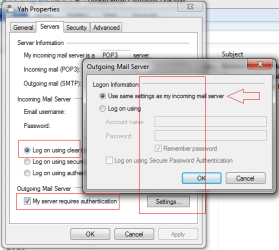
  1. Double check the Servers tab on the account - see attached. Basically, use clear text authentication and use same as incoming are the normal. The servers were correct the last time you posted them.
  2. Disable Email protection in your anti-virus. It's redundant anyway
  3. Create a new account in WE with a different name, but use the same values for the field entries (id, passwdor, server, etc)
       Note
    On the first dialog when you create a new account - tick the Manually Configure Server settings. This overrides WEmail auto-configure - there's something in that process that might contribute to problems. I don't know what it is, but often building an account by hand fixes it.
   Note
See how it goes.

Ref ATT:
   Note
If you created a free att.net email address after June 11th, 2011 you will not be able to use an email client to access your email. Retrieve your email at att.net.

You'll need to know the current AT&T email server settings, shown in the table below, for setting up an email client for AT&T email. You are only able to use an email client if you created a free att.net account before June 11th, 2011.


So my question is: When did you establish the account?

You can also use the setup instructions to verify your existng account.
Don't change anything on your "working" account - I might have incorrectly transcribed something. Ask me about it first.

To set up a new AT&T Mail account in WEmail
  1. Open WEmail on your computer.
  2. Select Accounts from the ribbon, then click @+Email
  3. Tick the check box: Manually configure server settings
  4. Enter your full eMail address ([email protected]) in the E-mail Address field
  5. Enter you password in the Password field and tick Remember password
  6. Click Next
  7. Server type should default to POP, if not then select POP from the drop down box
  8. In the incoming server address enter:
    inbound.att.net
  9. tick the SSL box
  10. double check that the port is 995, not 110
  11. verify: authenticate using clear text
    the login name should be filled in for you from the first screen
  12. In the outgoing server address enter:
    outbound.att.net
  13. tick the SSL box
  14. double check that the port is 465, not 25
  15. tick the Requires authentication box
  16. Click Next
  17. Click finish
Edit the properties of the new account

Server Tab:
Double check the server names (common error is to type a comma instead of a period)
Double check your login information. Make sure it is your full eMail address, not just your user name.

Advanced tab:
Double check the ports and SSL (sometimes the ports do not set correctly)

While you are testing
tick Leave a copy on Server...
untick Remove from server....
-> that way you can receive, delete, send without losing any real mail.
When you're done testing, configure those options how it best suits your needs.

Some ISPs off an alternative port for the outbound server - using 587 instead of 465 might help. If it doesn't help, set it back to 465.
 

Attachments

  • srvset.png
    srvset.png
    22.6 KB · Views: 1

My Computer My Computer

Computer type
Laptop
Computer Manufacturer/Model Number
HP Pavilion dv6-6c10us
OS
x64 (6.3.9600) Win8.1 Pro & soon dual boot x64 (6.1.7601) Win7_SP1 HomePrem
CPU
AMD A6-3420M APU with Radeon(tm) HD Graphics
Motherboard
Hewlett-Packard 1805
Memory
6.00 GB
Graphics Card(s)
AMD Radeon(TM) HD 6520G
Sound Card
(1) AMD High Definition Audio Device (2) IDT High Definiti
Monitor(s) Displays
HP W2072a 20" LCD (1600 x 900) @ 60 Hz
Screen Resolution
1366 x 768 x 32 bits (4294967296 colors) @ 60 Hz
Hard Drives
ST640LM0 00 HM641JI SATA Disk Device
Keyboard
Logitech k520 wireless KB
Mouse
Logitech m320 wireless mouse (bundled with KB)
Internet Speed
15/5 | 54 MB Wireless 'n'
Antivirus
Realtime: Defender or Avast | On-demand: Malwarebytes, ESET
Browser
IE 11 on Win8, IE 10 on win 7
Other Info
Media: [Gimp, Audacity, VLC] || Comm: [WEmail 2012, Skype] || Productivity: [OpenOffice,| Textpad] || Utils: [Sysinternals, cCleaner, Speccy, Defraggler]
Back
Top