enable AHCI in Windows 7

Tyderion

New member
Member
Local time
3:02 AM
Messages
49
hi...
i found several tutorials to enable the AHCI-driver in win7/vista but the registry keys don't match mine...

the tutorial is as following:
1. Exit all Windows-based programs. 2. Click Start, type regedit in the Start Search box, and then press ENTER. 3. If you receive the User Account Control dialog box, click Continue. 4. Locate and then click the following registry subkey: HKEY_LOCAL_MACHINE\System\CurrentControlSet\Services\Msahci
5. In the right pane, right-click Start in the Name column, and then click Modify. 6. In the Value data box, type 0, and then click OK. 7. On the File menu, click Exit to close Registry Editor


but in my registry key the key "Start" does not exist and the Msahci is called msahci (though i don't think the capital letter makes a difference).
it has a "Default" value which doesn't enable the driver if set to 0 (instead of undefined (or something similar)

should i just create a value named "Start" and set it to 0 ?

thanks for helping

Edit
   Tip

New Seven Forums Tutorial added - AHCI : How to Enable in Windows 7 / Vista
 

My Computer

OS
Windows 7 Professional x64
CPU
Intel i7 930 2.8 Ghz
Motherboard
Gigabyte GA-EX58-UD5
Memory
Mushkin Redline 3x2GB, DDR3-1600 CL6-8-6-24
Graphics Card(s)
Sapphire HD 5770 1G
Sound Card
Creative X-Fi XtremeGamer Fatal1ty Pro Series
Monitor(s) Displays
Samsung SyncMaster 226BW
Hard Drives
1x 500 GB System
2x 1TB
1x 1.5 TB
2x 2TB
PSU
be quiet! DARK POWER PRO, P8 900W
Case
Lian Li PCB-70 Black
Cooling
stock
Keyboard
Logitech G15 Blue Backlight
Mouse
Logitech G5 Laser Mouse
Internet Speed
100 mbit
Better read this thread first:

HOWTO: enable AHCI mode after installing Windows - PC Perspective Forums

AFAICT, you cannot change it - it needs to be set when installing. Then you'll have the correct key there, and will need to simply enable it by changing the value.

if the key is not there and you add it, it may cause your system to hang / reboot constantly / all sorts of other problems.

More details at M$ site: Error message when you start a Windows Vista-based computer after you change the SATA mode of the boot drive: "STOP 0x0000007B INACCESSABLE_BOOT_DEVICE"
 

My Computers

System One System Two

  • Computer type
    PC/Desktop
    Computer Manufacturer/Model Number
    The Beast Model A (homebrew)
    OS
    Windows 11 21H2 Current build
    CPU
    AMD Ryzen 9 3950X
    Motherboard
    MSI MEG X570 GODLIKE
    Memory
    4 * 32 GB - Corsair Vengeance 3600 MHz
    Graphics Card(s)
    EVGA GeForce RTX 3080 Ti XC3 ULTRA GAMING (12G-P5-3955-KR)
    Sound Card
    Realtek® ALC1220 Codec
    Monitor(s) Displays
    2x Eve Spectrum ES07D03 4K Gaming Monitor (Matte) | Eve Spec
    Screen Resolution
    3x 3840 x 2160
    Hard Drives
    3x Samsung 980 Pro NVMe PCIe 4 M.2 2 TB SSD (MZ-V8P2T0B/AM) } 3x Sabrent Rocket NVMe 4.0 1 TB SSD
    PSU
    PC Power & Cooling’s Silencer Series 1050 Watt, 80 Plus Plat
    Case
    Fractal Design Define 7 XL Dark ATX Full Tower Case
    Cooling
    SteelSeries Apex Pro Wired Gaming Keyboard
    Keyboard
    SteelSeries Apex Pro
    Mouse
    Logitech MX Master 3S | MX Master 3 for business
    Internet Speed
    AT&T LightSpeed Gigabit Duplex Ftth
    Antivirus
    Windows Defender + MB 3
    Browser
    Nightly (default) + Firefox (stable),Chrome, Edge
  • Computer type
    PC/Desktop
    System Manufacturer/Model Number
    Dell Latitude E5470
    OS
    ChromeOS Flex Dev Channel (current)
    CPU
    Intel(R) Core(TM) i5-6300U CPU @ 2.40GHz, 2501 Mhz, 2 Core(s), 4 Logical Processor(s)
    Motherboard
    Dell
    Memory
    16 GB
    Graphics Card(s)
    Intel(R) HD Graphics 520
    Sound Card
    Intel(R) HD Graphics 520 + RealTek Audio
    Monitor(s) Displays
    Dell laptop display 15"
    Screen Resolution
    1920 * 1080
    Hard Drives
    Toshiba 128GB M.2 22300 drive
    INTEL Cherryville 520 Series SSDSC2CW180A 180 GB SATA III SSD
    PSU
    Dell
    Case
    Dell
    Cooling
    Dell
    Keyboard
    Dell
    Mouse
    Logitech MX Master 3S (shared w. Sys 1) | Dell TouchPad
    Internet Speed
    AT&T LightSpeed Gigabit Duplex Ftth
interestingly i didn't get any bluescreen ...
i just changed bios sata-controller setting to AHCI and it just didn't boot... was there with a flashing cursor and then the display shut off (though the pc still was powered).
so i shut it down and my bios settings got changed (from a 8-multiplier to 9) and then the OC failed (logically ... can't use 9x with that vcore settings i have...)

strange... especially that the multiplier got changed ...
well back to IDE mode up and running fine :)
 

My Computer

OS
Windows 7 Professional x64
CPU
Intel i7 930 2.8 Ghz
Motherboard
Gigabyte GA-EX58-UD5
Memory
Mushkin Redline 3x2GB, DDR3-1600 CL6-8-6-24
Graphics Card(s)
Sapphire HD 5770 1G
Sound Card
Creative X-Fi XtremeGamer Fatal1ty Pro Series
Monitor(s) Displays
Samsung SyncMaster 226BW
Hard Drives
1x 500 GB System
2x 1TB
1x 1.5 TB
2x 2TB
PSU
be quiet! DARK POWER PRO, P8 900W
Case
Lian Li PCB-70 Black
Cooling
stock
Keyboard
Logitech G15 Blue Backlight
Mouse
Logitech G5 Laser Mouse
Internet Speed
100 mbit
not strange - it tried to boot with AHCI in the BIOS but could not - so the BIOS reset itself.

My eVGA mobo has that feature - if the machine will not boot after making a BIOS change it reverts to default setting so I can boot.

but the reason I referred you to that exhaustively long topic elsewhere was that, bottom line, if you did not install Windows with AHCI support, enabling it is going to be a PITA.
 

My Computers

System One System Two

  • Computer type
    PC/Desktop
    Computer Manufacturer/Model Number
    The Beast Model A (homebrew)
    OS
    Windows 11 21H2 Current build
    CPU
    AMD Ryzen 9 3950X
    Motherboard
    MSI MEG X570 GODLIKE
    Memory
    4 * 32 GB - Corsair Vengeance 3600 MHz
    Graphics Card(s)
    EVGA GeForce RTX 3080 Ti XC3 ULTRA GAMING (12G-P5-3955-KR)
    Sound Card
    Realtek® ALC1220 Codec
    Monitor(s) Displays
    2x Eve Spectrum ES07D03 4K Gaming Monitor (Matte) | Eve Spec
    Screen Resolution
    3x 3840 x 2160
    Hard Drives
    3x Samsung 980 Pro NVMe PCIe 4 M.2 2 TB SSD (MZ-V8P2T0B/AM) } 3x Sabrent Rocket NVMe 4.0 1 TB SSD
    PSU
    PC Power & Cooling’s Silencer Series 1050 Watt, 80 Plus Plat
    Case
    Fractal Design Define 7 XL Dark ATX Full Tower Case
    Cooling
    SteelSeries Apex Pro Wired Gaming Keyboard
    Keyboard
    SteelSeries Apex Pro
    Mouse
    Logitech MX Master 3S | MX Master 3 for business
    Internet Speed
    AT&T LightSpeed Gigabit Duplex Ftth
    Antivirus
    Windows Defender + MB 3
    Browser
    Nightly (default) + Firefox (stable),Chrome, Edge
  • Computer type
    PC/Desktop
    System Manufacturer/Model Number
    Dell Latitude E5470
    OS
    ChromeOS Flex Dev Channel (current)
    CPU
    Intel(R) Core(TM) i5-6300U CPU @ 2.40GHz, 2501 Mhz, 2 Core(s), 4 Logical Processor(s)
    Motherboard
    Dell
    Memory
    16 GB
    Graphics Card(s)
    Intel(R) HD Graphics 520
    Sound Card
    Intel(R) HD Graphics 520 + RealTek Audio
    Monitor(s) Displays
    Dell laptop display 15"
    Screen Resolution
    1920 * 1080
    Hard Drives
    Toshiba 128GB M.2 22300 drive
    INTEL Cherryville 520 Series SSDSC2CW180A 180 GB SATA III SSD
    PSU
    Dell
    Case
    Dell
    Cooling
    Dell
    Keyboard
    Dell
    Mouse
    Logitech MX Master 3S (shared w. Sys 1) | Dell TouchPad
    Internet Speed
    AT&T LightSpeed Gigabit Duplex Ftth
normally when the mobo resets it resets to "Auto" settings and not to a 400mhz bus speed with 9x multiplier...
auto settings mean 266mhz bus speed and 9x multiplier (which results in 2.4ghz)

yep i won't enable ahci ... too much trouble :)
 

My Computer

OS
Windows 7 Professional x64
CPU
Intel i7 930 2.8 Ghz
Motherboard
Gigabyte GA-EX58-UD5
Memory
Mushkin Redline 3x2GB, DDR3-1600 CL6-8-6-24
Graphics Card(s)
Sapphire HD 5770 1G
Sound Card
Creative X-Fi XtremeGamer Fatal1ty Pro Series
Monitor(s) Displays
Samsung SyncMaster 226BW
Hard Drives
1x 500 GB System
2x 1TB
1x 1.5 TB
2x 2TB
PSU
be quiet! DARK POWER PRO, P8 900W
Case
Lian Li PCB-70 Black
Cooling
stock
Keyboard
Logitech G15 Blue Backlight
Mouse
Logitech G5 Laser Mouse
Internet Speed
100 mbit
- go into BIOS and check your AHCI settings
- there may be an option to "stagger" the drive identification process

- this takes a while to register, so don't be alarmed if you see a black screen to begin with..
 

My Computer

Computer type
PC/Desktop
Computer Manufacturer/Model Number
benchtec, built to personal specs
OS
Windows10 Pro - 64Bit vs.10547
CPU
i7-965 Extreme Edition (8 Cores) at 3.3GHz (no OC)
Motherboard
BloodRageX58 (Socket1366)
Memory
12G Corsair Dominator DDR3 - tripled
Graphics Card(s)
2xAMD SapphireNITRO R9 380(4G) crossfire
Sound Card
Sonar(SB)X-Fi onboard
Monitor(s) Displays
SyncMaster P2050 20"
Screen Resolution
1600x900 (widescreen)
Hard Drives
480G\OCZSolid3SSD, 64G\OCZVertex3SSD,60G\OCZVertex2SSD, 1TB\spinpointF1SATAHDD
PSU
1200w Power Station Gold
Case
ANTEC 900/2 all blue lights, etc..
Cooling
Noctua SE1366 NH-U12P - a tight fit, but a monster cooler!!
Keyboard
Logitech G19 (wired)
Mouse
Logitech G9 Laser (wired)
Internet Speed
150mb unlimited
Browser
IE11(RP)
Other Info
Xbox One, Nokia735 Windows10 mobile, LG HD/DVD/Blu-Ray r/w, CyberlinkPowerDVD15, LogitechZ5500-SS(5.1), LogitechG35Phones-SS(7.1),MSOffice 2007,CorelDrawX7,Painter2016, Wacom Intuos Pro-SE
Hello all, Seven Forums now has an easily understood tutorial on how to enable AHCI after the OS has been installed; it can be viewed at the link below.


AHCI : Enable in Windows 7 / Vista
 

My Computer

Computer Manufacturer/Model Number
* BFK Customs *
OS
W 7 64-bit Ultimate
CPU
Intel Q9550 Yorkfield
Motherboard
ASUS P5Q Pro
Memory
8GB Dominator 8500C5D
Graphics Card(s)
ATI : XFX 5870
Sound Card
Realtek HD Audio 7-1
Monitor(s) Displays
1x 47" LCD HDMI & 3x 26" LCD HDMI
Screen Resolution
1920x1080P & 1920x1200
Hard Drives
1x 80GB Intel X25-M G2 SSD : 1x 500GB & 1x 640GB WD Caviar Black(s)
PSU
Corsair 620HX
Case
Cooler Master RC-690
Cooling
Tuniq Tower 120, 2x 140mm and 3x 120mm case fans
Keyboard
Microsoft 500
Mouse
Razer Diamondback 3G
Internet Speed
14 Mb/s
Other Info
1x Koutech 3Gb/s SATA HDD Hot Swap Rack
Can't get it to work

So I've tried the tutorial, when I go to regedit and to msachi the start value is already 0. So I tried enabling it in the bios and no joy. Had to switch back to IDE.

I tried downloading the matrix drivers from Intel, when I try to install them they say I don't meet the minimum system requirements.

I really don't want to re-install windows and would value any suggestions.

My system is:
Motherboard: Asus P7p55d Pro
CPU: Intel core I7 2.8ghz
Vid Card: ATI 5850
OS: Windows 7 Pro 64bit
 

My Computer

OS
Windows 7 Professional 64bit
So I've tried the tutorial, when I go to regedit and to msachi the start value is already 0. So I tried enabling it in the bios and no joy. Had to switch back to IDE.

I tried downloading the matrix drivers from Intel, when I try to install them they say I don't meet the minimum system requirements.

I really don't want to re-install windows and would value any suggestions.

My system is:
Motherboard: Asus P7p55d Pro
CPU: Intel core I7 2.8ghz
Vid Card: ATI 5850
OS: Windows 7 Pro 64bit


My Computer

Computer Manufacturer/Model Number
* BFK Customs *
OS
W 7 64-bit Ultimate
CPU
Intel Q9550 Yorkfield
Motherboard
ASUS P5Q Pro
Memory
8GB Dominator 8500C5D
Graphics Card(s)
ATI : XFX 5870
Sound Card
Realtek HD Audio 7-1
Monitor(s) Displays
1x 47" LCD HDMI & 3x 26" LCD HDMI
Screen Resolution
1920x1080P & 1920x1200
Hard Drives
1x 80GB Intel X25-M G2 SSD : 1x 500GB & 1x 640GB WD Caviar Black(s)
PSU
Corsair 620HX
Case
Cooler Master RC-690
Cooling
Tuniq Tower 120, 2x 140mm and 3x 120mm case fans
Keyboard
Microsoft 500
Mouse
Razer Diamondback 3G
Internet Speed
14 Mb/s
Other Info
1x Koutech 3Gb/s SATA HDD Hot Swap Rack
Is there any difference / improvement with AHCI vs IDE ?
Actually i tried that, i changed in the registry, but the OS didn't boot at all.
I repaired with the Windows 7 CD and now is fine.
Just wonder if i change in BIOS to AHCI and make a fresh install of OS, will that work ?
 

My Computer

Computer type
PC/Desktop
OS
Windows 7 Ultimate x64
CPU
Intel7 4790K
Motherboard
Gigabyte GA-Z97X UD5H
Memory
8 GB DDR3
Graphics Card(s)
GTX 980Ti G1
Sound Card
SoundBlaster X-FI XtremeGamer
Monitor(s) Displays
Samsung UE40JU6550 UHD
Screen Resolution
3840 X 2160
Hard Drives
1 SSD Intel 330
2 x Western Digital 6400 AAKS
1 x Western Digital 3200 AAKS
PSU
Corsair 750W
Case
Cooler Master HAF 922
It should do. IDE, AHCI, and RAID require different versions of the storage driver (this is one of the first drivers that is loaded during boot) and, as such, changing the setting in the BIOS will result in a failure to boot.
 

My Computer

Computer type
PC/Desktop
Computer Manufacturer/Model Number
Dwarf Dwf/11/2012 r09/2013
OS
Windows 8.1 Pro RTM x64
CPU
Intel Core-i5-3570K 4-core @ 3.4GHz (Ivy Bridge) (OC 4.4GHz)
Motherboard
ASRock Z77 Extreme4-M
Memory
4 x 4GB DDR3-1600 Corsair Vengeance CMZ8GX3M2A1600C9B (16GB)
Graphics Card(s)
MSI GeForce GTX770 Gaming OC 2GB
Sound Card
Realtek High Definition on board solution (ALC 898)
Monitor(s) Displays
ViewSonic VA1912w Widescreen (VGA)
Screen Resolution
1440x900
Hard Drives
OCZ Agility 3 SSD 120GB SATA III x2 (RAID 0)
Samsung HD501LJ 500GB SATA II x2
Hitachi HDS721010CLA332 1TB SATA II
Iomega 1.5TB Ext USB 2.0
WD 2.0TB Ext USB 3.0
PSU
XFX Pro Series 850W Semi-Modular
Case
Gigabyte IF233
Cooling
1 x 120mm Front Inlet 1 x 120mm Rear Exhaust
Keyboard
Microsoft Comfort Curve Keyboard 3000 (USB)
Mouse
Microsoft Comfort Mouse 3000 for Business (USB)
Internet Speed
NetGear DG834Gv3 ADSL Modem/Router (Ethernet) ~4.0 Mb/s (O2)
Antivirus
Avast! 8.0.1497
Browser
IE 11
Other Info
Optical Drive: HL-DT-ST BD-RE BH10LS30 SATA Bluray
Lexmark S305 Printer/Scanner/Copier (USB)
WEI Score: 8.1/8.1/8.5/8.5/8.25
Asus Eee PC 1011PX Netbook (Windows 7 x86 Starter)
It should do. IDE, AHCI, and RAID require different versions of the storage driver (this is one of the first drivers that is loaded during boot) and, as such, changing the setting in the BIOS will result in a failure to boot.
I could change in BIOS to AHCI and reinstall the Windows.
What do you think ? Is that worth ?
 

My Computer

Computer type
PC/Desktop
OS
Windows 7 Ultimate x64
CPU
Intel7 4790K
Motherboard
Gigabyte GA-Z97X UD5H
Memory
8 GB DDR3
Graphics Card(s)
GTX 980Ti G1
Sound Card
SoundBlaster X-FI XtremeGamer
Monitor(s) Displays
Samsung UE40JU6550 UHD
Screen Resolution
3840 X 2160
Hard Drives
1 SSD Intel 330
2 x Western Digital 6400 AAKS
1 x Western Digital 3200 AAKS
PSU
Corsair 750W
Case
Cooler Master HAF 922
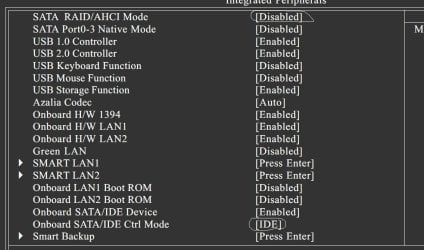
I wanna make a fresh install right now, but i'm not sure which of those 2 options i have to change.
As you can see in the image, i have "SATA / RAID/ AHCI Mode" which is IDE now in my BIOS.
And down to the bottom i have "Onboard SATA/IDE Ctrl Mode" which is IDE as well.
Which one do i have to change to AHCI before i make a fresh install ? Both ?
Thanks in advance.
 

Attachments

  • mainboard.jpg
    mainboard.jpg
    79.4 KB · Views: 138

My Computer

Computer type
PC/Desktop
OS
Windows 7 Ultimate x64
CPU
Intel7 4790K
Motherboard
Gigabyte GA-Z97X UD5H
Memory
8 GB DDR3
Graphics Card(s)
GTX 980Ti G1
Sound Card
SoundBlaster X-FI XtremeGamer
Monitor(s) Displays
Samsung UE40JU6550 UHD
Screen Resolution
3840 X 2160
Hard Drives
1 SSD Intel 330
2 x Western Digital 6400 AAKS
1 x Western Digital 3200 AAKS
PSU
Corsair 750W
Case
Cooler Master HAF 922
Hello mate.


"Onboard SATA/IDE Ctrl Mode"

Set this one to AHCI and leave the other alone; if you're going to do a clean install, though the method outlined in this tutorial shows how to enable AHCI after Windows has been installed.
 

My Computer

Computer Manufacturer/Model Number
* BFK Customs *
OS
W 7 64-bit Ultimate
CPU
Intel Q9550 Yorkfield
Motherboard
ASUS P5Q Pro
Memory
8GB Dominator 8500C5D
Graphics Card(s)
ATI : XFX 5870
Sound Card
Realtek HD Audio 7-1
Monitor(s) Displays
1x 47" LCD HDMI & 3x 26" LCD HDMI
Screen Resolution
1920x1080P & 1920x1200
Hard Drives
1x 80GB Intel X25-M G2 SSD : 1x 500GB & 1x 640GB WD Caviar Black(s)
PSU
Corsair 620HX
Case
Cooler Master RC-690
Cooling
Tuniq Tower 120, 2x 140mm and 3x 120mm case fans
Keyboard
Microsoft 500
Mouse
Razer Diamondback 3G
Internet Speed
14 Mb/s
Other Info
1x Koutech 3Gb/s SATA HDD Hot Swap Rack
Hello mate.


"Onboard SATA/IDE Ctrl Mode"

Set this one to AHCI and leave the other alone; if you're going to do a clean install, though the method outlined in this tutorial shows how to enable AHCI after Windows has been installed.
I already installed Windows.
I changed the first one at the top, to AHCI, and "Onboard SATA/IDE Ctrl Mode" as well
Is that bad ??
One more question, please : how can i get ride of this icon from sistray ?
See those 2 images, please.
I tried from right click Start button / Properties / Taskbar / Customize
But i cannot remove this icon from sistray
I tried to enable AHCI yesterday, but the os couldn't boot. So i said, i better do i fresh install.
Can i leave now the first option " SATA / RAID / AHCI Mode as it is now, to AHCI ??
 

Attachments

  • 1.jpg
    1.jpg
    2.9 KB · Views: 5,402
  • 2.jpg
    2.jpg
    617 bytes · Views: 5,401

My Computer

Computer type
PC/Desktop
OS
Windows 7 Ultimate x64
CPU
Intel7 4790K
Motherboard
Gigabyte GA-Z97X UD5H
Memory
8 GB DDR3
Graphics Card(s)
GTX 980Ti G1
Sound Card
SoundBlaster X-FI XtremeGamer
Monitor(s) Displays
Samsung UE40JU6550 UHD
Screen Resolution
3840 X 2160
Hard Drives
1 SSD Intel 330
2 x Western Digital 6400 AAKS
1 x Western Digital 3200 AAKS
PSU
Corsair 750W
Case
Cooler Master HAF 922
Right click the taskbar, properties, taskbar, customize, only show notifications; see if that helps.
 

My Computer

Computer Manufacturer/Model Number
* BFK Customs *
OS
W 7 64-bit Ultimate
CPU
Intel Q9550 Yorkfield
Motherboard
ASUS P5Q Pro
Memory
8GB Dominator 8500C5D
Graphics Card(s)
ATI : XFX 5870
Sound Card
Realtek HD Audio 7-1
Monitor(s) Displays
1x 47" LCD HDMI & 3x 26" LCD HDMI
Screen Resolution
1920x1080P & 1920x1200
Hard Drives
1x 80GB Intel X25-M G2 SSD : 1x 500GB & 1x 640GB WD Caviar Black(s)
PSU
Corsair 620HX
Case
Cooler Master RC-690
Cooling
Tuniq Tower 120, 2x 140mm and 3x 120mm case fans
Keyboard
Microsoft 500
Mouse
Razer Diamondback 3G
Internet Speed
14 Mb/s
Other Info
1x Koutech 3Gb/s SATA HDD Hot Swap Rack
Right click the taskbar, properties, taskbar, customize, only show notifications; see if that helps.
I tried this before. Didn't help me.
Another way, maybe ?
Cheers.
 

My Computer

Computer type
PC/Desktop
OS
Windows 7 Ultimate x64
CPU
Intel7 4790K
Motherboard
Gigabyte GA-Z97X UD5H
Memory
8 GB DDR3
Graphics Card(s)
GTX 980Ti G1
Sound Card
SoundBlaster X-FI XtremeGamer
Monitor(s) Displays
Samsung UE40JU6550 UHD
Screen Resolution
3840 X 2160
Hard Drives
1 SSD Intel 330
2 x Western Digital 6400 AAKS
1 x Western Digital 3200 AAKS
PSU
Corsair 750W
Case
Cooler Master HAF 922
Sorry mate, I don't fool with that side of Windows alot and I'm not much help; have you posted a new thread on it yet to see if someone has an idea for you?

I know CCleaner has an option to clean up the note area, have a look at that.
 

My Computer

Computer Manufacturer/Model Number
* BFK Customs *
OS
W 7 64-bit Ultimate
CPU
Intel Q9550 Yorkfield
Motherboard
ASUS P5Q Pro
Memory
8GB Dominator 8500C5D
Graphics Card(s)
ATI : XFX 5870
Sound Card
Realtek HD Audio 7-1
Monitor(s) Displays
1x 47" LCD HDMI & 3x 26" LCD HDMI
Screen Resolution
1920x1080P & 1920x1200
Hard Drives
1x 80GB Intel X25-M G2 SSD : 1x 500GB & 1x 640GB WD Caviar Black(s)
PSU
Corsair 620HX
Case
Cooler Master RC-690
Cooling
Tuniq Tower 120, 2x 140mm and 3x 120mm case fans
Keyboard
Microsoft 500
Mouse
Razer Diamondback 3G
Internet Speed
14 Mb/s
Other Info
1x Koutech 3Gb/s SATA HDD Hot Swap Rack

My Computer

Computer type
PC/Desktop
Computer Manufacturer/Model Number
Custom Build
OS
Windows 7 Home Premium 64 bit
CPU
Intel Core i7-4790
Motherboard
GA-Z87X-D3H
Memory
G.SKILL 8GB (2 x 4GB) DDR3 F3-10666CL9D-8GBNT
Graphics Card(s)
AMD Radeon R7 250
Sound Card
Realtek ALC892
Monitor(s) Displays
Samsung UN32EH5000, Dell 1703FPT
Screen Resolution
1920 x 1080, 1280 x 1024
Hard Drives
WD5003AZEX
WD10EZEX
Samsung HD103SJ
Samsung 128 GB 840 PRO
PSU
SeaSonic M12II SS-500GM
Case
Fractal Design Define R4
Cooling
Zalman CNPS9900ALED
Keyboard
Logitech K800
Mouse
Logitech M705
Internet Speed
16 Mbps
Antivirus
Avast
Browser
Firefox
Other Info
Bose Companion 2 Multimedia Speakers

My Computer

Computer type
PC/Desktop
OS
Windows 7 Ultimate x64
CPU
Intel7 4790K
Motherboard
Gigabyte GA-Z97X UD5H
Memory
8 GB DDR3
Graphics Card(s)
GTX 980Ti G1
Sound Card
SoundBlaster X-FI XtremeGamer
Monitor(s) Displays
Samsung UE40JU6550 UHD
Screen Resolution
3840 X 2160
Hard Drives
1 SSD Intel 330
2 x Western Digital 6400 AAKS
1 x Western Digital 3200 AAKS
PSU
Corsair 750W
Case
Cooler Master HAF 922
Back
Top