Enable test mode to solve USB problems?

Look in Windows Update, installed updates for SP1
You can also look in Control Panel -> Programs and Features then click View installed updates

You'll have to look for the words SP1 (I hope MS labeled it with that phrase...I'm not positive though). WU is organized by knowledge base articles (KB) - that's just the way MS refers to updates. I'm on Win8, so I can't look at Win7 without firing up a VM or another machine with Win7 on it, hence my I hope - if you can't find it, no worries.

Speccy says you are running SP1, but it doesn't tell the date it was installed
Operating System: Windows 7 Home Premium 64-bit SP1

This isn't that important - only to answer your inquiry re: the USB article.

Regarding the fresh install.
Ok, let's forget about adding a drive.
but... think about replacing the existing drive with a new one.

To make it easier, let's forget about all the fancy SSD stuff and just consider a new HDD
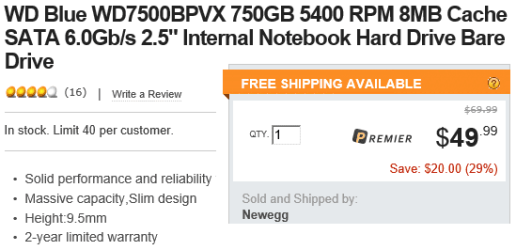
Something like this would be fine
(not necessarily from Newegg, or this drive in particular ... talk to a local store to get a better feel for what is available - ask questions, then decide on a drive)
WD Blue WD7500BPVX 750GB 5400 RPM 8MB Cache SATA 6.0Gb/s 2.5" Internal Notebook Hard Drive Bare Drive - Newegg.com
WDltDrive.png

Installing a disk drive is not much more difficult than changing a light bulb, especially in a laptop. You open the bottom, pull out the drive, slide in the new drive and close the bottom (there might be one cable to disconnect and reconnect on the new drive). The service manual makes it easy.
http://h10032.www1.hp.com/ctg/Manual/c03221579.pdf

Think about it - it is the best way forward. If you can live without the USB ports, that's your call.

There are two things I'd like to try while you ponder the drive information I posted.

CompGeek suggested repairing or rebuilding the root catalog
TVeblen suggested testing the hardware using Ubuntu

It's a good time to try those strategies. Let me review both and I'll get back with instructions (I have to read up).

While I'm gone please run through these tutorials and see what the additional malware scanners see.
http://www.sevenforums.com/tutorials/338877-kaspersky-tdsskiller-detect-repair-tdss-rookits.html
http://www.sevenforums.com/tutorials/338716-malwarebytes-anti-malware-free.html

Don't worry about the VirusTotal part in either (unless you want to), but please post the logs

Thanks,

Bill
.
 

My Computer My Computer

Computer type
Laptop
Computer Manufacturer/Model Number
HP Pavilion dv6-6c10us
OS
x64 (6.3.9600) Win8.1 Pro & soon dual boot x64 (6.1.7601) Win7_SP1 HomePrem
CPU
AMD A6-3420M APU with Radeon(tm) HD Graphics
Motherboard
Hewlett-Packard 1805
Memory
6.00 GB
Graphics Card(s)
AMD Radeon(TM) HD 6520G
Sound Card
(1) AMD High Definition Audio Device (2) IDT High Definiti
Monitor(s) Displays
HP W2072a 20" LCD (1600 x 900) @ 60 Hz
Screen Resolution
1366 x 768 x 32 bits (4294967296 colors) @ 60 Hz
Hard Drives
ST640LM0 00 HM641JI SATA Disk Device
Keyboard
Logitech k520 wireless KB
Mouse
Logitech m320 wireless mouse (bundled with KB)
Internet Speed
15/5 | 54 MB Wireless 'n'
Antivirus
Realtime: Defender or Avast | On-demand: Malwarebytes, ESET
Browser
IE 11 on Win8, IE 10 on win 7
Other Info
Media: [Gimp, Audacity, VLC] || Comm: [WEmail 2012, Skype] || Productivity: [OpenOffice,| Textpad] || Utils: [Sysinternals, cCleaner, Speccy, Defraggler]
Lost my touchpad

I just lost my touchpad. I went back to post 151 to install the optional updates. One of them was an update for the touchpad. After rebooting, the touchpad didn't work anymore. Now that I think of it, I believe this is how I lost my touchpad in the first place. But I can't remember when that update first appeared. I think it was well after the Dec. 26 loss of my USBs but not sure.

Here I am on my old, slow HP notebook. running Windows XP. Was XP so bad? I don't think so.

Anyway, I had a little trouble tabbing back into safe mode to get to system restore but finally managed to get there and restored the system back to this morning. Now the touchpad on my dv7 works again. So I am NOT going to install that touchpad update again.
 

My Computer My Computer

Computer type
PC/Desktop
Computer Manufacturer/Model Number
HP Pavilian DV7-7012 notebook
OS
Windows 7 Home Premium 64 bit
CPU
3rd generation Intel Core i7-3610QM Processor
Motherboard
2.30GHz
Memory
8GB DDR3 1600MHz RAM (2 DIMM); 750GB 7200RPM hard drive
Graphics Card(s)
2GB (2048MB) NVIDIA GeForce GT 650M GDDR5 Graphics
Hard Drives
750GB 7200RPM hard drive with HP ProtectSmart Hard Drive Protection
Antivirus
Microsoft
Browser
Firefox, Chrome, Microsoft
Don't worry, I won't ask you to update the touchpad - as a matter of fact, hide it in Windows update
(right click on the Touchpad update offer, and select hide update)

Ok, there's a less intrusive way to remove an update if (when) this happens.
Using a Restore Point works, but it puts all the entire system back to the snapshot time. No harm, no foul ... I don't think much was changed between then and now, mostly conversation on the thread.

No user data was changed.

You can selectively uninstall updates, instead of reverting all system files back.

It's a learning curve, when to use which tool / feature.

Ok, now, where were we.
Manually run Windows Update and post a screen shot of both the optional and regular offers.

Don't select any optional offers, but do accept the regular offers. The Restore Point essentially told Windows to forget about those. The touchpad update should only appear in the optional offers, if you see one in the regular offers, de-select it.

Bill
.
 

My Computer My Computer

Computer type
Laptop
Computer Manufacturer/Model Number
HP Pavilion dv6-6c10us
OS
x64 (6.3.9600) Win8.1 Pro & soon dual boot x64 (6.1.7601) Win7_SP1 HomePrem
CPU
AMD A6-3420M APU with Radeon(tm) HD Graphics
Motherboard
Hewlett-Packard 1805
Memory
6.00 GB
Graphics Card(s)
AMD Radeon(TM) HD 6520G
Sound Card
(1) AMD High Definition Audio Device (2) IDT High Definiti
Monitor(s) Displays
HP W2072a 20" LCD (1600 x 900) @ 60 Hz
Screen Resolution
1366 x 768 x 32 bits (4294967296 colors) @ 60 Hz
Hard Drives
ST640LM0 00 HM641JI SATA Disk Device
Keyboard
Logitech k520 wireless KB
Mouse
Logitech m320 wireless mouse (bundled with KB)
Internet Speed
15/5 | 54 MB Wireless 'n'
Antivirus
Realtime: Defender or Avast | On-demand: Malwarebytes, ESET
Browser
IE 11 on Win8, IE 10 on win 7
Other Info
Media: [Gimp, Audacity, VLC] || Comm: [WEmail 2012, Skype] || Productivity: [OpenOffice,| Textpad] || Utils: [Sysinternals, cCleaner, Speccy, Defraggler]
I went back to see if anything else needed attention after you used the Restore Point, but didn't see anything other than running WU again.

I did see something I missed though. When Ii read the thread this morning, I didn't notice the time stamps on your posts about MSE. You started the scan last night and it was still running this morning.

That's indicative of two or three things.
1) A Full scan - with full options
2) Fragmentation on the disk
3) Malware was battling MSE to avoid detection.

1 & 2 aren't critical, but 3 is

I've copied my other scans post here - please run these after you post the WU screen shot and install the regular updates offered (not any optional ones unitl I can see the screen shot)

Additional malware scanners:
http://www.sevenforums.com/tutorials/338877-kaspersky-tdsskiller-detect-repair-tdss-rookits.html
http://www.sevenforums.com/tutorials/338716-malwarebytes-anti-malware-free.html

Don't worry about the VirusTotal part in either (unless you want to), but please post the logs

Bill
.
 

My Computer My Computer

Computer type
Laptop
Computer Manufacturer/Model Number
HP Pavilion dv6-6c10us
OS
x64 (6.3.9600) Win8.1 Pro & soon dual boot x64 (6.1.7601) Win7_SP1 HomePrem
CPU
AMD A6-3420M APU with Radeon(tm) HD Graphics
Motherboard
Hewlett-Packard 1805
Memory
6.00 GB
Graphics Card(s)
AMD Radeon(TM) HD 6520G
Sound Card
(1) AMD High Definition Audio Device (2) IDT High Definiti
Monitor(s) Displays
HP W2072a 20" LCD (1600 x 900) @ 60 Hz
Screen Resolution
1366 x 768 x 32 bits (4294967296 colors) @ 60 Hz
Hard Drives
ST640LM0 00 HM641JI SATA Disk Device
Keyboard
Logitech k520 wireless KB
Mouse
Logitech m320 wireless mouse (bundled with KB)
Internet Speed
15/5 | 54 MB Wireless 'n'
Antivirus
Realtime: Defender or Avast | On-demand: Malwarebytes, ESET
Browser
IE 11 on Win8, IE 10 on win 7
Other Info
Media: [Gimp, Audacity, VLC] || Comm: [WEmail 2012, Skype] || Productivity: [OpenOffice,| Textpad] || Utils: [Sysinternals, cCleaner, Speccy, Defraggler]
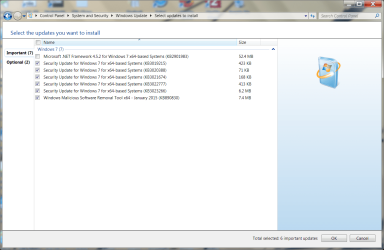
Here are the screen shots of the updates. The only other optional update is the virus definitions which I assume is safe to install.

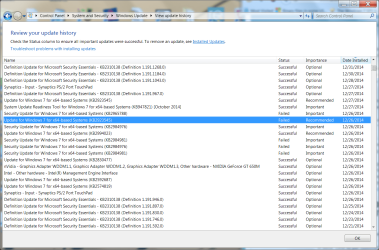
I also have attached a screen shot of the updates around Dec. 26. The touchpad was installed around 10 pm Dec. 26. The USBs were out earlier in the day. I'm not sure when it happened. I think they worked in the early am but when I tried to download some photos I had taken that morning, none of them worked.
When the touchpad went out, I was able to restore it in device manager. Then it went out again. I'm thinking it went out after because it updated itself the next day. Then I had to restore the touchpad again. Not sure why it didn't try to update itself again.
I had installed the Logitech wireless keyboard Dec. 25. That's the item I thought might have caused the USBs to fail. It was the last thing I had done.

I also looked for SP1 but I don't see anything around the time of the USB problem. Only see a reference way back in 2012 and I'm not sure that's what I'm seeing. It's mixed in with some other stuff. Too far back to affect this anyway.
 

Attachments

  • history of updates around dec 26 - jan 14 screenshot.png
    history of updates around dec 26 - jan 14 screenshot.png
    93.5 KB · Views: 2
  • screen shot of optional updates jan 14.png
    screen shot of optional updates jan 14.png
    68.3 KB · Views: 1
  • screen shot of the new updates jan 14.png
    screen shot of the new updates jan 14.png
    73.9 KB · Views: 1

My Computer My Computer

Computer type
PC/Desktop
Computer Manufacturer/Model Number
HP Pavilian DV7-7012 notebook
OS
Windows 7 Home Premium 64 bit
CPU
3rd generation Intel Core i7-3610QM Processor
Motherboard
2.30GHz
Memory
8GB DDR3 1600MHz RAM (2 DIMM); 750GB 7200RPM hard drive
Graphics Card(s)
2GB (2048MB) NVIDIA GeForce GT 650M GDDR5 Graphics
Hard Drives
750GB 7200RPM hard drive with HP ProtectSmart Hard Drive Protection
Antivirus
Microsoft
Browser
Firefox, Chrome, Microsoft
I didn't install any updates yet.
 

My Computer My Computer

Computer type
PC/Desktop
Computer Manufacturer/Model Number
HP Pavilian DV7-7012 notebook
OS
Windows 7 Home Premium 64 bit
CPU
3rd generation Intel Core i7-3610QM Processor
Motherboard
2.30GHz
Memory
8GB DDR3 1600MHz RAM (2 DIMM); 750GB 7200RPM hard drive
Graphics Card(s)
2GB (2048MB) NVIDIA GeForce GT 650M GDDR5 Graphics
Hard Drives
750GB 7200RPM hard drive with HP ProtectSmart Hard Drive Protection
Antivirus
Microsoft
Browser
Firefox, Chrome, Microsoft
Ok good - Then SP1 was installed a long time ago (2012 - using your feedback) and has no bearing on the USB issue now.

Right click on the touchpad update in the optional section and select hide update (or hide)
Yes, the definition updates are ok - select that.
the other regular updates are ok, I'm not sure why .NET 4.5.2 isn't selected, but WU does that on occasion, I just take what WU gives and run it again after the first set gets installed. If it's still not selected, I select it and install it. My guess is that Windows wants the other stuff installed and then the unselected one. Not sure on the exact reason though.

So click OK, you should see 6 important updates and 1 optional (definitions)
you can double check by clicking on the optional and important 'links' in the WU window
- make sure the touch pad is gone or at least that it isn't selected.

When you're sure - click install
 
Last edited:

My Computer My Computer

Computer type
Laptop
Computer Manufacturer/Model Number
HP Pavilion dv6-6c10us
OS
x64 (6.3.9600) Win8.1 Pro & soon dual boot x64 (6.1.7601) Win7_SP1 HomePrem
CPU
AMD A6-3420M APU with Radeon(tm) HD Graphics
Motherboard
Hewlett-Packard 1805
Memory
6.00 GB
Graphics Card(s)
AMD Radeon(TM) HD 6520G
Sound Card
(1) AMD High Definition Audio Device (2) IDT High Definiti
Monitor(s) Displays
HP W2072a 20" LCD (1600 x 900) @ 60 Hz
Screen Resolution
1366 x 768 x 32 bits (4294967296 colors) @ 60 Hz
Hard Drives
ST640LM0 00 HM641JI SATA Disk Device
Keyboard
Logitech k520 wireless KB
Mouse
Logitech m320 wireless mouse (bundled with KB)
Internet Speed
15/5 | 54 MB Wireless 'n'
Antivirus
Realtime: Defender or Avast | On-demand: Malwarebytes, ESET
Browser
IE 11 on Win8, IE 10 on win 7
Other Info
Media: [Gimp, Audacity, VLC] || Comm: [WEmail 2012, Skype] || Productivity: [OpenOffice,| Textpad] || Utils: [Sysinternals, cCleaner, Speccy, Defraggler]
Sorry, I don't think I let you know about those failed updates before.
I checked them in Speccy and they all succeeded on a subsequent update (one I'm not sure about, but I'm also not concerned - it wasn't a continuing failed update, only one time. IF WU doesn't consider it important enough to offer again , I'm not going to chase it)
 

My Computer My Computer

Computer type
Laptop
Computer Manufacturer/Model Number
HP Pavilion dv6-6c10us
OS
x64 (6.3.9600) Win8.1 Pro & soon dual boot x64 (6.1.7601) Win7_SP1 HomePrem
CPU
AMD A6-3420M APU with Radeon(tm) HD Graphics
Motherboard
Hewlett-Packard 1805
Memory
6.00 GB
Graphics Card(s)
AMD Radeon(TM) HD 6520G
Sound Card
(1) AMD High Definition Audio Device (2) IDT High Definiti
Monitor(s) Displays
HP W2072a 20" LCD (1600 x 900) @ 60 Hz
Screen Resolution
1366 x 768 x 32 bits (4294967296 colors) @ 60 Hz
Hard Drives
ST640LM0 00 HM641JI SATA Disk Device
Keyboard
Logitech k520 wireless KB
Mouse
Logitech m320 wireless mouse (bundled with KB)
Internet Speed
15/5 | 54 MB Wireless 'n'
Antivirus
Realtime: Defender or Avast | On-demand: Malwarebytes, ESET
Browser
IE 11 on Win8, IE 10 on win 7
Other Info
Media: [Gimp, Audacity, VLC] || Comm: [WEmail 2012, Skype] || Productivity: [OpenOffice,| Textpad] || Utils: [Sysinternals, cCleaner, Speccy, Defraggler]
May I add Bill when that CCleaner is run that crabby checks the cookies in Options and saves the cookies that are linked to her passworded sites or else she will lose them and have to login all over again:) - it saves lot of time and what I always do.
Good point John, I'm fairly certain the default rules for the cleaner feature does not include cookie cleanup.
But ... I only asked her to run the Registry feature.

Smart Cookies is the name cCleaner uses - I use that, but you have to actually tell cCleaner that you want to preserve a certain cookie.

Bill
.
Ok mate mine just downloads with cookies n the clean up list - just a thought to save a heap of grief with the passwords.
 

My Computer My Computer

Computer type
PC/Desktop
Computer Manufacturer/Model Number
Own build (new) Desk1 / Asus ROG Win 7 / Desk2 1st build
OS
Desk1 7 Home Prem / Desk2 10 Pro / Main lap Asus ROG 10 Pro 2 laptop Toshiba 7 Pro Asus P2520 7 & 10
CPU
Desk1 i5 3750K / Laptop i7 GTX 860M / Desk2 i5 2500
Motherboard
Desk1 Asus P877-V / Desk2 Gigabyte H67 UD3H / Laptop ?
Memory
Desk1 8GB (1866) / Desk2 16GB (1333) / Laptop 8Gb DDR3
Graphics Card(s)
Desk 1& 2NVidia GTX 650 & Laptops on board Intel
Sound Card
Desk 1 & 2 -XONAR DG Realtek High Def audio Laptop
Monitor(s) Displays
Desk 1 Benq HD 2450 / Desk2 Philips 24" / Laptop 17.5"
Screen Resolution
1920x1080 D1 & D2 & Laptop 1
Hard Drives
Desk1 Samsung 120GB 830 SSD
Asus ROG 256GB 850 Pro SSD
Desk2 Samsung 840 256 SSD
Toshiba 120GB EVO
PSU
Desk 1 Corsair HX 1050/ Laptop ? / Desk 2 Corsair HX 650
Case
Desk 1 Cooler HAF XM ? Toshiba laptop / Desk2 Coolermaster
Cooling
Fans on all Desk1 -2 Desk2 - all Coolermasters 5 Laptop ?
Keyboard
Desk 1 MS Sidewinder X6 Desk 2 MS Sidewinder X 4
Mouse
Desk 1&2 - Gigabyte MS 900 gamer - laptop - Logitec wireless
Internet Speed
ADSL2+
Other Info
One other Desktop (tester) and spare Toshba laptop both with SSD's
Running Kaspersky 2016 ISS on all machines config'd identically
Logitec audio stereo systems on each machine (x3)
Canon MG5250MFC
Router/modem TP-Link running WPA2SK
Ok mate mine just downloads with cookies n the clean up list - just a thought to save a heap of grief with the passwords.
and it is a good thought too - I'm not absolutely certain, only fairly certain :)

Always good to have another pair of eyes and cautionary advice given.

Thanks John.
 

My Computer My Computer

Computer type
Laptop
Computer Manufacturer/Model Number
HP Pavilion dv6-6c10us
OS
x64 (6.3.9600) Win8.1 Pro & soon dual boot x64 (6.1.7601) Win7_SP1 HomePrem
CPU
AMD A6-3420M APU with Radeon(tm) HD Graphics
Motherboard
Hewlett-Packard 1805
Memory
6.00 GB
Graphics Card(s)
AMD Radeon(TM) HD 6520G
Sound Card
(1) AMD High Definition Audio Device (2) IDT High Definiti
Monitor(s) Displays
HP W2072a 20" LCD (1600 x 900) @ 60 Hz
Screen Resolution
1366 x 768 x 32 bits (4294967296 colors) @ 60 Hz
Hard Drives
ST640LM0 00 HM641JI SATA Disk Device
Keyboard
Logitech k520 wireless KB
Mouse
Logitech m320 wireless mouse (bundled with KB)
Internet Speed
15/5 | 54 MB Wireless 'n'
Antivirus
Realtime: Defender or Avast | On-demand: Malwarebytes, ESET
Browser
IE 11 on Win8, IE 10 on win 7
Other Info
Media: [Gimp, Audacity, VLC] || Comm: [WEmail 2012, Skype] || Productivity: [OpenOffice,| Textpad] || Utils: [Sysinternals, cCleaner, Speccy, Defraggler]
USB ports work on Ubuntu

I burned Ubuntu to disk and when I booted it up, all my USB ports worked.
I need my computer for other things tomorrow but if I get a chance I will download the malware software and see if that does any good to get the USBs to work on Windows. :confused: I will entertain any other suggestions.
 

My Computer My Computer

Computer type
PC/Desktop
Computer Manufacturer/Model Number
HP Pavilian DV7-7012 notebook
OS
Windows 7 Home Premium 64 bit
CPU
3rd generation Intel Core i7-3610QM Processor
Motherboard
2.30GHz
Memory
8GB DDR3 1600MHz RAM (2 DIMM); 750GB 7200RPM hard drive
Graphics Card(s)
2GB (2048MB) NVIDIA GeForce GT 650M GDDR5 Graphics
Hard Drives
750GB 7200RPM hard drive with HP ProtectSmart Hard Drive Protection
Antivirus
Microsoft
Browser
Firefox, Chrome, Microsoft
That's good news - it proves the hardware is ok. CompGeek and I thought it was driver/software and TVeblen suggested Ubuntu as a good way to test the HW.

One more thing eliminated!

I sent you a Private Message (PM) basically saying "Hey take a break if you want to" and then I see that you posted pretty much just that.

I was a little concerned that one of the things I asked you to do incapacitated your machine. Phew!

The malware tools will not fix the USBs, they might not find anything. It will make me feel better knowing what they report, especially after seeing that MSE ran so long.

Did you ever get a chance to run Windows Update (sans Touchpad update)?

'til your next post then.

Bill
.
 

My Computer My Computer

Computer type
Laptop
Computer Manufacturer/Model Number
HP Pavilion dv6-6c10us
OS
x64 (6.3.9600) Win8.1 Pro & soon dual boot x64 (6.1.7601) Win7_SP1 HomePrem
CPU
AMD A6-3420M APU with Radeon(tm) HD Graphics
Motherboard
Hewlett-Packard 1805
Memory
6.00 GB
Graphics Card(s)
AMD Radeon(TM) HD 6520G
Sound Card
(1) AMD High Definition Audio Device (2) IDT High Definiti
Monitor(s) Displays
HP W2072a 20" LCD (1600 x 900) @ 60 Hz
Screen Resolution
1366 x 768 x 32 bits (4294967296 colors) @ 60 Hz
Hard Drives
ST640LM0 00 HM641JI SATA Disk Device
Keyboard
Logitech k520 wireless KB
Mouse
Logitech m320 wireless mouse (bundled with KB)
Internet Speed
15/5 | 54 MB Wireless 'n'
Antivirus
Realtime: Defender or Avast | On-demand: Malwarebytes, ESET
Browser
IE 11 on Win8, IE 10 on win 7
Other Info
Media: [Gimp, Audacity, VLC] || Comm: [WEmail 2012, Skype] || Productivity: [OpenOffice,| Textpad] || Utils: [Sysinternals, cCleaner, Speccy, Defraggler]
I will entertain any other suggestions.
I'll offer another suggestion - and explain why.

All evidence points to ===> your USB problem is due to software corruption. The digital signatures on the driver files are bad. Device manager has been screaming that to us with code 52 errors which were only highlighted and reconfirmed when we saw DevMgr tell us in the Device Manager trace that it wouldn't load/start the device because of an unsigned driver error.

Getting your BIOS fixed is good, for sure. But IMO you're only going to be able to fix this problem if you can fix the corrupt files on the disk. That means fixing either
> The driver files. If one or more files are corrupt, the file's digital sig is broke, or
> Fixing the System Catalog where Windows stores the "golden" signatures it uses for comparison.
So short of a system restore (which you've tried) or a system re-install (which you can't till May) we can try a few things that come to mind

(p.s. I'm better at fixing corrupt driver files. I've never fixed a System Cat file before - but let's see how this goes).

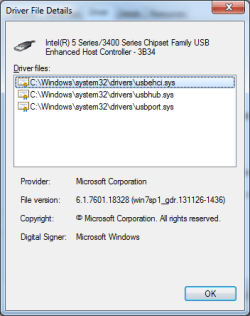
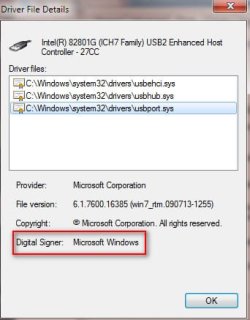
Crabby, let's start by looking at your driver files. Go to Device Manager, right click either of the broken USB Enhanced controllers, select Properties. Click the Driver tab. Click Driver Details button. (fyi... I'm running 32 bit Windows so don't worry if your driver version #'s are different from my snapshot below. Tho, Slarty i see you're running 64-bit Windows 7 too? I may ask you to check some things on your machine as well later :) ) Click on each driver file. Look at the Digital Signer. Which file(s) are not signed by Microsoft?

While you're at it, why don't you do the same for the USB 3.0 driver files on the USB 3.0 controller
 

Attachments

  • 2015-01-14_223545.jpg
    2015-01-14_223545.jpg
    21.5 KB · Views: 54
Last edited:

My Computer My Computer

Computer type
PC/Desktop
Computer Manufacturer/Model Number
Dell Optiplex 360 and Optiplex 755
OS
Desk 1: Win 7 Pro x32; Desk 2: Windows 10 x64
Hard Drives
500GB Crucial SSD in both Desktops
Other Info
Buffalo 6TB NAS, Raid 1
All evidence points to ===> your USB problem is due to software corruption. The digital signatures on the driver files are bad. Device manager has been screaming that to us with code 52 errors which were only highlighted and reconfirmed when we saw DevMgr tell us in the Device Manager trace that it wouldn't load/start the device because of an unsigned driver error.
@CompGeek,
I had a few logs in the fire and the catroot repair / rebuild was next on the list.

We'll have to wait until Crabby gets back to the thread, but I'm good with switching the order.
The only thing I want to bring up is a code 52 caused by malware. MSE came back with a browser threat that was actually in AdwCleaner's quarantine. The threat was minor and mitigated, MSE simply saw it again.
When an issue like this (chipset drivers) is being considered and a malware scan runs abnormally long, it's a good idea to look deeper for a threat.

To be honest, it's a coin toss - the catroot or malware.

You're up batter, I'm rooting for you. We need a grand slam!

@Crabby,
We're switching gears, CompGeek has been very patient ;)

The catroot repair was already discussed and it makes sense to go through the process.
Everything that I've already suggested (Windows Update and the two malware scans) is put on hold until CompGeek does his magic.

Bill
.
 

My Computer My Computer

Computer type
Laptop
Computer Manufacturer/Model Number
HP Pavilion dv6-6c10us
OS
x64 (6.3.9600) Win8.1 Pro & soon dual boot x64 (6.1.7601) Win7_SP1 HomePrem
CPU
AMD A6-3420M APU with Radeon(tm) HD Graphics
Motherboard
Hewlett-Packard 1805
Memory
6.00 GB
Graphics Card(s)
AMD Radeon(TM) HD 6520G
Sound Card
(1) AMD High Definition Audio Device (2) IDT High Definiti
Monitor(s) Displays
HP W2072a 20" LCD (1600 x 900) @ 60 Hz
Screen Resolution
1366 x 768 x 32 bits (4294967296 colors) @ 60 Hz
Hard Drives
ST640LM0 00 HM641JI SATA Disk Device
Keyboard
Logitech k520 wireless KB
Mouse
Logitech m320 wireless mouse (bundled with KB)
Internet Speed
15/5 | 54 MB Wireless 'n'
Antivirus
Realtime: Defender or Avast | On-demand: Malwarebytes, ESET
Browser
IE 11 on Win8, IE 10 on win 7
Other Info
Media: [Gimp, Audacity, VLC] || Comm: [WEmail 2012, Skype] || Productivity: [OpenOffice,| Textpad] || Utils: [Sysinternals, cCleaner, Speccy, Defraggler]
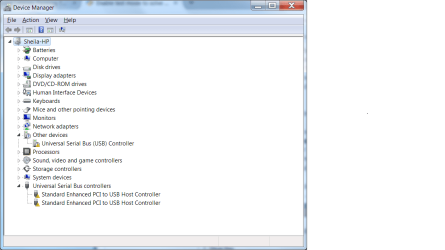
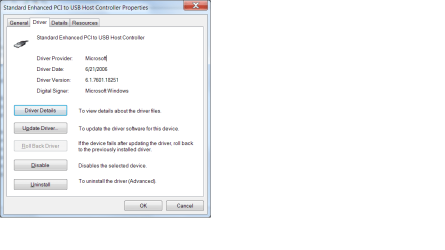
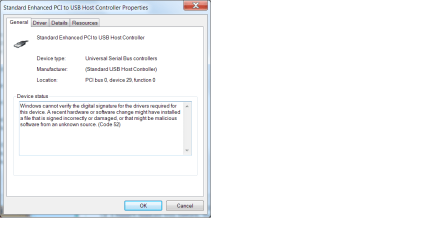
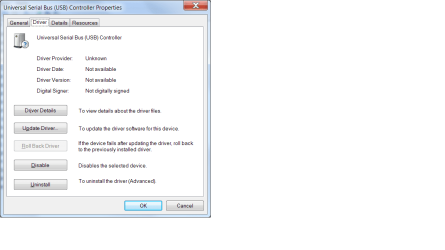
I hadn't noticed this before, but the drivers have changed with various things we have done over the last couple days. Right now they seem to be generic drivers from Microsoft, but before that they were Intel drivers. If you look at some of the previous screen shots I posted you will see. I am posting screen shots of the drivers I have on the computer right now. The one listed under other devices has no driver and is code 28. The other two are code 52. I have to confess that I don't know which drivers go to which ports USB3 or USB2.

device manager jan 15.png

driver screen shot jan 15.png

driver screen shot 2 jan 15.png

driver screen shot 3 jan 15.png
 

My Computer My Computer

Computer type
PC/Desktop
Computer Manufacturer/Model Number
HP Pavilian DV7-7012 notebook
OS
Windows 7 Home Premium 64 bit
CPU
3rd generation Intel Core i7-3610QM Processor
Motherboard
2.30GHz
Memory
8GB DDR3 1600MHz RAM (2 DIMM); 750GB 7200RPM hard drive
Graphics Card(s)
2GB (2048MB) NVIDIA GeForce GT 650M GDDR5 Graphics
Hard Drives
750GB 7200RPM hard drive with HP ProtectSmart Hard Drive Protection
Antivirus
Microsoft
Browser
Firefox, Chrome, Microsoft
The "Other" Device in Device Manager
Right now, your USB 3.0 driver isn't installed. So your USB 3.0 controller is listed under "Other" device category. That's OK for now. Ignore it. We'll start by looking at the other 2 controllers

Your "Enhanced" Controllers
fyi.... Crabby: USB 2.0 controllers have the word Enhanced and/or USB 2 in their name. The devices you see in Device Manager under USB named "Enhanced PCI to USB Controller" are your USB 2.0 controllers.


@Crabby and @Slartybart please do the following
  • Download sigcheck Unzip and place sigcheck.exe in your C:\Windows\System32 folder
  • Download attached file CheckSigs.bat file and save on your Desktop
  • Right click CheckSigs.bat and you must Run as Administrator
  • Upload file C:\sig.txt to your next post
@Crabby Adownload the attached Set LogLevel Default.zip file. Unzip and apply the .reg file to reset Device Manager trace logging back to normal (so it's not constantly writing to disk)
 

Attachments

My Computer My Computer

Computer type
PC/Desktop
Computer Manufacturer/Model Number
Dell Optiplex 360 and Optiplex 755
OS
Desk 1: Win 7 Pro x32; Desk 2: Windows 10 x64
Hard Drives
500GB Crucial SSD in both Desktops
Other Info
Buffalo 6TB NAS, Raid 1
Confused

I see sigcheck on my computer already. Did we do this step already, Bill. I await your response.

Geek, I am confused by what you told me. My notebook supposedly has 3 USB3 ports and 1 USB2 port so why am I seeing two enhanced controllers in device manager?
 

My Computer My Computer

Computer type
PC/Desktop
Computer Manufacturer/Model Number
HP Pavilian DV7-7012 notebook
OS
Windows 7 Home Premium 64 bit
CPU
3rd generation Intel Core i7-3610QM Processor
Motherboard
2.30GHz
Memory
8GB DDR3 1600MHz RAM (2 DIMM); 750GB 7200RPM hard drive
Graphics Card(s)
2GB (2048MB) NVIDIA GeForce GT 650M GDDR5 Graphics
Hard Drives
750GB 7200RPM hard drive with HP ProtectSmart Hard Drive Protection
Antivirus
Microsoft
Browser
Firefox, Chrome, Microsoft
Here is the old sigtest.txt zipped. Let me know if I need to run a new one.
 

Attachments

My Computer My Computer

Computer type
PC/Desktop
Computer Manufacturer/Model Number
HP Pavilian DV7-7012 notebook
OS
Windows 7 Home Premium 64 bit
CPU
3rd generation Intel Core i7-3610QM Processor
Motherboard
2.30GHz
Memory
8GB DDR3 1600MHz RAM (2 DIMM); 750GB 7200RPM hard drive
Graphics Card(s)
2GB (2048MB) NVIDIA GeForce GT 650M GDDR5 Graphics
Hard Drives
750GB 7200RPM hard drive with HP ProtectSmart Hard Drive Protection
Antivirus
Microsoft
Browser
Firefox, Chrome, Microsoft
Here is the old sigtest.txt zipped. Let me know if I need to run a new one.
Oh my! I'm so sorry. I never saw your reply to my original request in post #114. I was notified when you first replied to someone else but didn't get a subsequent email alert when you actually posted the data - and by then i was distracted and not keeping up with the thread for some time so i missed it. So sorry... :o

But, yes, I now have the data i requested in your original reply. Now let's see what SB's data shows. And, yes, all those "UNSIGNEDs" show the digital signature for the USB 2.0 driver "package" is broken. (fyi...A driver "package" contains all the files needed to install/deploy a driver. A single signature is calculated for the entire package. If any one file in the package changes, the dig signature for the package fails. Is why no file shows it's digitally signed)

As to your other question about usb ports, it can get a bit confusing. But (to generalize)
  • Every USB Controller has a "Root hub"
  • Every Root hub has ports
  • Controllers, root hubs and root hub ports are all on the motherboard
  • Separate from all that are the physical USB ports you see on your computer - let's call these the "computer ports"
  • It's quite common to have many root hub ports but only a limited number of comupter ports
  • Sometimes, an onboard device (like a card reader) may be connected directly to a Root hub port
  • But most often there are simply many more root hub ports then computer ports

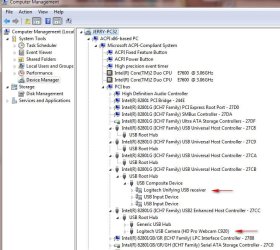
You can see the relationship between Controllers, Root Hubs and devices that connect to them using Device Manager. Click View->Devices by Connection. Expand the ACPI devices. Then PCI bus. Then your controllers and their Root Hubs to see their connections. Note: a "Generic Hub" is a USB hub that is EXTERNAL to your computer. Root Hubs are on the motherboard and connect to the Controller.

Note in my snapshot, I don't have a USB 3.0 Controller on this computer. You can see my webcam connected to the "Enhanced" controller. You can see my logitech keyboard/mouse transceiver connected to my USB 1.1 controller. (I know it's 1.1 based on the naming convention for controllers)

It can also get confusing because (depending on how a computer is built) the connection from computer port to Root Hub port is a dynamic decision Windows makes when the device is plugged in! A particular computer port doesn't always mean you'll connect to the same controller each time.
 

Attachments

  • 2015-01-15_165035.jpg
    2015-01-15_165035.jpg
    79.3 KB · Views: 1

My Computer My Computer

Computer type
PC/Desktop
Computer Manufacturer/Model Number
Dell Optiplex 360 and Optiplex 755
OS
Desk 1: Win 7 Pro x32; Desk 2: Windows 10 x64
Hard Drives
500GB Crucial SSD in both Desktops
Other Info
Buffalo 6TB NAS, Raid 1
Just catching up:

Here's one host controller, let me know if you want to see more than just this
USBhost3834.png

Here's the checksig output: View attachment Sig.txt
 

Attachments

Last edited:

My Computer My Computer

Computer type
Laptop
Computer Manufacturer/Model Number
HP Pavilion dv6-6c10us
OS
x64 (6.3.9600) Win8.1 Pro & soon dual boot x64 (6.1.7601) Win7_SP1 HomePrem
CPU
AMD A6-3420M APU with Radeon(tm) HD Graphics
Motherboard
Hewlett-Packard 1805
Memory
6.00 GB
Graphics Card(s)
AMD Radeon(TM) HD 6520G
Sound Card
(1) AMD High Definition Audio Device (2) IDT High Definiti
Monitor(s) Displays
HP W2072a 20" LCD (1600 x 900) @ 60 Hz
Screen Resolution
1366 x 768 x 32 bits (4294967296 colors) @ 60 Hz
Hard Drives
ST640LM0 00 HM641JI SATA Disk Device
Keyboard
Logitech k520 wireless KB
Mouse
Logitech m320 wireless mouse (bundled with KB)
Internet Speed
15/5 | 54 MB Wireless 'n'
Antivirus
Realtime: Defender or Avast | On-demand: Malwarebytes, ESET
Browser
IE 11 on Win8, IE 10 on win 7
Other Info
Media: [Gimp, Audacity, VLC] || Comm: [WEmail 2012, Skype] || Productivity: [OpenOffice,| Textpad] || Utils: [Sysinternals, cCleaner, Speccy, Defraggler]
Back
Top