Encrypted Volume Check: Volume Info on \\?\Volume{X}Can't read

glennc

New member
Power User
VIP
Local time
1:51 AM
Messages
1,024
Encrypted Volume Check: Volume Info on \\?\Volume{X}Can Not Read

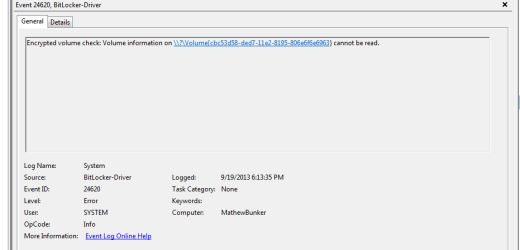
Found this in my Event Viewer on each start/restart. I don't have any Volumes that I have encrypted. Is this malware? I've run everything prior to noticing including Windows Offline Defender.
Not sure if this is even the correct area to post this!
Glenn
 

My Computer My Computer

At a glance

Windows 7 UltimateAMD Phenom-II X4 9658192 MB DDR2-SDRAMATI Radeon HD 4200
Computer type
PC/Desktop
Computer Manufacturer/Model Number
Self-Built
OS
Windows 7 Ultimate
CPU
AMD Phenom-II X4 965
Motherboard
Gigabyte GA-MA785GM-US2H
Memory
8192 MB DDR2-SDRAM
Graphics Card(s)
ATI Radeon HD 4200
Sound Card
ATI Radeon HD 4200 High Definition Audo
Monitor(s) Displays
LG Electronics W1943
Screen Resolution
1360 X 768
Hard Drives
C: 500 GB Caviar Black SATA
E: 500 GB Caviar Black SATA
PSU
Ultra LSP 750
Case
Ultra XBlaster
Cooling
2 Fans, CPU Fan, PS Fan
Keyboard
Acer
Mouse
Logitech
Internet Speed
6 MB
I'm going to take a guess, please upload a screenshot of the disk manager (Windows Key+R to open the Run dialog, type diskmgmt.msc, and press Enter).
Posting the actual entry from the Event Viewer can help.
 

My Computer My Computer

At a glance

Windows 10Intel Core i5 3570K16GB 1600Mhz G.SkillGigabyte GTX 970 G1-Gaming
Computer type
PC/Desktop
OS
Windows 10
CPU
Intel Core i5 3570K
Motherboard
Asus P8Z77V-PRO
Memory
16GB 1600Mhz G.Skill
Graphics Card(s)
Gigabyte GTX 970 G1-Gaming
PSU
Seasonic 1000W Platinum
Case
Fractal Design Define R4
Cooling
Noctua NH-D14
I'm going to take a guess, please upload a screenshot of the disk manager (Windows Key+R to open the Run dialog, type diskmgmt.msc, and press Enter).
Posting the actual entry from the Event Viewer can help.

Hello and thanks for responding. Here is a view from the event viewer, I'll do it with diskmgmt.msc if it is still necessary!

Capture.PNG


Glenn
 

My Computer My Computer

At a glance

Windows 7 UltimateAMD Phenom-II X4 9658192 MB DDR2-SDRAMATI Radeon HD 4200
Computer type
PC/Desktop
Computer Manufacturer/Model Number
Self-Built
OS
Windows 7 Ultimate
CPU
AMD Phenom-II X4 965
Motherboard
Gigabyte GA-MA785GM-US2H
Memory
8192 MB DDR2-SDRAM
Graphics Card(s)
ATI Radeon HD 4200
Sound Card
ATI Radeon HD 4200 High Definition Audo
Monitor(s) Displays
LG Electronics W1943
Screen Resolution
1360 X 768
Hard Drives
C: 500 GB Caviar Black SATA
E: 500 GB Caviar Black SATA
PSU
Ultra LSP 750
Case
Ultra XBlaster
Cooling
2 Fans, CPU Fan, PS Fan
Keyboard
Acer
Mouse
Logitech
Internet Speed
6 MB
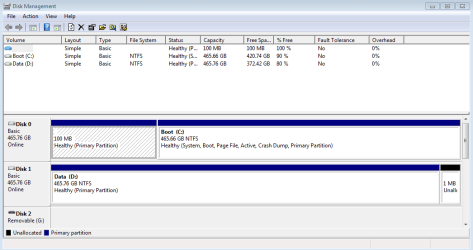
Here is the diskmgmt shot!

Capture.PNG

Thanks for any assistance!
Glenn
 

My Computer My Computer

At a glance

Windows 7 UltimateAMD Phenom-II X4 9658192 MB DDR2-SDRAMATI Radeon HD 4200
Computer type
PC/Desktop
Computer Manufacturer/Model Number
Self-Built
OS
Windows 7 Ultimate
CPU
AMD Phenom-II X4 965
Motherboard
Gigabyte GA-MA785GM-US2H
Memory
8192 MB DDR2-SDRAM
Graphics Card(s)
ATI Radeon HD 4200
Sound Card
ATI Radeon HD 4200 High Definition Audo
Monitor(s) Displays
LG Electronics W1943
Screen Resolution
1360 X 768
Hard Drives
C: 500 GB Caviar Black SATA
E: 500 GB Caviar Black SATA
PSU
Ultra LSP 750
Case
Ultra XBlaster
Cooling
2 Fans, CPU Fan, PS Fan
Keyboard
Acer
Mouse
Logitech
Internet Speed
6 MB
The more info the better the thing I don't quite understand is how is this an issue in your eyes?
Have you experienced any problems?
I don't have Windows 7 Ultimate so I can't try and reproduce this condition.

I would go into the registry and search for the value inside the {} to see who's it's parent.
A word of caution! DON'T change anything.
 

My Computer My Computer

At a glance

Windows 10Intel Core i5 3570K16GB 1600Mhz G.SkillGigabyte GTX 970 G1-Gaming
Computer type
PC/Desktop
OS
Windows 10
CPU
Intel Core i5 3570K
Motherboard
Asus P8Z77V-PRO
Memory
16GB 1600Mhz G.Skill
Graphics Card(s)
Gigabyte GTX 970 G1-Gaming
PSU
Seasonic 1000W Platinum
Case
Fractal Design Define R4
Cooling
Noctua NH-D14
The more info the better the thing I don't quite understand is how is this an issue in your eyes?
Have you experienced any problems?
I don't have Windows 7 Ultimate so I can't try and reproduce this condition.

I would go into the registry and search for the value inside the {} to see who's it's parent.
A word of caution! DON'T change anything.

Hello YoYo155,
I don't have the experience of confidence to try that without help..... But looking at the disk management page on Disk 0 the first 100 MB partition is supposed to be the System Resereved IIRC. It is now unnamed and doesn't look right!
Any ideas?? Thanks again
Glenn
 

My Computer My Computer

At a glance

Windows 7 UltimateAMD Phenom-II X4 9658192 MB DDR2-SDRAMATI Radeon HD 4200
Computer type
PC/Desktop
Computer Manufacturer/Model Number
Self-Built
OS
Windows 7 Ultimate
CPU
AMD Phenom-II X4 965
Motherboard
Gigabyte GA-MA785GM-US2H
Memory
8192 MB DDR2-SDRAM
Graphics Card(s)
ATI Radeon HD 4200
Sound Card
ATI Radeon HD 4200 High Definition Audo
Monitor(s) Displays
LG Electronics W1943
Screen Resolution
1360 X 768
Hard Drives
C: 500 GB Caviar Black SATA
E: 500 GB Caviar Black SATA
PSU
Ultra LSP 750
Case
Ultra XBlaster
Cooling
2 Fans, CPU Fan, PS Fan
Keyboard
Acer
Mouse
Logitech
Internet Speed
6 MB
Mine is unnamed too, it is still system reserved though.
 

My Computer My Computer

At a glance

Win 10 Pro x64Intel I5-2500K @3.3GHz16GB G.Skill Ripjaws X (4x4GB)EVGA GeForce 750 Ti SC 2GB
Computer type
PC/Desktop
Computer Manufacturer/Model Number
Self Built
OS
Win 10 Pro x64
CPU
Intel I5-2500K @3.3GHz
Motherboard
Asrock P67 Extreme4
Memory
16GB G.Skill Ripjaws X (4x4GB)
Graphics Card(s)
EVGA GeForce 750 Ti SC 2GB
Sound Card
ASUS Xonar DG 5.1 Channels 24-bit 96KHz PCI Interface Sound
Monitor(s) Displays
auria eq2367
Screen Resolution
1920 x 1080
Hard Drives
250GB Samsung 850 EVO SSD
1TB WD Blue
1TB Hitachi
PSU
SeaSonic X 650W 80 Plus Gold
Case
Corsair Obsidian 750D
Cooling
Corsair H60, Three 140mm case fans
Keyboard
Logitech Wireless Keyboard K520
Mouse
Logitech Wireless Mouse M310
Internet Speed
Wave Broadband ~ 100 dn 5 up
Antivirus
Windows Defender, Malwarebytes Premium
Browser
Edge, IE11, Chrome
Other Info
Laptop specs: HP g7-1365dx /
CPU: AMD A6-3420M APU with Radeon(tm) HD Graphics /
RAM: Crucial 8Gb (2x4Gb) /
SSD: Crucial M4-CT128M4SSD2 ATA Device/ FW 000F /
GFX: AMD Radeon HD 6520G /
OS: Windows 10 Pro x64
No I don't believe that to be the problem, or any problem for that matter.

If I may ask, what made you go and look in the event viewer in the first place, did some issues arise?


with that said, you can look in the registry by Windows Key + R and typing regedit then pressing Enter (accept the UAC [User Access Control]).
In the registry the first thing you do is File>Export (make sure that the export range is set to All [a bullet point at the bottom left]) and save a backup.
Then hit the F3 key and enter the string (the series of characters between the {} and search.
Let us know if something comes up.

But really I have to stress is there a problem?
 

My Computer My Computer

At a glance

Windows 10Intel Core i5 3570K16GB 1600Mhz G.SkillGigabyte GTX 970 G1-Gaming
Computer type
PC/Desktop
OS
Windows 10
CPU
Intel Core i5 3570K
Motherboard
Asus P8Z77V-PRO
Memory
16GB 1600Mhz G.Skill
Graphics Card(s)
Gigabyte GTX 970 G1-Gaming
PSU
Seasonic 1000W Platinum
Case
Fractal Design Define R4
Cooling
Noctua NH-D14
Mine is unnamed too, it is still system reserved though.

Thanks Derek,
I thought I remember it being different, the last time I looked at it. Thanks for confirming!
Glenn
 

My Computer My Computer

At a glance

Windows 7 UltimateAMD Phenom-II X4 9658192 MB DDR2-SDRAMATI Radeon HD 4200
Computer type
PC/Desktop
Computer Manufacturer/Model Number
Self-Built
OS
Windows 7 Ultimate
CPU
AMD Phenom-II X4 965
Motherboard
Gigabyte GA-MA785GM-US2H
Memory
8192 MB DDR2-SDRAM
Graphics Card(s)
ATI Radeon HD 4200
Sound Card
ATI Radeon HD 4200 High Definition Audo
Monitor(s) Displays
LG Electronics W1943
Screen Resolution
1360 X 768
Hard Drives
C: 500 GB Caviar Black SATA
E: 500 GB Caviar Black SATA
PSU
Ultra LSP 750
Case
Ultra XBlaster
Cooling
2 Fans, CPU Fan, PS Fan
Keyboard
Acer
Mouse
Logitech
Internet Speed
6 MB
Do you have TrueCrypt installed? Any encrypted containers?
 

My Computer My Computer

At a glance

Windows 10 Pro x64 ; Xubuntu x64Intel i7 860 @ 2.80 GHz O/C'ed to 4.0GHz16GB Corsair Vengance DDR3 @ 661 MHz Dual Cha...EVGA NVidia GTX 560 1024MB
Computer type
PC/Desktop
Computer Manufacturer/Model Number
Golden Mk. I.4
OS
Windows 10 Pro x64 ; Xubuntu x64
CPU
Intel i7 860 @ 2.80 GHz O/C'ed to 4.0GHz
Motherboard
Gigabyte P55A-UD3R Rev.1. Award BIOS F13
Memory
16GB Corsair Vengance DDR3 @ 661 MHz Dual Channel (9-9-9-24)
Graphics Card(s)
EVGA NVidia GTX 560 1024MB
Sound Card
Realtek Integrated
Monitor(s) Displays
Dual Samsung SyncMaster 2494HS
Screen Resolution
1920*1080 and 1920*1080
Hard Drives
1*Samsung 840 EVO 120GB SSD;
1*OCZ Vertex 2 60GB SSD;
2*Samsung F3 SpinPoint 1TB in RAID0;
1*Samsung F1 SpinPoint 1TB;
2*Western Digital 1TB External USB 3.0
1*Western Digital 500GB External USB 3.0
1*Seagate 500GB External USB 2.0
PSU
Thermaltake ToughPower QFan 750W
Case
Thermaltake Element S VK60001W2Z
Cooling
Corsair H60 Water Cooling, 2*230mm and 2*80mm case fans
Keyboard
Logitech G110
Mouse
Logitech MX518
No I don't believe that to be the problem, or any problem for that matter.

If I may ask, what made you go and look in the event viewer in the first place, did some issues arise?


with that said, you can look in the registry by Windows Key + R and typing regedit then pressing Enter (accept the UAC [User Access Control]).
In the registry the first thing you do is File>Export (make sure that the export range is set to All [a bullet point at the bottom left]) and save a backup.
Then hit the F3 key and enter the string (the series of characters between the {} and search.
Let us know if something comes up.

But really I have to stress is there a problem?

Well as to a problem yes and no. A month or so ago my computer would do lock ups on booting. It would lock up after you hit Ctrl/Alt/Del with no users. Variation, it would let you pick user and not give the user icon and password box. Another is it would accept the user password and then sit there. At first I would reset and go into safe mode. Run AV's, Antimalwares, Rootkits, chkdsks, SFC /scannows with no result. Then I would boot into Windows and it would work. Did this for a while and then just started booting on hard reset into Normal Mode and it would work. I ran down problems of not shutting down properly and lengthened the time. I found my secondary drive a very old SATA was going bad and replaced it.
The problem became less and less prevalent. After a debacle with trying to upgrade drivers and getting more problems, and then removing them. Having to fix the drives as to active or not and then the MBR redo. The machine was working pretty good. I must have taken my off an installation of something and it added an add-on to my Firefox. Re AV/Malware/Rootkit/Chkdsk/SFC..... Still nothing.
Now my machine was running well for a week-ish, always booting, rebooting and coming back from a program install reboot.
Two days ago powered up and went to get coffee. This allows the the broadband to fire up completely.
Normally I just wait for a minute and then power up the computer. Well this time, when I powered the computer it locked after booting and password at the waiting stage. Hard reset, quick scans, chkdsk in Safe Mode and booted into Normal. This is the first time it has done this and I wanted to see if there is some event that is causing it. When the problem first started back a ways, it was attributed to the C: drive going (did WD tests) and Disk Checker. The motherboard was quiting, my use of Revo Unistaller. Nobody was sure. Since I got the computer running better and can't afford to replace my WD 500 Black, I was looking for events that might be hampering the start. So I am attempting to identify, quantify the warnings and errors that occur on each boot or reboot. This is one of them!!
Will look into doing the task you suggested.
In event viewer it claims it is a BitLocker Driver, and event ID # and None in category.....
Thanks Kind Sir,
Glenn

BTW I have 2 or 3 consistent other errors which I intended to explore one at a time :huh:

 

My Computer My Computer

At a glance

Windows 7 UltimateAMD Phenom-II X4 9658192 MB DDR2-SDRAMATI Radeon HD 4200
Computer type
PC/Desktop
Computer Manufacturer/Model Number
Self-Built
OS
Windows 7 Ultimate
CPU
AMD Phenom-II X4 965
Motherboard
Gigabyte GA-MA785GM-US2H
Memory
8192 MB DDR2-SDRAM
Graphics Card(s)
ATI Radeon HD 4200
Sound Card
ATI Radeon HD 4200 High Definition Audo
Monitor(s) Displays
LG Electronics W1943
Screen Resolution
1360 X 768
Hard Drives
C: 500 GB Caviar Black SATA
E: 500 GB Caviar Black SATA
PSU
Ultra LSP 750
Case
Ultra XBlaster
Cooling
2 Fans, CPU Fan, PS Fan
Keyboard
Acer
Mouse
Logitech
Internet Speed
6 MB
Do you have TrueCrypt installed? Any encrypted containers?

Howdy Golden,
No I do not. Since I did a clean reinstall and replaced my second drive, I have been having some issues, so I have not as yet reinstalled Truecrypt. Thanks BTW
Glenn
 

My Computer My Computer

At a glance

Windows 7 UltimateAMD Phenom-II X4 9658192 MB DDR2-SDRAMATI Radeon HD 4200
Computer type
PC/Desktop
Computer Manufacturer/Model Number
Self-Built
OS
Windows 7 Ultimate
CPU
AMD Phenom-II X4 965
Motherboard
Gigabyte GA-MA785GM-US2H
Memory
8192 MB DDR2-SDRAM
Graphics Card(s)
ATI Radeon HD 4200
Sound Card
ATI Radeon HD 4200 High Definition Audo
Monitor(s) Displays
LG Electronics W1943
Screen Resolution
1360 X 768
Hard Drives
C: 500 GB Caviar Black SATA
E: 500 GB Caviar Black SATA
PSU
Ultra LSP 750
Case
Ultra XBlaster
Cooling
2 Fans, CPU Fan, PS Fan
Keyboard
Acer
Mouse
Logitech
Internet Speed
6 MB
OK.....I think I know whats going on.

Your 100MB System Reserved partition might be the issue. Notice that the C: partition contains both the System + Boot files....usually the 100MB System Reserved contains the System files (bootmanager). So......your 100MB System Reserved partition appears to have no function as far as booting goes - its superfluous.

I think what is going on is that because your bootmanager no longer resides on this 100MB System Partition, this causes Bitlocker to return the error (in order to use Bitlocker your bootmanager must reside in the 100MB System partition).

If you never plan on using Bitlocker, then this shouldn't be an issue for you at all - I don't think you will see any performance degradation.
 

My Computer My Computer

At a glance

Windows 10 Pro x64 ; Xubuntu x64Intel i7 860 @ 2.80 GHz O/C'ed to 4.0GHz16GB Corsair Vengance DDR3 @ 661 MHz Dual Cha...EVGA NVidia GTX 560 1024MB
Computer type
PC/Desktop
Computer Manufacturer/Model Number
Golden Mk. I.4
OS
Windows 10 Pro x64 ; Xubuntu x64
CPU
Intel i7 860 @ 2.80 GHz O/C'ed to 4.0GHz
Motherboard
Gigabyte P55A-UD3R Rev.1. Award BIOS F13
Memory
16GB Corsair Vengance DDR3 @ 661 MHz Dual Channel (9-9-9-24)
Graphics Card(s)
EVGA NVidia GTX 560 1024MB
Sound Card
Realtek Integrated
Monitor(s) Displays
Dual Samsung SyncMaster 2494HS
Screen Resolution
1920*1080 and 1920*1080
Hard Drives
1*Samsung 840 EVO 120GB SSD;
1*OCZ Vertex 2 60GB SSD;
2*Samsung F3 SpinPoint 1TB in RAID0;
1*Samsung F1 SpinPoint 1TB;
2*Western Digital 1TB External USB 3.0
1*Western Digital 500GB External USB 3.0
1*Seagate 500GB External USB 2.0
PSU
Thermaltake ToughPower QFan 750W
Case
Thermaltake Element S VK60001W2Z
Cooling
Corsair H60 Water Cooling, 2*230mm and 2*80mm case fans
Keyboard
Logitech G110
Mouse
Logitech MX518
Hello YoYo155,
Hope I did it correctly:

Computer\HKEY_Current_Users\Software\Microsoft\Windows\CurrentVersion\Explorer\MountPoint2\?\Volume{CBC53D58-DED7-11E2-8195-806E6F6E6963}

Here is what is in that section:

Capture.PNG


Thanks
Glenn
 

My Computer My Computer

At a glance

Windows 7 UltimateAMD Phenom-II X4 9658192 MB DDR2-SDRAMATI Radeon HD 4200
Computer type
PC/Desktop
Computer Manufacturer/Model Number
Self-Built
OS
Windows 7 Ultimate
CPU
AMD Phenom-II X4 965
Motherboard
Gigabyte GA-MA785GM-US2H
Memory
8192 MB DDR2-SDRAM
Graphics Card(s)
ATI Radeon HD 4200
Sound Card
ATI Radeon HD 4200 High Definition Audo
Monitor(s) Displays
LG Electronics W1943
Screen Resolution
1360 X 768
Hard Drives
C: 500 GB Caviar Black SATA
E: 500 GB Caviar Black SATA
PSU
Ultra LSP 750
Case
Ultra XBlaster
Cooling
2 Fans, CPU Fan, PS Fan
Keyboard
Acer
Mouse
Logitech
Internet Speed
6 MB
OK.....I think I know whats going on.

Your 100MB System Reserved partition might be the issue. Notice that the C: partition contains both the System + Boot files....usually the 100MB System Reserved contains the System files (bootmanager). So......your 100MB System Reserved partition appears to have no function as far as booting goes - its superfluous.

I think what is going on is that because your bootmanager no longer resides on this 100MB System Partition, this causes Bitlocker to return the error (in order to use Bitlocker your bootmanager must reside in the 100MB System partition).

If you never plan on using Bitlocker, then this shouldn't be an issue for you at all - I don't think you will see any performance degradation.

Golden,
Many thanks for your time and insight. I have written above in reply to another poster the reason for my search. It has to do with intermittent failures to reboot and long boot times like 93 seconds. I don't know when this change occurred!!??!!?! I do not intend to use BitLocker for sure, I think :sarc:! I have been told that this partition was set-up for system recovery in earlier installations of W7. This is what happened to me. Supposedly some of the members when installed, do not have this partition at all!
I don't know if I should try to recover it, forget it, or at least get rid of that 100MB partition.......
Opinions, reasons, explanations and WAG's are entertained!!
Glenn
 

My Computer My Computer

At a glance

Windows 7 UltimateAMD Phenom-II X4 9658192 MB DDR2-SDRAMATI Radeon HD 4200
Computer type
PC/Desktop
Computer Manufacturer/Model Number
Self-Built
OS
Windows 7 Ultimate
CPU
AMD Phenom-II X4 965
Motherboard
Gigabyte GA-MA785GM-US2H
Memory
8192 MB DDR2-SDRAM
Graphics Card(s)
ATI Radeon HD 4200
Sound Card
ATI Radeon HD 4200 High Definition Audo
Monitor(s) Displays
LG Electronics W1943
Screen Resolution
1360 X 768
Hard Drives
C: 500 GB Caviar Black SATA
E: 500 GB Caviar Black SATA
PSU
Ultra LSP 750
Case
Ultra XBlaster
Cooling
2 Fans, CPU Fan, PS Fan
Keyboard
Acer
Mouse
Logitech
Internet Speed
6 MB
Easiest thing is to get rid of it - you can create your own "recovery media/partition" using Macrium Reflect later on (more on that later) - thats what I do anyway.

For now, follow this very simple tutorial to be 100% sure the bootmanager is definately on C:. Post back with a screen capture image of Disk Management, once you are done.

Once we are happy with the results, we can simple delete the 100MB System Reserved partition.
 

My Computer My Computer

At a glance

Windows 10 Pro x64 ; Xubuntu x64Intel i7 860 @ 2.80 GHz O/C'ed to 4.0GHz16GB Corsair Vengance DDR3 @ 661 MHz Dual Cha...EVGA NVidia GTX 560 1024MB
Computer type
PC/Desktop
Computer Manufacturer/Model Number
Golden Mk. I.4
OS
Windows 10 Pro x64 ; Xubuntu x64
CPU
Intel i7 860 @ 2.80 GHz O/C'ed to 4.0GHz
Motherboard
Gigabyte P55A-UD3R Rev.1. Award BIOS F13
Memory
16GB Corsair Vengance DDR3 @ 661 MHz Dual Channel (9-9-9-24)
Graphics Card(s)
EVGA NVidia GTX 560 1024MB
Sound Card
Realtek Integrated
Monitor(s) Displays
Dual Samsung SyncMaster 2494HS
Screen Resolution
1920*1080 and 1920*1080
Hard Drives
1*Samsung 840 EVO 120GB SSD;
1*OCZ Vertex 2 60GB SSD;
2*Samsung F3 SpinPoint 1TB in RAID0;
1*Samsung F1 SpinPoint 1TB;
2*Western Digital 1TB External USB 3.0
1*Western Digital 500GB External USB 3.0
1*Seagate 500GB External USB 2.0
PSU
Thermaltake ToughPower QFan 750W
Case
Thermaltake Element S VK60001W2Z
Cooling
Corsair H60 Water Cooling, 2*230mm and 2*80mm case fans
Keyboard
Logitech G110
Mouse
Logitech MX518
Easiest thing is to get rid of it - you can create your own "recovery media/partition" using Macrium Reflect later on (more on that later) - thats what I do anyway.

For now, follow this very simple tutorial to be 100% sure the bootmanager is definately on C:. Post back with a screen capture image of Disk Management, once you are done.

Once we are happy with the results, we can simple delete the 100MB System Reserved partition.

Golden,
I can see what this is getting at and I have a question and some info that may or may not be relevant. I do not use Macrium, I use Paragon. The last time I used Paragon it shows this.......

Capture1.PNG

It has always shown that, I have always been concerned but not enough, as to why it shows the MBR and System Reserve on my 2nd drive, even though it is not bootable?
Back to the my current concern, I have used the Windows Recovery Environment and it has helped me many times. I am a bit unsure of loosing this feature.
Have no experience with the Macrium Recovery/Media Partition. Might you impart some of your knowledge of this?
Thanks again for your help!
Glenn
 

My Computer My Computer

At a glance

Windows 7 UltimateAMD Phenom-II X4 9658192 MB DDR2-SDRAMATI Radeon HD 4200
Computer type
PC/Desktop
Computer Manufacturer/Model Number
Self-Built
OS
Windows 7 Ultimate
CPU
AMD Phenom-II X4 965
Motherboard
Gigabyte GA-MA785GM-US2H
Memory
8192 MB DDR2-SDRAM
Graphics Card(s)
ATI Radeon HD 4200
Sound Card
ATI Radeon HD 4200 High Definition Audo
Monitor(s) Displays
LG Electronics W1943
Screen Resolution
1360 X 768
Hard Drives
C: 500 GB Caviar Black SATA
E: 500 GB Caviar Black SATA
PSU
Ultra LSP 750
Case
Ultra XBlaster
Cooling
2 Fans, CPU Fan, PS Fan
Keyboard
Acer
Mouse
Logitech
Internet Speed
6 MB
Mmmm, that Paragon image is odd......your earlier screen capture image showing your Disk Management screen doesn't show a 2nd disk with a System Reserved partition - is that screen capture image recent?

If you want to use the Windows Recovery environment, then you MUST keep the 100MB System Reserved partition.

Macrium is an absolute foolproof imaging software - free, and very easy to use. Its widely used here and exceptionally well regarded. If you do use it, you will never use anything else.

See this:
http://www.sevenforums.com/tutorials/73828-imaging-free-macrium.html
 

My Computer My Computer

At a glance

Windows 10 Pro x64 ; Xubuntu x64Intel i7 860 @ 2.80 GHz O/C'ed to 4.0GHz16GB Corsair Vengance DDR3 @ 661 MHz Dual Cha...EVGA NVidia GTX 560 1024MB
Computer type
PC/Desktop
Computer Manufacturer/Model Number
Golden Mk. I.4
OS
Windows 10 Pro x64 ; Xubuntu x64
CPU
Intel i7 860 @ 2.80 GHz O/C'ed to 4.0GHz
Motherboard
Gigabyte P55A-UD3R Rev.1. Award BIOS F13
Memory
16GB Corsair Vengance DDR3 @ 661 MHz Dual Channel (9-9-9-24)
Graphics Card(s)
EVGA NVidia GTX 560 1024MB
Sound Card
Realtek Integrated
Monitor(s) Displays
Dual Samsung SyncMaster 2494HS
Screen Resolution
1920*1080 and 1920*1080
Hard Drives
1*Samsung 840 EVO 120GB SSD;
1*OCZ Vertex 2 60GB SSD;
2*Samsung F3 SpinPoint 1TB in RAID0;
1*Samsung F1 SpinPoint 1TB;
2*Western Digital 1TB External USB 3.0
1*Western Digital 500GB External USB 3.0
1*Seagate 500GB External USB 2.0
PSU
Thermaltake ToughPower QFan 750W
Case
Thermaltake Element S VK60001W2Z
Cooling
Corsair H60 Water Cooling, 2*230mm and 2*80mm case fans
Keyboard
Logitech G110
Mouse
Logitech MX518
Mmmm, that Paragon image is odd......your earlier screen capture image showing your Disk Management screen doesn't show a 2nd disk with a System Reserved partition - is that screen capture image recent?

If you want to use the Windows Recovery environment, then you MUST keep the 100MB System Reserved partition.

Macrium is an absolute foolproof imaging software - free, and very easy to use. Its widely used here and exceptionally well regarded. If you do use it, you will never use anything else.

See this:
http://www.sevenforums.com/tutorials/73828-imaging-free-macrium.html

Yes Golden, that is a look at the Paragon Display for smartbackup/Partitions from this morning. IIRC when the external drive is attached it show the MBR and System Reserved. Figured it was a bug.
Now that I think of it, when I first reinstalled W7, the windows defrag showed the System Reserved partition. It does not now. I have all by system images in Paragon. Though I will look at the Macrium and maybe switch over after reading the link.
Do you think that the current 100MB partition is a functioning System Reserved partition?
Thanks
Glenn
 

My Computer My Computer

At a glance

Windows 7 UltimateAMD Phenom-II X4 9658192 MB DDR2-SDRAMATI Radeon HD 4200
Computer type
PC/Desktop
Computer Manufacturer/Model Number
Self-Built
OS
Windows 7 Ultimate
CPU
AMD Phenom-II X4 965
Motherboard
Gigabyte GA-MA785GM-US2H
Memory
8192 MB DDR2-SDRAM
Graphics Card(s)
ATI Radeon HD 4200
Sound Card
ATI Radeon HD 4200 High Definition Audo
Monitor(s) Displays
LG Electronics W1943
Screen Resolution
1360 X 768
Hard Drives
C: 500 GB Caviar Black SATA
E: 500 GB Caviar Black SATA
PSU
Ultra LSP 750
Case
Ultra XBlaster
Cooling
2 Fans, CPU Fan, PS Fan
Keyboard
Acer
Mouse
Logitech
Internet Speed
6 MB
It doesnt look like it functions from a boot aspect since the bootmanager resides on C:. However, it will be needed if you use the Windows recovery environment.

Are you saying that the 2nd disk with the system reserved partition is an external disk?
 

My Computer My Computer

At a glance

Windows 10 Pro x64 ; Xubuntu x64Intel i7 860 @ 2.80 GHz O/C'ed to 4.0GHz16GB Corsair Vengance DDR3 @ 661 MHz Dual Cha...EVGA NVidia GTX 560 1024MB
Computer type
PC/Desktop
Computer Manufacturer/Model Number
Golden Mk. I.4
OS
Windows 10 Pro x64 ; Xubuntu x64
CPU
Intel i7 860 @ 2.80 GHz O/C'ed to 4.0GHz
Motherboard
Gigabyte P55A-UD3R Rev.1. Award BIOS F13
Memory
16GB Corsair Vengance DDR3 @ 661 MHz Dual Channel (9-9-9-24)
Graphics Card(s)
EVGA NVidia GTX 560 1024MB
Sound Card
Realtek Integrated
Monitor(s) Displays
Dual Samsung SyncMaster 2494HS
Screen Resolution
1920*1080 and 1920*1080
Hard Drives
1*Samsung 840 EVO 120GB SSD;
1*OCZ Vertex 2 60GB SSD;
2*Samsung F3 SpinPoint 1TB in RAID0;
1*Samsung F1 SpinPoint 1TB;
2*Western Digital 1TB External USB 3.0
1*Western Digital 500GB External USB 3.0
1*Seagate 500GB External USB 2.0
PSU
Thermaltake ToughPower QFan 750W
Case
Thermaltake Element S VK60001W2Z
Cooling
Corsair H60 Water Cooling, 2*230mm and 2*80mm case fans
Keyboard
Logitech G110
Mouse
Logitech MX518
Back
Top