Solved Endlessly Identifying Network. No Internet Connection

Jerenisugly

New member
Local time
1:06 PM
Messages
5
Hello, I have an old laptop I'd like to bring back to life. It doesn't connect to the internet with a wireless or wired connection. It locates the network, and I can even go into the network and sharing center and have it find other computers on the network, but it never connects to the internet.

I have multiple other devices (ipad, cell phone, desktop pc, blu-ray) connected successfully, and I have the same problem when connecting to any other network, so I'm quite certain it's something to do with the computer, and not with my modem, router etc.

I've been searching forums and have read about Bonjour, I've flushed dns, and tried a couple other tangential things I can't recall at this point, to no avail. It's possible I have some sort of malware, but I've run several tests and haven't found anything.

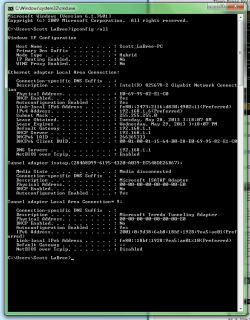
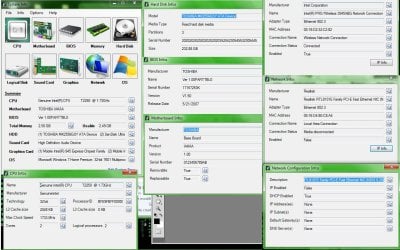
I've attached my ipconfig info as well as a screenshot of a bunch of my system info as I've been told to do :)
Thank you in advance to anyone who can help!
 

Attachments
  • System Info Screenshot.jpg
    System Info Screenshot.jpg
    347.2 KB · Views: 6
  • ipconfig.png
    ipconfig.png
    93.8 KB · Views: 3

My Computer

Computer type
PC/Desktop
OS
Windows 7. 64 and 32 bit
Still adamantly working on this. I believe it may have something to do with the fact the DHCP Client service isn't working. I've followed a couple different walkthroughs on how to fix this, but they haven't lined up exactly with my experience. They are usually for Windows XP.

I ran "cmd /k sc qc dhcp"

and got" binary_path_name :C:\Windows\system32\svchost.exe -k LocalServiceNetworkRestricted"
which I wasn't supposed to encounter..

Not sure it's the issue, but possibly?
 

My Computer

Computer type
PC/Desktop
OS
Windows 7. 64 and 32 bit
Welcome to the Seven Forums.

Can you ping Google? See this post.
 

My Computer

Computer type
Laptop
Computer Manufacturer/Model Number
Employer provided Dell Latitude
OS
W7 Pro SP1 64bit
CPU
i7
Memory
8GB
Graphics Card(s)
Intel HD Graphics
Hard Drives
crappy SSD
Antivirus
Employer mandated Symantec Endpoint Protection
Browser
Pale Moon 64bit, IE11 64bit & Chrome 64bit
The command prompt only flashed for a second, but no, "could not find host google.com"
 

My Computer

Computer type
PC/Desktop
OS
Windows 7. 64 and 32 bit

My Computer

Computer type
Laptop
Computer Manufacturer/Model Number
Employer provided Dell Latitude
OS
W7 Pro SP1 64bit
CPU
i7
Memory
8GB
Graphics Card(s)
Intel HD Graphics
Hard Drives
crappy SSD
Antivirus
Employer mandated Symantec Endpoint Protection
Browser
Pale Moon 64bit, IE11 64bit & Chrome 64bit
Transmit Failed. General Failure.

Also, just ran a "sfc /verify only" and integrity violations were found. Possible Problem?
 

My Computer

Computer type
PC/Desktop
OS
Windows 7. 64 and 32 bit
Run SFC several times per this tutorial.
You might want to reboot between each time.
 

My Computer

Computer type
Laptop
Computer Manufacturer/Model Number
Employer provided Dell Latitude
OS
W7 Pro SP1 64bit
CPU
i7
Memory
8GB
Graphics Card(s)
Intel HD Graphics
Hard Drives
crappy SSD
Antivirus
Employer mandated Symantec Endpoint Protection
Browser
Pale Moon 64bit, IE11 64bit & Chrome 64bit
Just finished running the scf scan and rebooted. Problem solved. Thank you for your help, I have spent so many hours looking into this. Guess I should've gone the more general route and let the computer do the scanning.
 

My Computer

Computer type
PC/Desktop
OS
Windows 7. 64 and 32 bit
You are welcome.

Just for fun - you might want to grab a USB flash drive and try a WDO scan.

What is Windows Defender Offline?

Just in case there is some nasty hiding that caused the system files to barf in the first place.
 

My Computer

Computer type
Laptop
Computer Manufacturer/Model Number
Employer provided Dell Latitude
OS
W7 Pro SP1 64bit
CPU
i7
Memory
8GB
Graphics Card(s)
Intel HD Graphics
Hard Drives
crappy SSD
Antivirus
Employer mandated Symantec Endpoint Protection
Browser
Pale Moon 64bit, IE11 64bit & Chrome 64bit
Back
Top