Solved Epic Games "api-ms-win-downlevel-kernel32-l1-1-0.dll" is missing error

EroDoto

New member
Local time
9:11 PM
Messages
19
Epic Games "api-ms-win-downlevel-kernel32-l1-1-0.dll" is missing error

Hi


Hope it's the right thread

I've been using Epic Games for years without issues but today starting its launcher I got an error message stating that "api-ms-win-downlevel-kernel32-l1-1-0.dll" was missing

Re-installation made no difference

Got in touch with Epic Games tech support and was told to reinstall visual c++ 2015 redistributable (both 32 & 64 bit) but nothing changed

Even tried manually copying that dll to C:\Program Files (x86)\Epic Games\Launcher\Engine\Binaries ....
but no luck

Any help is welcome

Thanks

Ps I quickly tried one game (The Outer Worlds) that I have on Epic and it started just fine
 

My Computer

Computer type
PC/Desktop
Computer Manufacturer/Model Number
Custom build
OS
Windows 7 Pro 64bit;Windows 10,Ubuntu
CPU
i5 4670k
Motherboard
MSI Z87-G55
Memory
16GB G.SKILL 1866 DDR3
Graphics Card(s)
Evga GTX 980 Ti
Sound Card
Sounblaster Z
Monitor(s) Displays
Acer Xb270hu
Screen Resolution
2560x1440
Hard Drives
SanDisk Ultra 1TB (W7)
WD Gold 6TB
PSU
XFX Pro Series B.E. 750W 80 Plus Gold
Case
CM 690 III
Cooling
Phanteks PH-TC14PE
Keyboard
CM STORM QUICKFIRE TK
Mouse
Logitech G502 Proteus Core
Internet Speed
Vodafone 100 Mbit/s more or less
Antivirus
EMSISOFT Anti Malware Home
Browser
Firefox 93.0 ,Chrome 94
This is a dependency issue. Meaning it's either Visual C++ or .Net related.

Did you fully uninstall both those two visual c++ versions first? Do you have .net 2.0 and .Net 3.5? I don't know if those are required or not.
 

My Computer

Computer type
PC/Desktop
OS
Windows 7 Ultimate x64
Thx for the reply
I did uninstall both visual c++ then just to be sure I rebooted.
I'm pretty sure I've all the necessary .net packages (see the attacches pictures)
 

Attachments

  • .net on my pc.jpg
    .net on my pc.jpg
    69.5 KB · Views: 0

My Computer

Computer type
PC/Desktop
Computer Manufacturer/Model Number
Custom build
OS
Windows 7 Pro 64bit;Windows 10,Ubuntu
CPU
i5 4670k
Motherboard
MSI Z87-G55
Memory
16GB G.SKILL 1866 DDR3
Graphics Card(s)
Evga GTX 980 Ti
Sound Card
Sounblaster Z
Monitor(s) Displays
Acer Xb270hu
Screen Resolution
2560x1440
Hard Drives
SanDisk Ultra 1TB (W7)
WD Gold 6TB
PSU
XFX Pro Series B.E. 750W 80 Plus Gold
Case
CM 690 III
Cooling
Phanteks PH-TC14PE
Keyboard
CM STORM QUICKFIRE TK
Mouse
Logitech G502 Proteus Core
Internet Speed
Vodafone 100 Mbit/s more or less
Antivirus
EMSISOFT Anti Malware Home
Browser
Firefox 93.0 ,Chrome 94
Hmm, Dependency Walker might say whether the Epic Games client is calling api-ms-win-downlevel-kernel32-l1-1-0.dll or not. With my use of depends it's been hit and miss.

The other thought is something is interfering with internal functionality. Maybe an anti-virus or something.

Did you install or do something prior to this issue happening? How about an anti-virus update? Maybe even a Windows update.

Something else. In the Epic Games directory of, C:\Program Files (x86)\Epic Games\DirectXRedist there are CAB files. Those are archive files that can be extracted. 7Z can do it. I think you can place those contents in the win32 or 64 folders, but I don't exactly know what they are other than certain video dependency files or something.

Edit - It appears most are drivers since they have INF files.
 
Last edited:

My Computer

Computer type
PC/Desktop
OS
Windows 7 Ultimate x64
So I just ran Process Hacker with Epic Games running and I don't see a call to api-ms-win-downlevel-kernel32-l1-1-0.dll. I also don't even see this DLL on my computer anywhere even though I have a boat ton of C++ and .Net dependencies installed already due to Flight Simulator usage and their tools. Though, it seems like it could be a part of Windows.

Just for the heck of it, run command as admin and execute the following:

Code:
sfc /scannow
That might fix any integrity violations. Worst case scenario, you run a repair install. I do have a legit copy of the api-ms-win-downlevel-kernel32-l1-1-0.dll and if necessary I can give it to you. You'd probably place it in the system32 folder and then you have to register it. But again, I don't even see this DLL in my system32 folder and my copy of Epic Games runs fine.

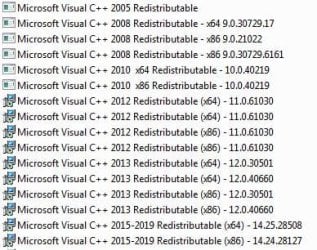
Here is a screenshot of all the Visual C++ versions I'm running. First, look at the bottom there at the 2015 versions. Are those two versions what you have?
 

Attachments

  • Capture.JPG
    Capture.JPG
    57.5 KB · Views: 16

My Computer

Computer type
PC/Desktop
OS
Windows 7 Ultimate x64
The other thought is something is interfering with internal functionality. Maybe an anti-virus or something.

Did you install or do something prior to this issue happening? How about an anti-virus update? Maybe even a Windows update.

Something else. In the Epic Games directory of, C:\Program Files (x86)\Epic Games\DirectXRedist there are CAB files. Those are archive files that can be extracted. 7Z can do it. I think you can place those contents in the win32 or 64 folders, but I don't exactly know what they are other than certain video dependency files or something.

Edit - It appears most are drivers since they have INF files.


Sorry for my late reply


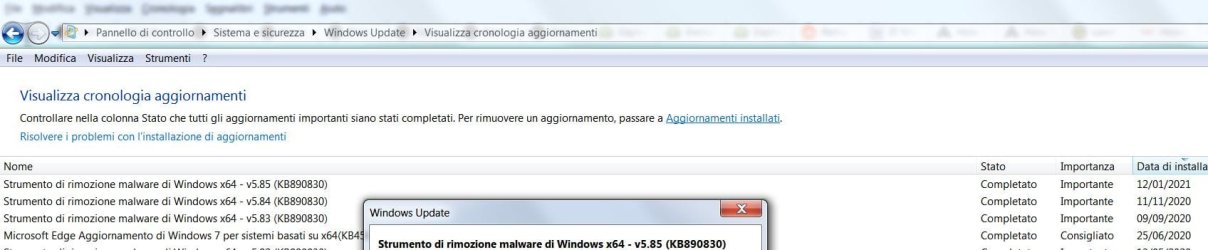
I've been using Emsisoft Anti Malware for ages and I'm pretty sure it's not the culprit but by mistake I run Windows Update downloading the latest windows maliciuos software removal tool
 

Attachments

  • winupdate mistake.jpg
    winupdate mistake.jpg
    97.3 KB · Views: 1

My Computer

Computer type
PC/Desktop
Computer Manufacturer/Model Number
Custom build
OS
Windows 7 Pro 64bit;Windows 10,Ubuntu
CPU
i5 4670k
Motherboard
MSI Z87-G55
Memory
16GB G.SKILL 1866 DDR3
Graphics Card(s)
Evga GTX 980 Ti
Sound Card
Sounblaster Z
Monitor(s) Displays
Acer Xb270hu
Screen Resolution
2560x1440
Hard Drives
SanDisk Ultra 1TB (W7)
WD Gold 6TB
PSU
XFX Pro Series B.E. 750W 80 Plus Gold
Case
CM 690 III
Cooling
Phanteks PH-TC14PE
Keyboard
CM STORM QUICKFIRE TK
Mouse
Logitech G502 Proteus Core
Internet Speed
Vodafone 100 Mbit/s more or less
Antivirus
EMSISOFT Anti Malware Home
Browser
Firefox 93.0 ,Chrome 94
Just for the heck of it, run command as admin and execute the following:

Code:
sfc /scannow
That might fix any integrity violations. Worst case scenario, you run a repair install. I do have a legit copy of the api-ms-win-downlevel-kernel32-l1-1-0.dll and if necessary I can give it to you. You'd probably place it in the system32 folder and then you have to register it. But again, I don't even see this DLL in my system32 folder and my copy of Epic Games runs fine.

Here is a screenshot of all the Visual C++ versions I'm running. First, look at the bottom there at the 2015 versions. Are those two versions what you have?


I'll try running that command


I cannot see your screenshot
 

My Computer

Computer type
PC/Desktop
Computer Manufacturer/Model Number
Custom build
OS
Windows 7 Pro 64bit;Windows 10,Ubuntu
CPU
i5 4670k
Motherboard
MSI Z87-G55
Memory
16GB G.SKILL 1866 DDR3
Graphics Card(s)
Evga GTX 980 Ti
Sound Card
Sounblaster Z
Monitor(s) Displays
Acer Xb270hu
Screen Resolution
2560x1440
Hard Drives
SanDisk Ultra 1TB (W7)
WD Gold 6TB
PSU
XFX Pro Series B.E. 750W 80 Plus Gold
Case
CM 690 III
Cooling
Phanteks PH-TC14PE
Keyboard
CM STORM QUICKFIRE TK
Mouse
Logitech G502 Proteus Core
Internet Speed
Vodafone 100 Mbit/s more or less
Antivirus
EMSISOFT Anti Malware Home
Browser
Firefox 93.0 ,Chrome 94
Ran sfc and found no violations
 

Attachments

  • sfc shows no issues.jpg
    sfc shows no issues.jpg
    54.7 KB · Views: 0

My Computer

Computer type
PC/Desktop
Computer Manufacturer/Model Number
Custom build
OS
Windows 7 Pro 64bit;Windows 10,Ubuntu
CPU
i5 4670k
Motherboard
MSI Z87-G55
Memory
16GB G.SKILL 1866 DDR3
Graphics Card(s)
Evga GTX 980 Ti
Sound Card
Sounblaster Z
Monitor(s) Displays
Acer Xb270hu
Screen Resolution
2560x1440
Hard Drives
SanDisk Ultra 1TB (W7)
WD Gold 6TB
PSU
XFX Pro Series B.E. 750W 80 Plus Gold
Case
CM 690 III
Cooling
Phanteks PH-TC14PE
Keyboard
CM STORM QUICKFIRE TK
Mouse
Logitech G502 Proteus Core
Internet Speed
Vodafone 100 Mbit/s more or less
Antivirus
EMSISOFT Anti Malware Home
Browser
Firefox 93.0 ,Chrome 94
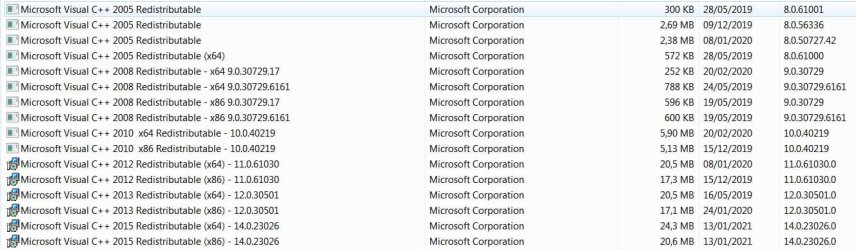
Before you ask in the attachment you can see which Visual C++ packages I've installed
 

Attachments

  • visual c++.jpg
    visual c++.jpg
    140.6 KB · Views: 2

My Computer

Computer type
PC/Desktop
Computer Manufacturer/Model Number
Custom build
OS
Windows 7 Pro 64bit;Windows 10,Ubuntu
CPU
i5 4670k
Motherboard
MSI Z87-G55
Memory
16GB G.SKILL 1866 DDR3
Graphics Card(s)
Evga GTX 980 Ti
Sound Card
Sounblaster Z
Monitor(s) Displays
Acer Xb270hu
Screen Resolution
2560x1440
Hard Drives
SanDisk Ultra 1TB (W7)
WD Gold 6TB
PSU
XFX Pro Series B.E. 750W 80 Plus Gold
Case
CM 690 III
Cooling
Phanteks PH-TC14PE
Keyboard
CM STORM QUICKFIRE TK
Mouse
Logitech G502 Proteus Core
Internet Speed
Vodafone 100 Mbit/s more or less
Antivirus
EMSISOFT Anti Malware Home
Browser
Firefox 93.0 ,Chrome 94
Thx I'll try when I get home
 

My Computer

Computer type
PC/Desktop
Computer Manufacturer/Model Number
Custom build
OS
Windows 7 Pro 64bit;Windows 10,Ubuntu
CPU
i5 4670k
Motherboard
MSI Z87-G55
Memory
16GB G.SKILL 1866 DDR3
Graphics Card(s)
Evga GTX 980 Ti
Sound Card
Sounblaster Z
Monitor(s) Displays
Acer Xb270hu
Screen Resolution
2560x1440
Hard Drives
SanDisk Ultra 1TB (W7)
WD Gold 6TB
PSU
XFX Pro Series B.E. 750W 80 Plus Gold
Case
CM 690 III
Cooling
Phanteks PH-TC14PE
Keyboard
CM STORM QUICKFIRE TK
Mouse
Logitech G502 Proteus Core
Internet Speed
Vodafone 100 Mbit/s more or less
Antivirus
EMSISOFT Anti Malware Home
Browser
Firefox 93.0 ,Chrome 94
I can't believe it works :eek: :shock::D . Grazie Thank you .

At first I thought you misread my post as you were quoting a slightly different file

The one in my error message was "api-ms-win-downlevel-kernel32-l1-1-0.dll" while yours was "api-ms-win-downlevel-kernel32-l2-1-0.dll"

Copied "my file" from your /Windows/System32/CompatTel
to C:\Program Files (x86)\Epic Games\Launcher\Portal\Binaries\Win64
then changed "Api" to lowercase "a" and rebooted ...no difference at all

Copied "yours" from the same folder to the Epic one changing it to all lowercase.
Restarted and voilà no more error.
 

My Computer

Computer type
PC/Desktop
Computer Manufacturer/Model Number
Custom build
OS
Windows 7 Pro 64bit;Windows 10,Ubuntu
CPU
i5 4670k
Motherboard
MSI Z87-G55
Memory
16GB G.SKILL 1866 DDR3
Graphics Card(s)
Evga GTX 980 Ti
Sound Card
Sounblaster Z
Monitor(s) Displays
Acer Xb270hu
Screen Resolution
2560x1440
Hard Drives
SanDisk Ultra 1TB (W7)
WD Gold 6TB
PSU
XFX Pro Series B.E. 750W 80 Plus Gold
Case
CM 690 III
Cooling
Phanteks PH-TC14PE
Keyboard
CM STORM QUICKFIRE TK
Mouse
Logitech G502 Proteus Core
Internet Speed
Vodafone 100 Mbit/s more or less
Antivirus
EMSISOFT Anti Malware Home
Browser
Firefox 93.0 ,Chrome 94
My first post here, new member.

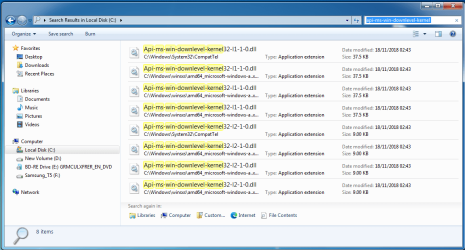
Anyway i have the same problem, but here is what i think is the problem. See screenshot below. NOTE: As soon as i type "3" the file is not available, not seen by the search engine. If you copy/move the file, the full path to the file is seen by the OS.
 

Attachments

  • Capture.PNG
    Capture.PNG
    135.2 KB · Views: 2
Last edited:

My Computer

Computer type
PC/Desktop
OS
Windows 7 Ultimate 64 bit
Fix that worked for me

I have gotten the same error in the past few days, and reinstalling the client hasn't helped.

Win7 Pro x64 Here.

I do not have a CompatTel subdir under System32, however this may be because I'm selective about updates and removed many telemetry related ones, if those are what creates this..

For me, api-ms-win-downlevel-kernel32-l2-1-0.dll was entirely missing from my system. I downloaded this using the site I use often and trust for dlls, api-ms-win-downlevel-kernel32-l2-1-0.dll free download | DLL‑files.com and tried placing this in the Win64 subdir of the Epic progfiles folder and I still got the error. Only when copying this to System32 like with most dlls erroring as missing did it resolve this for me.

I don't know if this being different for me has to do with those telemetry updates I prevented or removed or something else, but Epic Games Store specifically just started producing this error at launch just in the last few days like many of you, and so far this has remained resolved after placing the dll here.

I hope this helps someone that wasn't able to resolve this thus far and also had missing the CompatTel subdir too.
 

My Computer

Computer type
PC/Desktop
Computer Manufacturer/Model Number
Custom Build
OS
Windows 7 Pro X64
CPU
i5 2500K
Memory
16GB
Graphics Card(s)
NVIDIA 1060 GTX
This works for me, Thanks.


Enable GingerCannot connect to Ginger Check your internet connection
or reload the browserDisable in this text fieldRephraseRephrase current sentenceEdit in Ginger×
 

My Computers

System One System Two

  • Computer type
    PC/Desktop
    Computer Manufacturer/Model Number
    lenovo thincentre
    OS
    win7
    CPU
    i5-3470
    Memory
    8gb
    Graphics Card(s)
    R5 340x
    Antivirus
    AVG FREE
  • Computer type
    PC/Desktop
I have just got this same error in a different program that I installed yesterday and this thread came up in a search. I did also get the same error much earlier with the Epic client but they did fix that with an update.
I used a similar idea to what is detailed here ie "copying" the dll to the installed program directory and that eliminated the problem. I am using Win 7 as well BTW because that seems to be the common connection between all the reports that I have read.

I quoted "copying" because I did not actually copy the dll, I made a hardlink in the program install folder which did what was necessary. I have "Link Shell Extension" by Hermann Schinagl installed for a long time and never really used it until now. It worked quite well. That appears in file properties where it shows any links and their location and can be used to create links on the right click menu. See the instructions on his site for details on how to use it.
Link Shell Extension
 

My Computer

Computer type
PC/Desktop
Computer Manufacturer/Model Number
Custom Self-Built
OS
Windows 7 Ultimate x64 SP1
CPU
[1] Intel i7-3770K OC to 4.6GHz [2] Intell Q9450 Core2 Quad
Motherboard
[1]Asus P8Z77-V Premium [2] Gigabyte GA-X48-DS5
Memory
[1] 2x4GB Samsung DDR3 [2] 1xReaper 2GB 8500+2x1GB 6400 DDR2
Graphics Card(s)
[1] Zotac GT240 1GB [2] Gigabyte HD8500 512MB
Sound Card
On board
Monitor(s) Displays
VGA D-Sub CRT (Dead)
Hard Drives
500GB Samsung 850 EVO SSD
1x1TB Samsung
1x500GB Samsung
1x500GB WD
2x250GB Seagate
Startech SDOCK2U33HFW USB 3.0 Dual Docking Station
PSU
Corsair HX520W (Faulty) Tagan 480W
Cooling
Thermalright Venomous-X dual fan & OCZ
Keyboard
Microsoft Internet Keyboard Pro (Dead) Microsoft Wired 600
Mouse
i-Rocks USB Mouse
Internet Speed
ADSL 2+
Antivirus
MSE
Browser
Pale Moon x64
Other Info
Video Encoding Rig
Back
Top