epson Perfection 2480 Photo Scanner

lostsoul62

Banned
Local time
11:20 PM
Messages
380
Location
AZ
Where can I get drivers for this Epson Scanner for windows 7?
 

My Computer My Computer

At a glance

Windows 7 x64 RC1, Vista Ultimate, XP ProAMD 9554 gigs - 13335750
OS
Windows 7 x64 RC1, Vista Ultimate, XP Pro
CPU
AMD 955
Memory
4 gigs - 1333
Graphics Card(s)
5750
Monitor(s) Displays
i-inc 28"
Screen Resolution
1920x1200
Hard Drives
2 SATA2 750 GB - 1 SATA2 1TB - 1 SATA3 1TB - 1 USB3 2TB - 1 USB3 500 GB, SSD 60 GB
Internet Speed
7 Megs
Have you tried the one from Epson,

Epson America, Inc. - Support: Microsoft Windows 7 Support for the Epson Perfection 2480 Photo

Just downloaded it and checked the INF and it supports both 32 bit and 64 bit.

Code:
[Strings]
Mfg                    = "EPSON"
ES41.DeviceDesc        = "EPSON Perfection 2480/2580"
DSName                = "EPSON Perfection 2480/2580"
StartButton            = "Start Button"
CopyButton            = "Copy Button"
MailButton            = "Scan to E-mail Button"
SaveButton            = "Scan to PDF Button"
RegSection            = "SOFTWARE\EPSON\EPSON Scan\ES0041"
RegSection.x64        = "SOFTWARE\WoW6432Node\EPSON\EPSON Scan\ES0041"
ScanApp                = "EPSON Smart Panel"
DiskName            = "EPSON Scanners Driver Disk"
ICCName                = "PER248_R.ICM,PER248_T.ICM"

;--------------------------------------------------------------------------------

[Manufacturer]
%Mfg%=Models,NTx86.5.1,NTamd64

[Models]
%ES41.DeviceDesc%  = USB.ES41,USB\VID_04B8&PID_0121

[Models.NTx86.5.1]
%ES41.DeviceDesc%  = USB.ES41XP,USB\VID_04B8&PID_0121

[Models.NTamd64]
%ES41.DeviceDesc%  = USB.ES41XP.x64,USB\VID_04B8&PID_0121
 

My Computer My Computer

At a glance

Win 7 Ultimate x64FX-8350 @ 4.6 GHz so farADATA XPG V1 Series Black 8GB DDR3 1600Sapphire R9 270x Dual-X
Computer type
PC/Desktop
Computer Manufacturer/Model Number
Me
OS
Win 7 Ultimate x64
CPU
FX-8350 @ 4.6 GHz so far
Motherboard
Asus M5A97 EVO
Memory
ADATA XPG V1 Series Black 8GB DDR3 1600
Graphics Card(s)
Sapphire R9 270x Dual-X
Sound Card
Xonar DGX w/ Corsair Vengence 1300
Monitor(s) Displays
Acer S232HL Abid
Screen Resolution
1920x1080
Hard Drives
120 GB OCZ Vertex 3
500 GB Seagate 7200.12
PSU
Antec Earthwatts 650W Green
Case
Antec Three Hundred
Cooling
Cooler Master 212 EVO
Keyboard
Logitech G510
Mouse
Logitech G500s
Internet Speed
35000/3000
Don't work?

I downloaded the drivers from SEIKO Epson and installed them after I deleted all epson drivers without my USB port being plug in like it says. It don't work. My last computer with Windows 7 (64 bit) had this scanner on it for over a year so what could I be doing wrong?
 

My Computer My Computer

At a glance

Windows 7 x64 RC1, Vista Ultimate, XP ProAMD 9554 gigs - 13335750
OS
Windows 7 x64 RC1, Vista Ultimate, XP Pro
CPU
AMD 955
Memory
4 gigs - 1333
Graphics Card(s)
5750
Monitor(s) Displays
i-inc 28"
Screen Resolution
1920x1200
Hard Drives
2 SATA2 750 GB - 1 SATA2 1TB - 1 SATA3 1TB - 1 USB3 2TB - 1 USB3 500 GB, SSD 60 GB
Internet Speed
7 Megs
Well I just visited the looked for your drivers at Epson's website, and looked at the link Stormy presented, the same page I came to when looking, and it appears that Windows 7 64-bit isn't supported :(

BTW I have two Epson Printers (2200 & R800) and an Epson Scanner (Epson Perfection 2400) all of which are Windows 7 64-bit compatible thankfully.

Anyways I couldn't find a 64-bit driver for your scanner, just the 32-bit version for W7.

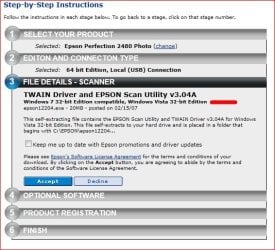
Capture.JPG

I downloaded the drivers from SEIKO Epson and installed them after I deleted all epson drivers without my USB port being plug in like it says. It don't work. My last computer with Windows 7 (64 bit) had this scanner on it for over a year so what could I be doing wrong?

So did it work? Do you remember what driver you used?
 

My Computer My Computer

At a glance

Windows 10 ProIntel Core i7-4770K (3.5Ghz)32 gig Corsair Dominator Platinum (4x8Gig)Sapphire Tri-X R9 Fury
Computer type
PC/Desktop
Computer Manufacturer/Model Number
Custom built by me.
OS
Windows 10 Pro
CPU
Intel Core i7-4770K (3.5Ghz)
Motherboard
Gigabyte G1 Sniper 5 (F10 Bios)
Memory
32 gig Corsair Dominator Platinum (4x8Gig)
Graphics Card(s)
Sapphire Tri-X R9 Fury
Sound Card
Soundblaster ZXR
Monitor(s) Displays
NEC PA242W 24" LCD Monitor
Screen Resolution
1920 x 1200
Hard Drives
Primary - Samsung 850 Pro (512gig), Samsung 840 Pro (256gig), 2TB WD Caviar Black.
PSU
EVGA Supernova 1000 G2
Case
Cooler Master HAF X
Cooling
Corsair H100i with Corsair Air Series SP120 Quiet Fans
Keyboard
Logitech Wireless Wave
Mouse
Logitech Performance MX
Internet Speed
High Speed Cable
Antivirus
Norton Security
Browser
IE11
Other Info
Memory Timings - 1866MHz @ 9-9-9-27-1T @ 1.5 volts
sygnus21 Epson may not say 64 bit on the support page, but there is 64 bit support in the INF from the one on that link. Here's a bit more from the INF showing the 64 bit support,

Code:
[ESSTI41.AddReg]
HKR,,DevLoader,,*NTKERN
HKR,,USDClass,,"{A3B140F5-08B8-41c1-8023-9D9735323B6B}"
HKCR,CLSID\{A3B140F5-08B8-41c1-8023-9D9735323B6B},,,"EPSON USD"
HKCR,CLSID\{A3B140F5-08B8-41c1-8023-9D9735323B6B}\InProcServer32,,,%11%\essti41.dll
HKCR,CLSID\{A3B140F5-08B8-41c1-8023-9D9735323B6B}\InProcServer32,ThreadingModel,,"Apartment"

[ESWIA41.AddReg]
HKR,,DevLoader,,*NTKERN
HKR,,USDClass,,"{E6DB89C2-5A2A-43a7-BB0C-158D50C291F4}"
HKCR,CLSID\{E6DB89C2-5A2A-43a7-BB0C-158D50C291F4},,,"EPSON USD"
HKCR,CLSID\{E6DB89C2-5A2A-43a7-BB0C-158D50C291F4}\InProcServer32,,,%11%\eswia41.dll
HKCR,CLSID\{E6DB89C2-5A2A-43a7-BB0C-158D50C291F4}\InProcServer32,ThreadingModel,,"Both"

[ESWIA41.x64.AddReg]
HKR,,DevLoader,,*NTKERN
HKR,,USDClass,,"{E6DB89C2-5A2A-43a7-BB0C-158D50C291F4}"
HKCR,CLSID\{E6DB89C2-5A2A-43a7-BB0C-158D50C291F4},,,"EPSON USD"
HKCR,CLSID\{E6DB89C2-5A2A-43a7-BB0C-158D50C291F4}\InProcServer32,,,%11%\esxwia41.dll
HKCR,CLSID\{E6DB89C2-5A2A-43a7-BB0C-158D50C291F4}\InProcServer32,ThreadingModel,,"Both"

This is form the epson12204.exe file.
 

My Computer My Computer

At a glance

Win 7 Ultimate x64FX-8350 @ 4.6 GHz so farADATA XPG V1 Series Black 8GB DDR3 1600Sapphire R9 270x Dual-X
Computer type
PC/Desktop
Computer Manufacturer/Model Number
Me
OS
Win 7 Ultimate x64
CPU
FX-8350 @ 4.6 GHz so far
Motherboard
Asus M5A97 EVO
Memory
ADATA XPG V1 Series Black 8GB DDR3 1600
Graphics Card(s)
Sapphire R9 270x Dual-X
Sound Card
Xonar DGX w/ Corsair Vengence 1300
Monitor(s) Displays
Acer S232HL Abid
Screen Resolution
1920x1080
Hard Drives
120 GB OCZ Vertex 3
500 GB Seagate 7200.12
PSU
Antec Earthwatts 650W Green
Case
Antec Three Hundred
Cooling
Cooler Master 212 EVO
Keyboard
Logitech G510
Mouse
Logitech G500s
Internet Speed
35000/3000
I agree - they "should" be working based on the info in the file, but..... And epson doesn't list a 64-bit version like they do with their other drivers. Again, I own a few older Epson products myself, and those driver packages specifically state 64-bit support right in the title.
 

My Computer My Computer

At a glance

Windows 10 ProIntel Core i7-4770K (3.5Ghz)32 gig Corsair Dominator Platinum (4x8Gig)Sapphire Tri-X R9 Fury
Computer type
PC/Desktop
Computer Manufacturer/Model Number
Custom built by me.
OS
Windows 10 Pro
CPU
Intel Core i7-4770K (3.5Ghz)
Motherboard
Gigabyte G1 Sniper 5 (F10 Bios)
Memory
32 gig Corsair Dominator Platinum (4x8Gig)
Graphics Card(s)
Sapphire Tri-X R9 Fury
Sound Card
Soundblaster ZXR
Monitor(s) Displays
NEC PA242W 24" LCD Monitor
Screen Resolution
1920 x 1200
Hard Drives
Primary - Samsung 850 Pro (512gig), Samsung 840 Pro (256gig), 2TB WD Caviar Black.
PSU
EVGA Supernova 1000 G2
Case
Cooler Master HAF X
Cooling
Corsair H100i with Corsair Air Series SP120 Quiet Fans
Keyboard
Logitech Wireless Wave
Mouse
Logitech Performance MX
Internet Speed
High Speed Cable
Antivirus
Norton Security
Browser
IE11
Other Info
Memory Timings - 1866MHz @ 9-9-9-27-1T @ 1.5 volts
Confirmed the drivers work with Win7 x64. I used "epson12204.exe" from Epson's website and my Perfection 2580 scanner scans photos fine.


Cheers,

Kokanee
 

My Computer My Computer

At a glance

Win7 Home Premium x64
OS
Win7 Home Premium x64
I have an Epson 2480 Photo using a driver 3.0.4.0 according to properties. It is dated Dec 28 2006 but came on the CD. It runs well on x86 and x64 for me.
 

My Computer My Computer

At a glance

Windows 7 Ultimate X64 SP1Intel i5-2550K, Differing ~4.4-4.8GHz No buil...16GB G.Skill Sniper 1866MHz @ 2133MHz 2x8GBASUS GTX650TIB-DC2OC-2GD5, (650TI Boost)
Computer type
PC/Desktop
Computer Manufacturer/Model Number
Home Built Desktop By DataTech
OS
Windows 7 Ultimate X64 SP1
CPU
Intel i5-2550K, Differing ~4.4-4.8GHz No built in GPU
Motherboard
ASUS P8Z68-V PRO/GEN3
Memory
16GB G.Skill Sniper 1866MHz @ 2133MHz 2x8GB
Graphics Card(s)
ASUS GTX650TIB-DC2OC-2GD5, (650TI Boost)
Sound Card
Onboard Realtek 5-1
Monitor(s) Displays
Samsung P2570HD
Screen Resolution
1920x1080
Hard Drives
Samsung 840 Pro 256GB SSD for OS, 500GB Seagate Constellation (Enterprise drive) for Data
PSU
Corsair HX650W
Case
Inwin Dragon Rider
Cooling
Hyper 212 EVO w/two Noctua fans, push-pull, @1300 RPM
Keyboard
E-Z Eyes, bright yellow keys with large characters
Mouse
steelseries SENSEI Laser Pro Gaming
Internet Speed
48-51Mbs Mbs down, 11 Mbs up Xfinity Cable
Antivirus
Norton Internet Security 2013
Browser
IE 10, Opera, Pale Moon if needed
Other Info
4 case fans, LG BluRay-RE, ASUS DVD-RW, Mr. Fusion power supply, 1.21 gigawatts.
You may also find that Vista drivers for your scanner will work under Windows 7.
 

My Computer My Computer

At a glance

Windows 7 Ultimate SP1 64-BitIntel Core i7 870 @ 2.93GHz8Gb Dual-Channel DDR3 @ 664MHznVidia GeForce GTX 460 1024MB dedicated RAM
Computer Manufacturer/Model Number
HP Pavilion Elite 495UK
OS
Windows 7 Ultimate SP1 64-Bit
CPU
Intel Core i7 870 @ 2.93GHz
Motherboard
MSI 2A9C (CPU1)
Memory
8Gb Dual-Channel DDR3 @ 664MHz
Graphics Card(s)
nVidia GeForce GTX 460 1024MB dedicated RAM
Sound Card
Realtek HD Audio
Monitor(s) Displays
HP2310i
Screen Resolution
1920 x 1080
Hard Drives
1x1954GB Hitachi HDS22020ALA 330 (RAID), 1x1954GB Hitachi External for backup and storage
PSU
460W
Case
HP Elite
Cooling
Air cooled
Keyboard
Logitech K750 solar-powered keyboard
Mouse
Logitech Wireless M180 mouse
Internet Speed
2Mb
Other Info
Pure Avanti Flow Internet Radio with iPod Dock, 64Gb iPod, HP USB Speakers, Sony MDR-V500 Headphones, Sony Vaio F-Series Laptop
This is a 3 year old thread but it may be of interest to some that the following driver works perfectly on my Windows10-64 bit system.
Epson Perfection 2480 : EPSON Scan 3.0u

It is Version 3.0u

Make sure you remove all previous drivers for the scanner, then uninstall device from device manger.

Switch off the scanner + remove power source and USB lead.

Download and run the installer. After installation connect and turn on power then connect USB.

You should be good to go, but note previous "Smart Panel" software will not work You need to use the utility which is included with the driver or download and run the Vista 64bit "Epson Copy Utility.
Hope this may be of help to anyone.
 

My Computer My Computer

At a glance

Windows11 ProIntel Skt 1200 Comet Lake Core i-7 3.80 GHZ32GB [4 x 8gb] Crucial Ballistix XMP DDR 4ATI [MSI] Radeon RX 5500 XT 8GB DDR6
Computer type
PC/Desktop
Computer Manufacturer/Model Number
Self Built with TLC
OS
Windows11 Pro
CPU
Intel Skt 1200 Comet Lake Core i-7 3.80 GHZ
Motherboard
Gigabyte Z590 UD AC
Memory
32GB [4 x 8gb] Crucial Ballistix XMP DDR 4
Graphics Card(s)
ATI [MSI] Radeon RX 5500 XT 8GB DDR6
Sound Card
Realtek HD 7.1 Onboard
Monitor(s) Displays
iiyama G2730HSU-B1 27" G-Master 75Mhz HD LED
Screen Resolution
1920 X 1080
Hard Drives
Samsung EVO 970 NVMe 1TB [Boot drive]
Samsung EVO 850 SSD 500GB
Western Digital DC WD10EFRX-68PJCN0 1TB
Western Digital DC WD1002FBYS-02A6B0 Enterprise 1TB
PSU
Corsair TX750M
Case
Zalman Z9 Plus
Cooling
Thermalright True Spirit 120 BW
Keyboard
Havit KB432L blue key mechanical
Mouse
Havit KB 432L Programmable
Internet Speed
Fibre To The Home 100Mbps from KCom
Antivirus
Avast Free
Browser
Firefox
Other Info
Logitech C525 HD Webcam
Epson XP-640 Expression-Premium printer with direct CD/DVD printing
Back
Top