Erase a write protected usb

charlie3

help?
Member
Local time
11:46 PM
Messages
67
Location
Scotland
I have a write protected usb memory stick and i cant use it because its write protected, for some reason?:confused:???? i cant even format it!!, it has no valuable data on it and can be wiped, i just want to be able to use it.

Charlie
 

My Computer

Computer Manufacturer/Model Number
Dell Inspiron 546 & Asus EEE PC 1005HAG & Home Build
OS
Windows 7 Home Premium x64 & Ultimate x64
CPU
2.8GHZ & 1.66GHZ & Intel i5-2500k @3.3
Motherboard
Asus p8p67
Memory
4GB & 1GB & 4GB
Graphics Card(s)
ATI Radeon 3200, Intel intregrated, gtx 570
Sound Card
all intregrated
Monitor(s) Displays
22" Samsung PP227HD & Dell 20" & sony bravia 32 inch tv
Screen Resolution
1920*1080, 1024*768, 1980*1080
Hard Drives
C: 640gb
External HD: 500gb
netbook: 250
C: 1TB (home build)
PSU
Antec tp650
Case
Antec 300
Cooling
Xilence and Asaka and Thermaltake
Keyboard
Microsoft Ergonomic Desktop 7000, + dell entry, + apple kb.
Mouse
Microsoft Ergonomic Desktop 7000 & Logitech Trackman Mouse
Internet Speed
slow, just slow thats all i can say
Go to Computer, and right click on your USB drive and click on 'Properties'. Once there go to the 'Security' tab (top of window). Below 'Permissions for authenticated users' there is an 'Advanced' button. Click on it. On the 'Owners' tab, there should be an 'Edit' button. Now, select your username in the bottom box, and make sure the checkbox at the bottom is checked. Click on okay, then once it has changed ownership, click on Ok on all 'Properties' windows. You should now have full control of your USB memory stick.
 

My Computer

Computer type
PC/Desktop
Computer Manufacturer/Model Number
The Dominator?
OS
Windows Seven Ultimate
CPU
AMD Piledriver FX 8320 @ 3.5GHz
Motherboard
ASUS M5A97 EVO R2.0
Memory
Crucial Ballistix 8GB 1600 MHz DDR3
Graphics Card(s)
ASUS GeForce GTX 970 Strix Edition @ 1.114 GHz
Sound Card
Integrated
Monitor(s) Displays
LG 23EA63V 23" IPS 1080p Monitor
Screen Resolution
1920x1080
Hard Drives
Samsung SSD 840 EVO 120 GB
1x WD GreenPower 500GB 7200RPM
1 External HDD 1TB
PSU
Corsair CX500
Case
Zalman Z9 Plus
Cooling
CPU - Corsair Hydro H80i, Case - 3x Aerocool Shark Edition
Keyboard
Xenta Backlit Keyboard (Not very good!)
Mouse
Logitech G400
Internet Speed
Download: 7 mb/s Upload: 0.76 mb/s
Antivirus
Microsoft Security Essentials
Browser
Google Chrome
Other Info
Overclockers UK Desk Pad 89 x 45 cm
1200x730x600mm Desk
Using Virtual Audio Cable to split stereo sound into Audio Technica ATH-M50 headphones and Logitech X-530 speakers.
Right click on the USB drive in My Computer, go to Properties, then click on the Security tab. Make sure the box for Writes Allowed is checked, if not, log into an admin account and enable it for users.

Otherwise, right click and format.
 

My Computer

Computer Manufacturer/Model Number
Zen Productions
OS
Windows 7 Ultimate x64
CPU
Intel i7-860
Motherboard
Gigabyte GA-P55A-UD4P
Memory
Corsair Dominator 1600Mhz, 8-8-8-24 1.65v 2x2GB
Graphics Card(s)
ATI Radeon 5770 HD
Sound Card
Intel High Definition Sound
Monitor(s) Displays
Samsung P2570HD
Screen Resolution
1920x1080
Hard Drives
Western Digital Caviar Black 500gb
PSU
Corsair CMPSU-750HX 750W
Case
Antec p183
Cooling
Corsair H50 Water Cooler
Keyboard
Logitech G110
Mouse
Logitech MX Revolution
Internet Speed
768 mb/s
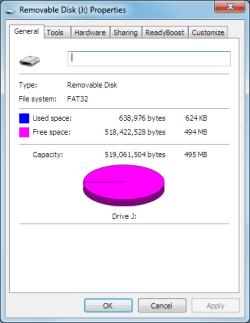
cant, this is what my window looks like, and i cant format it either, trust me ive tried. The data on the disk can be deleted if need be.
 

Attachments

  • Capture.PNG
    Capture.PNG
    11 KB · Views: 191

My Computer

Computer Manufacturer/Model Number
Dell Inspiron 546 & Asus EEE PC 1005HAG & Home Build
OS
Windows 7 Home Premium x64 & Ultimate x64
CPU
2.8GHZ & 1.66GHZ & Intel i5-2500k @3.3
Motherboard
Asus p8p67
Memory
4GB & 1GB & 4GB
Graphics Card(s)
ATI Radeon 3200, Intel intregrated, gtx 570
Sound Card
all intregrated
Monitor(s) Displays
22" Samsung PP227HD & Dell 20" & sony bravia 32 inch tv
Screen Resolution
1920*1080, 1024*768, 1980*1080
Hard Drives
C: 640gb
External HD: 500gb
netbook: 250
C: 1TB (home build)
PSU
Antec tp650
Case
Antec 300
Cooling
Xilence and Asaka and Thermaltake
Keyboard
Microsoft Ergonomic Desktop 7000, + dell entry, + apple kb.
Mouse
Microsoft Ergonomic Desktop 7000 & Logitech Trackman Mouse
Internet Speed
slow, just slow thats all i can say
i have an admin account aswell
 

My Computer

Computer Manufacturer/Model Number
Dell Inspiron 546 & Asus EEE PC 1005HAG & Home Build
OS
Windows 7 Home Premium x64 & Ultimate x64
CPU
2.8GHZ & 1.66GHZ & Intel i5-2500k @3.3
Motherboard
Asus p8p67
Memory
4GB & 1GB & 4GB
Graphics Card(s)
ATI Radeon 3200, Intel intregrated, gtx 570
Sound Card
all intregrated
Monitor(s) Displays
22" Samsung PP227HD & Dell 20" & sony bravia 32 inch tv
Screen Resolution
1920*1080, 1024*768, 1980*1080
Hard Drives
C: 640gb
External HD: 500gb
netbook: 250
C: 1TB (home build)
PSU
Antec tp650
Case
Antec 300
Cooling
Xilence and Asaka and Thermaltake
Keyboard
Microsoft Ergonomic Desktop 7000, + dell entry, + apple kb.
Mouse
Microsoft Ergonomic Desktop 7000 & Logitech Trackman Mouse
Internet Speed
slow, just slow thats all i can say
What if you right click My Computer | Manage | Disk management. Here right click on the dirve and choose delete volume. Once deleted, right click and choose New volume I think and create a new space. Then format it.
 

My Computer

Computer Manufacturer/Model Number
Home Built
OS
Windows 7 Pro
CPU
Intel i5
Motherboard
Gigabyte P55M-UD2
Memory
4 Gig Corsair 1600
Graphics Card(s)
Nvidia 260
Sound Card
On Board
Monitor(s) Displays
Samsung 226BW
Screen Resolution
1680*1050
Hard Drives
1 Terabyte
PSU
Coolmax 700watt
Case
Cooler Master 690
Cooling
Air
Keyboard
MS Laser Keyboard 6000 v2.0
Mouse
MS Laser Mouse 6000 v2.0
Internet Speed
Fiber
What kind of thumb drive is it?
Brand/Model?

If it is locked by Firmware, then there is nothing you can do but use whatever software that locked it to unlock it.
 

My Computer

Computer Manufacturer/Model Number
Self Built
OS
Win 7 Ultimate 32bit
CPU
C2D E6600 2.4Ghz
Motherboard
Intel D965WH
Memory
4G Kingston KHX5400D2
Graphics Card(s)
EVGA GTX 570 HD SC (012-P3-1573-KR)
Sound Card
On-Board
Monitor(s) Displays
Samsung 226BW
Screen Resolution
1680 x 1050
Hard Drives
2 x 250 Seagate Barracuda
2 x 500 Seagate Barracuda (Raid1)
PSU
Corsair TX750W
Case
In-Win C589
Cooling
Stock Intel Cooling
From your computer Right click on the thumbdrive .... in the dropdown list does it say "Format"?
 

My Computer

Computer type
PC/Desktop
Computer Manufacturer/Model Number
Bruce ... somewhere in his 40's
OS
Windows 7 Ultimate 32bit SP1
CPU
Intel(R) Core(TM)2 Quad CPU @ 2.40GHz, 2400 MHz
Motherboard
INTEL/D975XBX2
Memory
4 GB
Graphics Card(s)
ATI Radeon HD 2600 Pro
Monitor(s) Displays
Samsung SyncMaster 914v
Screen Resolution
1280 x 1024
Hard Drives
2/500GB each ... ST3500630AS ATA Device.
One is not connected
PSU
Rocketfish 700 W
Case
G.Skill Gigabyte Chassis
Keyboard
Standard PS/2 Keyboard
Mouse
Microsoft PS/2 Mouse
Internet Speed
DSL
Antivirus
Avira Internet Security
Browser
IE 11
Other Info
ATI HDMI Audio
cant use disk management either delete volume is blacked out.

my friend gave me it and said he couldn't get them to work and if they don't work just throw them away. they don't have a make on them or a model.
 

Attachments

  • Untitled.jpg
    Untitled.jpg
    21.2 KB · Views: 397

My Computer

Computer Manufacturer/Model Number
Dell Inspiron 546 & Asus EEE PC 1005HAG & Home Build
OS
Windows 7 Home Premium x64 & Ultimate x64
CPU
2.8GHZ & 1.66GHZ & Intel i5-2500k @3.3
Motherboard
Asus p8p67
Memory
4GB & 1GB & 4GB
Graphics Card(s)
ATI Radeon 3200, Intel intregrated, gtx 570
Sound Card
all intregrated
Monitor(s) Displays
22" Samsung PP227HD & Dell 20" & sony bravia 32 inch tv
Screen Resolution
1920*1080, 1024*768, 1980*1080
Hard Drives
C: 640gb
External HD: 500gb
netbook: 250
C: 1TB (home build)
PSU
Antec tp650
Case
Antec 300
Cooling
Xilence and Asaka and Thermaltake
Keyboard
Microsoft Ergonomic Desktop 7000, + dell entry, + apple kb.
Mouse
Microsoft Ergonomic Desktop 7000 & Logitech Trackman Mouse
Internet Speed
slow, just slow thats all i can say
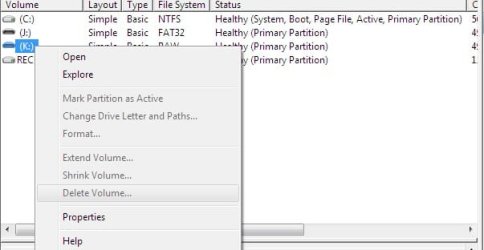
jacee, i do have format in the menu
 

My Computer

Computer Manufacturer/Model Number
Dell Inspiron 546 & Asus EEE PC 1005HAG & Home Build
OS
Windows 7 Home Premium x64 & Ultimate x64
CPU
2.8GHZ & 1.66GHZ & Intel i5-2500k @3.3
Motherboard
Asus p8p67
Memory
4GB & 1GB & 4GB
Graphics Card(s)
ATI Radeon 3200, Intel intregrated, gtx 570
Sound Card
all intregrated
Monitor(s) Displays
22" Samsung PP227HD & Dell 20" & sony bravia 32 inch tv
Screen Resolution
1920*1080, 1024*768, 1980*1080
Hard Drives
C: 640gb
External HD: 500gb
netbook: 250
C: 1TB (home build)
PSU
Antec tp650
Case
Antec 300
Cooling
Xilence and Asaka and Thermaltake
Keyboard
Microsoft Ergonomic Desktop 7000, + dell entry, + apple kb.
Mouse
Microsoft Ergonomic Desktop 7000 & Logitech Trackman Mouse
Internet Speed
slow, just slow thats all i can say
Then they are either bad (most likely)
or what I posted above in post 7
 

My Computer

Computer Manufacturer/Model Number
Self Built
OS
Win 7 Ultimate 32bit
CPU
C2D E6600 2.4Ghz
Motherboard
Intel D965WH
Memory
4G Kingston KHX5400D2
Graphics Card(s)
EVGA GTX 570 HD SC (012-P3-1573-KR)
Sound Card
On-Board
Monitor(s) Displays
Samsung 226BW
Screen Resolution
1680 x 1050
Hard Drives
2 x 250 Seagate Barracuda
2 x 500 Seagate Barracuda (Raid1)
PSU
Corsair TX750W
Case
In-Win C589
Cooling
Stock Intel Cooling
Any tries from safe mode?
 

My Computer

Computer Manufacturer/Model Number
MacBook Pro
OS
Lion
CPU
i5
Memory
4GB
Graphics Card(s)
Intel
Screen Resolution
1200x800
Hard Drives
Seagate FreeAgent GO 250GB Ext. HDD
safe mode returns no results either?? im confused
 

My Computer

Computer Manufacturer/Model Number
Dell Inspiron 546 & Asus EEE PC 1005HAG & Home Build
OS
Windows 7 Home Premium x64 & Ultimate x64
CPU
2.8GHZ & 1.66GHZ & Intel i5-2500k @3.3
Motherboard
Asus p8p67
Memory
4GB & 1GB & 4GB
Graphics Card(s)
ATI Radeon 3200, Intel intregrated, gtx 570
Sound Card
all intregrated
Monitor(s) Displays
22" Samsung PP227HD & Dell 20" & sony bravia 32 inch tv
Screen Resolution
1920*1080, 1024*768, 1980*1080
Hard Drives
C: 640gb
External HD: 500gb
netbook: 250
C: 1TB (home build)
PSU
Antec tp650
Case
Antec 300
Cooling
Xilence and Asaka and Thermaltake
Keyboard
Microsoft Ergonomic Desktop 7000, + dell entry, + apple kb.
Mouse
Microsoft Ergonomic Desktop 7000 & Logitech Trackman Mouse
Internet Speed
slow, just slow thats all i can say

My Computer

Computer type
PC/Desktop
Computer Manufacturer/Model Number
LENOVO K450 @3.0GHZ
OS
64-bit Windows 8.1 Pro
CPU
Core(TM) i5 CPU 4330 Haswell @ 3.20GHz
Motherboard
LENOVO
Memory
12.00 GB
Graphics Card(s)
Intel(R) HD Graphics
Sound Card
Intel HD integtrated
Monitor(s) Displays
HP 25' ISP Monitor
Screen Resolution
1900/1020
Hard Drives
(1) ST1000DM003-1CH162 (2) Generic STORAGE DEVICE USB Device (3) Generic STORAGE DEVICE USB Device
Internet Speed
100mb down/10mb up
The problem is the USB stick not Windows and you will not fix it from Windows.
Does the USB stick have a (physical) lock switch? If not it probably means the stick is broken.
 

My Computer

Computer type
PC/Desktop
Computer Manufacturer/Model Number
Alienware Aurora ALX R4
OS
Windows 10 Pro (x64)
CPU
Intel Core i7-3930K (3.2GHz - 4.5GHz)
Motherboard
Alienware Aurora-R4 x79
Memory
4x Samsung 4GB PC3-12800 DDR3 (16GB 1600MHz)
Graphics Card(s)
Nvidia Geforce GTX 690
Sound Card
SteelSeries Siberia Elite
Monitor(s) Displays
Dell UltraSharp U3011
Screen Resolution
2560x1600
Hard Drives
Samsung 850 Pro 256 GB, Seagate 1TB Desktop Hybrid HDD, 2x Western Digital 4TB Green HDD
PSU
875W Some Dell PSU <.<
Case
Alienware Aurora ALX
Cooling
Custom Liquid Cooling (EK CPU & GPU blocks) dual EK 480RAD
Keyboard
Logitech G710+ Mechanical
Mouse
Logitech G700s
Internet Speed
Verizon Fios (50 mbps average)
Other Info
Server: Intel NUC D54250WYK: i5-4250U, 16GB, 256 GB mSATA, Windows Server 2012 R2
Have you tried the following:

  1. Plug in your USB Flash Drive
  2. Open a command prompt as administrator (Right click on Start > All Programs > Accessories > Command Prompt and select “Run as administrator”
  3. Find the drive number of your USB Drive by typing the following into the Command Prompt window:
    diskpart
    list disk

    The number of your USB drive will listed. You’ll need this for the next step. I’ll assume that the USB flash drive is disk 1.
Format the drive by typing the next instructions into the same window. Replace the number “1” with the number of your disk below.
select disk 1
clean
create partition primary
select partition 1
active
format fs=FAT32
assign
exit
 

My Computer

Computer type
PC/Desktop
Computer Manufacturer/Model Number
Dell OP7010
OS
Windows 7 Enterprise (x64); Windows Server 2008 R2 (x64)
Memory
16GB
Monitor(s) Displays
4 Dell 24" LCD
Screen Resolution
1280x1024
Keyboard
Dell
Mouse
Dell Optical
Internet Speed
40meg
  • Like
Reactions: Dom
can take ownership do i need to restart??? after adding the keys
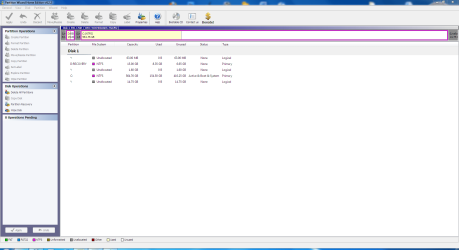
looks like the pic

is my usb disk 1 for sure, i dont want to f**k things up, look at the pic
 

Attachments

  • Untitled.png
    Untitled.png
    3.9 KB · Views: 54
  • Capture.PNG
    Capture.PNG
    12.9 KB · Views: 277

My Computer

Computer Manufacturer/Model Number
Dell Inspiron 546 & Asus EEE PC 1005HAG & Home Build
OS
Windows 7 Home Premium x64 & Ultimate x64
CPU
2.8GHZ & 1.66GHZ & Intel i5-2500k @3.3
Motherboard
Asus p8p67
Memory
4GB & 1GB & 4GB
Graphics Card(s)
ATI Radeon 3200, Intel intregrated, gtx 570
Sound Card
all intregrated
Monitor(s) Displays
22" Samsung PP227HD & Dell 20" & sony bravia 32 inch tv
Screen Resolution
1920*1080, 1024*768, 1980*1080
Hard Drives
C: 640gb
External HD: 500gb
netbook: 250
C: 1TB (home build)
PSU
Antec tp650
Case
Antec 300
Cooling
Xilence and Asaka and Thermaltake
Keyboard
Microsoft Ergonomic Desktop 7000, + dell entry, + apple kb.
Mouse
Microsoft Ergonomic Desktop 7000 & Logitech Trackman Mouse
Internet Speed
slow, just slow thats all i can say

My Computer

Computer Manufacturer/Model Number
Custom
OS
Windows 7 Professional x64
CPU
Intel i7 2600K OC'd @ 4620 MHz
Motherboard
Asus P8Z68-V Pro
Memory
16GB GSkill Sniper 2133 Mhz (4x4GB)
Graphics Card(s)
EVGA GeForce GTX 480 SuperClocked+
Sound Card
Realtek High Definition Audio
Monitor(s) Displays
2x Acer S273HLbmii 27"
Screen Resolution
2 x 1920x1080
Hard Drives
64GB Crucial M4 SSD

Storage: Hitachi 1TB 5400RPM, Samsung 1.5TB 5400RPM
PSU
Corsair HW Series 750w (modular)
Case
Cooler Master HAF 932 Advanced Blue Edition
Cooling
CM Hyper 212+ CPU cooler, 3x 230mm + 1x 140mm case fans
Keyboard
Logitech MK320 (wireless)
Mouse
Logitech MK320 (wireless)
Internet Speed
30 Mb/s : 2 Mb/s
tryed didnt show up
 

Attachments

  • Capture.PNG
    Capture.PNG
    49.6 KB · Views: 342

My Computer

Computer Manufacturer/Model Number
Dell Inspiron 546 & Asus EEE PC 1005HAG & Home Build
OS
Windows 7 Home Premium x64 & Ultimate x64
CPU
2.8GHZ & 1.66GHZ & Intel i5-2500k @3.3
Motherboard
Asus p8p67
Memory
4GB & 1GB & 4GB
Graphics Card(s)
ATI Radeon 3200, Intel intregrated, gtx 570
Sound Card
all intregrated
Monitor(s) Displays
22" Samsung PP227HD & Dell 20" & sony bravia 32 inch tv
Screen Resolution
1920*1080, 1024*768, 1980*1080
Hard Drives
C: 640gb
External HD: 500gb
netbook: 250
C: 1TB (home build)
PSU
Antec tp650
Case
Antec 300
Cooling
Xilence and Asaka and Thermaltake
Keyboard
Microsoft Ergonomic Desktop 7000, + dell entry, + apple kb.
Mouse
Microsoft Ergonomic Desktop 7000 & Logitech Trackman Mouse
Internet Speed
slow, just slow thats all i can say
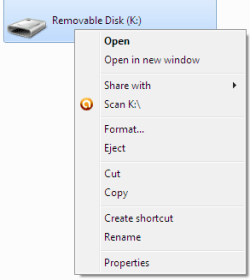
I would say if you cannot see it with the software JK suggested and you cannot see it with DISKPART by looking at your pictures; then the USB drive may be defective. - I am out of ideas anyone else??
 

My Computer

Computer type
PC/Desktop
Computer Manufacturer/Model Number
Dell OP7010
OS
Windows 7 Enterprise (x64); Windows Server 2008 R2 (x64)
Memory
16GB
Monitor(s) Displays
4 Dell 24" LCD
Screen Resolution
1280x1024
Keyboard
Dell
Mouse
Dell Optical
Internet Speed
40meg
Back
Top