Error 0x8007007E during Windows 10 Update

jrd761

New member
Local time
4:05 AM
Messages
1
Hello All,
I have a computer running Windows 7 Pro that I'm trying to update to Windows 10 using the "Windows 10 Update Assistant". This laptop has a new clean install of Windows 7 Pro.

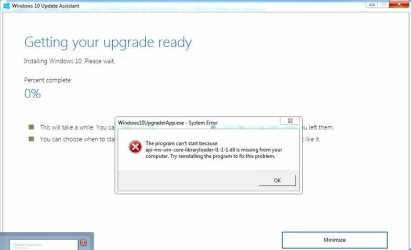
The upgrade downloads, but when it starts to install I get the following pop-up with this error:
title: "Windows10UpgraderApp.exe - System Error"
message: "The program can't start because api-ms-win-core-libraryloader-l1-1-1.dll is missing from your computer. Try reinstalling the program to fix this problem"

When I click OK, it goes back to the Windows 10 Upgrade Assistance and has an error "You can contact Microsoft support for help with this error. Here is the error code 0x8007007e."

I ran SFC Scan, it found no issues.
There isn't an anti-virus program on it.
I've tried everything I could possibly find from Googling both errors and going through the steps everyone says to do..

Any ideas?
 

Attachments
  • error1.JPG
    error1.JPG
    38.1 KB · Views: 5
  • error 2.JPG
    error 2.JPG
    15 KB · Views: 3

My Computer

Computer type
PC/Desktop
OS
Windows 7 Professional 64-Bit
I joined so I could tell you. It's funny you joined just to ask. :)

Someone brought this problem up on 4chan briefly, but then it got deleted. Figures.

I found a solution!!

It's Microsoft's fault. Try to find a system you previously updated to 10. The key is, sometime between yesterday and today they updated something. I know, because I upgraded a few computers yesterday no problem. Today, all machines fail. The Windows10Upgrader folder on the successfully upgraded system will have working files.

Copy the Windows10Upgrader folder from the root directory of the working machine to a flash drive.

Open the Windows10Upgrader24074.exe (since that's the verison that seems messed up). Let it check for updates, and move on to the agreement page. I accepted the agreement, let it check my system for requirements, and did not click next. It will auto proceed in 10 seconds so do the next step quick.

Copy the working Windows10Upgrader folder you have on your flash drive, onto the target machine overwriting the Windows10Upgrader folder on it. Confirm all overwrites and skip the few in use files. If you do it fast enough, it will overwrite the messed up files and allow the install to work.

Tada! Hacking at its finest lol.

If any Microsoft engineer is going to fix this and uses my info, also know, the problem may relate to GetCurrentRollback.exe since launching that individually causes the error to be thrown. Test your code before release!
 
Last edited by a moderator:

My Computer

Computer type
PC/Desktop
OS
All
Would you mind zipping that up and uploading it somewhere? Having the same problem here but unfortunately don't have another machine with these files on it. :/
 

My Computer

OS
Windows 7
CPU
Intel Core Duo 2.0ghz
Memory
4GB
Graphics Card(s)
Nvidia 8400
Sure, here you go!

[Direct links are not allowed, especially to unknown not HTTPs site - Removed]
 
Last edited by a moderator:

My Computer

Computer type
PC/Desktop
OS
All
I just joined, to say, I love you

He joined to post, you joined to answer and I just joined to say thank you... after 3 hours of troubleshooting and the very real possibility of a failed project your solution seems born of an evil genius.

I put the folder on a USB stick, then I wrote a one line batch file that says;
XCOPY .\Windows10Upgrade C:\Windows10Upgrade\ /e /y /h /r /c

So the upgrade process is;

  • Insert USB Stick
  • Open an elevated command prompt and browse to USB... usually D: but sometimes E: etc
  • Run Upgrade Wizard
  • When you get to the 10 Second countdown, run the batch file
The batch file simply speeds up the process of overwriting the folder, removing all the acknowledgements that you need to make if you do it in GUI.


I now have a repeatable process... again... thank you!
 

My Computer

Computer type
PC/Desktop
OS
Windows 10 Pro 64 Bit
Thanks!

Oddly enough, I found an old version of Windows10Upgrade24074 on a USB drive that also worked (I just pulled network cable for it's first run so it wouldn't update itself).

The version that worked is 6,307kB compared to the broken version which is 6,097kB. You'd think they'd at least increment the version number if they're going to change it...
 

My Computer

OS
Windows 7
CPU
Intel Core Duo 2.0ghz
Memory
4GB
Graphics Card(s)
Nvidia 8400
Termina
Can you send your old version of Windows10Upgrade24074 to me Please!!!. I don't have any upgraded windows 7 machine. I didn't find old version of this file.

Thanks
 

My Computer

Computer type
Laptop
Computer Manufacturer/Model Number
HP
OS
Windows 7 Pro
Upload files

Hi, I also joined just to try to fix this :)

The day before yesterday I upgraded succesfully, but today there is no luck.

I have deleted the updatefiles, so I really need them.
 

My Computer

Computer type
PC/Desktop
OS
Windows 7 Ultimate x64
Hi. I am able to get past the message now, but then i get a new error message: 0x80070002 i upgraded a lot of computers yesterday. Hope microsoft releases an update soon.
 

My Computer

Computer type
PC/Desktop
Computer Manufacturer/Model Number
Dell Latitude 5480
OS
Windows 10 Enterprise
Fixed it. if you get 0x80070002, do the following:

- Delete all files in C:\Windows10Upgrade
- Copy all files from old Windows 10 upgrade folder to C:\Windows10Upgrade
- Disconnect from the network
- Start the upgrade tool from C:\Windows10Upgrade
- Agree on the terms
- When the download starts, reconnect to your network.
 

My Computer

Computer type
PC/Desktop
Computer Manufacturer/Model Number
Dell Latitude 5480
OS
Windows 10 Enterprise
I have the same problem. I need to upgrade 30 windows 7 pro OEM (64-bit) machines.

The solution of Wolden91 works for me !!!

But the download is much slower now than it was 2 hours ago.
 

My Computer

Computer type
PC/Desktop
Computer Manufacturer/Model Number
HP
OS
Windows 7 Pro 64bit
Well this broken file sucks.

Anyone have access to the old files and could upload them to a reasonable site for us poor souls without old upgrade folders available?
 

My Computer

Computer type
PC/Desktop
OS
Windows 10 Professional
I joined so I could tell you. It's funny you joined just to ask. :)

Someone brought this problem up on 4chan briefly, but then it got deleted. Figures.

I found a solution!!

It's Microsoft's fault. Try to find a system you previously updated to 10. The key is, sometime between yesterday and today they updated something. I know, because I upgraded a few computers yesterday no problem. Today, all machines fail. The Windows10Upgrader folder on the successfully upgraded system will have working files.

Also joined to thank you all for sharing this. Spent quite a few hours diagnosing issues presumed to be windows update issues with dotnet, Visual C++, etc, and in the end it's the installer that's apparently broken. Fortunately I had another machine that I just recently updated and had the old installer files on it and I was able to (remotely) connect to it and transfer them over to the current system I was aiming to upgrade. This is a Win7Pro 32bit -> Win10 upgrade so I'm guessing you need to have matching source/target for it to work.

Anyway, I did the transfer, renamed the bad Windows10Upgrade folder to New... and kept a copy of the working one around as Old. I placed all the files from the old/working one in the "windows10upgrade" folder along with the downloaded ESD file and ran the upgrade wizard. Unfortunately I didn't follow the instructions to disconnect from the network the first time, and when I ran the upgrade it checked for an update to the Upgrade tool and updated itself to the bad version again.

On try #2 (wipe the folder, copy back the working "old" version) I did disable the network on the initial launch, and as instructed when it got past the agreement screen I connected back to the network, it found the already downloaded Windows 10 ESD file and verified it and is now about 80% completed in the installation process... well past the point where it failed previously.

So again, thank you all for taking the time to post this and hopefully my explanation of why you need to disable the networking temporarily helps others avoid my same mistake and let you know that if you did have the large ESD file already downloaded you don't have to wipe that out and download it again.

So much wasted time on this one over something they broke on their end and no info posted on their site. :cry:
 

My Computer

Computer type
PC/Desktop
OS
Various / IT support Person
Well this broken file sucks.

Anyone have access to the old files and could upload them to a reasonable site for us poor souls without old upgrade folders available?

Does it matter if the source is 32bit/64bit and/or does the edition matter? There might be multiple iterations...
 

My Computer

Computer type
PC/Desktop
OS
Various / IT support Person
Does it matter if the source is 32bit/64bit and/or does the edition matter? There might be multiple iterations...

Not sure if the source matters, I'm trying to upgrade a 64bit windows 7,
teh "broken" file is GetCurrentRollback.exe i believe and that is included in Windows10Upgrade24074.exe so it should be edition agnostic.
 

My Computer

Computer type
PC/Desktop
OS
Windows 10 Professional
Not sure if the source matters, I'm trying to upgrade a 64bit windows 7,
teh "broken" file is GetCurrentRollback.exe i believe and that is included in Windows10Upgrade24074.exe so it should be edition agnostic.

I can't send PM's yet, if you send me an email (gmail with same user name) I will see if I can help you out.
 

My Computer

Computer type
PC/Desktop
OS
Various / IT support Person
I can't send PM's yet, if you send me an email (gmail with same user name) I will see if I can help you out.

Joined just to be able to ask for help. I need copy of working files.
 
Last edited:

My Computer

Computer type
PC/Desktop
OS
WV
I'm here for the same reason as everyone else who recently joined. :( I'd love to have a copy of the working file(s), getting the same issue when I try to run the Windows 10 Updater. Trying to upgrade a 64bit Windows 7 Home laptop. Thanks. :)
 

My Computer

Computer type
PC/Desktop
Computer Manufacturer/Model Number
Lenovo
OS
64 bit Win 7 Home SP 1
CPU
Intel i5
GOT IT

Download attached file. If any previous folders in C:\ for Windows10Upgrade - delete whole folder
Disconnect network, either unplug ethernet or airplane mode for wireless
double click on the attached file. It will create the folder and attempt to update the app.
It will timeout after 5 seconds or so. When it gets to downloading the update, plug ethernet back in
Sit and watch the download happen, verify, and install. Worked on 32bit Win 7 Pro.
 

Attachments

My Computer

Computer type
PC/Desktop
OS
WV
GOT IT

Download attached file. If any previous folders in C:\ for Windows10Upgrade - delete whole folder
Disconnect network, either unplug ethernet or airplane mode for wireless
double click on the attached file. It will create the folder and attempt to update the app.
It will timeout after 5 seconds or so. When it gets to downloading the update, plug ethernet back in
Sit and watch the download happen, verify, and install. Worked on 32bit Win 7 Pro.

This worked, thanks! It did take a few attempts. The first few times the download never finished, claiming corrupt files or something (I can't quite remember). But after about my 5th attempt it finally completed.
 

My Computer

Computer type
PC/Desktop
OS
Win10 Pro x64
Back
Top