Hello!
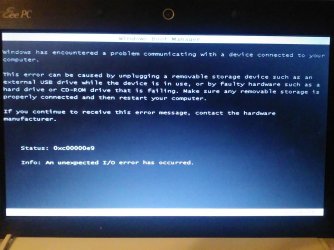
The 0xc00000e9 error is an I/O error, and appears when system is unable to make contact with certain components - a failed hardware, corrupted system files, and/or misconfigured BIOS/CMOS settings. Once this happens you may be sitting with this black screen and the message on top of it without being able to boot.
Since this error is caused by a few possible reasons, there are a few possible solutions.
1. Boot your computer through an antivirus rescue boot disc, following a systematic scan to detect and remove viruses. In order to assure malware-free directories, try scanning with multiple antivirus solutions
2. Consult with a professional as a registry hive could be corrupt
3. Check your HDD, including cables and ports:
- boot into Safe mode
- right click on Properties on Computer
- access Tools, click Check button under Error-checking option
- check both options stating, Automatically fix file system errors and Scan for and attempt recovery for bad sectors
- click Start
4. Use System restore
5. Use the installation disk to Repair your system
6. If nothing works, reinstall Windows
Hope any of this helps, good luck!
CK_WD