Error 2753

Hello!

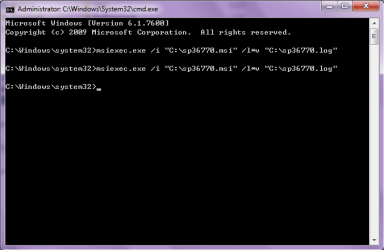
This particular error requires an installation log file to have much chance of fixing. Please follow the top section of this article: MSI log « Setup And Deployment Blog

to generate an installation log file. After that, please upload that log file here. If it is too big to upload, compress it (right click on the log file, Send To > Compressed (Zipped) file, and upload that new file).

Don't worry about trying to read or analyse the log file. I shall do that, just please upload it for me.

Thanks :)

Richard
 

My Computer

Computer Manufacturer/Model Number
Dell XPS 420
OS
Vista Home Premium x86 SP2
CPU
Intel Core 2 Quad Q9300 2.50GHz
Motherboard
Stock Dell 0TP406
Memory
4 gb (DDR2 800) 400MHz
Graphics Card(s)
ATI Radeon HD 3870 (512 MBytes)
Monitor(s) Displays
1 x Dell 2007FP and 1 x (old) Sonic flat screen
Screen Resolution
1600 x 1200 and 1280 x 1204
Hard Drives
1 x 640Gb (SATA 300) Western Digital: WDC WD6400AAKS-75A7B0 1 x 1Tb (SATA 600) Western Digital: Caviar Black, SATA 6GB/S, 64Mb cache, 8ms Western Digital: WDC WD1002FAEX-00Z3A0 ATA Device
Case
Dell XPS 420
Cooling
Stock Fan
Keyboard
Dell Bluetooth
Mouse
Advent Optical ADE-WG01 (colour change light up)
Internet Speed
Varies from 10kb/s to 170kb/s. So unreliable it is not funny
Other Info
ASUS USB 3.0 5Gbps/SATA 6Gbps - PCI-Express Combo Controller Card (U3S6)
i tried all the method, but none of it applicable. i think i choose the simpest method. Anyway, thanks so much for all the help. thanks chris1neji and profdlp
 

My Computer

OS
window 7 ultimate 32bit
I am really sorry that my methods did not work, however don't be discouraged. Niemiro, has a great suggestion, all he needs is the information he asked and he will start analyzing your instllation log file,
 

My Computer

Computer type
PC/Desktop
Computer Manufacturer/Model Number
Gateway / Slight Modifications
OS
Windows 8 64 bit PRO
CPU
AMD Phenom X4 9100e
Motherboard
Gateway RS780
Memory
2GB X2 DDR2
Graphics Card(s)
Sapphire HD 6850
Sound Card
Integrated
Monitor(s) Displays
Gateway 19" + Dell 19"
Screen Resolution
1440X900 sometimes 2880 by 900
Hard Drives
WD 80GB
WD 640GB
WD 1,000GB
PSU
Antec BP 550watts
Case
Antec 300
Cooling
Stock Cooling
Keyboard
Saitek Eclipse II
Mouse
Gigabyte GM-M6800
Internet Speed
D: 30Mbps U:4Mbps
Antivirus
Avast version 8
Browser
Internet Explorer ver 10 64 bit
Other Info
This is my work computer.
I have another laptop running Windows 7 64 bit.
Another PC running Windows 8 64 bit pro.
Total of 3
As a long time HP user I have learned to prepare my HPs. One of the first things to do when I get a new one is to uninstall unnecessary HP software. Wireless Assistant and Quick Launch Buttons are always first to go, being two of the most useless HP applications.

Although I can understand that you would like to find an explanation, I wholeheartedly recommend you to completely forget HP Wireless Assistant, not to install it. It is not needed.

Kari
 
Last edited:

My Computer

Computer type
Laptop
Computer Manufacturer/Model Number
HP ENVY 17-1150eg
OS
Windows 10 Pro x64 EN-GB
CPU
1.6 GHz Intel Core i7-720QM Processor
Memory
6 GB
Graphics Card(s)
ATI Mobility Radeon HD 5850 Graphics
Sound Card
Beats sound system with integrated subwoofer
Monitor(s) Displays
17" laptop display, 22" LED and 32" Full HD TV through HDMI
Screen Resolution
1600*900 (1), 1920*1080 (2&3)
Hard Drives
Internal: 2 x 500 GB SATA Hard Disk Drive 7200 rpm
External: 2TB for backups, 3TB USB3 network drive for media
Cooling
As Envy runs a bit warm, I have it on a Cooler Master pad
Keyboard
Logitech diNovo Media Desktop Laser (bluetooth)
Mouse
Logitech Performance Mouse MX
Internet Speed
50/10 Mbps VDSL
Antivirus
Windows Defender 4.3.9431.0
Browser
Maxthon 3.5.2., IE11
Hi niemiro,
I had tried the method u mention, but i not sure whether i done it correctly or not. The result i get was attached.
The log file also is attached.
Forgive me if i done it wrongly.
 

Attachments

  • 5.png
    5.png
    29.7 KB · Views: 1
  • 6.png
    6.png
    48 KB · Views: 6
  • sp36770.log
    sp36770.log
    1.6 KB · Views: 6

My Computer

OS
window 7 ultimate 32bit
I am really sorry that my methods did not work, however don't be discouraged. Niemiro, has a great suggestion, all he needs is the information he asked and he will start analyzing your instllation log file,

Really thanks for all the encouragement and support u gave. u had help me a lot. although i still can't get a good result. but u had done your best. thank you.
 

My Computer

OS
window 7 ultimate 32bit
As a long time HP user I have learned to prepare my HPs. One of the first things to do when I get a new one is to uninstall unnecessary HP software. Wireless Assistant and Quick Launch Buttons are always first to go, being two of the most useless HP applications.

Although I can understand that you would like to find an exolanation, I wholeheartedly recommend you to completely forget HP Wireless Assistant, not to install it. It is not needed.

Kari

thank you for your information. Besides install the file, i would like to learn how to debug such problem as it won't be my obstacle the next time i face the same problem. I am really weak in computer software. I sincerely thanks all the senior that teach me a lot and willing to help me in my case.
 

My Computer

OS
window 7 ultimate 32bit
Back
Top