error code: 0x800b0001 & DirectX due to regsvr32 initpki.dll missing

airforcebuns

New member
Local time
8:53 AM
Messages
17
error code: 0x800b0001 & DirectX due to regsvr32 initpki.dll missing

got that error code whilst trying to run MS security essentials, and while trying to install directX i got the "regsvr32 initpki.dll is missing" error. i can give pictures if needed. please help. ive tried several things. i know my way around a computer, i went to school for this type of stuff but im stumped. i ran sfc /scannow and apparently i have some corrupt system files. which btw the scan was NOT able to complete. i dont know how to manually fix them so im at a loss with that as well. i can provide pictures if needed. my first post on this forum, so thanks in advance.
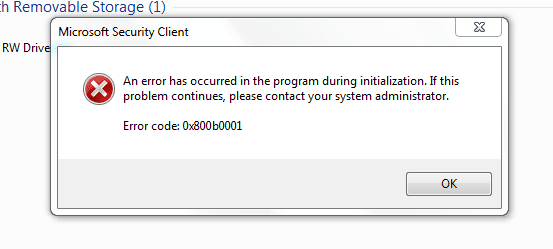
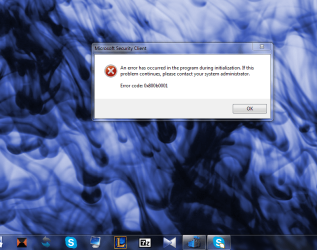
1. the first pic is what happens when i try and open MS security essentials
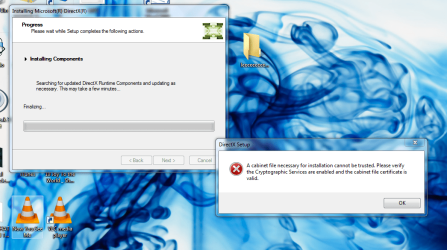
2. the second is when i try and get directX
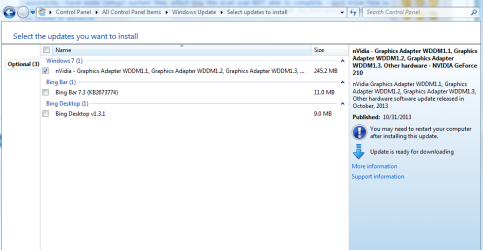
3. the third is an update that i have tried numerous times to install with no luck (figured it could be connected in some way)


also i would very much like to be able to solve this WITHOUT having to reinstall my OS. thanks. much love
 

Attachments
  • MSS.PNG
    MSS.PNG
    7.1 KB · Views: 22
  • directx.PNG
    directx.PNG
    192.3 KB · Views: 6
  • Nvidia update.PNG
    Nvidia update.PNG
    38.6 KB · Views: 4

My Computer My Computer

At a glance

windows 7 professional x64AMD Phenom(tm) II X2 550 Processor, 3100 Mhz,...8 GIG DDR3NVIDIA GeForce 210
Computer type
PC/Desktop
Computer Manufacturer/Model Number
Custom build
OS
windows 7 professional x64
CPU
AMD Phenom(tm) II X2 550 Processor, 3100 Mhz, 2 Core(s), 2 L
Motherboard
BIOSTAR N68S3B
Memory
8 GIG DDR3
Graphics Card(s)
NVIDIA GeForce 210
Hard Drives
500 gig sata
Antivirus
microsoft security essentials
Browser
chrome preffered, but no problem with IE 10,11
Hi, Welcome to Seven forums.

For this error:

Failed to find updates with error code 800B0001

It indicated that Windows Update engine files has been corrupted.

Please use the following steps to re-register system files:

1. Click Start, Run, type: notepad C:\register.bat and press Enter. Choose "Yes"
when you are prompted.
2. Copy the following commands and then paste them into the opened Notepad window.


net stop wuauserv
regsvr32 wuapi.dll /s
regsvr32 wups.dll /s
regsvr32 wuaueng.dll /s
regsvr32 wucltui.dll /s
regsvr32 wuweb.dll /s
regsvr32 msxml.dll /s
regsvr32 msxml2.dll /s
regsvr32 msxml3.dll /s
regsvr32 urlmon.dll /s
net start wuauserv
regsvr32 softpub.dll /s
regsvr32 initpki.dll /s
regsvr32 mssip32.dll /s
regsvr32 wintrust.dll /s
regsvr32 dssenh.dll /s
regsvr32 rsaenh.dll /s
regsvr32 gpkcsp.dll /s
regsvr32 sccbase.dll /s
regsvr32 slbcsp.dll /s
regsvr32 cryptdlg.dll /s
regsvr32 jscript.dll /s

3. After the above commands have been pasted, please close the Notepad window.
Choose "Yes" when you are prompted to save the file.
4. Click Start, Run, type: C:\register.bat and press Enter to run the commands that
have been pasted.

Once you have completed the above steps, try to connect to the Windows Update site
and download the Updates again.

FOR DirectX issue.

1. navigate to \Windows\System32\directx\ or \Windows\SysWow64\directx
if you have Windows 7 x64.
2. Click on "organise" file menu, then "folder and search options" then
in the "View" tab check "show hidden files and folders" and then "ok"
3. websetup folder will be visible now. go in there and delete all
contents.
4. run "dxwebsetup" again.
 

My Computer My Computer

At a glance

Windows 11 x64i5 2500K @ 3.3 GHz16 GB DDR 3 @ 1600MhzMSI 1050TI 4GB OC version
Computer type
PC/Desktop
Computer Manufacturer/Model Number
Custom Bulid/Self made
OS
Windows 11 x64
CPU
i5 2500K @ 3.3 GHz
Motherboard
ASUS P8 Z77 V pro
Memory
16 GB DDR 3 @ 1600Mhz
Graphics Card(s)
MSI 1050TI 4GB OC version
Sound Card
On Board (Realtek HD audio)
Monitor(s) Displays
Samsung 22" LCD
Screen Resolution
1920*1080
Hard Drives
Seagate 1 TB, WD 1TB, Seagate 2 TB ( I use a lot of space)
PSU
coolermaster 750 W
Case
Coolermaster HAF912
Cooling
Coolermaster hyper 212 EVO
Keyboard
Samsung
Mouse
Dell Wireless
Internet Speed
Wireless 50 Mbps
Antivirus
AVG 2016 Internet Security
Browser
Google Chrome

My Computer My Computer

At a glance

Windows 10 Pro x64Intel Core i7 6700KGSkill TridentZ RGB 16GB 3600 16-16-16-36EVGA GTX 980 Ti SC x2
Computer type
PC/Desktop
Computer Manufacturer/Model Number
Skylake Special #666
OS
Windows 10 Pro x64
CPU
Intel Core i7 6700K
Motherboard
Asus Sabertooth Z170 Mark 1
Memory
GSkill TridentZ RGB 16GB 3600 16-16-16-36
Graphics Card(s)
EVGA GTX 980 Ti SC x2
Sound Card
Realtek High Definition
Monitor(s) Displays
AOC G2460PG
Screen Resolution
1920 x 1080 144Hz
Hard Drives
Samsung 860 Pro 256GB, Seagate Barracuda 4TB x2
PSU
EVGA 1000 P2, EVGA White Custom Braided Cables
Case
Corsair Vengeance C70 Gunmetal Black
Cooling
Corsair H100i v2, Corsair ML120 x2, Thermal Grizzly Kryonaut
Keyboard
Logitech G910 Orion Spectrum
Mouse
Logitech G700s
Internet Speed
Verizon Fios Quantum Gateway 75/75
Antivirus
Windows Defender, Malwarebytes Free 3.8.3
Browser
Chrome
Other Info
Corsair SP120 x4, LG Blu-ray Drive, Durabrand HT-395 100 Watt Dolby Digital Amp, Corsair H2100 Wireless 7.1 Headset
Hey guys firstly....thanks SO much for all the help. I'm currently working but I get off at 3:30. I'm gonna try these out first thing when I get home
 

My Computer My Computer

At a glance

windows 7 professional x64AMD Phenom(tm) II X2 550 Processor, 3100 Mhz,...8 GIG DDR3NVIDIA GeForce 210
Computer type
PC/Desktop
Computer Manufacturer/Model Number
Custom build
OS
windows 7 professional x64
CPU
AMD Phenom(tm) II X2 550 Processor, 3100 Mhz, 2 Core(s), 2 L
Motherboard
BIOSTAR N68S3B
Memory
8 GIG DDR3
Graphics Card(s)
NVIDIA GeForce 210
Hard Drives
500 gig sata
Antivirus
microsoft security essentials
Browser
chrome preffered, but no problem with IE 10,11
Also you cannot install "direct x" anymore. From vista onward, directx cannot be updated. It's built into windows. Your probably thinking like in windows xp you could upgrade direct x to the latest supported version. It does not work like that anymore.

Your version of direct x stays what it is from vista onward.

This is why it did not work, as well as why you received that error.
 

My Computer My Computer

At a glance

Windows 10 ProAMD Ryzen 5 2400G Processor with Radeon RX Ve...G.SKILL Ripjaws V Series 16GB (2 x 8GB) 288-P...2047MB NVIDIA GeForce GTX 1060 6GB (EVGA)
Computer type
PC/Desktop
Computer Manufacturer/Model Number
Custom Built
OS
Windows 10 Pro
CPU
AMD Ryzen 5 2400G Processor with Radeon RX Vega 11 Graphics
Motherboard
ASRock X470 Master SLI/AC AM4 AMD Promontory X470 SATA 6Gb/s
Memory
G.SKILL Ripjaws V Series 16GB (2 x 8GB) 288-Pin DDR4 SDRAM D
Graphics Card(s)
2047MB NVIDIA GeForce GTX 1060 6GB (EVGA)
Sound Card
Motherboard Built in
Monitor(s) Displays
Acer R240HY bidx 23.8-Inch IPS HDMI DVI VGA (1920 x 1080) Wi
Screen Resolution
1920 x 1080
Hard Drives
1TB Sandisk SSD PLUS (Main drive)
500 GB Seagate 7200 RPM (Games)
500 GB Western Digital 7200 RPM (Virtual Machines)
PSU
CORSAIR TX Series TX650M 650W 80+ Gold Modular Power Supply
Case
CORSAIR CARBIDE SPEC-02 Mid-Tower Gaming Case, Red LED Fan
Cooling
220mm, two 120mm, and four 60mm fans
Keyboard
Wired Dell keyboard
Mouse
Wireless Logitech mouse
Internet Speed
250mb down, 30mb up
Antivirus
Panda Cloud Antivirus
Browser
Chrome-ish x64
Other Info
Your awesome for reading this.
@archer
where do i save the .bat file to? it said "Cannot find C:\ register.bat does not exist, would you like to create a new file?" i said yes...then i copy and pasted what you said to. then saved the file and got this...where do i put it ? or does it not matter.
 

My Computer My Computer

At a glance

windows 7 professional x64AMD Phenom(tm) II X2 550 Processor, 3100 Mhz,...8 GIG DDR3NVIDIA GeForce 210
Computer type
PC/Desktop
Computer Manufacturer/Model Number
Custom build
OS
windows 7 professional x64
CPU
AMD Phenom(tm) II X2 550 Processor, 3100 Mhz, 2 Core(s), 2 L
Motherboard
BIOSTAR N68S3B
Memory
8 GIG DDR3
Graphics Card(s)
NVIDIA GeForce 210
Hard Drives
500 gig sata
Antivirus
microsoft security essentials
Browser
chrome preffered, but no problem with IE 10,11
@andrew
so are you saying that im....good? lol i just dont have to worry about it or...?
 

My Computer My Computer

At a glance

windows 7 professional x64AMD Phenom(tm) II X2 550 Processor, 3100 Mhz,...8 GIG DDR3NVIDIA GeForce 210
Computer type
PC/Desktop
Computer Manufacturer/Model Number
Custom build
OS
windows 7 professional x64
CPU
AMD Phenom(tm) II X2 550 Processor, 3100 Mhz, 2 Core(s), 2 L
Motherboard
BIOSTAR N68S3B
Memory
8 GIG DDR3
Graphics Card(s)
NVIDIA GeForce 210
Hard Drives
500 gig sata
Antivirus
microsoft security essentials
Browser
chrome preffered, but no problem with IE 10,11
@AddRam
thank you...im a tad embarrassed that i didnt think of that already actually. lol
 

My Computer My Computer

At a glance

windows 7 professional x64AMD Phenom(tm) II X2 550 Processor, 3100 Mhz,...8 GIG DDR3NVIDIA GeForce 210
Computer type
PC/Desktop
Computer Manufacturer/Model Number
Custom build
OS
windows 7 professional x64
CPU
AMD Phenom(tm) II X2 550 Processor, 3100 Mhz, 2 Core(s), 2 L
Motherboard
BIOSTAR N68S3B
Memory
8 GIG DDR3
Graphics Card(s)
NVIDIA GeForce 210
Hard Drives
500 gig sata
Antivirus
microsoft security essentials
Browser
chrome preffered, but no problem with IE 10,11
@archer

one more thing...the DirectX folder does not exist in my system32 directory at all. but im guessing thats because i cant download it? idk...from what andrew said, maybe its supposed to not be there? idk
 

My Computer My Computer

At a glance

windows 7 professional x64AMD Phenom(tm) II X2 550 Processor, 3100 Mhz,...8 GIG DDR3NVIDIA GeForce 210
Computer type
PC/Desktop
Computer Manufacturer/Model Number
Custom build
OS
windows 7 professional x64
CPU
AMD Phenom(tm) II X2 550 Processor, 3100 Mhz, 2 Core(s), 2 L
Motherboard
BIOSTAR N68S3B
Memory
8 GIG DDR3
Graphics Card(s)
NVIDIA GeForce 210
Hard Drives
500 gig sata
Antivirus
microsoft security essentials
Browser
chrome preffered, but no problem with IE 10,11
You need to save the batch file to your desktop.

Is this an upgraded Windows installation? You may have incompatible programs or drivers working against you.
 

My Computer My Computer

At a glance

Windows 7 Ultimate 32bit SP1Intel(R) Core(TM)2 Quad CPU @ 2.40GHz, 2400 MHz4 GBATI Radeon HD 2600 Pro
Computer type
PC/Desktop
Computer Manufacturer/Model Number
Bruce ... somewhere in his 40's
OS
Windows 7 Ultimate 32bit SP1
CPU
Intel(R) Core(TM)2 Quad CPU @ 2.40GHz, 2400 MHz
Motherboard
INTEL/D975XBX2
Memory
4 GB
Graphics Card(s)
ATI Radeon HD 2600 Pro
Monitor(s) Displays
Samsung SyncMaster 914v
Screen Resolution
1280 x 1024
Hard Drives
2/500GB each ... ST3500630AS ATA Device.
One is not connected
PSU
Rocketfish 700 W
Case
G.Skill Gigabyte Chassis
Keyboard
Standard PS/2 Keyboard
Mouse
Microsoft PS/2 Mouse
Internet Speed
DSL
Antivirus
Avira Internet Security
Browser
IE 11
Other Info
ATI HDMI Audio
@jacee
nope. custom built. fresh install (2 years ago) been fine up until these past few weeks.
 

My Computer My Computer

At a glance

windows 7 professional x64AMD Phenom(tm) II X2 550 Processor, 3100 Mhz,...8 GIG DDR3NVIDIA GeForce 210
Computer type
PC/Desktop
Computer Manufacturer/Model Number
Custom build
OS
windows 7 professional x64
CPU
AMD Phenom(tm) II X2 550 Processor, 3100 Mhz, 2 Core(s), 2 L
Motherboard
BIOSTAR N68S3B
Memory
8 GIG DDR3
Graphics Card(s)
NVIDIA GeForce 210
Hard Drives
500 gig sata
Antivirus
microsoft security essentials
Browser
chrome preffered, but no problem with IE 10,11
click start and type dxdiag in the search box and hit the enter key, a window will open, click yes and the DirectX Diagnostic Tool will open, and you should see you have DirectX 11
 

My Computer My Computer

At a glance

Windows 10 Pro x64Intel Core i7 6700KGSkill TridentZ RGB 16GB 3600 16-16-16-36EVGA GTX 980 Ti SC x2
Computer type
PC/Desktop
Computer Manufacturer/Model Number
Skylake Special #666
OS
Windows 10 Pro x64
CPU
Intel Core i7 6700K
Motherboard
Asus Sabertooth Z170 Mark 1
Memory
GSkill TridentZ RGB 16GB 3600 16-16-16-36
Graphics Card(s)
EVGA GTX 980 Ti SC x2
Sound Card
Realtek High Definition
Monitor(s) Displays
AOC G2460PG
Screen Resolution
1920 x 1080 144Hz
Hard Drives
Samsung 860 Pro 256GB, Seagate Barracuda 4TB x2
PSU
EVGA 1000 P2, EVGA White Custom Braided Cables
Case
Corsair Vengeance C70 Gunmetal Black
Cooling
Corsair H100i v2, Corsair ML120 x2, Thermal Grizzly Kryonaut
Keyboard
Logitech G910 Orion Spectrum
Mouse
Logitech G700s
Internet Speed
Verizon Fios Quantum Gateway 75/75
Antivirus
Windows Defender, Malwarebytes Free 3.8.3
Browser
Chrome
Other Info
Corsair SP120 x4, LG Blu-ray Drive, Durabrand HT-395 100 Watt Dolby Digital Amp, Corsair H2100 Wireless 7.1 Headset
ran the batch file. restarted my comp. and this is LITERALLY the first thing that pops up...:(
 

Attachments

  • Capture.PNG
    Capture.PNG
    167.5 KB · Views: 2

My Computer My Computer

At a glance

windows 7 professional x64AMD Phenom(tm) II X2 550 Processor, 3100 Mhz,...8 GIG DDR3NVIDIA GeForce 210
Computer type
PC/Desktop
Computer Manufacturer/Model Number
Custom build
OS
windows 7 professional x64
CPU
AMD Phenom(tm) II X2 550 Processor, 3100 Mhz, 2 Core(s), 2 L
Motherboard
BIOSTAR N68S3B
Memory
8 GIG DDR3
Graphics Card(s)
NVIDIA GeForce 210
Hard Drives
500 gig sata
Antivirus
microsoft security essentials
Browser
chrome preffered, but no problem with IE 10,11
Uninstall Microsoft Security Essentials

Do you have Ccleaner installed ? If not, install it. Run Ccleaner and scan the registry for any issues then choose fix all issues, do that until there are no more issues. (scan for issues again)

http://www.piriform.com/ccleaner

Now click start, computer, Local Disk C:, Program Files (x86) and delete the Microsoft Security Client folder, also delete it from the Program Files folder ( yes it`s in the Program Files folder and the Program Files (x86) folder, delete it from both.

Run Ccleaner again the same way, now download and re install Microsoft Security Essentials again, let it update but uncheck scan my computer, you can do that later. You shouldn`t have any more issues with MSE :)

Microsoft Security Essentials - Microsoft Windows
 

My Computer My Computer

At a glance

Windows 10 Pro x64Intel Core i7 6700KGSkill TridentZ RGB 16GB 3600 16-16-16-36EVGA GTX 980 Ti SC x2
Computer type
PC/Desktop
Computer Manufacturer/Model Number
Skylake Special #666
OS
Windows 10 Pro x64
CPU
Intel Core i7 6700K
Motherboard
Asus Sabertooth Z170 Mark 1
Memory
GSkill TridentZ RGB 16GB 3600 16-16-16-36
Graphics Card(s)
EVGA GTX 980 Ti SC x2
Sound Card
Realtek High Definition
Monitor(s) Displays
AOC G2460PG
Screen Resolution
1920 x 1080 144Hz
Hard Drives
Samsung 860 Pro 256GB, Seagate Barracuda 4TB x2
PSU
EVGA 1000 P2, EVGA White Custom Braided Cables
Case
Corsair Vengeance C70 Gunmetal Black
Cooling
Corsair H100i v2, Corsair ML120 x2, Thermal Grizzly Kryonaut
Keyboard
Logitech G910 Orion Spectrum
Mouse
Logitech G700s
Internet Speed
Verizon Fios Quantum Gateway 75/75
Antivirus
Windows Defender, Malwarebytes Free 3.8.3
Browser
Chrome
Other Info
Corsair SP120 x4, LG Blu-ray Drive, Durabrand HT-395 100 Watt Dolby Digital Amp, Corsair H2100 Wireless 7.1 Headset
@AddRam
running the diagnostic tool as we speak

will run ccleaner as well and we'll see what happens
 

My Computer My Computer

At a glance

windows 7 professional x64AMD Phenom(tm) II X2 550 Processor, 3100 Mhz,...8 GIG DDR3NVIDIA GeForce 210
Computer type
PC/Desktop
Computer Manufacturer/Model Number
Custom build
OS
windows 7 professional x64
CPU
AMD Phenom(tm) II X2 550 Processor, 3100 Mhz, 2 Core(s), 2 L
Motherboard
BIOSTAR N68S3B
Memory
8 GIG DDR3
Graphics Card(s)
NVIDIA GeForce 210
Hard Drives
500 gig sata
Antivirus
microsoft security essentials
Browser
chrome preffered, but no problem with IE 10,11
DirectX diagnostic tool report no problems found.

CCleaner fixed the registry errors, i began to scan the "WINDOWS" tab and its scannning now
 

My Computer My Computer

At a glance

windows 7 professional x64AMD Phenom(tm) II X2 550 Processor, 3100 Mhz,...8 GIG DDR3NVIDIA GeForce 210
Computer type
PC/Desktop
Computer Manufacturer/Model Number
Custom build
OS
windows 7 professional x64
CPU
AMD Phenom(tm) II X2 550 Processor, 3100 Mhz, 2 Core(s), 2 L
Motherboard
BIOSTAR N68S3B
Memory
8 GIG DDR3
Graphics Card(s)
NVIDIA GeForce 210
Hard Drives
500 gig sata
Antivirus
microsoft security essentials
Browser
chrome preffered, but no problem with IE 10,11
You don`t scan the windows tab, you just run the cleaner
 

My Computer My Computer

At a glance

Windows 10 Pro x64Intel Core i7 6700KGSkill TridentZ RGB 16GB 3600 16-16-16-36EVGA GTX 980 Ti SC x2
Computer type
PC/Desktop
Computer Manufacturer/Model Number
Skylake Special #666
OS
Windows 10 Pro x64
CPU
Intel Core i7 6700K
Motherboard
Asus Sabertooth Z170 Mark 1
Memory
GSkill TridentZ RGB 16GB 3600 16-16-16-36
Graphics Card(s)
EVGA GTX 980 Ti SC x2
Sound Card
Realtek High Definition
Monitor(s) Displays
AOC G2460PG
Screen Resolution
1920 x 1080 144Hz
Hard Drives
Samsung 860 Pro 256GB, Seagate Barracuda 4TB x2
PSU
EVGA 1000 P2, EVGA White Custom Braided Cables
Case
Corsair Vengeance C70 Gunmetal Black
Cooling
Corsair H100i v2, Corsair ML120 x2, Thermal Grizzly Kryonaut
Keyboard
Logitech G910 Orion Spectrum
Mouse
Logitech G700s
Internet Speed
Verizon Fios Quantum Gateway 75/75
Antivirus
Windows Defender, Malwarebytes Free 3.8.3
Browser
Chrome
Other Info
Corsair SP120 x4, LG Blu-ray Drive, Durabrand HT-395 100 Watt Dolby Digital Amp, Corsair H2100 Wireless 7.1 Headset
oh...well ok then. lol stopping it now.
 

My Computer My Computer

At a glance

windows 7 professional x64AMD Phenom(tm) II X2 550 Processor, 3100 Mhz,...8 GIG DDR3NVIDIA GeForce 210
Computer type
PC/Desktop
Computer Manufacturer/Model Number
Custom build
OS
windows 7 professional x64
CPU
AMD Phenom(tm) II X2 550 Processor, 3100 Mhz, 2 Core(s), 2 L
Motherboard
BIOSTAR N68S3B
Memory
8 GIG DDR3
Graphics Card(s)
NVIDIA GeForce 210
Hard Drives
500 gig sata
Antivirus
microsoft security essentials
Browser
chrome preffered, but no problem with IE 10,11
Even if you do click analyze, it should only take a few seconds. You should be running the cleaner everyday when you`re done with your pc, so web pages, and other garbage, don`t pile up on the hard drive.

Just concentrate on fixing Microsoft Security Essentials ;)
 

My Computer My Computer

At a glance

Windows 10 Pro x64Intel Core i7 6700KGSkill TridentZ RGB 16GB 3600 16-16-16-36EVGA GTX 980 Ti SC x2
Computer type
PC/Desktop
Computer Manufacturer/Model Number
Skylake Special #666
OS
Windows 10 Pro x64
CPU
Intel Core i7 6700K
Motherboard
Asus Sabertooth Z170 Mark 1
Memory
GSkill TridentZ RGB 16GB 3600 16-16-16-36
Graphics Card(s)
EVGA GTX 980 Ti SC x2
Sound Card
Realtek High Definition
Monitor(s) Displays
AOC G2460PG
Screen Resolution
1920 x 1080 144Hz
Hard Drives
Samsung 860 Pro 256GB, Seagate Barracuda 4TB x2
PSU
EVGA 1000 P2, EVGA White Custom Braided Cables
Case
Corsair Vengeance C70 Gunmetal Black
Cooling
Corsair H100i v2, Corsair ML120 x2, Thermal Grizzly Kryonaut
Keyboard
Logitech G910 Orion Spectrum
Mouse
Logitech G700s
Internet Speed
Verizon Fios Quantum Gateway 75/75
Antivirus
Windows Defender, Malwarebytes Free 3.8.3
Browser
Chrome
Other Info
Corsair SP120 x4, LG Blu-ray Drive, Durabrand HT-395 100 Watt Dolby Digital Amp, Corsair H2100 Wireless 7.1 Headset
Security essentials won't uninstall -__- I right click uninstall in the control panel and it just does literally nothing. Computer doesn't freeze or anything... it just acts as if I never clicked at all. Did it twice
 

My Computer My Computer

At a glance

windows 7 professional x64AMD Phenom(tm) II X2 550 Processor, 3100 Mhz,...8 GIG DDR3NVIDIA GeForce 210
Computer type
PC/Desktop
Computer Manufacturer/Model Number
Custom build
OS
windows 7 professional x64
CPU
AMD Phenom(tm) II X2 550 Processor, 3100 Mhz, 2 Core(s), 2 L
Motherboard
BIOSTAR N68S3B
Memory
8 GIG DDR3
Graphics Card(s)
NVIDIA GeForce 210
Hard Drives
500 gig sata
Antivirus
microsoft security essentials
Browser
chrome preffered, but no problem with IE 10,11
Back
Top