
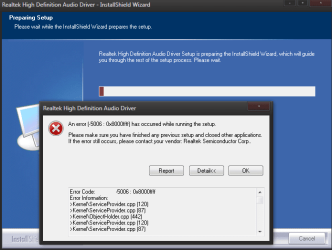
Error Code:-5006:0x8000ffff when installing RealtekHD

Esthreel

New member
Local time
7:37 PM
Messages
20
I have a weird static noise on my realtek HD audio, nothing helped so I tried to update driver and got this :confused:
 

Attachments

  • Capture2.PNG
    Capture2.PNG
    26.1 KB · Views: 178

My Computer

Computer Manufacturer/Model Number
Myself
OS
Windows 7 Ultimate X64
CPU
Phenom 9950 BE
Motherboard
MSI K9A2 Platinum V2
Memory
Vitesta 1066+ 2x2GB
Graphics Card(s)
Asus EAH4870
Sound Card
Integrated
Monitor(s) Displays
Asus 22" and ACER S243HL
Hard Drives
500GB WD, MAXTOR, SEAGATE. RAID 0 1TB, JBOD 500GB
PSU
CHIEFTEC GPS-550AB
Case
NEXUS CLODIUS
Cooling
APAC ZEROTHERM NIRVANA NV120
Hello,

Try uninstalling the program from Programs and Features. Then try installing again.

Good luck!

~JK
 

My Computer

Computer Manufacturer/Model Number
Custom
OS
Windows 7 Professional x64
CPU
Intel i7 2600K OC'd @ 4620 MHz
Motherboard
Asus P8Z68-V Pro
Memory
16GB GSkill Sniper 2133 Mhz (4x4GB)
Graphics Card(s)
EVGA GeForce GTX 480 SuperClocked+
Sound Card
Realtek High Definition Audio
Monitor(s) Displays
2x Acer S273HLbmii 27"
Screen Resolution
2 x 1920x1080
Hard Drives
64GB Crucial M4 SSD

Storage: Hitachi 1TB 5400RPM, Samsung 1.5TB 5400RPM
PSU
Corsair HW Series 750w (modular)
Case
Cooler Master HAF 932 Advanced Blue Edition
Cooling
CM Hyper 212+ CPU cooler, 3x 230mm + 1x 140mm case fans
Keyboard
Logitech MK320 (wireless)
Mouse
Logitech MK320 (wireless)
Internet Speed
30 Mb/s : 2 Mb/s
I also had problems installing bioshock, or updating directX, so I think this won't help.
Error code 0x80000FFF
This problem may occur if any of the following values exist in the Windows registry:
HKEY_LOCAL_MACHINE\COMPONENTS\PendingXmlIdentifier
HKEY_LOCAL_MACHINE\COMPONENTS\NextQueueEntryIndex
HKEY_LOCAL_MACHINE\COMPONENTS\AdvancedInstallersNeedResolving

This is more likely, but I cant find this on WIN7
 

My Computer

Computer Manufacturer/Model Number
Myself
OS
Windows 7 Ultimate X64
CPU
Phenom 9950 BE
Motherboard
MSI K9A2 Platinum V2
Memory
Vitesta 1066+ 2x2GB
Graphics Card(s)
Asus EAH4870
Sound Card
Integrated
Monitor(s) Displays
Asus 22" and ACER S243HL
Hard Drives
500GB WD, MAXTOR, SEAGATE. RAID 0 1TB, JBOD 500GB
PSU
CHIEFTEC GPS-550AB
Case
NEXUS CLODIUS
Cooling
APAC ZEROTHERM NIRVANA NV120
Try opening an elevated command prompt and entering sfc /scannow.

That will scan for bad system files, repairing as necessary.
 

My Computer

Computer Manufacturer/Model Number
Custom
OS
Windows 7 Professional x64
CPU
Intel i7 2600K OC'd @ 4620 MHz
Motherboard
Asus P8Z68-V Pro
Memory
16GB GSkill Sniper 2133 Mhz (4x4GB)
Graphics Card(s)
EVGA GeForce GTX 480 SuperClocked+
Sound Card
Realtek High Definition Audio
Monitor(s) Displays
2x Acer S273HLbmii 27"
Screen Resolution
2 x 1920x1080
Hard Drives
64GB Crucial M4 SSD

Storage: Hitachi 1TB 5400RPM, Samsung 1.5TB 5400RPM
PSU
Corsair HW Series 750w (modular)
Case
Cooler Master HAF 932 Advanced Blue Edition
Cooling
CM Hyper 212+ CPU cooler, 3x 230mm + 1x 140mm case fans
Keyboard
Logitech MK320 (wireless)
Mouse
Logitech MK320 (wireless)
Internet Speed
30 Mb/s : 2 Mb/s
Just did that, after restart nothing better. I probably messed up something by trying to fix this, I still think this is registry related.
 

My Computer

Computer Manufacturer/Model Number
Myself
OS
Windows 7 Ultimate X64
CPU
Phenom 9950 BE
Motherboard
MSI K9A2 Platinum V2
Memory
Vitesta 1066+ 2x2GB
Graphics Card(s)
Asus EAH4870
Sound Card
Integrated
Monitor(s) Displays
Asus 22" and ACER S243HL
Hard Drives
500GB WD, MAXTOR, SEAGATE. RAID 0 1TB, JBOD 500GB
PSU
CHIEFTEC GPS-550AB
Case
NEXUS CLODIUS
Cooling
APAC ZEROTHERM NIRVANA NV120

My Computer

Computer Manufacturer/Model Number
Custom
OS
Windows 7 Professional x64
CPU
Intel i7 2600K OC'd @ 4620 MHz
Motherboard
Asus P8Z68-V Pro
Memory
16GB GSkill Sniper 2133 Mhz (4x4GB)
Graphics Card(s)
EVGA GeForce GTX 480 SuperClocked+
Sound Card
Realtek High Definition Audio
Monitor(s) Displays
2x Acer S273HLbmii 27"
Screen Resolution
2 x 1920x1080
Hard Drives
64GB Crucial M4 SSD

Storage: Hitachi 1TB 5400RPM, Samsung 1.5TB 5400RPM
PSU
Corsair HW Series 750w (modular)
Case
Cooler Master HAF 932 Advanced Blue Edition
Cooling
CM Hyper 212+ CPU cooler, 3x 230mm + 1x 140mm case fans
Keyboard
Logitech MK320 (wireless)
Mouse
Logitech MK320 (wireless)
Internet Speed
30 Mb/s : 2 Mb/s
you have a previous install that did not complete correctly causing the issue you need to rectify that in order to install something else

disable any anti virus software you may have and try to run a driver cleaner program

give this a try

Guru3D - Driver Sweeper (Setup) download from Guru3D.com
 
Last edited by a moderator:

My Computer

Computer Manufacturer/Model Number
Custom Built
OS
Windows 7 Ultimate 32 bit
CPU
AMD Athlon 64 X2 4200+ Overclocked to 3.0Ghz
Motherboard
Biostar TF560 A2+
Memory
2 Gigs of G.Skill DDR2 800
Graphics Card(s)
HIS ATI Radeon HD 2600 Pro With IceQ cooler
Sound Card
6.1 Channel Sound Blaster Live 24 Bit
Monitor(s) Displays
Dual 20.5 " LG Flatrons W2052TO
Screen Resolution
1152x864
Hard Drives
Dual 36 Gig 10,000 RPM Raptors
PSU
430 watt Seasonic 80%+ Dual 12v Rails 2x80mm fans
Case
CHIEFMAX YA-5X
Cooling
4-80mm case fans 1-140mm case fan freezer 64 Pro CPU cooler
Keyboard
Saitek Eclipse II
Mouse
A4Tech wireless battery free optical scroll mouse
Internet Speed
1.5 meg down 384 up
Other Info
Logisys LED fan/light controller and dual 16" LED sticks mounted inside top of case all fans are LED all lighting is blue
DVD RW and CD RW both and Memory card reader

Attachments

  • sweep.PNG
    sweep.PNG
    3.3 KB · Views: 40
Last edited by a moderator:

My Computer

Computer Manufacturer/Model Number
Myself
OS
Windows 7 Ultimate X64
CPU
Phenom 9950 BE
Motherboard
MSI K9A2 Platinum V2
Memory
Vitesta 1066+ 2x2GB
Graphics Card(s)
Asus EAH4870
Sound Card
Integrated
Monitor(s) Displays
Asus 22" and ACER S243HL
Hard Drives
500GB WD, MAXTOR, SEAGATE. RAID 0 1TB, JBOD 500GB
PSU
CHIEFTEC GPS-550AB
Case
NEXUS CLODIUS
Cooling
APAC ZEROTHERM NIRVANA NV120
Back
Top