Solved Error codes while updating Windows

wmtrucker

New member
Local time
4:01 PM
Messages
11
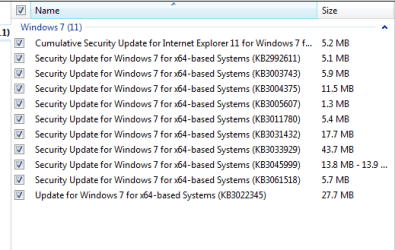
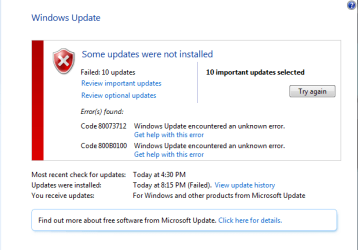
I built this computer around 2 or 3 years ago for a friend, he brought it back to me because he couldn't get 10 updates installed. I have tried the fixit repair and the SURT tool with no errors on completion of each. I have tried stopping the updating service and changing Software Distribution folder. any help would be appreciated. The CBS zip will not upload (Properties says it's 73.9 MB)
 

Attachments

  • windows failed update.PNG
    windows failed update.PNG
    27.4 KB · Views: 36
  • Windows needed updates.PNG
    Windows needed updates.PNG
    27.5 KB · Views: 38

My Computer

Computer type
PC/Desktop
Computer Manufacturer/Model Number
Custom Build
OS
Windows 7 Home Premium 64 Bit
CPU
AMD FX-8150
Motherboard
Asus Sabertooth 990FX
Memory
16 GB
Graphics Card(s)
Nvidia GTX 680
PSU
Corsair TX 750
Antivirus
Norton
Please follow the Windows Update Posting Instructions and post the requested data

If the file is too large (8MB compressed), remove the older CBSPersist cab files until the final file is below the limit - you can always post them separately after zipping them. (the forum doesn't allow the upload of bare CAB files, for a number of reasons)

Please also post the C:\Windows\windowsudpate.log file
 

My Computer

Computer type
Laptop
Computer Manufacturer/Model Number
Asus K52F or Lenovo B51-80
OS
Win 7 x64 Home Premium (and x86 VirtualBox VM)/Win10
CPU
i3 370M/i7 6500U
Motherboard
Asus/Lenovo
Memory
8GB - finally :)/8GB
Graphics Card(s)
it's an i3, dude!/dual Intel&nVidia
Sound Card
onboard
Monitor(s) Displays
15.6" built-in
Screen Resolution
1366x768/1920x1080
Hard Drives
750GB Seagate internal
Sundry external drives attached to other computers on the local network
1TB SSD on the Lenovo
PSU
n/a
Internet Speed
as much as I can get - usually on a dongle/phone, so <1MB/s
Antivirus
MSE/Defender
Browser
IE11/12/Edge/Chrome/FF(if I must)
This is a picture of the CBS file when I opened it, I removed all but the smallest persist file. I couldn't get the CBS text file to come thru (TO BIG)... Another idea?
 

My Computer

Computer type
PC/Desktop
Computer Manufacturer/Model Number
Custom Build
OS
Windows 7 Home Premium 64 Bit
CPU
AMD FX-8150
Motherboard
Asus Sabertooth 990FX
Memory
16 GB
Graphics Card(s)
Nvidia GTX 680
PSU
Corsair TX 750
Antivirus
Norton
I have had other suggestions to try "High jack this" and "combo fix"
I have included both reports and the one from sfc/scannow.

Thank you for your time and knowledge
 

Attachments

My Computer

Computer type
PC/Desktop
Computer Manufacturer/Model Number
Custom Build
OS
Windows 7 Home Premium 64 Bit
CPU
AMD FX-8150
Motherboard
Asus Sabertooth 990FX
Memory
16 GB
Graphics Card(s)
Nvidia GTX 680
PSU
Corsair TX 750
Antivirus
Norton
You need to compress the files before uploading - that way the 14MB CBS.log file will come down to less than 1MB.

HijackThis is almost useless in an x64 install - it has no real knowledge of the folder structure, and reports many false-positives.

The SFC scan is clear

I don't really know enough abut ComboFix to be able to tell much from what it shows.

However - You appear to have Glary Utilities installed and running at boot. Glary is known to cause problems on some machines, especially if the registry cleaner is used.

Please post the logs requested - I need to see the background data.
 

My Computer

Computer type
Laptop
Computer Manufacturer/Model Number
Asus K52F or Lenovo B51-80
OS
Win 7 x64 Home Premium (and x86 VirtualBox VM)/Win10
CPU
i3 370M/i7 6500U
Motherboard
Asus/Lenovo
Memory
8GB - finally :)/8GB
Graphics Card(s)
it's an i3, dude!/dual Intel&nVidia
Sound Card
onboard
Monitor(s) Displays
15.6" built-in
Screen Resolution
1366x768/1920x1080
Hard Drives
750GB Seagate internal
Sundry external drives attached to other computers on the local network
1TB SSD on the Lenovo
PSU
n/a
Internet Speed
as much as I can get - usually on a dongle/phone, so <1MB/s
Antivirus
MSE/Defender
Browser
IE11/12/Edge/Chrome/FF(if I must)
The CheckSUR scan doesn't appear to have completed - The log file breaks off very early in the scan.

Please run it again an wait for it to finish.
 

My Computer

Computer type
Laptop
Computer Manufacturer/Model Number
Asus K52F or Lenovo B51-80
OS
Win 7 x64 Home Premium (and x86 VirtualBox VM)/Win10
CPU
i3 370M/i7 6500U
Motherboard
Asus/Lenovo
Memory
8GB - finally :)/8GB
Graphics Card(s)
it's an i3, dude!/dual Intel&nVidia
Sound Card
onboard
Monitor(s) Displays
15.6" built-in
Screen Resolution
1366x768/1920x1080
Hard Drives
750GB Seagate internal
Sundry external drives attached to other computers on the local network
1TB SSD on the Lenovo
PSU
n/a
Internet Speed
as much as I can get - usually on a dongle/phone, so <1MB/s
Antivirus
MSE/Defender
Browser
IE11/12/Edge/Chrome/FF(if I must)
I deleted the contents of the CBS folder and ran everything again. This is what I came up with, I had to split up the CBS text file into two parts to get them small enough to upload. I hope that is not a problem.

CBS 1.1 is the beginning of the file and CBS 1.2 is the end.
No CBS persist file sent.

Sorry for the delay... I had to go back to work and am only home two days at a time.
 

Attachments

My Computer

Computer type
PC/Desktop
Computer Manufacturer/Model Number
Custom Build
OS
Windows 7 Home Premium 64 Bit
CPU
AMD FX-8150
Motherboard
Asus Sabertooth 990FX
Memory
16 GB
Graphics Card(s)
Nvidia GTX 680
PSU
Corsair TX 750
Antivirus
Norton
Here's the errorlist from the CheckSUR log...
Code:
Unavailable repair files:
 winsxs\manifests\amd64_microsoft-windows-c..graphy-cryptoconfig_31bf3856ad364e35_6.1.7601.18606_none_0484237db300588c.manifest
 winsxs\manifests\amd64_microsoft-windows-ciphersuiteorder-adm_31bf3856ad364e35_6.1.7601.22814_none_534f44ae5b481c54.manifest
 winsxs\manifests\amd64_microsoft-windows-lsa_31bf3856ad364e35_6.1.7601.22814_none_04fa1a008c887630.manifest
 winsxs\manifests\amd64_microsoft-windows-msauditevtlog_31bf3856ad364e35_6.1.7601.22814_none_25f2098ca82ab2b6.manifest
 winsxs\manifests\amd64_microsoft-windows-ncrypt-dll_31bf3856ad364e35_6.1.7601.22814_none_bc8de4d021594c9d.manifest
 winsxs\manifests\amd64_microsoft-windows-security-ntlm_31bf3856ad364e35_6.1.7601.22814_none_db627c1192480112.manifest
 winsxs\manifests\amd64_microsoft-windows-security-digest_31bf3856ad364e35_6.1.7601.22814_none_997cda55ac7251c3.manifest
 winsxs\manifests\amd64_microsoft-windows-security-credssp_31bf3856ad364e35_6.1.7601.22814_none_2267c0add14d42cb.manifest
 winsxs\manifests\amd64_microsoft-windows-security-kerberos_31bf3856ad364e35_6.1.7601.22814_none_45866c69e08acdf2.manifest
 winsxs\manifests\amd64_microsoft-windows-audio-audiocore_31bf3856ad364e35_6.1.7601.22826_none_d546840d14634c73.manifest
 winsxs\manifests\wow64_microsoft-windows-audio-audiocore_31bf3856ad364e35_6.1.7601.22826_none_df9b2e5f48c40e6e.manifest
 winsxs\manifests\amd64_microsoft-windows-ciphersuiteorder-adm_31bf3856ad364e35_6.1.7601.18606_none_52d2767d42209620.manifest
 winsxs\manifests\amd64_microsoft-windows-lsa_31bf3856ad364e35_6.1.7601.18606_none_047d4bcf7360effc.manifest
 winsxs\manifests\amd64_microsoft-windows-m..ditevtlog.resources_31bf3856ad364e35_6.1.7601.22814_en-us_b8b533318999a4c7.manifest
 winsxs\manifests\wow64_microsoft-windows-audio-audiocore_31bf3856ad364e35_6.1.7601.18619_none_df1f60782f9ba191.manifest
 winsxs\manifests\amd64_microsoft-windows-audio-audiocore_31bf3856ad364e35_6.1.7601.18619_none_d4cab625fb3adf96.manifest
 winsxs\manifests\amd64_microsoft-windows-c..graphy-cryptoconfig_31bf3856ad364e35_6.1.7601.22814_none_0500f1aecc27dec0.manifest
 winsxs\manifests\amd64_microsoft-windows-lsa.resources_31bf3856ad364e35_6.1.7601.22814_en-us_e557638fc6589521.manifest
 winsxs\manifests\amd64_microsoft-windows-c..ityclient.resources_31bf3856ad364e35_6.1.7601.22814_en-us_c36ee628cf91f72d.manifest
 winsxs\manifests\amd64_microsoft-windows-ncrypt-dll_31bf3856ad364e35_6.1.7601.18606_none_bc11169f0831c669.manifest
 winsxs\manifests\amd64_microsoft-windows-security-schannel_31bf3856ad364e35_6.1.7601.18606_none_80490c1b6bd88e87.manifest
 winsxs\manifests\amd64_microsoft-windows-security-ntlm_31bf3856ad364e35_6.1.7601.18606_none_dae5ade079207ade.manifest
 winsxs\manifests\amd64_microsoft-windows-security-digest_31bf3856ad364e35_6.1.7601.18606_none_99000c24934acb8f.manifest
 winsxs\manifests\amd64_microsoft-windows-security-credssp_31bf3856ad364e35_6.1.7601.18606_none_21eaf27cb825bc97.manifest
 winsxs\manifests\amd64_microsoft-windows-security-kerberos_31bf3856ad364e35_6.1.7601.18606_none_45099e38c76347be.manifest
 winsxs\manifests\amd64_microsoft-windows-security-schannel_31bf3856ad364e35_6.1.7601.22814_none_80c5da4c850014bb.manifest
 winsxs\manifests\amd64_microsoft-windows-lsa.resources_31bf3856ad364e35_6.1.7601.18606_en-us_e4da955ead310eed.manifest
 winsxs\manifests\amd64_microsoft-windows-c..tionauthorityclient_31bf3856ad364e35_6.1.7601.22814_none_362d44ba6c64c620.manifest
 servicing\packages\Package_105_for_KB2992611~31bf3856ad364e35~amd64~~6.1.1.0.mum
 servicing\packages\Package_105_for_KB2992611~31bf3856ad364e35~amd64~~6.1.1.0.mum
 servicing\packages\Package_106_for_KB2992611~31bf3856ad364e35~amd64~~6.1.1.0.mum
 servicing\packages\Package_106_for_KB2992611~31bf3856ad364e35~amd64~~6.1.1.0.mum
 servicing\packages\Package_107_for_KB2992611~31bf3856ad364e35~amd64~~6.1.1.0.mum
 servicing\packages\Package_107_for_KB2992611~31bf3856ad364e35~amd64~~6.1.1.0.mum
 servicing\packages\Package_108_for_KB2992611~31bf3856ad364e35~amd64~~6.1.1.0.mum
 servicing\packages\Package_108_for_KB2992611~31bf3856ad364e35~amd64~~6.1.1.0.mum
 servicing\packages\Package_109_for_KB2992611~31bf3856ad364e35~amd64~~6.1.1.0.mum
 servicing\packages\Package_109_for_KB2992611~31bf3856ad364e35~amd64~~6.1.1.0.mum
 servicing\packages\Package_112_for_KB2992611~31bf3856ad364e35~amd64~~6.1.1.0.mum
 servicing\packages\Package_112_for_KB2992611~31bf3856ad364e35~amd64~~6.1.1.0.mum
 servicing\packages\Package_113_for_KB2992611~31bf3856ad364e35~amd64~~6.1.1.0.mum
 servicing\packages\Package_113_for_KB2992611~31bf3856ad364e35~amd64~~6.1.1.0.mum
 servicing\packages\Package_114_for_KB2992611~31bf3856ad364e35~amd64~~6.1.1.0.mum
 servicing\packages\Package_114_for_KB2992611~31bf3856ad364e35~amd64~~6.1.1.0.mum
 servicing\packages\Package_115_for_KB2992611~31bf3856ad364e35~amd64~~6.1.1.0.mum
 servicing\packages\Package_115_for_KB2992611~31bf3856ad364e35~amd64~~6.1.1.0.mum
 servicing\packages\Package_116_for_KB2992611~31bf3856ad364e35~amd64~~6.1.1.0.mum
 servicing\packages\Package_116_for_KB2992611~31bf3856ad364e35~amd64~~6.1.1.0.mum
 servicing\packages\Package_1_for_KB3005607~31bf3856ad364e35~amd64~~6.1.1.0.mum
 servicing\packages\Package_1_for_KB3005607~31bf3856ad364e35~amd64~~6.1.1.0.mum
 servicing\packages\Package_51_for_KB2992611~31bf3856ad364e35~amd64~~6.1.1.0.mum
 servicing\packages\Package_51_for_KB2992611~31bf3856ad364e35~amd64~~6.1.1.0.mum
 servicing\packages\Package_52_for_KB2992611~31bf3856ad364e35~amd64~~6.1.1.0.mum
 servicing\packages\Package_52_for_KB2992611~31bf3856ad364e35~amd64~~6.1.1.0.mum
 servicing\packages\Package_53_for_KB2992611~31bf3856ad364e35~amd64~~6.1.1.0.mum
 servicing\packages\Package_53_for_KB2992611~31bf3856ad364e35~amd64~~6.1.1.0.mum
 servicing\packages\Package_54_for_KB2992611~31bf3856ad364e35~amd64~~6.1.1.0.mum
 servicing\packages\Package_54_for_KB2992611~31bf3856ad364e35~amd64~~6.1.1.0.mum
 servicing\packages\Package_57_for_KB2992611~31bf3856ad364e35~amd64~~6.1.1.0.mum
 servicing\packages\Package_57_for_KB2992611~31bf3856ad364e35~amd64~~6.1.1.0.mum
 servicing\packages\Package_80_for_KB2992611~31bf3856ad364e35~amd64~~6.1.1.0.mum
 servicing\packages\Package_80_for_KB2992611~31bf3856ad364e35~amd64~~6.1.1.0.mum
 servicing\packages\Package_for_KB2992611_SP1~31bf3856ad364e35~amd64~~6.1.1.0.mum
 servicing\packages\Package_for_KB2992611_SP1~31bf3856ad364e35~amd64~~6.1.1.0.mum
 servicing\packages\Package_for_KB2992611~31bf3856ad364e35~amd64~~6.1.1.0.mum
 servicing\packages\Package_for_KB2992611~31bf3856ad364e35~amd64~~6.1.1.0.mum
 servicing\packages\Package_for_KB3005607_SP1~31bf3856ad364e35~amd64~~6.1.1.0.mum
 servicing\packages\Package_for_KB3005607_SP1~31bf3856ad364e35~amd64~~6.1.1.0.mum
 servicing\packages\Package_for_KB3005607~31bf3856ad364e35~amd64~~6.1.1.0.mum

 servicing\packages\Package_for_KB3005607~31bf3856ad364e35~amd64~~6.1.1.0.mum

I'll post a fix protocol later - when I can get to it..
 

My Computer

Computer type
Laptop
Computer Manufacturer/Model Number
Asus K52F or Lenovo B51-80
OS
Win 7 x64 Home Premium (and x86 VirtualBox VM)/Win10
CPU
i3 370M/i7 6500U
Motherboard
Asus/Lenovo
Memory
8GB - finally :)/8GB
Graphics Card(s)
it's an i3, dude!/dual Intel&nVidia
Sound Card
onboard
Monitor(s) Displays
15.6" built-in
Screen Resolution
1366x768/1920x1080
Hard Drives
750GB Seagate internal
Sundry external drives attached to other computers on the local network
1TB SSD on the Lenovo
PSU
n/a
Internet Speed
as much as I can get - usually on a dongle/phone, so <1MB/s
Antivirus
MSE/Defender
Browser
IE11/12/Edge/Chrome/FF(if I must)
thank you
 

My Computer

Computer type
PC/Desktop
Computer Manufacturer/Model Number
Custom Build
OS
Windows 7 Home Premium 64 Bit
CPU
AMD FX-8150
Motherboard
Asus Sabertooth 990FX
Memory
16 GB
Graphics Card(s)
Nvidia GTX 680
PSU
Corsair TX 750
Antivirus
Norton
I've uploaded a file - wmtaa.zip - to my OneDrive at Noel's OneDrive
Please download and save it.
Right-click on the downloaded file, and select Extract all…
Extract to the default location - which will create a new folder wmtaa in the same place.
Open this folder - there should be two folders inside it (Manifests, and Packages)

Copy the content of the Packages folder to the folder
C:\Windows\Temp\CheckSur\Servicing\Packages

And the content of the manifests folder (.manifest files) into this folder:

C:\Windows\Temp\CheckSur\Winsxs\Manifests

Now run the CheckSUR tool again (it may take a while)

Post the new CheckSUR.log file, and the CheckSUR.persist.log file.
 

My Computer

Computer type
Laptop
Computer Manufacturer/Model Number
Asus K52F or Lenovo B51-80
OS
Win 7 x64 Home Premium (and x86 VirtualBox VM)/Win10
CPU
i3 370M/i7 6500U
Motherboard
Asus/Lenovo
Memory
8GB - finally :)/8GB
Graphics Card(s)
it's an i3, dude!/dual Intel&nVidia
Sound Card
onboard
Monitor(s) Displays
15.6" built-in
Screen Resolution
1366x768/1920x1080
Hard Drives
750GB Seagate internal
Sundry external drives attached to other computers on the local network
1TB SSD on the Lenovo
PSU
n/a
Internet Speed
as much as I can get - usually on a dongle/phone, so <1MB/s
Antivirus
MSE/Defender
Browser
IE11/12/Edge/Chrome/FF(if I must)
Done as requested. Was I suppose to run windows update after installing?
 

Attachments

My Computer

Computer type
PC/Desktop
Computer Manufacturer/Model Number
Custom Build
OS
Windows 7 Home Premium 64 Bit
CPU
AMD FX-8150
Motherboard
Asus Sabertooth 990FX
Memory
16 GB
Graphics Card(s)
Nvidia GTX 680
PSU
Corsair TX 750
Antivirus
Norton
I finally figured out what I was doing wrong with the compression file. so here is the CBS log file if you still need it.
 

My Computer

Computer type
PC/Desktop
Computer Manufacturer/Model Number
Custom Build
OS
Windows 7 Home Premium 64 Bit
CPU
AMD FX-8150
Motherboard
Asus Sabertooth 990FX
Memory
16 GB
Graphics Card(s)
Nvidia GTX 680
PSU
Corsair TX 750
Antivirus
Norton
The CheckSUR scan doesn't appear to have completed properl - please run it again, and wait until it's complete, then post the new CheckSUR.log file.
 

My Computer

Computer type
Laptop
Computer Manufacturer/Model Number
Asus K52F or Lenovo B51-80
OS
Win 7 x64 Home Premium (and x86 VirtualBox VM)/Win10
CPU
i3 370M/i7 6500U
Motherboard
Asus/Lenovo
Memory
8GB - finally :)/8GB
Graphics Card(s)
it's an i3, dude!/dual Intel&nVidia
Sound Card
onboard
Monitor(s) Displays
15.6" built-in
Screen Resolution
1366x768/1920x1080
Hard Drives
750GB Seagate internal
Sundry external drives attached to other computers on the local network
1TB SSD on the Lenovo
PSU
n/a
Internet Speed
as much as I can get - usually on a dongle/phone, so <1MB/s
Antivirus
MSE/Defender
Browser
IE11/12/Edge/Chrome/FF(if I must)
I ran everything again and let it alone overnight, here is the files...
 

Attachments

My Computer

Computer type
PC/Desktop
Computer Manufacturer/Model Number
Custom Build
OS
Windows 7 Home Premium 64 Bit
CPU
AMD FX-8150
Motherboard
Asus Sabertooth 990FX
Memory
16 GB
Graphics Card(s)
Nvidia GTX 680
PSU
Corsair TX 750
Antivirus
Norton
Here's the log summary..
Code:
Unavailable repair files:
 servicing\packages\Package_105_for_KB2992611~31bf3856ad364e35~amd64~~6.1.1.0.mum
 servicing\packages\Package_105_for_KB2992611~31bf3856ad364e35~amd64~~6.1.1.0.mum
 servicing\packages\Package_105_for_KB2992611~31bf3856ad364e35~amd64~~6.1.1.0.cat
 servicing\packages\Package_105_for_KB2992611~31bf3856ad364e35~amd64~~6.1.1.0.cat

I'll post a fix protocol a little later.
 

My Computer

Computer type
Laptop
Computer Manufacturer/Model Number
Asus K52F or Lenovo B51-80
OS
Win 7 x64 Home Premium (and x86 VirtualBox VM)/Win10
CPU
i3 370M/i7 6500U
Motherboard
Asus/Lenovo
Memory
8GB - finally :)/8GB
Graphics Card(s)
it's an i3, dude!/dual Intel&nVidia
Sound Card
onboard
Monitor(s) Displays
15.6" built-in
Screen Resolution
1366x768/1920x1080
Hard Drives
750GB Seagate internal
Sundry external drives attached to other computers on the local network
1TB SSD on the Lenovo
PSU
n/a
Internet Speed
as much as I can get - usually on a dongle/phone, so <1MB/s
Antivirus
MSE/Defender
Browser
IE11/12/Edge/Chrome/FF(if I must)
I've uploaded a file - wmtaa.zip - to my OneDrive at Noel's OneDrive
Please download and save it.
Right-click on the downloaded file, and select Extract all…
Extract to the default location - which will create a new folder wmtaa in the same place.
Open this folder - there should be one folder inside it (Packages)

Copy the content of the Packages folder to the folder
C:\Windows\Temp\CheckSur\Servicing\Packages

Now run the CheckSUR tool again (it may take a while)

Post the new CheckSUR.log file, and the CheckSUR.persist.log file.
 

My Computer

Computer type
Laptop
Computer Manufacturer/Model Number
Asus K52F or Lenovo B51-80
OS
Win 7 x64 Home Premium (and x86 VirtualBox VM)/Win10
CPU
i3 370M/i7 6500U
Motherboard
Asus/Lenovo
Memory
8GB - finally :)/8GB
Graphics Card(s)
it's an i3, dude!/dual Intel&nVidia
Sound Card
onboard
Monitor(s) Displays
15.6" built-in
Screen Resolution
1366x768/1920x1080
Hard Drives
750GB Seagate internal
Sundry external drives attached to other computers on the local network
1TB SSD on the Lenovo
PSU
n/a
Internet Speed
as much as I can get - usually on a dongle/phone, so <1MB/s
Antivirus
MSE/Defender
Browser
IE11/12/Edge/Chrome/FF(if I must)
Ok, here's the set of files.

Thank you again for your help and patience.
 

Attachments

My Computer

Computer type
PC/Desktop
Computer Manufacturer/Model Number
Custom Build
OS
Windows 7 Home Premium 64 Bit
CPU
AMD FX-8150
Motherboard
Asus Sabertooth 990FX
Memory
16 GB
Graphics Card(s)
Nvidia GTX 680
PSU
Corsair TX 750
Antivirus
Norton
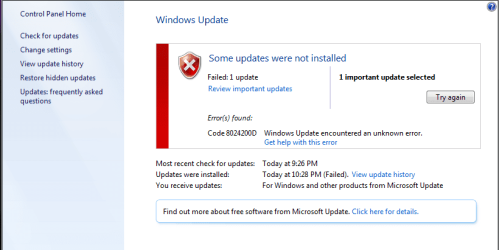
After last post I restarted the PC, then ran windows update again. All updates installed except 1 (KB2992611). got this error code....8024200D
 

Attachments

  • Code 8024200D.PNG
    Code 8024200D.PNG
    50 KB · Views: 0

My Computer

Computer type
PC/Desktop
Computer Manufacturer/Model Number
Custom Build
OS
Windows 7 Home Premium 64 Bit
CPU
AMD FX-8150
Motherboard
Asus Sabertooth 990FX
Memory
16 GB
Graphics Card(s)
Nvidia GTX 680
PSU
Corsair TX 750
Antivirus
Norton

My Computer

Computer type
Laptop
Computer Manufacturer/Model Number
Asus K52F or Lenovo B51-80
OS
Win 7 x64 Home Premium (and x86 VirtualBox VM)/Win10
CPU
i3 370M/i7 6500U
Motherboard
Asus/Lenovo
Memory
8GB - finally :)/8GB
Graphics Card(s)
it's an i3, dude!/dual Intel&nVidia
Sound Card
onboard
Monitor(s) Displays
15.6" built-in
Screen Resolution
1366x768/1920x1080
Hard Drives
750GB Seagate internal
Sundry external drives attached to other computers on the local network
1TB SSD on the Lenovo
PSU
n/a
Internet Speed
as much as I can get - usually on a dongle/phone, so <1MB/s
Antivirus
MSE/Defender
Browser
IE11/12/Edge/Chrome/FF(if I must)
THANK YOU VERY MUCH!!!
ALL is well now :party:
 

My Computer

Computer type
PC/Desktop
Computer Manufacturer/Model Number
Custom Build
OS
Windows 7 Home Premium 64 Bit
CPU
AMD FX-8150
Motherboard
Asus Sabertooth 990FX
Memory
16 GB
Graphics Card(s)
Nvidia GTX 680
PSU
Corsair TX 750
Antivirus
Norton
Back
Top