
Error "Could Not Access Network %APPDATA%

Tullynally

New member
Member
Local time
7:28 AM
Messages
57
Location
Dublin Ireland now, Rockford Il USA before retirin
Error "Could Not Access Network %APPDATA%

This has been a pain. I have tried to install many programs & get this error.

Why don't Microsoft fix this error Or at least a method to correct it that takes a registry hack.

Now I can't use Nokia OVI suit because of the error. All my data on my cell phone is undownloadable!!!

What is the answer??
 

My Computer

Computer Manufacturer/Model Number
Home Built
OS
Win 7 Home Pro 64 Bit
CPU
I5 2.66 ghz quad
Motherboard
ASUS p7p55d
Memory
4GB III 1332 Kit
Graphics Card(s)
Gainward GTX260 896GB
Sound Card
onboard
Monitor(s) Displays
1- Samung SyncMaster 2333S 2- Samsung T200HD PC/TV
Screen Resolution
I 1920 X 1080 2 1024 X 720
Hard Drives
Segate 500GB SATA II (3)
PSU
FSP Group Inc.
Case
Generic Tower
Cooling
AIR
Keyboard
Microsoft Wireless Multimedia Keyboard 1.1
Mouse
Microsoft Wireless Optical 2.0
Internet Speed
2.0
Other Info
I am 81 years old & started with Radio Shack TRs 80
(Trash 80) 2 -5 1/4 " Floppies, 640 KB mem, cassette drive, basic language.

My first work desktop was a PDP 8E with high speed tape reader & punch. Teletype input, no monitor.
A couple of questions first:

  • Have you tried to install your Nokia OVI program by right clicking the installer, and selecting 'Run as Administrator' ? If not try that.
  • And, can you tell me if you receive any numerical error code such as, 0x80070646, error code: 646, or error code: 1606?
Depending on your error code answer there can be up to three different registry fixes.

This could be a Services, and or a Registry problem, lets work on the Services first.

I need you to check the Network Location Awareness service (NLA) to see if it is set properly, i.e. Started >Automatic:

  • Copy/Paste Services into your Start >Search box.
  • You should see Services at the top of the results list, left click on that to open the Services window.
  • When it opens, scroll down to Network Location Awareness.
  • Check to make sure it is set to start Automatically, and is started.
  • Then double check its dependencies and make sure those are started and set to automatic.
To check, and or change the NLA, and its dependencies:

  • Right click on Network Location Awareness then move down, and left click on properties.
  • Properties will open to the General tab. If NLA needs to be changed, do it here.
  • Then left click on the Dependencies Tab.
  • For every dependency listed you have to find it listed in the Services window, and make sure they are set to started >automatic, this is done on that General tab.
  • For every change you do make, make sure you click on Apply, and then OK.

When you are satisfied that all Services are set properly reboot your machine, and try to install your Nokia OVI program by right clicking the installer, and selecting 'Run as Administrator'.

If that does not help, leave the Service settings as they are, and I walk you through the registry settings.

I realize that there are a lot of steps, and this is a long post/reply. So please remain calm and patient while you are going through the Service settings.

If you think this is bad, wait until we tackle the registry.....If we have to.
 

My Computer

Computer type
PC/Desktop
Computer Manufacturer/Model Number
Gateway DX4831-01e (Mid-Tower Desktop)
OS
Originally Win 7 Hm Prem x64 Ver 6.1.7600 Build 7601-SP1 | Upgraded to Windows 10 December 14, 2019
CPU
Intel i3 530 2.93GHz, 2933MHz 2 Cores 4 Logical Processors
Motherboard
Gateway H57M01 133 megahertz
Memory
6GB of 1,333MHz DDR3 SDRAM
Graphics Card(s)
32MB Intel Graphics Media Accelerator HD IGChip
Sound Card
Realtek High Definition Audio
Monitor(s) Displays
Gateway HX2000 20inch TFT active matrix TN
Screen Resolution
1600 x 900 x 59 hertz
Hard Drives
WDC WD10EADS-00M2B0 [HDD] (1000.20 GB) -- drive 0,
HL-DT-ST DVDRAM GH41N [CD-ROM dr]
Four card readers, and Four USB 2.0
PSU
300watts.
Case
Mid-Tower Desktop
Cooling
Stock from Gateway
Keyboard
Natural Ergonomic Keyboard 4000, see Other Info
Mouse
Orig. Gateway wore out now using Insignia USB wired optical
Internet Speed
Vz FIOS 10ms png 57.64Mbps down 65.53Mbps up Speedtest.org
Antivirus
Zamana Anti-logger with Anti-malware, MSE, Windows Firewall,
Browser
IE11.0.9600.19399-Upd ver11.0.135, Firefox 68.0.1 x64
Other Info
System Specs by Belarc.

BIOS: American Megatrends Inc. P01-A0 11/17/2009

Replaced the MS 'Natural' Standard PS/2 Enhanced 101-102 Keyboard with a new Natural Ergonomic Keyboard 4000 on August 1st 2014.

Canon Pixma MG3222 Printer.

Updated to IE11 on 12102015 | Fios Quantum Router g1100

Additional AV: SpywareBlaster, manual Mbam, SAS
OK! THANX!

I will try to follow your instructions!

Tully
 

My Computer

Computer Manufacturer/Model Number
Home Built
OS
Win 7 Home Pro 64 Bit
CPU
I5 2.66 ghz quad
Motherboard
ASUS p7p55d
Memory
4GB III 1332 Kit
Graphics Card(s)
Gainward GTX260 896GB
Sound Card
onboard
Monitor(s) Displays
1- Samung SyncMaster 2333S 2- Samsung T200HD PC/TV
Screen Resolution
I 1920 X 1080 2 1024 X 720
Hard Drives
Segate 500GB SATA II (3)
PSU
FSP Group Inc.
Case
Generic Tower
Cooling
AIR
Keyboard
Microsoft Wireless Multimedia Keyboard 1.1
Mouse
Microsoft Wireless Optical 2.0
Internet Speed
2.0
Other Info
I am 81 years old & started with Radio Shack TRs 80
(Trash 80) 2 -5 1/4 " Floppies, 640 KB mem, cassette drive, basic language.

My first work desktop was a PDP 8E with high speed tape reader & punch. Teletype input, no monitor.
I checked the Services.

Result;

Under Network Awareness dependances 1 & 2 OK!

Number 3 Listed TCP/IP NetBios Helper.

That was not listed in the services.

TCP/IP Protocal Driver was & is set to automatic.:cry:

What now.

Sorry for the delay, but was in hospital.

Tully
 
Last edited:

My Computer

Computer Manufacturer/Model Number
Home Built
OS
Win 7 Home Pro 64 Bit
CPU
I5 2.66 ghz quad
Motherboard
ASUS p7p55d
Memory
4GB III 1332 Kit
Graphics Card(s)
Gainward GTX260 896GB
Sound Card
onboard
Monitor(s) Displays
1- Samung SyncMaster 2333S 2- Samsung T200HD PC/TV
Screen Resolution
I 1920 X 1080 2 1024 X 720
Hard Drives
Segate 500GB SATA II (3)
PSU
FSP Group Inc.
Case
Generic Tower
Cooling
AIR
Keyboard
Microsoft Wireless Multimedia Keyboard 1.1
Mouse
Microsoft Wireless Optical 2.0
Internet Speed
2.0
Other Info
I am 81 years old & started with Radio Shack TRs 80
(Trash 80) 2 -5 1/4 " Floppies, 640 KB mem, cassette drive, basic language.

My first work desktop was a PDP 8E with high speed tape reader & punch. Teletype input, no monitor.
I am sad to hear of your recent medical condition. I trust it went well for you.
As in all situations of a personal matter it is best to take care of yourself, and your loved ones first, the material items can be fixed or replaced.

About those material items......Your %APPDATA% error was generated from a Windows Installer problem that is usually caused by incorrect Registry entries, but on some systems the Service settings can come into play, that is why I had you check those first.

Go to this site, and run the Fixit that is there:
You receive error code: 0x80070646, error code: 646, or error code: 1606 when you use Windows Update or Microsoft Update

I know.....When you read the KB article it deals specifically with MS Office products.

But, being that it is a problem with Windows Installer it can also affect other areas of updating, and program installation.

You can try fixing it yourself, but I would advise against that. If you are curious though, you could follow the 'Let me fix it myself' portion of the article just to see if there are any incorrect values in the registry.
There are three main areas to check:
HKEY_USERS\.DEFAULT, HKEY_CURRENT_USER, and HKEY_LOCAL_MACHINE

If you do, again, be calm and patient in trying to find these keys as it is very easy to find yourself in the wrong area, that is why I advise to run the Fixit. In any event make sure you Backup the Registry! Using Method One.

Research Sources:


Off topic:
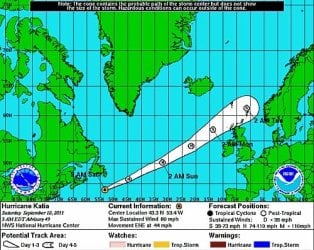
Just wanted to give you a heads up about Hurricane Katia. It should arrive, your location, early Monday morning with tropical force winds.
1kat.jpg
We just went through T.S. Lee and received 13.5 inches of rain, and now we are waiting to see what Maria is going to do. Here is a similar thread: http://www.sevenforums.com/chillout-room/185750-storm-warnings-british-isles.html

Take care


My Computer

Computer type
PC/Desktop
Computer Manufacturer/Model Number
Gateway DX4831-01e (Mid-Tower Desktop)
OS
Originally Win 7 Hm Prem x64 Ver 6.1.7600 Build 7601-SP1 | Upgraded to Windows 10 December 14, 2019
CPU
Intel i3 530 2.93GHz, 2933MHz 2 Cores 4 Logical Processors
Motherboard
Gateway H57M01 133 megahertz
Memory
6GB of 1,333MHz DDR3 SDRAM
Graphics Card(s)
32MB Intel Graphics Media Accelerator HD IGChip
Sound Card
Realtek High Definition Audio
Monitor(s) Displays
Gateway HX2000 20inch TFT active matrix TN
Screen Resolution
1600 x 900 x 59 hertz
Hard Drives
WDC WD10EADS-00M2B0 [HDD] (1000.20 GB) -- drive 0,
HL-DT-ST DVDRAM GH41N [CD-ROM dr]
Four card readers, and Four USB 2.0
PSU
300watts.
Case
Mid-Tower Desktop
Cooling
Stock from Gateway
Keyboard
Natural Ergonomic Keyboard 4000, see Other Info
Mouse
Orig. Gateway wore out now using Insignia USB wired optical
Internet Speed
Vz FIOS 10ms png 57.64Mbps down 65.53Mbps up Speedtest.org
Antivirus
Zamana Anti-logger with Anti-malware, MSE, Windows Firewall,
Browser
IE11.0.9600.19399-Upd ver11.0.135, Firefox 68.0.1 x64
Other Info
System Specs by Belarc.

BIOS: American Megatrends Inc. P01-A0 11/17/2009

Replaced the MS 'Natural' Standard PS/2 Enhanced 101-102 Keyboard with a new Natural Ergonomic Keyboard 4000 on August 1st 2014.

Canon Pixma MG3222 Printer.

Updated to IE11 on 12102015 | Fios Quantum Router g1100

Additional AV: SpywareBlaster, manual Mbam, SAS
I tried the FixIt ! No joy!

I also tried fixing it myself, everything matched except the last registry key

Every line in the "fix" had "common" in front of it. Mine didn't.

Is this the problem.

I don't like to "fiddle" with the registry.

It seems that Microsoft should be the one to come up with a real fix!

I have been a loyal user of Microsoft software, but now it is weakening.

I can't even use my cell phone software now because of the error.

This is not a recent error & I feel really let down by Microsoft & the computer community. Lots of advice but no solution.

Tully :cry:
 

My Computer

Computer Manufacturer/Model Number
Home Built
OS
Win 7 Home Pro 64 Bit
CPU
I5 2.66 ghz quad
Motherboard
ASUS p7p55d
Memory
4GB III 1332 Kit
Graphics Card(s)
Gainward GTX260 896GB
Sound Card
onboard
Monitor(s) Displays
1- Samung SyncMaster 2333S 2- Samsung T200HD PC/TV
Screen Resolution
I 1920 X 1080 2 1024 X 720
Hard Drives
Segate 500GB SATA II (3)
PSU
FSP Group Inc.
Case
Generic Tower
Cooling
AIR
Keyboard
Microsoft Wireless Multimedia Keyboard 1.1
Mouse
Microsoft Wireless Optical 2.0
Internet Speed
2.0
Other Info
I am 81 years old & started with Radio Shack TRs 80
(Trash 80) 2 -5 1/4 " Floppies, 640 KB mem, cassette drive, basic language.

My first work desktop was a PDP 8E with high speed tape reader & punch. Teletype input, no monitor.
I also tried fixing it myself, everything matched except the last registry key

Every line in the "fix" had "common" in front of it. Mine didn't.
Please be more specific.

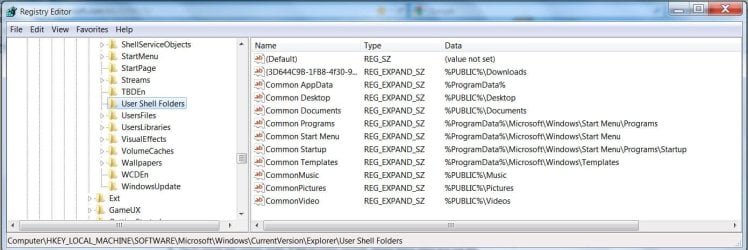
By 'last registry key' do you mean the one located at:
HKEY_LOCAL_MACHINE
\Software\Microsoft\Windows\CurrentVersion\Explorer\User Shell Folders
?

If you do, you can see by the snip of my key at that location,

1tully.JPG that indeed it does say Common.

Have you made the Backup of the Registry by creating a restore point?

To change it, right click on that 'AppData' key, move down to Rename, and add the word Common (notice the capitalization), with a space between Common and AppData, and touch Enter on your keyboard.
Also make sure the Key Type is REG_EXPAND_SZ, as a matter of fact all of these Keys in question are of that type.

Then try to install the Nokia OVI program.

The KB2258121 article does not say that you need to restart your machine after changing the key, but I usually do when making changes of this nature.

http://www.sevenforums.com/tutorials/1649-clean-install-windows-7-a.html
 

My Computer

Computer type
PC/Desktop
Computer Manufacturer/Model Number
Gateway DX4831-01e (Mid-Tower Desktop)
OS
Originally Win 7 Hm Prem x64 Ver 6.1.7600 Build 7601-SP1 | Upgraded to Windows 10 December 14, 2019
CPU
Intel i3 530 2.93GHz, 2933MHz 2 Cores 4 Logical Processors
Motherboard
Gateway H57M01 133 megahertz
Memory
6GB of 1,333MHz DDR3 SDRAM
Graphics Card(s)
32MB Intel Graphics Media Accelerator HD IGChip
Sound Card
Realtek High Definition Audio
Monitor(s) Displays
Gateway HX2000 20inch TFT active matrix TN
Screen Resolution
1600 x 900 x 59 hertz
Hard Drives
WDC WD10EADS-00M2B0 [HDD] (1000.20 GB) -- drive 0,
HL-DT-ST DVDRAM GH41N [CD-ROM dr]
Four card readers, and Four USB 2.0
PSU
300watts.
Case
Mid-Tower Desktop
Cooling
Stock from Gateway
Keyboard
Natural Ergonomic Keyboard 4000, see Other Info
Mouse
Orig. Gateway wore out now using Insignia USB wired optical
Internet Speed
Vz FIOS 10ms png 57.64Mbps down 65.53Mbps up Speedtest.org
Antivirus
Zamana Anti-logger with Anti-malware, MSE, Windows Firewall,
Browser
IE11.0.9600.19399-Upd ver11.0.135, Firefox 68.0.1 x64
Other Info
System Specs by Belarc.

BIOS: American Megatrends Inc. P01-A0 11/17/2009

Replaced the MS 'Natural' Standard PS/2 Enhanced 101-102 Keyboard with a new Natural Ergonomic Keyboard 4000 on August 1st 2014.

Canon Pixma MG3222 Printer.

Updated to IE11 on 12102015 | Fios Quantum Router g1100

Additional AV: SpywareBlaster, manual Mbam, SAS
I'm sorry, I went to that key again & it matches your snip.

I am so confused now that I am going back to my old, old Dell Laptop with Win XP.

All the programs that won't work on my hi-spec computer & win7 Home Premium

work perfectly on the old decreped, low spec, Dell!!

I feel that Microsoft has completely let me down & will think twice before buying MS again!!

There are 5 programs I cannot run after an update because of the "Can Not Locate Network Location %APPDATA%

Since 5 different programs, from 5 different sources won't work it is a MICROSOFT problem!

I really apreciate the time you have taken to help me try to solve the problem!

Tully
 

My Computer

Computer Manufacturer/Model Number
Home Built
OS
Win 7 Home Pro 64 Bit
CPU
I5 2.66 ghz quad
Motherboard
ASUS p7p55d
Memory
4GB III 1332 Kit
Graphics Card(s)
Gainward GTX260 896GB
Sound Card
onboard
Monitor(s) Displays
1- Samung SyncMaster 2333S 2- Samsung T200HD PC/TV
Screen Resolution
I 1920 X 1080 2 1024 X 720
Hard Drives
Segate 500GB SATA II (3)
PSU
FSP Group Inc.
Case
Generic Tower
Cooling
AIR
Keyboard
Microsoft Wireless Multimedia Keyboard 1.1
Mouse
Microsoft Wireless Optical 2.0
Internet Speed
2.0
Other Info
I am 81 years old & started with Radio Shack TRs 80
(Trash 80) 2 -5 1/4 " Floppies, 640 KB mem, cassette drive, basic language.

My first work desktop was a PDP 8E with high speed tape reader & punch. Teletype input, no monitor.
Your welcome!

The AppData error does seem to be a tough nut to crack. What works for some users does not for others. :(

As you will be running XP, please make sure you have the latest service pack (SP3) that way you will continue to be eligible for support and receive updates until its official retirement on April 8, 2014.

Some XP sites of interest:
Preparing Windows XP for the long haul. Check the Lounge area of this site there is some good XP information there.

Windows XP Software Updates

Support for Windows XP technical problems and troubleshooting

Learn how to install Windows XP Service Pack 3 (SP3)
 

My Computer

Computer type
PC/Desktop
Computer Manufacturer/Model Number
Gateway DX4831-01e (Mid-Tower Desktop)
OS
Originally Win 7 Hm Prem x64 Ver 6.1.7600 Build 7601-SP1 | Upgraded to Windows 10 December 14, 2019
CPU
Intel i3 530 2.93GHz, 2933MHz 2 Cores 4 Logical Processors
Motherboard
Gateway H57M01 133 megahertz
Memory
6GB of 1,333MHz DDR3 SDRAM
Graphics Card(s)
32MB Intel Graphics Media Accelerator HD IGChip
Sound Card
Realtek High Definition Audio
Monitor(s) Displays
Gateway HX2000 20inch TFT active matrix TN
Screen Resolution
1600 x 900 x 59 hertz
Hard Drives
WDC WD10EADS-00M2B0 [HDD] (1000.20 GB) -- drive 0,
HL-DT-ST DVDRAM GH41N [CD-ROM dr]
Four card readers, and Four USB 2.0
PSU
300watts.
Case
Mid-Tower Desktop
Cooling
Stock from Gateway
Keyboard
Natural Ergonomic Keyboard 4000, see Other Info
Mouse
Orig. Gateway wore out now using Insignia USB wired optical
Internet Speed
Vz FIOS 10ms png 57.64Mbps down 65.53Mbps up Speedtest.org
Antivirus
Zamana Anti-logger with Anti-malware, MSE, Windows Firewall,
Browser
IE11.0.9600.19399-Upd ver11.0.135, Firefox 68.0.1 x64
Other Info
System Specs by Belarc.

BIOS: American Megatrends Inc. P01-A0 11/17/2009

Replaced the MS 'Natural' Standard PS/2 Enhanced 101-102 Keyboard with a new Natural Ergonomic Keyboard 4000 on August 1st 2014.

Canon Pixma MG3222 Printer.

Updated to IE11 on 12102015 | Fios Quantum Router g1100

Additional AV: SpywareBlaster, manual Mbam, SAS
Back
Top