Error loading operating system

xenot7

Computer User
Member
VIP
Local time
1:42 PM
Messages
131
Location
SEE THE FLAG
Hi everyone!

Well as the title says, I got that message when booting. Actually it is a long story before i got that message so i'll try to sum it up. So, what i've done and what happened are as follows:

27 October 2012: I built my PC from a scratch.

three weeks ago: I began suspecting HDD failure because it is not detected in the bios frequently, failed short dst and long generic test in seatools for windows and began to make weird sounds (kind of a scratching or grinding noise, but I can't really describe it) only when booting or extracting .rar files.

two weeks ago : the problem with the bios was gone. But the sound retains.

1.5 - 1 week ago : the PC loads gadgets and some programs (that launch on startup ex. drivers, antivirus) a bit slower. I suspect the HDD is causing this because the other components are fine and my PC could play games in full HD. Windows explorer also crashes sometimes, and minecraft too.

Just YESTERDAY : I've had enough with constant explorer crashing and slow system, so I decided to open my HDD to check for hardware problems (It's a stupid move, i know) but I failed because after i opened the screw and tried to open the cover I can't because the cover is shut tight and prying it open wont work. Then i just put the HDD back together with the PC and booted, then magically an error status 0xc000000f appeared on my screen. I searched forums and run repairs from my installation disk but my OS is not listed. So i went on to the commant prompt and used bootrec, diskpart, rebuild bcd, and other commands.

Earlier TODAY : I found out that partition c: (the place i installed my os) was in RAW format (it used to be NTFS. I got the message (see the title) today, before that i got anothe bcd related error and fiddled with the command prompt. See below for my list of errors.


ADDITIONAL INFO:

- I use a 500GB Seagate Pipeline HD.2
-M y OS is Win7 Ultimate 32-bit
- Errors (if i'm not mistaken): 0xc000000f, 0xc000034, 0xc00000098 and the error whe loading the OS.
- The drive where i installed my OS turned RAW.
- my partitions are c: (260-something GB)(it is RAW), e: (97.6GB), f: (103GB)
- Lastly, please don' t tell me that i need to get a new HDD cos i'm just a kid. If that is the only solution, please tell me how to extract all the data from the HDD including the RAW partition.

Thank YOU in advance.
 

My Computer

Computer Manufacturer/Model Number
custom built
OS
Windows 7 Ultimate x64 SP1
CPU
Intel core i5 3470 @3.2 GHz
Motherboard
ECS H77-M3
Memory
V-Gen 4GB DDR3
Graphics Card(s)
PowerColor HD7750
Monitor(s) Displays
BenQ RL 2240h
Screen Resolution
1920*1080
Hard Drives
Seagate Barracuda 7200rpm 1TB
PSU
Enlight Blacksilver 550W
Case
NZXT Phantom 410
Keyboard
Logitech G100
Mouse
Logitech G100
Internet Speed
Very SLOW (512Kbps)
sorry for the long post.
 

My Computer

Computer Manufacturer/Model Number
custom built
OS
Windows 7 Ultimate x64 SP1
CPU
Intel core i5 3470 @3.2 GHz
Motherboard
ECS H77-M3
Memory
V-Gen 4GB DDR3
Graphics Card(s)
PowerColor HD7750
Monitor(s) Displays
BenQ RL 2240h
Screen Resolution
1920*1080
Hard Drives
Seagate Barracuda 7200rpm 1TB
PSU
Enlight Blacksilver 550W
Case
NZXT Phantom 410
Keyboard
Logitech G100
Mouse
Logitech G100
Internet Speed
Very SLOW (512Kbps)
Hi... did you try to open the harddisk itself?! Don't do that!! Even one piece of dust will cause a disk crash. Never ever open it.

e,f are still ntfs? What is d (most like the dvd)?
Did you see this in recovery environment (because win7 doesn't boot)?
 

My Computer

Computer type
Laptop
Computer Manufacturer/Model Number
ACER ASPIRE 5742G
OS
Microsoft Windows 7 Home Premium 64-bits 7601 Multiprocessor Free Service Pack 1
CPU
Intel(R) Core(TM) i3 CPU M 370 @ 2.40GHz
Motherboard
Acer Aspire 5742G
Memory
4,00 GB
Graphics Card(s)
ATI Mobility Radeon HD 5400 Series
Sound Card
(1) AMD High Definition Audio Device (2) Realtek High Defi
Screen Resolution
1366 x 768 x 32 bits (4294967296 colors) @ 60 Hz
Hard Drives
WDC WD5000BEVT-22ZAT0

My Computer

Computer type
Laptop
Computer Manufacturer/Model Number
ACER ASPIRE 5742G
OS
Microsoft Windows 7 Home Premium 64-bits 7601 Multiprocessor Free Service Pack 1
CPU
Intel(R) Core(TM) i3 CPU M 370 @ 2.40GHz
Motherboard
Acer Aspire 5742G
Memory
4,00 GB
Graphics Card(s)
ATI Mobility Radeon HD 5400 Series
Sound Card
(1) AMD High Definition Audio Device (2) Realtek High Defi
Screen Resolution
1366 x 768 x 32 bits (4294967296 colors) @ 60 Hz
Hard Drives
WDC WD5000BEVT-22ZAT0
I saw it through the win7 installation CD System recovery options. And D: (now shown as C:) is a part of my HDD
 

My Computer

Computer Manufacturer/Model Number
custom built
OS
Windows 7 Ultimate x64 SP1
CPU
Intel core i5 3470 @3.2 GHz
Motherboard
ECS H77-M3
Memory
V-Gen 4GB DDR3
Graphics Card(s)
PowerColor HD7750
Monitor(s) Displays
BenQ RL 2240h
Screen Resolution
1920*1080
Hard Drives
Seagate Barracuda 7200rpm 1TB
PSU
Enlight Blacksilver 550W
Case
NZXT Phantom 410
Keyboard
Logitech G100
Mouse
Logitech G100
Internet Speed
Very SLOW (512Kbps)
Oops i meant c: not c with smiley face
 

My Computer

Computer Manufacturer/Model Number
custom built
OS
Windows 7 Ultimate x64 SP1
CPU
Intel core i5 3470 @3.2 GHz
Motherboard
ECS H77-M3
Memory
V-Gen 4GB DDR3
Graphics Card(s)
PowerColor HD7750
Monitor(s) Displays
BenQ RL 2240h
Screen Resolution
1920*1080
Hard Drives
Seagate Barracuda 7200rpm 1TB
PSU
Enlight Blacksilver 550W
Case
NZXT Phantom 410
Keyboard
Logitech G100
Mouse
Logitech G100
Internet Speed
Very SLOW (512Kbps)
ok i'll try the partition wizard
 

My Computer

Computer Manufacturer/Model Number
custom built
OS
Windows 7 Ultimate x64 SP1
CPU
Intel core i5 3470 @3.2 GHz
Motherboard
ECS H77-M3
Memory
V-Gen 4GB DDR3
Graphics Card(s)
PowerColor HD7750
Monitor(s) Displays
BenQ RL 2240h
Screen Resolution
1920*1080
Hard Drives
Seagate Barracuda 7200rpm 1TB
PSU
Enlight Blacksilver 550W
Case
NZXT Phantom 410
Keyboard
Logitech G100
Mouse
Logitech G100
Internet Speed
Very SLOW (512Kbps)
Just to be clear, if i delete the raw partition, i could still recover the data in it?
 

My Computer

Computer Manufacturer/Model Number
custom built
OS
Windows 7 Ultimate x64 SP1
CPU
Intel core i5 3470 @3.2 GHz
Motherboard
ECS H77-M3
Memory
V-Gen 4GB DDR3
Graphics Card(s)
PowerColor HD7750
Monitor(s) Displays
BenQ RL 2240h
Screen Resolution
1920*1080
Hard Drives
Seagate Barracuda 7200rpm 1TB
PSU
Enlight Blacksilver 550W
Case
NZXT Phantom 410
Keyboard
Logitech G100
Mouse
Logitech G100
Internet Speed
Very SLOW (512Kbps)
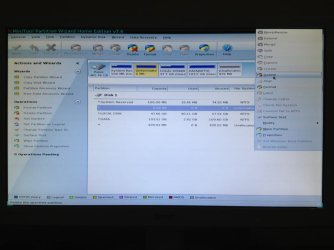
Ok, so this is the partition wizard (RAW partition selected) and should I select the delete option.
 

Attachments

  • ImageUploadedBySeven Forums1357136439.400036.jpg
    ImageUploadedBySeven Forums1357136439.400036.jpg
    57.1 KB · Views: 22

My Computer

Computer Manufacturer/Model Number
custom built
OS
Windows 7 Ultimate x64 SP1
CPU
Intel core i5 3470 @3.2 GHz
Motherboard
ECS H77-M3
Memory
V-Gen 4GB DDR3
Graphics Card(s)
PowerColor HD7750
Monitor(s) Displays
BenQ RL 2240h
Screen Resolution
1920*1080
Hard Drives
Seagate Barracuda 7200rpm 1TB
PSU
Enlight Blacksilver 550W
Case
NZXT Phantom 410
Keyboard
Logitech G100
Mouse
Logitech G100
Internet Speed
Very SLOW (512Kbps)
Just to be clear, if i delete the raw partition, i could still recover the data in it?
you had C,E,F on harddrive (D was dvd drive). Now you have RAW, C, D

They are just drive letters.... can be different in each windows instance. In this conversation and follow ups we're talking about RAW (old name C), C (old name E), D (old name F)

boot from partition wizard CD. Doubleclick on what's now called C and D. Do you see files? Both C and D are NTFS?

What is the status of the partition that you call RAW? Is it primary, is it ACTIVE?
 

My Computer

Computer type
Laptop
Computer Manufacturer/Model Number
ACER ASPIRE 5742G
OS
Microsoft Windows 7 Home Premium 64-bits 7601 Multiprocessor Free Service Pack 1
CPU
Intel(R) Core(TM) i3 CPU M 370 @ 2.40GHz
Motherboard
Acer Aspire 5742G
Memory
4,00 GB
Graphics Card(s)
ATI Mobility Radeon HD 5400 Series
Sound Card
(1) AMD High Definition Audio Device (2) Realtek High Defi
Screen Resolution
1366 x 768 x 32 bits (4294967296 colors) @ 60 Hz
Hard Drives
WDC WD5000BEVT-22ZAT0
I'm doing a quick scan now.
 

My Computer

Computer Manufacturer/Model Number
custom built
OS
Windows 7 Ultimate x64 SP1
CPU
Intel core i5 3470 @3.2 GHz
Motherboard
ECS H77-M3
Memory
V-Gen 4GB DDR3
Graphics Card(s)
PowerColor HD7750
Monitor(s) Displays
BenQ RL 2240h
Screen Resolution
1920*1080
Hard Drives
Seagate Barracuda 7200rpm 1TB
PSU
Enlight Blacksilver 550W
Case
NZXT Phantom 410
Keyboard
Logitech G100
Mouse
Logitech G100
Internet Speed
Very SLOW (512Kbps)
The RAW (unformatted) partition is 0MB in size!
right click on system reserved->properties.->tab "partition info". What is the first and last physical sector?
right click on LOCAL DISK->properties.->tab "partition info". What is the first and last physical sector?
 

My Computer

Computer type
Laptop
Computer Manufacturer/Model Number
ACER ASPIRE 5742G
OS
Microsoft Windows 7 Home Premium 64-bits 7601 Multiprocessor Free Service Pack 1
CPU
Intel(R) Core(TM) i3 CPU M 370 @ 2.40GHz
Motherboard
Acer Aspire 5742G
Memory
4,00 GB
Graphics Card(s)
ATI Mobility Radeon HD 5400 Series
Sound Card
(1) AMD High Definition Audio Device (2) Realtek High Defi
Screen Resolution
1366 x 768 x 32 bits (4294967296 colors) @ 60 Hz
Hard Drives
WDC WD5000BEVT-22ZAT0
You have "system reserved", "local disk" and "DATA". "Local Disk" is most likely what is called C in WIN7. What was DATA called (E or F?)
"system reserved" normally doesn't have a drive letter in normal win7. Did it have a drive letter when win7 was booting normal? If so, what drive letter?

So.... what was C,D,E,F?
 

My Computer

Computer type
Laptop
Computer Manufacturer/Model Number
ACER ASPIRE 5742G
OS
Microsoft Windows 7 Home Premium 64-bits 7601 Multiprocessor Free Service Pack 1
CPU
Intel(R) Core(TM) i3 CPU M 370 @ 2.40GHz
Motherboard
Acer Aspire 5742G
Memory
4,00 GB
Graphics Card(s)
ATI Mobility Radeon HD 5400 Series
Sound Card
(1) AMD High Definition Audio Device (2) Realtek High Defi
Screen Resolution
1366 x 768 x 32 bits (4294967296 colors) @ 60 Hz
Hard Drives
WDC WD5000BEVT-22ZAT0
Ok, wait a minute
 

My Computer

Computer Manufacturer/Model Number
custom built
OS
Windows 7 Ultimate x64 SP1
CPU
Intel core i5 3470 @3.2 GHz
Motherboard
ECS H77-M3
Memory
V-Gen 4GB DDR3
Graphics Card(s)
PowerColor HD7750
Monitor(s) Displays
BenQ RL 2240h
Screen Resolution
1920*1080
Hard Drives
Seagate Barracuda 7200rpm 1TB
PSU
Enlight Blacksilver 550W
Case
NZXT Phantom 410
Keyboard
Logitech G100
Mouse
Logitech G100
Internet Speed
Very SLOW (512Kbps)
What if the RAW partition is active
 

My Computer

Computer Manufacturer/Model Number
custom built
OS
Windows 7 Ultimate x64 SP1
CPU
Intel core i5 3470 @3.2 GHz
Motherboard
ECS H77-M3
Memory
V-Gen 4GB DDR3
Graphics Card(s)
PowerColor HD7750
Monitor(s) Displays
BenQ RL 2240h
Screen Resolution
1920*1080
Hard Drives
Seagate Barracuda 7200rpm 1TB
PSU
Enlight Blacksilver 550W
Case
NZXT Phantom 410
Keyboard
Logitech G100
Mouse
Logitech G100
Internet Speed
Very SLOW (512Kbps)
System reserved: first: 2048, last: 206847

DATA: first: 757966848, last: 975054847
 

My Computer

Computer Manufacturer/Model Number
custom built
OS
Windows 7 Ultimate x64 SP1
CPU
Intel core i5 3470 @3.2 GHz
Motherboard
ECS H77-M3
Memory
V-Gen 4GB DDR3
Graphics Card(s)
PowerColor HD7750
Monitor(s) Displays
BenQ RL 2240h
Screen Resolution
1920*1080
Hard Drives
Seagate Barracuda 7200rpm 1TB
PSU
Enlight Blacksilver 550W
Case
NZXT Phantom 410
Keyboard
Logitech G100
Mouse
Logitech G100
Internet Speed
Very SLOW (512Kbps)
Ok, so this is the partition wizard (RAW partition selected) and should I select the delete option.
You have 1 very small partition "system reserved" 100MB. And unallocated space at the end of disk, also very small. 2 partitions are still there 103GB and 97GB. Because drive is 465GB in total.... 265GB is lost.
The RAW partition is actually C about 265GB. Now I understand what you mean.

Simply delete RAW and do a partition recovery (unallocated space, quick scan). Does is find anything (ignore fake partitions size 3MB or so).

You can safely delete the RAW partition.... it's fake/corrupt anyway. Delete a partition only means delete the pointer in partition table

If it can recover it, make it primary. "system reserved" is active I assume? Leave that active
 
Last edited:

My Computer

Computer type
Laptop
Computer Manufacturer/Model Number
ACER ASPIRE 5742G
OS
Microsoft Windows 7 Home Premium 64-bits 7601 Multiprocessor Free Service Pack 1
CPU
Intel(R) Core(TM) i3 CPU M 370 @ 2.40GHz
Motherboard
Acer Aspire 5742G
Memory
4,00 GB
Graphics Card(s)
ATI Mobility Radeon HD 5400 Series
Sound Card
(1) AMD High Definition Audio Device (2) Realtek High Defi
Screen Resolution
1366 x 768 x 32 bits (4294967296 colors) @ 60 Hz
Hard Drives
WDC WD5000BEVT-22ZAT0
What does the status mean?
 

My Computer

Computer Manufacturer/Model Number
custom built
OS
Windows 7 Ultimate x64 SP1
CPU
Intel core i5 3470 @3.2 GHz
Motherboard
ECS H77-M3
Memory
V-Gen 4GB DDR3
Graphics Card(s)
PowerColor HD7750
Monitor(s) Displays
BenQ RL 2240h
Screen Resolution
1920*1080
Hard Drives
Seagate Barracuda 7200rpm 1TB
PSU
Enlight Blacksilver 550W
Case
NZXT Phantom 410
Keyboard
Logitech G100
Mouse
Logitech G100
Internet Speed
Very SLOW (512Kbps)
Ignore my previous post, now I am waiting for the scan
 

My Computer

Computer Manufacturer/Model Number
custom built
OS
Windows 7 Ultimate x64 SP1
CPU
Intel core i5 3470 @3.2 GHz
Motherboard
ECS H77-M3
Memory
V-Gen 4GB DDR3
Graphics Card(s)
PowerColor HD7750
Monitor(s) Displays
BenQ RL 2240h
Screen Resolution
1920*1080
Hard Drives
Seagate Barracuda 7200rpm 1TB
PSU
Enlight Blacksilver 550W
Case
NZXT Phantom 410
Keyboard
Logitech G100
Mouse
Logitech G100
Internet Speed
Very SLOW (512Kbps)
Scanning it is taking forever, so I'll show you the result tomorrow cos it's 10 pm now and I really need sleep.
 

My Computer

Computer Manufacturer/Model Number
custom built
OS
Windows 7 Ultimate x64 SP1
CPU
Intel core i5 3470 @3.2 GHz
Motherboard
ECS H77-M3
Memory
V-Gen 4GB DDR3
Graphics Card(s)
PowerColor HD7750
Monitor(s) Displays
BenQ RL 2240h
Screen Resolution
1920*1080
Hard Drives
Seagate Barracuda 7200rpm 1TB
PSU
Enlight Blacksilver 550W
Case
NZXT Phantom 410
Keyboard
Logitech G100
Mouse
Logitech G100
Internet Speed
Very SLOW (512Kbps)
Back
Top