Solved error mft corrupt

prateek133

New member
Local time
9:05 PM
Messages
46
Location
India
when creating image of c drive through macrium, i got an error msg showing that MFT corrupt, please run chkdsk c:/f, what is this error type, and why it is occured????
screen shots showing the error below, and after running chkdsk C: /f , a black screen blinks and then nothing happens..:hot:
 

Attachments

  • mft.JPG
    mft.JPG
    131.8 KB · Views: 256

My Computer

Computer Manufacturer/Model Number
HP Pavilion g7-1219wm
OS
Windows 7 Home Premium (x64) Service Pack 1 (build 7601)
CPU
1.65 gigahertz AMD E-450 APU with Radeon HD Graphics
Motherboard
Hewlett-Packard 3562 07.27
Memory
4 GB DDR3 RAM
Graphics Card(s)
AMD Radeon HD 6320 Graphics
Sound Card
AMD High Definition Audio Device & IDT HD
Monitor(s) Displays
Generic PnP Monitor (17.1"vis)
Hard Drives
Hitachi HTS547550A9E384 [Hard drive] (500.11 GB) -- drive 0
Hello prateek,
I hope you are in the habit of tacking regular backups of your system, seeing that you are familiar with Mac-Ref. If you have a previous Backup&Restore DVD somewhere around, you can recover from the corrupted Master File system Table.

As for what is MFT and why it can get corrupted, view this article:

Resolving Mft Is Corrupt And Unreadable Error Message

best wishes,
sreedhav
 

My Computer

Computer Manufacturer/Model Number
Sony Vaio C series VPCCB35FN laptop
OS
MS Windows 7 Home Premium 64-bit SP1
CPU
IntelCore [email protected]; Sandy Bridge 32nm Tech.
Motherboard
Sony Vaio Version:C609NJYJ
Memory
4096Mb RAM; Single ChannelDDR3@665MHz; DRAM Freq:662MHz
Graphics Card(s)
AMD Radeon HD 6630M; GPU:Whistler;BIOS Core&mem Clock:123.36
Sound Card
REALTEK High Definition Audio Device; INTEL Display Card
Monitor(s) Displays
Generic PnP Intel HD;Resolution:1920*1040 Pixels; BPP:32bits
Screen Resolution
Current Resolution:1920*1080 Pixels; Monitor Frequency:60Hz
Hard Drives
Internal HD:TOSHIBA MK5061GSY; Real Size:488 GB;NTFS; 3 Partitions; SATA; HEADS:16

External HDD: WD Elements 1023 PORTABLE; Estimated Size: 1TB; NTFS; 3 Partitions
Cooling
Lateral Exhaust with a Cooling Pad Placed Beneath.
Keyboard
Logitech Bluetooth+ Generic Integrated K-B
Mouse
Logitech Bluetooth
Internet Speed
2MBPS
Other Info
1)Trend Micro Titanium Maximum Security Suite Version:3
2)SAS-PRO

3)MBAM--PRO


4)WATERFOX+IE9 +WOT+LINKEXTEND+ DRWEBCUREIT LINK CHECKER

5)SPYWAREBLASTER

6) WINPATROL PLUS

7) SANDBOXIE and
8) A BIT OF COMMON SENSE.

My Computer

Computer Manufacturer/Model Number
Sony Vaio C series VPCCB35FN laptop
OS
MS Windows 7 Home Premium 64-bit SP1
CPU
IntelCore [email protected]; Sandy Bridge 32nm Tech.
Motherboard
Sony Vaio Version:C609NJYJ
Memory
4096Mb RAM; Single ChannelDDR3@665MHz; DRAM Freq:662MHz
Graphics Card(s)
AMD Radeon HD 6630M; GPU:Whistler;BIOS Core&mem Clock:123.36
Sound Card
REALTEK High Definition Audio Device; INTEL Display Card
Monitor(s) Displays
Generic PnP Intel HD;Resolution:1920*1040 Pixels; BPP:32bits
Screen Resolution
Current Resolution:1920*1080 Pixels; Monitor Frequency:60Hz
Hard Drives
Internal HD:TOSHIBA MK5061GSY; Real Size:488 GB;NTFS; 3 Partitions; SATA; HEADS:16

External HDD: WD Elements 1023 PORTABLE; Estimated Size: 1TB; NTFS; 3 Partitions
Cooling
Lateral Exhaust with a Cooling Pad Placed Beneath.
Keyboard
Logitech Bluetooth+ Generic Integrated K-B
Mouse
Logitech Bluetooth
Internet Speed
2MBPS
Other Info
1)Trend Micro Titanium Maximum Security Suite Version:3
2)SAS-PRO

3)MBAM--PRO


4)WATERFOX+IE9 +WOT+LINKEXTEND+ DRWEBCUREIT LINK CHECKER

5)SPYWAREBLASTER

6) WINPATROL PLUS

7) SANDBOXIE and
8) A BIT OF COMMON SENSE.
Hi,

Are you running from chkdsk /f from an elavated command prompt? If unsure, follow these steps:

1. Click :orb:
2. In the search box, type cmd
3. Right-click on cmd.exe in the list, and choose 'Run as administrator'
4. In the cmd windows, type chkdsk /f and hit enter.

Please post back any messages that are displayed.

Regards,
Golden
 

My Computer

Computer type
PC/Desktop
Computer Manufacturer/Model Number
Golden Mk. I.4
OS
Windows 10 Pro x64 ; Xubuntu x64
CPU
Intel i7 860 @ 2.80 GHz O/C'ed to 4.0GHz
Motherboard
Gigabyte P55A-UD3R Rev.1. Award BIOS F13
Memory
16GB Corsair Vengance DDR3 @ 661 MHz Dual Channel (9-9-9-24)
Graphics Card(s)
EVGA NVidia GTX 560 1024MB
Sound Card
Realtek Integrated
Monitor(s) Displays
Dual Samsung SyncMaster 2494HS
Screen Resolution
1920*1080 and 1920*1080
Hard Drives
1*Samsung 840 EVO 120GB SSD;
1*OCZ Vertex 2 60GB SSD;
2*Samsung F3 SpinPoint 1TB in RAID0;
1*Samsung F1 SpinPoint 1TB;
2*Western Digital 1TB External USB 3.0
1*Western Digital 500GB External USB 3.0
1*Seagate 500GB External USB 2.0
PSU
Thermaltake ToughPower QFan 750W
Case
Thermaltake Element S VK60001W2Z
Cooling
Corsair H60 Water Cooling, 2*230mm and 2*80mm case fans
Keyboard
Logitech G110
Mouse
Logitech MX518
Hello prateek,
I hope you are in the habit of tacking regular backups of your system, seeing that you are familiar with Mac-Ref. If you have a previous Backup&Restore DVD somewhere around, you can recover from the corrupted Master File system Table.

As for what is MFT and why it can get corrupted, view this article:

Resolving Mft Is Corrupt And Unreadable Error Message

best wishes,
sreedhav
THANK U SIR :), but before ur reply i defragmented the c drive, and i think it is fixed.. no such type of error is coming.. what do u think is defragmentation fixed it or not????
yes no doubt if everything fails i will try to recover my system image
..
 

My Computer

Computer Manufacturer/Model Number
HP Pavilion g7-1219wm
OS
Windows 7 Home Premium (x64) Service Pack 1 (build 7601)
CPU
1.65 gigahertz AMD E-450 APU with Radeon HD Graphics
Motherboard
Hewlett-Packard 3562 07.27
Memory
4 GB DDR3 RAM
Graphics Card(s)
AMD Radeon HD 6320 Graphics
Sound Card
AMD High Definition Audio Device & IDT HD
Monitor(s) Displays
Generic PnP Monitor (17.1"vis)
Hard Drives
Hitachi HTS547550A9E384 [Hard drive] (500.11 GB) -- drive 0
I would suspect a malware attack to have corrupted the MFT. Kindly download,SuperAntiSpyware Portable Edition onto a USB stick and just run. Site:SUPERAntiSpyware.com - SUPERAntiSpyware Portable Scanner

Also run an on-line virus scanner-HOUSECALL from here: HouseCall - Free Online Virus Scan - Trend Micro USA
Please get back and tell us how things sorted out!
regards,
sreedhav
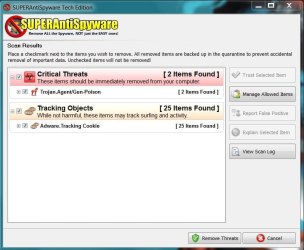
i used microsoft security essential(up to date)but it not detected anything..
and then i used Superanti spyware suggested by you, it detects much, given below in the screen shots:
now i m confused and having doubt over microsoft security essential, which one is better??
 

Attachments

  • antispyware.JPG
    antispyware.JPG
    71.3 KB · Views: 52

My Computer

Computer Manufacturer/Model Number
HP Pavilion g7-1219wm
OS
Windows 7 Home Premium (x64) Service Pack 1 (build 7601)
CPU
1.65 gigahertz AMD E-450 APU with Radeon HD Graphics
Motherboard
Hewlett-Packard 3562 07.27
Memory
4 GB DDR3 RAM
Graphics Card(s)
AMD Radeon HD 6320 Graphics
Sound Card
AMD High Definition Audio Device & IDT HD
Monitor(s) Displays
Generic PnP Monitor (17.1"vis)
Hard Drives
Hitachi HTS547550A9E384 [Hard drive] (500.11 GB) -- drive 0
Hi,

Are you running from chkdsk /f from an elavated command prompt? If unsure, follow these steps:

1. Click :orb:
2. In the search box, type cmd
3. Right-click on cmd.exe in the list, and choose 'Run as administrator'
4. In the cmd windows, type chkdsk /f and hit enter.

Please post back any messages that are displayed.

Regards,
Golden

thank u sir,,
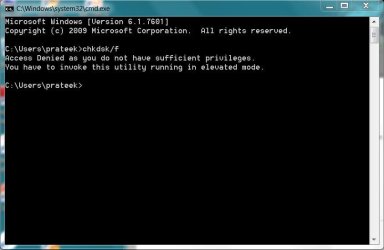
it gives an error,(in the screenshot below):
 

Attachments

  • cmdchkdsk.JPG
    cmdchkdsk.JPG
    37.9 KB · Views: 187

My Computer

Computer Manufacturer/Model Number
HP Pavilion g7-1219wm
OS
Windows 7 Home Premium (x64) Service Pack 1 (build 7601)
CPU
1.65 gigahertz AMD E-450 APU with Radeon HD Graphics
Motherboard
Hewlett-Packard 3562 07.27
Memory
4 GB DDR3 RAM
Graphics Card(s)
AMD Radeon HD 6320 Graphics
Sound Card
AMD High Definition Audio Device & IDT HD
Monitor(s) Displays
Generic PnP Monitor (17.1"vis)
Hard Drives
Hitachi HTS547550A9E384 [Hard drive] (500.11 GB) -- drive 0
Hi,

Thats because you aren't running chkdsk in an elevated command prompt - please follow the steps in my previous post.

Regards,
golden
 

My Computer

Computer type
PC/Desktop
Computer Manufacturer/Model Number
Golden Mk. I.4
OS
Windows 10 Pro x64 ; Xubuntu x64
CPU
Intel i7 860 @ 2.80 GHz O/C'ed to 4.0GHz
Motherboard
Gigabyte P55A-UD3R Rev.1. Award BIOS F13
Memory
16GB Corsair Vengance DDR3 @ 661 MHz Dual Channel (9-9-9-24)
Graphics Card(s)
EVGA NVidia GTX 560 1024MB
Sound Card
Realtek Integrated
Monitor(s) Displays
Dual Samsung SyncMaster 2494HS
Screen Resolution
1920*1080 and 1920*1080
Hard Drives
1*Samsung 840 EVO 120GB SSD;
1*OCZ Vertex 2 60GB SSD;
2*Samsung F3 SpinPoint 1TB in RAID0;
1*Samsung F1 SpinPoint 1TB;
2*Western Digital 1TB External USB 3.0
1*Western Digital 500GB External USB 3.0
1*Seagate 500GB External USB 2.0
PSU
Thermaltake ToughPower QFan 750W
Case
Thermaltake Element S VK60001W2Z
Cooling
Corsair H60 Water Cooling, 2*230mm and 2*80mm case fans
Keyboard
Logitech G110
Mouse
Logitech MX518
I would suspect a malware attack to have corrupted the MFT. Kindly download,SuperAntiSpyware Portable Edition onto a USB stick and just run. Site:SUPERAntiSpyware.com - SUPERAntiSpyware Portable Scanner

Also run an on-line virus scanner-HOUSECALL from here: HouseCall - Free Online Virus Scan - Trend Micro USA
Please get back and tell us how things sorted out!
regards,
sreedhav
i used microsoft security essential(up to date)but it not detected anything..
and then i used Superanti spyware suggested by you, it detects much, given below in the screen shots:
now i m confused and having doubt over microsoft security essential, which one is better??

Dear prateek,
Thanks for the reply. SAS clearly indicates you have TROJANS in your system.Did you select"remove selected items" to get rid of them? Kindly run the scan with SAS again. Also download MBAM from here and update and run:Malwarebytes : Malwarebytes Anti-Malware PRO removes malware including viruses, spyware, worms and trojans, plus it protects your computer

Regarding your question as to "defragging" the HDD resolving the "symptom",i have to say "yes", but the "disease" remains! Got to treat and cure it!;)
Please get back and keep us posted!
best wishes,
sree (call me sree)
 

My Computer

Computer Manufacturer/Model Number
Sony Vaio C series VPCCB35FN laptop
OS
MS Windows 7 Home Premium 64-bit SP1
CPU
IntelCore [email protected]; Sandy Bridge 32nm Tech.
Motherboard
Sony Vaio Version:C609NJYJ
Memory
4096Mb RAM; Single ChannelDDR3@665MHz; DRAM Freq:662MHz
Graphics Card(s)
AMD Radeon HD 6630M; GPU:Whistler;BIOS Core&mem Clock:123.36
Sound Card
REALTEK High Definition Audio Device; INTEL Display Card
Monitor(s) Displays
Generic PnP Intel HD;Resolution:1920*1040 Pixels; BPP:32bits
Screen Resolution
Current Resolution:1920*1080 Pixels; Monitor Frequency:60Hz
Hard Drives
Internal HD:TOSHIBA MK5061GSY; Real Size:488 GB;NTFS; 3 Partitions; SATA; HEADS:16

External HDD: WD Elements 1023 PORTABLE; Estimated Size: 1TB; NTFS; 3 Partitions
Cooling
Lateral Exhaust with a Cooling Pad Placed Beneath.
Keyboard
Logitech Bluetooth+ Generic Integrated K-B
Mouse
Logitech Bluetooth
Internet Speed
2MBPS
Other Info
1)Trend Micro Titanium Maximum Security Suite Version:3
2)SAS-PRO

3)MBAM--PRO


4)WATERFOX+IE9 +WOT+LINKEXTEND+ DRWEBCUREIT LINK CHECKER

5)SPYWAREBLASTER

6) WINPATROL PLUS

7) SANDBOXIE and
8) A BIT OF COMMON SENSE.
I would suspect a malware attack to have corrupted the MFT. Kindly download,SuperAntiSpyware Portable Edition onto a USB stick and just run. Site:SUPERAntiSpyware.com - SUPERAntiSpyware Portable Scanner

Also run an on-line virus scanner-HOUSECALL from here: HouseCall - Free Online Virus Scan - Trend Micro USA
Please get back and tell us how things sorted out!
regards,
sreedhav
i used microsoft security essential(up to date)but it not detected anything..
and then i used Superanti spyware suggested by you, it detects much, given below in the screen shots:
now i m confused and having doubt over microsoft security essential, which one is better??
Only the 2 trojans SAS detected are critical. The tracking cookies (although a pain) are harmless.

If you are a heavy internet user, MSE is not good enough. You need a more muscular AV program. I tried MSE for a couple of weeks and also caught 2 viruses. I quickly went back to Norton where I never had any problems.

But I am not trying to sell you Norton. Eset Nod32, G-Data or BitDefender would be good choices too.
 

My Computer

Computer Manufacturer/Model Number
HP, Dell, Gateway, Toshiba - 4 laptops and 2 desktops
OS
Vista, Windows7, Mint Mate, Zorin, Windows 8
CPU
from 1.6GHz Duo to i7
Monitor(s) Displays
2x HP w2207
Hard Drives
5x HDD, 7x SSD, 12x Externals
Keyboard
with trackball - no mices
Mouse
Trackball mice
Internet Speed
DSL 6000
Hi,

Thats because you aren't running chkdsk in an elevated command prompt - please follow the steps in my previous post.

Regards,
golden

i ran chkdsk it asked me that it cant do it know because c is in use, it can do checking after restarting again. so i have restarted, it started checking. checking was in three steps, in the third step after completion of 75% , a msg displayed below that it is processed .. after this it was hanged up.. and then i restarted again, windows could not able to start it was asking me for installation disc.. that i m not having. so booting with system repair disc, i have restored my computer to an earlier date.. but how can i find that problem exists till now.. during when windows running.. !!!
 

My Computer

Computer Manufacturer/Model Number
HP Pavilion g7-1219wm
OS
Windows 7 Home Premium (x64) Service Pack 1 (build 7601)
CPU
1.65 gigahertz AMD E-450 APU with Radeon HD Graphics
Motherboard
Hewlett-Packard 3562 07.27
Memory
4 GB DDR3 RAM
Graphics Card(s)
AMD Radeon HD 6320 Graphics
Sound Card
AMD High Definition Audio Device & IDT HD
Monitor(s) Displays
Generic PnP Monitor (17.1"vis)
Hard Drives
Hitachi HTS547550A9E384 [Hard drive] (500.11 GB) -- drive 0
I would suspect a malware attack to have corrupted the MFT. Kindly download,SuperAntiSpyware Portable Edition onto a USB stick and just run. Site:SUPERAntiSpyware.com - SUPERAntiSpyware Portable Scanner

Also run an on-line virus scanner-HOUSECALL from here: HouseCall - Free Online Virus Scan - Trend Micro USA
Please get back and tell us how things sorted out!
regards,
sreedhav
i used microsoft security essential(up to date)but it not detected anything..
and then i used Superanti spyware suggested by you, it detects much, given below in the screen shots:
now i m confused and having doubt over microsoft security essential, which one is better??

Dear prateek,
Thanks for the reply. SAS clearly indicates you have TROJANS in your system.Did you select"remove selected items" to get rid of them? Kindly run the scan with SAS again. Also download MBAM from here and update and run:Malwarebytes : Malwarebytes Anti-Malware PRO removes malware including viruses, spyware, worms and trojans, plus it protects your computer

Regarding your question as to "defragging" the HDD resolving the "symptom",i have to say "yes", but the "disease" remains! Got to treat and cure it!;)
Please get back and keep us posted!
best wishes,
sree (call me sree)

thanks,,
yes i have removed them, and also i have run sas again.. also checked with malwarebytes no objects detected as faulty.. is there any other way to repair mft other than restoring wid system image, because i dont know whether my system image consists of that corrupted mft or not.
 

My Computer

Computer Manufacturer/Model Number
HP Pavilion g7-1219wm
OS
Windows 7 Home Premium (x64) Service Pack 1 (build 7601)
CPU
1.65 gigahertz AMD E-450 APU with Radeon HD Graphics
Motherboard
Hewlett-Packard 3562 07.27
Memory
4 GB DDR3 RAM
Graphics Card(s)
AMD Radeon HD 6320 Graphics
Sound Card
AMD High Definition Audio Device & IDT HD
Monitor(s) Displays
Generic PnP Monitor (17.1"vis)
Hard Drives
Hitachi HTS547550A9E384 [Hard drive] (500.11 GB) -- drive 0
Dear prateek,
You have done a great job of cleaning the system of all malware! I am quite sure that the MFT has been cleaned and is no longer corrupted.

Now that you have installed MBAM, kindly update it daily, and run it as a precaution whenever you download a Game or a Movie via torrents;i mean immediately after the download. My sincere and strong advice is not to use torrents of any kind, some may be safe, but the majority carry malware into your system! The same goes for adult web sites! Don't be a naughty!Play safe.

best wishes,
sree(dhav):)
PS: Update your Anti-Virus and run a scan, scheduled or "as you please" at the least once in 15 days?
 

My Computer

Computer Manufacturer/Model Number
Sony Vaio C series VPCCB35FN laptop
OS
MS Windows 7 Home Premium 64-bit SP1
CPU
IntelCore [email protected]; Sandy Bridge 32nm Tech.
Motherboard
Sony Vaio Version:C609NJYJ
Memory
4096Mb RAM; Single ChannelDDR3@665MHz; DRAM Freq:662MHz
Graphics Card(s)
AMD Radeon HD 6630M; GPU:Whistler;BIOS Core&mem Clock:123.36
Sound Card
REALTEK High Definition Audio Device; INTEL Display Card
Monitor(s) Displays
Generic PnP Intel HD;Resolution:1920*1040 Pixels; BPP:32bits
Screen Resolution
Current Resolution:1920*1080 Pixels; Monitor Frequency:60Hz
Hard Drives
Internal HD:TOSHIBA MK5061GSY; Real Size:488 GB;NTFS; 3 Partitions; SATA; HEADS:16

External HDD: WD Elements 1023 PORTABLE; Estimated Size: 1TB; NTFS; 3 Partitions
Cooling
Lateral Exhaust with a Cooling Pad Placed Beneath.
Keyboard
Logitech Bluetooth+ Generic Integrated K-B
Mouse
Logitech Bluetooth
Internet Speed
2MBPS
Other Info
1)Trend Micro Titanium Maximum Security Suite Version:3
2)SAS-PRO

3)MBAM--PRO


4)WATERFOX+IE9 +WOT+LINKEXTEND+ DRWEBCUREIT LINK CHECKER

5)SPYWAREBLASTER

6) WINPATROL PLUS

7) SANDBOXIE and
8) A BIT OF COMMON SENSE.
Dear prateek,
You have done a great job of cleaning the system of all malware! I am quite sure that the MFT has been cleaned and is no longer corrupted.

Now that you have installed MBAM, kindly update it daily, and run it as a precaution whenever you download a Game or a Movie via torrents;i mean immediately after the download. My sincere and strong advice is not to use torrents of any kind, some may be safe, but the majority carry malware into your system! The same goes for adult web sites! Don't be a naughty!Play safe.

best wishes,
sree(dhav):)
PS: Update your Anti-Virus and run a scan, scheduled or "as you please" at the least once in 15 days?

thank u for ur help..i will update it regularly, but how can i know that my mft is no longer corrupted. also what about the command prompt checking and its problem, that i stated above... please check that out..
 

My Computer

Computer Manufacturer/Model Number
HP Pavilion g7-1219wm
OS
Windows 7 Home Premium (x64) Service Pack 1 (build 7601)
CPU
1.65 gigahertz AMD E-450 APU with Radeon HD Graphics
Motherboard
Hewlett-Packard 3562 07.27
Memory
4 GB DDR3 RAM
Graphics Card(s)
AMD Radeon HD 6320 Graphics
Sound Card
AMD High Definition Audio Device & IDT HD
Monitor(s) Displays
Generic PnP Monitor (17.1"vis)
Hard Drives
Hitachi HTS547550A9E384 [Hard drive] (500.11 GB) -- drive 0
prateek you have done good. Now run sfc /scannow run as admin. This is Windows 7 System File Checker. Run it 3 time booting after each one. It will repair System Files if it can.
 

My Computer

Computer type
PC/Desktop
Computer Manufacturer/Model Number
Home made Desktop
OS
Windows 10 Pro. 64/ version 1709 Windows 7 Pro/64
CPU
Intel i7-6800K @ 4.3
Motherboard
ASUS X-99 Deluxe II
Memory
Corsair Platinum 16 gig @2400
Graphics Card(s)
EVGA GTX 1070 OC
Monitor(s) Displays
Asus 27" LED LCD/VE278Q
Screen Resolution
1920-1080 or 1280-720 HDMI
Hard Drives
INTEL SSD 730-240 Gb Sata 3.0/
PSU
EVGA Platium 1200W
Case
Phanteks Luxe Tempered Glass 8 fans/ one radiator
Cooling
XSPC/ Water Cooled CPU
Keyboard
Das 4 Professional
Mouse
Logitech M705/MX Anywhere 2-S
Internet Speed
100 mbits
Antivirus
Microsoft Security Essentials/ Malwarebytes Premium 3.0/ SAS
Browser
I.E. 11 default/Firefox/ ISP Time Warner Cable/Spectrum
Other Info
LG BluRay Burner/
Sound system-KLipsch-THX/
Icy Dock ssd Hot Swap bays.
prateek you have done good. Now run sfc /scannow run as admin. This is Windows 7 System File Checker. Run it 3 time booting after each one. It will repair System Files if it can.

I have run it and no error is found,, thank u for ur help, everything is fine now..
:)
 

My Computer

Computer Manufacturer/Model Number
HP Pavilion g7-1219wm
OS
Windows 7 Home Premium (x64) Service Pack 1 (build 7601)
CPU
1.65 gigahertz AMD E-450 APU with Radeon HD Graphics
Motherboard
Hewlett-Packard 3562 07.27
Memory
4 GB DDR3 RAM
Graphics Card(s)
AMD Radeon HD 6320 Graphics
Sound Card
AMD High Definition Audio Device & IDT HD
Monitor(s) Displays
Generic PnP Monitor (17.1"vis)
Hard Drives
Hitachi HTS547550A9E384 [Hard drive] (500.11 GB) -- drive 0
I would suspect a malware attack to have corrupted the MFT. Kindly download,SuperAntiSpyware Portable Edition onto a USB stick and just run. Site:SUPERAntiSpyware.com - SUPERAntiSpyware Portable Scanner

Also run an on-line virus scanner-HOUSECALL from here: HouseCall - Free Online Virus Scan - Trend Micro USA
Please get back and tell us how things sorted out!
regards,
sreedhav
i used microsoft security essential(up to date)but it not detected anything..
and then i used Superanti spyware suggested by you, it detects much, given below in the screen shots:
now i m confused and having doubt over microsoft security essential, which one is better??
Only the 2 trojans SAS detected are critical. The tracking cookies (although a pain) are harmless.

If you are a heavy internet user, MSE is not good enough. You need a more muscular AV program. I tried MSE for a couple of weeks and also caught 2 viruses. I quickly went back to Norton where I never had any problems.

But I am not trying to sell you Norton. Eset Nod32, G-Data or BitDefender would be good choices too.
Thanks a lot, can u tell me, some good free anti-virus, which can detect such type of critical threats, Hoping to hear from u soon
 

My Computer

Computer Manufacturer/Model Number
HP Pavilion g7-1219wm
OS
Windows 7 Home Premium (x64) Service Pack 1 (build 7601)
CPU
1.65 gigahertz AMD E-450 APU with Radeon HD Graphics
Motherboard
Hewlett-Packard 3562 07.27
Memory
4 GB DDR3 RAM
Graphics Card(s)
AMD Radeon HD 6320 Graphics
Sound Card
AMD High Definition Audio Device & IDT HD
Monitor(s) Displays
Generic PnP Monitor (17.1"vis)
Hard Drives
Hitachi HTS547550A9E384 [Hard drive] (500.11 GB) -- drive 0
Hi,

Are you running from chkdsk /f from an elavated command prompt? If unsure, follow these steps:

1. Click :orb:
2. In the search box, type cmd
3. Right-click on cmd.exe in the list, and choose 'Run as administrator'
4. In the cmd windows, type chkdsk /f and hit enter.

Please post back any messages that are displayed.

Regards,
Golden
I have run it and no error found, everything is better now,, thank u for ur kind assistance:)
 

My Computer

Computer Manufacturer/Model Number
HP Pavilion g7-1219wm
OS
Windows 7 Home Premium (x64) Service Pack 1 (build 7601)
CPU
1.65 gigahertz AMD E-450 APU with Radeon HD Graphics
Motherboard
Hewlett-Packard 3562 07.27
Memory
4 GB DDR3 RAM
Graphics Card(s)
AMD Radeon HD 6320 Graphics
Sound Card
AMD High Definition Audio Device & IDT HD
Monitor(s) Displays
Generic PnP Monitor (17.1"vis)
Hard Drives
Hitachi HTS547550A9E384 [Hard drive] (500.11 GB) -- drive 0
Hi,

Thats OK. The StartUp Repair you performed would have fixed those chkdsk errors you were having.

Regards,
Golden
 

My Computer

Computer type
PC/Desktop
Computer Manufacturer/Model Number
Golden Mk. I.4
OS
Windows 10 Pro x64 ; Xubuntu x64
CPU
Intel i7 860 @ 2.80 GHz O/C'ed to 4.0GHz
Motherboard
Gigabyte P55A-UD3R Rev.1. Award BIOS F13
Memory
16GB Corsair Vengance DDR3 @ 661 MHz Dual Channel (9-9-9-24)
Graphics Card(s)
EVGA NVidia GTX 560 1024MB
Sound Card
Realtek Integrated
Monitor(s) Displays
Dual Samsung SyncMaster 2494HS
Screen Resolution
1920*1080 and 1920*1080
Hard Drives
1*Samsung 840 EVO 120GB SSD;
1*OCZ Vertex 2 60GB SSD;
2*Samsung F3 SpinPoint 1TB in RAID0;
1*Samsung F1 SpinPoint 1TB;
2*Western Digital 1TB External USB 3.0
1*Western Digital 500GB External USB 3.0
1*Seagate 500GB External USB 2.0
PSU
Thermaltake ToughPower QFan 750W
Case
Thermaltake Element S VK60001W2Z
Cooling
Corsair H60 Water Cooling, 2*230mm and 2*80mm case fans
Keyboard
Logitech G110
Mouse
Logitech MX518
Dear prateek,
Go for Avira Anti-Virus free and you won't go wrong. It is highly rated and it's detection powers are great! The one thing lacking in the free version is the "real-time monitoring". Site:Avira Free Antivirus - Download Best Antivirus Software

Best wishes,
sree
PS: Are you using any Anti-virus right now? It has to be "completely" uninstalled ,before you install the new one! Kindly get back and tell us!
 

My Computer

Computer Manufacturer/Model Number
Sony Vaio C series VPCCB35FN laptop
OS
MS Windows 7 Home Premium 64-bit SP1
CPU
IntelCore [email protected]; Sandy Bridge 32nm Tech.
Motherboard
Sony Vaio Version:C609NJYJ
Memory
4096Mb RAM; Single ChannelDDR3@665MHz; DRAM Freq:662MHz
Graphics Card(s)
AMD Radeon HD 6630M; GPU:Whistler;BIOS Core&mem Clock:123.36
Sound Card
REALTEK High Definition Audio Device; INTEL Display Card
Monitor(s) Displays
Generic PnP Intel HD;Resolution:1920*1040 Pixels; BPP:32bits
Screen Resolution
Current Resolution:1920*1080 Pixels; Monitor Frequency:60Hz
Hard Drives
Internal HD:TOSHIBA MK5061GSY; Real Size:488 GB;NTFS; 3 Partitions; SATA; HEADS:16

External HDD: WD Elements 1023 PORTABLE; Estimated Size: 1TB; NTFS; 3 Partitions
Cooling
Lateral Exhaust with a Cooling Pad Placed Beneath.
Keyboard
Logitech Bluetooth+ Generic Integrated K-B
Mouse
Logitech Bluetooth
Internet Speed
2MBPS
Other Info
1)Trend Micro Titanium Maximum Security Suite Version:3
2)SAS-PRO

3)MBAM--PRO


4)WATERFOX+IE9 +WOT+LINKEXTEND+ DRWEBCUREIT LINK CHECKER

5)SPYWAREBLASTER

6) WINPATROL PLUS

7) SANDBOXIE and
8) A BIT OF COMMON SENSE.
Back
Top