Solved Error when attempting to update windows

Hello everyone,

I've been having the same problems with Windows updates. No matter what I did it wouldn't update just seemed to checking for updates.

I've been trying to get this sorted for the last week.

Today I've spent all day on it and finally found a solution.

I installed an update from the Microsoft site and then restarted my laptop and now within 10 mins I've got all the updates coming through.

https://support.microsoft.com/en-us/kb/3102810

Please ensure you restart it after the update has completed and then check for updates again.

This is what I did and it seems to have worked.


Thanks

NWR

Installed it, restarted it, still doesn't work.
 

My Computer

OS
Windows 7 Home Premium
Hi Raith,
can you do the following,
Turn OFF windows updates

Update your gtx950 graphics driver directly from NVidia.
turn off driver updates in windowsUpdate, its failing here.
I strongly suspect that when you updated to W10 it screwed them up, as you have allready updated once the free option is still available, go via the clean install route
http://www.sevenforums.com/tutorials/1649-clean-install-windows-7-a.html?ltr=C

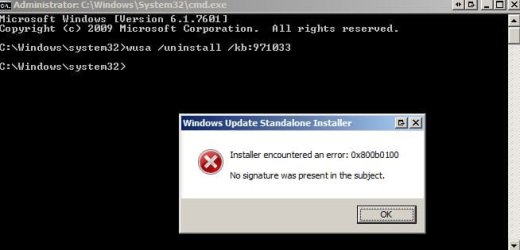
uninstall kb971033, from an elevated command mode, copy/paste the following

wusa /uninstall /kb:971033

REBOOT

Re-install kb971033 from my previous link

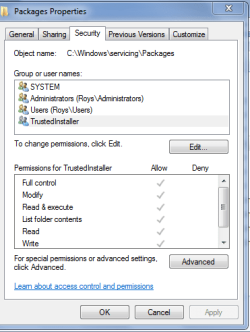
can you also check the permissions for
C:\windows\servicing\packages
it should be identical to those in the screenshot

try updating.

Roy
 

Attachments

  • packsec.PNG
    packsec.PNG
    14.2 KB · Views: 14

My Computer

Computer type
PC/Desktop
Computer Manufacturer/Model Number
medionl/Aspire 6930G/acer x55a
OS
W7 home premium 32bit/W7HP 64bit/w10 tp insider ring
CPU
E5300 dual core
Motherboard
medion MS7366
Memory
3gb
Graphics Card(s)
Nvidia Geforce 7100 Nforce 630i
Monitor(s) Displays
avixc
Internet Speed
n (isp resticted to 72)
Antivirus
mse/pands
Browser
palemoon
Other Info
Belkin Fd7050 n USB using Railink RT2870 drivers, more upto date
Hi Roy, thanks for the info, would clean install basically wipe the OS essentially? I'd lose my data (unless I back it up)?
 

My Computer

OS
Windows 7 Home Premium
Hi Raith,
Yes all data would be wiped, so do back it up.
FWIW most of the more experienced users create system images on a REGULAR basis, macrium/aomie.

Roy
 

My Computer

Computer type
PC/Desktop
Computer Manufacturer/Model Number
medionl/Aspire 6930G/acer x55a
OS
W7 home premium 32bit/W7HP 64bit/w10 tp insider ring
CPU
E5300 dual core
Motherboard
medion MS7366
Memory
3gb
Graphics Card(s)
Nvidia Geforce 7100 Nforce 630i
Monitor(s) Displays
avixc
Internet Speed
n (isp resticted to 72)
Antivirus
mse/pands
Browser
palemoon
Other Info
Belkin Fd7050 n USB using Railink RT2870 drivers, more upto date
Hi Raith,
Yes all data would be wiped, so do back it up.
FWIW most of the more experienced users create system images on a REGULAR basis, macrium/aomie.

Roy
Doesn't the system images hold the same drivers, etc then? Also I tried to remove the kb: wusa /uninstall /kb:971033 but it errors, I suppose I do need a clean reinstall. ;/
 

Attachments

  • Administrator CWindowsSystem32cmd.jpg
    Administrator CWindowsSystem32cmd.jpg
    19.4 KB · Views: 6

My Computer

OS
Windows 7 Home Premium
Hi Raith,
Thats a bummer,
Did your permissions show the same as mine, if so then it looks like a clean install.
if there different we can reset them.
The purpose of regular imaging is that you can "roll back" to a clean state, quick and easy.

Roy
 

My Computer

Computer type
PC/Desktop
Computer Manufacturer/Model Number
medionl/Aspire 6930G/acer x55a
OS
W7 home premium 32bit/W7HP 64bit/w10 tp insider ring
CPU
E5300 dual core
Motherboard
medion MS7366
Memory
3gb
Graphics Card(s)
Nvidia Geforce 7100 Nforce 630i
Monitor(s) Displays
avixc
Internet Speed
n (isp resticted to 72)
Antivirus
mse/pands
Browser
palemoon
Other Info
Belkin Fd7050 n USB using Railink RT2870 drivers, more upto date
The permissions are the same as yours, everything is correct and intact. I just purchased an external harddrive, I will perform a clean wipe. I have the OEM product key, so hopefully this is sufficient. Thanks for the help. I will mark this as solved since I have no other alternatives.
 

My Computer

OS
Windows 7 Home Premium
Back
Top