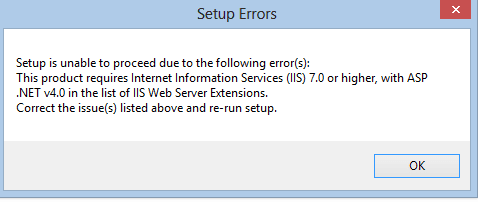
This is the error I am getting when trying to install ofice 13
I had it on there before, then "refreshed" my pc, which actually uninstalled ALLL of my software when it says it wouldn't. Now I have to reinstall this, and I am getting this error.
Please provide us with more info about your OS and you version of Office 2013.
Is your OS x64? Office? What type of installation are you using? Where did you get this version of Office 2013. Give as many details as possible, and steps that you took.
My Computer
At a glance
Windows 8.1 ; Windows 7 x86 (Dec2008-Jan2013)
Computer type
PC/Desktop
OS
Windows 8.1 ; Windows 7 x86 (Dec2008-Jan2013)
Other Info
"The scale icon at the top right of a post or tutorial is how you can give rep to the member."
Please provide us with more info about your OS and you version of Office 2013.
Is your OS x64? Office? What type of installation are you using? Where did you get this version of Office 2013. Give as many details as possible, and steps that you took.
I have an HP elite x64 windows 8 pro. I believe the office is 32 bit which I have on another laptop that is 64 bit and works amazing. I got it legally from work throught the MVLC