Solved Error while installing Win7 64bit; 'Unexpected error'

Running memtest now, hopefully everything turns out alright.
 

My Computer

OS
Windows 7 Ultimate x64 SP1
CPU
Intel Core 2 Quad Q9400 @ 2.66GHz Yorkfield 45nm Technology
Motherboard
Gigabyte Technology Co., Ltd. EP45-UD3L (Socket 775)
Memory
4.00 GB Dual-Channel DDR2 @ 399MHz (5-5-5-18)
Graphics Card(s)
ATI Radeon HD 5450 (Gigabyte)
Screen Resolution
1280x1024
Hard Drives
932GB Western Digital WDC WD1001FALS-00J7B0 ATA Device (SATA)
Updating for the sake of updating:
I have one stick of RAM that I believe to be 100% okay.

I also have one mobo slot that could very possibly be entirely broken.
Memtest takes forever to run. :/
 

My Computer

OS
Windows 7 Ultimate x64 SP1
CPU
Intel Core 2 Quad Q9400 @ 2.66GHz Yorkfield 45nm Technology
Motherboard
Gigabyte Technology Co., Ltd. EP45-UD3L (Socket 775)
Memory
4.00 GB Dual-Channel DDR2 @ 399MHz (5-5-5-18)
Graphics Card(s)
ATI Radeon HD 5450 (Gigabyte)
Screen Resolution
1280x1024
Hard Drives
932GB Western Digital WDC WD1001FALS-00J7B0 ATA Device (SATA)
As far as I can understand the instructions, yes.
So far:
Tested stick #1 in slots 1, 2, and 3; no errors except in slot 2, but slot 2 also fails when using sticks #2 and 3 as well.

Currently testing stick #1 in slot 4.

That said, I didn't have a stick of RAM in slot 2 to begin with, but my initial RAM test found errors, so I'm relatively certain that either stick #2 or 3 has errors as well.
 

My Computer

OS
Windows 7 Ultimate x64 SP1
CPU
Intel Core 2 Quad Q9400 @ 2.66GHz Yorkfield 45nm Technology
Motherboard
Gigabyte Technology Co., Ltd. EP45-UD3L (Socket 775)
Memory
4.00 GB Dual-Channel DDR2 @ 399MHz (5-5-5-18)
Graphics Card(s)
ATI Radeon HD 5450 (Gigabyte)
Screen Resolution
1280x1024
Hard Drives
932GB Western Digital WDC WD1001FALS-00J7B0 ATA Device (SATA)
Spec any new RAM closely using the computer or mobo maker's exact specs.
 
Last edited:
The good stick in the good slot?
As in, good stick in good slot + other sticks in the bad slot?
 

My Computer

OS
Windows 7 Ultimate x64 SP1
CPU
Intel Core 2 Quad Q9400 @ 2.66GHz Yorkfield 45nm Technology
Motherboard
Gigabyte Technology Co., Ltd. EP45-UD3L (Socket 775)
Memory
4.00 GB Dual-Channel DDR2 @ 399MHz (5-5-5-18)
Graphics Card(s)
ATI Radeon HD 5450 (Gigabyte)
Screen Resolution
1280x1024
Hard Drives
932GB Western Digital WDC WD1001FALS-00J7B0 ATA Device (SATA)
No, remove any confirmed bad sticks to RMA or replace.

Likewise avoid any bad slots. You'll need to confirm slot is bad then repair or avoid.
 
Ah. Lemme rephrase what I said earlier, then.

Tested: Slots 1-4
Failed: Slot #2, with all sticks of RAM
Passed: Stick #1, in slots 1 and 3, slot 4 currently pending.

As far as matching RAM to my mobo, it's sort of bothersome that none of my RAM is listed on http://download.gigabyte.us/FileList/Memory/motherboard_memory_ga-ep45-ud3p.pdf
I don't think it's really that big of a deal that I'm mixing 400/800 MHz RAM, though I realize the 800MHz is getting downgraded to 400MHz.

....Maybe I should also look into buying new RAM? Hm.
 

My Computer

OS
Windows 7 Ultimate x64 SP1
CPU
Intel Core 2 Quad Q9400 @ 2.66GHz Yorkfield 45nm Technology
Motherboard
Gigabyte Technology Co., Ltd. EP45-UD3L (Socket 775)
Memory
4.00 GB Dual-Channel DDR2 @ 399MHz (5-5-5-18)
Graphics Card(s)
ATI Radeon HD 5450 (Gigabyte)
Screen Resolution
1280x1024
Hard Drives
932GB Western Digital WDC WD1001FALS-00J7B0 ATA Device (SATA)
Run for awhile with the tested-good RAM to see if problems persist.

I'd use the exact specs given for RAM by your mobo maker.

I've asked for some RAM expertise here.
 
Mmm. So finish the memtest with all sticks of RAM, then run with the good RAM to see if things are still crashing?
 

My Computer

OS
Windows 7 Ultimate x64 SP1
CPU
Intel Core 2 Quad Q9400 @ 2.66GHz Yorkfield 45nm Technology
Motherboard
Gigabyte Technology Co., Ltd. EP45-UD3L (Socket 775)
Memory
4.00 GB Dual-Channel DDR2 @ 399MHz (5-5-5-18)
Graphics Card(s)
ATI Radeon HD 5450 (Gigabyte)
Screen Resolution
1280x1024
Hard Drives
932GB Western Digital WDC WD1001FALS-00J7B0 ATA Device (SATA)
Please fill in your system specs, in the drop box in the lower left corner of any of your posts.
Use Speccy to find your system specs.
Speccy Free System information Utility


Can you give as much info as possible (manufacturer, part number, size, minimum info) on all your RAM?

As Greg mentioned, don't use slot #2 or any RAM that failed in slots 1,3,4.

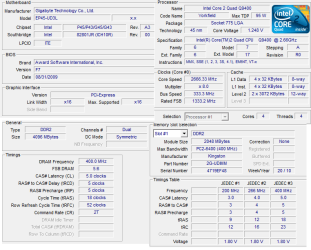
Can you download CPUZ and post a snip of the CPU, Mainboard, Memory, and SPD tabs.
For posting the information , enter 'Snipping tool' in the Start button > Search box, hit enter. Select the area you want to post and save to a convenient place.
How to Post a Screenshot in Seven Forums

Doesn't seem that your motherboard supports running RAM of different frequencies.
From you manual:
Read the following guidelines before you begin to install the memory:
• Make sure that the motherboard supports the memory. It is recommended that memory of
the same capacity, brand, speed, and chips be used.
...
2. When enabling Dual Channel mode with two or four memory modules, it is recommended that
memory of the same capacity, brand, speed, and chips be used and installed in the same
colored DDR2 sockets for optimum performance.

When memory modules of different capacity and chips are installed, a message which says
memory is operating in Flex Memory Mode will appear during the POST. Intel Flex Memory
Technology offers greater flexibility to upgrade by allowing different memory sizes to be
populated and remain in Dual Channel mode/performance.

There are no instructions for installing 3 RAM cards, different size - yes, different frequencies aren't mentioned.

I would wait on buying any RAM until you get the motherboard slot problem solved.
If you end up getting a new motherboard, you might as well get one that uses DDR3 RAM. DDR3 is normally cheaper than DDR2 due to demand.

If you keep your motherboard use only two RAM cards in slots #1 and #3.

All RAM cards failing in slot #2 and passing in the other slots indicates a bad motherboard slot and not a bad North Bridge.
This gives you the option of still using the motherboard, but not recommended as there is no guarantee that the NB has not been damaged.

Post some of the above information and what you want to do with the motherboard and I can suggest some RAM for you to consider.

 

My Computer

Computer type
PC/Desktop
Computer Manufacturer/Model Number
76~2.0
OS
Windows 7 Ult x64 - SP1/ Windows 8 Pro x64
CPU
Intel Core i5-3570K 4.6GHz
Motherboard
Gigabyte GA-Z77X UD3H, f18
Memory
8GB (2X4GB) DDR3 1600 Corsair Vengeance CL8 1.5v
Graphics Card(s)
Sapphire HD 7770 Vapor-X OC 1GB DDR5
Sound Card
Onboard VIA VT2021
Monitor(s) Displays
22" LCD Dell
Screen Resolution
1680x1050
Hard Drives
Samsung 840Pro 128GB SSD,
Seagate Barracuda 500GB SATA2 7200rpm 32MB cache, Seagate Barracuda 1TB SATA2 7200rpm 32MB cache,
PSU
Corsair HX650W
Case
Cooler Master Storm Scout
Cooling
Corsair H80 2x12cm Noctua NF P12 , 2x14cm case fans
Keyboard
Logitech Wave
Mouse
CM Sentinel
Internet Speed
Dismal
Antivirus
Avast
Browser
Opera Next
Other Info
Haswell laptop: HP Envy 17t-j, i7-4700MQ, GeForce 740M 2GB DDR3, 17.3" Full HD 1920x1080, 16GB RAM, Samsung 840 Pro 128GB, 1TB Hitachi 7200 HDD,
Desktop: eSATA ports,
External eSATA Seagate 500GB SATA2 7200rpm,
External WD USB 500GB
Heya, Dave!

I'll run Speccy/CPU-Z as soon as Memtest is done; I've got this slot to finish, and then one more after, if I want to finish the test entirely.
That said, I am reasonably sure I could quit the test now, because my 2x Kingston sticks passed slots 1,3,4 without any issues - and my initial Memtest did report that errors were present.

Would you advise running the test to completion, or cutting it now?

My two good (as far as I know) sticks of RAM are:
2gb Kingston "Hyper Blu", 400MHz, I believe.
KHX6400D2B1K2/4G

Don't put RAM in slots #2 and 4. Got it.

I'm reluctant to change mobos, mainly because I don't really have the time to go shop around for one / gut my rig and put everything back together. Though, at this point, I suppose I've spent so much time working on it already that if you'd advise getting a new mobo when this is all said and done, I'll consider it seriously.

I don't believe my CPU's been damaged, if that's what you mean by the NB - though my admittedly small amount of knowledge about hardware could be leading me astray here, too.

Thanks for continuing to help me out, guys!
 

My Computer

OS
Windows 7 Ultimate x64 SP1
CPU
Intel Core 2 Quad Q9400 @ 2.66GHz Yorkfield 45nm Technology
Motherboard
Gigabyte Technology Co., Ltd. EP45-UD3L (Socket 775)
Memory
4.00 GB Dual-Channel DDR2 @ 399MHz (5-5-5-18)
Graphics Card(s)
ATI Radeon HD 5450 (Gigabyte)
Screen Resolution
1280x1024
Hard Drives
932GB Western Digital WDC WD1001FALS-00J7B0 ATA Device (SATA)
Heya, Dave:
System specs are up, CPU-Z SS below.
 

Attachments

  • CPU-Z.png
    CPU-Z.png
    27.6 KB · Views: 4

My Computer

OS
Windows 7 Ultimate x64 SP1
CPU
Intel Core 2 Quad Q9400 @ 2.66GHz Yorkfield 45nm Technology
Motherboard
Gigabyte Technology Co., Ltd. EP45-UD3L (Socket 775)
Memory
4.00 GB Dual-Channel DDR2 @ 399MHz (5-5-5-18)
Graphics Card(s)
ATI Radeon HD 5450 (Gigabyte)
Screen Resolution
1280x1024
Hard Drives
932GB Western Digital WDC WD1001FALS-00J7B0 ATA Device (SATA)
If you are sure slot#2 is dead, and all the RAM passed in the other slots, no need to continue the testing.

Your RAM is 400MHz DDR2, if running in dual configuration it is actually running at 800MHz.

If you want to keep the motherboard just run the two RAM cards in slots #1&3, as mentioned.
You shouldn't have any further issues but, if you do then you know the motherboard is suspect.

NB is Northbridge, and is a seperate chip on your motherboard it among other things is your memory controller. This can be the cause of RAM issues.
See this link for information: Northbridge
Later CPUs have the memory controller integrated in the CPU, like the i-series CPUs.

CPUZ snips look good.

There is a BIOS update that states 'Enhanced memory compatibilities', version F9.
If you are having anymore RAM issues and you feel comfortable with upgrading the BIOS, this may help. If your system is running fine, then no need to do this.
GA-EP45-UD3L - Downloads - BIOS

Let us know if you have any more crashes or any questions.
 

My Computer

Computer type
PC/Desktop
Computer Manufacturer/Model Number
76~2.0
OS
Windows 7 Ult x64 - SP1/ Windows 8 Pro x64
CPU
Intel Core i5-3570K 4.6GHz
Motherboard
Gigabyte GA-Z77X UD3H, f18
Memory
8GB (2X4GB) DDR3 1600 Corsair Vengeance CL8 1.5v
Graphics Card(s)
Sapphire HD 7770 Vapor-X OC 1GB DDR5
Sound Card
Onboard VIA VT2021
Monitor(s) Displays
22" LCD Dell
Screen Resolution
1680x1050
Hard Drives
Samsung 840Pro 128GB SSD,
Seagate Barracuda 500GB SATA2 7200rpm 32MB cache, Seagate Barracuda 1TB SATA2 7200rpm 32MB cache,
PSU
Corsair HX650W
Case
Cooler Master Storm Scout
Cooling
Corsair H80 2x12cm Noctua NF P12 , 2x14cm case fans
Keyboard
Logitech Wave
Mouse
CM Sentinel
Internet Speed
Dismal
Antivirus
Avast
Browser
Opera Next
Other Info
Haswell laptop: HP Envy 17t-j, i7-4700MQ, GeForce 740M 2GB DDR3, 17.3" Full HD 1920x1080, 16GB RAM, Samsung 840 Pro 128GB, 1TB Hitachi 7200 HDD,
Desktop: eSATA ports,
External eSATA Seagate 500GB SATA2 7200rpm,
External WD USB 500GB
In regards to the BIOS upgrade, I feel like I should do it anyway, since it seems like it could only help, even if only by just a little. Good idea, bad idea, terrible mindset to have regarding software?

Ran a stess test last night:
Installed Chrome, no crashes. (So far.)
Installed League of Legends, no crashes - even played a game without crashes.

Still keeping my fingers crossed, just in case.

Would it be alright to hook up my two secondary HDDs again, or should I wait until we know for sure that the computer's stable? (And are there specific SATA_? ports that I'm supposed to use here, and ports I'm not supposed to use, like the RAM slots?)
 

My Computer

OS
Windows 7 Ultimate x64 SP1
CPU
Intel Core 2 Quad Q9400 @ 2.66GHz Yorkfield 45nm Technology
Motherboard
Gigabyte Technology Co., Ltd. EP45-UD3L (Socket 775)
Memory
4.00 GB Dual-Channel DDR2 @ 399MHz (5-5-5-18)
Graphics Card(s)
ATI Radeon HD 5450 (Gigabyte)
Screen Resolution
1280x1024
Hard Drives
932GB Western Digital WDC WD1001FALS-00J7B0 ATA Device (SATA)
Wait on the secondary HDDs, let's see how long it will remain stable.

If/when you connect the secondary HDDs do one at a time and check for stability.
Best to have your OS HDD on SATA0 and any other HDD on SATA1, SATA2, etc. with optical drive a couple ports after them.
 

My Computer

Computer type
PC/Desktop
Computer Manufacturer/Model Number
76~2.0
OS
Windows 7 Ult x64 - SP1/ Windows 8 Pro x64
CPU
Intel Core i5-3570K 4.6GHz
Motherboard
Gigabyte GA-Z77X UD3H, f18
Memory
8GB (2X4GB) DDR3 1600 Corsair Vengeance CL8 1.5v
Graphics Card(s)
Sapphire HD 7770 Vapor-X OC 1GB DDR5
Sound Card
Onboard VIA VT2021
Monitor(s) Displays
22" LCD Dell
Screen Resolution
1680x1050
Hard Drives
Samsung 840Pro 128GB SSD,
Seagate Barracuda 500GB SATA2 7200rpm 32MB cache, Seagate Barracuda 1TB SATA2 7200rpm 32MB cache,
PSU
Corsair HX650W
Case
Cooler Master Storm Scout
Cooling
Corsair H80 2x12cm Noctua NF P12 , 2x14cm case fans
Keyboard
Logitech Wave
Mouse
CM Sentinel
Internet Speed
Dismal
Antivirus
Avast
Browser
Opera Next
Other Info
Haswell laptop: HP Envy 17t-j, i7-4700MQ, GeForce 740M 2GB DDR3, 17.3" Full HD 1920x1080, 16GB RAM, Samsung 840 Pro 128GB, 1TB Hitachi 7200 HDD,
Desktop: eSATA ports,
External eSATA Seagate 500GB SATA2 7200rpm,
External WD USB 500GB
Found this solution that worked

1) On the same error screen press SHIFT+F10 and it will open up a black Window. (a command prompt window)
2) In the black windows type the word "regedit"(without the inverted commas and hit enter. That will open the registry editor.
In the Registry Editor..
Browse to....
HKLocal machine/SYSTEM/SETUP/STATUS/ChildCompletion, and after highliting childcompletion,on the right hand side check for setup.exe. if the value is 1 change it to 3.(by double clicking on setup.exe and changing the value shown in the box).
Then close the registry editor and then also close the black window.
Then click on OK for the error and the computer will restart and the installation may complete. just try it and let me know if it worked.
 

My Computer

Computer type
Laptop
Computer Manufacturer/Model Number
Sony Vaio
OS
Win 7 Ultimate 64bit
Back
Top