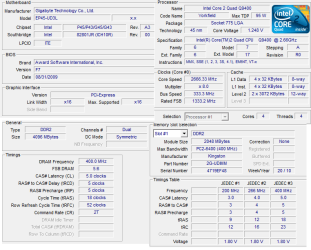
Please fill in your system specs, in the drop box in the lower left corner of any of your posts.
Use Speccy to find your system specs.
Speccy Free System information Utility
Can you give as much info as possible (manufacturer, part number, size, minimum info) on all your RAM?
As Greg mentioned, don't use slot #2 or any RAM that failed in slots 1,3,4.
Can you
download CPUZ and post a snip of the CPU, Mainboard, Memory, and SPD tabs.
For posting the information , enter 'Snipping tool' in the Start button > Search box, hit enter. Select the area you want to post and save to a convenient place.
How to Post a Screenshot in Seven Forums
Doesn't seem that your motherboard supports running RAM of different frequencies.
From you manual:
Read the following guidelines before you begin to install the memory:
• Make sure that the motherboard supports the memory. It is recommended that memory of
the same capacity, brand, speed, and chips be used.
...
2. When enabling Dual Channel mode with two or four memory modules, it is recommended that
memory of the same capacity, brand, speed, and chips be used and installed in the same
colored DDR2 sockets for optimum performance.
When memory modules of different capacity and chips are installed, a message which says
memory is operating in Flex Memory Mode will appear during the POST. Intel Flex Memory
Technology offers greater flexibility to upgrade by allowing different memory sizes to be
populated and remain in Dual Channel mode/performance.
There are no instructions for installing 3 RAM cards, different size - yes, different frequencies aren't mentioned.
I would wait on buying any RAM until you get the motherboard slot problem solved.
If you end up getting a new motherboard, you might as well get one that uses DDR3 RAM. DDR3 is normally cheaper than DDR2 due to demand.
If you keep your motherboard use only two RAM cards in slots #1 and #3.
All RAM cards failing in slot #2 and passing in the other slots indicates a bad motherboard slot and not a bad North Bridge.
This gives you the option of still using the motherboard, but not recommended as there is no guarantee that the NB has not been damaged.
Post some of the above information and what you want to do with the motherboard and I can suggest some RAM for you to consider.