Error while trying to install win "invalid partition table"

beganov1k

New member
Local time
1:33 PM
Messages
1
So my old HDD stoped working and I bought new one . I connected it and try to boot (install) system from USB ( i made USB bootable )(win 7 in this case i tried 8.1 too) and set 1st boot device to USB , it automaticly restarted and after i see logo of motherboard i get message "invalid partition table ".
I looked on forums but all of them have just fixes when there is a Operative System on HDD , in my case I don't have one .
Any sugestions

Have a nice day :D
 

My Computer

Computer type
PC/Desktop
OS
Windows 8.1 Ultimate x64
Welcome to the forum. Did you set usb as first boot drive the error means its booting from the hard drive how did you create the bootable usb?
 

My Computer

Computer type
PC/Desktop
OS
win 8 32 bit

My Computer

Computer type
PC/Desktop
Computer Manufacturer/Model Number
medionl/Aspire 6930G/acer x55a
OS
W7 home premium 32bit/W7HP 64bit/w10 tp insider ring
CPU
E5300 dual core
Motherboard
medion MS7366
Memory
3gb
Graphics Card(s)
Nvidia Geforce 7100 Nforce 630i
Monitor(s) Displays
avixc
Internet Speed
n (isp resticted to 72)
Antivirus
mse/pands
Browser
palemoon
Other Info
Belkin Fd7050 n USB using Railink RT2870 drivers, more upto date

My Computer

Computer type
PC/Desktop
Computer Manufacturer/Model Number
Custom assembled by me :}
OS
Win-7-Pro64bit 7-H-Prem-64bit
CPU
i7-5930K 2nd i9-9940x both water blocked VRM's too
Motherboard
ASUS SABERTOOTH X99 2nd ASUS x299 Apex
Memory
Trident-z 3200C14 2nd Trident-z 3600C16
Graphics Card(s)
EVGA 1080ti ftw3 2nd Titan Xp both water blocked
Sound Card
Built-in Realtek
Monitor(s) Displays
1-AOC G2460PG 24"G-Sync 144Hz/ 2nd 1-ASUS VG248QE 24" 144Hz
Screen Resolution
1920 x 1080 144Hz
Hard Drives
2-Samsung M.2 Evo & Evo Plus
2-Samsung 850 EVO 500GB SSD's/ 3-2.5 W.D. Black 1tb-&3-1tb/3-3.5 WD Black 1tb hdd's
PSU
EVGA SuperNOVA 1000-P2 2nd 1200-P2
Case
2-Corsair Obsidian Series 450D Black ATX Mid Tower
Cooling
Custom water loops
Keyboard
Logitech G710+/ 2nd Logitech G910
Mouse
2-RedDragon M901 Perdition 16400 dpi Gaming mouse = wired
Internet Speed
Comcast Ping 19ms 89.31mbps download speed 6.12mbps upload
Antivirus
Malwarebytes Pro/ Superantispyware Pro
Browser
FireFox & Pale moon
Other Info
2nd ASUS X299 Apex/Intel i9-9940x with Custom water loop/7H-Prem-x64/Corsair 450D case/Ram Trident-z 3600C16 4x8gb / Samsung970Evo plus 500gb SSD/Dual ssd EZ swap evo/PSU EVGA SuperNova 1200w-P2 80+Platinum/GPU Titan Xp /8-ML-140 on push-pull on 2-280GTX rads
Please edit your profile with ALL your hardware specs.

Roy and Mike got to the point. If your computer is set to boot only as UEFI and your USB installation disk isn't UEFI compatible or not booted on UEFI mode (F? boot menu) you receive the "invalid partition table" message.
- How did you create the boot able USB?
 

My Computers

System One System Two

  • Computer type
    PC/Desktop
    Computer Manufacturer/Model Number
    custom build
    OS
    Windows 7 HP 64
    CPU
    i5 6600K - 800MHz to 4200MHz
    Motherboard
    GA-Z170-HD3P
    Memory
    4+4G GSkill DDR4 3000
    Graphics Card(s)
    IG - Intel 530
    Monitor(s) Displays
    Samsung 226BW
    Screen Resolution
    1680x1050
    Hard Drives
    (1) -1 SM951 – 128GB M.2 AHCI PCIe SSD drive for Windows 7 and Lubuntu
    (2) -1 WD SATA 3 - 1T for Data
    (3) -1 WD SATA 3 - 1T for backup
    PSU
    Thermaltake 450W TR2 gold
    Keyboard
    Old and good Chicony mechanical keyboard
    Mouse
    Logitech mX performance - 9 buttons (had to disable some)
    Internet Speed
    500Mb/s
    Browser
    Firefox 64
    Other Info
    TinyWall firewall
  • Computer type
    Laptop
    System Manufacturer/Model Number
    Asus Q550LF
    OS
    Windows 7 Pro
    CPU
    i7-4500U 800MHz to 3.0GHz
    Motherboard
    Asus Q550LF
    Memory
    (4+4)G DDR3 1600
    Graphics Card(s)
    IG intel 4400 + NVIDIA GeForce GT 745M
    Sound Card
    Realtek
    Monitor(s) Displays
    LG Display LP156WF4-SPH1
    Screen Resolution
    1920 x 1080
    Hard Drives
    BX500 120G SSD for Windows and programs +
    1T HDD for data
    Internet Speed
    500 Mb/s
    Browser
    Firefox
    Other Info
    TinyWall firewall
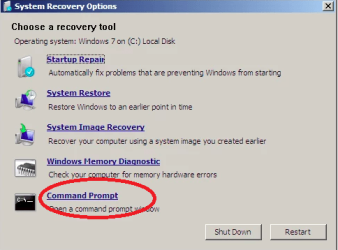
first, you can try rebuilding MBR for the disk in question. In many cases, the invalid partition table issue is caused by an corrupt MBR (Master Boot Record). Rebuilding MBR can be done in Command Prompt (boot computer using an Installation CD and locate the Command Prompt; then enter command /FixMbr and press Enter).003.pnghow-to-fix-invalid-partition-table-099.png
If your computer contains more than one local disks or external disk, many times, the invalid partition table is likely to happen due to incorrect boot order. On such occasion, you should restart your PC and enter Boot Menu where you can set disk boot order. Make sure your computer is booted from correct disk, save changes and restart computer.
You can view detailed steps here: How to fix "invalid partition table" error on Windows 10/8/7/XP?
 

My Computer

Computer type
PC/Desktop
Computer Manufacturer/Model Number
unknown
OS
windows 7 64
CPU
i3-2100
Back
Top