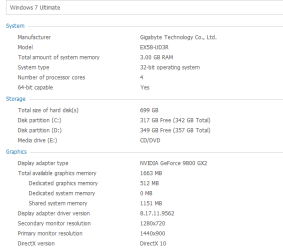
errors 500 , 501

saad1957

New member
Local time
9:23 AM
Messages
49
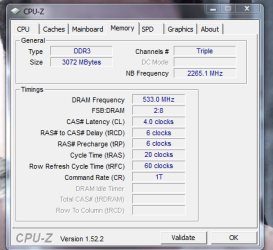
every thing at default no overclocking , but most of the time when resume from sleeping i get a black screen and these tow errors 500 , 501 before desktop appear and cpu multiplier change from 21 to 20
and my mem cas timing change from what ever i have put manualy to 4 .
 

Attachments
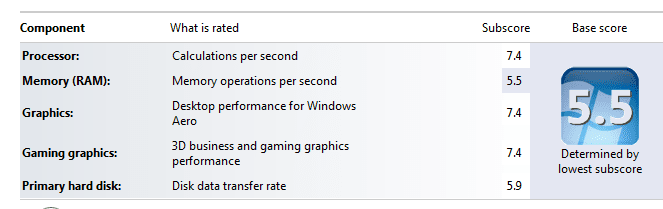
  • 3.PNG
    3.PNG
    10.8 KB · Views: 5
  • 4.PNG
    4.PNG
    10.4 KB · Views: 11
  • 2.PNG
    2.PNG
    19.6 KB · Views: 7

My Computer

Computer Manufacturer/Model Number
own built
OS
win 7 home premium
CPU
Intel core I7-920
Motherboard
ga-ex58-ud3r
Memory
KINGSTON KVR1066D3N7/3G ValueRAM
Graphics Card(s)
Gigabyte GT 430
Monitor(s) Displays
PRIMARY: samsung 2333m 23' , SECONDARY : SAMSUNG 32'
Screen Resolution
1080p , 1360*768
Hard Drives
Intel® X25-V Value SATA Solid-State Drive / WD caviar black 750G
PSU
Cooler Master GX Series RS750 750W
Case
azza 910
Cooling
Zalman 9900
Internet Speed
20 MB
Did you try typing cmd in search from an Adm account then in cmd type sfc /scannow. Lets see what happens.
 

My Computer

Computer type
PC/Desktop
Computer Manufacturer/Model Number
Dell XPS 420
OS
Windows 10, Home Clean Install
CPU
Intel Core2 processsor Q8200(2.33Ghz 1333FSB) Quad Core Tech
Motherboard
Dell
Memory
6 gb
Graphics Card(s)
ATI Radeon 256MB HD3650
Sound Card
Intergrated 7.1 Channel Audio
Monitor(s) Displays
Dell SP2009W 20"
Hard Drives
640 GB Serial ATA Hard drive
Cooling
Fan
Keyboard
Dell USB Keyboard
Mouse
Dell Premium Optical USB
Internet Speed
DSL 2.85
i did , nothing found
 

My Computer

Computer Manufacturer/Model Number
own built
OS
win 7 home premium
CPU
Intel core I7-920
Motherboard
ga-ex58-ud3r
Memory
KINGSTON KVR1066D3N7/3G ValueRAM
Graphics Card(s)
Gigabyte GT 430
Monitor(s) Displays
PRIMARY: samsung 2333m 23' , SECONDARY : SAMSUNG 32'
Screen Resolution
1080p , 1360*768
Hard Drives
Intel® X25-V Value SATA Solid-State Drive / WD caviar black 750G
PSU
Cooler Master GX Series RS750 750W
Case
azza 910
Cooling
Zalman 9900
Internet Speed
20 MB
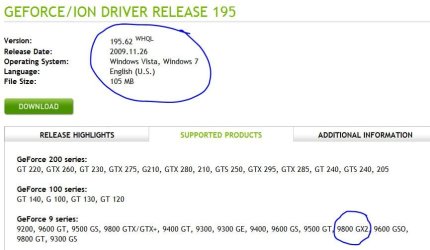
Have you tried the newest drivers for your nvida9800gx2 ? And if not are you running the current one in compatibility mode? I had same problem and fixed with drivers but I did not have your graphics card. Good luck to you with this problem.
 

My Computer

Computer Manufacturer/Model Number
Gateway GT5692
OS
Windows 7 Ulti. x64
CPU
AMD Phenom 8450 triple-core 2.10 ghz
Memory
4GB
Graphics Card(s)
ATI Radion HD 3200
Monitor(s) Displays
Gateway FPD1775W
Screen Resolution
1280x720
Hard Drives
465.6613 Gibibytes
Boot from your win7 DVD. When given the choice select repair. That may work.
 

My Computer

Computer type
PC/Desktop
Computer Manufacturer/Model Number
Dell XPS 420
OS
Windows 10, Home Clean Install
CPU
Intel Core2 processsor Q8200(2.33Ghz 1333FSB) Quad Core Tech
Motherboard
Dell
Memory
6 gb
Graphics Card(s)
ATI Radeon 256MB HD3650
Sound Card
Intergrated 7.1 Channel Audio
Monitor(s) Displays
Dell SP2009W 20"
Hard Drives
640 GB Serial ATA Hard drive
Cooling
Fan
Keyboard
Dell USB Keyboard
Mouse
Dell Premium Optical USB
Internet Speed
DSL 2.85
i have newest drivers , tried to repair nothing helped but for compatility mode the driver is for win 7 why should i run it in compatility mode and for wich os , xp , or vista .
and for this problem i had it with all systems i had before and i have upgraded ram , cpu , os , mobo
it happens when pc resume from sleep the only solution may helped was turning off " thumbnails "
 

My Computer

Computer Manufacturer/Model Number
own built
OS
win 7 home premium
CPU
Intel core I7-920
Motherboard
ga-ex58-ud3r
Memory
KINGSTON KVR1066D3N7/3G ValueRAM
Graphics Card(s)
Gigabyte GT 430
Monitor(s) Displays
PRIMARY: samsung 2333m 23' , SECONDARY : SAMSUNG 32'
Screen Resolution
1080p , 1360*768
Hard Drives
Intel® X25-V Value SATA Solid-State Drive / WD caviar black 750G
PSU
Cooler Master GX Series RS750 750W
Case
azza 910
Cooling
Zalman 9900
Internet Speed
20 MB
i have newest drivers , tried to repair nothing helped but for compatility mode the driver is for win 7 why should i run it in compatility mode and for wich os , xp , or vista .
and for this problem i had it with all systems i had before and i have upgraded ram , cpu , os , mobo
it happens when pc resume from sleep the only solution may helped was turning off " thumbnails "


Did you check the driver in the graphics card. I know you said you have all the drivers, but there seems to be a connection between the thumbnails and your problem.
 

My Computer

Computer type
PC/Desktop
Computer Manufacturer/Model Number
Dell XPS 420
OS
Windows 10, Home Clean Install
CPU
Intel Core2 processsor Q8200(2.33Ghz 1333FSB) Quad Core Tech
Motherboard
Dell
Memory
6 gb
Graphics Card(s)
ATI Radeon 256MB HD3650
Sound Card
Intergrated 7.1 Channel Audio
Monitor(s) Displays
Dell SP2009W 20"
Hard Drives
640 GB Serial ATA Hard drive
Cooling
Fan
Keyboard
Dell USB Keyboard
Mouse
Dell Premium Optical USB
Internet Speed
DSL 2.85
" Did you check the driver in the graphics card " how?
 

My Computer

Computer Manufacturer/Model Number
own built
OS
win 7 home premium
CPU
Intel core I7-920
Motherboard
ga-ex58-ud3r
Memory
KINGSTON KVR1066D3N7/3G ValueRAM
Graphics Card(s)
Gigabyte GT 430
Monitor(s) Displays
PRIMARY: samsung 2333m 23' , SECONDARY : SAMSUNG 32'
Screen Resolution
1080p , 1360*768
Hard Drives
Intel® X25-V Value SATA Solid-State Drive / WD caviar black 750G
PSU
Cooler Master GX Series RS750 750W
Case
azza 910
Cooling
Zalman 9900
Internet Speed
20 MB
Did you see this driver? Good luck to you with this problem.
driver version.JPG

driver version2.JPG
 

My Computer

Computer Manufacturer/Model Number
Gateway GT5692
OS
Windows 7 Ulti. x64
CPU
AMD Phenom 8450 triple-core 2.10 ghz
Memory
4GB
Graphics Card(s)
ATI Radion HD 3200
Monitor(s) Displays
Gateway FPD1775W
Screen Resolution
1280x720
Hard Drives
465.6613 Gibibytes
" Did you check the driver in the graphics card " how?

The prior poster may have uncovered something. But to check your drivers, type device manager in search. Then go to the driver in question and click on it. Does it show working properly, or do you see a yellow warning to update?
 

My Computer

Computer type
PC/Desktop
Computer Manufacturer/Model Number
Dell XPS 420
OS
Windows 10, Home Clean Install
CPU
Intel Core2 processsor Q8200(2.33Ghz 1333FSB) Quad Core Tech
Motherboard
Dell
Memory
6 gb
Graphics Card(s)
ATI Radeon 256MB HD3650
Sound Card
Intergrated 7.1 Channel Audio
Monitor(s) Displays
Dell SP2009W 20"
Hard Drives
640 GB Serial ATA Hard drive
Cooling
Fan
Keyboard
Dell USB Keyboard
Mouse
Dell Premium Optical USB
Internet Speed
DSL 2.85
i do have driver 195.62
 

My Computer

Computer Manufacturer/Model Number
own built
OS
win 7 home premium
CPU
Intel core I7-920
Motherboard
ga-ex58-ud3r
Memory
KINGSTON KVR1066D3N7/3G ValueRAM
Graphics Card(s)
Gigabyte GT 430
Monitor(s) Displays
PRIMARY: samsung 2333m 23' , SECONDARY : SAMSUNG 32'
Screen Resolution
1080p , 1360*768
Hard Drives
Intel® X25-V Value SATA Solid-State Drive / WD caviar black 750G
PSU
Cooler Master GX Series RS750 750W
Case
azza 910
Cooling
Zalman 9900
Internet Speed
20 MB
Good, that is one less thing to worry about.
 

My Computer

Computer type
PC/Desktop
Computer Manufacturer/Model Number
Dell XPS 420
OS
Windows 10, Home Clean Install
CPU
Intel Core2 processsor Q8200(2.33Ghz 1333FSB) Quad Core Tech
Motherboard
Dell
Memory
6 gb
Graphics Card(s)
ATI Radeon 256MB HD3650
Sound Card
Intergrated 7.1 Channel Audio
Monitor(s) Displays
Dell SP2009W 20"
Hard Drives
640 GB Serial ATA Hard drive
Cooling
Fan
Keyboard
Dell USB Keyboard
Mouse
Dell Premium Optical USB
Internet Speed
DSL 2.85
every thing at default no overclocking , but most of the time when resume from sleeping i get a black screen and these tow errors 500 , 501 before desktop appear and cpu multiplier change from 21 to 20
and my mem cas timing change from what ever i have put manualy to 4 .

I have no experience with the I7 CPU but a few months experience with Gigabyte motherboards. Is the FSB/DRAM of 2:8 a normal configuration? Gigabyte mobos are so configurable to the point of being hard to get along with sometimes. Have you changed anything in your BIOS?
 
Last edited:

My Computer

Computer type
PC/Desktop
Computer Manufacturer/Model Number
Self build
OS
Windows 10 Home
CPU
Intel Core i5 3550
Motherboard
ASUS P8Z77-V LX (LGA1155)
Memory
Corsair Vengeance DDR3 16GB
Graphics Card(s)
Nvidia GEForce GTX 970 SSC
Monitor(s) Displays
Hanns-G 23.6", Acer 17"
Screen Resolution
1920x1080, 1440x900
Hard Drives
Sandisk SSD 256 GB
WD500GB
WD640GB
Seagage Ultra + 1TB ext.
BWD 800GB
WD 1TB ext
PSU
Antec 650w
Case
Cooler Master Centurion 534
Cooling
COOLER MASTER GeminII S524, 3 120 mm case fans.
Keyboard
Logitech MK300
Mouse
Logitech MK300
Internet Speed
Cable
Antivirus
MSSE, Malwarebytes
Browser
IE 10, Chrome
Back
Top