Errors after I start programs (corrupted disk)

teddiefurry

New member
Local time
6:41 AM
Messages
3
When I started my computer today windows was unable to full start. It got the the colorful welcome screen, and froze. I restarted and it went to chkdsk.
So i ran chkdsk because it was highly recommended when I started my computer today.
After a good 30 minutes it finally ended and told me a few files were unreadable and a few were deleted, scanned, etc. here is an image to help show what I mean:
32804927.jpg

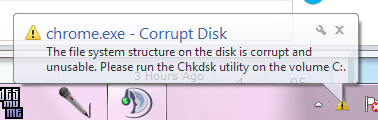
Afterwards, when I attempted to run Google Chrome, and a few other programs, I obtained an error message at the bottom of the screen, and when i clicked on the balloon, to hopefully get a reason or options on how to fix it, I got nothing and it popped up again, and again, and again.
It is not stopping anything, it is not ending a program or closing any; it is just annoying and a little uneasing on my part of keeping this computer running.
Here is an image to help express exactly what I see:
c6689e7ed9e3946d9ef5852f085765a5.png

Please help me out with how to fix this. A friend told me how I could just turn the alert balloon off, but I would like a complete fix, not just 'duct tape'.
Also, I have been getting this whenever i try to 1 uninstall a program and when I try to save an image/file:
unledtof.png
 
Last edited:

My Computer

OS
Windows 7 Home Premium x64
Code:
[CENTER][SIZE=4]When I started my computer today windows was unable to full start. It got the the colorful welcome screen, and froze. I restarted and it went to chkdsk.
So i ran chkdsk because it was highly recommended when I started my computer today.
After a good 30 minutes it finally ended and told me a few files were unreadable and a few were deleted, scanned, etc. here is an image to help show what I mean:
[IMG]http://img217.imageshack.us/img217/3766/32804927.jpg[/IMG]
Afterwards, when I attempted to run Google Chrome, and a few other programs, I obtained an error message at the bottom of the screen, and when i clicked on the balloon, to hopefully get a reason or options on how to fix it, I got nothing and it popped up again, and again, and again.
It is not stopping anything, it is not ending a program or closing any; it is just annoying and a little uneasing on my part of keeping this computer running.
Here is an image to help express exactly what I see:
[IMG]http://gyazo.com/c6689e7ed9e3946d9ef5852f085765a5.png[/IMG]
Please help me out with how to fix this. A friend told me how I could just turn the alert balloon off, but I would like a complete fix, not just 'duct tape'.
Also, I have been getting this whenever i try to 1 uninstall a program and when I try to save an image/file:
[IMG]http://img696.imageshack.us/img696/888/unledtof.png[/IMG][/SIZE][/CENTER]

The error screen shows a HD chkdsk was run. Usually indicates a problem with the file system or HD itself.

The only way to completely repair it is first to determine the problem (download the HD utility from the mfr and run it) then either replace the HD, or re-install windows.

You can narrow the focus by running a system file check


Run a system file check to verify and repair your system files.
To do this type cmd in search, then right click to run as administrator, then
SFC /SCANNOW

Read here for more information http://www.sevenforums.com/tutorials/1538-sfc-scannow-command-system-file-checker.html

Let us know the results from the report at the end.
 

My Computer

Computer Manufacturer/Model Number
HP Pavillion dv-7 1005 Tx
OS
Win 8 Release candidate 8400
CPU
[email protected]
Memory
4 gigs
Graphics Card(s)
Nvidia 9600M
Sound Card
HD built-in
Monitor(s) Displays
17" Wxga
Screen Resolution
1440x900
Cooling
none
Internet Speed
45Mb down 5Mb up
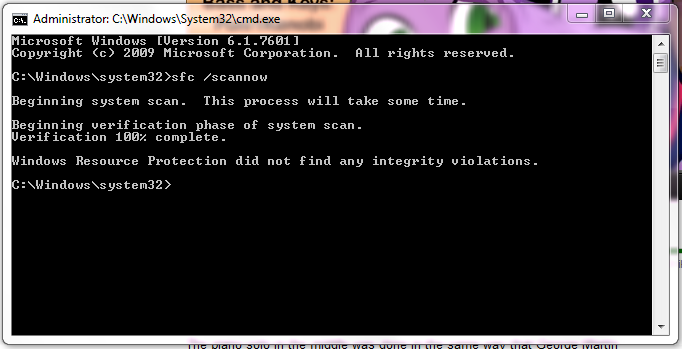
I ran sfc /scannow and here is the result:
0ff29add44357593c0dc56eb56f438cd.png

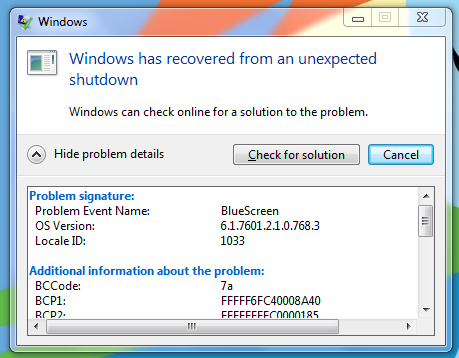
also I got the BSOD before i even got to check my thread.
And Again:
9280c1801f71b78cf70f9dd345ce22b5.png

That's twice now since the chkdsk...
 
Last edited:

My Computer

OS
Windows 7 Home Premium x64

My Computer

Computer type
PC/Desktop
OS
Microsoft Windows 10 Professional / Windows 7 Professional
CPU
Intel i5-3570
Motherboard
Lenovo Mahobay
Memory
16GB DDR3
Graphics Card(s)
AMD Radeon HD 7850 2GB
Sound Card
(1) Realtek HD Audio (2) AMD HD Audio
Monitor(s) Displays
LG LS192WS
Screen Resolution
1440 x 900 @ 32bit color
Hard Drives
(1) SUV300S37A/120G (2) ST3500413AS SATA Disk Device AHCI mode enabled.
PSU
Corsair HX620
Case
Thermaltake V4 Black Edition
Cooling
Cooler Master Hyper 212 + Artic Silver 5 on CPU/GPU
Keyboard
Dell SK-8115
Mouse
Razer Copperhead with MAPED mat (awesome!)
Internet Speed
100 Mbps up/down
Browser
Chrome
Back
Top