eSATA hard disk drive not detected when hotplugged

ischglhanna

New member
Local time
10:01 AM
Messages
5
Hello,

my situation is the following:

I'm still using Winxp x64 (SP2). My external WD hdd is connected via esata and I regularly switch it on while the computer is running. It is detected by windows within a few seconds. My SATA controller is configured to work in AHCI mode in the BIOS. When I want to switch it off again, I use the HotSwap! Utility to safely remove it (because it is not shown in the native Windows list of removable drives). So far, so good.

Now I installed Windows 7 x64. I try the same thing, but Windows just doesn't detect the drive when I switch it on while the OS is running. It's not even present in the device manager.
It is correctly detected when I switch the external hdd on before powering up the computer.
It is also correctly detected when the following sequence is followed:
1. unplug esata cable and switch off hdd
2. switch on computer and wait until win7 is up and running
3. turn on hdd
4. wait for hdd to spin up (can be heard)
5. plug in esata cable

Then I can also remove it in the Windows removable drive list in the tray icon bar. HOWEVER, when i switch it off again, unplug it, switch it on and plug it in, it is not detected anymore. I have to reboot then. Very strange behaviour.
I also tried the Hotswap! utility and its feature "scan for hardware changes", but it doesn't help.

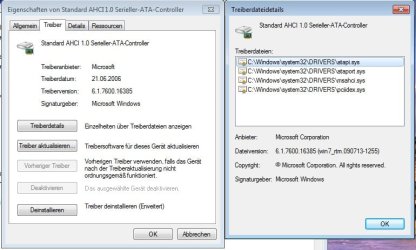
FYI, the standard microsoft sata ahci driver is currently installed. I searched for an AMD driver, but I can't seem to find one. (It's a SB600 southbridge, the northbridge is amd 770)

Any suggestions would be great.

edit: View my system specs on the lefthand side for more information
 
Last edited:

My Computer My Computer

At a glance

Windows 7 Professional x64AMD Phenom X4 96502 * 2GB Kingston Valueram DDR2, 800 MHz, CL5Sapphire Ultimate HD 3850
Computer Manufacturer/Model Number
assembled by myself
OS
Windows 7 Professional x64
CPU
AMD Phenom X4 9650
Motherboard
Gigabyte GA-MA770-DS3 rev 1.0
Memory
2 * 2GB Kingston Valueram DDR2, 800 MHz, CL5
Graphics Card(s)
Sapphire Ultimate HD 3850
Sound Card
onboard
Hard Drives
OCZ Vertex 2 Extended SSD, 120GB (internal)
Samsung HD103SJ (internal)
Western Digital WD5000AACS (Caviar Green), external, ESATA
Just a wild guess, maybe need new firmware for the external enclosure or drive?
 

My Computer My Computer

At a glance

Windows 7 Ultimate x64Core i5 7602x2GB Mushkin PC3-10666GeForce GTX 460
Computer Manufacturer/Model Number
Home Build
OS
Windows 7 Ultimate x64
CPU
Core i5 760
Motherboard
Biostar T5XE (P55)
Memory
2x2GB Mushkin PC3-10666
Graphics Card(s)
GeForce GTX 460
Internet Speed
FiOS 25Gbps down & up

My Computer My Computer

At a glance

Windows 10 Pro x64, Windows 8.1 Pro x64, Wind...INTEL i9-7920X LGA 206664 GB (4 X 16 GB) G-Skill V Series DDR4 3200 ...EVGA GTX 1060 SC 3 GB
Computer type
PC/Desktop
Computer Manufacturer/Model Number
Custom Built
OS
Windows 10 Pro x64, Windows 8.1 Pro x64, Windows 7 Ultimate x64 SP1,
CPU
INTEL i9-7920X LGA 2066
Motherboard
Gigabyte X299-WU8 F3
Memory
64 GB (4 X 16 GB) G-Skill V Series DDR4 3200 Quad Channel
Graphics Card(s)
EVGA GTX 1060 SC 3 GB
Sound Card
Realtek Onboard ALC1220
Monitor(s) Displays
2 x Samsung S27E310
Screen Resolution
1920x1080
Hard Drives
Samsung 2 x 970 EVO Plus 500 GB NVMe
1 x 6TB WD 6003FZBX SATA
1 x 6TB WD 60EFRX SATA
12 x 3TB WD 30EFRX SATA
PSU
Seasonic X-1050
Case
Thermaltake Armor+
Cooling
Corsair H80i V2 Liquid AOI Cooler
Keyboard
Logitech G510s
Mouse
Logitech MX Master 2S
Internet Speed
200 Mb/s
Antivirus
ESET NOD32 13.1
Browser
EDGE (Dev, Canary, Beta), Chrome
Other Info
ASUS RT-AC68U router
Malwarebytes 4.0.4
Concerning the first question:

My enclosure can be seen here: HD + Ext. Geh easyNova 3,5 Zoll PRO-35SUS (PRO-35SUS / 4250287200082) - Produkte | easyNova (only in German, I guess)
No firmware update is available, only a win98 driver.

concerning the second question:

Yes, I've been on the Gigabyte site. However it doesn't really help. There are 3 downloads listed that sounded interesting but proved to be useless:

- "Chipset Driver (include sata raid driver)" is just the AMD RAID Xpert Utility and doesn't install a SATA driver
- "AMD Chipset Driver (include chipset\sata raid driver)" only contains Northbridge Filter Drivers but no stuff for the southbridge
- "ATi SATA2 RAID Driver (Preinstall driver, press F6 during Windows* setup to read from floppy)" contains a *.sys, *.inf and *.cat file, but Windows says the drivers are not compatible with the sata ahci controller.

so i'm still a bit clueless
 

My Computer My Computer

At a glance

Windows 7 Professional x64AMD Phenom X4 96502 * 2GB Kingston Valueram DDR2, 800 MHz, CL5Sapphire Ultimate HD 3850
Computer Manufacturer/Model Number
assembled by myself
OS
Windows 7 Professional x64
CPU
AMD Phenom X4 9650
Motherboard
Gigabyte GA-MA770-DS3 rev 1.0
Memory
2 * 2GB Kingston Valueram DDR2, 800 MHz, CL5
Graphics Card(s)
Sapphire Ultimate HD 3850
Sound Card
onboard
Hard Drives
OCZ Vertex 2 Extended SSD, 120GB (internal)
Samsung HD103SJ (internal)
Western Digital WD5000AACS (Caviar Green), external, ESATA

My Computer My Computer

At a glance

Windows 7 X86 SP1 V.741Amd Athlon Xp mobile 2500@3200+ (socket 462)1 Gb DDR ( GSKILL F1-3200PHU2-2GBZX )Asus AH3650 SILENT/HTDI/512M ( agp )
Computer Manufacturer/Model Number
Test Computer
OS
Windows 7 X86 SP1 V.741
CPU
Amd Athlon Xp mobile 2500@3200+ (socket 462)
Motherboard
Asrock K7S8XE+
Memory
1 Gb DDR ( GSKILL F1-3200PHU2-2GBZX )
Graphics Card(s)
Asus AH3650 SILENT/HTDI/512M ( agp )
Sound Card
Onboard
Monitor(s) Displays
Benq FP91GP 19"
Hard Drives
OCZ VerteX 2 - 60GB ( SSD )
PSU
Chieftec GPS-450AA
Case
Chieftec GIGA
Sounds like it's in IDE mode, Check your BIOS and confirm it's in AHCI mode.
 

My Computer My Computer

At a glance

Windows 7 Ult x64 - SP1/ Windows 8 Pro x64Intel Core i5-3570K 4.6GHz8GB (2X4GB) DDR3 1600 Corsair Vengeance CL8 1.5vSapphire HD 7770 Vapor-X OC 1GB DDR5
Computer type
PC/Desktop
Computer Manufacturer/Model Number
76~2.0
OS
Windows 7 Ult x64 - SP1/ Windows 8 Pro x64
CPU
Intel Core i5-3570K 4.6GHz
Motherboard
Gigabyte GA-Z77X UD3H, f18
Memory
8GB (2X4GB) DDR3 1600 Corsair Vengeance CL8 1.5v
Graphics Card(s)
Sapphire HD 7770 Vapor-X OC 1GB DDR5
Sound Card
Onboard VIA VT2021
Monitor(s) Displays
22" LCD Dell
Screen Resolution
1680x1050
Hard Drives
Samsung 840Pro 128GB SSD,
Seagate Barracuda 500GB SATA2 7200rpm 32MB cache, Seagate Barracuda 1TB SATA2 7200rpm 32MB cache,
PSU
Corsair HX650W
Case
Cooler Master Storm Scout
Cooling
Corsair H80 2x12cm Noctua NF P12 , 2x14cm case fans
Keyboard
Logitech Wave
Mouse
CM Sentinel
Internet Speed
Dismal
Antivirus
Avast
Browser
Opera Next
Other Info
Haswell laptop: HP Envy 17t-j, i7-4700MQ, GeForce 740M 2GB DDR3, 17.3" Full HD 1920x1080, 16GB RAM, Samsung 840 Pro 128GB, 1TB Hitachi 7200 HDD,
Desktop: eSATA ports,
External eSATA Seagate 500GB SATA2 7200rpm,
External WD USB 500GB
@pmc: the drivers on the site you posted don't update the sata controller either. the installer just tells me that all components are up-to-date

@Dave76: It's definitely in SATA -> AHCI mode, I've double checked it.
 

My Computer My Computer

At a glance

Windows 7 Professional x64AMD Phenom X4 96502 * 2GB Kingston Valueram DDR2, 800 MHz, CL5Sapphire Ultimate HD 3850
Computer Manufacturer/Model Number
assembled by myself
OS
Windows 7 Professional x64
CPU
AMD Phenom X4 9650
Motherboard
Gigabyte GA-MA770-DS3 rev 1.0
Memory
2 * 2GB Kingston Valueram DDR2, 800 MHz, CL5
Graphics Card(s)
Sapphire Ultimate HD 3850
Sound Card
onboard
Hard Drives
OCZ Vertex 2 Extended SSD, 120GB (internal)
Samsung HD103SJ (internal)
Western Digital WD5000AACS (Caviar Green), external, ESATA
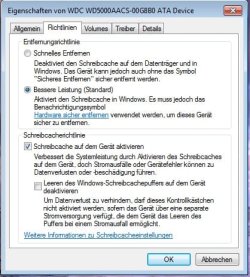
What SATA controller? Is this the onboard sata? Can you open up the device manager and display the sata controller information and post it here? When the drive is plugged in and working, can you display its device properties and post them here? The following is sorta what I am looking for for a start. I am assuming this is a SATA channel and not a SCSI one (like a jMicron or Marvell chipset). If it is the atter then post the SCSI device properties policcy tab.
 

Attachments

  • Capture1.JPG
    Capture1.JPG
    50.7 KB · Views: 178
  • Capture2.JPG
    Capture2.JPG
    43.9 KB · Views: 113

My Computer My Computer

At a glance

Windows 10 Pro. EFI boot partition, full EFI ...i7 4770k 4.4GHz (44-44-43-43 turbo) @ 1.248V16GB (8GBx2) @2200 MHz G.skill Sniper 10-11-1...MSI GTX 970 Gaming 4G
Computer type
PC/Desktop
Computer Manufacturer/Model Number
Home built (GeneO industries)/Model 4
OS
Windows 10 Pro. EFI boot partition, full EFI boot
CPU
i7 4770k 4.4GHz (44-44-43-43 turbo) @ 1.248V
Motherboard
ASUS Maximus VI Hero
Memory
16GB (8GBx2) @2200 MHz G.skill Sniper 10-11-10-30-1, 1.6V
Graphics Card(s)
MSI GTX 970 Gaming 4G
Sound Card
Onboard SupremeFX Audio
Monitor(s) Displays
NEC Spectraview 2490WUXi-SV
Screen Resolution
1920 x 1200
Hard Drives
Samsung 850 Pro 256GB (OS), Samsung 2x 128GB 840 Pro SSD in RAID0, 3x WD Blue 6Gb/s 1TB RAID0, WD 2TB Black external USB 3.0, 2TB WD20EARS Green external USB 3.0, 2x 500GB Seagate and 1 750 GB external USB, 1x 350GB external USB3
PSU
Seasonic X-850 (2012 KM3 model)
Case
Fractal Design Define R4
Cooling
NH-D14, NF-F12, NF-A15; NF-P14, NF-P12,NF-A14, S12A PWM
Keyboard
Cooler Master Storm Quickfire Rapid - Brown
Mouse
Logitech G602
Internet Speed
126.4 Mb/s down, 24.3 Mb/s up
Other Info
USB 3.0 x8 , SATA III x8, eSATA, USB 2.0 x6. Samsung DVD R/W drive.

WEI: CPU 7.8, Memory 7.9, Graphics 7.9, Disk 7.9
yes, it is the onboard controller. (AMD 770 chipset with SB600 southbridge)

you mean something like this? it's in German but I think the structure of the dialogues should be the same.
 

Attachments

  • pic1.jpg
    pic1.jpg
    21.9 KB · Views: 26
  • pic2.jpg
    pic2.jpg
    52.4 KB · Views: 39
  • pic3.jpg
    pic3.jpg
    45.3 KB · Views: 23

My Computer My Computer

At a glance

Windows 7 Professional x64AMD Phenom X4 96502 * 2GB Kingston Valueram DDR2, 800 MHz, CL5Sapphire Ultimate HD 3850
Computer Manufacturer/Model Number
assembled by myself
OS
Windows 7 Professional x64
CPU
AMD Phenom X4 9650
Motherboard
Gigabyte GA-MA770-DS3 rev 1.0
Memory
2 * 2GB Kingston Valueram DDR2, 800 MHz, CL5
Graphics Card(s)
Sapphire Ultimate HD 3850
Sound Card
onboard
Hard Drives
OCZ Vertex 2 Extended SSD, 120GB (internal)
Samsung HD103SJ (internal)
Western Digital WD5000AACS (Caviar Green), external, ESATA
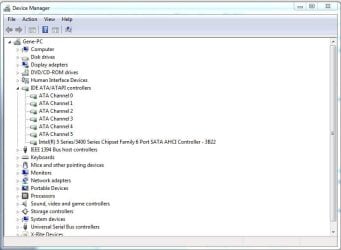
You are using the standard Microsoft AHCI drivers that apparently have a known problem detecting hot-plugged hard drives. I was going to suggest you use the AMD AHCI drivers but came across the thread linked below. This thread also discusses the failure of MS AHCI drivers to detect hard drives that are plugged in.

You can try the AMD drivers - you could always revert back to the Microsoft drivers if they are a problem.

Avoid AMD AHCI driver at all costs - AnandTech Forums
 

My Computer My Computer

At a glance

Windows 10 Pro. EFI boot partition, full EFI ...i7 4770k 4.4GHz (44-44-43-43 turbo) @ 1.248V16GB (8GBx2) @2200 MHz G.skill Sniper 10-11-1...MSI GTX 970 Gaming 4G
Computer type
PC/Desktop
Computer Manufacturer/Model Number
Home built (GeneO industries)/Model 4
OS
Windows 10 Pro. EFI boot partition, full EFI boot
CPU
i7 4770k 4.4GHz (44-44-43-43 turbo) @ 1.248V
Motherboard
ASUS Maximus VI Hero
Memory
16GB (8GBx2) @2200 MHz G.skill Sniper 10-11-10-30-1, 1.6V
Graphics Card(s)
MSI GTX 970 Gaming 4G
Sound Card
Onboard SupremeFX Audio
Monitor(s) Displays
NEC Spectraview 2490WUXi-SV
Screen Resolution
1920 x 1200
Hard Drives
Samsung 850 Pro 256GB (OS), Samsung 2x 128GB 840 Pro SSD in RAID0, 3x WD Blue 6Gb/s 1TB RAID0, WD 2TB Black external USB 3.0, 2TB WD20EARS Green external USB 3.0, 2x 500GB Seagate and 1 750 GB external USB, 1x 350GB external USB3
PSU
Seasonic X-850 (2012 KM3 model)
Case
Fractal Design Define R4
Cooling
NH-D14, NF-F12, NF-A15; NF-P14, NF-P12,NF-A14, S12A PWM
Keyboard
Cooler Master Storm Quickfire Rapid - Brown
Mouse
Logitech G602
Internet Speed
126.4 Mb/s down, 24.3 Mb/s up
Other Info
USB 3.0 x8 , SATA III x8, eSATA, USB 2.0 x6. Samsung DVD R/W drive.

WEI: CPU 7.8, Memory 7.9, Graphics 7.9, Disk 7.9
i would really like to try the AMD driver, the problem is that windows just won't let me install them. I suppose the problem is the following:
The device class of the MS driver is "IDE ATA/ATAPI controllers" (Class GUID 4D36E96A-E325-11CE-BFC1-08002BE10318) and the class of the AMD AHCI SATA driver is "SCSI and RAID controllers" (Class GUID 4D36E97B-E325-11CE-BFC1-08002BE10318)
I'm not quite sure why this is the case. I wonder if it is possible to modify the *.inf file (AMD driver) or the registry (MS driver) to make them matching.
It's strange, because in Winxp x64, I had no problems installing the AMD driver.
 

My Computer My Computer

At a glance

Windows 7 Professional x64AMD Phenom X4 96502 * 2GB Kingston Valueram DDR2, 800 MHz, CL5Sapphire Ultimate HD 3850
Computer Manufacturer/Model Number
assembled by myself
OS
Windows 7 Professional x64
CPU
AMD Phenom X4 9650
Motherboard
Gigabyte GA-MA770-DS3 rev 1.0
Memory
2 * 2GB Kingston Valueram DDR2, 800 MHz, CL5
Graphics Card(s)
Sapphire Ultimate HD 3850
Sound Card
onboard
Hard Drives
OCZ Vertex 2 Extended SSD, 120GB (internal)
Samsung HD103SJ (internal)
Western Digital WD5000AACS (Caviar Green), external, ESATA
Back
Top