
Solved ETC directory

barsim

New member
Member
Local time
8:53 AM
Messages
50
Hello,
I was looking for the HOST files, and of course had to open the ect directory first where HOST was found.
Besides a bunch of backups were there. I think those were created by Spybot search & destroy program that I no longer use.
My question is, can I safely delet them?
Thank you
barsim
 

Attachments

My Computer

Computer type
PC/Desktop
Computer Manufacturer/Model Number
HP Compaq dc5800
OS
Microsoft Windows 7 Professional 64-bit 7601 Multiprocessor Free Service Pack 1
CPU
Intel(R) Core(TM)2 Duo CPU E8400 @ 3.00GHz
Motherboard
Hewlett-Packard 2820h
Memory
6.00 GB, usable: 5.92 GB
Graphics Card(s)
ATI Radeon HD 3400 Series
Sound Card
(1) High Definition Audio Device (2) HD Webcam C270
Monitor(s) Displays
HP
Screen Resolution
1920 x 1080 x 60 hertz
Hard Drives
ST3500418AS ATA Device
Fixed hard disk media
Partitions: 2
Size: 465.76 GB
Other Info
BIOS: Hewlett-Packard
Default System BIOS
Version: 786F2 v01.51
Release Date: 8/1/2008
You can keep the following and delete the rest:

Code:
# Copyright (c) 1993-2009 Microsoft Corp.
#
# This is a sample HOSTS file used by Microsoft TCP/IP for Windows.
#
# This file contains the mappings of IP addresses to host names. Each
# entry should be kept on an individual line. The IP address should
# be placed in the first column followed by the corresponding host name.
# The IP address and the host name should be separated by at least one
# space.
#
# Additionally, comments (such as these) may be inserted on individual
# lines or following the machine name denoted by a '#' symbol.
#
# For example:
#
#      102.54.94.97     rhino.acme.com          # source server
#       38.25.63.10     x.acme.com              # x client host

# localhost name resolution is handled within DNS itself.
#	127.0.0.1       localhost
#	::1             localhost

So delete everything after the last line shown above.
 

My Computer

Computer type
Laptop
Computer Manufacturer/Model Number
ASUS
OS
Microsoft Windows 7 Home Premium 64-bit 7601 Multiprocessor Free Service Pack 1
CPU
AMD C-60 APU with Radeon(tm) HD Graphics
Motherboard
ASUSTeK COMPUTER INC. X501U
Memory
4.00 GB
Graphics Card(s)
AMD Radeon HD 6290 Graphics
Sound Card
(1) AMD High Definition Audio Device (2) Realtek High Defi
Screen Resolution
1366 x 768 x 32 bits (4294967296 colors) @ 60 Hz
Hard Drives
Hitachi HTS545050A7E380 SATA Disk Device
Antivirus
Comodo CIS & FW, SecureAplus App Whitelisting, Threatfire
Browser
Cyberfox 64bit, Opera 64bit, Airfox
Other Info
Spy-The-Spy, HitmanPro.Alert, Norton Connect Safe, MJRegWatcher, BitDefender TrafficLight, Voodoo Shield, Zemana AntiMalware
Re ETC directory

Dear Callender,
Thank you for the aswer.
Should have specified more accuratly.
See the highlighted files in the screenshots 1. and 2.. They are the ones I was talkig about as deletable?
Thank you again
 

Attachments

  • hostbackups1.jpg
    hostbackups1.jpg
    63.3 KB · Views: 1
  • hostbackups2.jpg
    hostbackups2.jpg
    63.9 KB · Views: 1

My Computer

Computer type
PC/Desktop
Computer Manufacturer/Model Number
HP Compaq dc5800
OS
Microsoft Windows 7 Professional 64-bit 7601 Multiprocessor Free Service Pack 1
CPU
Intel(R) Core(TM)2 Duo CPU E8400 @ 3.00GHz
Motherboard
Hewlett-Packard 2820h
Memory
6.00 GB, usable: 5.92 GB
Graphics Card(s)
ATI Radeon HD 3400 Series
Sound Card
(1) High Definition Audio Device (2) HD Webcam C270
Monitor(s) Displays
HP
Screen Resolution
1920 x 1080 x 60 hertz
Hard Drives
ST3500418AS ATA Device
Fixed hard disk media
Partitions: 2
Size: 465.76 GB
Other Info
BIOS: Hewlett-Packard
Default System BIOS
Version: 786F2 v01.51
Release Date: 8/1/2008
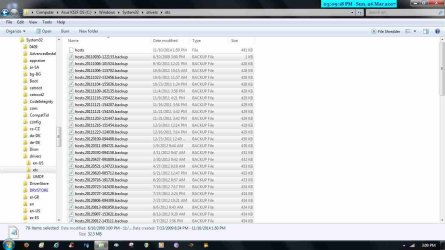
I looked at your attachment and thought you were asking if entries in your hosts file could be deleted.

As for backed up hosts files - if you don't need them you can delete them.

The file named HOSTS without a file extension is the active hosts file. Those other with the .backup extension are old backups and assuming that you do not wish to transfer any entries from those into your current hosts file or wish to keep them for reference purposes you can delete them.
 
Last edited:

My Computer

Computer type
Laptop
Computer Manufacturer/Model Number
ASUS
OS
Microsoft Windows 7 Home Premium 64-bit 7601 Multiprocessor Free Service Pack 1
CPU
AMD C-60 APU with Radeon(tm) HD Graphics
Motherboard
ASUSTeK COMPUTER INC. X501U
Memory
4.00 GB
Graphics Card(s)
AMD Radeon HD 6290 Graphics
Sound Card
(1) AMD High Definition Audio Device (2) Realtek High Defi
Screen Resolution
1366 x 768 x 32 bits (4294967296 colors) @ 60 Hz
Hard Drives
Hitachi HTS545050A7E380 SATA Disk Device
Antivirus
Comodo CIS & FW, SecureAplus App Whitelisting, Threatfire
Browser
Cyberfox 64bit, Opera 64bit, Airfox
Other Info
Spy-The-Spy, HitmanPro.Alert, Norton Connect Safe, MJRegWatcher, BitDefender TrafficLight, Voodoo Shield, Zemana AntiMalware
I have to say that the one that is 1kb in size looks like it mught be a copy of the original hosts file so you should keep that one.
 

My Computer

Computer type
Laptop
Computer Manufacturer/Model Number
ASUS
OS
Microsoft Windows 7 Home Premium 64-bit 7601 Multiprocessor Free Service Pack 1
CPU
AMD C-60 APU with Radeon(tm) HD Graphics
Motherboard
ASUSTeK COMPUTER INC. X501U
Memory
4.00 GB
Graphics Card(s)
AMD Radeon HD 6290 Graphics
Sound Card
(1) AMD High Definition Audio Device (2) Realtek High Defi
Screen Resolution
1366 x 768 x 32 bits (4294967296 colors) @ 60 Hz
Hard Drives
Hitachi HTS545050A7E380 SATA Disk Device
Antivirus
Comodo CIS & FW, SecureAplus App Whitelisting, Threatfire
Browser
Cyberfox 64bit, Opera 64bit, Airfox
Other Info
Spy-The-Spy, HitmanPro.Alert, Norton Connect Safe, MJRegWatcher, BitDefender TrafficLight, Voodoo Shield, Zemana AntiMalware
No idea where they've come from, but it seems some sort of automated backup. All of those are completely ignored by Windows and can be safely deleted (the only consequence being not being able to restore them if needed).

BTW, the best form of a backup would be to copy it to somewhere else, preferably an external disk. Leaving them alongside the original only protects against accidental modification, but not against deliverate attacks.


You can keep the following and delete the rest:

Code:
# Copyright (c) 1993-2009 Microsoft Corp.
#
# This is a sample HOSTS file used by Microsoft TCP/IP for Windows.
#
# This file contains the mappings of IP addresses to host names. Each
# entry should be kept on an individual line. The IP address should
# be placed in the first column followed by the corresponding host name.
# The IP address and the host name should be separated by at least one
# space.
#
# Additionally, comments (such as these) may be inserted on individual
# lines or following the machine name denoted by a '#' symbol.
#
# For example:
#
#      102.54.94.97     rhino.acme.com          # source server
#       38.25.63.10     x.acme.com              # x client host

# localhost name resolution is handled within DNS itself.
#	127.0.0.1       localhost
#	::1             localhost

So delete everything after the last line shown above.

Doing so destroys any custom configuration that may be there, replacing it with a completely empty hosts file (every single line is a comment). Without knowing exactly the system of the OP, this is NOT a safe approach.
 

My Computer

Computer type
Laptop
Computer Manufacturer/Model Number
Toshiba Sattelite A665-S6092
OS
Windows 7 Ultimate x64
CPU
Intel Core i7-740QM
Memory
8 GB DDR3
Graphics Card(s)
NVIDIA GeForce 330GT
Screen Resolution
1366x768
Hard Drives
Samsung 840 SSD 500GB
1TB USB3 external HD
Cooling
Coolermaster Notepal U3 notebook cooling pad
Internet Speed
3mbps ASDL
Antivirus
ClamWin 0.98.7
Browser
Opera 12.17 x86 (main), Firefox 38 (sec), IE11 (last resort)
Doing so destroys any custom configuration that may be there, replacing it with a completely empty hosts file (every single line is a comment). Without knowing exactly the system of the OP, this is NOT a safe approach.

True. I misunderstood the original question where the OP states that Spyboy S&D is no longer required with an attached hosts file that only contained entries added by Spybot S&D and no other entries have been added.
 

My Computer

Computer type
Laptop
Computer Manufacturer/Model Number
ASUS
OS
Microsoft Windows 7 Home Premium 64-bit 7601 Multiprocessor Free Service Pack 1
CPU
AMD C-60 APU with Radeon(tm) HD Graphics
Motherboard
ASUSTeK COMPUTER INC. X501U
Memory
4.00 GB
Graphics Card(s)
AMD Radeon HD 6290 Graphics
Sound Card
(1) AMD High Definition Audio Device (2) Realtek High Defi
Screen Resolution
1366 x 768 x 32 bits (4294967296 colors) @ 60 Hz
Hard Drives
Hitachi HTS545050A7E380 SATA Disk Device
Antivirus
Comodo CIS & FW, SecureAplus App Whitelisting, Threatfire
Browser
Cyberfox 64bit, Opera 64bit, Airfox
Other Info
Spy-The-Spy, HitmanPro.Alert, Norton Connect Safe, MJRegWatcher, BitDefender TrafficLight, Voodoo Shield, Zemana AntiMalware
Dear Callender,
THKX for the help.
barsim
 

My Computer

Computer type
PC/Desktop
Computer Manufacturer/Model Number
HP Compaq dc5800
OS
Microsoft Windows 7 Professional 64-bit 7601 Multiprocessor Free Service Pack 1
CPU
Intel(R) Core(TM)2 Duo CPU E8400 @ 3.00GHz
Motherboard
Hewlett-Packard 2820h
Memory
6.00 GB, usable: 5.92 GB
Graphics Card(s)
ATI Radeon HD 3400 Series
Sound Card
(1) High Definition Audio Device (2) HD Webcam C270
Monitor(s) Displays
HP
Screen Resolution
1920 x 1080 x 60 hertz
Hard Drives
ST3500418AS ATA Device
Fixed hard disk media
Partitions: 2
Size: 465.76 GB
Other Info
BIOS: Hewlett-Packard
Default System BIOS
Version: 786F2 v01.51
Release Date: 8/1/2008
Back
Top