Ethernet Adapter not recognized

tdcv

New member
Local time
2:15 PM
Messages
12
So I have a Dell PC I bought a little over 1.5 yrs ago that came with an integrated ethernet adapter on mobo.
worked fine uptill november last year when it started giving me problems where the comp would not recognize the adapter on start-up, a reboot would solve the problem and I'd be able to go online. recently even that stopped and I can not go online, neither would it recognize the adapter on the system device list at all.

Thinking that the port has gone bad, I bought a new PCI Express X1 card and installed that on the computer.
It showed up on the device manager list only the very first time I started the machine, on every subsequent start-up, the device manager list does not show either of the adapters and I have not been able to go online on that machine for more than three weeks now.

any help on this would be great if somebody has gone thru similar predicament.
thx
 

My Computer My Computer

At a glance

windows 7 professional 64bit
OS
windows 7 professional 64bit
Welcome tdcv,

Is there any way you can tell us the make & model of the Dell & a service tag number ?

Also make & model of the PCI card ? Did it come with a driver Disc ?
 

My Computer My Computer

At a glance

Win7 Enterprise, Win7 x86 (Ult 7600), Win7 x6...AMD fx8350 4ghz, AMD-32 2400mhz, AMD-64 3200m...2gb, 4gb on the Ult 7600, 4gb on Technet RTM,...Draw my own Graphics, several nVidia cards
Computer type
PC/Desktop
Computer Manufacturer/Model Number
Built them myself, Science Experiments !
OS
Win7 Enterprise, Win7 x86 (Ult 7600), Win7 x64 Ult 7600, TechNet RTM on AMD x64 (2.8Ghz)
CPU
AMD fx8350 4ghz, AMD-32 2400mhz, AMD-64 3200mhz, AMDx64 2.8G
Motherboard
SIS 755, ECS-K8M890M-M (Ult 7600), GigaByte & others
Memory
2gb, 4gb on the Ult 7600, 4gb on Technet RTM, 32gb on FX8350
Graphics Card(s)
Draw my own Graphics, several nVidia cards
Sound Card
on motherboard
Monitor(s) Displays
19" flat scr, 28" I-Inc widescr,22" Emprex Widescr, 23" Acer
Screen Resolution
1280 x 1024, 1440 x 900, 1920 x 1080
Hard Drives
6 pata Ide HD's & 2 Sata HD's
added 80gb external on Ult 7600 computer,
numerous extra 1tb, 2TB, 3Tb SATA HD's
A collection of ext HD Docks w/ HDs
PSU
430w, 550w, 600w, 700, 800, etc
Case
All Generic Full Towers
Cooling
Open Air & a few fans, some w/ colored LEDs
Keyboard
Compaq & Dell recycled from GoodWill
Mouse
Made in China Optical Wired Mouse
Internet Speed
Fast Cable InterNet
Antivirus
AVG Free on 24 different Desktops, NO Problems!
Browser
IE 8 is preferred, but use FireFox sometimes
Other Info
Linksys Routers, switches, & Hubs
Too Many USB Flash Drives to count, Biggest is 64GB !
Eight computers in my home network.
Sixteen computers at my business network.
Linked via TeamViewer !
Lots of old used spare computer parts everywhere!
vostro 460
service tag# CR6M0R1
the PCIe card is a TP-Link TG-3468, it did come with the install disk
thx in advance
 

My Computer My Computer

At a glance

windows 7 professional 64bit
OS
windows 7 professional 64bit
Hi tdcv,

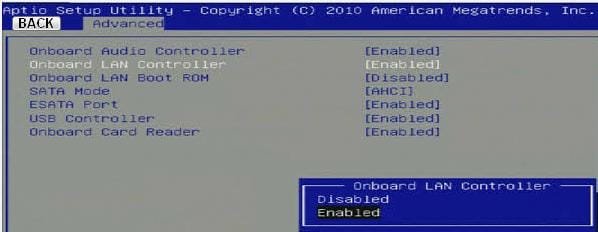
Would like to know if you checked the status of the original 'Ethernet adapter' in 'Device Manager'. If it was not getting detected in 'Device Manger', you may want to check if it is enabled in 'BIOS'. To check the status of the 'on-board Ethernet adapter', you may follow the steps listed below:

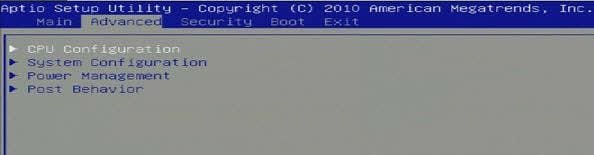
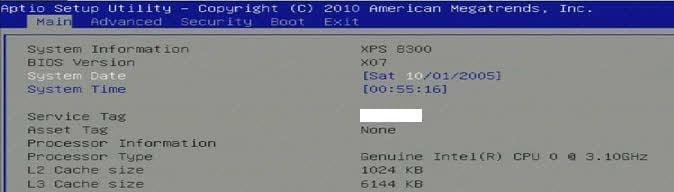
1. Power off the computer > Power it back on and at 'Dell splash screen' repeatedly tap 'F2 key' to enter 'System BIOS' > Navigate to the option 'Advanced' > Move to 'System Configuration' > Ensure that 'On-board LAN Controller' is 'Enabled' > You may tap 'F9 key' to load 'BIOS defaults' > Tap 'F10 key' to 'Save settings' and 'Exit' (Mouse would not work in BIOS; please use 'arrow keys' to navigate. You may find the below mentioned images useful)

attachment.php


attachment.php


attachment.php


2. If it is enabled in 'BIOS' capture the status in 'Device Manager' again. It would be listed under the category 'Network Adapters'

If the 'on-board adapter' still does not show up in the 'Device Manager', you may try to 'Disable' it in BIOS to see if the 'Discrete Adapter' shows up.

Do reply with the findings; would be glad to assist.


Attachments

  • 2.JPG
    2.JPG
    9.8 KB · Views: 95
  • 3.JPG
    3.JPG
    17.4 KB · Views: 96
  • 1.JPG
    1.JPG
    15.3 KB · Views: 93

My Computer My Computer

At a glance

Windows 7 64bit
OS
Windows 7 64bit
thx for the reply
I've tried both these steps already in the BIOS, disabled the adapter and then restarted the comp, no change, reactivated it in the BIOS and after the re-start, no change.
After this, I took the new PCIe card out, shut the comp down, installed it again, restarted the comp, same problem persisted, neither adapters show up on device manager, the light does come on on the new PCIe card but the comp does not recognize it
would a re-flash of the BIOS make this work?
thx in advance for the help
 

My Computer My Computer

At a glance

windows 7 professional 64bit
OS
windows 7 professional 64bit
thx for the reply
I've tried both these steps already in the BIOS, disabled the adapter and then restarted the comp, no change, reactivated it in the BIOS and after the re-start, no change.
After this, I took the new PCIe card out, shut the comp down, installed it again, restarted the comp, same problem persisted, neither adapters show up on device manager, the light does come on on the new PCIe card but the comp does not recognize it
would a re-flash of the BIOS make this work?
thx in advance for the help

It may help to try clearing the cmos then setting BIOS to defaults.
 

My Computer My Computer

At a glance

Windows 7 Ult, Windows 8.1 Pro,Q9650-4.275GHz, E8600 4.5GHz, E6750-3.8GHzG.Skill PC2 9600 1200Mhz 5 5 5 15 2TGTX480
Computer type
PC/Desktop
Computer Manufacturer/Model Number
Home built
OS
Windows 7 Ult, Windows 8.1 Pro,
CPU
Q9650-4.275GHz, E8600 4.5GHz, E6750-3.8GHz
Motherboard
Evga 780i FTW
Memory
G.Skill PC2 9600 1200Mhz 5 5 5 15 2T
Graphics Card(s)
GTX480
Sound Card
Asus Xonar D2
Monitor(s) Displays
HannsG
Screen Resolution
1680X1050
Hard Drives
GSkill Phoenix Pro 120GB SSD
PSU
ThermalTake Toughpower 1000Watt modular
Case
ThermalTake XaserV
Cooling
Xigmatek S1283
Keyboard
Logitech G15
Mouse
Logitech G9
Internet Speed
T1
I did that as well, to no avail unfortunately
could this be a virus problem?
 

My Computer My Computer

At a glance

windows 7 professional 64bit
OS
windows 7 professional 64bit
First open up the PC. Disconnect the adpater. If you have any dust remover spray, spray the pci port and the card. Plug it back in and test. If its still not working do you have access to another PC to test the card in?
 

My Computer My Computer

At a glance

Windows 7 Ultimate x64
OS
Windows 7 Ultimate x64
The PCIe card is brand new, will test on another comp
it's just so frustrating cause the comp is practically new, sucks for me
 

My Computer My Computer

At a glance

windows 7 professional 64bit
OS
windows 7 professional 64bit
Yeah it does suck I have gotten new components that are defective before. This is the easiest way to test it.
 

My Computer My Computer

At a glance

Windows 7 Ultimate x64
OS
Windows 7 Ultimate x64
The real problem is not with the new PCIe card, the comp doesn't recognize the on-board integrated adapter which is why I had to buy the PCIe card. After installation, the comp did not recognize the new or the old adapter at all, in fact the device manager does not list network adapters at all when you look at the list.
 

My Computer My Computer

At a glance

windows 7 professional 64bit
OS
windows 7 professional 64bit
Have you disabled the internal nic?
 

My Computer My Computer

At a glance

Windows 7 Ultimate x64
OS
Windows 7 Ultimate x64
How do you do that? Thru BIOS?
 

My Computer My Computer

At a glance

windows 7 professional 64bit
OS
windows 7 professional 64bit
The real problem is not with the new PCIe card, the comp doesn't recognize the on-board integrated adapter which is why I had to buy the PCIe card. After installation, the comp did not recognize the new or the old adapter at all, in fact the device manager does not list network adapters at all when you look at the list.

Hi tdcv,

Apologies for the delay in my response; was away from work.

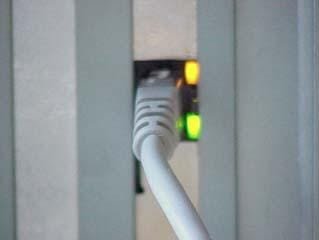
It is surprising that none of the 'network adapters' are showing up in 'Device Manager' page. I would understand if it were an issue with the 'On-board adapter'; however the 'Discrete adapter' should show-up fine. Please share the status of 'link lights' with both 'adapters' (Onboard & Discrete) one by one.

Ensure that you 'disable' the 'On-board NIC' from 'BIOS' while checking the status for 'PCI Express' card. Also remove the 'PCI Express' card; and 'enable' 'On-board NIC' in 'BIOS' in the other case. (Similar link-lights appear when an 'Ethernet cable' is plugged into an 'Ethernet port'; refer to the image below):

attachment.php


I also recommend you to restore 'BIOS defaults' without the 'PCI Express card' plugged in; and check results.

If you still experience issues, please share a 'screen shot' of the 'Device Manager' page (with 'Network Adapter's category expanded, if listed); you may try to 'scan for hardware changes' in 'Device Manager' to see if the category appears.

Hope this helps. Do reply with the findings; would be glad to assist.
 

Attachments

  • 1.JPG
    1.JPG
    5.4 KB · Views: 54
Last edited:

My Computer My Computer

At a glance

Windows 7 64bit
OS
Windows 7 64bit
thx for the reply
I have tried all the suggestions you mentioned, at this time it seems either like a fried mobo or a virus in the system!
 

My Computer My Computer

At a glance

windows 7 professional 64bit
OS
windows 7 professional 64bit
I think I might try running the sfc/scannow command to see if there are any missing system files.

Using system restore or running a start up repair a few times from the Windows CD is another option.

Clearing the cmos then setting to defaults would fix most board problems unless the board is just fried "unlikely".

Reinstalling the Op system should also be tried before the board is tossed.
 

My Computer My Computer

At a glance

Windows 7 Ult, Windows 8.1 Pro,Q9650-4.275GHz, E8600 4.5GHz, E6750-3.8GHzG.Skill PC2 9600 1200Mhz 5 5 5 15 2TGTX480
Computer type
PC/Desktop
Computer Manufacturer/Model Number
Home built
OS
Windows 7 Ult, Windows 8.1 Pro,
CPU
Q9650-4.275GHz, E8600 4.5GHz, E6750-3.8GHz
Motherboard
Evga 780i FTW
Memory
G.Skill PC2 9600 1200Mhz 5 5 5 15 2T
Graphics Card(s)
GTX480
Sound Card
Asus Xonar D2
Monitor(s) Displays
HannsG
Screen Resolution
1680X1050
Hard Drives
GSkill Phoenix Pro 120GB SSD
PSU
ThermalTake Toughpower 1000Watt modular
Case
ThermalTake XaserV
Cooling
Xigmatek S1283
Keyboard
Logitech G15
Mouse
Logitech G9
Internet Speed
T1
Hi tdcv,

If none of the 'repair options' work, you may try re-installing 'Windows' before replacing the motherboard. (Note: Please backup the personal data before attempting a re-install of the 'Operating System').

Out-of-curiosity, would like to know the status of 'link lights' when 'Ethernet cable' is 'plugged in' (both cases).

@chev65: You've summed up everything with perfection :)
 

My Computer My Computer

At a glance

Windows 7 64bit
OS
Windows 7 64bit
Before chucking out the window, run the liveCD of Ubuntu to see if the hardware is any good.
Download and burn to CD, then boot the CD

Download Ubuntu | Ubuntu
 

My Computer My Computer

At a glance

Windows 7 Ultimate x64
OS
Windows 7 Ultimate x64
thx guys
will try all the suggestions and update in a couple of days
the critical point here is that this is my point of sale comp, if it goes down, my business suffers so I have to be very careful, at the same time I need internet connectivity to monitor the employees so it's between a rock and a hard place situation for me
thx again for all the help
 

My Computer My Computer

At a glance

windows 7 professional 64bit
OS
windows 7 professional 64bit
Back
Top