"Ethernet" Connection Drop

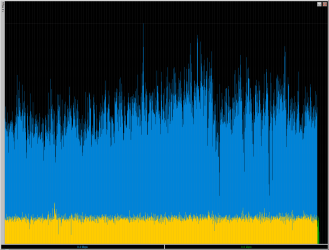
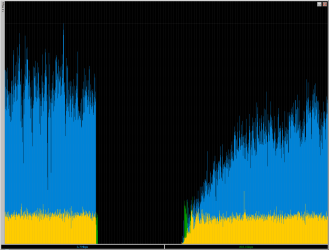
I've taken many snapshots recently of my connection over the weekend, but this one here was different and takes the cake so far, as it will have me digging for more answers. Hence the name ;)

I blew this up so you can see a closer look... pay attention to the deep drops, both up and down.... the dotted lines represent 10secs. Now one would expect the drops to be on the "same line", at the same time. That wold lead me in one direction more likely, but this isnt the case. Tis why i said it doesnt matter if just up, down, or both, that make a difference. Which if both up and down dropped at same time, well then thats more explainable, atleast in my practical mind. but, not the case.
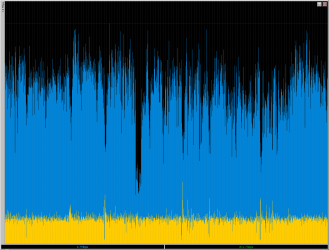
big graph.PNG

and of course if you remember me stating i have a 10mb connection, you can see that i am not using it all by any means... the upload is around 85% utilized
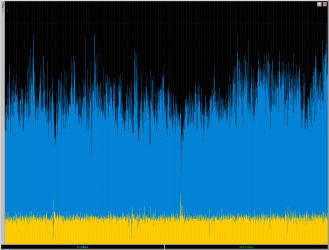
big graph2.PNG

now look here at the spikes above the 85% upload threshold and complimentary dips with DL. I hold it at 85% because anything more degrades the overall throughput wan side.


now this just happened 30 mins after i posted the 2nd shot. I didnt change anything i was doing, was same processes... actually coincidentally most likely happened when i went to submit a post to a different thread.
big graph3.PNG


also here is a snapshot around the same time of the router's info page. With an uptime of 6.5 days currently. I noticed some quirkyness, particularly the errors and also the usage of IP sessions is rarely pretty high, but not max limit, and is explainable with the given tests. So i am not suprised at that, just taking note of.

router.packet.info.PNG
router.packet.info2.PNG
 
Last edited:

My Computer

Computer Manufacturer/Model Number
CUSTOM
OS
XP/win7 x86 build 7127
CPU
Athlon64 X2 DUAL 4200+ 2.21ghz
Motherboard
ASUS K8 PRO SLI
Memory
2GB Dual Chan DDR2 Corsair
Graphics Card(s)
Nvidia 6800GT
Sound Card
nvidia
Monitor(s) Displays
19' LCD
Screen Resolution
1280x1024
Hard Drives
WD 250, 2x500, 2x1TB IDE/USB
WD 250 SATA (system)
SEAGATE 120 Sata
PSU
coolermaster 450
Case
SUPERFLOWER
Cooling
1 HDD bay fan, 5x80mm Case Fans, AEROGATE II Fan/Temp
Keyboard
MS wireless
Mouse
MS Wireless
Internet Speed
fassssssssst
Any magnetic interference nearby like a speaker or sub?

That's pretty bad dropping, but nothing unsual, especially for broadcom hardware.
There's only two hardware router vendors i trust, billion and siemens.
You can't get a "cheap" wireless router with either so it's not an option for most, but honestly if you want a trouble-free experience you simply have no choice.

Computing is a "Get what you pay for" industry.
 

My Computer

OS
Windows 7 dual with XP SP2 ((Highly Custom))
CPU
Intel Core2Duo e7300 sometimes @ 3.33Ghtz
Motherboard
Gigabyte G31M-S2L
Memory
2gb Kingston HyperX
Graphics Card(s)
nVidia 9800GT 1gb
Sound Card
Onboard Realtech AC97 High Definition codec
Monitor(s) Displays
HP P1120 21" CRT
Screen Resolution
1600x1200
Hard Drives
WD 250gb caviar
WD 500GB SATAII
PSU
Gigabyte bundled 550w
Case
Gigabyte Generic
Cooling
stock
Keyboard
POS $25 cheapo because i type too fast, wears down kb's
Mouse
M$ Intellipoint 1.1 5 button
Internet Speed
ADSL2 @ max 1.3MBYTE/sec down, 1 up.
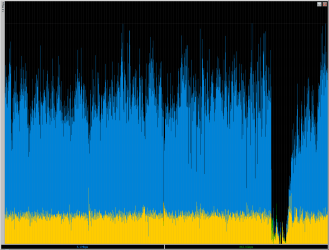
and 20 mins later after being connected most the morning (4+ hours).... bam

big graph4.PNG

take notice here, as the download DROPPED FIRST... the upload, in green, was still transmitting before the failure.

complete d/c. First troubleshoot didnt get it back connected, nic reported as showing no available networks with red X. Took 2 times of doing this before it finally corrected itself and connected.

note fyi, the yellow is the overlap/combining of both up and down.


edit: Here's what it looks like after connection was re-established...

big graph5.PNG
 

My Computer

Computer Manufacturer/Model Number
CUSTOM
OS
XP/win7 x86 build 7127
CPU
Athlon64 X2 DUAL 4200+ 2.21ghz
Motherboard
ASUS K8 PRO SLI
Memory
2GB Dual Chan DDR2 Corsair
Graphics Card(s)
Nvidia 6800GT
Sound Card
nvidia
Monitor(s) Displays
19' LCD
Screen Resolution
1280x1024
Hard Drives
WD 250, 2x500, 2x1TB IDE/USB
WD 250 SATA (system)
SEAGATE 120 Sata
PSU
coolermaster 450
Case
SUPERFLOWER
Cooling
1 HDD bay fan, 5x80mm Case Fans, AEROGATE II Fan/Temp
Keyboard
MS wireless
Mouse
MS Wireless
Internet Speed
fassssssssst

My Computer

Computer Manufacturer/Model Number
CUSTOM
OS
XP/win7 x86 build 7127
CPU
Athlon64 X2 DUAL 4200+ 2.21ghz
Motherboard
ASUS K8 PRO SLI
Memory
2GB Dual Chan DDR2 Corsair
Graphics Card(s)
Nvidia 6800GT
Sound Card
nvidia
Monitor(s) Displays
19' LCD
Screen Resolution
1280x1024
Hard Drives
WD 250, 2x500, 2x1TB IDE/USB
WD 250 SATA (system)
SEAGATE 120 Sata
PSU
coolermaster 450
Case
SUPERFLOWER
Cooling
1 HDD bay fan, 5x80mm Case Fans, AEROGATE II Fan/Temp
Keyboard
MS wireless
Mouse
MS Wireless
Internet Speed
fassssssssst
If it's a router dying out, your download SHOULD be dying first as the device fails to respond.
The uploading will continue for up to 5 seconds while your PC tries to just "keep going anyway, must just be lag!".

Turn the router off for a while, set up an ad-hoc network between the laptop + PC. Leave it copying large files over network for a few hours and see if you again get the "No network" with red X.

If you do, then it's windows 7 networking infrastructure crashing the wireless router when SVCHOST comes accross the error that causes IT to die out and kill your local LAN.
 

My Computer

OS
Windows 7 dual with XP SP2 ((Highly Custom))
CPU
Intel Core2Duo e7300 sometimes @ 3.33Ghtz
Motherboard
Gigabyte G31M-S2L
Memory
2gb Kingston HyperX
Graphics Card(s)
nVidia 9800GT 1gb
Sound Card
Onboard Realtech AC97 High Definition codec
Monitor(s) Displays
HP P1120 21" CRT
Screen Resolution
1600x1200
Hard Drives
WD 250gb caviar
WD 500GB SATAII
PSU
Gigabyte bundled 550w
Case
Gigabyte Generic
Cooling
stock
Keyboard
POS $25 cheapo because i type too fast, wears down kb's
Mouse
M$ Intellipoint 1.1 5 button
Internet Speed
ADSL2 @ max 1.3MBYTE/sec down, 1 up.
If it's a router dying out, your download SHOULD be dying first as the device fails to respond.
The uploading will continue for up to 5 seconds while your PC tries to just "keep going anyway, must just be lag!".

Turn the router off for a while, set up an ad-hoc network between the laptop + PC. Leave it copying large files over network for a few hours and see if you again get the "No network" with red X.

If you do, then it's windows 7 networking infrastructure crashing the wireless router when SVCHOST comes accross the error that causes IT to die out and kill your local LAN.

right, the whole thing, i lose everything, lan wan, my hair... everything


and yes, i am inclined this has to do with somekind of framework thats causing this
 

My Computer

Computer Manufacturer/Model Number
CUSTOM
OS
XP/win7 x86 build 7127
CPU
Athlon64 X2 DUAL 4200+ 2.21ghz
Motherboard
ASUS K8 PRO SLI
Memory
2GB Dual Chan DDR2 Corsair
Graphics Card(s)
Nvidia 6800GT
Sound Card
nvidia
Monitor(s) Displays
19' LCD
Screen Resolution
1280x1024
Hard Drives
WD 250, 2x500, 2x1TB IDE/USB
WD 250 SATA (system)
SEAGATE 120 Sata
PSU
coolermaster 450
Case
SUPERFLOWER
Cooling
1 HDD bay fan, 5x80mm Case Fans, AEROGATE II Fan/Temp
Keyboard
MS wireless
Mouse
MS Wireless
Internet Speed
fassssssssst
Actually, i forgot. The other option is to grab tweak7 and reset to default settings for the local network :P

Try it, please. It's worked for me so far, going on 24 hours.
Considering i had 2 network dropouts in 30 minutes before i reset settings with tweak7, i'd say the problem is definitively fixed.
 

My Computer

OS
Windows 7 dual with XP SP2 ((Highly Custom))
CPU
Intel Core2Duo e7300 sometimes @ 3.33Ghtz
Motherboard
Gigabyte G31M-S2L
Memory
2gb Kingston HyperX
Graphics Card(s)
nVidia 9800GT 1gb
Sound Card
Onboard Realtech AC97 High Definition codec
Monitor(s) Displays
HP P1120 21" CRT
Screen Resolution
1600x1200
Hard Drives
WD 250gb caviar
WD 500GB SATAII
PSU
Gigabyte bundled 550w
Case
Gigabyte Generic
Cooling
stock
Keyboard
POS $25 cheapo because i type too fast, wears down kb's
Mouse
M$ Intellipoint 1.1 5 button
Internet Speed
ADSL2 @ max 1.3MBYTE/sec down, 1 up.
also, i would be inclined to think it was the router IF the following things werent true

1. tried this on two different routers, tho same chipset
2. this matters not if traversing thru lan or wan.
3. In the past, with these routers when trying different firmware, if a crash happened for whatever reason, a hard reboot was required. That is not needed.
4. If i could produce these same results with the laptop with the intel chip.


Nothing sticks out when using either router as both results are very similar. So like i said, my next test would be using one of the routers in client mode and "bridge" the wifi of the two routers, thus disabling wlan feature and just leaving the Lan ethernet connection available. Like using the second router as a complex wifi adapter. May produce more insight into the log files as far as the wifi connectivity. If that fails... end of story. Tho i'm not too optomistic being the intel adapter hasnt had a problem nor foced the issue/problem, nor does the wired up Media Extender run into any issues.
 

My Computer

Computer Manufacturer/Model Number
CUSTOM
OS
XP/win7 x86 build 7127
CPU
Athlon64 X2 DUAL 4200+ 2.21ghz
Motherboard
ASUS K8 PRO SLI
Memory
2GB Dual Chan DDR2 Corsair
Graphics Card(s)
Nvidia 6800GT
Sound Card
nvidia
Monitor(s) Displays
19' LCD
Screen Resolution
1280x1024
Hard Drives
WD 250, 2x500, 2x1TB IDE/USB
WD 250 SATA (system)
SEAGATE 120 Sata
PSU
coolermaster 450
Case
SUPERFLOWER
Cooling
1 HDD bay fan, 5x80mm Case Fans, AEROGATE II Fan/Temp
Keyboard
MS wireless
Mouse
MS Wireless
Internet Speed
fassssssssst
you also have to understand, no matter wireless or wired, i believe they are both connected. Like i said, red x, no networks, when in this neighborhood, its full of wifi around me... not just my own... now if i just lost connection, and seen my own router network drop off the face of the earth, then this would be solved with a trip to best buy, or a rushed shipment from online. I'd be on my happy way, but tis not that easy.
 

My Computer

Computer Manufacturer/Model Number
CUSTOM
OS
XP/win7 x86 build 7127
CPU
Athlon64 X2 DUAL 4200+ 2.21ghz
Motherboard
ASUS K8 PRO SLI
Memory
2GB Dual Chan DDR2 Corsair
Graphics Card(s)
Nvidia 6800GT
Sound Card
nvidia
Monitor(s) Displays
19' LCD
Screen Resolution
1280x1024
Hard Drives
WD 250, 2x500, 2x1TB IDE/USB
WD 250 SATA (system)
SEAGATE 120 Sata
PSU
coolermaster 450
Case
SUPERFLOWER
Cooling
1 HDD bay fan, 5x80mm Case Fans, AEROGATE II Fan/Temp
Keyboard
MS wireless
Mouse
MS Wireless
Internet Speed
fassssssssst
Just a reference point.

I had no net connectivity problems UNTIL I installed the nvidia nforce driver set for my 680i motherboard.

Then I would lose all ethernet at some point anywhere from about 10 seconds to an hour of HEAVY net use. Local net gone, the driver or interface was hosed until I rebooted.

I "rolled back" to the original built in MS supplied ethernet driver (Dec 2008) and it's back to working fine.

I always turn this machine off when I'm not using it, so the longest I've gone is probably 8-10 hours in a streach, but no drops in that period using the built in W7 driver.
 

My Computer

Computer Manufacturer/Model Number
Scratch built
OS
Windows 7 x64 Ultimate
CPU
i7 960
Motherboard
Asus P6X58D
Memory
12 Gig Corsair Dominator
Graphics Card(s)
Nvidia 480
Sound Card
Maudio Delta 44 + breakout box
Monitor(s) Displays
Dell UltraSharp U2410 24in and Samsung 21 dual monitors
Screen Resolution
1920x1200 and 1280x1024
Hard Drives
Primary: Intel X-25M G2 160G SSD
Secondary: Segate baracuda 1.0 TB
HDs in AHCI mode.
PSU
Corasair TX850
Case
Cooler Master HAF
Cooling
Corsair H50
Keyboard
Logitech G15 + N52 game pad
Mouse
Logitech MX518
Internet Speed
15kbs down 4.5kbps up
Other Info
WEI 7.6
CPU & RAM 7.6
Graphics 7.9
Hard disk 7.7
Digger let me get this straight;
You have a wireless adapter in your PC.
your.. laptop? has an intel wireless onboard?
You connect to your router with this PC and your laptop and your media box.
PC and laptop are wireless, media box is wired.
Intel doesn't drop out at all, your PC drops wireless but you can plug a cable in and notice your ethernet works fine on the PC, even when the wireless is broken?
 

My Computer

OS
Windows 7 dual with XP SP2 ((Highly Custom))
CPU
Intel Core2Duo e7300 sometimes @ 3.33Ghtz
Motherboard
Gigabyte G31M-S2L
Memory
2gb Kingston HyperX
Graphics Card(s)
nVidia 9800GT 1gb
Sound Card
Onboard Realtech AC97 High Definition codec
Monitor(s) Displays
HP P1120 21" CRT
Screen Resolution
1600x1200
Hard Drives
WD 250gb caviar
WD 500GB SATAII
PSU
Gigabyte bundled 550w
Case
Gigabyte Generic
Cooling
stock
Keyboard
POS $25 cheapo because i type too fast, wears down kb's
Mouse
M$ Intellipoint 1.1 5 button
Internet Speed
ADSL2 @ max 1.3MBYTE/sec down, 1 up.
Digger let me get this straight;
You have a wireless adapter in your PC.
your.. laptop? has an intel wireless onboard?
You connect to your router with this PC and your laptop and your media box.
PC and laptop are wireless, media box is wired.
Intel doesn't drop out at all, your PC drops wireless but you can plug a cable in and notice your ethernet works fine on the PC, even when the wireless is broken?

yes, yes, yes, yes, and then no, not yet... I havent configured the 2nd router to act as an adapter/client mode. Thats the next degree of testing, throwing out the adapter in question itself. Also the laptop and intel chip, has a very good win7 driver, even all the specifics i can/could configure under XP. its just the wireless pro a/b/g. Streaming from laptop itself, no problem, atleast not yet, tho minimal testing. Same goes for the Extender. If streaming from desktop, problems sometimes occur, but not all the time. Usually when streaming and doing something else on the network, be it from the desktop or laptop, but more common with the desktop as if the laptop is in use 95% of the time the desktop is in use.

When i lose signal here, i lose it completely, as far as the adapter goes on the desktop, have to troubleshoot. Now with first install of the vista drivers, i had a period that when i lost everything here, the laptop lost wan access, but no red X, other available networks, and also showing my own. Now i still dont and didnt know then, if this just wasnt refreshing properly and maybe wasnt showing that my wlan totally dropped/failed, or my conspiracy theory - the faulty driver is causing a brief crash moment of the wlan, throwing off everyone. Tho no troubleshooting is needed on the laptop, and once i get this adapter up working, the laptop (configured as to auto connect when in range) connects back to the network by itself.

also just to note fyi. I have yet to even use my nvidia controller on RC. I am just asssuming (sp pun) that since the drivers had no problems with the 7000 installing and connection problem, that it works with RC. but thats why i spelled it the way i did :P I just want to have some hair left before i take a leap into a pile of you know what. lol.... call me skeerd:shock:

but i will have to find out real soon, as i'm wiring up things starting today... plans laid out, today is drill day! woohooooo! lol
 

My Computer

Computer Manufacturer/Model Number
CUSTOM
OS
XP/win7 x86 build 7127
CPU
Athlon64 X2 DUAL 4200+ 2.21ghz
Motherboard
ASUS K8 PRO SLI
Memory
2GB Dual Chan DDR2 Corsair
Graphics Card(s)
Nvidia 6800GT
Sound Card
nvidia
Monitor(s) Displays
19' LCD
Screen Resolution
1280x1024
Hard Drives
WD 250, 2x500, 2x1TB IDE/USB
WD 250 SATA (system)
SEAGATE 120 Sata
PSU
coolermaster 450
Case
SUPERFLOWER
Cooling
1 HDD bay fan, 5x80mm Case Fans, AEROGATE II Fan/Temp
Keyboard
MS wireless
Mouse
MS Wireless
Internet Speed
fassssssssst
Same here-Random connection drops

You can add me to the list having this connection issue as well!
I found that the best connection I can get is using the drivers that W7 installs, but even still I have connection drops too often for my liking! :confused:

I've done the troubleshoot your connection problems & it comes back with my needing to reboot my Modem to get my connection back.
This becomes a PITA when I have to do this 5-10 times a day!

Never seems to happen while downloading anything, only when the connection is sitting idle while reading a post such as this one.
As a matter of a fact I had to reboot my modem before I could post a reply to this thread as my connection had been dropped again!!! RRR

I've since reading this thread did go into advanced power options for my NIC & unchecked the box that says allow the computer to turn this device off to see if that helps or not. I'll post back if it fixes it or not...but I too am having this connection dropping problem. :(

Btw, in power options I have EVERYTHING set to NEVER turn off or go to sleep & have it set to High Performance in the advance options.
 

My Computer

Computer Manufacturer/Model Number
ABS Tech Ultimate X9
OS
Windows® 7 Ultimate x64 SP1
CPU
Intel Core 2 Duo E8400 (E0) @ 4.0GHz
Motherboard
ASUS P5Q Pro Turbo / 1780 FSB
Memory
G.SKILL-F2-8500CL5D-4GBPK (2x2Gbs) (5-5-5-15) @ 1067Mhz
Graphics Card(s)
EVGA GTX 470 SC (845/1690/2000) 160Gbs
Sound Card
VIA HD Audio / Boston Acoustics
Monitor(s) Displays
Acer X222W HD 22" LCD 2500:1 / 5ms
Screen Resolution
1680x1050
Hard Drives
Seagate Barracuda SATAII 2 x 320GB
Seagate Barracuda SATAII 1Tb
Intel® Rapid Storage Technology v10.1.0.1008
AHCI-NCQ Enabled
PSU
Silent Pro GOLD 80 PLUS 800w /95% efficiency / SLI-Crossfire
Case
ABS Stealth Black-Custom
Cooling
CoolerMaster V6GT 6 Heatpipe 200w CPU Cooler
Keyboard
Logitech G15 Gaming Keyboard (Old Style Blue!)
Mouse
Logitech MX518 Gaming Mouse
Internet Speed
1Mbs-up/ 6Mbs-down
I just also wanted to mention that i installed 27 and the problem isnt fixed still... tho not a big shock.... there was NO NEED to download the two IE fixes and the RC x86 Critical update... it wasnt found when getting updates.... so like i have been preaching on this forum, they rushed into the releasing of this whole RC... errrr ahem.... beta 2... to the public.

things that make you go hmmmmm....
 

My Computer

Computer Manufacturer/Model Number
CUSTOM
OS
XP/win7 x86 build 7127
CPU
Athlon64 X2 DUAL 4200+ 2.21ghz
Motherboard
ASUS K8 PRO SLI
Memory
2GB Dual Chan DDR2 Corsair
Graphics Card(s)
Nvidia 6800GT
Sound Card
nvidia
Monitor(s) Displays
19' LCD
Screen Resolution
1280x1024
Hard Drives
WD 250, 2x500, 2x1TB IDE/USB
WD 250 SATA (system)
SEAGATE 120 Sata
PSU
coolermaster 450
Case
SUPERFLOWER
Cooling
1 HDD bay fan, 5x80mm Case Fans, AEROGATE II Fan/Temp
Keyboard
MS wireless
Mouse
MS Wireless
Internet Speed
fassssssssst
Well... put me down for wireless and wired........

for the nvidia controller, it was working fine at first... did alot of rebooting and configuring network and playing with a media extender. had some initial problems when trying to rejoin the homegroup. I had this problem in beta and when i first installed RC. So atleast i knew how to get around that. Tho, in between all of this, during one of the startups, i recieved a bsod, with something about "... if the corrupt driver is not found... " then something about "enable special pool" i think... I meant to write that one down, but i was wore out and the media extender was on the fritz at the time, was trying to suss it out in the meantime.

So, I just tested the extender, everything was streaming from and working just fine. Then i decided to have a look at the driver props settings. I thought i'd toggle the speed from auto nego to 100 full. Well doing that screwed everything to hell. I think that i do not have the correct driver for this particular controller (downloaded via MS as it auto detected, its been disabled since i was on wireless and still had the wireless enabled to download any driver needed). But the thing is, this controller is a 1000/100/10. It doesnt show any 1000 at all under the current driver installed I thought. Well, after another reboot, came to desktop and the RED X appeared, and this time it was correct, no nothing now. Troubleshooting couldnt identify the problem. So i change the setting back to auto nego. reboot. Come back and same RED X. Only this time, i click to double check, and voila, homepage. Triple check, yahoo, good to go. Still have the red X.

Now prior when i toggled the setting back to auto nego, the property general tab reported driver not installed. I knew it had to be. Did a driver search, windows already has the best one installed. Thus the reason why i changed it back to auto nego, only now the X sticks with me while connected, like the rest. So, yea, something is amiss, and i'm pretty sure its 90% driver related.
 

My Computer

Computer Manufacturer/Model Number
CUSTOM
OS
XP/win7 x86 build 7127
CPU
Athlon64 X2 DUAL 4200+ 2.21ghz
Motherboard
ASUS K8 PRO SLI
Memory
2GB Dual Chan DDR2 Corsair
Graphics Card(s)
Nvidia 6800GT
Sound Card
nvidia
Monitor(s) Displays
19' LCD
Screen Resolution
1280x1024
Hard Drives
WD 250, 2x500, 2x1TB IDE/USB
WD 250 SATA (system)
SEAGATE 120 Sata
PSU
coolermaster 450
Case
SUPERFLOWER
Cooling
1 HDD bay fan, 5x80mm Case Fans, AEROGATE II Fan/Temp
Keyboard
MS wireless
Mouse
MS Wireless
Internet Speed
fassssssssst
oh and by the way, just for good measure... i found my trendnet G adapter, installed it while other wireless connected, so it picked up the supposed correct driver from MS, but not but 2 mins of connection and downloading, it dropped like a rock. 2 mins!! So thats when i had had it, and started drilling holes everywhere. lol. I also found my dlink G adapter, so i am going to test it as well, different chipset I think also.

Also, on the issue of dropped connection, I have yet to run any real true lingering tests on the nvidia controller. Tho in a few short tests, no complete drops, but i did see some dramatic drops. This was done before I changed from auto nego and having the red X.
 

My Computer

Computer Manufacturer/Model Number
CUSTOM
OS
XP/win7 x86 build 7127
CPU
Athlon64 X2 DUAL 4200+ 2.21ghz
Motherboard
ASUS K8 PRO SLI
Memory
2GB Dual Chan DDR2 Corsair
Graphics Card(s)
Nvidia 6800GT
Sound Card
nvidia
Monitor(s) Displays
19' LCD
Screen Resolution
1280x1024
Hard Drives
WD 250, 2x500, 2x1TB IDE/USB
WD 250 SATA (system)
SEAGATE 120 Sata
PSU
coolermaster 450
Case
SUPERFLOWER
Cooling
1 HDD bay fan, 5x80mm Case Fans, AEROGATE II Fan/Temp
Keyboard
MS wireless
Mouse
MS Wireless
Internet Speed
fassssssssst
to be honest with you, unless W7 comes with the device driver i think you're just not going to get a stable connection.

On the other hand, DOWNLOAD TWEAK 7 AND TRY RESETTING BACK TO DEFAULT SETTINGS ALREADY >.>

I can't stress this enough;
Changing network settings caused the dropouts.
Changing them back to default FIXED THEM.

It's not a driver issue. It's caused by drivers changing network settings when they install. It's the actual network settings themselves which are the cause, drivers only happen to be the catalyst instead of Tweak 7- as in my case.

You've got to understand, i've been running the exact same hardware, exact same driver the entire time.
The only time i encoutnered drop-outs is when i changed network settings with tweak 7 and they stopped occuring when i reset those network settings back to default.

It's arguably 100% provable to be networking settings causing the problem, reset them back to default with Tweak7 already and quit making a big mess, bigger.
 

My Computer

OS
Windows 7 dual with XP SP2 ((Highly Custom))
CPU
Intel Core2Duo e7300 sometimes @ 3.33Ghtz
Motherboard
Gigabyte G31M-S2L
Memory
2gb Kingston HyperX
Graphics Card(s)
nVidia 9800GT 1gb
Sound Card
Onboard Realtech AC97 High Definition codec
Monitor(s) Displays
HP P1120 21" CRT
Screen Resolution
1600x1200
Hard Drives
WD 250gb caviar
WD 500GB SATAII
PSU
Gigabyte bundled 550w
Case
Gigabyte Generic
Cooling
stock
Keyboard
POS $25 cheapo because i type too fast, wears down kb's
Mouse
M$ Intellipoint 1.1 5 button
Internet Speed
ADSL2 @ max 1.3MBYTE/sec down, 1 up.
to be honest with you, unless W7 comes with the device driver i think you're just not going to get a stable connection.

On the other hand, DOWNLOAD TWEAK 7 AND TRY RESETTING BACK TO DEFAULT SETTINGS ALREADY >.>

I can't stress this enough;
Changing network settings caused the dropouts.
Changing them back to default FIXED THEM.

It's not a driver issue. It's caused by drivers changing network settings when they install. It's the actual network settings themselves which are the cause, drivers only happen to be the catalyst instead of Tweak 7- as in my case.

You've got to understand, i've been running the exact same hardware, exact same driver the entire time.
The only time i encoutnered drop-outs is when i changed network settings with tweak 7 and they stopped occuring when i reset those network settings back to default.

It's arguably 100% provable to be networking settings causing the problem, reset them back to default with Tweak7 already and quit making a big mess, bigger.

i dont think you understand here. I havent changed ANY internal settings for connections on W7. I dont and havent used any tweaks at all on RC. I had only used TPCZ on the beta, seen no performance change, so i discarded the notion of installing again. The only configs/tweaks i've done is on the network itself LAN/WAN, other than driver specific related. But i tell ya what, just to simmer your suggestion... After i run some initial tests in the morn, i'll create restore point, reset to default and run same tests.
 

My Computer

Computer Manufacturer/Model Number
CUSTOM
OS
XP/win7 x86 build 7127
CPU
Athlon64 X2 DUAL 4200+ 2.21ghz
Motherboard
ASUS K8 PRO SLI
Memory
2GB Dual Chan DDR2 Corsair
Graphics Card(s)
Nvidia 6800GT
Sound Card
nvidia
Monitor(s) Displays
19' LCD
Screen Resolution
1280x1024
Hard Drives
WD 250, 2x500, 2x1TB IDE/USB
WD 250 SATA (system)
SEAGATE 120 Sata
PSU
coolermaster 450
Case
SUPERFLOWER
Cooling
1 HDD bay fan, 5x80mm Case Fans, AEROGATE II Fan/Temp
Keyboard
MS wireless
Mouse
MS Wireless
Internet Speed
fassssssssst
Well I have been having this internet lan connection dropping out, 1st I thought its my ISP, called them they checked everything was fine, later searched this forum & found that this has been happening since RC1 only.
I have a realtek onboard lan card & have been using windows 7 driver nothing else.

As far as I remember this started happening after I didsome windows update.
 

My Computer

Computer Manufacturer/Model Number
Custom Built
OS
Windows 7 Ultimate x64 build 7600
CPU
Intel C2D 6300 1.86MHz
Motherboard
Asus P5B-dlx wifi
Memory
4x1Gb Transcend JetRAM DDR2 PC2-6400 800MHz
Graphics Card(s)
XFX 7600GT
Sound Card
Creative Audigy Value
Monitor(s) Displays
Lenovo 20"
Screen Resolution
1680x1050
Hard Drives
4 x 1.5TB Seagate barracuda
PSU
Zebronics Platinum 450Watts
Case
Zebronics Peace
Cooling
stock cooling
Keyboard
silicon keyboard
Mouse
Logitech 3 button mouse
Internet Speed
1mbps
i dont think you understand here. I havent changed ANY internal settings for connections on W7. I dont and havent used any tweaks at all on RC..... other than driver specific related.

You don't have to use tweaks. You installed 3rd party unsupported drivers.
They probably changed the settings FOR you instead of a tweaking program.
Intels' driver package does it every time... what makes you think your NIC is any different?

Well I have been having this internet lan connection dropping out, 1st I thought its my ISP, called them they checked everything was fine, later searched this forum & found that this has been happening since RC1 only.
I have a realtek onboard lan card & have been using windows 7 driver nothing else.

As far as I remember this started happening after I didsome windows update.

Again, you installed a driver different to the one W7 comes with stock. I tried as well, luckily for some reason my "updated" driver from windows update failed to install.
After seeing the thread on realtech lan cards having dropouts more frequently than any other maker, i'm feeling rather lucky it DID fail.
 

My Computer

OS
Windows 7 dual with XP SP2 ((Highly Custom))
CPU
Intel Core2Duo e7300 sometimes @ 3.33Ghtz
Motherboard
Gigabyte G31M-S2L
Memory
2gb Kingston HyperX
Graphics Card(s)
nVidia 9800GT 1gb
Sound Card
Onboard Realtech AC97 High Definition codec
Monitor(s) Displays
HP P1120 21" CRT
Screen Resolution
1600x1200
Hard Drives
WD 250gb caviar
WD 500GB SATAII
PSU
Gigabyte bundled 550w
Case
Gigabyte Generic
Cooling
stock
Keyboard
POS $25 cheapo because i type too fast, wears down kb's
Mouse
M$ Intellipoint 1.1 5 button
Internet Speed
ADSL2 @ max 1.3MBYTE/sec down, 1 up.
Back
Top