
- Local time
- 5:33 AM
- Messages
- 31
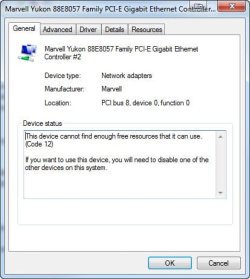
I decided to update some of my drivers and decided to start with the Marvel Yukon Ethernet controller. I downloaded the latest version from Marvel which is 11.45.4.3. Prior to installing I uninstalled the old version, 11.45.1.3 and then installed the new. I rebooted and found that I did not have internet connection. I went to Device manager and found that Ethernet Controller #2 had the "!" on it so I did some checking. I went to Properties and found this message :see screenshot
I closed out of device manager and restarted the computer. After restart I had internet connection. I rechecked Device manager and everything was fine. Just to see what would happen I shut down the computer and restarted. After restart I did not have internet connection. I checked device manager and again I got the same message as in the screenshot. Again I just restarted the computer and again I had internet connection. Feeling that maybe the driver download was bad I decided to re install my old Ethernet Controller. Needless to say I had to uninstall the newer drivers and I re installed the old driver. I rebooted and again I had no internet connection and again I got the same message as in the screen shot and again if I just restart the computer I can get internet connection but if I shutdown and start I have no internet connection. I tried disabling the second Ethernet controller but that don't work even if I just restart. I uninstalled Ethernet #2 but windows just re installs it and I'm guessing I need both controllers or they wouldn't be there. So now I'm at a loss. I haven't tried just installing the newer drivers without uninstalling the old ones which I will try after leaving here but if that don't work can somebody give me a hand here? What am I doing wrong or what am I missing?
I closed out of device manager and restarted the computer. After restart I had internet connection. I rechecked Device manager and everything was fine. Just to see what would happen I shut down the computer and restarted. After restart I did not have internet connection. I checked device manager and again I got the same message as in the screenshot. Again I just restarted the computer and again I had internet connection. Feeling that maybe the driver download was bad I decided to re install my old Ethernet Controller. Needless to say I had to uninstall the newer drivers and I re installed the old driver. I rebooted and again I had no internet connection and again I got the same message as in the screen shot and again if I just restart the computer I can get internet connection but if I shutdown and start I have no internet connection. I tried disabling the second Ethernet controller but that don't work even if I just restart. I uninstalled Ethernet #2 but windows just re installs it and I'm guessing I need both controllers or they wouldn't be there. So now I'm at a loss. I haven't tried just installing the newer drivers without uninstalling the old ones which I will try after leaving here but if that don't work can somebody give me a hand here? What am I doing wrong or what am I missing?
Attachments
My Computer
At a glance
Windows 7 home premium 64bitIntel I7 86016 gig Corsair VengenceEVGA GTX 560 TI
- Computer Manufacturer/Model Number
- Intel I7 860
- OS
- Windows 7 home premium 64bit
- CPU
- Intel I7 860
- Motherboard
- EVGA P55 200 Classified 3x SLI
- Memory
- 16 gig Corsair Vengence
- Graphics Card(s)
- EVGA GTX 560 TI
- Sound Card
- Soundblaster X-FI
- Monitor(s) Displays
- Asus, Sony Bravia
- Hard Drives
- C; WD Velociraptor 300gig
D; Seagate, 500gig
E; WD 500gig
- PSU
- Kingwin ABT-1000MA1S
- Case
- Thermaltake Armor+
- Cooling
- Noctua NH-D14
- Keyboard
- MS 4000
- Mouse
- Logitech Trackman Wheel
- Internet Speed
- Insight BroadBand 20.0


