Solved Event 1096, GroupPolicy Access is denied

Mark Foley

New member
Local time
10:08 AM
Messages
3
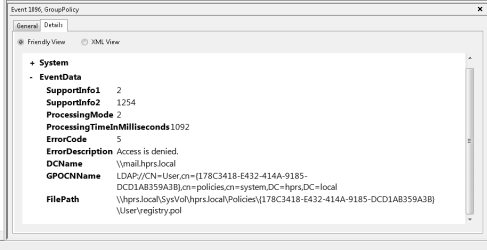
I've been struggling for months to solve this problem; no joy from any other forums yet. I have and Active Directory domain with several Windows 7 workstations as domain members. The AD/DC controller is Samba4. This has been working well for about 4 years. Sometime during the past year something happened and now a domain user logging onto another workstation for the first time no longer gets his/her redirected desktop. I get an event 1085 warning, "GroupPolicy. Windows failed to apply the folder Redirection settings." The problem that needs to be solved is apparently an event 1096 GroupPolicy error, access denied on the file \\hprs.local\SysVol\hprs.local\Policies\{178C3418-E432-414A-9185-DCD1AB359A3B]\User\registry.pol. See attached image. I've checked and adjusted sysvol folder and share permissions to no avail. I'm quite out of ideas. I hope someone on this forum can help.
 

Attachments

  • Event1096.png
    Event1096.png
    9.7 KB · Views: 0

My Computer My Computer

At a glance

Windows 7 Professional 64 bitmostly amd FX-83508Gmostly Nvidia GT710
Computer type
PC/Desktop
Computer Manufacturer/Model Number
office of several computers, all custom builds
OS
Windows 7 Professional 64 bit
CPU
mostly amd FX-8350
Motherboard
mostly M5A78L-M PLUS/USB3
Memory
8G
Graphics Card(s)
mostly Nvidia GT710
Antivirus
Norton
Browser
Firefox
Hi Mark Foley, welcome to Seven Forums,

I have not had any dealings with Group Policy and I know that this will probably not make a difference but the DCName has mail in it > mail.hprs.local.

I also saw that this post had had over 1,000 views so I thought I would try and help!

It just stuck out to me so I thought I would mention it!
 

My Computer My Computer

At a glance

Win 7 HP SP1 64-bit Vista HB SP2 32-bit Linux...Intel(R) Pentium(R) CPU P6200 @ 2.13GHz4.00 GBIntel(R) Graphics Media Accelerator HD
Computer type
Laptop
Computer Manufacturer/Model Number
Fujitsu LIFEBOOK
OS
Win 7 HP SP1 64-bit Vista HB SP2 32-bit Linux Mint 18.3
CPU
Intel(R) Pentium(R) CPU P6200 @ 2.13GHz
Motherboard
FUJITSU FJNBB06
Memory
4.00 GB
Graphics Card(s)
Intel(R) Graphics Media Accelerator HD
Sound Card
[1] Realtek High Definition Audio [2] Intel(R) Display Audio
Screen Resolution
1366 x 768 x 32 bits (4294967296 colors) @ 59 Hz
Hard Drives
TOSHIBA MK5076GSX
Antivirus
AVG FREE
Thanks for your response Paul. The domain is hprs.local and the AD/DC host is mail, so mail.hprs.local is the FDQN of that host. Its name is 'mail' because it is also the mail server. I don't think that's a problem.
 

My Computer My Computer

At a glance

Windows 7 Professional 64 bitmostly amd FX-83508Gmostly Nvidia GT710
Computer type
PC/Desktop
Computer Manufacturer/Model Number
office of several computers, all custom builds
OS
Windows 7 Professional 64 bit
CPU
mostly amd FX-8350
Motherboard
mostly M5A78L-M PLUS/USB3
Memory
8G
Graphics Card(s)
mostly Nvidia GT710
Antivirus
Norton
Browser
Firefox

My Computer My Computer

At a glance

Win 7 HP SP1 64-bit Vista HB SP2 32-bit Linux...Intel(R) Pentium(R) CPU P6200 @ 2.13GHz4.00 GBIntel(R) Graphics Media Accelerator HD
Computer type
Laptop
Computer Manufacturer/Model Number
Fujitsu LIFEBOOK
OS
Win 7 HP SP1 64-bit Vista HB SP2 32-bit Linux Mint 18.3
CPU
Intel(R) Pentium(R) CPU P6200 @ 2.13GHz
Motherboard
FUJITSU FJNBB06
Memory
4.00 GB
Graphics Card(s)
Intel(R) Graphics Media Accelerator HD
Sound Card
[1] Realtek High Definition Audio [2] Intel(R) Display Audio
Screen Resolution
1366 x 768 x 32 bits (4294967296 colors) @ 59 Hz
Hard Drives
TOSHIBA MK5076GSX
Antivirus
AVG FREE
OK! I have a solution thanks to the brilliant folk at the samba maillist.

As the domain administrator, open a Windows Explorer (Computer) window and enter \\addchost.domain in the address bar. In my case the location is \\mail.hprs.local. Then, right click on sysvol > Properties > Security. Make sure all settings are as follows:
Code:
sysvol FOLDER Permissions:
 
CREATOR OWNER 
special
(Advanced) Subfolders and files only
Full Control - everything is checked)

CREATOR GROUP Subfolders and files only
special
(Advanced) Subfolders and files only
Traverse folder / execute file
List folder / read data
Read attributes
Read extended attributes
Read permissions

Authenticated Users
Read & Execute
List folder contents
Read
(Advanced) This folder, Subfolders and files
Traverse folder / execute file
List folder / read data
Read attributes
Read extended attributes
Read permissions

SYSTEM
Full control                                                                                                                                
(advanced) This folder, subfolders and files
full control - everything is checked

Administrators (HPRS\Administrators)
Full control
(advanced) This folder, subfolders and files
full control - everything is checked
In addition to these settings, on the 'Permissions > Edit' dialog, I checked "Apply these permissions to objects and/or containers ...", and on the 'Permission' tab (after setting 'Edit') I checked "Replace all child object permissions with inheritable permissions from this object".

I don't know specifically if checking these options is necessary, but it didn't hurt.

Then, I set Share Permissions: In the Start > Search box I typed 'Computer Management' > Action > Connection to another computer, and entered my AD/DC host "mail". Then expand System Tools > Shared Folders > Shares > right-click sysvol > Properties > Share Permissions. Set as follows:
Code:
sysvol SHARE Permissions:
 
EVERYONE: READ
Authenticated Users: FULL CONTROL
HPRS\Administrators: FULL CONTROL
SYSTEM, FULL CONTROL
At this point I restarted Samba. Again, not sure I had to do that here, but it didn't hurt.

Next, as the domain administrator I ran Administrative Tools > Group Policy Management > expand Group Policy Objects. I clicked on each Policy in turn. Each one gave me a message to the effect that the permissions were inconsistent with the AD -- sorry, I didn't think at the time to get the exact message, but it was something like that. The dialog asked if I wanted to update the permissions and I answered OK to this for each policy. After exiting GPO Management, I restarted Samba4 again and rebooted one of the Windows 7 workstations (with the idea that it would refresh GPOs upon reboot).

Then I tried logging in as a user who I confirmed did NOT have an account on this workstation. Voila! She got her redirected desktop. Computer > Desktop > properties showed the location as \\mail.hprs.local\Users\userid\Desktop, not C:\Users\...! More importantly, checking the event log showed only this for Group Policy: "The Group Policy settings for the user were processed successfully".

I've spent MONTHS on this and finally, FIXED!

 

My Computer My Computer

At a glance

Windows 7 Professional 64 bitmostly amd FX-83508Gmostly Nvidia GT710
Computer type
PC/Desktop
Computer Manufacturer/Model Number
office of several computers, all custom builds
OS
Windows 7 Professional 64 bit
CPU
mostly amd FX-8350
Motherboard
mostly M5A78L-M PLUS/USB3
Memory
8G
Graphics Card(s)
mostly Nvidia GT710
Antivirus
Norton
Browser
Firefox
Hi Mark Foley, :thumbsup: I am glad you have resolved it and thanks for the feedback. I am sure it will help others.
 

My Computer My Computer

At a glance

Win 7 HP SP1 64-bit Vista HB SP2 32-bit Linux...Intel(R) Pentium(R) CPU P6200 @ 2.13GHz4.00 GBIntel(R) Graphics Media Accelerator HD
Computer type
Laptop
Computer Manufacturer/Model Number
Fujitsu LIFEBOOK
OS
Win 7 HP SP1 64-bit Vista HB SP2 32-bit Linux Mint 18.3
CPU
Intel(R) Pentium(R) CPU P6200 @ 2.13GHz
Motherboard
FUJITSU FJNBB06
Memory
4.00 GB
Graphics Card(s)
Intel(R) Graphics Media Accelerator HD
Sound Card
[1] Realtek High Definition Audio [2] Intel(R) Display Audio
Screen Resolution
1366 x 768 x 32 bits (4294967296 colors) @ 59 Hz
Hard Drives
TOSHIBA MK5076GSX
Antivirus
AVG FREE
Back
Top