
Solved Eventvwr reporting Webcache problems

jpaulm

New member
Local time
2:37 AM
Messages
52
This is probably a very dumb error, but I have spent weeks on this (intermittently) and can't find the cause! :banghead: I figure one of you experts can probably zero in pretty quickly...

This happens on my wife's machine, and actually most apps work great, except for WeatherEye, which either starts and then dies later, or doesn't start at all. Also services/Services (Local) just spins for ever, and so did Adwcleaner.

However, all 3 of these work fine in Safe Mode.

When Pelmorex's Weathereye is running, eventvwr Windows Log/Application shows a steady stream of errors, saying

taskhost (3816) WebCacheLocal: An attempt to open the file "C:\Users\Brenda\AppData\Local\Microsoft\Windows\WebCache\WebCacheV01.dat" for read only access failed with system error 32 (0x00000020): "The process cannot access the file because it is being used by another process. ". The open file operation will fail with error -1032 (0xfffffbf8).

If I terminate Weathereye, the messages change to

taskhost (2940) WebCacheLocal: Database recovery/restore failed with unexpected error -1032.

I did a comparison of the normal and Safe Mode Bootlogs, and noticed one driver in the differences called discache.sys - could this be involved?

The odd thing is there are quite a few references to this WebCacheV01.dat -1032 error on the Internet, but no descriptions of what to do about it!

Hoping one of you can help,

Best regards,

Paul M.
 

My Computer

Computer type
PC/Desktop
OS
Microsoft Windows 7 Home Premium 32-bit 7601 Multiprocessor Free Service Pack 1
CPU
Intel(R) Core(TM) i3-2120 CPU @ 3.30GHz
Motherboard
Gigabyte Technology Co., Ltd. H61M-S2PV
Memory
8.00 GB
Graphics Card(s)
Intel(R) HD Graphics
Sound Card
Realtek High Definition Audio
Screen Resolution
0 x 0 x 0 bits (0 colors) @ 0 Hz
Hard Drives
(1) KINGSTON SV200S364G ATA Device (2) Brother MFC-255CW USB Device (3) USB Mass Storage Device USB Device
184 views in 2 days and not one suggestion! That's strange! And I know the -1032 error involving WebCacheV01.dat is not all that uncommon...

Forgot to mention that neither BitDefender not MalwareBytes report any problems on the machine I am referring to.

Could someone even suggest something I could look at? TIA
 

My Computer

Computer type
PC/Desktop
OS
Microsoft Windows 7 Home Premium 32-bit 7601 Multiprocessor Free Service Pack 1
CPU
Intel(R) Core(TM) i3-2120 CPU @ 3.30GHz
Motherboard
Gigabyte Technology Co., Ltd. H61M-S2PV
Memory
8.00 GB
Graphics Card(s)
Intel(R) HD Graphics
Sound Card
Realtek High Definition Audio
Screen Resolution
0 x 0 x 0 bits (0 colors) @ 0 Hz
Hard Drives
(1) KINGSTON SV200S364G ATA Device (2) Brother MFC-255CW USB Device (3) USB Mass Storage Device USB Device
Looks like this problem is solved - Weathereye is now staying up, and appears to be working properly after several restarts!

The problem appears to have been a corrupted WebCacheV01.dat. This was given as one of the possible causes of the -1032 error, so I decided to try deleting it. As people have noted elsewhere this is difficult as it is locked by a taskhost - also Windows Explorer doesn't show it.

I did the following steps:

- download Windows SysInternals programs handle.exe and procexp.exe
- in command prompt running as administrator, execute handle webcachev01.dat
- this gives a PID
- run procexp.exe, right click on line showing PID, Kill Process
- now, back to command prompt, locate c:\users\{USERID}\AppData\Local\Microsoft\Windows
- dir command won't show WebCache, but you can still do del WebCache (answer Y)
- do a restart

WebCache was rebuilt (not sure whether by WeatherEye or by something else), and WeatherEye is now running properly. So I am going to close this thread - fingers crossed!
 

My Computer

Computer type
PC/Desktop
OS
Microsoft Windows 7 Home Premium 32-bit 7601 Multiprocessor Free Service Pack 1
CPU
Intel(R) Core(TM) i3-2120 CPU @ 3.30GHz
Motherboard
Gigabyte Technology Co., Ltd. H61M-S2PV
Memory
8.00 GB
Graphics Card(s)
Intel(R) HD Graphics
Sound Card
Realtek High Definition Audio
Screen Resolution
0 x 0 x 0 bits (0 colors) @ 0 Hz
Hard Drives
(1) KINGSTON SV200S364G ATA Device (2) Brother MFC-255CW USB Device (3) USB Mass Storage Device USB Device
Lasted 4 days, and then WebCacheV01.dat went bad again - does anyone have an idea how to find what's corrupting it...? :(

Thanks in advance.
 

My Computer

Computer type
PC/Desktop
OS
Microsoft Windows 7 Home Premium 32-bit 7601 Multiprocessor Free Service Pack 1
CPU
Intel(R) Core(TM) i3-2120 CPU @ 3.30GHz
Motherboard
Gigabyte Technology Co., Ltd. H61M-S2PV
Memory
8.00 GB
Graphics Card(s)
Intel(R) HD Graphics
Sound Card
Realtek High Definition Audio
Screen Resolution
0 x 0 x 0 bits (0 colors) @ 0 Hz
Hard Drives
(1) KINGSTON SV200S364G ATA Device (2) Brother MFC-255CW USB Device (3) USB Mass Storage Device USB Device
Remove WeatherEye and then do your scans.

I'm thinking you have not go a lot of response is because you have already discovered the problem program/App.
 

My Computer

Computer type
PC/Desktop
Computer Manufacturer/Model Number
Home made Desktop
OS
Windows 10 Pro. 64/ version 1709 Windows 7 Pro/64
CPU
Intel i7-6800K @ 4.3
Motherboard
ASUS X-99 Deluxe II
Memory
Corsair Platinum 16 gig @2400
Graphics Card(s)
EVGA GTX 1070 OC
Monitor(s) Displays
Asus 27" LED LCD/VE278Q
Screen Resolution
1920-1080 or 1280-720 HDMI
Hard Drives
INTEL SSD 730-240 Gb Sata 3.0/
PSU
EVGA Platium 1200W
Case
Phanteks Luxe Tempered Glass 8 fans/ one radiator
Cooling
XSPC/ Water Cooled CPU
Keyboard
Das 4 Professional
Mouse
Logitech M705/MX Anywhere 2-S
Internet Speed
100 mbits
Antivirus
Microsoft Security Essentials/ Malwarebytes Premium 3.0/ SAS
Browser
I.E. 11 default/Firefox/ ISP Time Warner Cable/Spectrum
Other Info
LG BluRay Burner/
Sound system-KLipsch-THX/
Icy Dock ssd Hot Swap bays.
Thanks, Layback Bear! I thought I had found the problem, but Weathereye only stayed up for 4 days. I deleted WebCache, and this time Weathereye only stayed up for a few minutes!

Now Handle is reporting that a dllhost has WebCacheV01 - described as "COM surrogate". Could this be the real cause of my problem - and if so, what can I do about it?

Additional info - FWIW: my machine, where Weathereye works fine (and always has) shows WebCacheV01.dat owned by (?) a taskhost associated with
- Wininet Cache task
- MSCtfMonitor task handler
- Microsoft Play Sound Service Class

This is also true for my wife's machine most of the time, however, when I ran Handle again just now, it now reports no matching handles found!

Does this make sense?

TIA
 

My Computer

Computer type
PC/Desktop
OS
Microsoft Windows 7 Home Premium 32-bit 7601 Multiprocessor Free Service Pack 1
CPU
Intel(R) Core(TM) i3-2120 CPU @ 3.30GHz
Motherboard
Gigabyte Technology Co., Ltd. H61M-S2PV
Memory
8.00 GB
Graphics Card(s)
Intel(R) HD Graphics
Sound Card
Realtek High Definition Audio
Screen Resolution
0 x 0 x 0 bits (0 colors) @ 0 Hz
Hard Drives
(1) KINGSTON SV200S364G ATA Device (2) Brother MFC-255CW USB Device (3) USB Mass Storage Device USB Device
I have no idea what Handle is.
Browsers cache information when you browse the internet. That is normal.
If you use your browser to go to Handle it will be stored in WebCache. When you reboot your computer your Cache should be cleared.

From your post #6

this time Weathereye only stayed up for a few minutes

If Weathereye stays for anytime at all it is still on your computer some where. You will have to hunt it down to remove it.

We need the system specs of the trouble computer. Use this tutorial to help do that.

By Brink:
http://www.sevenforums.com/tutorials/180324-system-info-see-your-system-specs.html


Include what power supply you have and what security programs you use.
 

My Computer

Computer type
PC/Desktop
Computer Manufacturer/Model Number
Home made Desktop
OS
Windows 10 Pro. 64/ version 1709 Windows 7 Pro/64
CPU
Intel i7-6800K @ 4.3
Motherboard
ASUS X-99 Deluxe II
Memory
Corsair Platinum 16 gig @2400
Graphics Card(s)
EVGA GTX 1070 OC
Monitor(s) Displays
Asus 27" LED LCD/VE278Q
Screen Resolution
1920-1080 or 1280-720 HDMI
Hard Drives
INTEL SSD 730-240 Gb Sata 3.0/
PSU
EVGA Platium 1200W
Case
Phanteks Luxe Tempered Glass 8 fans/ one radiator
Cooling
XSPC/ Water Cooled CPU
Keyboard
Das 4 Professional
Mouse
Logitech M705/MX Anywhere 2-S
Internet Speed
100 mbits
Antivirus
Microsoft Security Essentials/ Malwarebytes Premium 3.0/ SAS
Browser
I.E. 11 default/Firefox/ ISP Time Warner Cable/Spectrum
Other Info
LG BluRay Burner/
Sound system-KLipsch-THX/
Icy Dock ssd Hot Swap bays.
Hi Layback Bear, thanks for your quick answer. However there seems to be some confusion - I just wanted to do a reset:

- Weathereye is a weather program which my wife and I both use for finding out temperature, upcoming weather, etc. It works fine for me, but dies periodically on my wife's machine

- when it dies, a couple of other things just spin forever: services (local), ADWCleaner

- all these problems seem to be associated with a corrupted WebCacheV01.dat file

- when I erase the file, things start running OK again

- I have BitDefender running all the time

- I run MalwareBytes periodically

- HitmanPro found something called Roboot.exe, which seems to be PUP - I deleted it

- Handle is part of Mark Russinovich's SysInternals tool, and lets you find out the PID associated with a particular file - when everything is running fine, it reports the WebCacheV01.dat associated with a taskhost, which has Multimedia System Sounds Server, MsCtfMonitor and WinInet - could any of these be causing problems? If so, can they be fixed?

- The COM surrogate I was asking about is labelled Wininet Cache Server, so I assume that's probably OK...?

So I guess my question is: how do I trap something that may be corrupting my WebcacheV01.dat file - assuming that is not Weathereye itself, as I have downloaded multiple copies over the last few months, and it works great on my own machine...

TIA Layback Bear - hope you can help me... :confused:
 

My Computer

Computer type
PC/Desktop
OS
Microsoft Windows 7 Home Premium 32-bit 7601 Multiprocessor Free Service Pack 1
CPU
Intel(R) Core(TM) i3-2120 CPU @ 3.30GHz
Motherboard
Gigabyte Technology Co., Ltd. H61M-S2PV
Memory
8.00 GB
Graphics Card(s)
Intel(R) HD Graphics
Sound Card
Realtek High Definition Audio
Screen Resolution
0 x 0 x 0 bits (0 colors) @ 0 Hz
Hard Drives
(1) KINGSTON SV200S364G ATA Device (2) Brother MFC-255CW USB Device (3) USB Mass Storage Device USB Device
Reading this for Microsoft might help.

Caching (Windows)

I have never run across this kind of problem before so what I'm doing is researching just like you have been doing to see if I can find something to give you guidance.

Could you list all the cleanup, tuneup and registry programs you use on this system.
Do you use Advanced System Care; many people do.

I requested you System Specs and I don't see them.
 

My Computer

Computer type
PC/Desktop
Computer Manufacturer/Model Number
Home made Desktop
OS
Windows 10 Pro. 64/ version 1709 Windows 7 Pro/64
CPU
Intel i7-6800K @ 4.3
Motherboard
ASUS X-99 Deluxe II
Memory
Corsair Platinum 16 gig @2400
Graphics Card(s)
EVGA GTX 1070 OC
Monitor(s) Displays
Asus 27" LED LCD/VE278Q
Screen Resolution
1920-1080 or 1280-720 HDMI
Hard Drives
INTEL SSD 730-240 Gb Sata 3.0/
PSU
EVGA Platium 1200W
Case
Phanteks Luxe Tempered Glass 8 fans/ one radiator
Cooling
XSPC/ Water Cooled CPU
Keyboard
Das 4 Professional
Mouse
Logitech M705/MX Anywhere 2-S
Internet Speed
100 mbits
Antivirus
Microsoft Security Essentials/ Malwarebytes Premium 3.0/ SAS
Browser
I.E. 11 default/Firefox/ ISP Time Warner Cable/Spectrum
Other Info
LG BluRay Burner/
Sound system-KLipsch-THX/
Icy Dock ssd Hot Swap bays.
Some information

Well I can't solve your problem but here's some reading material:

Forensic analysis of the ESE database in Internet Explorer 10 | Forensic Focus - Articles - covers webcachev01.dat

Also try reading the full thread (all seven pages) here:

http://www.sevenforums.com/browsers...-dat-vs-index-dat-files-how-clear-delete.html

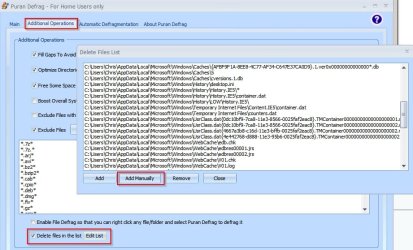
Based on the information in the first link in this post I regularly delete the following on boot:

Code:
%systemdrive%\Users\%user%\AppData\Local\Microsoft\FeedsCache\
%systemdrive%\Users\%user%\AppData\Roaming\Microsoft\Windows\iecompatuaCache\
%systemdrive%\Users\%user%\AppData\Roaming\Microsoft\Windows\IETldCache\
C:\Users\Chris\AppData\Local\Microsoft\Feeds Cache\
C:\Users\Chris\AppData\Local\Microsoft\Feeds Cache\container.dat
C:\Users\Chris\AppData\Local\Microsoft\IECompatCache\
C:\Users\Chris\AppData\Local\Microsoft\IETldcache\
C:\Users\Chris\AppData\Local\Microsoft\Inernet Explorer\UserData\LOW\
C:\Users\Chris\AppData\Local\Microsoft\Internet Explorer\DOMStore\container.dat
C:\Users\Chris\AppData\Local\Microsoft\Windows\AppCache\3B8P4TL9\container.dat
C:\Users\Chris\AppData\Local\Microsoft\Windows\AppCache\container.dat
C:\Users\Chris\AppData\Local\Microsoft\Windows\Caches\{AFBF9F1A-8EE8-4C77-AF34-C647E37CA0D9}.1.ver0x00000000000000*.db
C:\Users\Chris\AppData\Local\Microsoft\Windows\Caches\5
C:\Users\Chris\AppData\Local\Microsoft\Windows\Caches\cversions.1.db
C:\Users\Chris\AppData\Local\Microsoft\Windows\History\desktop.ini
C:\Users\Chris\AppData\Local\Microsoft\Windows\History\History.IE5\*
C:\Users\Chris\AppData\Local\Microsoft\Windows\History\History.IE5\container.dat
C:\Users\Chris\AppData\Local\Microsoft\Windows\History\LOW\History.IE5\
C:\Users\Chris\AppData\Local\Microsoft\Windows\Temporary Internet Files\Content.IE5\container.dat
C:\Users\Chris\AppData\Local\Microsoft\Windows\Temporary Internet Files\counters.dat
C:\Users\Chris\AppData\Local\Microsoft\Windows\UsrClass.dat{0dc10bf9-7ca8-11e3-8566-0025faf2eac8}.TMContainer00000000000000000001.regtrans-ms
C:\Users\Chris\AppData\Local\Microsoft\Windows\UsrClass.dat{0dc10bf9-7ca8-11e3-8566-0025faf2eac8}.TMContainer00000000000000000002.regtrans-ms
C:\Users\Chris\AppData\Local\Microsoft\Windows\WebCache\edb.chk
C:\Users\Chris\AppData\Local\Microsoft\Windows\WebCache\edbres00001.jrs
C:\Users\Chris\AppData\Local\Microsoft\Windows\WebCache\edbres00002.jrs
C:\Users\Chris\AppData\Local\Microsoft\Windows\WebCache\V01.chk
C:\Users\Chris\AppData\Local\Microsoft\Windows\WebCache\V01.log
C:\Users\Chris\AppData\Local\Microsoft\Windows\WebCache\V01res00001.jrs
C:\Users\Chris\AppData\Local\Microsoft\Windows\WebCache\V01res00002.jrs
C:\Users\Chris\AppData\Local\Microsoft\Windows\WebCache\WebCacheV01.dat
C:\Users\Chris\AppData\Roaming\Microsoft\Windows\IECompatCache
C:\Users\Chris\Cookies\container.dat

Now I'm not suggesting that it's a good idea to delete the above - I just delete these entries for privacy reasons. As far as I can work out you can delete Webcachev01.dat as much as you like but it will get rebuilt because it pulls data from many sources and I can't be very specific about those but deleting the above list does seem to prevent webcachev01.dat from getting fully rebuilt.

What I think I'd do if I had the same problem as you:

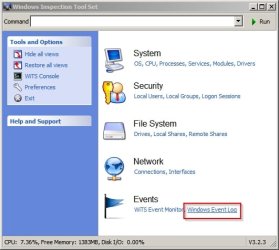
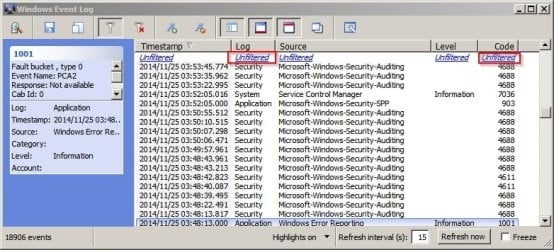
Run WITS (Windows Inspection Tool Set) and use it to filter Event Log by both Application and Error code 1032 to see if there's any pattern or if it might be possible to predict when the error will occur.

Click Event Log:

Windows Inspection Tool Set.jpg

Then filter by Log then by Code. Click "Unfiltered" underneath "Log" then type * *Application*

Then click "Unfiltered" underneath "Code" and type * *1032*

Windows Event Log.jpg

It could take a while to apply the filters depending upon the log size.

If you can spot a pattern and predict when the problem is likely to occur you could try running a ProcMon capture and check the output to see if you can spot the problem.

How to capture a Process Monitor trace

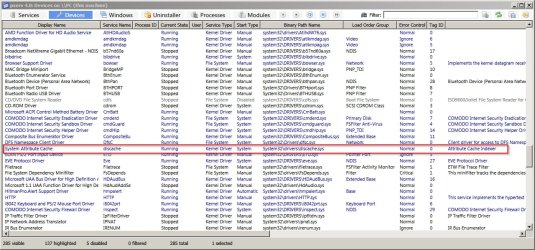
As for your question regarding discache.sys - it's running on my machine and research shows that it's a critical system file so it shouldn't be disabled.

pserv 4.0.jpg
 

My Computer

Computer type
Laptop
Computer Manufacturer/Model Number
ASUS
OS
Microsoft Windows 7 Home Premium 64-bit 7601 Multiprocessor Free Service Pack 1
CPU
AMD C-60 APU with Radeon(tm) HD Graphics
Motherboard
ASUSTeK COMPUTER INC. X501U
Memory
4.00 GB
Graphics Card(s)
AMD Radeon HD 6290 Graphics
Sound Card
(1) AMD High Definition Audio Device (2) Realtek High Defi
Screen Resolution
1366 x 768 x 32 bits (4294967296 colors) @ 60 Hz
Hard Drives
Hitachi HTS545050A7E380 SATA Disk Device
Antivirus
Comodo CIS & FW, SecureAplus App Whitelisting, Threatfire
Browser
Cyberfox 64bit, Opera 64bit, Airfox
Other Info
Spy-The-Spy, HitmanPro.Alert, Norton Connect Safe, MJRegWatcher, BitDefender TrafficLight, Voodoo Shield, Zemana AntiMalware
Hi Layback Bear and Callender,

Thanks for the feedback! Lots of good reading there - I'll get onto it!

I've filled out the System Info for my wife's machine (I think) - I had to use my own ID as I am the person registered on 7Forums - hope this doesn't cause confusion! I also had to use Safe Mode as in normal mode the WebCache problem killed IE (at least something did!).

I'll look into Advance System Care and the other tools - thanks!

Callender, when you talked about deleting those files, I assume you run a command to delete them at startup...? WebCacheV01 is hard to delete because it is held by the taskhost I mentioned - but not while in Safe Mode... (?)

I have bootlogs both in normal (i.e. broken) mode and in Safe Mode - would these be any use to either of you? Did I mention in my recap that everything runs fine in Safe Mode?

TIA I'll get reading!

Regards,

Paul M.
 

My Computer

Computer type
PC/Desktop
OS
Microsoft Windows 7 Home Premium 32-bit 7601 Multiprocessor Free Service Pack 1
CPU
Intel(R) Core(TM) i3-2120 CPU @ 3.30GHz
Motherboard
Gigabyte Technology Co., Ltd. H61M-S2PV
Memory
8.00 GB
Graphics Card(s)
Intel(R) HD Graphics
Sound Card
Realtek High Definition Audio
Screen Resolution
0 x 0 x 0 bits (0 colors) @ 0 Hz
Hard Drives
(1) KINGSTON SV200S364G ATA Device (2) Brother MFC-255CW USB Device (3) USB Mass Storage Device USB Device
Deleting Webcachev01.dat

Well boot logs won't be of any use to me as I've never needed to view them so I have zero experience with those. What is Weathereye? Is it a gadget? If so see this thread:

http://www.sevenforums.com/browsers-mail/353562-ie11-gadgets.html

Again I can't help much with gadgets. Personally I keep them disabled as per the advice from Microsoft.

In answer to your question on deleting files on boot - I use Puran Defrag and it's possible to create a list of files to delete on boot.

Puran.jpg

There are other utilities that could do the same thing. If you read that thread on deleting webcachev01.dat then I wouldn't be tempted to run Privazer without reading this first:

http://www.sevenforums.com/software/316912-privazer-pc-cleaner.html

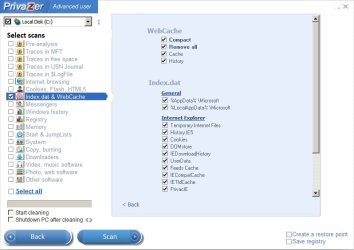
Even then I'd suggest that you might like to run it with only the following options checked:

webcache.jpg

Anyway deleting it doesn't appear to provide the solution to your problem but I was thinking that if you delete it you should be aware that it gets recreated.
 
Last edited:

My Computer

Computer type
Laptop
Computer Manufacturer/Model Number
ASUS
OS
Microsoft Windows 7 Home Premium 64-bit 7601 Multiprocessor Free Service Pack 1
CPU
AMD C-60 APU with Radeon(tm) HD Graphics
Motherboard
ASUSTeK COMPUTER INC. X501U
Memory
4.00 GB
Graphics Card(s)
AMD Radeon HD 6290 Graphics
Sound Card
(1) AMD High Definition Audio Device (2) Realtek High Defi
Screen Resolution
1366 x 768 x 32 bits (4294967296 colors) @ 60 Hz
Hard Drives
Hitachi HTS545050A7E380 SATA Disk Device
Antivirus
Comodo CIS & FW, SecureAplus App Whitelisting, Threatfire
Browser
Cyberfox 64bit, Opera 64bit, Airfox
Other Info
Spy-The-Spy, HitmanPro.Alert, Norton Connect Safe, MJRegWatcher, BitDefender TrafficLight, Voodoo Shield, Zemana AntiMalware
Hi Callender, thanks for the feedback!

Weathereye is a normal application from Pelmorex, as far as I know - I don't think it has anything to do with gadgets.

I suggested bootlogs because everything works great in Safe Mode, so I thought if I ran a Windiff comparing the normal bootlog and the Safe Mode bootlog, I could send you the list of differences, and the culprit might be one of the drivers that are only loaded in Normal Mode... and then maybe you (or someone) might be able to figure out if any of them look suspicious...?

I am also running ProcMon, and today I saw a Sharing Violation (a svchost, now gone) and a buffer overflow (another svchost, with 9 programs associated with it). Weathereye is still up, so I guess these didn't hurt - still, I'm hoping to catch something in the act!

I'll also look at WITS.

Thanks,

Paul
 

My Computer

Computer type
PC/Desktop
OS
Microsoft Windows 7 Home Premium 32-bit 7601 Multiprocessor Free Service Pack 1
CPU
Intel(R) Core(TM) i3-2120 CPU @ 3.30GHz
Motherboard
Gigabyte Technology Co., Ltd. H61M-S2PV
Memory
8.00 GB
Graphics Card(s)
Intel(R) HD Graphics
Sound Card
Realtek High Definition Audio
Screen Resolution
0 x 0 x 0 bits (0 colors) @ 0 Hz
Hard Drives
(1) KINGSTON SV200S364G ATA Device (2) Brother MFC-255CW USB Device (3) USB Mass Storage Device USB Device
Weathereye vs Webcachev01.dat

Thanks for the info. I downloaded the Weathereye app and have been running it for most of the day. I haven't been able to reproduce your issue.

Here's what I found.

It doesn't install any drivers or services. It does use a lot of resources. CPU usage was sometimes more than 25%

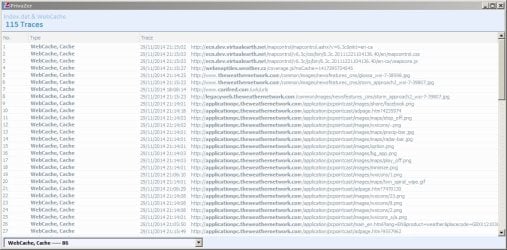
Cleared webcachev01.dat before running the app.

Webcache Cleaned.jpg

Ran Weathereye and saw the following 115 entries created. Only one entry was a non Weathereye entry!

Ran a ProcMon capture and saw multiple instances of taskhost interspersed with Weathereye.exe - this would appear to be normal.

See: Delete WebCacheV01.dat, WebCacheV01.dat Viewer & Deleter | Wilders Security Forums
 

Attachments

  • WeatherEye.jpg
    WeatherEye.jpg
    105.5 KB · Views: 1

My Computer

Computer type
Laptop
Computer Manufacturer/Model Number
ASUS
OS
Microsoft Windows 7 Home Premium 64-bit 7601 Multiprocessor Free Service Pack 1
CPU
AMD C-60 APU with Radeon(tm) HD Graphics
Motherboard
ASUSTeK COMPUTER INC. X501U
Memory
4.00 GB
Graphics Card(s)
AMD Radeon HD 6290 Graphics
Sound Card
(1) AMD High Definition Audio Device (2) Realtek High Defi
Screen Resolution
1366 x 768 x 32 bits (4294967296 colors) @ 60 Hz
Hard Drives
Hitachi HTS545050A7E380 SATA Disk Device
Antivirus
Comodo CIS & FW, SecureAplus App Whitelisting, Threatfire
Browser
Cyberfox 64bit, Opera 64bit, Airfox
Other Info
Spy-The-Spy, HitmanPro.Alert, Norton Connect Safe, MJRegWatcher, BitDefender TrafficLight, Voodoo Shield, Zemana AntiMalware
Thanks so much, Callender! I'll add that to my collection of tools! Since I killed roboot.exe, Weathereye has been working, but it ran for 4 days last time! I'll keep running procmon...

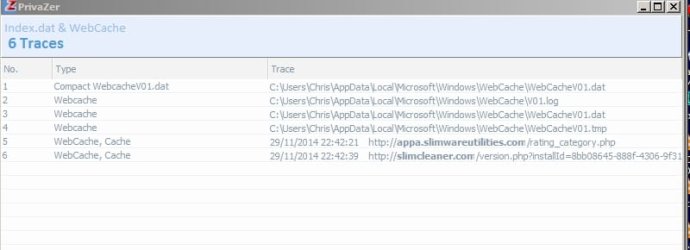
I get a weird error on my wife's machine where it doesn't let her update a Works database, saying some other programs is holding it (but SysInternals Handle doesn't show anything) - and I noticed a reference to that file in my Privazer scan. Could the two problems be related at all?

For now, fingers crossed! And thanks for all your help!
 

My Computer

Computer type
PC/Desktop
OS
Microsoft Windows 7 Home Premium 32-bit 7601 Multiprocessor Free Service Pack 1
CPU
Intel(R) Core(TM) i3-2120 CPU @ 3.30GHz
Motherboard
Gigabyte Technology Co., Ltd. H61M-S2PV
Memory
8.00 GB
Graphics Card(s)
Intel(R) HD Graphics
Sound Card
Realtek High Definition Audio
Screen Resolution
0 x 0 x 0 bits (0 colors) @ 0 Hz
Hard Drives
(1) KINGSTON SV200S364G ATA Device (2) Brother MFC-255CW USB Device (3) USB Mass Storage Device USB Device
Locked file or folder

Thanks so much, Callender! I'll add that to my collection of tools! Since I killed roboot.exe, Weathereye has been working, but it ran for 4 days last time! I'll keep running procmon...

I get a weird error on my wife's machine where it doesn't let her update a Works database, saying some other programs is holding it (but SysInternals Handle doesn't show anything) - and I noticed a reference to that file in my Privazer scan. Could the two problems be related at all?

For now, fingers crossed! And thanks for all your help!

Privazer is only concerned with privacy and it's not wise to scan and then select all cleaning options but you can use it to clear/ cleanup webcachev01.dat.

I can't see a connection between the two problems and I'm not familiar with SysInternals Handle preferring instead to use Process Explorer to find and close handles. Another very useful program that can scan all files. folders or just the ones you specify for locks is

File Governor

Maybe see if that helps.
 

My Computer

Computer type
Laptop
Computer Manufacturer/Model Number
ASUS
OS
Microsoft Windows 7 Home Premium 64-bit 7601 Multiprocessor Free Service Pack 1
CPU
AMD C-60 APU with Radeon(tm) HD Graphics
Motherboard
ASUSTeK COMPUTER INC. X501U
Memory
4.00 GB
Graphics Card(s)
AMD Radeon HD 6290 Graphics
Sound Card
(1) AMD High Definition Audio Device (2) Realtek High Defi
Screen Resolution
1366 x 768 x 32 bits (4294967296 colors) @ 60 Hz
Hard Drives
Hitachi HTS545050A7E380 SATA Disk Device
Antivirus
Comodo CIS & FW, SecureAplus App Whitelisting, Threatfire
Browser
Cyberfox 64bit, Opera 64bit, Airfox
Other Info
Spy-The-Spy, HitmanPro.Alert, Norton Connect Safe, MJRegWatcher, BitDefender TrafficLight, Voodoo Shield, Zemana AntiMalware
File Governor sounds like just what I need! I'll add it to the list of useful tools you have told me about. Thanks so much!

Best regards,

Paul
 

My Computer

Computer type
PC/Desktop
OS
Microsoft Windows 7 Home Premium 32-bit 7601 Multiprocessor Free Service Pack 1
CPU
Intel(R) Core(TM) i3-2120 CPU @ 3.30GHz
Motherboard
Gigabyte Technology Co., Ltd. H61M-S2PV
Memory
8.00 GB
Graphics Card(s)
Intel(R) HD Graphics
Sound Card
Realtek High Definition Audio
Screen Resolution
0 x 0 x 0 bits (0 colors) @ 0 Hz
Hard Drives
(1) KINGSTON SV200S364G ATA Device (2) Brother MFC-255CW USB Device (3) USB Mass Storage Device USB Device
Your system spec show:

Computer type PC/Desktop
OS Microsoft Windows 7 Home Premium 32-bit 7601 Multiprocessor Free Service Pack 1
CPU Intel(R) Core(TM) i3-2120 CPU @ 3.30GHz
Motherboard Gigabyte Technology Co., Ltd. H61M-S2PV
Memory 8.00 GB
Graphics Card Intel(R) HD Graphics

You will need a Windows 7/64 bit to use 8 gigs of ram.
Windows 7/32 is only able to use 4 gigs of ram.

I highly recommend not using Advanced System Care or any other program by
IObit. If you have ASC on that computer or ever have I would do a Clean Install with Windows 7/64.
If it was my system that is what I would do.
That way you would have a clean (no IObits any thing) install of Windows 7/64 where you could use your 8 gigs of ram.

IObit programs can destroy more computers systems than a D9 Caterpi9llar.
 

My Computer

Computer type
PC/Desktop
Computer Manufacturer/Model Number
Home made Desktop
OS
Windows 10 Pro. 64/ version 1709 Windows 7 Pro/64
CPU
Intel i7-6800K @ 4.3
Motherboard
ASUS X-99 Deluxe II
Memory
Corsair Platinum 16 gig @2400
Graphics Card(s)
EVGA GTX 1070 OC
Monitor(s) Displays
Asus 27" LED LCD/VE278Q
Screen Resolution
1920-1080 or 1280-720 HDMI
Hard Drives
INTEL SSD 730-240 Gb Sata 3.0/
PSU
EVGA Platium 1200W
Case
Phanteks Luxe Tempered Glass 8 fans/ one radiator
Cooling
XSPC/ Water Cooled CPU
Keyboard
Das 4 Professional
Mouse
Logitech M705/MX Anywhere 2-S
Internet Speed
100 mbits
Antivirus
Microsoft Security Essentials/ Malwarebytes Premium 3.0/ SAS
Browser
I.E. 11 default/Firefox/ ISP Time Warner Cable/Spectrum
Other Info
LG BluRay Burner/
Sound system-KLipsch-THX/
Icy Dock ssd Hot Swap bays.
Hi Layback Bear, thanks for the tip about ASC! I didn't like it because it seemed too "pushy", so I uninstalled it without letting it do any cleaning, and I don't see any signs of it any more... Hopefully it didn't change anything... (?)

Didn't know that Win 7/32 can't handle 8 Gb - that's the way my wife's machine was sold to us!

If I want to go to Win7/64, will I have to back up all my wife's data? Or is there a less painful way to do it?

Thanks,

Paul
 

My Computer

Computer type
PC/Desktop
OS
Microsoft Windows 7 Home Premium 32-bit 7601 Multiprocessor Free Service Pack 1
CPU
Intel(R) Core(TM) i3-2120 CPU @ 3.30GHz
Motherboard
Gigabyte Technology Co., Ltd. H61M-S2PV
Memory
8.00 GB
Graphics Card(s)
Intel(R) HD Graphics
Sound Card
Realtek High Definition Audio
Screen Resolution
0 x 0 x 0 bits (0 colors) @ 0 Hz
Hard Drives
(1) KINGSTON SV200S364G ATA Device (2) Brother MFC-255CW USB Device (3) USB Mass Storage Device USB Device
Backing up is ones own choice. You will have to ask your wife what she does and does not want to save.
 

My Computer

Computer type
PC/Desktop
Computer Manufacturer/Model Number
Home made Desktop
OS
Windows 10 Pro. 64/ version 1709 Windows 7 Pro/64
CPU
Intel i7-6800K @ 4.3
Motherboard
ASUS X-99 Deluxe II
Memory
Corsair Platinum 16 gig @2400
Graphics Card(s)
EVGA GTX 1070 OC
Monitor(s) Displays
Asus 27" LED LCD/VE278Q
Screen Resolution
1920-1080 or 1280-720 HDMI
Hard Drives
INTEL SSD 730-240 Gb Sata 3.0/
PSU
EVGA Platium 1200W
Case
Phanteks Luxe Tempered Glass 8 fans/ one radiator
Cooling
XSPC/ Water Cooled CPU
Keyboard
Das 4 Professional
Mouse
Logitech M705/MX Anywhere 2-S
Internet Speed
100 mbits
Antivirus
Microsoft Security Essentials/ Malwarebytes Premium 3.0/ SAS
Browser
I.E. 11 default/Firefox/ ISP Time Warner Cable/Spectrum
Other Info
LG BluRay Burner/
Sound system-KLipsch-THX/
Icy Dock ssd Hot Swap bays.
Back
Top