every when will i use Ccleaner

ningpra

Banned
Local time
8:45 AM
Messages
93
hihi
every when will i do CCleaner
and defrags every day every week or every i install new program?
or any recommendation regarding in cleaning registry^^
 

My Computer

Computer Manufacturer/Model Number
Acer
OS
Microsoft Windows 7 Home Premium 64-bit 7601 Multiprocessor Free Service Pack 1
CPU
Intel(R) Core(TM) i5-2450M CPU @ 2.50GHz
Motherboard
Acer JE50_HR
Memory
8.00 GB
Graphics Card(s)
Intel(R) HD Graphics Family
Sound Card
(1) Realtek High Definition Audio (2) Intel(R) Display Aud
Screen Resolution
1366 x 768 x 32 bits (4294967296 colors) @ 60 Hz
Hard Drives
(1) TOSHIBA MK1059GSMP (2) ZTE MMC Storage USB Device
hihi
every when will i do CCleaner
and defrags every day every week or every i install new program?
or any recommendation regarding in cleaning registry^^
If you use ccleaner, just use the cleaner. Do NOT use the registry cleaner. I would never trust anything that attempts to "fix" the registry. Also, Windows 7 defrags itself automatically, so there is no need for a 3rd party defragger.
 

My Computer

Computer type
PC/Desktop
Computer Manufacturer/Model Number
HP Pavilion P7-1010
OS
Windows 7 Professional x64 Service Pack 1
CPU
AMD Athlon X4 645
Motherboard
Foxxcon N-Alvorix RS880
Memory
6GB DDR3 1066
Graphics Card(s)
Sapphire Radeon HD 5670 512MB GDDR5
Sound Card
Realtek Integrated Audio
Monitor(s) Displays
HP 2011x
Screen Resolution
1600x900
Hard Drives
1. Crucial M4 128GB SSD
2. 1TB Seagate Barracuda 7200.12 RPM
3. 1TB Western Digital Caviar Green 5400RPM
PSU
Seasonic S12 II Bronze 380 Watt
Case
HP OEM
Cooling
Coolermaster Heatsink, AVC Case Fan
Keyboard
HP OEM- Made by Chicony
Mouse
HP OEM- Made by Logitech
Internet Speed
20MBit Down/4 Up
Antivirus
Microsoft Security Essentials
Browser
Internet Explorer 10
Also, Windows 7 defrags itself automatically

Could you please explain this and how it does it? Little skeptical on this as I run 4 ssd drives and do not want ANY defraging!

Ron Burnes
 

My Computer

Computer type
PC/Desktop
Computer Manufacturer/Model Number
Computer by ME
OS
Windows 7 Pro 64 bit & Windows Pro 64 bit
CPU
Intel i7-2600k 3.06 GHz
Motherboard
Gigabyte H67A-UD3H-B3
Memory
16 GB GSkill F3-10666CL7Q
Graphics Card(s)
EVGA GeForce GT 1030
Sound Card
onboard for now
Monitor(s) Displays
Dual AOC 2770VH1
Screen Resolution
1920x1080
Hard Drives
3 - Samsung 850 Pro Series 256 GB SSD
2 - Samsung 840 Pro Series 128 GB SSD
2 - Muskin Chronos Deluxe 120 GB SSD
PSU
Antec EarthWatts EA750
Case
Antec Sonata Elite
Cooling
120 mm Antec System Fan & 120 Antec rear exhaust fan
Keyboard
Keys U See
Mouse
Logitech Trackball T-BC21
Internet Speed
18 mbps down / 4 mbps up
Antivirus
MSE
Browser
Firefox
Other Info
Icy Dock 4 bay x 2.5 ssd to 5.25 exterior hot swap
4-LaCie Rugged USB3 Thunderbolt Series 120GB SSD
2-Mushkin Enhanced Ventura Pro 32GB USB 3.0 Flash Drive
3-Sandisk Extreme Pro 128gb Flash Drive
Netgear Nighthawk X6 AC 3200 R8000 - WZR-1 D1800H
US Robotics USr5610C modem
Also, Windows 7 defrags itself automatically

Could you please explain this and how it does it? Little skeptical on this as I run 4 ssd drives and do not want ANY defraging!

Ron Burnes
Go to start and type in disk defragmenter and hit enter. Then, clikc on configure schedule at the top and be sure to uncheck the box in the window that comes up that says "defragment on a schedule."
 

My Computer

Computer type
PC/Desktop
Computer Manufacturer/Model Number
HP Pavilion P7-1010
OS
Windows 7 Professional x64 Service Pack 1
CPU
AMD Athlon X4 645
Motherboard
Foxxcon N-Alvorix RS880
Memory
6GB DDR3 1066
Graphics Card(s)
Sapphire Radeon HD 5670 512MB GDDR5
Sound Card
Realtek Integrated Audio
Monitor(s) Displays
HP 2011x
Screen Resolution
1600x900
Hard Drives
1. Crucial M4 128GB SSD
2. 1TB Seagate Barracuda 7200.12 RPM
3. 1TB Western Digital Caviar Green 5400RPM
PSU
Seasonic S12 II Bronze 380 Watt
Case
HP OEM
Cooling
Coolermaster Heatsink, AVC Case Fan
Keyboard
HP OEM- Made by Chicony
Mouse
HP OEM- Made by Logitech
Internet Speed
20MBit Down/4 Up
Antivirus
Microsoft Security Essentials
Browser
Internet Explorer 10
Ok, that I was aware of. Just thought there was something else I had missed. Thanks
 

My Computer

Computer type
PC/Desktop
Computer Manufacturer/Model Number
Computer by ME
OS
Windows 7 Pro 64 bit & Windows Pro 64 bit
CPU
Intel i7-2600k 3.06 GHz
Motherboard
Gigabyte H67A-UD3H-B3
Memory
16 GB GSkill F3-10666CL7Q
Graphics Card(s)
EVGA GeForce GT 1030
Sound Card
onboard for now
Monitor(s) Displays
Dual AOC 2770VH1
Screen Resolution
1920x1080
Hard Drives
3 - Samsung 850 Pro Series 256 GB SSD
2 - Samsung 840 Pro Series 128 GB SSD
2 - Muskin Chronos Deluxe 120 GB SSD
PSU
Antec EarthWatts EA750
Case
Antec Sonata Elite
Cooling
120 mm Antec System Fan & 120 Antec rear exhaust fan
Keyboard
Keys U See
Mouse
Logitech Trackball T-BC21
Internet Speed
18 mbps down / 4 mbps up
Antivirus
MSE
Browser
Firefox
Other Info
Icy Dock 4 bay x 2.5 ssd to 5.25 exterior hot swap
4-LaCie Rugged USB3 Thunderbolt Series 120GB SSD
2-Mushkin Enhanced Ventura Pro 32GB USB 3.0 Flash Drive
3-Sandisk Extreme Pro 128gb Flash Drive
Netgear Nighthawk X6 AC 3200 R8000 - WZR-1 D1800H
US Robotics USr5610C modem
I'd use CCleaner Disk and Registry cleaners approximately monthly. If it regularly finds 1gb+ of crap to clean up then use it more often, otherwise you can use it less often.

There is nothing risky whatsoever about using CCleaner's Registry cleaner in spite of misinformation which is sometimes posted about it, apparently confusing it with the registry cleaner scamware which is sold on the internet that will in fact mess up Win7.
 
As is often the case when discussing CCleaners registry cleaner, I find myself agreeing with Greg that CCleaner is the only registry cleaner I can recommend universally. I have yet to see an instance where it has caused any problems. A Guy
 

My Computer

Computer type
PC/Desktop
OS
Windows 10 Home x64
CPU
INTEL Core i5-750 Quad-Core 3.37GHz
Motherboard
ASUS P7P55D
Memory
HyperX Fury Black Series 8GB (2 x 4GB) 1866Mhz
Graphics Card(s)
EVGA GeForce GTX 750 Superclocked 1GB 128-Bit GDDR5
Monitor(s) Displays
LG 32MA68HY 32" IPS
Screen Resolution
1920 x 1080
Hard Drives
Samsung 840 Evo 120GB, SEAGATE 500GB Barracuda® 7200.12, SATA 3 Gb/s, 7200 RPM, 16MB cache
PSU
ANTEC TruePower New TP-550, 80 PLUS, 550W
Case
ANTEC Three Hundred Illusion
Cooling
COOLER MASTER Hyper 212 Plus, 4 x 120mm 1 x 140mm Noctua's
Internet Speed
85 + Mbps
Antivirus
Avast
Browser
Vivaldi
+1 for what Greg said .. I've been using CCLeaner for HD & Reg stuff for years.
 

My Computer

Computer Manufacturer/Model Number
Asus V2-M3M8200 Barebones
OS
Windows 7 Professional x64
CPU
AMD Phenom II X4 925
Motherboard
V2-M3M8200 (basically a M3N78-VM)
Memory
4x1024mb Kingston HyperX DDR2-1066 KHX8500D2/1G
Graphics Card(s)
Asus GTS 450 OC
Sound Card
Creative Sound Blaster X-Fi Titanium PCIe
Monitor(s) Displays
Asus 24" LCD VH242H
Screen Resolution
1920x1080
Hard Drives
WDC WD5000AAKS
WDC WD5002ABYS
Seagate ST325062 USB-to-IDE
Fujitsu 160GB Pocket USB HDD
PSU
Antec Earthwatts EA-430D
Case
Asus V2-M3M8200
Cooling
120mm side fan & 80mm front & 92mm rear fan
Keyboard
Dell USB mini Multimedia
Mouse
Logitech MX518
Internet Speed
Comcast Xfinity
Other Info
Logitech Webcam Pro 9000
Accurian 40-1462 Speakers
little dot MKII Headphone Amp
I have been an over-the-top user of ccleaner for years, usually several times a day, to be sure to clear temp files, browser remnants, cookies etc, + use it regularly to clean registry, delete restore points, uninstall programs, edit start-up programs and more. Regarding the registry, option is there to backup any changes (which I do), never ever had to revert. Many different pc's, never missed a beat. imho, Ccleaner must be the most reliable and most useful utility of all times.
 

My Computer

Computer type
Laptop
Computer Manufacturer/Model Number
Dell \ Lenovo\ HP \ Toshiba
OS
W7, W8.1
Antivirus
MSE, Malwarebytes
Browser
FF
I would not run CCleaner that often, in fact I would not run it more than monthly and not even that often if it doesn't find a lot to clean up.

Those of us enamored of CCleaner or any tool should be realistic about whether and how often it's really needed in Win7. I don't see any difference if I don't run it for months sometimes. Where I see a difference is when I clean up a PC that has 3-10gb of schmutz and 100+ orphan reg keys to clean up.
 
over-the-top user of ccleaner for years, usually several times a day
I would not run CCleaner that often
Agree, this is not needed at all for everyone. My extreme use has to do with the nature of some work. Am also regularly using Ccleaner's Drive Wiper (and in addition: TFC).

Only point was to praise Ccleaner for being 100% reliable even after using it literally 1000's of times.
 

My Computer

Computer type
Laptop
Computer Manufacturer/Model Number
Dell \ Lenovo\ HP \ Toshiba
OS
W7, W8.1
Antivirus
MSE, Malwarebytes
Browser
FF
Also, Windows 7 defrags itself automatically

Could you please explain this and how it does it? Little skeptical on this as I run 4 ssd drives and do not want ANY defraging!

Ron Burnes

Hi Ron,

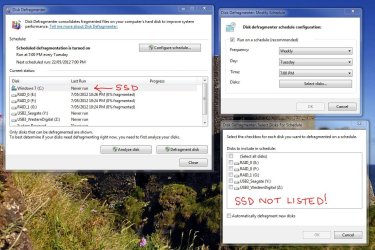
Just to clarify and ease your concern. Windows 7 is smart enough to realise that when a SSD is installed, it does not place it in the scheduled defragmentation list. See the attached image from my system.

Regards,
Golden
 

Attachments

  • Capture.JPG
    Capture.JPG
    149.3 KB · Views: 35

My Computer

Computer type
PC/Desktop
Computer Manufacturer/Model Number
Golden Mk. I.4
OS
Windows 10 Pro x64 ; Xubuntu x64
CPU
Intel i7 860 @ 2.80 GHz O/C'ed to 4.0GHz
Motherboard
Gigabyte P55A-UD3R Rev.1. Award BIOS F13
Memory
16GB Corsair Vengance DDR3 @ 661 MHz Dual Channel (9-9-9-24)
Graphics Card(s)
EVGA NVidia GTX 560 1024MB
Sound Card
Realtek Integrated
Monitor(s) Displays
Dual Samsung SyncMaster 2494HS
Screen Resolution
1920*1080 and 1920*1080
Hard Drives
1*Samsung 840 EVO 120GB SSD;
1*OCZ Vertex 2 60GB SSD;
2*Samsung F3 SpinPoint 1TB in RAID0;
1*Samsung F1 SpinPoint 1TB;
2*Western Digital 1TB External USB 3.0
1*Western Digital 500GB External USB 3.0
1*Seagate 500GB External USB 2.0
PSU
Thermaltake ToughPower QFan 750W
Case
Thermaltake Element S VK60001W2Z
Cooling
Corsair H60 Water Cooling, 2*230mm and 2*80mm case fans
Keyboard
Logitech G110
Mouse
Logitech MX518
As is often the case when discussing CCleaners registry cleaner, I find myself agreeing with Greg that CCleaner is the only registry cleaner I can recommend universally. I have yet to see an instance where it has caused any problems. A Guy

With regards CCleaner registry scan was there not a time (just after Win7 came out) when it was recommended to untick "scan for unused file extensions"? I havent used that bit since and wonder if it is now ok to do so? I know I can (and do) make a back up but was just wondering.
 

My Computer

Computer type
PC/Desktop
Computer Manufacturer/Model Number
Self Built with TLC
OS
Windows11 Pro
CPU
Intel Skt 1200 Comet Lake Core i-7 3.80 GHZ
Motherboard
Gigabyte Z590 UD AC
Memory
32GB [4 x 8gb] Crucial Ballistix XMP DDR 4
Graphics Card(s)
ATI [MSI] Radeon RX 5500 XT 8GB DDR6
Sound Card
Realtek HD 7.1 Onboard
Monitor(s) Displays
iiyama G2730HSU-B1 27" G-Master 75Mhz HD LED
Screen Resolution
1920 X 1080
Hard Drives
Samsung EVO 970 NVMe 1TB [Boot drive]
Samsung EVO 850 SSD 500GB
Western Digital DC WD10EFRX-68PJCN0 1TB
Western Digital DC WD1002FBYS-02A6B0 Enterprise 1TB
PSU
Corsair TX750M
Case
Zalman Z9 Plus
Cooling
Thermalright True Spirit 120 BW
Keyboard
Havit KB432L blue key mechanical
Mouse
Havit KB 432L Programmable
Internet Speed
Fibre To The Home 100Mbps from KCom
Antivirus
Avast Free
Browser
Firefox
Other Info
Logitech C525 HD Webcam
Epson XP-640 Expression-Premium printer with direct CD/DVD printing
I only use ccleaner when I experience problems. I don't run it regularly.

I hardly ever defrag. My primary machines are on SSD. My data storage drives rarely have files deleted.

I never use registry cleaners unless something is very broken.
 

My Computer

Computer Manufacturer/Model Number
Self-Built in July 2009
OS
Windows 7 Ultimate x64
CPU
Intel Q9550 2.83Ghz OC'd to 3.40Ghz
Motherboard
Gigabyte GA-EP45-UD3R rev. 1.1, F12 BIOS
Memory
8GB G.Skill PI DDR2-800, 4-4-4-12 timings
Graphics Card(s)
EVGA 1280MB Nvidia GeForce GTX570
Sound Card
Realtek ALC899A 8 channel onboard audio
Monitor(s) Displays
23" Acer x233H
Screen Resolution
1920x1080
Hard Drives
Intel X25-M 80GB Gen 2 SSD
Western Digital 1TB Caviar Black, 32MB cache. WD1001FALS
PSU
Corsair 620HX modular
Case
Antec P182
Cooling
stock
Keyboard
ABS M1 Mechanical
Mouse
Logitech G9 Laser Mouse
Internet Speed
15/2 cable modem
Other Info
Windows and Linux enthusiast. Logitech G35 Headset.
With regards CCleaner registry scan was there not a time (just after Win7 came out) when it was recommended to untick "scan for unused file extensions"? I havent used that bit since and wonder if it is now ok to do so? I know I can (and do) make a back up but was just wondering.

I still have it unticked.

I rarely clean the registry, but right now I have about 15 errors found, plus another 30 or so that are found if I check "scan for unused file extensions".

I haven't heard any news recently about that particular choice in CC, so I'm leaving it unchecked.
 

My Computer

Computer type
PC/Desktop
Computer Manufacturer/Model Number
Ignatz Special; 4 speed manual gearbox; factory air conditioning; one of one
OS
Windows 7 Home Premium SP1, 64-bit
CPU
Intel Skylake i5-6600K, not overclocked
Motherboard
AsRock Z170M Extreme 4, micro ATX
Memory
8 GB HyperX DDR4-2666 (2 x 4 GB)
Graphics Card(s)
none; graphics are integrated on CPU
Sound Card
onboard: Realtek ALC1150; external: USB Behringer UF0-202
Monitor(s) Displays
Dell S2340M 23 inch IPS
Screen Resolution
1600 x 900
Hard Drives
System: Crucial MX100 series SSD, 128 GB;
Data: Samsung Spinpoint 103SJ, 1 TB;
Backup: WD Caviar Green WD30EZRX-00D8PB0, 3 TB
PSU
Rosewill SilentNight 500 watt fanless, semi-modular
Case
Antec Solo II
Cooling
Noctua NH-U12S; Noctua F12 intake, Noctua S12A exhaust
Keyboard
Microsoft 200 6JH-00001 USB
Mouse
Dell or Microsoft optical wired; USB
Antivirus
Microsoft Security Essentials and Malwarebytes Premium
Browser
Pale Moon
Other Info
All fans PWM; speeds at idle: CPU circa 500 rpm; intake circa 600 rpm; exhaust circa 600 rpm; CPU temps 27 idle and 47 C load in a warm room (27 C/81 F) when running Intel Extreme Tuning Utility stress test.
With regards CCleaner registry scan was there not a time (just after Win7 came out) when it was recommended to untick "scan for unused file extensions"? I havent used that bit since and wonder if it is now ok to do so? I know I can (and do) make a back up but was just wondering.

I still have it unticked.

I rarely clean the registry, but right now I have about 15 errors found, plus another 30 or so that are found if I check "scan for unused file extensions".

I haven't heard any news recently about that particular choice in CC, so I'm leaving it unchecked.


Thanks for that confirmation I'll leave it unticked.
 

My Computer

Computer type
PC/Desktop
Computer Manufacturer/Model Number
Self Built with TLC
OS
Windows11 Pro
CPU
Intel Skt 1200 Comet Lake Core i-7 3.80 GHZ
Motherboard
Gigabyte Z590 UD AC
Memory
32GB [4 x 8gb] Crucial Ballistix XMP DDR 4
Graphics Card(s)
ATI [MSI] Radeon RX 5500 XT 8GB DDR6
Sound Card
Realtek HD 7.1 Onboard
Monitor(s) Displays
iiyama G2730HSU-B1 27" G-Master 75Mhz HD LED
Screen Resolution
1920 X 1080
Hard Drives
Samsung EVO 970 NVMe 1TB [Boot drive]
Samsung EVO 850 SSD 500GB
Western Digital DC WD10EFRX-68PJCN0 1TB
Western Digital DC WD1002FBYS-02A6B0 Enterprise 1TB
PSU
Corsair TX750M
Case
Zalman Z9 Plus
Cooling
Thermalright True Spirit 120 BW
Keyboard
Havit KB432L blue key mechanical
Mouse
Havit KB 432L Programmable
Internet Speed
Fibre To The Home 100Mbps from KCom
Antivirus
Avast Free
Browser
Firefox
Other Info
Logitech C525 HD Webcam
Epson XP-640 Expression-Premium printer with direct CD/DVD printing
Use the default settings. If you have any question about what they are, uninstall it and install the latest version from File Hippo.

There is no reason to second guess the default settings as the top authority in the field on which settings are safe are the CCleaner developers. I have watched them since beta days and this is a work of sheer genius.
 
You can leave the registry alone, unless
you are having problems related to it.
Then I find manual editing works best.
:banghead:
 

My Computer

Computer type
PC/Desktop
Computer Manufacturer/Model Number
Acer M5641
OS
Windows 7 Home Premium 64bit
CPU
Q6600
Motherboard
Nvidia MCP73PV
Memory
4GB.
Graphics Card(s)
Sapphire Vapor-X 5750
Sound Card
XFI Extreem music
Monitor(s) Displays
Acer X223W
Screen Resolution
1680x1050
Hard Drives
WD10 02FAEX
WD64 00AAKS
PSU
stock 450w
Case
acer
Cooling
stock
Keyboard
Microsoft Digital Media Pro.
Mouse
Logitech MX620
Internet Speed
49.51Mbs down 4.98Mbs up 17.6ms ping
Antivirus
MSE
Browser
Waterfox
Other Info
Shaw Cable
Netgear R6200
Under no circumstances should you manually edit the Registry unless you are a highly experienced troubleshooter. If you do be sure to set a Restore Point and have your Win7 DVD or System Repair Disk handy.
 
MAnd CCleaner is better?
Never said he should start poken around in there. Besides it's not heart surgury. Whats the worst
that could happen? You loose some data, happens to the best of us. Thats one of the ways you learn. You didn't learn that way?
And besides I never said he should just go in and start hacking.
 

My Computer

Computer type
PC/Desktop
Computer Manufacturer/Model Number
Acer M5641
OS
Windows 7 Home Premium 64bit
CPU
Q6600
Motherboard
Nvidia MCP73PV
Memory
4GB.
Graphics Card(s)
Sapphire Vapor-X 5750
Sound Card
XFI Extreem music
Monitor(s) Displays
Acer X223W
Screen Resolution
1680x1050
Hard Drives
WD10 02FAEX
WD64 00AAKS
PSU
stock 450w
Case
acer
Cooling
stock
Keyboard
Microsoft Digital Media Pro.
Mouse
Logitech MX620
Internet Speed
49.51Mbs down 4.98Mbs up 17.6ms ping
Antivirus
MSE
Browser
Waterfox
Other Info
Shaw Cable
Netgear R6200
Back
Top