Excel 2010 Win7 Open Multiple Windows

kentonj123

New member
Local time
1:21 PM
Messages
6
Location
Chicago IL
I was searching for a way to open multiple windows in Excel every time I double clicked on an Xls or Xlsx file. I looked and found some solutions for 2007 and prior versions however I did not find any solutions for the Win7 Excel 2010 environment.

(I did find a way to do it by changing a fix for Win7 Excel 2007. Please let me know if it helps or if there is a different/better way to fix.)

Works for
Excel 2010 & Win7 (could work for 07 not tested)
------------------------------------------------------------------------
Open Registry Editor ver 6.1

-Go to Branch:
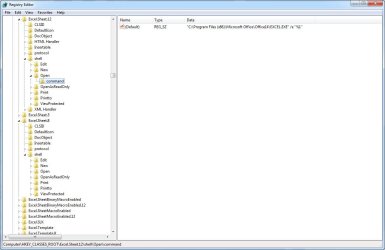
HKEY_CLASSES_ROOT\Excel.Sheet.12\shell\Open\command

(Note: it doesn't matter what is listed under default)

-Change the value command and under data remove /dde (or /e) and add after existing string the following code below

/p "C:\Program Files (x86)\Microsoft Office\Office14\EXCEL.EXE" /e "%1"

(Note: /p switch will ignore the (default) open settings)

-Go to Branch:
HKEY_CLASSES_ROOT\Excel.Sheet.12\shell\Open\ddeexec

-Rename ddeexec2

(compare to screen shot)
Excel 2010 Win7 Registry.jpg

Hope that helps users with Win7 Excel 2010.
-Kenton
 

Attachments

  • Excel 2010 Win7 Registry.jpg
    Excel 2010 Win7 Registry.jpg
    69.5 KB · Views: 4,711
Last edited:

My Computer

OS
Windows 7 Enterprise
-Similar solution to above as a .reg file: Copy the following into a .txt file, then rename as a .reg file and save. Run as an administrator. You will need to replace the <Hexidecimal value> with the value specific to your install. Easy way to do that is to export your current key value.
------------------------------------------------------------------------------------

Windows Registry Editor Version 5.00

[HKEY_CLASSES_ROOT\Excel.Sheet.12\shell\Open\command]
@="\"C:\\Program Files (x86)\\Microsoft Office\\Office14\\EXCEL.EXE\" /e \"%1\""
"command"=hex(7):<Hexidecimal value>

[-HKEY_CLASSES_ROOT\Excel.Sheet.12\shell\Open\ddeexec]
@="[open(\"%1\")]"

[-HKEY_CLASSES_ROOT\Excel.Sheet.12\shell\Open\ddeexec\application]
@="Excel"

[-HKEY_CLASSES_ROOT\Excel.Sheet.12\shell\Open\ddeexec\topic]
@="system"

[HKEY_CLASSES_ROOT\Excel.Sheet.12\shell\Open\ddeexec2]
@="[open(\"%1\")]"

[HKEY_CLASSES_ROOT\Excel.Sheet.12\shell\Open\ddeexec2\application]
@="Excel"

[HKEY_CLASSES_ROOT\Excel.Sheet.12\shell\Open\ddeexec2\topic]
@="system"

[HKEY_CLASSES_ROOT\Excel.Sheet.8\shell\Open\command]
@="\"C:\\Program Files (x86)\\Microsoft Office\\Office14\\EXCEL.EXE\" /e \"%1\""
"command"=hex(7):<Hexidecimal value>

[-HKEY_CLASSES_ROOT\Excel.Sheet.8\shell\Open\ddeexec]
@="[open(\"%1\")]"

[-HKEY_CLASSES_ROOT\Excel.Sheet.8\shell\Open\ddeexec\application]
@="Excel"

[-HKEY_CLASSES_ROOT\Excel.Sheet.8\shell\Open\ddeexec\topic]
@="system"

[HKEY_CLASSES_ROOT\Excel.Sheet.8\shell\Open\ddeexec2]
@="[open(\"%1\")]"

[HKEY_CLASSES_ROOT\Excel.Sheet.8\shell\Open\ddeexec2\application]
@="Excel"

[HKEY_CLASSES_ROOT\Excel.Sheet.8\shell\Open\ddeexec2\topic]
@="system"
 
Last edited:

My Computer

OS
Windows 7 Enterprise
Worked but now have problem

So I used this registry hack, and I can now open excel files in separate windows. But when I do that, the windows are blank. Any ideas on why/how to correct?

I made the .reg file as described.
 

My Computer

Computer Manufacturer/Model Number
Custom
OS
Win7 Pro 64-bit
CPU
AMD 8-Core FX-8120 3.1G 16M
Motherboard
Gigabyte GA-990FXA-UD3 AM3+
Memory
4Gx4 GSKILL F3-10666CL9Q-16GBRL
Graphics Card(s)
VBA ECS NGT430C-1GQR-F GT 430 RT
Sound Card
built-in
Monitor(s) Displays
2x Samsum SyncMaster 2333
Hard Drives
SSD 90G OCZ AGT3-25SAT3-90G R
PSU
430W
Case
Thermaltake VL84301W2Z V3 Black Edition
Cooling
stock
figured it out

After I applied the registry hack, I needed to change the Excel.Sheet.8\Shell\Command\command to add the [/p "C:\Program Files (x86)\Microsoft Office\Office14\EXCEL.EXE" /e "%1"], then it works perfect!
 

My Computer

Computer Manufacturer/Model Number
Custom
OS
Win7 Pro 64-bit
CPU
AMD 8-Core FX-8120 3.1G 16M
Motherboard
Gigabyte GA-990FXA-UD3 AM3+
Memory
4Gx4 GSKILL F3-10666CL9Q-16GBRL
Graphics Card(s)
VBA ECS NGT430C-1GQR-F GT 430 RT
Sound Card
built-in
Monitor(s) Displays
2x Samsum SyncMaster 2333
Hard Drives
SSD 90G OCZ AGT3-25SAT3-90G R
PSU
430W
Case
Thermaltake VL84301W2Z V3 Black Edition
Cooling
stock
So, [/p "C:\Program Files (x86)\Microsoft Office\Office14\EXCEL.EXE" /e "%1"] should have been added to the .reg file after the Hexadecimal value?
 

My Computer

Computer Manufacturer/Model Number
Custom
OS
Win7 Pro 64-bit
CPU
AMD 8-Core FX-8120 3.1G 16M
Motherboard
Gigabyte GA-990FXA-UD3 AM3+
Memory
4Gx4 GSKILL F3-10666CL9Q-16GBRL
Graphics Card(s)
VBA ECS NGT430C-1GQR-F GT 430 RT
Sound Card
built-in
Monitor(s) Displays
2x Samsum SyncMaster 2333
Hard Drives
SSD 90G OCZ AGT3-25SAT3-90G R
PSU
430W
Case
Thermaltake VL84301W2Z V3 Black Edition
Cooling
stock
/p will ingore the default open settings.

Depends on the enviroment. I'm deploying Win7 64bit and office 2010 32bit SBE. I had the note about the /p from our prior image with 2007 32bit. (we do not use 64bit office due to a plug in compatibility issue)

What is your O/S and Office version?
 

My Computer

OS
Windows 7 Enterprise
Win7 Pro 64-bit, Office 2010 32-bit. I got it working (also modified it to work with .csv files opened in Excel), but I'm just thinking about how to flesh out the .reg file for sharing with other users here.
 

My Computer

Computer Manufacturer/Model Number
Custom
OS
Win7 Pro 64-bit
CPU
AMD 8-Core FX-8120 3.1G 16M
Motherboard
Gigabyte GA-990FXA-UD3 AM3+
Memory
4Gx4 GSKILL F3-10666CL9Q-16GBRL
Graphics Card(s)
VBA ECS NGT430C-1GQR-F GT 430 RT
Sound Card
built-in
Monitor(s) Displays
2x Samsum SyncMaster 2333
Hard Drives
SSD 90G OCZ AGT3-25SAT3-90G R
PSU
430W
Case
Thermaltake VL84301W2Z V3 Black Edition
Cooling
stock
Same enviroment... odd. Do you use a group policy?

I stopped using a .reg file and now update it by a scripting program. I check for the entry on boot before replacing it. (Windows updates will undo the change)

The command is as shown and works for me.
"C:\Program Files (x86)\Microsoft Office\Office14\EXCEL.EXE" /e "%1"
 

Attachments

  • 4-4-2012 11-57-09 AM.jpg
    4-4-2012 11-57-09 AM.jpg
    65.8 KB · Views: 628

My Computer

OS
Windows 7 Enterprise
I was searching for a way to open multiple windows in Excel every time I double clicked on an Xls or Xlsx file. ...
-Kenton
I'm curious, why would you want to open multiple windows whenever you double-click on an xls/xlsx file?
 

My Computer

Computer type
PC/Desktop
Computer Manufacturer/Model Number
Home Built desktop, Dell G15 5511 Gaming laptop,MS Surface Pro 7 tablet
OS
W10 Pro desktop, W11 laptop, W11 Pro tablet (all 64-bit)
CPU
3.7Ghz 8700K i7, i7-11800H, i7-1065G7
Motherboard
ASUS TUF Z370-Pro Gaming in desktop
Memory
16G desktop, 16G laptop, 4G tablet
Graphics Card(s)
AMD Radeon RX580, RTX 3060, Intel Iris Plus
Sound Card
High Definition Audio (Built-in to mobo)
Monitor(s) Displays
Samsung U32J59 32" (2x), 15.6", 12"
Screen Resolution
3840x2160, 3840x2160, 1920x1080, 2160x1440
Hard Drives
500G SSD for OS; 2T, 10T & 15T HDDs for Data on Desktop, 1TB SSD laptop, 128G SSD tablet.
PSU
Corsair CX 750M
Case
Antec 100
Cooling
CM 212+
Keyboard
IBM Model M - used continuously since 1986
Mouse
Microsoft Pro IntelliMouse
Internet Speed
400M down 8M up
Antivirus
Windows Defender
Browser
FireFox
Other Info
Built my first computer (8Mhz 8088cpu, 640K RAM, 20MB HDD, 2 360K floppy drives) in 1985 and have been building them for myself, relatives and friends ever since.
I was searching for a way to open multiple windows in Excel every time I double clicked on an Xls or Xlsx file. ...
-Kenton
I'm curious, why would you want to open multiple windows whenever you double-click on an xls/xlsx file?

Well, there's the point that I'd like to manage my windows in any way I chose, but the real reason is so that I can easily compare two Excel files, each in their own interface, and being able to get that environment by double-clicking files.

Word already works this way, so why not Excel? Based on the ease of this fix, Microsoft was just being lazy and didn't put this option in the Excel menus.
 

My Computer

Computer Manufacturer/Model Number
Custom
OS
Win7 Pro 64-bit
CPU
AMD 8-Core FX-8120 3.1G 16M
Motherboard
Gigabyte GA-990FXA-UD3 AM3+
Memory
4Gx4 GSKILL F3-10666CL9Q-16GBRL
Graphics Card(s)
VBA ECS NGT430C-1GQR-F GT 430 RT
Sound Card
built-in
Monitor(s) Displays
2x Samsum SyncMaster 2333
Hard Drives
SSD 90G OCZ AGT3-25SAT3-90G R
PSU
430W
Case
Thermaltake VL84301W2Z V3 Black Edition
Cooling
stock
I know this is a year old but has anyone found a fix for this yet?

I did not notice this was the case when working only with the excel program. The registry hack does work as I have used it on a customer's computer not but 20min ago because they told me it is what had been done previously on his old XP computer in order to have this same function.

So, when he called today asking about why his new Windows 7 machine wasn't able to do the same as his old XP machine, i thought he was crazy and wasn't doing as i was instructing as i walked him thru the process of moving the excel instances to different monitors over the phone.
After i jumped into his computer with him i discovered he wasn't the one at fault excel was. He showed me the reg key that someone had previously saved as a .txt file so that he could open multiple instances and without thinking i converted it to a .reg key and merged it. No harm right?

Until i went to open a file and the file association had become corrupt!
Here is the code from the reg key(shown below) and i do not have much to any experience with modify .reg key files, so would i just need to change anything saying Office12 to Office14(since this is what 2010 uses?)

Code:
Windows Registry Editor Version 5.00

[HKEY_CLASSES_ROOT\Excel.Backup\shell]
@="Open_in_New_Excel_Instance"

[HKEY_CLASSES_ROOT\Excel.Backup\shell\Open_in_New_Excel_Instance]
@="Open in New Excel Instance"

[HKEY_CLASSES_ROOT\Excel.Backup\shell\Open_in_New_Excel_Instance\command]
@="\"C:\\Program Files\\Microsoft Office\\Office12\\EXCEL.EXE\" \"%1\""


[HKEY_CLASSES_ROOT\Excel.OpenDocumentSpreadsheet.12\shell]
@="Open_in_New_Excel_Instance"

[HKEY_CLASSES_ROOT\Excel.OpenDocumentSpreadsheet.12\shell\Open_in_New_Excel_Instance]
@="Open in New Excel Instance"

[HKEY_CLASSES_ROOT\Excel.OpenDocumentSpreadsheet.12\shell\Open_in_New_Excel_Instance\command]
@="\"C:\\Program Files\\Microsoft Office\\Office12\\EXCEL.EXE\" \"%1\""


[HKEY_CLASSES_ROOT\Excel.Sheet.12\shell]
@="Open_in_New_Excel_Instance"

[HKEY_CLASSES_ROOT\Excel.Sheet.12\shell\Open_in_New_Excel_Instance]
@="Open in New Excel Instance"

[HKEY_CLASSES_ROOT\Excel.Sheet.12\shell\Open_in_New_Excel_Instance\command]
@="\"C:\\Program Files\\Microsoft Office\\Office12\\EXCEL.EXE\" \"%1\""


[HKEY_CLASSES_ROOT\Excel.Sheet.8\shell]
@="Open_in_New_Excel_Instance"

[HKEY_CLASSES_ROOT\Excel.Sheet.8\shell\Open_in_New_Excel_Instance]
@="Open in New Excel Instance"

[HKEY_CLASSES_ROOT\Excel.Sheet.8\shell\Open_in_New_Excel_Instance\command]
@="\"C:\\Program Files\\Microsoft Office\\Office12\\EXCEL.EXE\" \"%1\""


[HKEY_CLASSES_ROOT\Excel.SheetBinaryMacroEnabled.12\shell]
@="Open_in_New_Excel_Instance"

[HKEY_CLASSES_ROOT\Excel.SheetBinaryMacroEnabled.12\shell\Open_in_New_Excel_Instance]
@="Open in New Excel Instance"

[HKEY_CLASSES_ROOT\Excel.SheetBinaryMacroEnabled.12\shell\Open_in_New_Excel_Instance\command]
@="\"C:\\Program Files\\Microsoft Office\\Office12\\EXCEL.EXE\" \"%1\""


[HKEY_CLASSES_ROOT\Excel.SheetMacroEnabled.12\shell]
@="Open_in_New_Excel_Instance"

[HKEY_CLASSES_ROOT\Excel.SheetMacroEnabled.12\shell\Open_in_New_Excel_Instance]
@="Open in New Excel Instance"

[HKEY_CLASSES_ROOT\Excel.SheetMacroEnabled.12\shell\Open_in_New_Excel_Instance\command]
@="\"C:\\Program Files\\Microsoft Office\\Office12\\EXCEL.EXE\" \"%1\""


[HKEY_CLASSES_ROOT\Excel.Template\shell]
@="Open_in_New_Excel_Instance"

[HKEY_CLASSES_ROOT\Excel.Template\shell\Open_in_New_Excel_Instance]
@="Open in New Excel Instance"

[HKEY_CLASSES_ROOT\Excel.Template\shell\Open_in_New_Excel_Instance\command]
@="\"C:\\Program Files\\Microsoft Office\\Office12\\EXCEL.EXE\" \"%1\""


[HKEY_CLASSES_ROOT\Excel.Template.8\shell]
@="Open_in_New_Excel_Instance"

[HKEY_CLASSES_ROOT\Excel.Template.8\shell\Open_in_New_Excel_Instance]
@="Open in New Excel Instance"

[HKEY_CLASSES_ROOT\Excel.Template.8\shell\Open_in_New_Excel_Instance\command]
@="\"C:\\Program Files\\Microsoft Office\\Office12\\EXCEL.EXE\" \"%1\""


[HKEY_CLASSES_ROOT\Excel.TemplateMacroEnabled\shell]
@="Open_in_New_Excel_Instance"

[HKEY_CLASSES_ROOT\Excel.TemplateMacroEnabled\shell\Open_in_New_Excel_Instance]
@="Open in New Excel Instance"

[HKEY_CLASSES_ROOT\Excel.TemplateMacroEnabled\shell\Open_in_New_Excel_Instance\command]
@="\"C:\\Program Files\\Microsoft Office\\Office12\\EXCEL.EXE\" \"%1\""


[HKEY_CLASSES_ROOT\Excel.Workspace\shell]
@="Open_in_New_Excel_Instance"

[HKEY_CLASSES_ROOT\Excel.Workspace\shell\Open_in_New_Excel_Instance]
@="Open in New Excel Instance"

[HKEY_CLASSES_ROOT\Excel.Workspace\shell\Open_in_New_Excel_Instance\command]
@="\"C:\\Program Files\\Microsoft Office\\Office12\\EXCEL.EXE\" \"%1\""

any help from you guys would be appreciated....and sorry if i am resurrecting a dead post, i can repost it if i need to.
 

My Computer

Computer type
PC/Desktop
Computer Manufacturer/Model Number
Dell Optiplex
OS
Windows 7 Professional 32bit, 64 bit, Windows XP Professional
CPU
Intel
Memory
4GB-8GB
Monitor(s) Displays
1-3
Hard Drives
80GB+
Keyboard
wired dell stock keyboard and wireless logitech
Mouse
wired dell stock mouse and wireless logitech
Antivirus
System Center 2012 Endpoint Protection
Browser
Internet Explorer 8/9, Firefox, Chrome
i have got a big problem that makes me head ache
the excel can't open in windows 7 ultimate
it says error with win32 what stupid thing it is pls any one help[ me
 

My Computer

Computer type
PC/Desktop
Computer Manufacturer/Model Number
DELL
OS
win 7 ultimate
i have got a big problem that makes me head ache
the excel can't open in windows 7 ultimate
it says error with win32 what stupid thing it is pls any one help[ me

That has nothing to do with this post, btw.
 

My Computer

Computer type
PC/Desktop
Computer Manufacturer/Model Number
Dell Optiplex
OS
Windows 7 Professional 32bit, 64 bit, Windows XP Professional
CPU
Intel
Memory
4GB-8GB
Monitor(s) Displays
1-3
Hard Drives
80GB+
Keyboard
wired dell stock keyboard and wireless logitech
Mouse
wired dell stock mouse and wireless logitech
Antivirus
System Center 2012 Endpoint Protection
Browser
Internet Explorer 8/9, Firefox, Chrome
Back
Top